
Automated Web Accessibility Testing Made Easy
Automated Web Accessibility Testing Made Easy
Why Automated Web Accessibility Testing Matters for Your Website
Automated web accessibility testing uses software tools to scan your website and flag issues that can make it hard or impossible for people with disabilities to use it, without needing a manual review of every line of code.
Here’s a quick overview of how it works and what to expect:
| Topic | Quick Answer |
|---|---|
| What it does | Scans pages for WCAG violations like missing alt text, low contrast, and unlabeled forms |
| How fast | Runs in minutes vs. days for manual audits |
| What it catches | Roughly 30–40% of all known accessibility issues |
| What it misses | Screen reader logic, caption clarity, complex keyboard flows |
| Best approach | Combine automated scans with manual expert review |
| Key standards | WCAG 2.2 AA, Section 508, EN 301 549 |
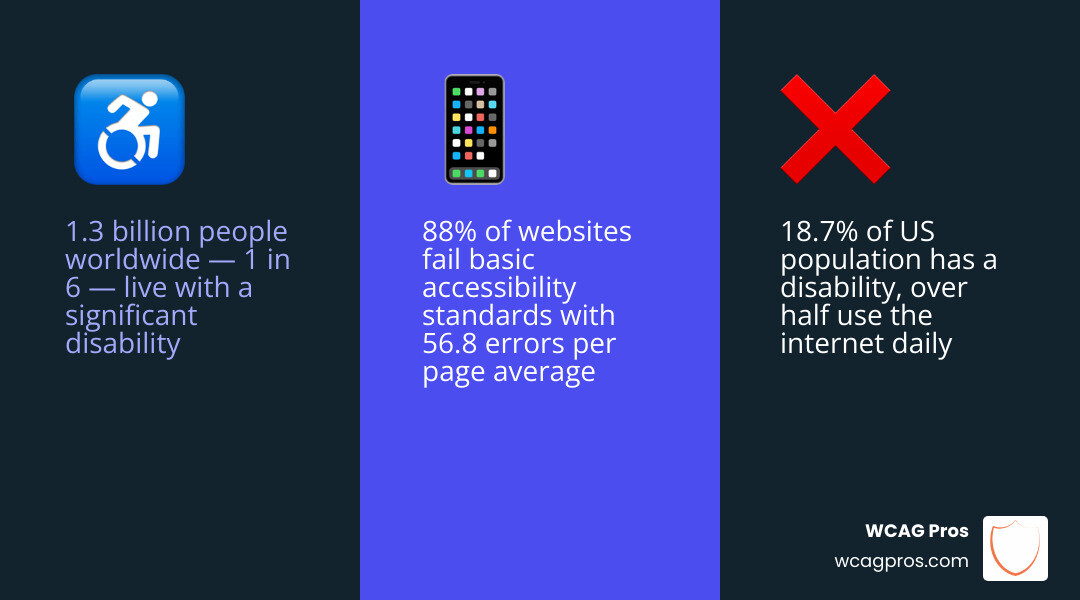
If your website is not accessible, the numbers are not on your side. Over 1.3 billion people worldwide, or about 1 in 6, live with a significant disability. In the US alone, 18.7% of the population has some form of disability, and more than half of them actively use the internet. Yet a review of one million homepages found that 88% of websites fail basic accessibility standards, with an average of 56.8 errors per page.
That’s not just a usability problem. It’s a legal liability.
Automated testing won’t solve everything. But it’s one of the fastest ways to find the most obvious problems before they become lawsuits.
I’m Matthew Post, a web developer and accessibility specialist with nearly 30 years of experience building and auditing websites, and co-founder of WCAG Pros — where I’ve personally overseen hundreds of automated web accessibility testing audits and remediation projects. In this guide, I’ll walk you through the tools, workflows, and best practices that actually work.
Why Automated Web Accessibility Testing is Essential for Modern Dev
In the world of modern web development, manual-only testing is no longer sustainable. With 88% of websites currently non-compliant, the digital landscape is fraught with barriers. On average, homepages harbor 56.8 accessibility errors, many of which are “low-hanging fruit” that could be caught instantly by a machine.
The most common offenders we see in our audits include:
- Low-contrast text (81%): Making content unreadable for users with low vision.
- Missing alternative text (54.5%): Leaving screen reader users in the dark about visual content.
- Unlabeled form inputs (48.6%): Preventing users from knowing what information to enter in a field.
By implementing automated web accessibility testing, teams can validate changes up to 90% faster than manual review cycles. Catching issues early is often called shifting left and it can reduce rework costs by up to 10x. If you want a practical starting point, check out the ultimate website accessibility testing checklist for 2026 to see where automation fits into your broader strategy.
Key Benefits of Automation
Why should your team prioritize automation? It boils down to efficiency and reliability. Automation provides:
- Speed: Scans that take a human hours can be completed by a tool in seconds.
- Consistency: Unlike humans, tools don’t get tired or skip checks; they apply the same rules every single time.
- Early Detection: By integrating checks into the development environment, you find issues before they ever reach a staging server.
- CI/CD Integration: You can “fail the build” if a new pull request introduces a blatant WCAG violation.
- Reduced Effort: Automation can reduce repetitive manual analysis effort by approximately 70%, allowing your experts to focus on complex UX issues.
Standards Supported by Modern Tools
Modern automated tools are designed to keep pace with evolving regulations. Most high-quality scanners now support:
- WCAG 2.2 AA: The current gold standard for web accessibility.
- Section 508: Crucial for any organization doing business with the US federal government.
- EN 301 549: The European standard for digital accessibility.
- ARIA: Ensuring that Rich Internet Applications are properly interpreted by assistive technology.
To ensure your underlying code is structurally sound, we also recommend using the W3C Markup Validation Service alongside your accessibility scans.
Top Tools for Automating Accessibility Audits
Choosing the right tool depends on your technical stack and your goals. Some tools are built for developers to use while coding, while others are designed for QA teams or compliance officers to monitor a live site.
Comparing Popular Automated Web Accessibility Testing Tools
There are several categories of tools you should be aware of:
- Open-Source Engines: The most famous is axe-core. It is widely considered the global standard and powers many other tools. It is highly reliable because it focuses on “zero false positives.”
- Browser-Based Extensions: Tools like WAVE, Axe, and other browser-based inspectors allow you to inspect a single page in real-time. These are excellent for developers and designers to do quick spot checks.
- Built-in Developer Tools: Both Chrome and Firefox have built-in accessibility inspectors. Chrome’s Lighthouse is a popular choice for a quick, high-level audit of performance, SEO, and accessibility.
For a deeper dive into how these stack up, read our automated tool audits report.
| Tool Type | Best For | Example Tools |
|---|---|---|
| Browser Extension | Instant page-level feedback | WAVE, Axe, Browser Inspectors |
| API / CLI | Bulk scanning & CI/CD | Pa11y, axe-core, WAVE API |
| Enterprise Platform | Monitoring & Reporting | Enterprise Compliance Dashboards |
| Built-in DevTools | Inspecting the DOM | Chrome/Firefox Accessibility Inspector |
Specialized Testing Solutions
As we move into 2026, specialized solutions are becoming more prevalent. These tools go beyond basic scans:
- Authenticated Page Scanning: Some tools can now navigate behind login screens to test dashboards and private user areas.
- Staging Environment Checks: Advanced scanners allow you to test internal or staging URLs that aren’t public-facing yet.
- Sitemap Integration: Instead of entering one URL at a time, you can upload a sitemap to scan thousands of pages automatically.
Overcoming the Limitations of Automated Web Accessibility Testing
While we love automation, we have to be honest about its limits. A famous GDS audit of automated tools found that even the best tools only detect about 30% to 40% of known accessibility issues.
Automation is great at checking simple pass or fail rules. Either an image has an alt attribute or it does not. However, a tool cannot tell you whether the text in that attribute accurately describes the image.
What Automation Cannot Detect
There are several critical areas where machines still fail:
- Screen Reader Logic: Does the page “sound” right? A tool can’t tell you if the reading order is confusing.
- Caption Clarity: A tool can check if a video has a caption track, but it can’t tell if the captions are synchronized or accurate.
- Readability: Machines struggle to judge if the language is too complex for users with cognitive disabilities.
- Complex Keyboard Paths: While a tool can find a “keyboard trap,” it often can’t judge if the tab order is logical for a complex interactive widget.
To bridge this gap, you must learn how to test with real users who navigate your site with assistive technology every day.
Combining Automation with Manual Review
The most effective strategy is a “Hybrid Workflow.” Use automated web accessibility testing to clear out the easy errors (like color contrast and missing labels) first. This “cleans the slate” so that your manual testers can focus on the nuanced user experience.
We recommend using a combination of:
- Persona-based testing: Using profiles that simulate different disabilities.
- Screen reader commands: Manually navigating with NVDA, JAWS, or VoiceOver.
- Expert Audits: Professional reviews that cover the 60-70% of issues automation misses.
Best Practices for Implementing Accessibility Automation
To get the most out of your automation, you need to integrate it into your daily habits rather than treating it as a once-a-year event.
Metrics to Track Effectiveness
How do you know if you’re actually getting better? We suggest tracking these five metrics:
- WCAG Violation Count: The raw number of errors found by your scanner.
- Error Density: The number of errors per page (this helps you identify which sections of the site are most problematic).
- Keyboard Coverage: The percentage of interactive elements that are reachable via the Tab key.
- Remediation Time: How long it takes from the moment an error is flagged until it is fixed in production.
- Detection Split: The ratio of issues found by automation versus those found during manual audits.
Future Trends in 2026 and Beyond
The future of automated web accessibility testing is incredibly exciting. We are already seeing the rise of AI agents that don’t just find issues but suggest the exact code fix, potentially speeding up remediation by 3x.
Other trends include:
- Visual Regression Integration: Checking if design changes accidentally break accessibility features.
- Real-Device Cloud Testing: Running accessibility scans on hundreds of different physical mobile devices and browser combinations simultaneously.
- Automated Monitoring: Continuous background scanning that alerts you the moment a content editor uploads an inaccessible image or document.
Frequently Asked Questions about Automated Testing
Can automated tools guarantee 100% WCAG compliance?
No. Because automated tools only catch 30-40% of issues, they cannot guarantee full compliance. You could have a “perfect” automated score and still be sued for a site that is unusable for a screen reader user. Automation is a starting point, not a finish line.
How do you test accessibility for pages behind a login?
You can use browser extensions (which test the page currently loaded in your browser) or advanced enterprise scanners that allow you to record a login script or provide authentication credentials.
What are the most common issues found by automated scans?
The “Big Three” are low color contrast, missing alt text for images, and form inputs that lack a programmatically associated label. These account for the vast majority of automated flags.
Conclusion
Automated web accessibility testing is a powerful ally in the fight for a more inclusive internet. It saves time, reduces costs, and helps your team stay consistent. However, as we’ve discussed, it is only one piece of the puzzle. To truly protect your organization and serve your users, you must pair these tools with human expertise.
At WCAG Pros, we specialize in going where the machines can’t. While we use the best automated tools available to provide rapid feedback, our core strength lies in our comprehensive page-by-page audits of all 54 WCAG points. We don’t just give you a list of errors; we provide the code fixes and a free re-audit to ensure you earn your compliance badge.
Ready to move beyond basic scans and secure your site’s future? Get a professional WCAG audit from our team, and let’s make the web accessible for everyone.
Read more website accessibility articles
Get Help With Your Website
We'll follow up with info about:
- The process
- Cost
- Timeline
We promise to respect your privacy, and never abuse the information you provide. We will not sell or rent your information to any third party.
By submitting this form, you consent to receive SMS messages and/or emails from SEM Dynamics LLC, dba WCAG Pros. To unsubscribe, follow the instructions provided in our communications. Msg & data rates may apply for SMS. Your information is secure and will not be sold to third parties.