
Remediation with Fixes That Won’t Break the Bank
Remediation with Fixes That Won’t Break the Bank
Understanding ADA Audit with Remediation for Digital Compliance
An ADA audit with remediation is the process of scanning your website for accessibility barriers, then fixing them so people with disabilities can fully use your site, and so your business stays protected from costly lawsuits.
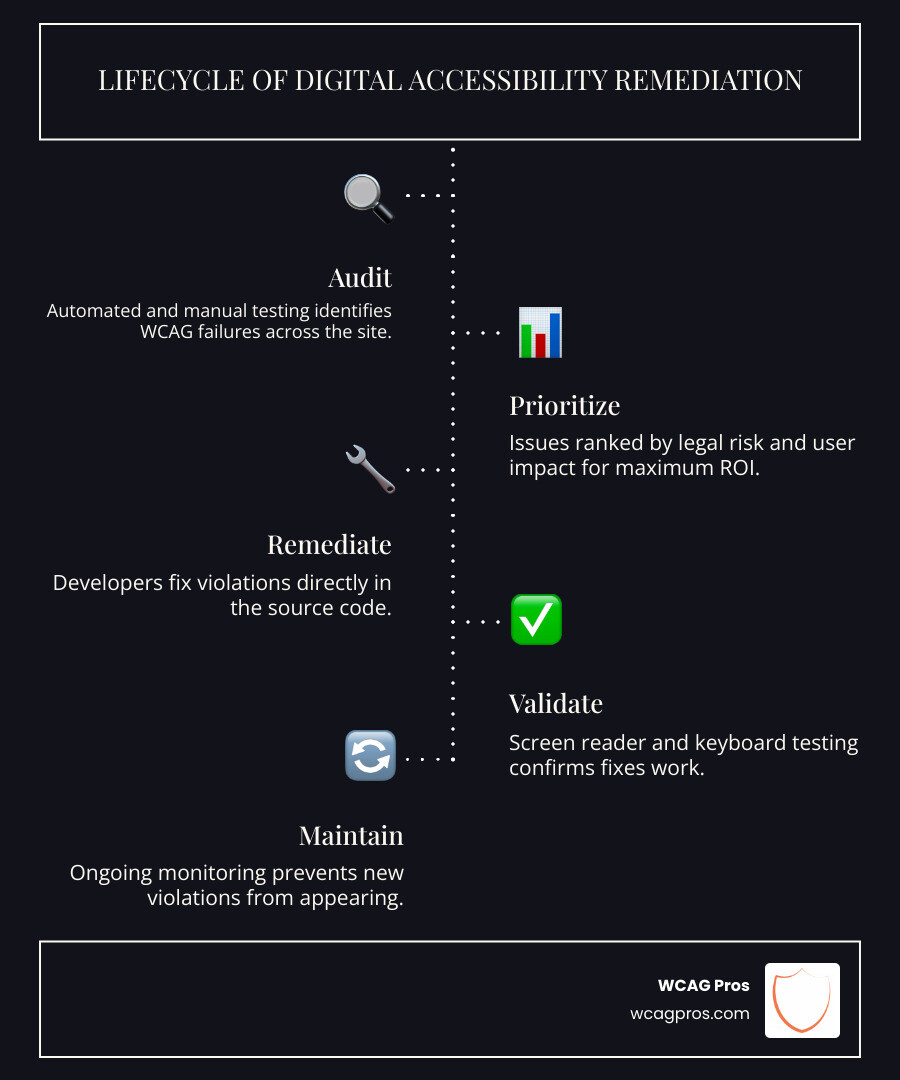
Here is a quick overview of what the process involves:
| Step | What Happens |
|---|---|
| Audit | Automated and manual testing identifies WCAG failures across your site |
| Prioritize | Issues are ranked by legal risk and user impact |
| Remediate | Developers fix violations directly in the source code |
| Validate | Screen reader and keyboard testing confirms fixes work |
| Maintain | Ongoing monitoring prevents new violations from appearing |
More than 4,000 ADA lawsuits were filed last year targeting inaccessible websites. The average settlement runs over $30,000. And yet, according to the WebAIM Million Report, 95.9% of homepages still have detectable WCAG failures, with an average of 56.8 errors per page.
That means most websites are one complaint away from a legal headache.
The good news? Most violations fall into a short list of fixable issues: low-contrast text, missing alt text, broken keyboard navigation, and unlabeled form fields. With the right process, these can be addressed systematically without rebuilding your entire site.
Accessibility is not just a legal checkbox. One in four Americans lives with a disability. Accessible sites also see roughly 23% more organic traffic on average. Getting this right protects your business and grows it.
I’m Matthew Post, co-founder of WCAG Pros and a web developer with nearly three decades of experience, including years of hands-on work guiding businesses through every stage of ADA audit with remediation. The sections below walk you through exactly what to do, in the right order, without wasted effort.

When we talk about an ADA audit with remediation, we are looking at the intersection of civil rights law and modern web development. The Americans with Disabilities Act was passed in 1990 to prevent discrimination. While the original text did not mention the internet, the Department of Justice (DOJ) and the courts have made it clear that websites are “places of public accommodation.”
Compliance is generally split into two categories. Title II applies to public entities like state and local governments. Title III applies to private businesses, including retailers, banks, and healthcare providers. Regardless of which category you fall into, the technical benchmark used to measure compliance is the WCAG specification.
At WCAG Pros, we believe that a WCAG Audit is the essential first step toward digital equity. Beyond avoiding a lawsuit, making your site accessible is a massive win for SEO. Search engine crawlers act very much like screen readers. When you add alt text to images and use a logical heading structure, you make it easier for Google to index your content, which often leads to a significant boost in organic traffic.
Defining the Remediation Process
Remediation is the “fix” part of the equation. It involves going into the source code of your website to correct the errors found during the audit. This might mean adding ARIA labels to buttons, fixing the tab order for keyboard users, or tagging documents like PDFs so they can be read by assistive technology.
The 2024 DOJ rule has raised the stakes, specifically for public entities, by mandating WCAG 2.1 Level AA as the technical standard. This rule covers everything from mobile apps to posted Office documents. Real remediation provides permanent liability protection because it solves the root cause of the problem in the code itself.
Why Proactive Audits Matter
Waiting for a demand letter to arrive is a high-risk strategy. Proactive audits allow us to find and fix issues before they become legal liabilities. If you are a public entity, you face Title II exposure even for third-party portals or PDFs if you make them available to the public.
By conducting regular audits and publishing an accessibility statement, you show the world that you are committed to inclusivity. This transparency can often deter frivolous lawsuits by demonstrating that you have a remediation plan in place and are actively working toward a better user experience.
Common Accessibility Violations and Strategic Prioritization
The WebAIM Million Report provides a sobering look at the state of the web. Most errors are not complex technical glitches but rather simple oversights. For example, 81% of homepages have low-contrast text, making them nearly impossible to read for users with low vision.
To help you understand where to start, we use a rubric to compare legal risk against user impact.
| Violation | User Impact | Legal Risk | Ease of Fix |
|---|---|---|---|
| Missing Alt Text | High (Content is invisible) | High | Fast |
| Broken Keyboard Navigation | Critical (Cannot use site) | High | Medium |
| Low Color Contrast | High (Cannot read text) | Medium | Fast |
| Missing Form Labels | Critical (Cannot buy/contact) | High | Fast |
| Empty Links | Medium (Confusion) | Medium | Fast |
Identifying High Impact Barriers
A critical blocker is anything that stops a user from completing a primary task, such as checking out of an e-commerce store or filling out a contact form. Keyboard traps are a prime example. If a user tabs into a menu but cannot tab back out, they are effectively stuck.
While an Automated Tools Audit can catch about 30 to 40% of these issues, manual testing is required to find the rest. Automated scans are great for finding “low-hanging fruit” like missing alt text, but they cannot tell you if the alt text actually describes the image accurately or if a complex interactive component is usable.
Prioritizing Fixes for Maximum ROI
We recommend tackling critical blockers first. These are the issues that generate the most complaints and legal exposure. Under Title II’s self-evaluation rule, public entities with 50 or more employees must maintain records of their findings and remediation logs.
By focusing on high-impact barriers, you get the most “accessibility for your buck.” Fixing a broken “Submit” button on a form is infinitely more important than adjusting the color of a decorative border.
Step-by-Step Best Practices for Fixing ADA Violations
Remediation should always start with semantic HTML. Using the right tags for the right jobs (like using a Our WCAG Remediation process focuses on creating a seamless experience for all users. This includes adding “skip links” so keyboard users can jump over the navigation menu directly to the main content, and ensuring that every interactive element has a visible focus indicator. A successful plan combines automated scanning with deep manual testing. We use tools like NVDA to hear exactly what a blind user hears. This hands-on approach is the only way to ensure that “code fixes” actually result in a usable website. We follow The Ultimate Website Accessibility Testing Checklist for 2026 to ensure no stone is left unturned. This involves checking tab orders, testing form validation messages, and ensuring that modals or pop-ups correctly “trap” the focus so the user doesn’t get lost in the background. The final step is validation. We don’t just fix the code and walk away. We perform regression testing to make sure our fixes didn’t break other parts of the site. The gold standard for validation is disabled user testing. Having someone who relies on assistive technology daily navigate your site is the ultimate proof of compliance. Once validated, we provide a compliance certification and a badge to display on your site. The digital landscape is always shifting. While most businesses currently target WCAG 2.1 AA, the DOJ’s ADA Title II Final Rule has set hard deadlines for public entities. Large entities serving over 50,000 people must be compliant by April 24, 2026. Smaller entities have until April 26, 2027. It is also important to note that web content includes documents. PDF remediation can be a massive undertaking if you have thousands of legacy files. Modern remediation often involves a mix of AI-assisted tagging and manual review to ensure that complex tables and charts are accessible. Looking further ahead, the W3C is building WCAG 3.0, which aims to move toward outcome-based guidelines. However, this is still in the draft stage and won’t replace current standards for several years. How long does an ada audit with remediation take? It depends on several factors: Our ADA Website Compliance 2025 Accessibility Checklist helps teams stay on track and avoid common delays. Accessibility is a journey, not a destination. Every time you add a new blog post, launch a product, or update your theme, you risk introducing new violations. We recommend integrating automated checks into your development pipeline (CI/CD) to catch errors before they go live. Team training is also vital. When your designers and content creators understand the basics of accessibility, they stop creating problems in the first place. This proactive “governance” is much cheaper than fixing errors after the fact. Even as the W3C WCAG 3.0 Working Draft evolves, the core principles of clear, robust, and navigable content will remain the same. Ignoring an audit report is incredibly risky. Beyond the high cost of legal settlements, you may face a DOJ investigation, which can lead to a consent decree. This effectively puts your business under government supervision, requiring mandatory monitoring and strict milestones. You also face significant brand damage and the loss of revenue from the 20% of the population that lives with a disability. For public entities, Title II exposure can lead to loss of federal funding or civil penalties. For a standard business website, an audit usually takes one to two weeks. Remediation typically follows in two-week sprints. Most sites can reach a high level of compliance within 30 to 60 days. However, for enterprise-level sites or those with massive document libraries, the process can be ongoing. The key is to show continuous progress and maintain a remediation log to prove you are acting in good faith. This is a crucial distinction. Accessibility overlays are automated widgets that sit on top of your site. They do not fix the underlying source code. The WebAIM Million Report and recent legal trends show that overlays often fail to provide actual compliance and can even make the experience worse for screen reader users. In 2023 alone, hundreds of businesses using overlays were still sued. Source code remediation, on the other hand, involves permanent fixes to your site’s foundation, providing true accessibility and much stronger legal protection. Creating an inclusive digital world is about more than just avoiding a lawsuit. It is about making sure that everyone, regardless of their physical or cognitive abilities, has equal access to information and services. Inclusive design is a long-term sustainability strategy that builds trust and expands your market reach. At WCAG Pros, we specialize in making this complex process simple. Our page-by-page audits cover all 54 WCAG points, and we don’t just tell you what is wrong — we provide the code fixes to make it right. If you are ready to secure your site and welcome all users, start by reviewing our ADA Website Compliance 2025 Accessibility Checklist or schedule your WCAG Audit today. We are here to help you every step of the way, from the first scan to the final compliance badge. tag for a button instead of a Executing an ADA Audit with Remediation Plan
Validating Success through User Testing
Technical Standards and Professional Remediation Timelines
Factors Affecting Remediation Speed
Maintaining Ongoing Compliance
Frequently Asked Questions
What are the legal consequences of ignoring an ADA audit?
How long does an ADA audit with remediation take?
What is the difference between overlays and source code remediation?
Conclusion
Read more website accessibility articles
Get Help With Your Website
We'll follow up with info about:
- The process
- Cost
- Timeline
We promise to respect your privacy, and never abuse the information you provide. We will not sell or rent your information to any third party.
By submitting this form, you consent to receive SMS messages and/or emails from SEM Dynamics LLC, dba WCAG Pros. To unsubscribe, follow the instructions provided in our communications. Msg & data rates may apply for SMS. Your information is secure and will not be sold to third parties.