
The Ultimate Website Accessibility Testing Checklist for 2026
The Ultimate Website Accessibility Testing Checklist for 2026
Understanding the Foundations of a WCAG 2.0 AA Checklist
A WCAG 2.0 AA checklist is the structured set of 38 success criteria your website must meet to conform to Level AA of the Web Content Accessibility Guidelines — the standard referenced by the ADA, Section 508, and most other accessibility laws worldwide.
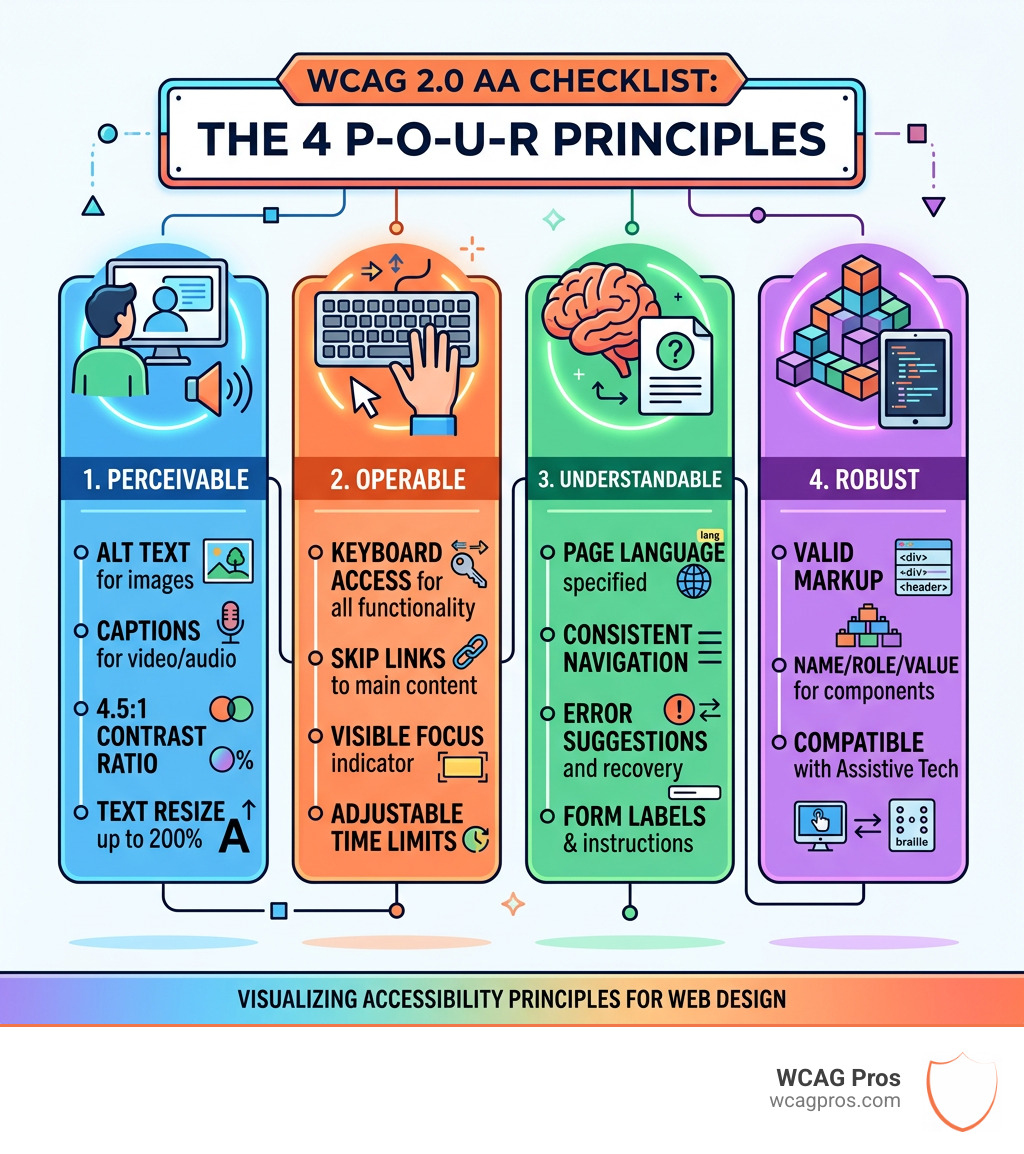
Here’s a quick reference of the core WCAG 2.0 AA checklist categories:
| Principle | Key AA Requirements |
|---|---|
| Perceivable | Alt text, captions, 4.5:1 contrast ratio, text resize to 200% |
| Operable | Keyboard access, skip links, visible focus, adjustable time limits |
| Understandable | Page language, consistent navigation, error suggestions, form labels |
| Robust | Valid semantic markup, name/role/value for UI components |
These 38 criteria build on the Level A foundation — together they form the complete AA conformance requirement that courts and regulators look for when evaluating ADA compliance.
WCAG 2.0 was released in 2008 and remains the baseline standard that nearly every accessibility law references. And while newer versions (2.1 and 2.2) add more criteria on top, meeting WCAG 2.0 AA is still the minimum benchmark for avoiding legal exposure.
I’m Matthew Post, web developer and accessibility specialist with nearly 30 years of experience building and auditing websites — and co-founder of WCAG Pros, where I’ve personally overseen hundreds of WCAG 2.0 AA checklist audits and remediations for businesses facing exactly this kind of legal pressure. Below, I’ll walk you through every requirement you need to know.

When we talk about a WCAG 2.0 AA checklist, we are diving into a technical standard developed by the World Wide Web Consortium (W3C). Think of WCAG as the “building code” for the internet. Just as a physical store needs ramps and wide aisles, a website needs specific digital features to be usable by everyone.
WCAG is organized into three levels of conformance:
- Level A: The most basic web accessibility features. If you don’t meet these, your site is likely unusable for many people with disabilities.
- Level AA: This is the “Gold Standard.” It includes all Level A criteria plus additional requirements that address the most common barriers for users with vision, hearing, and cognitive impairments. This is the level most often cited in legal settlements.
- Level AAA: The most rigorous level. While admirable, it is often difficult or impossible to achieve for all types of content.
To reach Level AA, you must meet a total of 38 success criteria from the 2.0 version. It’s a bit like a video game—you can’t beat the “AA” level until you’ve cleared all the “A” level hurdles first. If you’re wondering where your site stands, learning how to tell your website is ADA compliant is a great first step. For the official technical deep dive, you can always visit the Web Content Accessibility Guidelines (WCAG) Overview.
The Four POUR Principles Explained
The entire WCAG 2.0 AA checklist is built upon four foundational pillars known as the POUR principles. If your site doesn’t follow these, it’s like trying to bake a cake without flour—something is going to fall flat.
- Perceivable: Information and user interface components must be presentable to users in ways they can perceive. This means users must be able to “see” or “hear” the content (even if they are using a screen reader).
- Operable: User interface components and navigation must be operable. The site shouldn’t require interactions that a user cannot perform (like requiring a mouse for someone who can only use a keyboard).
- Understandable: Information and the operation of the user interface must be understandable. Users need to be able to comprehend the text and know how to use the menus without getting a headache.
- Robust: Content must be robust enough that it can be interpreted reliably by a wide variety of user agents, including assistive technologies. Essentially, your code shouldn’t break when a screen reader tries to read it.
Legal Requirements and Global Standards
Why does everyone care so much about Level AA? Because it’s the law. In the United States, the Department of Justice (DOJ) has made it clear that Title II of the Americans with Disabilities Act (ADA) applies to web content. Furthermore, Section 508 of the Rehabilitation Act requires federal agencies to make their electronic and information technology accessible to people with disabilities, specifically referencing WCAG 2.0 AA.
Internationally, standards like the Accessibility for Ontarians with Disabilities Act (AODA) in Canada also lean heavily on these guidelines. For us at WCAG Pros, helping clients navigate these waters is about legal risk mitigation. A solid WCAG 2.0 AA checklist isn’t just a “nice to have”—it’s a shield against lawsuits. For those running smaller operations, we recommend checking out our ADA Compliance for Small Businesses in 2025: A Complete Guide.
Principle 1: Perceivable Content and Media Requirements
The first principle is all about making sure nothing is “hidden” from a user because of their disability. The biggest heavy hitter here is 1.1.1 Non-text Content. This requires that any non-text content (like images, charts, or icons) has a text alternative.
If you have a picture of a “Golden Retriever playing in the park,” the alt text shouldn’t just be “image123.jpg.” It needs to describe the content. However, if an image is purely decorative (like a swirl in the background), we use a “null alt” (alt="") so screen readers know to skip it. You can find more details on this in our guide on WCAG Guideline 1.1.1 Non-text Content.
Visual and Media Success Criteria for WCAG 2.0 AA Checklist
Media accessibility is where many sites stumble. Under the wcag 2.0 aa checklist, prerecorded video and audio have strict rules:
- Captions (1.2.2): All prerecorded video with audio must have synchronized captions. This isn’t just for the deaf community; it’s for the person watching your video in a noisy coffee shop without headphones, too! See our breakdown of WCAG 1.2.2 Captions (Prerecorded) Explained.
- Audio Description (1.2.3 & 1.2.5): If a video has important visual information that isn’t conveyed in the audio (like a silent scene where a character signs a contract), you need an audio description or a text alternative.
- Live Captions (1.2.4): For AA conformance, even live broadcasts need captions. WCAG 1.2.4 Captions (Live) Explained covers how to handle these real-time requirements.
Another critical AA requirement is 1.4.4 Resize Text. Your website must remain functional and readable even when the text is zoomed to 200%. If your layout “explodes” or text overlaps when someone zooms in, you’ve got a problem. Yale University provides a great WCAG 2 A and AA Checklist that highlights these visual requirements.
Distinguishable Interface Elements
To make content “Distinguishable,” we have to talk about color contrast.
- 1.4.3 Contrast (Minimum): Standard text must have a contrast ratio of at least 4.5:1 against its background.
- Large Text: For larger text (18pt or 14pt bold), the ratio can be 3:1.
We also have to ensure that color isn’t the only way we convey information. If an error message just turns a form field red without adding an icon or text saying “Error,” a colorblind user might never know they missed a spot. Additionally, for those using audio, WCAG 1.2.1 Audio-only and Video-only (Prerecorded) Explained ensures that users have alternatives for media that doesn’t have a visual or audio counterpart.
Principle 2: Operable Interfaces and Site Navigation
If a user can’t move around your site, they can’t buy your products or read your blog. The cornerstone of the Operable principle is 2.1.1 Keyboard Accessibility. Every single link, button, and form field must be reachable and usable using only the Tab key and Enter/Space keys.
We often tell our clients: “Unplug your mouse for ten minutes and try to use your site.” If you get stuck in a “keyboard trap” (where you can get into a menu but can’t get out), you’re failing a major part of the WCAG 2.0 AA checklist. For more common pitfalls, read about 5 Common Accessibility Issues on Small Business Websites and How to Fix Them.
Navigation and Interaction in the WCAG 2.0 AA Checklist
Navigating a site shouldn’t be a marathon.
- Bypass Blocks (2.4.1): You need a “Skip to Main Content” link. This allows keyboard users to jump over the massive header navigation and get straight to the meat of the page.
- Page Titles (2.4.2): Every page needs a unique, descriptive title in the
</code> tag. “Home” isn’t enough; “Home | WCAG Pros Compliance Services” is much better.</li>
<li><strong>Focus Visible (2.4.7):</strong> This is a Level AA requirement. When you Tab through a site, there must be a visual “ring” or highlight showing where you are. If the focus indicator is hidden, the user is effectively flying blind.</li>
</ul>


<p>We also look at <strong>Link Purpose (2.4.4)</strong>. Links like “Click Here” or “Read More” are accessibility nightmares. If a screen reader pulls up a list of links, seeing twenty “Click Here” links provides zero context. Instead, use descriptive text like “Read more about our WCAG remediation services.” For more on media alternatives, check <a href="https://wcagpros.com/wcag-guidelines/wcag-1-2-3-audio-description-or-media-alternative-prerecorded-explained/">WCAG 1.2.3 Audio Description or Media Alternative (Prerecorded) Explained</a>.</p>


<h3 class="wp-block-heading" id="managing-time-limits-and-interruptions">Managing Time Limits and Interruptions</h3>


<p>Time limits can be a huge barrier for people with cognitive disabilities or those who use assistive technology slowly. <strong>2.2.1 Timing Adjustable</strong> requires that if you have a timeout (like on a bank site), you must give the user a way to turn it off, adjust it, or extend it. </p>


<p>The rule of thumb? Give them at least a 20-second warning before the time runs out and allow them to extend that time at least ten times the default length. There are exceptions for “real-time events” like auctions or competitive gaming, but for most business sites, the user should be in control of the clock. Also, make sure nothing flashes more than three times per second (<strong>2.3.1 Three Flashes</strong>) to prevent seizures.</p>


<h2 class="wp-block-heading" id="principles-3-4-understandable-design-and-robust-systems">Principles 3 & 4: Understandable Design and Robust Systems</h2>


<table>
<thead>
<tr>
<th>Level A Requirements</th>
<th>Level AA Additions</th>
</tr>
</thead>
<tbody>
<tr>
<td>3.1.1 Language of Page</td>
<td>3.1.2 Language of Parts</td>
</tr>
<tr>
<td>3.2.1 On Focus</td>
<td>3.2.3 Consistent Navigation</td>
</tr>
<tr>
<td>3.2.2 On Input</td>
<td>3.2.4 Consistent Identification</td>
</tr>
<tr>
<td>3.3.1 Error Identification</td>
<td>3.3.3 Error Suggestion</td>
</tr>
<tr>
<td>3.3.2 Labels or Instructions</td>
<td>3.3.4 Error Prevention (Legal/Financial)</td>
</tr>
</tbody>
</table>


<p>Making your site “Understandable” means removing the guesswork. It starts with <strong>3.1.1 Language of Page</strong>, where you programmatically declare the language (e.g., <code><html lang="en"></code>). This tells screen readers which accent and dictionary to use. </p>


<p>Level AA also demands <strong>Consistent Navigation (3.2.3)</strong>. If your “Search” button is at the top right on the homepage, it shouldn’t move to the bottom left on the “About Us” page. Consistency is key for users who rely on muscle memory or screen magnification. You can find a full list of these requirements in our <a href="https://wcagpros.com/wcag-articles/ada-website-compliance-2025-accessibility-checklist/">ADA Website Compliance 2025 Accessibility Checklist</a>.</p>


<h3 class="wp-block-heading" id="input-assistance-and-error-handling">Input Assistance and Error Handling</h3>


<p>Forms are where the most “user friction” happens. Under <strong>3.3 Input Assistance</strong>, we must ensure that forms have clear labels and that errors are easy to fix.</p>


<ul class="wp-block-list">
<li><strong>Error Identification (3.3.1):</strong> If a user forgets a field, tell them exactly which one it was in text.</li>
<li><strong>Error Suggestion (3.3.3):</strong> If a user enters a date in the wrong format, provide a suggestion like “Please use MM/DD/YYYY.”</li>
<li><strong>Error Prevention (3.3.4):</strong> For legal or financial transactions, allow the user to review, confirm, or reverse their submission before it becomes final. This is a critical Level AA safety net.</li>
</ul>


<p>If you find your forms are failing, our <a href="https://wcagpros.com/wcag-remediation/">WCAG Remediation</a> services can help you fix these code-level issues.</p>


<h3 class="wp-block-heading" id="maximizing-compatibility-and-robustness">Maximizing Compatibility and Robustness</h3>


<p>The “Robust” principle is the developer’s playground. <strong>4.1.2 Name, Role, Value</strong> ensures that every interactive component (like a custom-built dropdown menu) has the correct ARIA labels so assistive technology knows what it is and what it’s doing.</p>


<p>While <strong>4.1.1 Parsing</strong> (validating HTML) was recently marked as “obsolete” in WCAG 2.2 because browsers have gotten better at handling bad code, it was a staple of the <strong>wcag 2.0 aa checklist</strong> for years. We still recommend clean, semantic markup because it’s the best way to ensure your site works with future technologies. To see how your current code stacks up, you might consider an <a href="https://wcagpros.com/wcag-articles/automated-tools-audit/">Automated Tools Audit</a>, though remember that automated tools only catch about 30-40% of issues!</p>


<h2 class="wp-block-heading" id="frequently-asked-questions-about-wcag-conformance">Frequently Asked Questions about WCAG Conformance</h2>


<h3 class="wp-block-heading" id="how-many-success-criteria-are-included-in-wcag-20-aa">How many success criteria are included in WCAG 2.0 AA?</h3>


<p>There are <strong>38 success criteria</strong> in the full WCAG 2.0 AA conformance level. This includes 25 criteria from Level A and 13 additional criteria specifically for Level AA. When people ask for a <strong>WCAG 2.0 AA checklist</strong>, they are looking for this combined set of 38 points that form the baseline for modern digital accessibility.</p>


<h3 class="wp-block-heading" id="is-wcag-20-aa-still-the-standard-for-legal-compliance">Is WCAG 2.0 AA still the standard for legal compliance?</h3>


<p>Yes. While WCAG 2.1 and 2.2 have been released, WCAG 2.0 AA remains the foundational baseline referenced in major laws like ADA Title II and Section 508. Because WCAG is “backwards compatible,” if you meet the 2.1 or 2.2 standards, you are automatically meeting the 2.0 standard as well. However, 2.0 AA is usually the minimum requirement cited in courtrooms.</p>


<h3 class="wp-block-heading" id="what-roles-are-responsible-for-meeting-wcag-20-aa">What roles are responsible for meeting WCAG 2.0 AA?</h3>


<p>Accessibility is a team sport!</p>


<ul class="wp-block-list">
<li><strong>Designers</strong> handle color contrast, layout, and focus indicators.</li>
<li><strong>Developers</strong> write the semantic HTML, manage keyboard focus, and implement ARIA roles.</li>
<li><strong>Content Editors</strong> are responsible for alt text, descriptive link text, and video captions.
Without all three groups working together, a site will almost always have gaps in its <strong>WCAG 2.0 AA checklist</strong>.</li>
</ul>


<h2 class="wp-block-heading" id="conclusion-implementing-your-accessibility-strategy">Conclusion: Implementing Your Accessibility Strategy</h2>


<p>Meeting a <strong>WCAG 2.0 AA checklist</strong> is not a one-and-done project; it’s an ongoing commitment to your users. While automated tools are a great starting point for catching low-hanging fruit, they are no substitute for the real thing.</p>


<p>At WCAG Pros, we believe the only way to be truly sure of your compliance is through a combination of expert manual testing and real-world feedback. We offer comprehensive page-by-page audits of all success criteria, providing you with actual code fixes—not just a list of problems. We even offer free re-audits to ensure you can proudly display your compliance badge.</p>


<p>If you want to see how your site performs in the hands of the people who matter most, check out our guide on <a href="https://wcagpros.com/wcag-articles/how-to-test-your-websites-accessibility-using-real-users/">How to Test Your Website’s Accessibility Using Real Users</a>. Ready to get serious about your digital inclusivity? Let us help you with a professional <a href="https://wcagpros.com/wcag-audit/">WCAG Audit</a> today. We’re based in Norco, CA, and we’re ready to help you make the web a better place for everyone.</p>
	</div>
</div>
<div class="fl-module fl-module-separator fl-node-606f650cd49f3" data-node="606f650cd49f3">
	<div class="fl-module-content fl-node-content">
		<div class="fl-separator"></div>
	</div>
</div>
<div class="fl-module fl-module-rich-text fl-node-60a80f3dd6e66" data-node="60a80f3dd6e66">
	<div class="fl-module-content fl-node-content">
		<div class="fl-rich-text">
	<p>Read more <a href="https://wcagpros.com/articles/">website accessibility articles</a></p>
</div>
	</div>
</div>
<div class="fl-module fl-module-separator fl-node-606f650cd49f6" data-node="606f650cd49f6">
	<div class="fl-module-content fl-node-content">
		<div class="fl-separator"></div>
	</div>
</div>
<div class="fl-module fl-module-fl-post-navigation fl-node-606f650cd49f5" data-node="606f650cd49f5">
	<div class="fl-module-content fl-node-content">

	<nav class="navigation post-navigation" aria-label="Posts">
		<h2 class="screen-reader-text">Posts navigation</h2>
		<div class="nav-links"><div class="nav-previous"><a href="https://wcagpros.com/wcag-articles/the-roi-of-accessibility-for-small-businesses/" rel="prev">← The ROI of Accessibility for Small Businesses</a></div><div class="nav-next"><a href="https://wcagpros.com/wcag-articles/mastering-the-art-of-decorative-alt-text-for-web-accessibility/" rel="next">Mastering the Art of Decorative Alt Text for Web Accessibility →</a></div></div>
	</nav>	</div>
</div>
</div>
</div>
			<div class="fl-col fl-node-606f65b748bcd fl-col-bg-color fl-col-small" data-node="606f65b748bcd">
	<div class="fl-col-content fl-node-content"><div class="fl-module fl-module-heading fl-node-61665e85516bd" data-node="61665e85516bd">
	<div class="fl-module-content fl-node-content">
		<h2 class="fl-heading">
		<span class="fl-heading-text">Get Help With Your Website</span>
	</h2>
	</div>
</div>
<div class="fl-module fl-module-rich-text fl-node-61665f15ae7b6" data-node="61665f15ae7b6">
	<div class="fl-module-content fl-node-content">
		<div class="fl-rich-text">
	<p>We'll follow up with info about:</p>
<ul>
<li>The process</li>
<li>Cost</li>
<li>Timeline</li>
</ul>
</div>
	</div>
</div>
<div class="fl-module fl-module-pp-gravity-form fl-node-61665da88c41d" data-node="61665da88c41d">
	<div class="fl-module-content fl-node-content">
		<div class="pp-gf-content">
	<div class="pp-gf-inner">

                <div class='gf_browser_chrome gform_wrapper gform_legacy_markup_wrapper gform-theme--no-framework' data-form-theme='legacy' data-form-index='0' id='gform_wrapper_1' ><div id='gf_1' class='gform_anchor' tabindex='-1'></div><form method='post' enctype='multipart/form-data' target='gform_ajax_frame_1' id='gform_1'  action='/wcag-articles/the-ultimate-website-accessibility-testing-checklist-for-2026/#gf_1' data-formid='1' novalidate>
                        <div class='gform-body gform_body'><ul id='gform_fields_1' class='gform_fields top_label form_sublabel_below description_below validation_below'><li id="field_1_10" class="gfield gfield--type-honeypot gform_validation_container field_sublabel_below gfield--has-description field_description_below field_validation_below gfield_visibility_visible"  ><label class='gfield_label gform-field-label' for='input_1_10'>Facebook</label><div class='ginput_container'><input name='input_10' id='input_1_10' type='text' value='' autocomplete='new-password'/></div><div class='gfield_description' id='gfield_description_1_10'>This field is for validation purposes and should be left unchanged.</div></li><li id="field_1_2" class="gfield gfield--type-text gfield_contains_required field_sublabel_below gfield--no-description field_description_below field_validation_below gfield_visibility_visible"  ><label class='gfield_label gform-field-label' for='input_1_2'>Full Name<span class="gfield_required"><span class="gfield_required gfield_required_asterisk">*</span></span></label><div class='ginput_container ginput_container_text'><input name='input_2' id='input_1_2' type='text' value='' class='large'    placeholder='Full Name*' aria-required="true" aria-invalid="false"   /></div></li><li id="field_1_3" class="gfield gfield--type-email gfield_contains_required field_sublabel_below gfield--no-description field_description_below field_validation_below gfield_visibility_visible"  ><label class='gfield_label gform-field-label' for='input_1_3'>Email<span class="gfield_required"><span class="gfield_required gfield_required_asterisk">*</span></span></label><div class='ginput_container ginput_container_email'>
                            <input name='input_3' id='input_1_3' type='email' value='' class='large'   placeholder='Email Address*' aria-required="true" aria-invalid="false"  />
                        </div></li><li id="field_1_6" class="gfield gfield--type-text gfield_contains_required field_sublabel_below gfield--no-description field_description_below field_validation_below gfield_visibility_visible"  ><label class='gfield_label gform-field-label' for='input_1_6'>Phone<span class="gfield_required"><span class="gfield_required gfield_required_asterisk">*</span></span></label><div class='ginput_container ginput_container_text'><input name='input_6' id='input_1_6' type='text' value='' class='large'    placeholder='Phone*' aria-required="true" aria-invalid="false"   /></div></li><li id="field_1_7" class="gfield gfield--type-website field_sublabel_below gfield--no-description field_description_below field_validation_below gfield_visibility_visible"  ><label class='gfield_label gform-field-label' for='input_1_7'>Website (optional)</label><div class='ginput_container ginput_container_website'>
                    <input name='input_7' id='input_1_7' type='url' value='' class='large'    placeholder='https:// (optional)'  aria-invalid="false" />
                </div></li><li id="field_1_8" class="gfield gfield--type-textarea field_sublabel_below gfield--no-description field_description_below field_validation_below gfield_visibility_visible"  ><label class='gfield_label gform-field-label' for='input_1_8'>Anything we should be aware of? (optional)</label><div class='ginput_container ginput_container_textarea'><textarea name='input_8' id='input_1_8' class='textarea small'    placeholder='Anything we should be aware of? (optional)'  aria-invalid="false"   rows='10' cols='50'></textarea></div></li><li id="field_1_9" class="gfield gfield--type-hidden gform_hidden field_sublabel_below gfield--no-description field_description_below field_validation_below gfield_visibility_visible"  ><div class='ginput_container ginput_container_text'><input name='input_9' id='input_1_9' type='hidden' class='gform_hidden'  aria-invalid="false" value='' /></div></li></ul></div>
        <div class='gform-footer gform_footer top_label'> <input type='submit' id='gform_submit_button_1' class='gform_button button' onclick='gform.submission.handleButtonClick(this);' data-submission-type='submit' value='Get Started Now'  /> <input type='hidden' name='gform_ajax' value='form_id=1&title=&description=&tabindex=0&theme=legacy&styles=[]&hash=660e12debb2a16c526cd1c4df99fb98f' />
            <input type='hidden' class='gform_hidden' name='gform_submission_method' data-js='gform_submission_method_1' value='iframe' />
            <input type='hidden' class='gform_hidden' name='gform_theme' data-js='gform_theme_1' id='gform_theme_1' value='legacy' />
            <input type='hidden' class='gform_hidden' name='gform_style_settings' data-js='gform_style_settings_1' id='gform_style_settings_1' value='[]' />
            <input type='hidden' class='gform_hidden' name='is_submit_1' value='1' />
            <input type='hidden' class='gform_hidden' name='gform_submit' value='1' />

            <input type='hidden' class='gform_hidden' name='gform_currency' data-currency='USD' value='IcaGzL11jF6OzkmlI9f7xbkGao2GmZHTkA5S/dDy+AIiSrCoYUB0rXjP1OHsITiZ3oo9k8hwP1uizy1wklTu5hICBvkEQd1mOcfOVyCQxhIDDxs=' />
            <input type='hidden' class='gform_hidden' name='gform_unique_id' value='' />
            <input type='hidden' class='gform_hidden' name='state_1' value='WyJbXSIsIjI2NGI4ODU0MTVjNWY4NTg3NzI4NWMxZmNjYmQxZjZjIl0=' />
            <input type='hidden' autocomplete='off' class='gform_hidden' name='gform_target_page_number_1' id='gform_target_page_number_1' value='0' />
            <input type='hidden' autocomplete='off' class='gform_hidden' name='gform_source_page_number_1' id='gform_source_page_number_1' value='1' />
            <input type='hidden' name='gform_field_values' value='' />

        </div>
                        <p style="display: none !important;" class="akismet-fields-container" data-prefix="ak_"><label>Δ<textarea name="ak_hp_textarea" cols="45" rows="8" maxlength="100"></textarea></label><input type="hidden" id="ak_js_1" name="ak_js" value="43"/><script>document.getElementById( "ak_js_1" ).setAttribute( "value", ( new Date() ).getTime() );</script></p></form>
                        </div>
		                <iframe style='display:none;width:0px;height:0px;' src='about:blank' name='gform_ajax_frame_1' id='gform_ajax_frame_1' title='This iframe contains the logic required to handle Ajax powered Gravity Forms.'></iframe>
		                <script>
gform.initializeOnLoaded( function() {gformInitSpinner( 1, 'https://wcagpros.com/wp-content/plugins/gravityforms/images/spinner.svg', true );jQuery('#gform_ajax_frame_1').on('load',function(){var contents = jQuery(this).contents().find('*').html();var is_postback = contents.indexOf('GF_AJAX_POSTBACK') >= 0;if(!is_postback){return;}var form_content = jQuery(this).contents().find('#gform_wrapper_1');var is_confirmation = jQuery(this).contents().find('#gform_confirmation_wrapper_1').length > 0;var is_redirect = contents.indexOf('gformRedirect(){') >= 0;var is_form = form_content.length > 0 && ! is_redirect && ! is_confirmation;var mt = parseInt(jQuery('html').css('margin-top'), 10) + parseInt(jQuery('body').css('margin-top'), 10) + 100;if(is_form){jQuery('#gform_wrapper_1').html(form_content.html());if(form_content.hasClass('gform_validation_error')){jQuery('#gform_wrapper_1').addClass('gform_validation_error');} else {jQuery('#gform_wrapper_1').removeClass('gform_validation_error');}setTimeout( function() { /* delay the scroll by 50 milliseconds to fix a bug in chrome */ jQuery(document).scrollTop(jQuery('#gform_wrapper_1').offset().top - mt); }, 50 );if(window['gformInitDatepicker']) {gformInitDatepicker();}if(window['gformInitPriceFields']) {gformInitPriceFields();}var current_page = jQuery('#gform_source_page_number_1').val();gformInitSpinner( 1, 'https://wcagpros.com/wp-content/plugins/gravityforms/images/spinner.svg', true );jQuery(document).trigger('gform_page_loaded', [1, current_page]);window['gf_submitting_1'] = false;}else if(!is_redirect){var confirmation_content = jQuery(this).contents().find('.GF_AJAX_POSTBACK').html();if(!confirmation_content){confirmation_content = contents;}jQuery('#gform_wrapper_1').replaceWith(confirmation_content);jQuery(document).scrollTop(jQuery('#gf_1').offset().top - mt);jQuery(document).trigger('gform_confirmation_loaded', [1]);window['gf_submitting_1'] = false;wp.a11y.speak(jQuery('#gform_confirmation_message_1').text());}else{jQuery('#gform_1').append(contents);if(window['gformRedirect']) {gformRedirect();}}jQuery(document).trigger("gform_pre_post_render", [{ formId: "1", currentPage: "current_page", abort: function() { this.preventDefault(); } }]);        if (event && event.defaultPrevented) {                return;        }        const gformWrapperDiv = document.getElementById( "gform_wrapper_1" );        if ( gformWrapperDiv ) {            const visibilitySpan = document.createElement( "span" );            visibilitySpan.id = "gform_visibility_test_1";            gformWrapperDiv.insertAdjacentElement( "afterend", visibilitySpan );        }        const visibilityTestDiv = document.getElementById( "gform_visibility_test_1" );        let postRenderFired = false;        function triggerPostRender() {            if ( postRenderFired ) {                return;            }            postRenderFired = true;            gform.core.triggerPostRenderEvents( 1, current_page );            if ( visibilityTestDiv ) {                visibilityTestDiv.parentNode.removeChild( visibilityTestDiv );            }        }        function debounce( func, wait, immediate ) {            var timeout;            return function() {                var context = this, args = arguments;                var later = function() {                    timeout = null;                    if ( !immediate ) func.apply( context, args );                };                var callNow = immediate && !timeout;                clearTimeout( timeout );                timeout = setTimeout( later, wait );                if ( callNow ) func.apply( context, args );            };        }        const debouncedTriggerPostRender = debounce( function() {            triggerPostRender();        }, 200 );        if ( visibilityTestDiv && visibilityTestDiv.offsetParent === null ) {            const observer = new MutationObserver( ( mutations ) => {                mutations.forEach( ( mutation ) => {                    if ( mutation.type === 'attributes' && visibilityTestDiv.offsetParent !== null ) {                        debouncedTriggerPostRender();                        observer.disconnect();                    }                });            });            observer.observe( document.body, {                attributes: true,                childList: false,                subtree: true,                attributeFilter: [ 'style', 'class' ],            });        } else {            triggerPostRender();        }    } );} );
</script>
	</div>
</div>
	</div>
</div>
<div class="fl-module fl-module-rich-text fl-node-6166605b98f54" data-node="6166605b98f54">
	<div class="fl-module-content fl-node-content">
		<div class="fl-rich-text">
	<p>We promise to respect your privacy, and never abuse the information you provide. We will not sell or rent your information to any third party.</p>
</div>
	</div>
</div>
<div class="fl-module fl-module-rich-text fl-node-nayixgv03t8r" data-node="nayixgv03t8r">
	<div class="fl-module-content fl-node-content">
		<div class="fl-rich-text">
	<p>By submitting this form, you consent to receive SMS messages and/or emails from SEM Dynamics LLC, dba WCAG Pros. To unsubscribe, follow the instructions provided in our communications. Msg & data rates may apply for SMS. Your information is secure and will not be sold to third parties.</p>
</div>
	</div>
</div>
</div>
</div>
	</div>
		</div>
	</div>
</article>
</div>
	</div><!-- .fl-page-content -->
	<footer data-rocket-location-hash="f5e1bbb633bc1d51443035ad591e0d73" class="fl-builder-content fl-builder-content-20 fl-builder-global-templates-locked" data-post-id="20" data-type="footer" itemscope="itemscope" itemtype="http://schema.org/WPFooter"><div data-rocket-location-hash="13aeaea3d9d149ab3fa0ef3f685dd131" class="fl-row fl-row-full-width fl-row-bg-color fl-node-603f145dcc2cb fl-row-default-height fl-row-align-center" data-node="603f145dcc2cb">
	<div class="fl-row-content-wrap">
						<div class="fl-row-content fl-row-fixed-width fl-node-content">

<div class="fl-col-group fl-node-603f145dcc2cc" data-node="603f145dcc2cc">
			<div class="fl-col fl-node-603f145dcc2cf fl-col-bg-color fl-col-small" data-node="603f145dcc2cf">
	<div class="fl-col-content fl-node-content"><div class="fl-module fl-module-heading fl-node-603f145dcc2db" data-node="603f145dcc2db">
	<div class="fl-module-content fl-node-content">
		<h3 class="fl-heading">
		<span class="fl-heading-text">Get In Touch!</span>
	</h3>
	</div>
</div>
<div class="fl-module fl-module-icon fl-node-603f145dcc2d5" data-node="603f145dcc2d5">
	<div class="fl-module-content fl-node-content">
		<div class="fl-icon-wrap">
	<span class="fl-icon">
				<i class="fas fa-phone" aria-hidden="true"></i>
					</span>
			<div id="fl-icon-text-603f145dcc2d5" class="fl-icon-text fl-icon-text-wrap">
						<p>(866) 868-5486</p>					</div>
	</div>
	</div>
</div>
<div class="fl-module fl-module-icon fl-node-603f145dcc2d3" data-node="603f145dcc2d3">
	<div class="fl-module-content fl-node-content">
		<div class="fl-icon-wrap">
	<span class="fl-icon">
				<i class="far fa-map" aria-hidden="true"></i>
					</span>
			<div id="fl-icon-text-603f145dcc2d3" class="fl-icon-text fl-icon-text-wrap">
						<p>PO Box 5840 Norco, CA 92860</p>					</div>
	</div>
	</div>
</div>
<div class="fl-module fl-module-icon fl-node-603f145dcc2d4" data-node="603f145dcc2d4">
	<div class="fl-module-content fl-node-content">
		<div class="fl-icon-wrap">
	<span class="fl-icon">
								<a href="mailto:help@wcagpros.com" target="_self"  tabindex="-1" aria-hidden="true" aria-labelledby="fl-icon-text-603f145dcc2d4">
							<i class="far fa-envelope" aria-hidden="true"></i>
						</a>
			</span>
			<div id="fl-icon-text-603f145dcc2d4" class="fl-icon-text">
						<a href="mailto:help@wcagpros.com" target="_self"  class="fl-icon-text-link fl-icon-text-wrap">
						<p>help@wcagpros.com</p>						</a>
					</div>
	</div>
	</div>
</div>
</div>
</div>
			<div class="fl-col fl-node-603f145dcc2ce fl-col-bg-color fl-col-small" data-node="603f145dcc2ce">
	<div class="fl-col-content fl-node-content"><div class="fl-module fl-module-heading fl-node-603f145dcc2d6" data-node="603f145dcc2d6">
	<div class="fl-module-content fl-node-content">
		<h3 class="fl-heading">
		<span class="fl-heading-text">Additional Resources</span>
	</h3>
	</div>
</div>
<div class="fl-module fl-module-menu fl-node-6040f03a6f59a" data-node="6040f03a6f59a">
	<div class="fl-module-content fl-node-content">
		<div class="fl-menu">
		<div class="fl-clear"></div>
	<nav role="navigation" aria-label="Navigation Menu" itemscope="itemscope" itemtype="https://schema.org/SiteNavigationElement"><ul id="menu-footer-menu" class="menu fl-menu-vertical fl-toggle-none"><li id="menu-item-383" class="menu-item menu-item-type-post_type menu-item-object-page"><a role="menuitem" href="https://wcagpros.com/articles/">Accessibility Articles</a></li><li id="menu-item-76" class="menu-item menu-item-type-custom menu-item-object-custom"><a role="menuitem" href="/privacy-policy/">Privacy</a></li><li id="menu-item-77" class="menu-item menu-item-type-custom menu-item-object-custom"><a role="menuitem" href="/terms/">Terms</a></li><li id="menu-item-78" class="menu-item menu-item-type-custom menu-item-object-custom"><a role="menuitem" href="/accessibility-statement/">Accessibility Statement</a></li></ul></nav></div>
	</div>
</div>
</div>
</div>
			<div class="fl-col fl-node-603f145dcc2cd fl-col-bg-color fl-col-small" data-node="603f145dcc2cd">
	<div class="fl-col-content fl-node-content"><div class="fl-module fl-module-heading fl-node-603f145dcc2da" data-node="603f145dcc2da">
	<div class="fl-module-content fl-node-content">
		<h3 class="fl-heading">
		<span class="fl-heading-text">About Us</span>
	</h3>
	</div>
</div>
<div class="fl-module fl-module-rich-text fl-node-603f145dcc2d0" data-node="603f145dcc2d0">
	<div class="fl-module-content fl-node-content">
		<div class="fl-rich-text">
	<p>WCAG Pros helps businesses find and remediate ADA compliance issues on websites by utilizing highly trained programmers who visit and fix every page of that website.</p>
</div>
	</div>
</div>
<div class="fl-module fl-module-photo fl-node-608f7eda4cd68" data-node="608f7eda4cd68">
	<div class="fl-module-content fl-node-content">
		<div role="figure" class="fl-photo fl-photo-align-center" itemscope itemtype="https://schema.org/ImageObject">
	<div class="fl-photo-content fl-photo-img-jpg">
				<picture decoding="async" class="fl-photo-img wp-image-346 size-full" title="IAAP_Organ_Member_Horiz_595959" itemprop="image">
<source type="image/webp" data-lazy-srcset="https://wcagpros.com/wp-content/uploads/2021/03/IAAP_Organ_Member_Horiz_595959.jpg.webp"/>
<img decoding="async" src="data:image/svg+xml,%3Csvg%20xmlns='http://www.w3.org/2000/svg'%20viewBox='0%200%20300%2054'%3E%3C/svg%3E" alt="IAAP Organizational Member" height="54" width="300" itemprop="image" data-lazy-src="https://wcagpros.com/wp-content/uploads/2021/03/IAAP_Organ_Member_Horiz_595959.jpg"/><noscript><img decoding="async" src="https://wcagpros.com/wp-content/uploads/2021/03/IAAP_Organ_Member_Horiz_595959.jpg" alt="IAAP Organizational Member" height="54" width="300" itemprop="image"/></noscript>
</picture>

					</div>
	</div>
	</div>
</div>
</div>
</div>
	</div>

<div class="fl-col-group fl-node-603f148f6a882" data-node="603f148f6a882">
			<div class="fl-col fl-node-603f148f6a998 fl-col-bg-color" data-node="603f148f6a998">
	<div class="fl-col-content fl-node-content"><div class="fl-module fl-module-rich-text fl-node-603f145dcc2ca" data-node="603f145dcc2ca">
	<div class="fl-module-content fl-node-content">
		<div class="fl-rich-text">
	<p style="text-align: center;">© 2026 WCAG Pros. All Rights Reserved.</p>
</div>
	</div>
</div>
</div>
</div>
	</div>
		</div>
	</div>
</div>
</footer>	</div><!-- .fl-page -->
<script type="speculationrules">
{"prefetch":[{"source":"document","where":{"and":[{"href_matches":"/*"},{"not":{"href_matches":["/wp-*.php","/wp-admin/*","/wp-content/uploads/*","/wp-content/*","/wp-content/plugins/*","/wp-content/themes/bb-theme-child/*","/wp-content/themes/bb-theme/*","/*\\?(.+)"]}},{"not":{"selector_matches":"a[rel~=\"nofollow\"]"}},{"not":{"selector_matches":".no-prefetch, .no-prefetch a"}}]},"eagerness":"conservative"}]}
</script>
<script src="https://wcagpros.com/wp-content/plugins/bb-plugin/js/libs/jquery.imagesloaded.min.js?ver=2.10.1.1" id="imagesloaded-js"></script>
<script src="https://wcagpros.com/wp-content/plugins/bb-plugin/js/libs/jquery.ba-throttle-debounce.min.js?ver=2.10.1.1" id="jquery-throttle-js"></script>
<script src="https://wcagpros.com/wp-content/plugins/bb-plugin/js/libs/jquery.fitvids.min.js?ver=1.2" id="jquery-fitvids-js"></script>
<script src="https://wcagpros.com/wp-content/uploads/bb-plugin/cache/811db93050a3aad4e99745d11820c41a-layout-bundle.js?ver=2.10.1.1-1.5.2.2" id="fl-builder-layout-bundle-811db93050a3aad4e99745d11820c41a-js"></script>
<script id="rocket-browser-checker-js-after">
"use strict";var _createClass=function(){function defineProperties(target,props){for(var i=0;i<props.length;i++){var descriptor=props[i];descriptor.enumerable=descriptor.enumerable||!1,descriptor.configurable=!0,"value"in descriptor&&(descriptor.writable=!0),Object.defineProperty(target,descriptor.key,descriptor)}}return function(Constructor,protoProps,staticProps){return protoProps&&defineProperties(Constructor.prototype,protoProps),staticProps&&defineProperties(Constructor,staticProps),Constructor}}();function _classCallCheck(instance,Constructor){if(!(instance instanceof Constructor))throw new TypeError("Cannot call a class as a function")}var RocketBrowserCompatibilityChecker=function(){function RocketBrowserCompatibilityChecker(options){_classCallCheck(this,RocketBrowserCompatibilityChecker),this.passiveSupported=!1,this._checkPassiveOption(this),this.options=!!this.passiveSupported&&options}return _createClass(RocketBrowserCompatibilityChecker,[{key:"_checkPassiveOption",value:function(self){try{var options={get passive(){return!(self.passiveSupported=!0)}};window.addEventListener("test",null,options),window.removeEventListener("test",null,options)}catch(err){self.passiveSupported=!1}}},{key:"initRequestIdleCallback",value:function(){!1 in window&&(window.requestIdleCallback=function(cb){var start=Date.now();return setTimeout(function(){cb({didTimeout:!1,timeRemaining:function(){return Math.max(0,50-(Date.now()-start))}})},1)}),!1 in window&&(window.cancelIdleCallback=function(id){return clearTimeout(id)})}},{key:"isDataSaverModeOn",value:function(){return"connection"in navigator&&!0===navigator.connection.saveData}},{key:"supportsLinkPrefetch",value:function(){var elem=document.createElement("link");return elem.relList&&elem.relList.supports&&elem.relList.supports("prefetch")&&window.IntersectionObserver&&"isIntersecting"in IntersectionObserverEntry.prototype}},{key:"isSlowConnection",value:function(){return"connection"in navigator&&"effectiveType"in navigator.connection&&("2g"===navigator.connection.effectiveType||"slow-2g"===navigator.connection.effectiveType)}}]),RocketBrowserCompatibilityChecker}();
//# sourceURL=rocket-browser-checker-js-after
</script>
<script id="rocket-preload-links-js-extra">
var RocketPreloadLinksConfig = {"excludeUris":"/.htaccess|/robots.txt|/(?:.+/)?feed(?:/(?:.+/?)?)?$|/(?:.+/)?embed/|/(index.php/)?(.*)wp-json(/.*|$)|/refer/|/go/|/recommend/|/recommends/","usesTrailingSlash":"1","imageExt":"jpg|jpeg|gif|png|tiff|bmp|webp|avif|pdf|doc|docx|xls|xlsx|php","fileExt":"jpg|jpeg|gif|png|tiff|bmp|webp|avif|pdf|doc|docx|xls|xlsx|php|html|htm","siteUrl":"https://wcagpros.com","onHoverDelay":"100","rateThrottle":"3"};
//# sourceURL=rocket-preload-links-js-extra
</script>
<script id="rocket-preload-links-js-after">
(function() {
"use strict";var r="function"==typeof Symbol&&"symbol"==typeof Symbol.iterator?function(e){return typeof e}:function(e){return e&&"function"==typeof Symbol&&e.constructor===Symbol&&e!==Symbol.prototype?"symbol":typeof e},e=function(){function i(e,t){for(var n=0;n<t.length;n++){var i=t[n];i.enumerable=i.enumerable||!1,i.configurable=!0,"value"in i&&(i.writable=!0),Object.defineProperty(e,i.key,i)}}return function(e,t,n){return t&&i(e.prototype,t),n&&i(e,n),e}}();function i(e,t){if(!(e instanceof t))throw new TypeError("Cannot call a class as a function")}var t=function(){function n(e,t){i(this,n),this.browser=e,this.config=t,this.options=this.browser.options,this.prefetched=new Set,this.eventTime=null,this.threshold=1111,this.numOnHover=0}return e(n,[{key:"init",value:function(){!this.browser.supportsLinkPrefetch()||this.browser.isDataSaverModeOn()||this.browser.isSlowConnection()||(this.regex={excludeUris:RegExp(this.config.excludeUris,"i"),images:RegExp(".("+this.config.imageExt+")$","i"),fileExt:RegExp(".("+this.config.fileExt+")$","i")},this._initListeners(this))}},{key:"_initListeners",value:function(e){-1<this.config.onHoverDelay&&document.addEventListener("mouseover",e.listener.bind(e),e.listenerOptions),document.addEventListener("mousedown",e.listener.bind(e),e.listenerOptions),document.addEventListener("touchstart",e.listener.bind(e),e.listenerOptions)}},{key:"listener",value:function(e){var t=e.target.closest("a"),n=this._prepareUrl(t);if(null!==n)switch(e.type){case"mousedown":case"touchstart":this._addPrefetchLink(n);break;case"mouseover":this._earlyPrefetch(t,n,"mouseout")}}},{key:"_earlyPrefetch",value:function(t,e,n){var i=this,r=setTimeout(function(){if(r=null,0===i.numOnHover)setTimeout(function(){return i.numOnHover=0},1e3);else if(i.numOnHover>i.config.rateThrottle)return;i.numOnHover++,i._addPrefetchLink(e)},this.config.onHoverDelay);t.addEventListener(n,function e(){t.removeEventListener(n,e,{passive:!0}),null!==r&&(clearTimeout(r),r=null)},{passive:!0})}},{key:"_addPrefetchLink",value:function(i){return this.prefetched.add(i.href),new Promise(function(e,t){var n=document.createElement("link");n.rel="prefetch",n.href=i.href,n.onload=e,n.onerror=t,document.head.appendChild(n)}).catch(function(){})}},{key:"_prepareUrl",value:function(e){if(null===e||"object"!==(void 0===e?"undefined":r(e))||!1 in e||-1===["http:","https:"].indexOf(e.protocol))return null;var t=e.href.substring(0,this.config.siteUrl.length),n=this._getPathname(e.href,t),i={original:e.href,protocol:e.protocol,origin:t,pathname:n,href:t+n};return this._isLinkOk(i)?i:null}},{key:"_getPathname",value:function(e,t){var n=t?e.substring(this.config.siteUrl.length):e;return n.startsWith("/")||(n="/"+n),this._shouldAddTrailingSlash(n)?n+"/":n}},{key:"_shouldAddTrailingSlash",value:function(e){return this.config.usesTrailingSlash&&!e.endsWith("/")&&!this.regex.fileExt.test(e)}},{key:"_isLinkOk",value:function(e){return null!==e&&"object"===(void 0===e?"undefined":r(e))&&(!this.prefetched.has(e.href)&&e.origin===this.config.siteUrl&&-1===e.href.indexOf("?")&&-1===e.href.indexOf("#")&&!this.regex.excludeUris.test(e.href)&&!this.regex.images.test(e.href))}}],[{key:"run",value:function(){"undefined"!=typeof RocketPreloadLinksConfig&&new n(new RocketBrowserCompatibilityChecker({capture:!0,passive:!0}),RocketPreloadLinksConfig).init()}}]),n}();t.run();
}());

//# sourceURL=rocket-preload-links-js-after
</script>
<script src="https://wcagpros.com/wp-content/plugins/bb-plugin/js/libs/jquery.magnificpopup.min.js?ver=2.10.1.1" id="jquery-magnificpopup-js"></script>
<script id="fl-automator-js-extra">
var themeopts = {"medium_breakpoint":"992","mobile_breakpoint":"768","lightbox":"enabled","scrollTopPosition":"800"};
//# sourceURL=fl-automator-js-extra
</script>
<script src="https://wcagpros.com/wp-content/themes/bb-theme/js/theme.min.js?ver=1.7.19.2" id="fl-automator-js"></script>
<script src="https://wcagpros.com/wp-includes/js/dist/dom-ready.min.js?ver=f77871ff7694fffea381" id="wp-dom-ready-js"></script>
<script src="https://wcagpros.com/wp-includes/js/dist/hooks.min.js?ver=dd5603f07f9220ed27f1" id="wp-hooks-js"></script>
<script src="https://wcagpros.com/wp-includes/js/dist/i18n.min.js?ver=c26c3dc7bed366793375" id="wp-i18n-js"></script>
<script id="wp-i18n-js-after">
wp.i18n.setLocaleData( { 'text direction\u0004ltr': [ 'ltr' ] } );
//# sourceURL=wp-i18n-js-after
</script>
<script src="https://wcagpros.com/wp-includes/js/dist/a11y.min.js?ver=cb460b4676c94bd228ed" id="wp-a11y-js"></script>
<script defer='defer' src="https://wcagpros.com/wp-content/plugins/gravityforms/js/jquery.json.min.js?ver=2.9.28" id="gform_json-js"></script>
<script id="gform_gravityforms-js-extra">
var gform_i18n = {"datepicker":{"days":{"monday":"Mo","tuesday":"Tu","wednesday":"We","thursday":"Th","friday":"Fr","saturday":"Sa","sunday":"Su"},"months":{"january":"January","february":"February","march":"March","april":"April","may":"May","june":"June","july":"July","august":"August","september":"September","october":"October","november":"November","december":"December"},"firstDay":1,"iconText":"Select date"}};
var gf_legacy_multi = [];
var gform_gravityforms = {"strings":{"invalid_file_extension":"This type of file is not allowed. Must be one of the following:","delete_file":"Delete this file","in_progress":"in progress","file_exceeds_limit":"File exceeds size limit","illegal_extension":"This type of file is not allowed.","max_reached":"Maximum number of files reached","unknown_error":"There was a problem while saving the file on the server","currently_uploading":"Please wait for the uploading to complete","cancel":"Cancel","cancel_upload":"Cancel this upload","cancelled":"Cancelled","error":"Error","message":"Message"},"vars":{"images_url":"https://wcagpros.com/wp-content/plugins/gravityforms/images"}};
var gf_global = {"gf_currency_config":{"name":"U.S. Dollar","symbol_left":"$","symbol_right":"","symbol_padding":"","thousand_separator":",","decimal_separator":".","decimals":2,"code":"USD"},"base_url":"https://wcagpros.com/wp-content/plugins/gravityforms","number_formats":[],"spinnerUrl":"https://wcagpros.com/wp-content/plugins/gravityforms/images/spinner.svg","version_hash":"c98361be3a6f375cfae4eab75ff8a9ab","strings":{"newRowAdded":"New row added.","rowRemoved":"Row removed","formSaved":"The form has been saved.  The content contains the link to return and complete the form."}};
//# sourceURL=gform_gravityforms-js-extra
</script>
<script defer='defer' src="https://wcagpros.com/wp-content/plugins/gravityforms/js/gravityforms.min.js?ver=2.9.28" id="gform_gravityforms-js"></script>
<script defer='defer' src="https://wcagpros.com/wp-content/plugins/gravityforms/js/jquery.maskedinput.min.js?ver=2.9.28" id="gform_masked_input-js"></script>
<script defer='defer' src="https://wcagpros.com/wp-content/plugins/gravityforms/js/placeholders.jquery.min.js?ver=2.9.28" id="gform_placeholder-js"></script>
<script defer='defer' src="https://wcagpros.com/wp-content/plugins/gravityforms/assets/js/dist/utils.min.js?ver=48a3755090e76a154853db28fc254681" id="gform_gravityforms_utils-js"></script>
<script defer='defer' src="https://wcagpros.com/wp-content/plugins/gravityforms/assets/js/dist/vendor-theme.min.js?ver=4f8b3915c1c1e1a6800825abd64b03cb" id="gform_gravityforms_theme_vendors-js"></script>
<script id="gform_gravityforms_theme-js-extra">
var gform_theme_config = {"common":{"form":{"honeypot":{"version_hash":"c98361be3a6f375cfae4eab75ff8a9ab"},"ajax":{"ajaxurl":"https://wcagpros.com/wp-admin/admin-ajax.php","ajax_submission_nonce":"7707665849","i18n":{"step_announcement":"Step %1$s of %2$s, %3$s","unknown_error":"There was an unknown error processing your request. Please try again."}}}},"hmr_dev":"","public_path":"https://wcagpros.com/wp-content/plugins/gravityforms/assets/js/dist/","config_nonce":"7107f7a987"};
//# sourceURL=gform_gravityforms_theme-js-extra
</script>
<script defer='defer' src="https://wcagpros.com/wp-content/plugins/gravityforms/assets/js/dist/scripts-theme.min.js?ver=f5bd645c6a32e28f79908d2601a4d932" id="gform_gravityforms_theme-js"></script>
<script defer src="https://wcagpros.com/wp-content/plugins/akismet/_inc/akismet-frontend.js?ver=1764801979" id="akismet-frontend-js"></script>
<script>
gform.initializeOnLoaded( function() { jQuery(document).on('gform_post_render', function(event, formId, currentPage){if(formId == 1) {jQuery('#input_1_6').mask('(999) 999-9999? x99999').bind('keypress', function(e){if(e.which == 13){jQuery(this).blur();} } );if(typeof Placeholders != 'undefined'){
                        Placeholders.enable();
                    }} } );jQuery(document).on('gform_post_conditional_logic', function(event, formId, fields, isInit){} ) } );
</script>
<script>
gform.initializeOnLoaded( function() {jQuery(document).trigger("gform_pre_post_render", [{ formId: "1", currentPage: "1", abort: function() { this.preventDefault(); } }]);        if (event && event.defaultPrevented) {                return;        }        const gformWrapperDiv = document.getElementById( "gform_wrapper_1" );        if ( gformWrapperDiv ) {            const visibilitySpan = document.createElement( "span" );            visibilitySpan.id = "gform_visibility_test_1";            gformWrapperDiv.insertAdjacentElement( "afterend", visibilitySpan );        }        const visibilityTestDiv = document.getElementById( "gform_visibility_test_1" );        let postRenderFired = false;        function triggerPostRender() {            if ( postRenderFired ) {                return;            }            postRenderFired = true;            gform.core.triggerPostRenderEvents( 1, 1 );            if ( visibilityTestDiv ) {                visibilityTestDiv.parentNode.removeChild( visibilityTestDiv );            }        }        function debounce( func, wait, immediate ) {            var timeout;            return function() {                var context = this, args = arguments;                var later = function() {                    timeout = null;                    if ( !immediate ) func.apply( context, args );                };                var callNow = immediate && !timeout;                clearTimeout( timeout );                timeout = setTimeout( later, wait );                if ( callNow ) func.apply( context, args );            };        }        const debouncedTriggerPostRender = debounce( function() {            triggerPostRender();        }, 200 );        if ( visibilityTestDiv && visibilityTestDiv.offsetParent === null ) {            const observer = new MutationObserver( ( mutations ) => {                mutations.forEach( ( mutation ) => {                    if ( mutation.type === 'attributes' && visibilityTestDiv.offsetParent !== null ) {                        debouncedTriggerPostRender();                        observer.disconnect();                    }                });            });            observer.observe( document.body, {                attributes: true,                childList: false,                subtree: true,                attributeFilter: [ 'style', 'class' ],            });        } else {            triggerPostRender();        }    } );
</script>
<script>window.lazyLoadOptions=[{elements_selector:"img[data-lazy-src],.rocket-lazyload",data_src:"lazy-src",data_srcset:"lazy-srcset",data_sizes:"lazy-sizes",class_loading:"lazyloading",class_loaded:"lazyloaded",threshold:300,callback_loaded:function(element){if(element.tagName==="IFRAME"&&element.dataset.rocketLazyload=="fitvidscompatible"){if(element.classList.contains("lazyloaded")){if(typeof window.jQuery!="undefined"){if(jQuery.fn.fitVids){jQuery(element).parent().fitVids()}}}}}},{elements_selector:".rocket-lazyload",data_src:"lazy-src",data_srcset:"lazy-srcset",data_sizes:"lazy-sizes",class_loading:"lazyloading",class_loaded:"lazyloaded",threshold:300,}];window.addEventListener('LazyLoad::Initialized',function(e){var lazyLoadInstance=e.detail.instance;if(window.MutationObserver){var observer=new MutationObserver(function(mutations){var image_count=0;var iframe_count=0;var rocketlazy_count=0;mutations.forEach(function(mutation){for(var i=0;i<mutation.addedNodes.length;i++){if(typeof mutation.addedNodes[i].getElementsByTagName!=='function'){continue}
if(typeof mutation.addedNodes[i].getElementsByClassName!=='function'){continue}
images=mutation.addedNodes[i].getElementsByTagName('img');is_image=mutation.addedNodes[i].tagName=="IMG";iframes=mutation.addedNodes[i].getElementsByTagName('iframe');is_iframe=mutation.addedNodes[i].tagName=="IFRAME";rocket_lazy=mutation.addedNodes[i].getElementsByClassName('rocket-lazyload');image_count+=images.length;iframe_count+=iframes.length;rocketlazy_count+=rocket_lazy.length;if(is_image){image_count+=1}
if(is_iframe){iframe_count+=1}}});if(image_count>0||iframe_count>0||rocketlazy_count>0){lazyLoadInstance.update()}});var b=document.getElementsByTagName("body")[0];var config={childList:!0,subtree:!0};observer.observe(b,config)}},!1)</script><script data-no-minify="1" async src="https://wcagpros.com/wp-content/plugins/wp-rocket/assets/js/lazyload/17.8.3/lazyload.min.js"></script><script>var rocket_beacon_data = {"ajax_url":"https:\/\/wcagpros.com\/wp-admin\/admin-ajax.php","nonce":"dd2a42501e","url":"https:\/\/wcagpros.com\/wcag-articles\/the-ultimate-website-accessibility-testing-checklist-for-2026","is_mobile":false,"width_threshold":1600,"height_threshold":700,"delay":500,"debug":null,"status":{"atf":true,"lrc":true,"preconnect_external_domain":true},"elements":"img, video, picture, p, main, div, li, svg, section, header, span","lrc_threshold":1800,"preconnect_external_domain_elements":["link","script","iframe"],"preconnect_external_domain_exclusions":["static.cloudflareinsights.com","rel=\"profile\"","rel=\"preconnect\"","rel=\"dns-prefetch\"","rel=\"icon\""]}</script><script data-name="wpr-wpr-beacon" src='https://wcagpros.com/wp-content/plugins/wp-rocket/assets/js/wpr-beacon.min.js' async></script></body>
</html>

<!-- This website is like a Rocket, isn't it? Performance optimized by WP Rocket. Learn more: https://wp-rocket.me -->