
Why Your Site Needs AAA Accessibility Standards
Why Your Site Needs AAA Accessibility Standards
What Are WCAG AA Standards and Why Do They Matter?
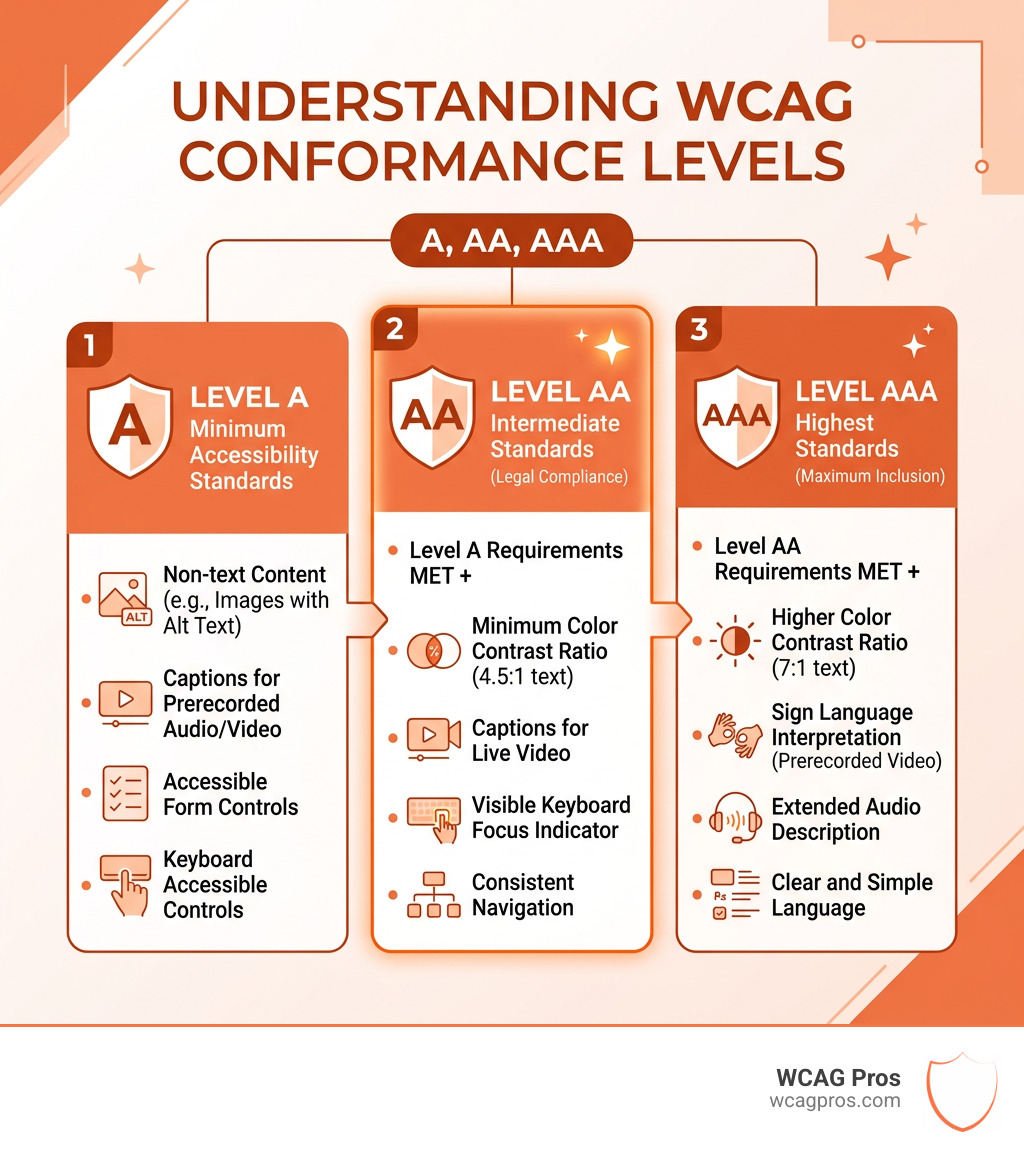
WCAG AA standards are the middle tier of the Web Content Accessibility Guidelines, widely recognized as the baseline for legal compliance and inclusive web design across the globe.
Here is a quick overview of what you need to know:
| Level | What It Means | Who Needs It |
|---|---|---|
| Level A | Minimum accessibility requirements | All websites |
| Level AA | Removes significant barriers for users with disabilities | Most organizations, legally required in many jurisdictions |
| Level AAA | Highest level of accessibility, not always achievable | Specialized content, government, public services |
WCAG AA conformance requires meeting all Level A and Level AA success criteria. This includes things like:
- A minimum color contrast ratio of 4.5:1 for text
- Visible keyboard focus indicators
- Captions for live video
- Consistent navigation across pages
- Error suggestions in forms
The stakes are real. Nearly 97% of the top one million websites fail basic accessibility checks, averaging more than 50 violations per homepage. ADA-related lawsuits have tripled since 2013, and the U.S. Department of Justice now formally mandates WCAG 2.1 Level AA for state and local governments under Title II of the ADA.
If your website is not meeting these standards, you are exposed to significant legal risk and you are locking out a large portion of potential customers.
I’m Matthew Post, a web developer and accessibility specialist with nearly three decades of experience building and auditing websites, and I co-founded WCAG Pros specifically to help businesses understand and meet WCAG AA standards before an attorney’s letter forces the issue. In the sections below, I’ll walk you through everything you need to know to get compliant and stay that way.
Understanding the Foundation of WCAG AA Standards
To understand why we talk so much about WCAG AA standards, we have to look at where they come from. WCAG stands for Web Content Accessibility Guidelines. These guidelines are created by the World Wide Web Consortium, which most people know as the W3C. Specifically, a group called the Web Accessibility Initiative or WAI handles the heavy lifting.
The W3C is an international group that makes sure the internet works the same way for everyone. They are the ones who decide the rules for HTML and other tech that makes websites run. Because they are a global group, their standards are accepted all over the world. You can even find authorized and unofficial translations of these rules in languages like Arabic, Chinese, French, and Spanish. This shows that these are the most common standards used by advocates and users globally.
The goal of these guidelines is simple. They want to make sure that people with disabilities can use the web just as easily as anyone else. This includes people who are blind or have low vision, people who are deaf or hard of hearing, and people with mobility or cognitive challenges.
When we look at the guidelines, we see they cover more than just websites. They also apply to mobile apps and other digital content. One of the very first things we look at in an audit is WCAG 1.1.1 Non-text Content. This rule says that if you have something on your site that isn’t text, like an image or a chart, you need to provide a text alternative. This is often called alt-text. It allows a screen reader to describe the image to a user who cannot see it. This is a basic building block of accessibility.
The POUR Principles of Web Accessibility
We like to use the acronym POUR to explain how accessibility works. These four principles guide everything in the WCAG AA standards. If a website follows these four ideas, it is well on its way to being inclusive.
The first principle is Perceivable. This means that users must be able to perceive the information being presented. It cannot be invisible to all of their senses. For example, if you only provide information through sound, a person who is deaf cannot perceive it. If you only provide it through sight, a person who is blind cannot perceive it. This is why we provide things like WCAG 1.2.4 Captions (Live) Explained for video content. It gives people another way to take in the information.
The second principle is Operable. This means that users must be able to operate the interface. The navigation cannot require an action that a user cannot perform. A common issue here is a website that only works with a mouse. If someone has a motor disability and uses a keyboard or a sip-and-puff device, they need to be able to click every button and link without a mouse.
The third principle is Understandable. This means that users must be able to understand the information and how to use the interface. The text should be readable and the way the site works should be predictable. If a user fills out a form and makes a mistake, the site should help them fix it rather than just clearing the whole form and making them start over.
The fourth principle is Robust. This means that the content must be robust enough that it can be interpreted reliably by a wide variety of user agents, including assistive technologies. As technology changes, the website should still work. It needs to follow the rules of clean code so that screen readers and other tools don’t get confused by “broken” HTML.
Why Level AA is the Legal Gold Standard
You might wonder why we focus so much on Level AA instead of Level A or Level AAA. In web accessibility, Level AA is considered the “Goldilocks” zone. Level A is often too basic and leaves many barriers in place. Level AAA is the highest level, but it is often impossible for most websites to reach. For example, Level AAA requires sign language interpretation for all prerecorded videos. That is a wonderful goal, but it is not always realistic for a small business or a local government.
Because Level AA is a balanced standard, it has become the benchmark for laws around the world. In the United States, the Americans with Disabilities Act or ADA is the primary law. While the ADA was written before the internet was a major part of life, courts have ruled that it applies to websites.
The U.S. Department of Justice recently released an official version of the rule that specifically names WCAG 2.1 Level AA as the technical standard for state and local governments. This is under Title II of the ADA. Governments with more than 50,000 people must comply by April 24, 2026. Smaller entities have until April 26, 2027.
The legal risks for private businesses are just as high. In 2013, there were relatively few web accessibility lawsuits. By 2021, that number exploded to over 11,000 filings. That is a 320 percent increase. Even though the numbers dipped slightly in 2022 and 2023, they are still triple what they were a decade ago. Most of these lawsuits point to WCAG AA standards as the evidence of whether a site is accessible or not.
Comparing WCAG AA Standards to Level A and AAA
It is helpful to think of these levels like a set of stairs. You cannot reach the second floor without passing the first. Level AA includes every single requirement from Level A plus its own specific rules. If you want to claim Level AA conformance, you must satisfy all the Level A criteria first.
Level A is the absolute minimum. It covers things like basic keyboard navigation and alt-text for images. If you don’t meet Level A, your site is likely unusable for many people. However, Level A alone is usually not enough to protect you from legal trouble.
Level AA goes further to make the experience better. it introduces rules for color contrast and more advanced navigation. This is the level that most experts and regulators agree is “good enough” for the general public. If you are looking for Quick Fixes to Improve Your Website’s Accessibility Today, you will likely find that many of them focus on moving from Level A toward Level AA.
Level AAA is for specialized sites. It includes things like very high contrast ratios and expanded audio descriptions. While it is the ultimate goal for inclusion, even the W3C admits that it is not recommended as a general policy for entire websites because some content simply cannot meet the requirements.
Technical Requirements for Conformance
When we perform a WCAG Remediation, we look at several technical areas. These are the nuts and bolts of the WCAG AA standards.
One of the biggest areas is color contrast. For Level AA, most text needs to have a contrast ratio of at least 4.5:1 against its background. This ensures that people with low vision or color blindness can read the words. If you use light gray text on a white background, you are likely failing this test.
Keyboard navigation is another huge factor. We often tell our clients in Norco to put their mouse in a drawer and try to use their website for ten minutes. Can you get to the “Buy Now” button? Can you close a pop-up window? If you get stuck in a “keyboard trap” where you can’t move the focus away from a certain element, that is a major violation.
Text resizing is also a requirement. A user should be able to zoom in on your site up to 200 percent without the text overlapping or disappearing off the side of the screen. This is vital for people who need larger letters to read comfortably.
Finally, we look at error prevention. This is especially important for sites that handle legal or financial data. If a user is about to delete a file or send a payment, the site should give them a chance to review and confirm the action or undo it if they made a mistake.
Key Success Criteria for WCAG AA Standards
There are specific “Success Criteria” that we use as a checklist. One of the most important is Contrast (Minimum). This is known as Success Criterion 1.4.3. It is the rule that sets that 4.5:1 ratio we mentioned.
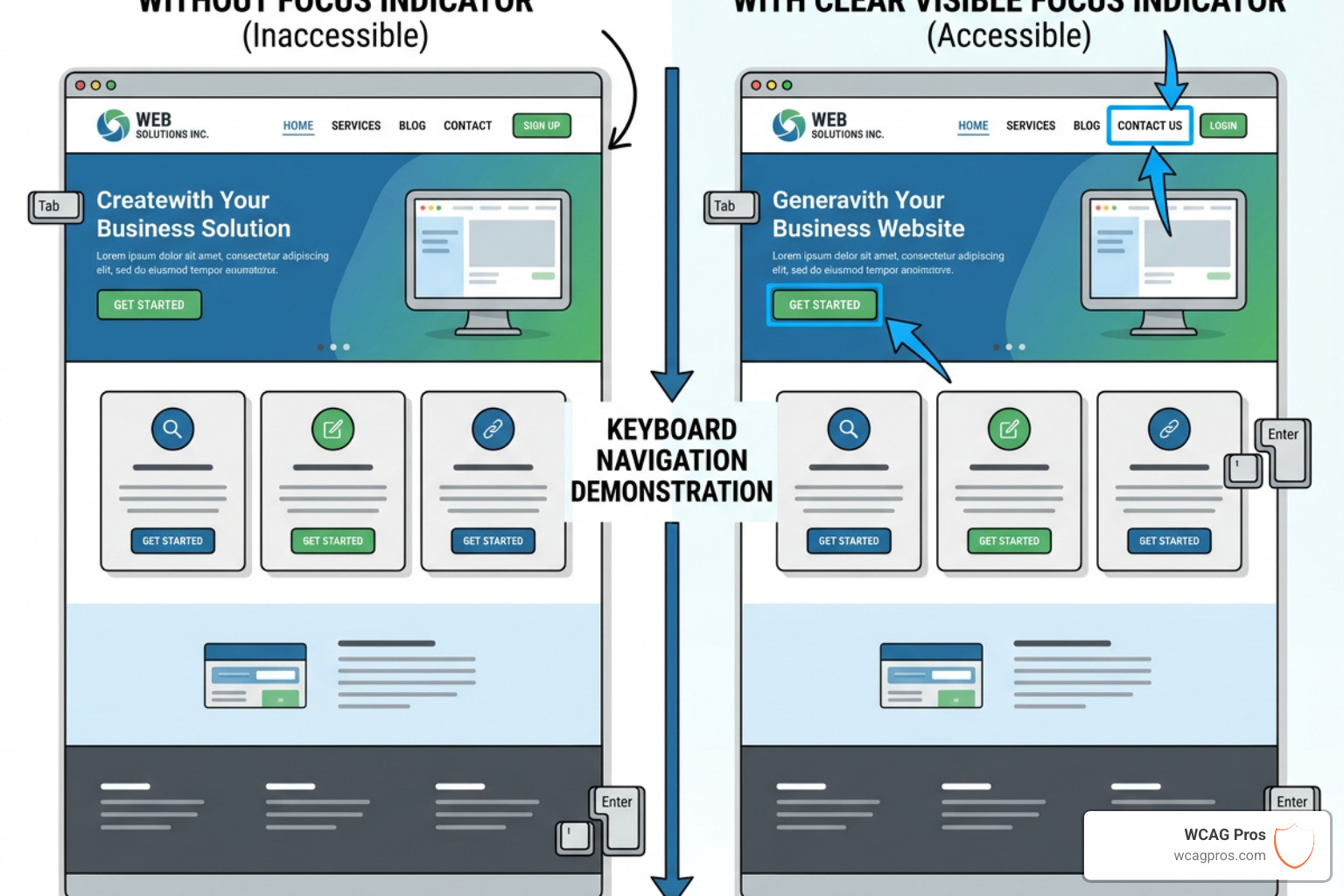
Another key one is Focus Visible. This means that when a user tabs through your site with a keyboard, there must be a clear visual box or outline around the item they are currently on. If the focus is “invisible,” the user has no idea where they are on the page.
Consistent navigation is also a Level AA requirement. This means that if you have a menu at the top of your homepage, it should be in the same place and in the same order on every other page. This helps people with cognitive disabilities or those using screen readers to predict how the site will behave.
We also look at media. For example, WCAG 1.2.1 Audio-only and Video-only (Prerecorded) Explained tells us that we need to provide transcripts or descriptions for media so that everyone can access the information. For Level AA, you also need to provide audio descriptions for prerecorded videos to explain what is happening visually on the screen.
How to Achieve and Maintain Compliance
Achieving compliance with WCAG AA standards is not a one-time task. It is a journey. The web is always changing, and your site likely changes with it. Every time you add a new blog post, a new product, or a new video, you have a chance to break your accessibility.
The first step is always a professional WCAG Audit. While there are many automated tools out there that can scan your site, they only catch about 30 percent of the issues. They are great for finding “low-hanging fruit” like missing alt-text, but they cannot tell you if your keyboard navigation makes sense or if your captions are accurate. You need a human expert to go through the site and test it with a screen reader.
Once you have your audit report, the next step is remediation. This is the process of fixing the code. At WCAG Pros, we provide specific code fixes for every issue we find. This makes it much easier for your developers to implement the changes.
After the fixes are in place, you should do a re-audit to make sure everything is working as intended. We provide free re-audits for our clients to ensure they can earn their compliance badges with confidence.
Finally, you need a plan for ongoing maintenance. This might include training for your content team so they know how to write good alt-text or how to structure headings correctly. It also means doing regular check-ups to catch new issues before they turn into legal problems.
Frequently Asked Questions
What is the difference between WCAG 2.1 and 2.2?
WCAG 2.2 is the newest version, released in late 2023. It builds on top of 2.1. It adds nine new success criteria that focus on users with low vision, cognitive disabilities, and those using mobile devices. For example, it introduces a rule about “Target Size,” which says that buttons need to be large enough for someone with a motor disability to tap them easily on a touchscreen. If you are already compliant with 2.1, you only have a few more things to check to reach 2.2.
Is WCAG AA mandatory for private businesses?
Technically, the ADA does not mention WCAG by name for private businesses. However, the Department of Justice and the courts almost always use WCAG AA standards as the benchmark. If a blind user sues a retailer because they cannot buy a shirt on the website, the court will look at whether the site meets Level AA criteria. In that sense, it is a “de facto” requirement. If you want to stay out of court, meeting these standards is the best way to do it.
How often should I audit my site for accessibility?
We generally recommend a full audit once a year. However, if you have a very active site where you are adding new features or changing the design frequently, you might want to do smaller “spot checks” every quarter. Accessibility is a moving target, and regular monitoring is the only way to ensure you don’t slip out of compliance.
Conclusion
At the end of the day, following WCAG AA standards is about more than just avoiding a lawsuit. It is about making the digital world a welcoming place for everyone. When you make your site accessible, you are not just helping people with disabilities. You are helping the senior citizen who needs to zoom in on the text. You are helping the person in a noisy coffee shop who needs captions to understand your video. You are even helping your own SEO, as search engines love well-structured, accessible content.
At WCAG Pros, we take the guesswork out of the process. We are based right here in Norco, California, and we understand the pressure businesses are under to get this right. Our comprehensive audits cover all 54 points of the guidelines, and we don’t just tell you what is wrong. We give you the code to fix it.
Whether you are just starting your accessibility journey or you need a final check to earn your compliance badge, we are here to help. You can explore our WCAG Guidelines resources to learn more about the specific rules, or reach out to us for a professional audit. Let’s work together to make your website a place where everyone is included.
Read more website accessibility articles
Get Help With Your Website
We'll follow up with info about:
- The process
- Cost
- Timeline
We promise to respect your privacy, and never abuse the information you provide. We will not sell or rent your information to any third party.
By submitting this form, you consent to receive SMS messages and/or emails from SEM Dynamics LLC, dba WCAG Pros. To unsubscribe, follow the instructions provided in our communications. Msg & data rates may apply for SMS. Your information is secure and will not be sold to third parties.