
How to Pass Your WCAG 2.1 AA Certification with Flying Colors
How to Pass Your WCAG 2.1 AA Certification with Flying Colors
Understanding the WCAG 2.1 AA Certification Standard
WCAG 2.1 AA certification is the process of formally verifying that your website meets the Web Content Accessibility Guidelines (WCAG) 2.1 at Level AA, the globally accepted standard for digital accessibility.
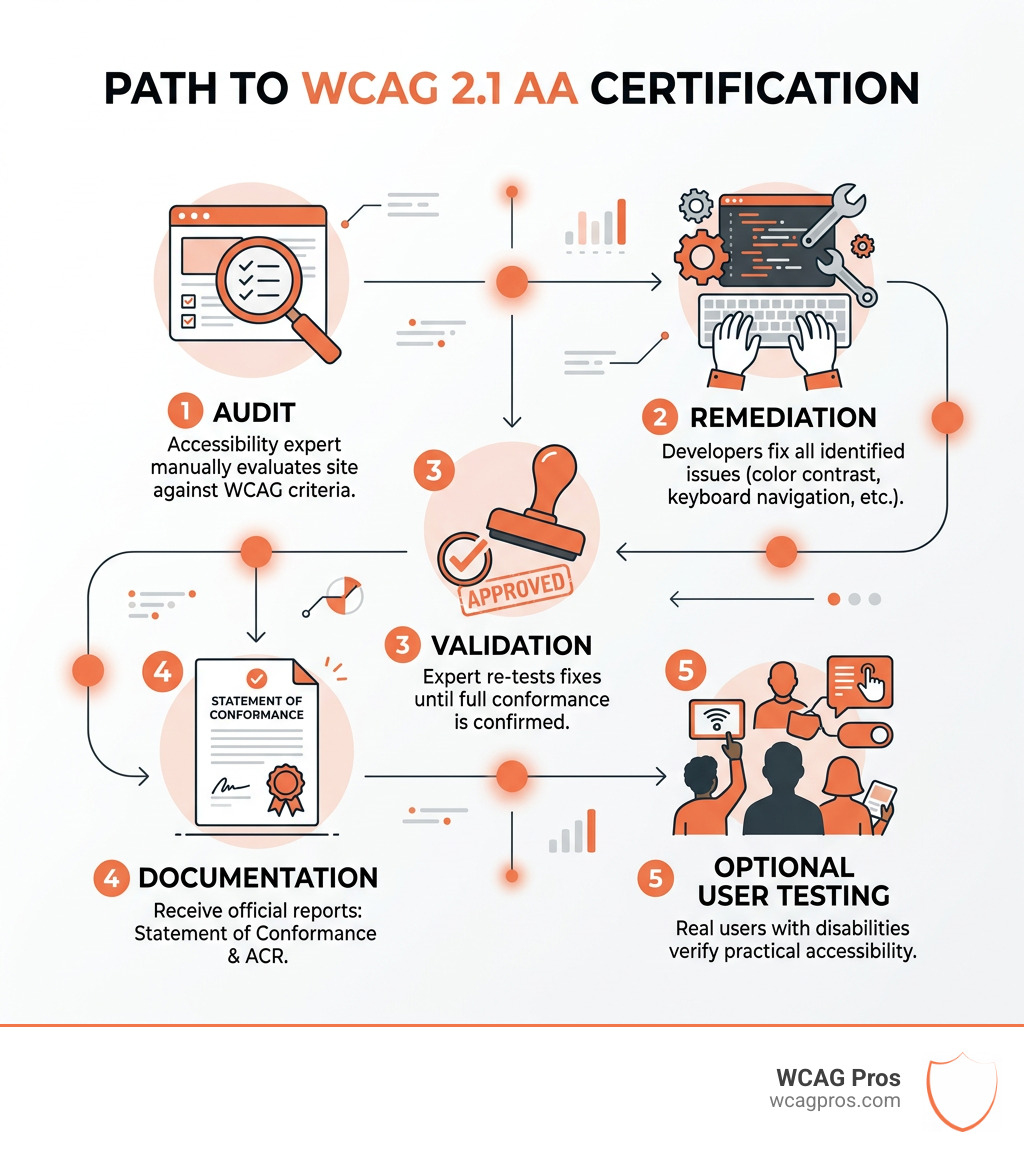
Here is how the certification process works, step by step:
- Audit: A qualified accessibility expert manually evaluates your site against WCAG 2.1 AA success criteria
- Remediation : Developers fix all identified issues, from color contrast to keyboard navigation
- Validation : The expert re-tests every fix, typically over 2 to 5 rounds, until full conformance is confirmed
- Documentation : You receive a Statement of Conformance and or an Accessibility Conformance Report (ACR) as formal proof
- Optional user testing : Real users with disabilities verify practical accessibility beyond technical checks
Automated tools alone will not get you there. Research shows they catch only 30 to 50% of accessibility issues. Full certification requires expert manual testing.
ADA-related lawsuits over inaccessible websites keep rising, and courts consistently point to WCAG 2.1 AA as the benchmark businesses must meet. If your site is not compliant, the legal and financial risk is real and growing.
The good news is that certification is a clear, structured process. Once you know the steps, it is entirely achievable.
I’m Matthew Post, co-founder of WCAG Pros and a web developer with nearly three decades of experience in website architecture and digital systems. I launched WCAG Pros in 2021 specifically to help businesses navigate WCAG 2.1 AA certification, having seen how many companies lacked the technical knowledge to properly audit and remediate their sites. In this guide, I will walk you through exactly what it takes to pass your certification with confidence.
To navigate web accessibility, we first need to understand the foundation. The Web Content Accessibility Guidelines (WCAG) 2.1 are organized around four core principles known as POUR. These are not just fancy acronyms but the pillars of an inclusive internet.
- Perceivable: Users must be able to see or hear the information. It cannot be invisible to all their senses.
- Operable: Users must be able to navigate the interface. If a person cannot use a mouse, they must be able to use a keyboard.
- Understandable: The content and the way the website works must be clear. No one likes a confusing “mystery meat” navigation menu.
- Robust: The site must work well with different browsers and assistive technologies like screen readers, both now and as technology evolves.
When we talk about WCAG 2.1 AA certification, we are looking at a specific “middle ground” of compliance. WCAG has three levels: A (the bare minimum), AA (the global standard), and AAA (the most rigorous). Most laws and business best practices target Level AA because it provides a high level of accessibility without being technically impossible for most website owners to maintain.
WCAG 2.1 was released in 2018 as an update to the older 2.0 version. It kept everything from 2.0 but added 17 new criteria specifically designed to help mobile users, people with low vision, and those with cognitive disabilities. If you want to dive deeper into these technicalities, check out our WCAG Articles for more insights.
| Feature | WCAG 2.0 AA | WCAG 2.1 AA |
|---|---|---|
| Total Success Criteria | 38 | 50 (38 from 2.0 + 12 new AA/A) |
| Mobile Focus | Minimal | High (Orientation, Gestures) |
| Low Vision Support | Basic | Enhanced (Reflow, Contrast) |
| Cognitive Support | Basic | Improved (Input Purpose) |
Why Businesses Prioritize WCAG 2.1 AA Compliance
Why are so many organizations suddenly rushing to get certified? For many, it starts with the law. In the United States, the Americans with Disabilities Act (ADA) has been interpreted by courts to apply to the digital world. Specifically, Title II of the Americans with Disabilities Act (ADA) now has very clear rules for state and local governments, and Title III covers “places of public accommodation,” which includes most businesses.
Beyond the ADA, Section 508 requires federal agencies to make their electronic information accessible. If you are a small business owner wondering how this affects you, our ADA Compliance for Small Businesses in 2025: A Complete Guide is a great place to start.
But it is not all about avoiding lawsuits. There are massive business benefits to being accessible:
- Market Reach: Over one billion people worldwide live with some form of disability. If your site is not accessible, you are essentially closing your doors to a huge segment of the population.
- SEO Benefits: Search engines love accessible sites. Proper heading structures, alt text for images, and clean code help Google understand your site better, which can lead to higher rankings.
- Brand Reputation: Showing that you care about inclusion builds trust. It tells your customers that you value everyone.
- Better UX for Everyone: Ever tried to read a website on a phone in bright sunlight? High contrast helps you too. Accessibility features often improve the experience for people without disabilities as well.

The Step-by-Step Process for Achieving Conformance
Getting your WCAG 2.1 AA certification is a journey, not a single task. We like to think of it as a three-phase process that moves from discovery to action to verification.
While you might be tempted to just run a free tool and call it a day, Automated Web Accessibility Testing Made Easy explains that software only catches a fraction of the problems. A real human needs to look at the code.
Phase 1: The Comprehensive WCAG Audit
The first step is a WCAG Audit. This is where a technical expert goes through your site page by page. We use a combination of automated scans to find the “low hanging fruit” and manual testing for the complex stuff.
Manual testing involves using assistive technologies like screen readers (NVDA, JAWS, or VoiceOver) and navigating the site using only a keyboard. An expert will check if the tab order makes sense and if interactive elements actually announce themselves correctly to a blind user. To see what we look for, you can review The Ultimate Website Accessibility Testing Checklist for 2026.
Phase 2: Remediation and Code Fixes
Once the audit is finished, you will have a list of errors. This is the “doing” phase. WCAG Remediation involves going into the backend of your website and fixing the code.
Common fixes include:
- Adding descriptive alt text to images so screen readers can describe them. For more on this, see Guideline 1.1.1 Non-text Content.
- Adjusting color contrast ratios to meet the 4.5:1 requirement for standard text.
- Fixing form labels so that a user knows exactly what to type in each box.
- Ensuring that “skip to content” links exist for keyboard users.
Phase 3: Validation and Issuing Your WCAG 2.1 AA Certification
After the fixes are applied, we don’t just take your word for it. We perform a validation. This is a re-audit to ensure that every single issue identified in Phase 1 has been properly resolved.
It is very common for this to take 2 to 5 rounds of testing. Sometimes a fix for one issue accidentally breaks something else. Once we are 100% sure the site is conformant, we can help you draft an Accessibility Statement.
The final “gold standard” of proof is a Statement of Conformance. This is a formal document that follows the rules for a statement of conformance set by the W3C. It lists the exact pages covered, the version of WCAG met, and the date of the audit.
Key Success Criteria and Documentation Requirements
To pass your WCAG 2.1 AA certification, you need to pay special attention to the criteria that were added in the 2.1 update. These were specifically created because the web changed between 2008 and 2018. We moved from desktop computers to mobile phones and tablets.
What’s New in WCAG 2.1 highlights several major changes. One big one is Reflow. This means that if a user zooms in to 400%, the website should stay in one column. The user should not have to scroll horizontally to read a single sentence. It is like a digital version of large print books.
Another key criterion is Orientation. Your website should not force a user to stay in portrait mode or landscape mode. If a user has their tablet mounted to a wheelchair in a fixed horizontal position, your site needs to work in that layout.
Enhancing Mobile and Low Vision Accessibility
Mobile accessibility is a huge part of the 2.1 standard. One of the most common failures we see is Target Size. Have you ever tried to click a tiny “X” on a mobile ad and ended up clicking the ad instead? That is a target size failure. WCAG 2.1 AA requires interactive elements to be large enough for people with tremors or limited fine motor skills to activate them easily.
We also look at Pointer Gestures. If your site requires a complex motion like a “pinch to zoom” or a three-finger swipe, you must provide a simple alternative, like a plus and minus button.
For users with low vision, Text Spacing is vital. Users should be able to increase the space between lines, words, and letters without the text overlapping or disappearing. If you want to get into the weeds of these requirements, Understanding WCAG 2.1 provides the full technical breakdown.
Documentation and VPAT Requirements for WCAG 2.1 AA Certification
If you are working with government agencies or large corporations, they might ask for a VPAT. This stands for Voluntary Product Accessibility Template. Once it is filled out, it becomes an ACR, or Accessibility Conformance Report.
This document is more than just a certificate. It is a detailed report card that goes through every single success criterion and explains how your site supports it (or where it falls short). For many organizations, having a clean ACR is the ultimate proof of compliance. This is especially important for meeting Section 508 of the Rehabilitation Act requirements.
Frequently Asked Questions about WCAG
What is the difference between WCAG 2.1 and 2.2? WCAG 2.2 is the latest version, released in late 2023. It adds nine more criteria on top of 2.1. While 2.1 is currently the most cited version in legal cases, many forward-thinking businesses are moving toward 2.2 to “future proof” their sites.
How long does certification take? It depends on the size of your site and the speed of your development team. A typical project might take anywhere from a few weeks to several months. The remediation phase is usually the longest part.
Can I just use an accessibility overlay or widget? We strongly advise against relying solely on overlays. While they might fix some visual issues, they often make the experience worse for screen reader users and do not provide true legal protection. Manual remediation of the actual source code is the only way to achieve real WCAG 2.1 AA certification.
Conclusion
Achieving WCAG 2.1 AA certification is one of the best things you can do for your business in 2025. It protects you legally, improves your search engine rankings, and most importantly, ensures that everyone can access your digital content regardless of their abilities.
Accessibility is not a “one and done” project. As you add new blog posts, products, or features, you need to ensure they remain accessible. It is a commitment to an inclusive future.
At WCAG Pros, we specialize in making this process as smooth as possible. We don’t just give you a list of problems, we provide the code fixes and the expert guidance to help you cross the finish line. If you are ready to start your journey toward a more accessible website, contact us for a comprehensive WCAG Audit today. Let’s build a web that works for everyone.
Read more website accessibility articles
Get Help With Your Website
We'll follow up with info about:
- The process
- Cost
- Timeline
We promise to respect your privacy, and never abuse the information you provide. We will not sell or rent your information to any third party.
By submitting this form, you consent to receive SMS messages and/or emails from SEM Dynamics LLC, dba WCAG Pros. To unsubscribe, follow the instructions provided in our communications. Msg & data rates may apply for SMS. Your information is secure and will not be sold to third parties.