
ADA Compliance WordPress 101
ADA Compliance WordPress 101
What ADA Compliance for WordPress Actually Means (And Why It Matters Now)
ADA compliance WordPress is the process of making your WordPress website accessible to people with disabilities, following the Web Content Accessibility Guidelines (WCAG) as the technical standard.
Here is what you need to know right away:
- What it is: Your website must meet WCAG 2.1 Level AA standards to be considered ADA compliant
- Who it applies to: Any WordPress site open to the public, including small and medium-sized businesses
- What happens if you ignore it: You risk lawsuits, fines, and reputational damage
- How to fix it: Audit your site, remediate accessibility issues, and maintain compliance over time
- Plugins alone are not enough: Most accessibility plugins cover only a fraction of WCAG requirements
WordPress powers over 43% of all websites. That makes it the most common platform targeted in accessibility lawsuits. In 2024 alone, over 4,000 ADA lawsuits were filed, many against small and medium-sized organizations. That works out to roughly 10 businesses sued every single day.
If your WordPress site is not accessible, you are exposed.
This guide walks you through everything you need to know: what the law requires, where most WordPress sites fall short, and how to fix it the right way.
I am Matthew Post, a web developer and accessibility specialist with nearly 30 years of experience and co-founder of WCAG Pros, where I help businesses solve exactly these kinds of ADA compliance wordpress challenges through manual auditing and hands-on remediation. Read on for a clear, practical breakdown of what it takes to protect your business and build a site that works for everyone.
Why ADA Compliance is Essential for WordPress Site Owners
When we talk about ADA compliance wordpress, we are discussing more than just a checklist of technical fixes. We are talking about civil rights. The Americans with Disabilities Act (ADA) was passed in 1990 to prevent discrimination. While the original law focused on physical spaces, the Department of Justice and US courts now widely apply Title III to digital platforms.
Under Title III, your website is considered a place of public accommodation. This means if a person with a visual impairment cannot navigate your checkout page or a person with a motor disability cannot use your contact form, your business is technically discriminating against them.
Beyond the legal requirement, there is a massive business case for accessibility. Over 61 million adults in the United States live with a disability. If your site is not compliant, you are effectively turning away a huge portion of the market. Furthermore, making your site accessible often improves your overall user experience and SEO. Search engines love well structured sites with clear headings and descriptive alt text.
Understanding WCAG Guidelines and Their Relation to ADA
The Americans with Disabilities Act (ADA) does not actually contain a list of technical instructions for websites. Instead, the legal community and the Department of Justice point to the Web Content Accessibility Guidelines (WCAG) as the gold standard.
WCAG is broken down into four main principles often called POUR:
- Perceivable: Users must be able to see or hear the information.
- Operable: Users must be able to navigate the site using various tools like a keyboard or voice commands.
- Understandable: The content and interface must be easy to comprehend.
- Robust: The site must work well with current and future assistive technologies like screen readers.
There are three levels of conformance: Level A (basic), Level AA (the legal standard for most businesses), and Level AAA (the highest level of accessibility). For most WordPress owners, aiming for WCAG 2.1 or 2.2 Level AA is the safest path to avoid litigation and ensure broad usability.
Common Accessibility Violations on WordPress Sites
Even with the best intentions, many WordPress sites suffer from common errors that trigger lawsuits. We see these issues daily during our WCAG Audit processes.
Poor Color Contrast
Many modern WordPress themes use light gray text on white backgrounds. While it might look sleek, it is nearly impossible for people with low vision to read. The standard ratio is 4.5:1 for normal text and 3:1 for large text.
Missing or Vague Image Alt Text
Images without alt text are invisible to screen readers. Even worse is using filenames like image123.png as alt text. Every meaningful image needs a description that conveys the purpose of the graphic.
Inaccessible Forms and Interactive Elements
If your contact form does not have clearly labeled fields or if the error messages do not tell the user exactly what went wrong, it is a major barrier. Many WordPress plugins for forms require manual tweaking to become fully compliant.
Keyboard Navigation Failures
A user should be able to navigate your entire site using only the Tab, Enter, and Arrow keys. If your dropdown menus do not open with a keyboard or if there is no visible focus indicator (the box that shows where you are on the page), your site is not compliant.
How to Choose an Accessibility-Ready WordPress Theme
Starting with a solid foundation is the easiest way to achieve ADA compliance wordpress. The WordPress Theme Directory allows you to filter by the accessibility-ready tag.
However, be careful. Just because a theme is labeled accessibility-ready does not mean your finished website will be compliant. These themes provide the necessary structure, but the moment you add a custom widget, a non-compliant plugin, or a low-contrast color scheme, you can break that accessibility. Commercial themes often put more effort into these features than free ones, but you must still verify the output yourself.
The Role of WordPress Plugins in ADA Compliance
There is a common myth that you can just install a WordPress ADA Compliance Plugin and be done with it. In reality, plugins are tools, not total solutions.
Some plugins are excellent for auditing. For example, the WP ADA Compliance Check Basic plugin can scan your content for errors as you write it. It helps identify missing alt text or empty links before you hit publish. Other tools like the HTML Validation plugin help ensure your underlying code is clean.
While you can use automated tools, these often only catch about 30 percent of total accessibility issues. They are great for finding the low hanging fruit, but they cannot replace a human eye.
Are Accessibility Overlay Widgets Sufficient?
You have likely seen the little blue person icon in the corner of many websites. These are called accessibility overlays or widgets. While they offer features like text resizing or high contrast modes, they are often criticized by the disability community.
Many experts argue that overlays are a “band-aid” fix. They sit on top of your site without actually fixing the underlying broken code. In some cases, they can even interfere with screen readers that users already have installed. Statistics show that 30 percent of 2023 web accessibility lawsuits involved sites that were using an overlay. Reliance on a widget alone is rarely enough to satisfy a court or provide a truly inclusive experience.
Step-by-Step Best Practices for WordPress Compliance
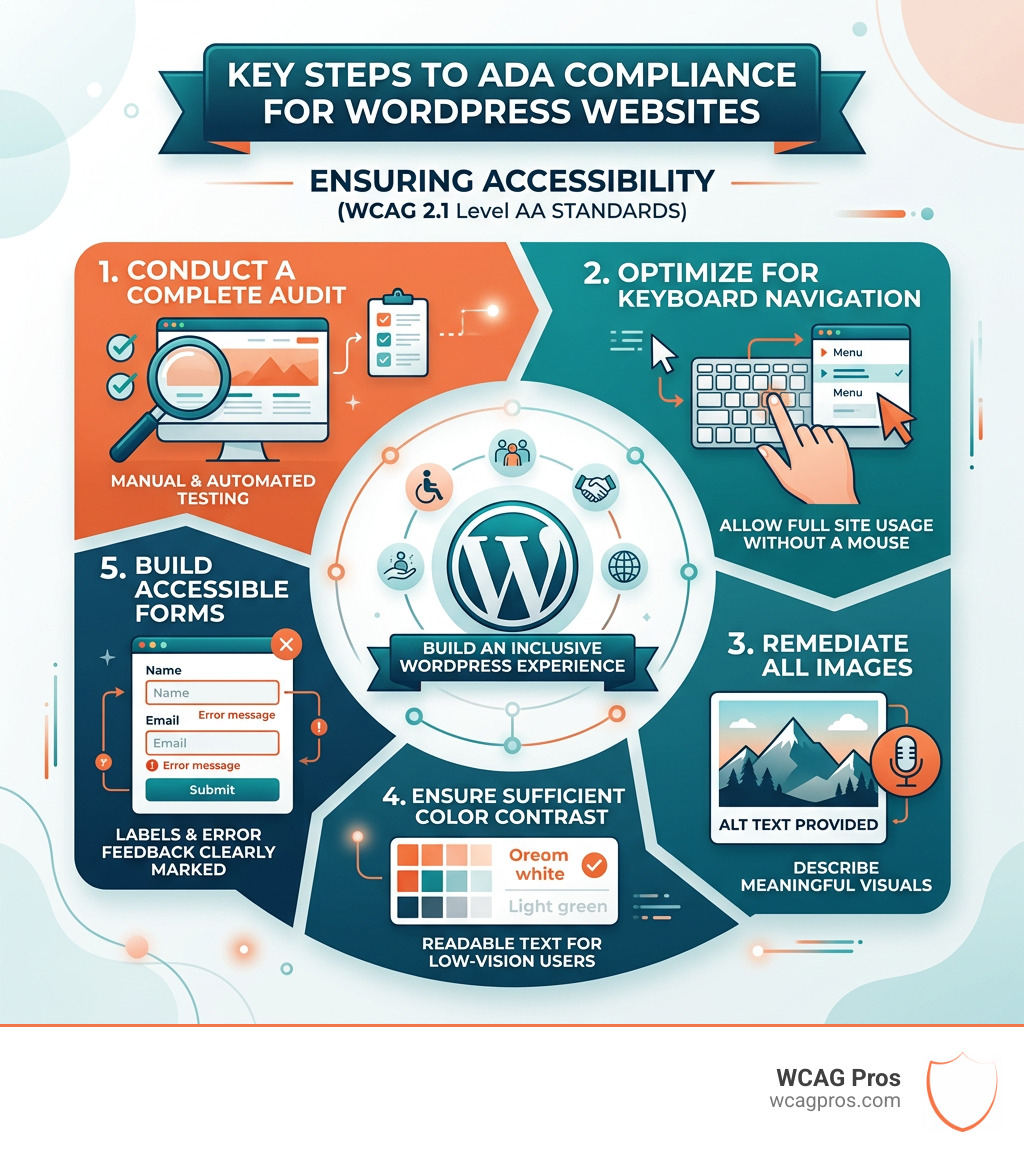
Achieving ADA compliance wordpress requires a systematic approach. Here is a roadmap we use at WCAG Pros for WCAG Remediation:
- Audit Your Site: Start with a mix of automated tools and manual testing.
- Fix Your Structure: Ensure you have one H1 tag per page and that subsequent headings (H2 through H6) follow a logical order.
- Optimize Images: Go through your media library and add descriptive alt text. If an image is purely decorative, leave the alt attribute empty so screen readers skip it.
- Check Your Contrast: Use a contrast checker to ensure all text is readable against its background.
- Test Keyboard Flow: Put your mouse away and try to use your site. Can you reach every link? Can you close pop-ups?
- Label Your Forms: Ensure every input field has a corresponding label tag.
- Add Captions: Any video content must have synchronized captions and a transcript.
Auditing and Testing Your WordPress Site
Testing is not a one-time event. Because WordPress is dynamic, every update to a plugin or a new blog post can introduce an error.
We recommend using the WP ADA Compliance Check Basic WordPress plugin for ongoing monitoring. For a deeper dive, use the WAVE Web Accessibility Evaluation Tool or other browser based checkers.
However, the most important test is a manual one. At WCAG Pros, we perform comprehensive page by page audits because automated tools simply cannot tell if a description makes sense or if a navigation flow is intuitive for a human being.
Maintaining Long-Term Compliance
Once your site is compliant, the goal is to keep it that way. This involves:
- Team Training: Anyone adding content to your site needs to know how to write alt text and use headings correctly.
- Regular Scans: Run automated scans monthly to catch new errors.
- Update Management: After updating WordPress core, your theme, or your plugins, do a quick manual check of your key pages.
- Accessibility Statement: Post an Accessibility Statement on your site. This shows you are committed to inclusion and gives users a way to contact you if they encounter a barrier instead of going straight to a lawyer.
Legal Risks and the Cost of Non-Compliance
The question Does My Website Have to Be ADA Compliant? is one we hear often from small business owners. The answer for almost everyone is yes. With 10 new businesses being sued every day, the risk is real.
A lawsuit can cost tens of thousands of dollars in legal fees and settlements, not to mention the cost of fixing the site under a tight court-ordered deadline. For many small companies, this is a devastating blow. Investing in ADA Compliance for Small Businesses in 2025 is much more affordable than fighting a legal battle.
How ADA Compliance Impacts SEO and User Experience
Accessibility and SEO are two sides of the same coin. Google’s goal is to provide the best possible result for the user. A site that is easy to navigate, has clear structure, and provides text alternatives for media is a site that Google wants to rank higher.
When you improve your ADA compliance wordpress, you are also improving your site for:
- Users on mobile devices in bright sunlight (contrast).
- Users with slow internet connections who may not load images (alt text).
- Older users who may struggle with small fonts.
- Power users who prefer keyboard shortcuts.
By making your site better for people with disabilities, you make it better for everyone.
Final Thoughts on WordPress Accessibility
Making your WordPress site ADA compliant is a journey, not a destination. It requires a combination of the right themes, smart plugin choices, and a commitment to manual testing. While the technical side can seem overwhelming, the benefits including legal protection, increased reach, and better SEO are well worth the effort.
If you are feeling unsure about where your site stands, we are here to help. You can Contact Us at WCAG Pros for a professional audit and a clear roadmap to full compliance. Let’s make the web a place where everyone is welcome.
Read more website accessibility articles
Get Help With Your Website
We'll follow up with info about:
- The process
- Cost
- Timeline
We promise to respect your privacy, and never abuse the information you provide. We will not sell or rent your information to any third party.
By submitting this form, you consent to receive SMS messages and/or emails from SEM Dynamics LLC, dba WCAG Pros. To unsubscribe, follow the instructions provided in our communications. Msg & data rates may apply for SMS. Your information is secure and will not be sold to third parties.