
The No-Nonsense Guide to ADA Audit and Certification
The No-Nonsense Guide to ADA Audit and Certification
The Importance of ADA Compliant Website Certification
ADA compliant website certification is the process of auditing your website, fixing accessibility barriers, and obtaining documented proof that your site meets WCAG 2.1 AA standards under the Americans with Disabilities Act.
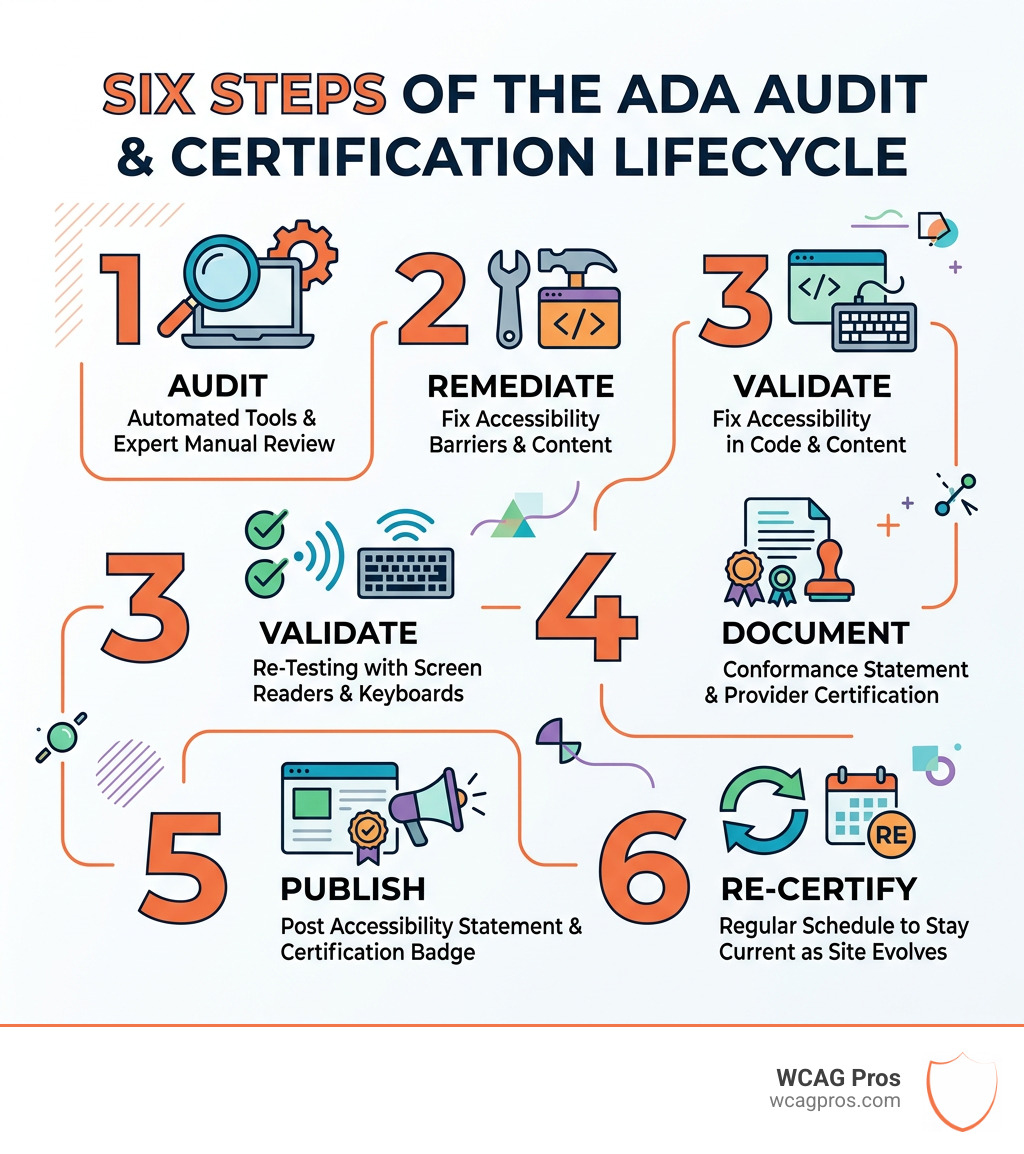
Here is what that process looks like at a glance:
- Audit your website using automated tools and manual expert review
- Remediate all identified barriers in your site’s code and content
- Validate fixes through re-testing, including screen reader and keyboard testing
- Document conformance with a formal conformance statement or provider certification
- Publish an accessibility statement and display your certification badge
- Re-certify on a regular schedule to stay current as your site and standards evolve
ADA lawsuits against websites have increased by 120% in the last two years. Right now, roughly 1 in 4 adults in the United States lives with a disability. That means a large portion of your potential customers may not be able to use your site at all.
The hard truth is that there is no single government body that issues an official ADA compliance certificate. Instead, certification comes from credible third-party accessibility firms that audit and document your conformance to recognized standards.
That is exactly what this guide covers. You will learn what certification actually means, how the process works, what documents you receive, and how to keep your site compliant over time.
I’m Matthew Post, a web developer and accessibility specialist with nearly 30 years of experience, and co-founder of WCAG Pros. I’ve guided many businesses through the full ADA compliant website certification process, from initial audit to remediation and ongoing compliance management. Let’s walk through everything you need to know.
When we talk about making the internet a better place, we are usually talking about inclusivity. But for business owners, there is also a very practical side to this conversation: legal protection.

The Americans with Disabilities Act (ADA) was passed in 1990, long before the modern web existed. However, the Department of Justice (DOJ) has made it clear that Title III of the ADA, which prohibits discrimination in places of public accommodation, applies to websites. If your website is a gateway to your business, it must be accessible to everyone.
Because the ADA itself does not provide a technical checklist, the industry relies on the Web Content Accessibility Guidelines (WCAG). Specifically, WCAG 2.1 Level AA is the gold standard that most courts and the DOJ reference when determining if a site is compliant.
The stakes are higher than ever. Lawsuits targeting digital assets have surged by 120 percent in the last two years. With 1 in 4 U.S. adults living with a disability, ignoring accessibility is not just a legal risk; it is a bad business move. You can find more info about legal requirements to see how these laws apply to your specific situation.
While the ADA is the primary law for private businesses, some organizations must also worry about Section 508. Here is a quick look at how they compare:
Who Needs an ADA Compliant Website Certification?
You might be wondering if your business is actually required to do this. Generally, if you have 15 or more employees and operate for 20 or more hours a week, you fall under the ADA mandate. This includes:
- Small Businesses: From local shops to professional service providers.
- E-commerce: Any site selling products directly to the public.
- SaaS Platforms: Software-as-a-Service providers often face high scrutiny.
- Public Accommodations: Hotels, restaurants, and private schools.
Ignoring these requirements can lead to “surf-by” lawsuits, where plaintiffs scan hundreds of sites looking for easy targets. To better understand these dangers, check out more info about noncompliance risks.
The Business Benefits of Accessibility
We often view ada compliant website certification as a defensive measure, but it is actually a powerful growth tool.
- Market Reach: There are over 51 million Americans living with disabilities. By making your site accessible, you are opening your doors to a massive demographic with significant spending power.
- SEO Improvements: Google loves accessible websites. Features like alt text for images, clear heading structures, and transcripts for videos help search engines understand your content better, which can boost your rankings.
- Brand Reputation: Showing that you care about all users builds trust. It tells your customers that your brand is inclusive and ethical.
- Inclusive Design: Often, the changes made for accessibility make the site easier for everyone to use, including elderly users or people on mobile devices in bright sunlight.
The Step-by-Step Process to Achieve Certification
Getting certified is not about clicking a button or installing a simple plugin. It is a rigorous process of finding and fixing errors.
At WCAG Pros, we believe in a “measure twice, cut once” approach. You can read more info about professional audits to see why a manual touch is so important. A true certification process involves a combination of automated scanning and human expertise.
Phase One: The Comprehensive Audit
The first step is knowing where you stand. We use automated tools to catch the “low hanging fruit” like missing alt text or poor color contrast. However, software alone only catches about 30 percent of issues.
The heavy lifting is done through human expert review. This includes:
- Keyboard Navigation: Ensuring a user can navigate the entire site without a mouse.
- Screen Reader Testing: Using software like NVDA or JAWS to “hear” the website as a blind user would.
- Color Contrast: Verifying that text is readable against its background.
- Alt Text: Checking that image descriptions actually convey the meaning of the image.
Common WCAG failures we often see include:
- Empty links or buttons that provide no context to screen readers.
- Missing form labels, making it impossible for users to fill out contact info.
- Low contrast text that is invisible to users with low vision.
- Lack of “skip to content” links, forcing keyboard users to tab through the entire menu on every page.
Phase Two: Remediation and Validation
Once we have the audit report, it is time for remediation. This is the “fixing” stage. We dive into the code to add ARIA labels, fix heading hierarchies, and ensure all interactive elements are accessible.
We don’t just guess if the fixes work. We perform validation through user testing, often involving members of the disabled community. Their feedback is invaluable because they use these technologies every day. Once every issue from the audit is resolved, we conduct a final verification to ensure the site meets the WCAG 2.1 AA success criteria.
Key Documentation for Web Accessibility Compliance
Documentation is your paper trail. If a legal claim ever arises, these documents prove that you took reasonable steps to be inclusive.
There are several types of documents you might encounter:
- Conformance Statements: A formal declaration that your site meets specific WCAG levels.
- VPAT (Voluntary Product Accessibility Template): Used primarily for government contracts to show how a product conforms to Section 508.
- ACR (Accessibility Conformance Report): The completed version of a VPAT.
- Accessibility Statement: A public-facing page on your site explaining your commitment to accessibility.
For those looking to dive deeper into the technical side, the DHS Trusted Tester Training offers a great foundation for web certification courses. You can also find more info about compliance checklists to help you keep track of your progress.
How to Display Your ADA Compliant Website Certification
Once you have earned your certification, you should show it off. This isn’t just about bragging; it is about transparency.
Most businesses display a “Trust Badge” or an accessibility icon in their website footer. This badge should link to your digital certificate or your accessibility statement. This tells users (and potential litigants) that you have undergone a professional audit and are committed to maintaining standards.
Understanding the Accessibility Statement
Every website should have an Accessibility Statement. This is usually a 3 to 5 paragraph document that includes:
- A Commitment Declaration: Stating that you value accessibility.
- Actions Taken: Briefly mentioning the standards you follow (like WCAG 2.1 AA).
- Contact Information: Providing a clear way for users to report barriers.
- Known Limitations: If there are parts of the site that are still being worked on, be honest about them.
- Future Pledges: Your plan for staying compliant as technology changes.
Maintaining Your ADA Compliant Website Certification
Accessibility is not a “one and done” project. Websites are living things. You add blog posts, launch new products, and update your theme. Any one of these actions can break your compliance.
Most ada compliant website certification documents are considered “fresh” for about one to two years. After that, they are seen as dated. We recommend annual re-certification to ensure that new content hasn’t introduced new barriers.
For professionals who want to lead these efforts in-house, seeking professional certification via IAAP (International Association of Accessibility Professionals) is a fantastic way to build internal expertise.
Why Certifications Expire
There are three main reasons why you can’t just certify once and forget it:
- Dynamic Content: Every time you upload an image without alt text or a video without captions, your compliance score drops.
- Evolving Standards: WCAG is constantly being updated. While 2.1 is the current standard for many, WCAG 2.2 is already introducing new requirements.
- Browser and Tool Updates: Screen readers and web browsers update frequently. What worked perfectly last year might have a bug this year.
Tools for Continuous Compliance
To stay on top of things between formal audits, we recommend using a mix of tools. The WebAIM WAVE tool is excellent for quick, page-by-page checks. Many businesses also opt for monthly audit reports that scan the site for major errors.
However, be wary of “overlays” or automated plugins that claim to fix everything with one line of code. These tools often fail to fix the underlying code and can sometimes make the experience worse for screen reader users. True compliance happens at the source code level.
Frequently Asked Questions about ADA Certification
Can a website be 100 percent ADA compliant?
In a strictly technical sense, “100 percent compliance” is a moving target. Because technology and standards change, it is more realistic to aim for “substantial conformance.” This means that while a tiny, non-critical error might pop up occasionally, a person with a disability can still navigate, understand, and use the site effectively. Continuous improvement is the name of the game.
How much does ADA website certification cost?
The cost varies depending on the size and complexity of your site. A small brochure site with ten pages will cost much less to audit and remediate than a massive e-commerce platform with thousands of products. You have to account for audit fees, developer hours for remediation, and ongoing management. The good news is that many small businesses may qualify for disabled access tax credits to help offset these costs.
What is the difference between a certification and a statement?
Think of the certification as the “diploma” and the statement as the “mission statement.” The certification is a technical document, often kept for internal or legal records, that proves you passed a professional audit. The accessibility statement is a public-facing document that tells your users you care about their experience and gives them a way to contact you if they have trouble.
Conclusion
Navigating ada compliant website certification can feel overwhelming, but it doesn’t have to be. By following a structured path of auditing, remediating, and documenting your efforts, you protect your business and serve your entire community.
At WCAG Pros, we specialize in making this process simple. We provide comprehensive, page-by-page audits of all 54 WCAG points, offer the code fixes you need, and provide free re-audits to ensure you earn your compliance badge.
If you are ready to make your digital presence accessible to everyone and shield your business from legal risks, start your WCAG audit today. We are here to help you every step of the way.
Read more website accessibility articles
Get Help With Your Website
We'll follow up with info about:
- The process
- Cost
- Timeline
We promise to respect your privacy, and never abuse the information you provide. We will not sell or rent your information to any third party.
By submitting this form, you consent to receive SMS messages and/or emails from SEM Dynamics LLC, dba WCAG Pros. To unsubscribe, follow the instructions provided in our communications. Msg & data rates may apply for SMS. Your information is secure and will not be sold to third parties.