
Your Shortcut to the Best WCAG Checker Tool
Your Shortcut to the Best WCAG Checker Tool
Is Your Website Accessible? Start Here
Online accessibility checker tools make it fast and easy to find WCAG compliance issues on your website before they turn into legal problems.
Here are the top options to know about:
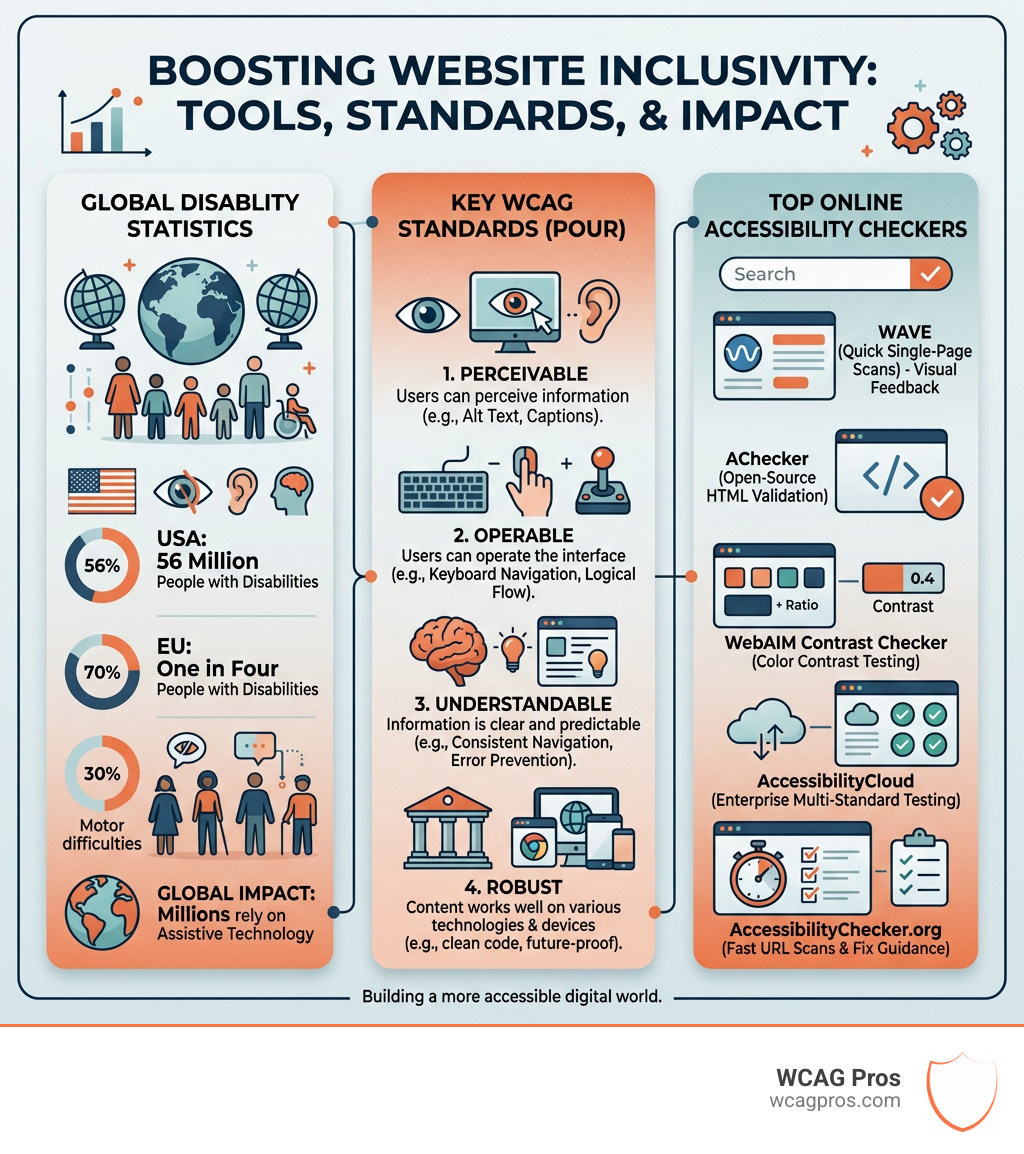
| Tool | Best For | Cost |
|---|---|---|
| WAVE (wave.webaim.org) | Quick single-page scans | Free |
| AChecker | Open-source HTML validation | Free |
| WebAIM Contrast Checker | Color contrast testing | Free |
The right tool depends on your website size, the standards you need to meet, and whether you need ongoing monitoring or a one-time scan.
Right now, 56 million people in the US live with a disability. In the EU, that number is one in four people. If your website creates barriers for those users, you are not just losing traffic. You may be exposed to serious legal risk under laws like the ADA, Section 508, and the European Accessibility Act.
The stakes are real and they are rising. ADA-related website lawsuits have grown steadily, and regulators in multiple countries are tightening enforcement. An online accessibility checker is one of the simplest first steps you can take to understand where your site stands.
I’m Matthew Post, co-founder of WCAG Pros and a web developer with over 20 years of experience auditing sites with online accessibility checker tools and remediating WCAG compliance issues. In the sections below, I’ll walk you through the best tools available and how to use them effectively.
Why Every Website Needs an Online Accessibility Checker
Every digital experience should be inclusive. When we build websites, we often assume everyone interacts with them the same way. However, millions of users rely on screen readers, keyboard navigation, or high contrast modes to browse the web. If our code is messy, those users are left behind. This is where an online accessibility checker becomes our best friend.
In the United States, the Americans with Disabilities Act is the primary law governing accessibility. Specifically, ADA Title III applies to places of public accommodation. For years, courts have ruled that websites fall into this category. If your site is not accessible, you could face a demand letter or a lawsuit. Beyond the legal risks, there is a massive business opportunity. With 56 million people in the US living with disabilities, making your site accessible opens your doors to a huge audience.
Global standards like the European Accessibility Act and the Accessibility for Ontarians with Disabilities Act also set strict requirements. For example, AODA requires many websites to reach WCAG 2.0 Level AA. Failing to do so can lead to massive fines. For federal agencies and their contractors, Section 508 is the standard to follow.
Using an online accessibility checker helps us identify the low hanging fruit. These tools scan for missing alt text, poor color contrast, and broken form labels. They give us a roadmap to start fixing issues before they become legal liabilities. While they are not a silver bullet, they are an essential part of any modern web workflow.
Top Tools to Audit Your Digital Compliance
Choosing the right online accessibility checker can feel overwhelming because there are so many options. Some tools are built for developers who want to check a single line of code. Others are designed for marketing teams who need to monitor an entire corporate domain.
Most of these tools work by crawling your HTML and comparing it against the World Wide Web Consortium guidelines. They look for specific markers like ARIA attributes and proper heading levels. ARIA roles define what an element does for a screen reader. For example, using a nav element or an ARIA navigation role helps users find the menu quickly.
Here is a breakdown of what these tools typically detect:
- Color Contrast: Checks if text is readable against its background.
- Missing Alt Text: Identifies images that lack descriptions for visually impaired users.
- Empty Links: Finds links with no text which are impossible for screen readers to interpret.
- Form Labels: Ensures every input field has a corresponding label.
- HTML Structure: Verifies that headings follow a logical order.
By using these tools regularly, we can maintain a high accessibility score. This is not just about a badge on your footer. It is about ensuring your brand is welcoming to everyone.
Free Online Accessibility Checker Options for Quick Scans
If you are just starting out, free tools are a fantastic resource. They provide immediate feedback without any financial commitment. One of the most popular options is WAVE by WebAIM. It is a free evaluation tool that lets you enter a URL and see a visual overlay of accessibility issues directly on your page.
Another great option is AChecker. This tool allows you to check single HTML pages for conformance with various standards. You can even upload a file or paste your HTML directly into the box. It is open source and very flexible for quick developer checks.
For those who prefer working in their browser, the WAVE extension is available for Chrome, Firefox, and Edge. This allows you to test password protected pages or local development sites that are not live yet. You can also use Chrome DevTools Inspect Mode to look at ARIA roles and accessible names on the fly.
Other free resources include:
- ANDI: A tool used by many federal agencies for Section 508 testing.
- Editoria11y: This functions like a spell checker for accessibility and is perfect for content editors.
- WebAIM WCAG Checklist: A simplified guide to help you understand the requirements.
Professional Online Accessibility Checker Platforms for Enterprise
For larger organizations, a single page scan is usually not enough. If you have hundreds or thousands of pages, you need a platform that can handle automated crawling and ongoing monitoring. Professional accessibility platforms offer these advanced features.
These platforms often provide a dashboard where we can see our progress over time. They can be set to scan your site weekly or monthly and alert you to new issues. This is crucial because websites are dynamic. Every time a new blog post is published or a new product is added, there is a chance for an accessibility error to creep in.
Enterprise grade solutions can also provide detailed issue tracking and guidance for remediation. Instead of only flagging that a button is broken, they may explain why the issue matters and what code changes are needed.
Using a professional online accessibility checker also helps with team collaboration. You can assign issues to specific developers and track when they are resolved. This creates a culture of accountability and ensures that accessibility is not just an afterthought.
Essential Complementary Resources for Full Compliance
While an online accessibility checker is a great starting point, we often need specialized tools for different types of content. For example, documents and videos have their own sets of rules.

Color contrast is one of the most common failures. WCAG 2.0 Level AA requires a contrast ratio of at least 4.5 to 1 for normal text. For large text, the requirement is 3 to 1. You can use the WebAIM Color Contrast Checker or the Deque Color Contrast Analyzer to verify your designs. If you want to check your links, the WebAIM Link Contrast Checker is a specific tool for that task.
Digital documents like PDFs also need to be accessible. You can use the PDF Accessibility Checker to verify the semantic structure of your files. If you work in Microsoft Office, the Microsoft Office Accessibility Assistant is a built in feature that helps you fix issues before you share a document.
For video content, we must include closed or open captions and transcripts. These resources ensure that users who are deaf or hard of hearing can access your information. You should also provide a WebAIM Word and PowerPoint Guide to your team so they can create accessible documents from the start.
Learning how to use a color contrast checker is a skill that every designer should have. It prevents costly redesigns and ensures that your brand is readable for everyone, including elderly users and those with low vision.
The Critical Limitations of Automated Testing
We love automated tools because they are fast and efficient. However, we must be honest about their limits. An online accessibility checker can only catch about 30 percent of all possible accessibility issues. That means 70 percent of potential barriers are missed by even the best software.
Automation is great at finding technical errors like missing code. It is terrible at judging the quality of the user experience. For example, an automated tool can tell you if an image has alt text. It cannot tell you if that alt text actually describes the image accurately or if it is just a string of useless keywords.
Manual testing is essential for full WCAG compliance. We need to test for:
- Keyboard Navigation: Can a user navigate the entire site using only the Tab key?
- Screen Reader Compatibility: Does the site make sense when read aloud?
- Logical Focus Order: Does the cursor move in a way that makes sense?
- Dynamic Content: Do alerts and popups get announced to users who cannot see them?
We recommend using an inclusive design checklist during the development process. You should also consider how to test your website’s accessibility using real users. Nothing replaces the feedback of a person who actually uses assistive technology every day.
By combining an online accessibility checker with manual audits, we get the best of both worlds. We use automation for scale and speed, and we use human judgment for nuance and accuracy. This hybrid approach is the only way to reach true compliance and provide a great experience for all visitors. You can find more details in The Ultimate Website Accessibility Testing Checklist for 2026.
Frequently Asked Questions about Web Audits
How often should I scan my website for accessibility?
We suggest scanning your website at least once a week if you are actively adding content. For static sites, a monthly scan might be enough. However, the best practice is to integrate an online accessibility checker into your publishing workflow. This ensures that every new page is checked before it goes live. Ongoing monitoring solutions are available that can automate this process and send you reports regularly.
Can an online checker guarantee 100 percent ADA compliance?
No, an automated tool cannot guarantee 100 percent compliance. As we discussed, these tools miss many subjective issues that require human testing. A passing score on a tool like WAVE or Siteimprove is a great sign, but it is not a legal shield. To be truly compliant, you need a professional manual audit that covers all the WCAG specification success criteria.
What are the penalties for failing to meet AODA standards?
The penalties for non-compliance can be very high. Under the Accessibility for Ontarians with Disabilities Act, individuals can be fined up to 50,000 dollars per day. For corporations, those fines can reach 100,000 dollars per day. While these are extreme cases, they show how seriously governments are taking digital inclusion. In the US, while there are no fixed daily fines for ADA violations, the cost of legal settlements and mandatory remediation can easily reach tens of thousands of dollars.
Conclusion
Building an accessible website is a journey, not a destination. An online accessibility checker is a vital tool on that journey, but it is only the first step. To truly protect your business and serve your users, you need a comprehensive strategy that includes both automation and expert human review.
At WCAG Pros, we specialize in helping businesses in Norco, CA, and beyond achieve lasting compliance. We provide detailed page-by-page audits that cover all 54 WCAG points. Our team does not just find problems. We provide the code fixes you need to solve them. Once the work is done, we offer free re-audits to ensure everything is perfect and provide you with a compliance badge.
If you are ready to stop guessing and start fixing, we are here to help. You can start with a professional WCAG Audit to get a clear picture of your current status. Let us help you make the web a more inclusive place for everyone.
Read more website accessibility articles
Get Help With Your Website
We'll follow up with info about:
- The process
- Cost
- Timeline
We promise to respect your privacy, and never abuse the information you provide. We will not sell or rent your information to any third party.
By submitting this form, you consent to receive SMS messages and/or emails from SEM Dynamics LLC, dba WCAG Pros. To unsubscribe, follow the instructions provided in our communications. Msg & data rates may apply for SMS. Your information is secure and will not be sold to third parties.