
The Definitive Guide to WCAG Guidelines
The Definitive Guide to WCAG Guidelines
Introduction to Web Content Accessibility Guidelines
WCAG guidelines are a set of technical standards published by the World Wide Web Consortium (W3C) that define how to make web content accessible to people with disabilities.
Here is a quick overview of what you need to know:
| Full name | Web Content Accessibility Guidelines |
| Published by | W3C Web Accessibility Initiative (WAI) |
| Latest version | WCAG 2.2 (published October 5, 2023) |
| Core principles | Perceivable, Operable, Understandable, Robust (POUR) |
| Conformance levels | A (basic), AA (standard), AAA (advanced) |
| Most commonly required | Level AA |
| Legal relevance | Referenced in ADA, Section 508, EU Accessibility Act, and more |
WCAG is the global benchmark for web accessibility. It tells developers, designers, and business owners exactly what an accessible website looks like. Governments and courts around the world use it as the technical standard in accessibility laws and litigation.
If your website does not meet WCAG standards, you are exposed to legal risk. ADA-related web accessibility lawsuits have been rising steadily, and many target businesses that simply did not know they were out of compliance.
I’m Matthew Post, a web developer and accessibility specialist with nearly three decades of experience, and co-founder of WCAG Pros, where I help businesses understand and meet wcag guidelines through hands-on audits and remediation. In this guide, I’ll walk you through everything you need to know to protect your business and build a more accessible website.
The Evolution and History of WCAG Guidelines
The journey of web accessibility began much earlier than many people realize. In the mid-1990s, the web was a wild frontier. Early pioneers recognized that without standards, the internet would become a place of exclusion. The first formal attempt to organize these ideas happened between 1995 and 1998 at the University of Wisconsin-Madison. This work eventually led to the creation of the Web Accessibility Initiative within the W3C.
In 1999, WCAG 1.0 was released. It consisted of 14 guidelines and 65 checkpoints. While it was a groundbreaking start, it was very focused on the technology of the time, such as HTML. As the web grew more complex, we needed a standard that focused on how people interact with content rather than just the code itself.
This shift led to the release of WCAG 2.0 in December 2008. This version introduced the four core principles we still use today: Perceivable, Operable, Understandable, and Robust. It contained 12 guidelines and 61 testable success criteria. It was so effective that it became an international standard known as ISO/IEC 40500:2012. You can learn more about this standard at ISO/IEC:www.iso.org/standard/58625.html.
As mobile devices and tablets became the primary way we browse the web, the guidelines had to adapt again. WCAG 2.1 was released in 2018. It kept everything from 2.0 but added 17 new success criteria specifically addressing mobile accessibility and the needs of people with low vision or cognitive disabilities.
The current standard is the Web Content Accessibility Guidelines (WCAG) 2.2. Published on October 5, 2023, it adds 9 more criteria to the list.
Understanding the Latest WCAG Guidelines 2.2
The release of WCAG 2.2 was a major milestone for our industry. It was designed to further improve accessibility for three specific groups: users with cognitive or learning disabilities, users with low vision, and users with disabilities on mobile devices.
One of the most significant changes in 2.2 is that it actually removed a success criterion for the first time. The criterion 4.1.1 Parsing was declared obsolete. Because modern browsers and assistive technologies handle code errors so well now, this specific rule was no longer necessary to ensure accessibility.
The 9 new success criteria in 2.2 include things like Focus Not Obscured, which ensures that when you navigate with a keyboard, the item you are focused on isn’t hidden by other content like sticky headers. Another important addition is Target Size (Minimum), which requires buttons and links to be large enough for people with mobility issues to click accurately.
If you are feeling overwhelmed by these updates, don’t worry. We have put together a list of Quick fixes to Improve Your Website’s Accessibility Today to help you get started on the right path.
Future Standards and WCAG 3.0
While we are currently working with the 2.2 version, the W3C is already looking toward the future with WCAG 3.0. This project is often called Silver. It is not just a minor update but a complete reimagining of how we measure accessibility.
WCAG 3.0 will likely move away from the strict pass or fail model of the current success criteria. Instead, it may use a scoring system that provides a more nuanced view of how accessible a site truly is. It aims to be easier to understand for people who aren’t technical experts and will cover a broader range of disabilities and technologies.
You can follow the progress of this new standard at W3C:www.w3.org/TR/wcag-3.0/. This is still a working draft and won’t be ready for official use for several years. For now, staying compliant with the version 2.2 wcag guidelines is your best strategy.
The Four Core Principles of Accessibility POUR
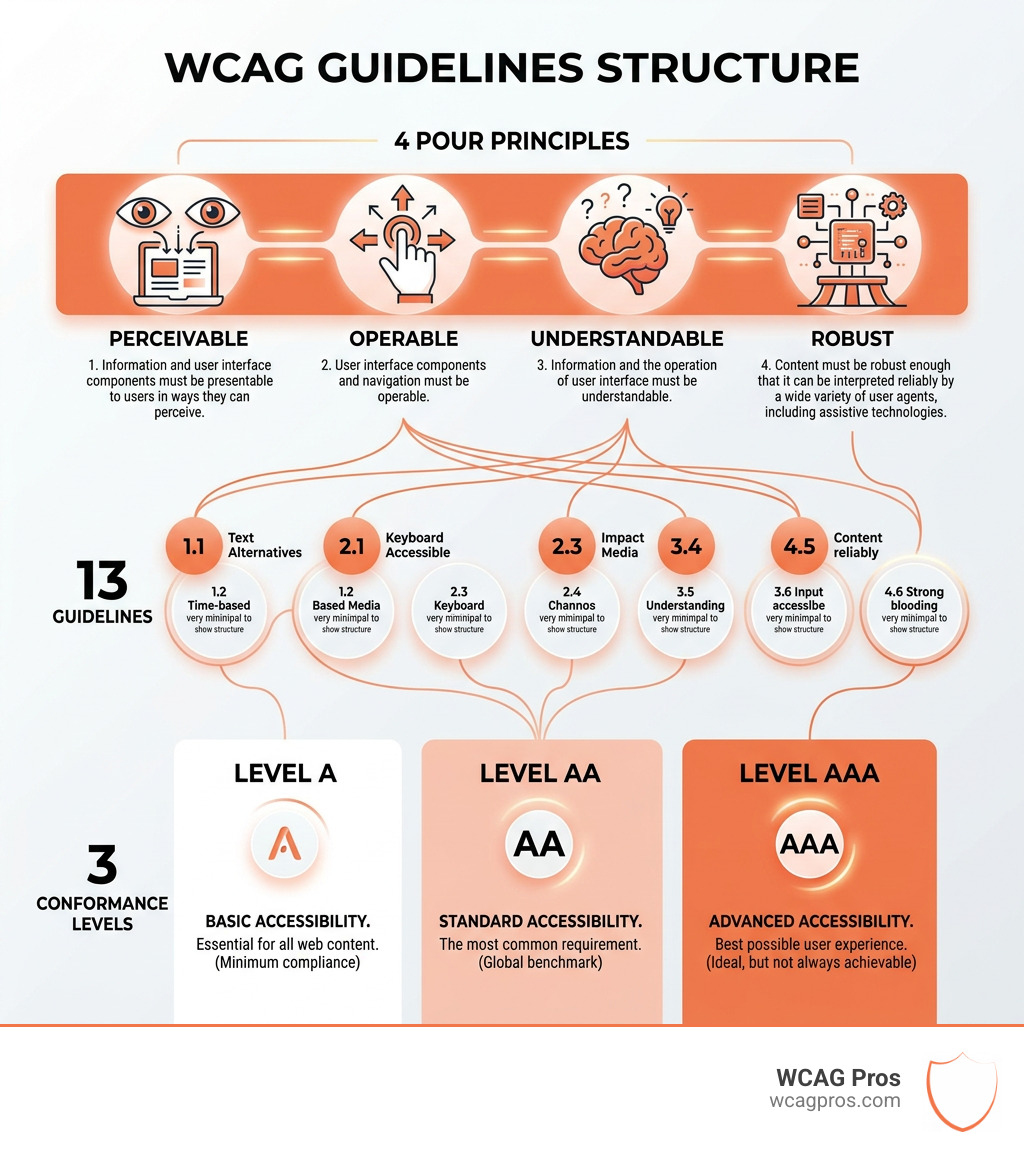
To make the wcag guidelines easier to understand, they are organized under four high-level principles. We use the acronym POUR to remember them. If a website fails to meet even one of these principles, it may be impossible for certain people to use.

These principles are the foundation of everything we do at WCAG Pros. They help us look beyond the code and think about the actual human experience.
| Principle | Meaning |
|---|---|
| Perceivable | Users must be able to see, hear, or touch the information. |
| Operable | Users must be able to navigate the site and use all features. |
| Understandable | The content and user interface must be clear and easy to follow. |
| Robust | The site must work well with different browsers and assistive tools. |
Perceivable and Operable Content
Perceivable content is all about making sure that information isn’t invisible to a user’s senses. For example, if you have an image on your site, a person who is blind cannot see it. We solve this by providing text alternatives. This is why Guideline 1.1.1 Non-text Content is so critical. It ensures that every image has a description that a screen reader can announce.
Color contrast is another big part of being perceivable. If your text is too light against a light background, people with low vision might not be able to read it. We recommend that everyone learn How to Use a Color Contrast Checker to Save Your Design to ensure their site stays readable for everyone.
Operability means that a user must be able to interact with your site. Many people cannot use a mouse due to tremors or motor impairments. They rely on their keyboard or voice commands to move through a page. If your menus only open when you hover a mouse over them, you have created an inaccessible trap.
We also have to consider time-based media. If you use video, you must provide captions for those who are deaf or hard of hearing. You might also need to look into WCAG 1.2.2 Captions (Prerecorded) Explained to see if your videos meet the mark. Other related requirements include WCAG 1.2.1 Audio-only and Video-only (Prerecorded) Explained and WCAG 1.2.3 Audio Description or Media Alternative (Prerecorded) Explained. For live events, WCAG 1.2.4 Captions (Live) Explained is the standard to follow.
Understandable and Robust WCAG Guidelines
A website is understandable when the user knows where they are and how to use the interface. This means your navigation should be consistent. If your “Contact” link is in the top right on the home page, it shouldn’t move to the footer on the about page.
Error messages are also a key part of this principle. If a user fills out a form incorrectly, the site should tell them exactly what went wrong and how to fix it. Simply turning a text box red isn’t enough because a colorblind user might not see the change.
The final principle is Robustness. This means your site needs to be built using well-adopted web standards. This ensures that it works not just on Chrome or Safari today, but also with screen readers and other assistive technologies tomorrow. One technical but vital part of this is 4.1.2 Name, Role, Value. This rule ensures that every interactive element on your page tells assistive software what it is and what it’s doing.
When we build robust sites, we often use 4.1.3 Status Messages to make sure that when something changes on the screen, like a “Success” message appearing after a form submission, the screen reader knows to announce it to the user.
Conformance Levels and Global Legal Requirements
The wcag guidelines are grouped into three levels of conformance. Think of these as a ladder where each step builds on the one before it.
- Level A: This is the most basic level. It addresses the most critical accessibility barriers. If you don’t meet Level A, your site is essentially unusable for many people.
- Level AA: This is the global standard. Most laws and regulations require businesses to meet this level. It removes the most common barriers for the widest range of users.
- Level AAA: This is the highest and most difficult level to achieve. While it provides the best experience, the W3C notes that it is not always possible to meet all AAA criteria for all types of content.
In the United States, several laws point to these standards. Section 508 of the Rehabilitation Act requires federal agencies to make their electronic and information technology accessible. In its recent “refresh,” Section 508 adopted WCAG 2.0 Level AA as its technical standard.
For private businesses, the Americans with Disabilities Act (ADA) is the primary concern. While the ADA was written before the internet was common, courts have consistently ruled that it applies to websites as “places of public accommodation.” If you are a small business owner, you should check out ADA Compliance for Small Businesses in 2025: A Complete Guide to learn how to protect yourself.
A major update occurred on April 24, 2024. The US Department of Justice issued a final rule that mandates WCAG 2.1 Level AA as the technical standard for all state and local governments. This includes their websites and mobile apps. This is a clear signal that the government views the 2.1 version as the modern baseline for accessibility.
To help you stay on track, we have created an ADA Website Compliance 2025 Accessibility Checklist that covers the most important points you need to hit.
International Standards and the European Accessibility Act
While our primary focus is on our clients in Norco, CA, it is important to understand that accessibility is a global effort. The wcag guidelines are the foundation for almost every international accessibility law.
For example, the European Accessibility Act (EAA) is a major piece of legislation that will require many private businesses to meet WCAG 2.1 AA standards by June 2025. Even if you are based in California, if you do significant business in Europe, this law might apply to you.
The relationship between these standards is very close. WCAG 2.0 is identical to the international standard ISO/IEC 40500:2012. By following WCAG, you are following a set of rules that are recognized and respected all over the world.
How to Achieve and Test for WCAG Compliance
Achieving compliance is a journey, not a one-time task. We believe in a three-pronged approach to testing that ensures no one is left behind.
First, there is automated testing. These are software tools that can scan your site and find obvious errors, like missing alt text or poor color contrast. They are fast and can check thousands of pages in minutes. However, they only catch about 30 to 40 percent of all accessibility issues. You can read more about this in our guide on Automated Tools Audit.
Second, we perform manual testing. This is where an expert like our team at WCAG Pros actually uses your site with a keyboard and a screen reader. We check for things that machines can’t understand, such as whether a description for an image actually makes sense or if the tab order of a menu is logical. This is the heart of a true WCAG Audit.
Third, we highly recommend user testing. There is no substitute for watching a person with a disability actually try to use your website. It often reveals barriers that neither a machine nor a sighted expert would ever notice. We have a detailed guide on How to Test Your Website’s Accessibility Using Real Users to help you set up this process.
Remediation and Long Term Maintenance
Once you have your audit results, the next step is remediation. This is the process of fixing the code and content to meet the wcag guidelines. This can range from simple tasks like adding labels to form fields to complex tasks like rewriting the JavaScript for a custom video player.
We provide comprehensive WCAG Remediation services where we don’t just tell you what is wrong, we give you the exact code fixes needed to make it right.
Common issues we see include 5 Common Accessibility Issues on Small Business Websites and How to Fix Them. One of the most frequent mistakes is the improper use of decorative images. To avoid this, we recommend Mastering the Art of Decorative Alt Text for Web Accessibility.
Accessibility is not a “set it and forget it” project. Every time you add a new blog post, a new product, or a new feature, you have the potential to introduce new barriers. You need a long-term plan for maintenance. We suggest using The Ultimate Website Accessibility Testing Checklist for 2026 to keep your site compliant year after year.
Frequently Asked Questions about Accessibility
Which WCAG level is required for most businesses?
For most businesses in the United States, Level AA is the standard you should aim for. This is the level referenced by the Department of Justice and used in the majority of legal settlements. Level A is too basic and leaves many users behind, while Level AAA is often too difficult to achieve for every single page of a modern, complex website.
Is WCAG 2.2 backwards compatible with 2.0?
Yes, the WCAG 2.x series is designed to be backwards compatible. This means that if you meet the requirements for WCAG 2.2, you automatically meet the requirements for 2.1 and 2.0. This is great for businesses because it means you only need to focus on the latest standard to be covered for all previous versions.
What is the difference between WCAG 2 and WCAG 3?
WCAG 2 is the current set of standards based on the POUR principles and A/AA/AAA conformance levels. WCAG 3 is a future project that will use a completely different structure and scoring system. WCAG 3 is still several years away from being an official recommendation, so businesses should continue to use WCAG 2.2 for their compliance efforts.
Conclusion
At WCAG Pros, we believe that the web should be a place where everyone can participate regardless of their abilities. Following the wcag guidelines is not just about avoiding a lawsuit, it is about doing the right thing for your customers and your community.
Whether you are looking for a way How to Tell Your Website is ADA Compliant or you are ready for a deep dive with The Ultimate WCAG Guide, we are here to help. Our team provides the most thorough audits in the industry, checking every single one of the 54 points required for Level AA compliance. We provide the code fixes you need and re-audit your site for free until you are ready for your compliance badge.
Digital inclusion starts with a single step. Let us help you make your website a welcoming place for everyone. Reach out to us today to start your journey toward a truly accessible digital presence.
Read more website accessibility articles
Get Help With Your Website
We'll follow up with info about:
- The process
- Cost
- Timeline
We promise to respect your privacy, and never abuse the information you provide. We will not sell or rent your information to any third party.
By submitting this form, you consent to receive SMS messages and/or emails from SEM Dynamics LLC, dba WCAG Pros. To unsubscribe, follow the instructions provided in our communications. Msg & data rates may apply for SMS. Your information is secure and will not be sold to third parties.