
Beginner’s Guide to Website Accessibility Audit
Beginner’s Guide to Website Accessibility Audit
What Is a Website Accessibility Audit?
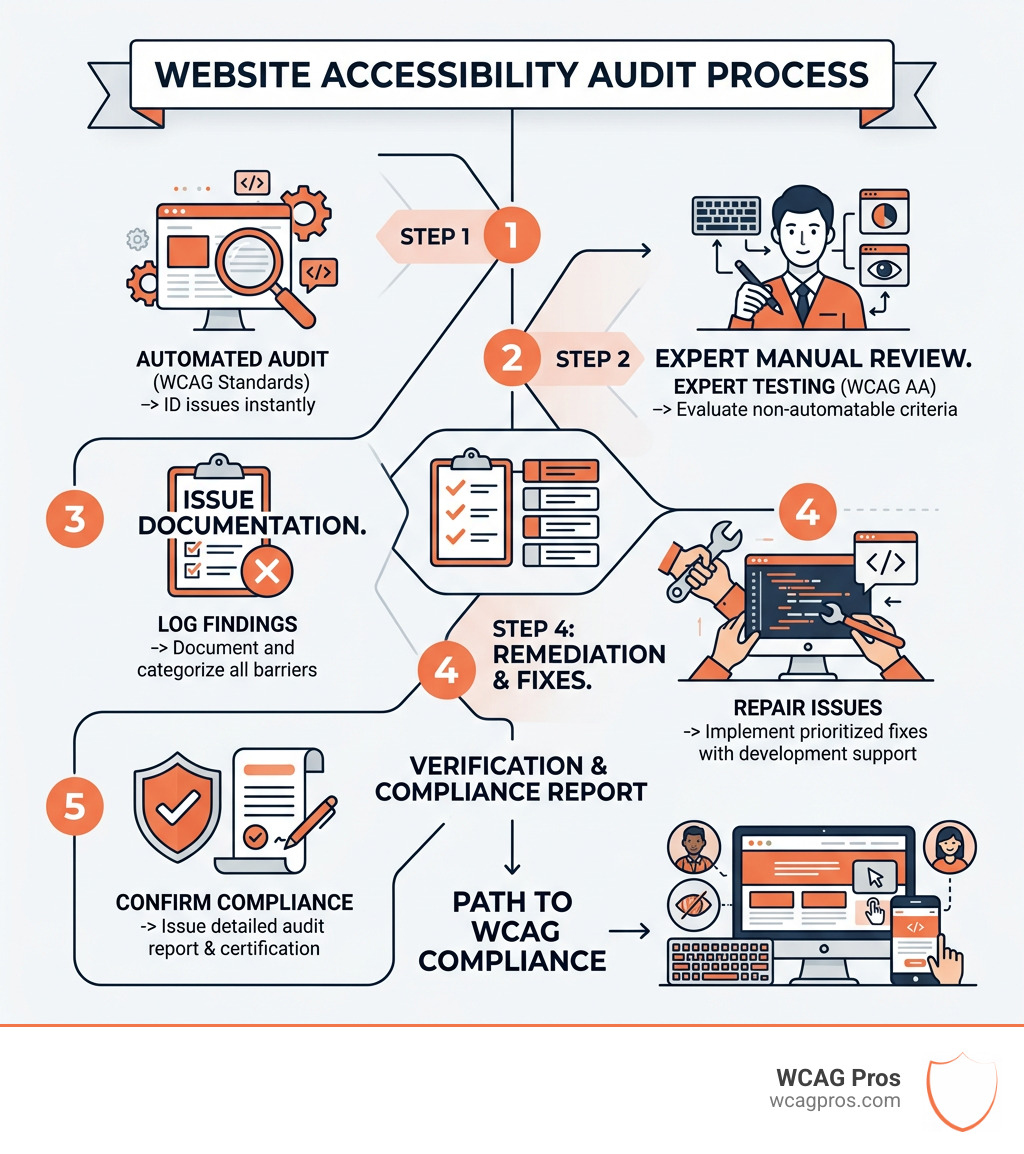
A website accessibility audit is an expert evaluation of your website to determine how well it can be used by people with disabilities, measured against the Web Content Accessibility Guidelines (WCAG).
Quick answer:
| Question | Answer |
|---|---|
| What is it? | A structured review of your website against WCAG standards |
| Who needs it? | Any business with a public-facing website |
| What does it check? | Alt text, color contrast, keyboard navigation, forms, and more |
| What are the audit types? | Automated, manual, or hybrid (both combined) |
| What do you get? | A report with a conformance rating, prioritized issues, and fixes |
| Which WCAG level applies? | Level AA is the standard most laws require |
Here is the reality: 1 in 4 U.S. adults lives with a disability. If your website is not accessible, you are locking out a massive portion of your potential customers. And beyond lost revenue, ADA-related lawsuits are rising fast. Businesses that ignore accessibility are increasingly finding themselves in court.
The good news is that an audit tells you exactly where your site falls short and what to fix. You do not need to guess.
I’m Matthew Post, a web developer and accessibility specialist with nearly 30 years of experience building and auditing websites. I co-founded WCAG Pros specifically to help businesses like yours navigate the website accessibility audit process, from first scan to full WCAG compliance. In the sections below, I’ll walk you through everything you need to know to protect your business and make your site work for everyone.
Why Your Business Needs a Website Accessibility Audit
If you have ever tried to navigate a website using only your keyboard or a screen reader, you know how frustrating a poorly designed site can be. But for many business owners, the “why” behind a website accessibility audit usually starts with a three letter acronym: ADA.
Legal Requirements and the ADA
The Americans with Disabilities Act (ADA) is a broad piece of legislation designed to prevent discrimination. While it was originally written for physical spaces, the Department of Justice and U.S. courts have made it clear that “places of public accommodation” include websites. If your site is not accessible, it is legally considered discriminatory.
For those working with the government or receiving federal funding, Section 508 requirements are even more strict. While we focus on our home base in Norco, CA, it is worth noting that businesses expanding internationally face similar hurdles. For instance, the European Accessibility Act is set to enforce strict digital standards by 2025. Ignoring these rules is not just a social faux pas. It is a financial risk.
The Massive Market Opportunity
Many businesses mistakenly believe that people with disabilities are a small minority. The data tells a different story. According to the CDC, one in four U.S. adults has a disability. Furthermore, Federal Reserve data on wealth shows that Baby Boomers hold over half of the nation’s wealth. As this generation ages, they increasingly rely on accessibility features like larger text, high contrast, and easy navigation. By performing a website accessibility audit, you are not just avoiding a lawsuit. You are opening your doors to a market with trillions of dollars in spending power.
SEO and User Experience
There is a secret benefit to accessibility that most marketing agencies do not talk about: accessibility is great for SEO. Google’s search crawlers act very much like screen readers. They look for clear heading structures, descriptive alt text for images, and logical navigation.
When you follow an ADA website compliance checklist, you are also improving your Core Web Vitals and overall page experience. A site that is easy for a person with a visual impairment to navigate is also a site that is easy for Google to index. It is a win-win for your rankings and your users.
Understanding WCAG Standards and Conformance Levels
When we perform a website accessibility audit, we do not just use our personal opinions. We use the global gold standard: the Web Content Accessibility Guidelines (WCAG). These are maintained by the World Wide Web Consortium (W3C), the same folks who helped build the foundations of the internet.
The Four Pillars of Accessibility (POUR)
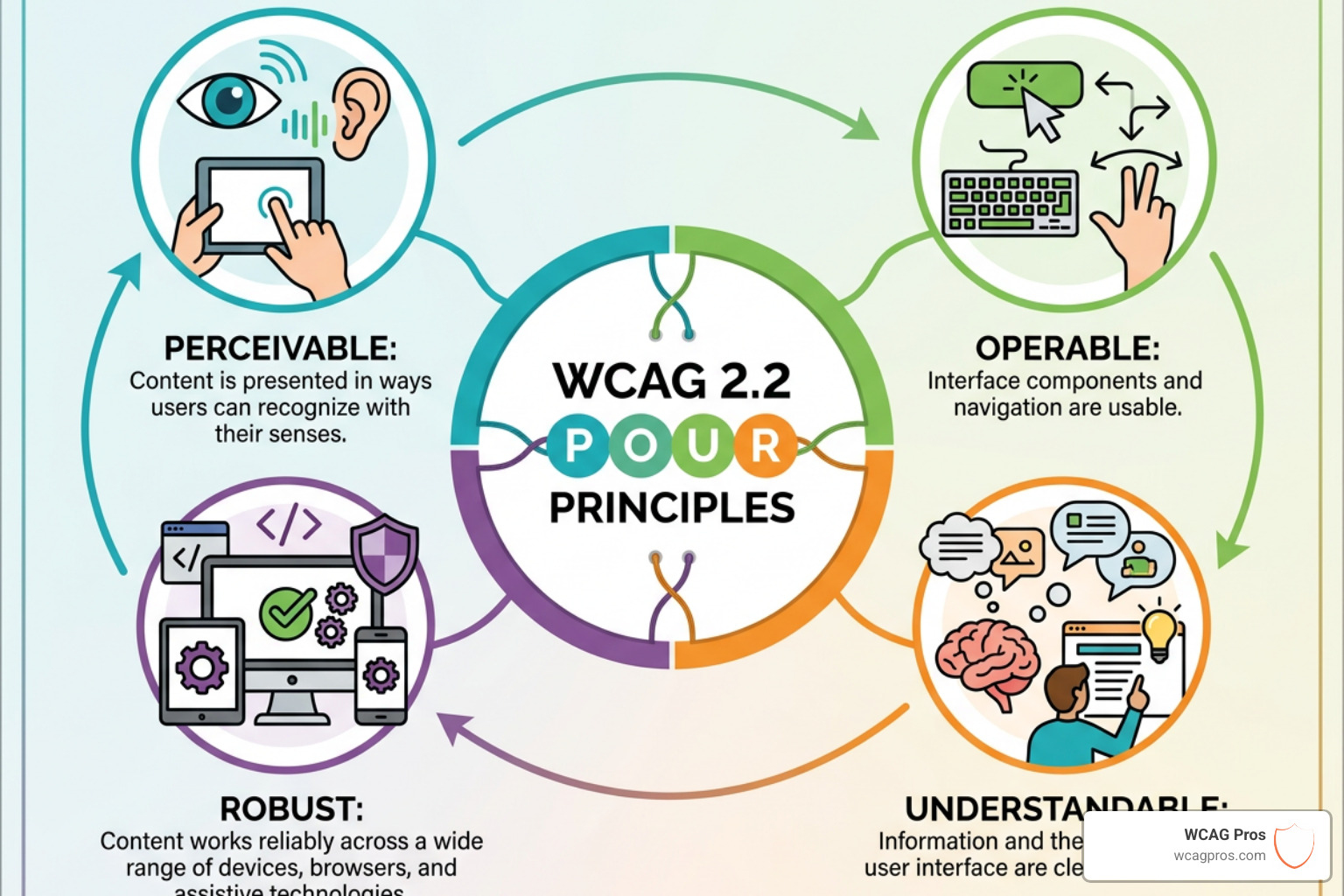
To make sense of the dozens of rules, the W3C organized them into four main principles:
- Perceivable: Users must be able to see or hear the content. This includes things like captions for videos and alt text for images.
- Operable: Users must be able to navigate the site. Can someone use your site without a mouse?
- Understandable: The content and UI must be clear. No confusing jargon or unpredictable navigation.
- Robust: The site must work with various assistive technologies, like different screen readers or voice control software.
Conformance Levels: A, AA, and AAA
The Web Content Accessibility Guidelines Level AA is the benchmark most businesses aim for.
- Level A: The bare minimum. Without these fixes, the site is virtually unusable for many people.
- Level AA: The standard for legal compliance. This level addresses the most common barriers for users with disabilities.
- Level AAA: The highest level of accessibility. While noble, it is often difficult for entire websites to reach this level due to design constraints.
At WCAG Pros, our Professional WCAG Audit services focus on hitting that Level AA sweet spot while identifying as many Level AAA improvements as possible to ensure your site is future-proof.
Automated vs Manual Website Accessibility Audit Methods
There is a common myth that you can just click a button, run a free scan, and be “compliant.” If only it were that easy! While automated tools are a great starting point, they are only one piece of the puzzle.
The Limits of Automation
Tools like WAVE, Siteimprove, and the Introduction to Lighthouse are fantastic for catching technical errors. They can tell you if an image is missing alt text or if your color contrast is too low. However, research shows that automated tools only catch about 30 to 40 percent of accessibility issues.
For example, an automated tool can tell you that an image has alt text, but it cannot tell you if that text is actually helpful. If your alt text for a “Buy Now” button just says “image123.jpg,” the tool might give you a green checkmark, but a blind user is still stuck.
The Power of Manual Expert Testing
This is where manual testing shines. A human expert uses screen readers like NVDA or JAWS to actually “listen” to your site. We test keyboard navigation to ensure a user can get through a checkout process without a mouse. We look for logical heading orders and ensure that form labels actually make sense.
| Feature | Automated Testing | Manual Expert Testing |
|---|---|---|
| Speed | Instant | Takes days or weeks |
| Cost | Low to Free | Higher investment |
| Accuracy | 30 to 40% of issues | Near 100% of issues |
| Context | Fails to understand meaning | Understands user intent |
| Legal Safety | Low | High |
Most organizations find that a hybrid approach is best. Use tools for the quick wins, but rely on experts for the deep dive. You can learn more in our Automated Tools Audit guide to see how we balance these two methods.
Key Components of a Professional Audit Report
When you receive a website accessibility audit from us, you are not just getting a list of errors. You are getting a roadmap. A professional report should be easy for your management team to understand and detailed enough for your developers to act on immediately.
What Should Be Inside?
- Conformance Rating: A clear “grade” of where you stand against WCAG 2.1 or 2.2 Level AA.
- Prioritized Issue List: We don’t just dump 100 errors on you. We tell you which ones are “Critical” and block users versus “Minor” and are visual tweaks.
- Specific Remediation Solutions: We provide the actual code fixes. Instead of saying “fix your contrast,” we tell you exactly which HEX codes to use.
- Checkpoint Details: We map every issue back to a specific WCAG success criteria so you know exactly why it matters.
Common Issues We Uncover
During our audits, we frequently find issues with HTML Validation and semantic markup. Proper use of ARIA patterns is another big one because many developers use ARIA incorrectly, which can actually make a site less accessible. We also look for “skip links” that allow keyboard users to jump past the navigation menu and get straight to the content.
If your team is overwhelmed by the results, our WCAG Remediation services can step in to handle the heavy lifting, ensuring every line of code meets the standard.
Frequently Asked Questions about Accessibility Audits
We hear a lot of the same questions from business owners in Norco and beyond. Here are the straight answers.
How much does a website accessibility audit cost?
The cost varies based on the size and complexity of your site. A small brochure website with a few pages is a much smaller project than a massive e-commerce platform with thousands of products. We offer tiered options, including small website audits (template plus key pages), large website audits, and even specialized PDF auditing. Since PDFs are often overlooked, auditing them is a crucial step for total compliance.
How often should I perform an audit?
Accessibility is not a “one and done” project. Every time you add a new blog post, launch a product, or update your theme, you risk introducing new errors. We recommend a major website accessibility audit during any website redesign or significant design change. For ongoing maintenance, quarterly checks are the gold standard. Following our Ultimate Testing Checklist can help your team stay on top of things between professional reviews.
Can automated tools replace a manual website accessibility audit?
In a word: No. Automated tools are like a spellchecker. They catch the obvious typos, but they don’t know if your story makes sense. Human judgment is required to understand the context of a page. Furthermore, testing with real users who actually use assistive technology every day provides insights that no software can replicate.
Conclusion
At WCAG Pros, we believe that the internet should be an open door for everyone. A website accessibility audit is the first step toward making that a reality for your business. By identifying barriers and implementing code level fixes, you protect your business from legal risk, improve your SEO, and reach a wider audience than ever before.
Once the audit is complete and issues are fixed, we can provide certification and compliance badges to show the world your commitment to inclusion. It is also helpful to establish an Accessibility Roles and Responsibilities Mapping within your team so that everyone from the CEO to the content writer knows their part in maintaining these standards.
Ready to see where your site stands? Start your WCAG Audit with us today, and let’s build a more inclusive digital world together.
Read more website accessibility articles
Get Help With Your Website
We'll follow up with info about:
- The process
- Cost
- Timeline
We promise to respect your privacy, and never abuse the information you provide. We will not sell or rent your information to any third party.
By submitting this form, you consent to receive SMS messages and/or emails from SEM Dynamics LLC, dba WCAG Pros. To unsubscribe, follow the instructions provided in our communications. Msg & data rates may apply for SMS. Your information is secure and will not be sold to third parties.