
How to Fix ADA Website Issues in 5 Easy Steps
How to Fix ADA Website Issues in 5 Easy Steps
The Legal Framework of ADA Website Remediation
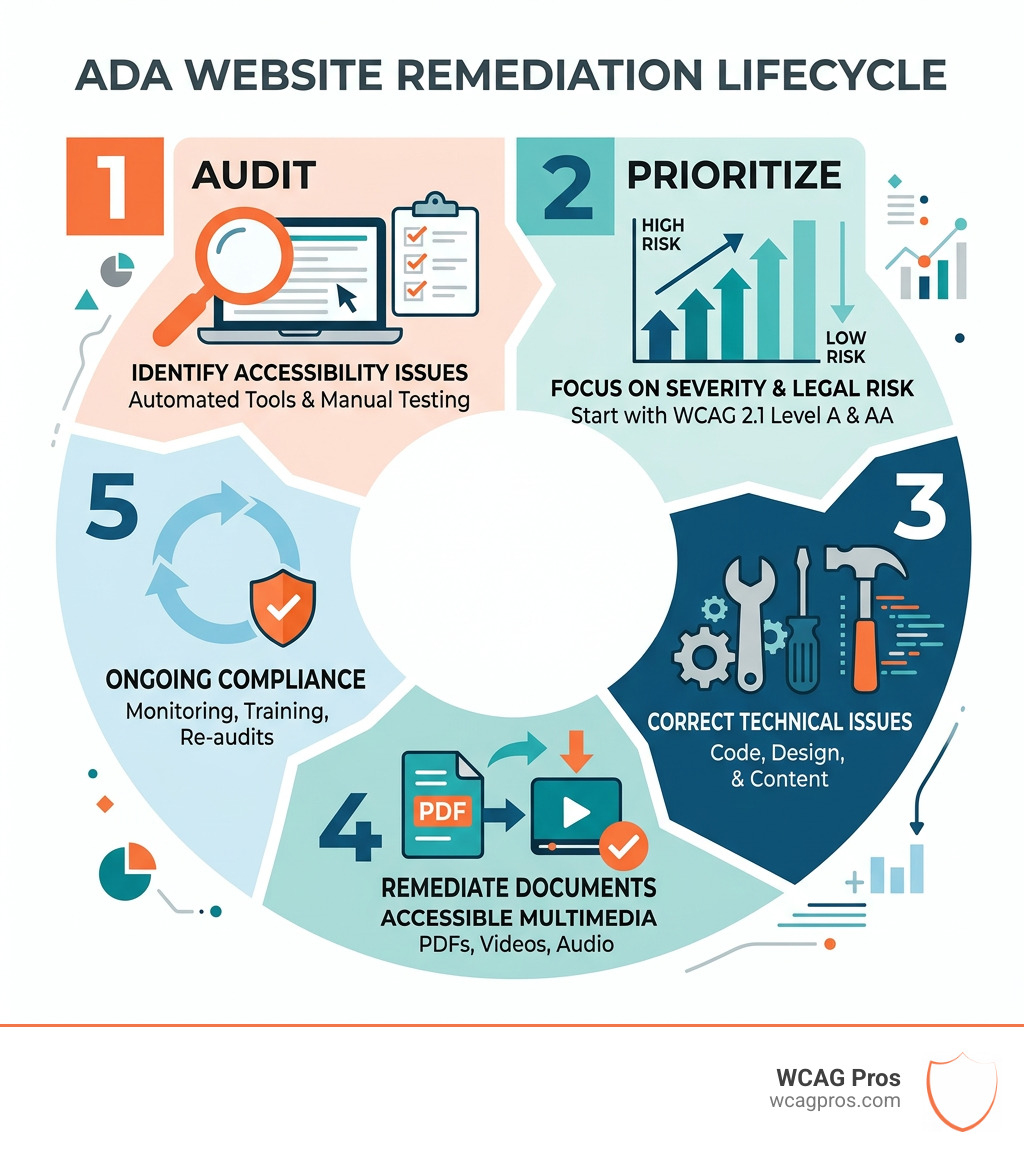
ADA website remediation is the process of identifying and fixing accessibility barriers on your website so that people with disabilities can use it fully and equally.
Here is a quick overview of how it works:
- Audit your website for accessibility issues using automated tools and manual testing
- Prioritize fixes based on severity and legal risk, starting with WCAG 2.1 Level A and AA failures
- Fix technical issues in code, design, and content (alt text, color contrast, keyboard navigation, and more)
- Remediate documents and multimedia (PDFs, videos, audio)
- Maintain compliance with ongoing monitoring, team training, and periodic re-audits
This matters more than ever right now. Over 4,000 lawsuits were filed last year alone against businesses with inaccessible websites. One in four Americans lives with a disability. That is a massive portion of your potential customers who may not be able to use your site today.
The legal stakes are real. The DOJ published a final rule in 2024 requiring state and local governments to meet WCAG 2.1 Level AA standards, and courts have consistently applied the ADA to private business websites as well. If your site has accessibility gaps, you are exposed.
The good news is that remediation is a clear, structured process. You do not need to rebuild your site from scratch. With the right audit and a focused plan, most issues can be resolved systematically.
I’m Matthew Post, web developer, accessibility specialist, and co-founder of WCAG Pros, with nearly three decades of experience in website development and digital systems architecture. I have guided businesses of all sizes through ADA website remediation, from initial audit to full WCAG compliance. In this guide, I will walk you through the exact five-step process we use with our clients.
Understanding the legal landscape is the first step toward protecting your organization. The Americans with Disabilities Act (ADA) was originally passed in 1990 to prevent discrimination in physical spaces. However, the Department of Justice (DOJ) and the courts have made it very clear that the internet is the new “place of public accommodation.” If your website is not accessible, you are effectively closing your doors to millions of people.
There are two main sections of the ADA that apply to digital content. Title II covers state and local government entities. This includes public schools, libraries, and city services. Title III applies to private businesses that are open to the public. Whether you run a small bakery in Norco or a massive e-commerce platform, Title III likely applies to you.
In April 2024, the DOJ released a historic update. This official version of the rule sets a concrete technical standard for public entities. For the first time, the law explicitly points to the Web Content Accessibility Guidelines (WCAG) 2.1 Level AA as the legal benchmark.
The clock is ticking on compliance deadlines. Large public entities serving more than 50,000 people must comply by April 24, 2026. Smaller public entities and special districts have until April 26, 2027. While these dates specifically target government bodies, they also serve as a warning for the private sector. Courts often look to these standards when deciding cases against private companies. You can read more info about ADA compliance for small businesses to see how these rules might impact your specific industry.
Common ADA Website Remediation Violations
When we perform an audit, we see the same issues popping up over and over. These are the “low hanging fruit” for plaintiffs’ lawyers but represent major hurdles for users with disabilities.
- Missing Alt Text: Images without descriptive text are invisible to screen reader users. If an image conveys information, it needs a text alternative.
- Poor Color Contrast: If your text color is too similar to your background color, people with low vision or color blindness cannot read your content.
- Keyboard Traps: Some users cannot use a mouse. If they get stuck in a menu or a form and cannot use the “Tab” key to move out of it, that is a keyboard trap.
- Inaccessible Forms: Labels that are not programmatically linked to their input fields make it impossible for a blind user to know what information to enter.
- Auto-playing Media: Videos or audio that start automatically can interfere with screen readers, making it impossible for a user to hear their own navigation software.
- Lack of Focus Indicators: When a user tabs through your site, they need a visual “halo” or border to show which element is currently selected. Without this, they are effectively flying blind.
Step 1 Conduct a Comprehensive Accessibility Audit
You cannot fix what you do not know is broken. The first phase of any ada website remediation project is a thorough audit. Many people start with a free automated scan. Tools like WAVE or Google Lighthouse are great for a quick pulse check, but they only catch about 25 percent of potential issues.
To truly meet the WCAG 2.1 Level AA standard, you need manual testing by experts. This involves navigating your site using only a keyboard and testing it with professional screen reading software like JAWS or NVDA. We look at every page and every unique element to find the subtle bugs that machines miss.
For example, an automated tool might see that an image has “alt text” and give you a green checkmark. But if that alt text says “image123.jpg” instead of “a person using a laptop,” it is still a violation. Only a human can judge the quality and context of your accessibility efforts.
| Feature | Automated Scans | Manual Expert Audits |
|---|---|---|
| Speed | Instant | Takes days or weeks |
| Accuracy | Often misses 70% of issues | High accuracy |
| Contextual Analysis | Low | High |
| Screen Reader Testing | No | Yes |
| Legal Defense Strength | Weak | Strong |
Knowing the difference between these methods is vital for your strategy. We recommend a hybrid approach. Use automation for broad monitoring but rely on manual audits for your primary compliance roadmap. If you are unsure where you stand, you can learn how to tell if your website is ADA compliant through our detailed guide.
Step 2 Prioritize Your ADA Website Remediation Efforts
Once the audit is finished, you might have a list of hundreds of issues. Do not panic. The next step is prioritization. We categorize fixes into three levels based on the Web Content Accessibility Guidelines.
Level A issues are the most critical. These are the “blockers” that prevent a user from performing basic tasks. If a user cannot click your “Submit” button or navigate your main menu, that is a Level A failure. These must be fixed immediately.
Level AA issues are the standard for most legal requirements. These include things like color contrast and consistent navigation. Fixing Level AA issues ensures that your site is not just usable, but also provides a good experience for everyone.
Level AAA is the gold standard. While not usually legally required for most businesses, it provides the highest level of inclusion.
We suggest focusing on “High Impact” fixes first. These are issues that appear on every page of your site, such as your header, footer, or main navigation. By fixing one global element, you might resolve hundreds of individual violations across your entire domain. This approach reduces your legal risk quickly and improves the user experience for the largest number of people.
Step 3 Implement Technical and Code Fixes
This is where the actual “remediation” happens. Our developers dive into your site’s code to fix the underlying structural problems. One of the most important tools in our toolkit is semantic HTML. This means using the right HTML tags for the right job. Instead of using a We also use ARIA (Accessible Rich Internet Applications) landmarks. These are hidden labels in the code that help screen reader users jump directly to the main content, the search bar, or the navigation menu. It is like providing a map for your website. Technical fixes also include: Our WCAG remediation services are designed to handle these complex code changes without breaking your site’s design or functionality. We believe that a website can be both beautiful and accessible. Many people forget that ada website remediation extends beyond just the web pages. If you have PDFs, Word documents, or videos on your site, they must also be accessible. PDF remediation is a specialized skill. It involves “tagging” the document so a screen reader knows the reading order and can identify headings, lists, and tables. If you have thousands of pages of old documents, this can be a daunting task. We often recommend a professional ADA PDF Remediation Service to handle high volumes of complex files. For multimedia, you need three main things: Providing these features does more than just meet legal requirements. It also helps people in noisy environments who cannot turn on their sound or people who prefer reading over watching. Accessibility is a journey, not a destination. Every time you add a new blog post, upload a product, or change a banner image, you risk introducing new accessibility barriers. That is why the final step is establishing a maintenance plan. We recommend a three-pronged approach to staying compliant: An automated tools audit can be a helpful part of this routine, but it should never be your only check. We also suggest publishing an accessibility statement on your site. This tells your users that you are committed to inclusion and provides them with a way to contact you if they encounter a barrier. There is a secret benefit to ada website remediation that many business owners overlook. Accessibility and Search Engine Optimization (SEO) are two sides of the same coin. Google is effectively a “blind user.” It cannot see your images or watch your videos. It relies on the code and text descriptions to understand what your site is about. When you add descriptive alt text, you are giving Google more keywords to index. When you use a clear heading structure (H1, H2, H3), you are helping search engines understand the hierarchy of your content. Clean, semantic code makes your site faster and easier for crawlers to navigate. Furthermore, accessibility improves user experience metrics. If your site is easy to navigate and read, users will stay longer and engage more. Google notices this “dwell time” and rewards your site with higher rankings. Making your site accessible is truly a win-win for your legal safety and your marketing goals. If you have already been sued for ADA noncompliance, you know how costly it can be. Investing in remediation now is much cheaper than paying for a legal settlement later. The cost of remediation varies widely based on the size and complexity of your website. A simple brochure site with ten pages might cost a few hundred dollars to fix. A massive e-commerce site with thousands of products and complex checkout flows could cost several thousand dollars. Factors like the number of PDFs and videos also play a role. We always suggest starting with an audit to get an accurate picture of the work required. For most small to medium businesses, the initial remediation process takes between two and four weeks. This includes the audit, the code fixes, and the final verification. If you are facing a legal deadline or a lawsuit, we can often expedite the high-priority fixes to reduce your risk immediately. Yes, the 2024 DOJ rule for public entities includes a few specific exceptions. These include archived web content that has not been updated, preexisting conventional electronic documents (like old PDFs), and certain third party content that you do not control. However, these exceptions are narrow. If a user requests an accessible version of an “excepted” document, you are still legally required to provide “effective communication.” This means you might still have to provide a transcript or an accessible version upon request. ADA website remediation is no longer a “nice to have” feature for businesses. It is a fundamental requirement for doing business in a digital world. By following these five steps, you can protect your organization from legal threats while opening your doors to a wider audience. We have seen how much of a difference an accessible site makes. It builds brand loyalty, improves your search rankings, and ensures that everyone, regardless of their ability, can interact with your brand. At WCAG Pros, we are dedicated to making the web a more inclusive place. Based in Norco, CA, we provide comprehensive wcag-remediation services that go beyond simple automated fixes. We offer page-by-page audits and code-level repairs to ensure your site meets the highest standards of accessibility. Do not wait for a demand letter to arrive in your inbox. Start your journey toward digital inclusion today. Your users, your lawyers, and your bottom line will thank you. tag. This tells assistive technology exactly what the element does.
Step 4 Remediate Documents and Multimedia
Step 5 Establish Ongoing Maintenance
Why Professional ADA Website Remediation Boosts SEO
Frequently Asked Questions
What is the cost of ADA website remediation?
How long does the remediation process take?
Are there exceptions to WCAG 2.1 Level AA compliance?
Conclusion
Read more website accessibility articles
Get Help With Your Website
We'll follow up with info about:
- The process
- Cost
- Timeline
We promise to respect your privacy, and never abuse the information you provide. We will not sell or rent your information to any third party.
By submitting this form, you consent to receive SMS messages and/or emails from SEM Dynamics LLC, dba WCAG Pros. To unsubscribe, follow the instructions provided in our communications. Msg & data rates may apply for SMS. Your information is secure and will not be sold to third parties.