
Everything You Need to Know About WCAG 2.1 AA Compliance
Everything You Need to Know About WCAG 2.1 AA Compliance
Why a WCAG 2.1 AA Compliance Checker is Essential for Your Website
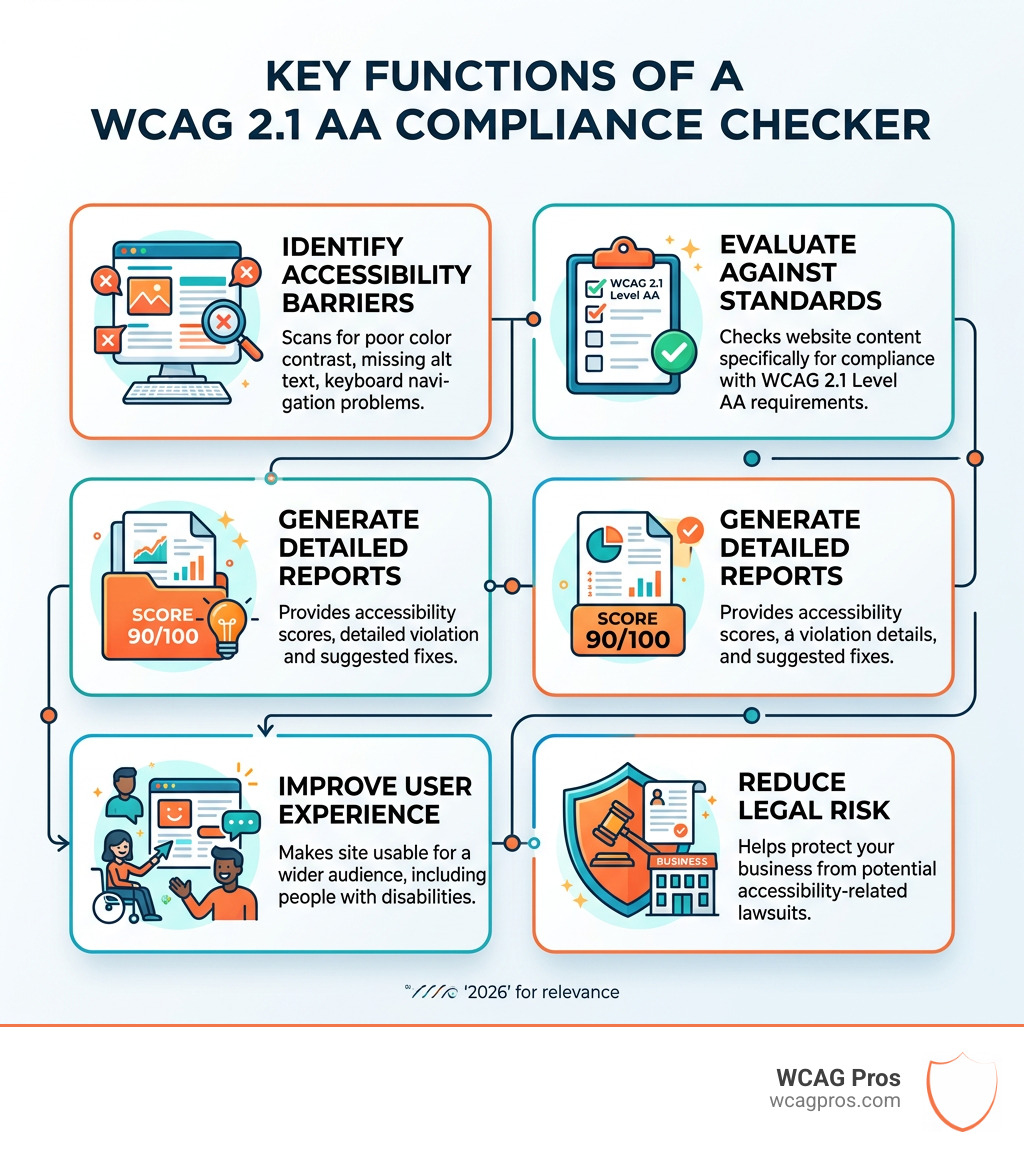
A WCAG 2.1 AA compliance checker is a vital tool for ensuring your website is accessible to everyone. It automatically scans your web pages to find accessibility issues.
Here’s what a WCAG 2.1 AA compliance checker helps you do:
- Identify Accessibility Barriers: It flags common problems like poor color contrast, missing alternative text for images, and inaccessible form fields.
- Evaluate Against Standards: It checks your website against the specific requirements of WCAG 2.1 Level AA, the most widely adopted accessibility standard.
- Generate Reports: You get a detailed report showing detected violations, often with an accessibility score and suggestions for fixes.
- Improve User Experience: By highlighting issues, it guides you to make your site usable for more people, including the 1.3 billion individuals globally who experience significant disability.
- Reduce Legal Risk: Addressing these issues helps protect your business from potential accessibility lawsuits, especially since websites scoring below 85 are at higher risk.
Making your website accessible is not just good practice; it’s a business necessity. It opens your site to a wider audience and helps you meet legal obligations.
Matthew Post, co-founder of WCAG Pros, has over 20 years of experience in web development, specializing in identifying and resolving complex website issues with a particular focus on accessibility and WCAG compliance. His extensive background includes auditing websites for WCAG compliance and overseeing remediation efforts, ensuring businesses receive thorough analysis and practical solutions using a WCAG 2.1 AA compliance checker.
Understanding WCAG 2.1 Level AA Standards and Versions
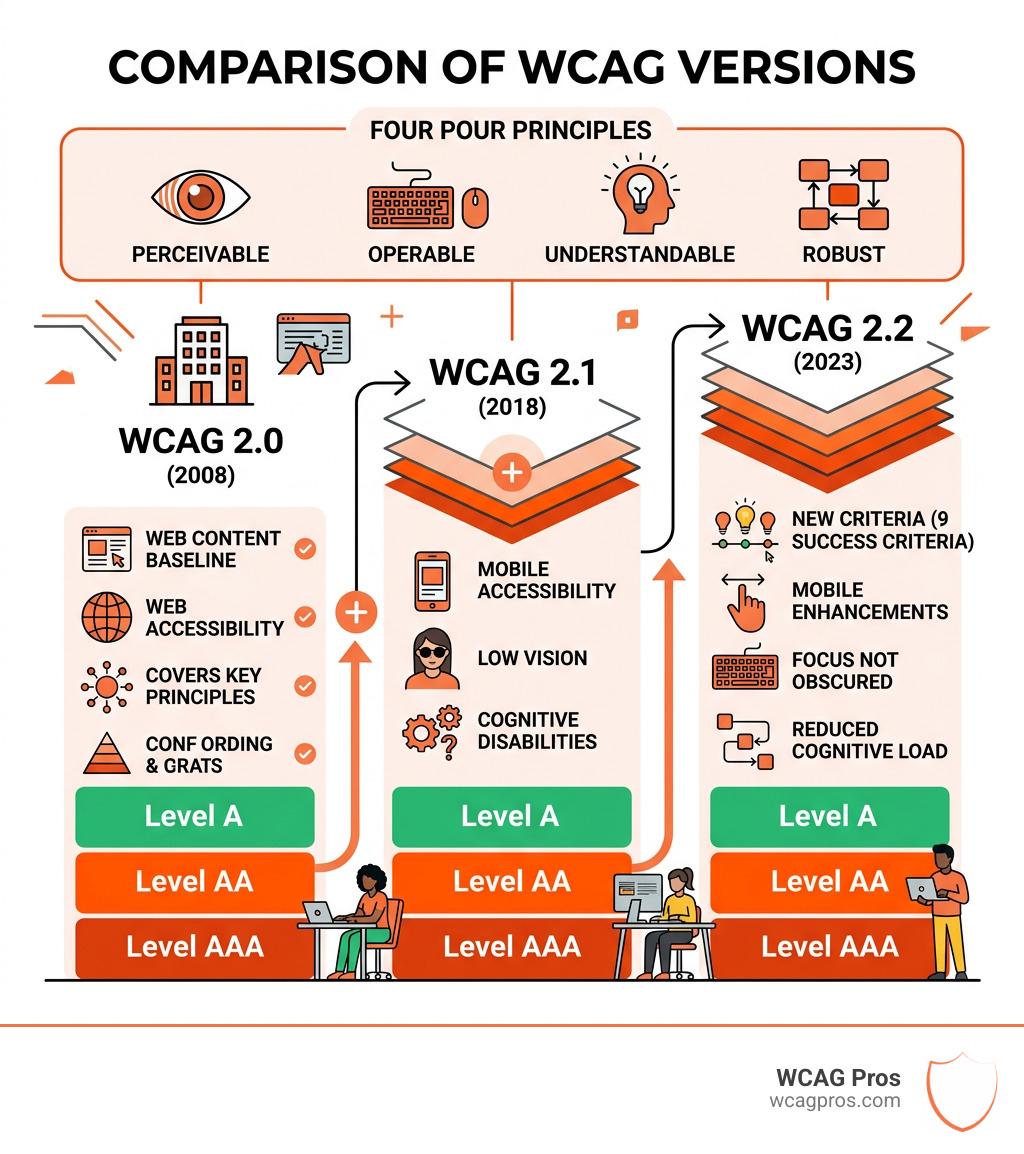
When we talk about web accessibility, the conversation always starts with the World Wide Web Consortium or W3C. This non-profit organization was founded in 1994 and is the primary body responsible for creating the World Wide Web Consortium guidelines that keep the internet functional and inclusive. Among their most critical contributions are the Web Content Accessibility Guidelines or WCAG.
These guidelines are built on four core principles often referred to by the acronym POUR. For a website to be considered accessible, it must be:
- Perceivable: Users must be able to perceive the information being presented. It cannot be invisible to all of their senses.
- Operable: Users must be able to operate the interface. The navigation cannot require interactions that a user cannot perform.
- Understandable: Users must be able to understand the information as well as the operation of the user interface.
- Robust: Content must be robust enough that it can be interpreted reliably by a wide variety of user agents, including assistive technologies.
WCAG 2.1 is an extension of the earlier 2.0 version. It includes all the original requirements but adds new criteria to address modern challenges like mobile accessibility and the needs of users with low vision or cognitive disabilities. You can explore the full list of WCAG 2.1 success criteria to see exactly how these rules are structured.
Within these versions, there are three levels of conformance: A, AA, and AAA. Level A is the bare minimum, covering the most basic accessibility features. Level AA is the “gold standard” that most businesses and legal frameworks require. Level AAA is the highest and most stringent level of accessibility. For most organizations, Level AA is the sweet spot because it balances high accessibility with practical implementation. We often discuss this balance in our guide on The Great Debate: WCAG AA vs AAA Explained.
Key Differences Between WCAG 2.1 and 2.2
The world of accessibility never stands still. While WCAG 2.1 has been the standard for years, WCAG 2.2 was released in October 2023. This newer version builds upon 2.1 by adding nine additional success criteria.
These new rules focus heavily on:
- Mobile Accessibility: Ensuring that touch targets are large enough and that gestures like dragging have simpler alternatives.
- Low Vision: Improving how focus indicators appear so users can always see where they are on a page.
- Cognitive Disabilities: Reducing the need for users to remember information from one step to another or solve complex puzzles to log in.
For example, WCAG 2.2 Level AA introduces a requirement for “Focus Not Obscured.” This means that when a user navigates via keyboard, the item they are focusing on shouldn’t be hidden by sticky footers or other overlapping content.
How a WCAG 2.1 AA Compliance Checker Evaluates Your Site
A WCAG 2.1 AA compliance checker works by performing automated scans of your website code and on-page content. Think of it like a digital proofreader that specifically looks for accessibility errors. When you enter your URL, the tool examines the HTML, CSS, and even some JavaScript to see if they meet the W3C Accessibility Conformance Testing Guidelines (ACT).
These tools check two main things:
- Code Validation: The checker looks at the underlying “bones” of your site. It checks if your elements have proper tags, if your IDs are unique, and if your ARIA roles are used correctly to help screen readers.
- On-Page Content: It evaluates the things users actually see and hear. This includes checking text for color contrast, looking for alt text on images, and ensuring that videos have the necessary captions or descriptions.
Using an automated tool is a great first step because it can scan hundreds of pages in seconds. We explore the benefits of this approach in our article on Automated Web Accessibility Testing Made Easy. However, it is important to remember that these tools are only part of the puzzle.
Common Issues Found by a WCAG 2.1 AA Compliance Checker
When we run a WCAG 2.1 AA compliance checker for our clients, we often see the same “usual suspects” appearing in the reports. These are common errors that are relatively easy for a machine to detect:
- Missing Alt Text: Every image needs a text alternative that describes its purpose. If an image is just for decoration, it should be marked so assistive technology can ignore it.
- Poor Color Contrast: This is a big one. WCAG Success Criterion 1.4.3 requires a contrast ratio of at least 4.5:1 for normal text and 3:1 for large text. If your light gray text is on a white background, the checker will flag it immediately.
- Empty Form Labels: If a user is filling out a “Contact Us” form, every input field must have a programmatically determined label. Without this, a screen reader user might not know what information to type into a box.
- Keyboard Traps: A wcag 2.1 aa compliance checker will look for areas where a keyboard user might get “stuck.” For example, if a user tabs into a calendar widget and cannot tab back out, that is a major violation.
- Missing Page Titles: Every web page needs a unique title that describes the topic or purpose of that specific page.
Limitations of an Automated WCAG 2.1 AA Compliance Checker
While we love the speed of automated tools, we have to be honest about their limits. Industry experts generally agree that automated tools can only identify about 30% to 50% of all potential WCAG issues.
Why is the percentage so low? Because machines lack human context. A checker can tell you if an image has alt text, but it cannot tell you if that text is actually helpful or accurate. It might see the alt text “image123.jpg” and mark it as “pass” even though that description is useless to a blind user.
Other issues that require a human touch include:
- Logical Reading Order: A tool can check if your code is valid, but it cannot always tell if the order in which a screen reader reads the page makes sense to a human.
- Complex Interactions: Hover effects, complex menus, and custom widgets often need manual testing to ensure they work for everyone.
- User Experience: Accessibility is about people. Testing with real users is the only way to know if your site is truly inclusive. We highly recommend learning How to Test Your Website’s Accessibility Using Real Users to complement your automated scans.
The Business and Legal Benefits of Accessibility Compliance
If you are a business owner in Norco, CA, or anywhere else in the United States, accessibility is not just a “nice to have” feature. It is a legal requirement under the Americans with Disabilities Act.. Specifically, ADA Title III applies to “places of public accommodation,” which courts have increasingly interpreted to include websites.
Beyond the ADA, there are other laws you might need to follow:
- Section 508: This law applies to federal agencies and any business that receives federal funding or provides services to the government. It requires that electronic and information technology be accessible to people with disabilities.
- European Accessibility Act: If you do business in the EU, the European Accessibility Act requires many digital products and services to be accessible by June 2025.
The benefits of compliance go far beyond avoiding lawsuits. When you use a WCAG 2.1 AA compliance checker to improve your site, you are also improving your SEO. Search engines like Google love accessible websites because they are well-structured, have clear labels, and provide a better user experience.
Furthermore, you are tapping into a massive market. People with disabilities and their families have a combined spending power of over $13 trillion. If your site is inaccessible, you are essentially closing your front door to 16% of the global population. For a deeper dive into these requirements, check out our ADA Compliance for Small Businesses in 2025: A Complete Guide.
Mapping Your Score to Global Regulations
Different regions have different names for their accessibility laws, but almost all of them point back to WCAG as the technical standard.
- Ontario, Canada: The Accessibility for Ontarians with Disabilities Act (AODA) requires both public and private sector organizations to meet WCAG 2.0 Level AA standards.
- Federal Canada: The Accessibility Canada Act applies to federally regulated sectors like banking and telecommunications.
- European Union: The standard known as EN 301549 is the official EU standard for web accessibility, and it is closely aligned with WCAG 2.1 Level AA.
When you use a WCAG 2.1 AA compliance checker, the score you receive is a helpful benchmark. If your score is high, you are likely meeting the technical requirements of these various global laws. If your score is low, you are at risk of fines and legal action, no matter where your business is located.
Frequently Asked Questions about WCAG Compliance
Are WCAG 2.1 AA compliance checkers free?
Yes and no. There are many free versions of a WCAG 2.1 AA compliance checker available online. These are great for a quick “spot check” of a single page. They will give you a basic score and list some obvious errors.
However, free tools often have limited functionality. They might only scan one page at a time, or they might not provide detailed instructions on how to fix the code. For a comprehensive look at your entire site, most businesses eventually need a paid audit or a more robust tool. At WCAG Pros, we believe that while free tools are a good start, a professional WCAG Audit is the only way to ensure 100% compliance.
When should I run an accessibility scan?
Accessibility shouldn’t be an afterthought. You should integrate a WCAG 2.1 AA compliance checker into your regular workflow. The ideal times to scan are:
- During Development: It is much easier and cheaper to fix an accessibility bug while you are writing the code than it is to fix it after the site is live.
- During a Redesign: If you are changing the look and feel of your site, it is the perfect time to ensure your new colors and layouts meet Level AA standards.
- Monthly Maintenance: Websites change constantly. Every time you add a new blog post, image, or product, you run the risk of introducing an accessibility error. A monthly scan helps you catch these issues before they become a problem.
How do I interpret my accessibility score?
Most checkers will give you a score between 1 and 100. If your score is 90 or above, you are doing a great job, though you should still check for those manual issues the tool might have missed.
If your score is lower than 85, you are in a “danger zone” for accessibility lawsuits. A low score usually means you have critical violations that make the site unusable for some people. Your next steps should be:
- Prioritize Fixes: Start with “Level A” issues first, as these are the most severe barriers. Then move on to Level AA.
- Focus on High Impact Areas: Fix your navigation menu, your homepage, and your checkout process first.
- Remediate the Code: Use the recommendations from the report to update your HTML and CSS. If you are not sure how to do this, you might need professional WCAG Remediation services.
Conclusion
Achieving web accessibility can feel like a daunting task, but you don’t have to do it alone. A WCAG 2.1 AA compliance checker is a powerful ally in your journey toward a more inclusive digital presence. By identifying barriers, evaluating your site against global standards, and guiding your remediation efforts, these tools help you build a better web for everyone.
At WCAG Pros, we specialize in taking the guesswork out of accessibility. We provide comprehensive, page-by-page audits that cover all 54 WCAG points. We don’t just tell you what is wrong. We provide the code fixes and offer free re-audits to ensure you earn your compliance badge.
Whether you are a small business in Norco, CA, or a large corporation looking to meet international standards, we are here to help. Let’s make the internet a place where everyone, regardless of their ability, can participate fully and equally. Ready to take the next step? Start with a professional WCAG Audit today and give yourself the peace of mind that comes with true compliance.
Read more website accessibility articles
Get Help With Your Website
We'll follow up with info about:
- The process
- Cost
- Timeline
We promise to respect your privacy, and never abuse the information you provide. We will not sell or rent your information to any third party.
By submitting this form, you consent to receive SMS messages and/or emails from SEM Dynamics LLC, dba WCAG Pros. To unsubscribe, follow the instructions provided in our communications. Msg & data rates may apply for SMS. Your information is secure and will not be sold to third parties.