
The Certified WCAG Audit Process: Your Shield Against Lawsuits
The Certified WCAG Audit Process: Your Shield Against Lawsuits
Why the Certified WCAG Audit Process Is Your Best Defense Against ADA Lawsuits
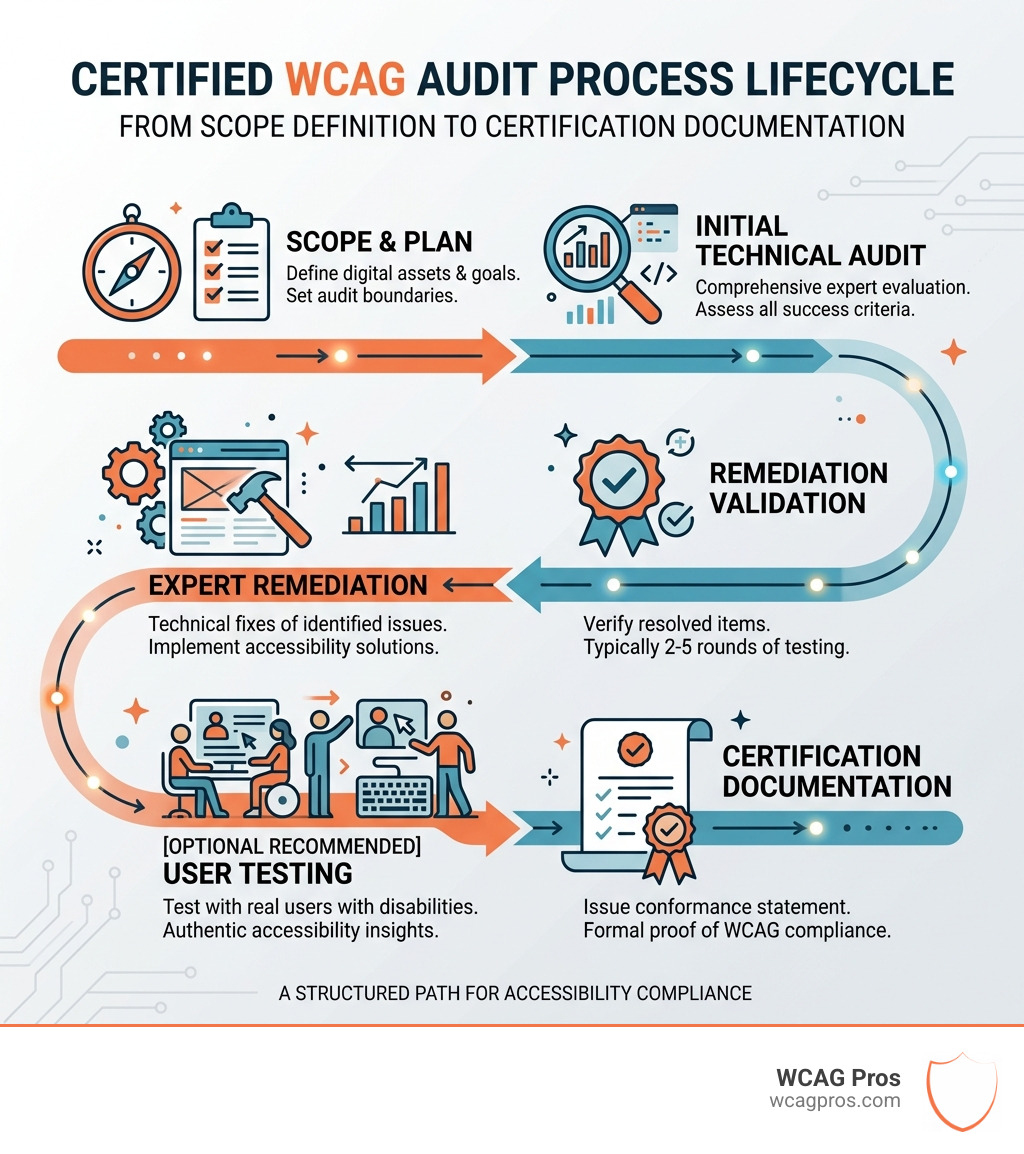
The certified WCAG audit process is the structured path businesses follow to evaluate, fix, and formally document their website’s compliance with the Web Content Accessibility Guidelines (WCAG). Here is a quick overview of how it works:
- Audit – A technical expert manually evaluates your website against WCAG success criteria
- Remediation – Your team fixes every accessibility issue identified in the audit report
- Validation – The auditor re-tests fixes to confirm they are fully resolved (typically 2 to 5 rounds)
- User Testing – Optional but recommended testing with real assistive technology users
- Documentation – A formal conformance statement or certification document is issued
ADA lawsuits targeting inaccessible websites increased by 320% between 2013 and 2021. People with disabilities are also 50% more likely to hit barriers when using online services. For business owners, an inaccessible website is not just an inclusion problem. It is a growing legal liability.
A certified WCAG audit gives you documented proof that you took the right steps. That documentation can be the difference between a dismissed complaint and a costly lawsuit.
I’m Matthew Post, co-founder of WCAG Pros and a web developer with over 20 years of experience. I have personally supervised hundreds of certified WCAG audit process engagements, helping businesses reduce legal risk and build genuinely accessible digital experiences. In the sections below, I’ll walk you through exactly what this process involves and what to look for when evaluating audit services.
Important certified wcag audit process terms:
The Certified WCAG Audit Process and Certification Myths
When we talk about a certified WCAG audit process, there is often a bit of confusion regarding who exactly does the “certifying.” In web accessibility, “certification” refers to a formal verification that a digital asset meets specific technical standards. It is a shield that proves your organization has done its due diligence.
The stakes have never been higher. With ADA lawsuits increasing by 320 percent between 2013 and 2021, businesses are scrambling to protect themselves. A professional audit is the foundation of that protection. To understand the landscape, it helps to read up on Everything You Need to Know About WCAG Versions and Audits so you can choose the right target for your brand.
Is there an official W3C certification?
One of the biggest myths in our industry is that the World Wide Web Consortium (W3C) issues certificates for websites. They do not. The W3C creates the standards, but they do not act as an inspection body. Instead, they provide the W3C Accessibility Guidelines Evaluation Methodology (WCAG-EM), which is a structured framework for how an audit should be conducted.
When a company like ours provides a “certification,” it is a professional assessment and a Statement of Conformance based on that W3C methodology. It is a legitimate document that stands up in a legal setting because it follows the rigorous steps required to prove every success criterion has been met.
Defining a certified WCAG audit process for 2026
As we move through 2026, the gold standard for most organizations is WCAG 2.2 AA. This version builds upon previous iterations, adding nine new success criteria that focus on users with low vision, cognitive disabilities, and motor impairments.
If you are just starting, you might wonder How to Pass Your WCAG 2.1 AA Certification with Flying Colors. The good news is that WCAG is backwards compatible. If you meet 2.2 AA requirements, you automatically meet 2.1 and 2.0 standards as well. For most businesses, targeting Level AA is the “sweet spot” that balances deep accessibility with technical feasibility.
Essential Steps to Achieve Full WCAG Conformance
Achieving a certified WCAG audit process result is not a “one and done” task. It is a journey that starts with defining your scope. You do not necessarily need to test every single one of the thousands of pages on a large site. Instead, we use representative sampling. We identify the primary user flows, unique page layouts, and most-trafficked screens. If we fix the header, footer, and main templates used across 10,000 pages, we have effectively improved the whole site.
A professional WCAG Audit focuses on these core areas to ensure that the most critical paths, like a checkout process or a contact form, are fully operable for everyone.
Manual testing vs automated tools in the certified WCAG audit process
There is a massive misconception that you can just click a button on an automated tool and become “compliant.” In reality, an Automated Tools Audit only catches about 30 to 40 percent of accessibility issues. For the newer WCAG 2.2 AA criteria, automated tools may only reliably flag about 13 percent of the requirements.
Why is the detection rate so low? Because machines cannot understand context. An automated tool can tell you if an image has “alt text,” but it cannot tell you if that text actually describes the image accurately for a blind user. Only human judgment can determine if a heading structure is logical or if a screen reader user can navigate a complex menu.
We use assistive technologies like NVDA, JAWS, and VoiceOver to hear the website exactly how a person with a visual impairment would. We also perform keyboard-only navigation to ensure that people who cannot use a mouse are not trapped in “keyboard traps.” This human-led approach is why the certified WCAG audit process is so respected.
The importance of remediation and validation
The audit is just the map; remediation is the actual hike. Once we deliver an audit report, your developers need to implement the fixes. This is where many projects stall, which is why we provide clear code fixes in our reports.
After the fixes are made, we enter the validation phase. This typically involves 2 to 5 rounds of testing. We re-audit the specific issues to make sure the “fix” did not accidentally break something else. This iterative process is detailed in our Expert Website WCAG Audit Guide for Businesses. To keep things organized, many of our clients use an Accessibility Tracker to manage the workflow between their developers and our auditors.
Documentation and Reporting for Legal Defense
If you ever face a legal challenge, the quality of your documentation is your primary defense. A simple “pass” or “fail” is not enough. You need a comprehensive report that shows you have a roadmap for compliance. Our ADA Site-Wide Audit: Your Roadmap to Total Compliance explains how these reports serve as a record of your good-faith efforts.
Types of certification documentation issued
Upon successful completion of the certified WCAG audit process, several types of documents can be issued:
| Document Type | Purpose | Best For |
|---|---|---|
| Statement of Conformance | Declares the site meets all WCAG criteria for a specific version and level. | Public accessibility pages and legal defense. |
| ACR (Accessibility Conformance Report) | A completed version of a VPAT that details how each criterion is met. | B2B sales and government contracts. |
| User Testing Attestation | Proves the site was tested by real people with disabilities. | Demonstrating high-level commitment to inclusion. |
| Statement of Partial Conformance | Used when third-party content (like Google Maps) is not fully accessible. | Sites with many third-party integrations. |
A “clean” ACR is often seen as the ultimate goal for software providers because it proves to potential buyers that the product will not be a liability for them. You can use The Ultimate WCAG Checklist PDF, Excel, and Print-Ready Versions to track your own internal progress before the official documents are issued.
Strategic Factors for Cost and Duration
Every website is unique, so the time and investment required for a certified WCAG audit process can vary. A basic audit for a smaller site might take about 2 weeks. However, large enterprise platforms with complex functionality can take 6 weeks or more to fully evaluate.
The scope is usually the biggest factor. Most professional audits focus on a representative sample of 7 to 15 pages. This provides enough data to identify systemic issues without requiring a manual review of every single blog post or product page. Across the industry, you might see enterprise-level audits for massive platforms costing between 5,000 and 15,000 euros, depending on the complexity of the interactive elements.
Frequently Asked Questions about Accessibility Audits
How often should we re-certify?
Accessibility is not a destination; it is a continuous state of being. We generally recommend annual audits for most businesses. If your site is dynamic and you add new features or content weekly, quarterly monitoring is a better bet. If you perform a significant UI update or a complete redesign, you should always trigger a new certified WCAG audit process to ensure no new barriers were introduced.
Who should perform the audit?
While in-house teams can do a great job with basic maintenance, a certification audit should be performed by third-party specialists. This provides the objectivity required for legal protection. Look for auditors with credentials from the International Association of Accessibility Professionals (IAAP). Having an outside expert sign off on your conformance carries much more weight in court than an internal self-assessment.
What is the difference between an audit and user testing?
An audit is a technical check against the rules (the WCAG success criteria). User testing is about the actual experience. An audit might say a button is “technically” accessible because it has a label, but user testing might reveal that the label is confusing to a person using a screen reader. Combining both gives you the most robust accessibility profile possible.
Conclusion
At WCAG Pros, we believe that web accessibility should be straightforward and stress-free. Our certified WCAG audit process is designed to take the guesswork out of compliance. We do not just hand you a list of errors; we provide a page-by-page audit of all 54 WCAG points with specific code fixes and free re-audits. Our goal is to get you that compliance badge so you can focus on running your business.
Whether you are in Norco, CA or anywhere else, we are here to help you navigate the complexities of the ADA and WCAG. Don’t wait for a demand letter to arrive in your inbox. Take the proactive step today to protect your business and open your digital doors to everyone. More info about certified WCAG audit services is just a click away.
Read more website accessibility articles
Get Help With Your Website
We'll follow up with info about:
- The process
- Cost
- Timeline
We promise to respect your privacy, and never abuse the information you provide. We will not sell or rent your information to any third party.
By submitting this form, you consent to receive SMS messages and/or emails from SEM Dynamics LLC, dba WCAG Pros. To unsubscribe, follow the instructions provided in our communications. Msg & data rates may apply for SMS. Your information is secure and will not be sold to third parties.