
Audio Description Services for Videos Deliver Clear Visual Narration to Every Viewer
What Audio Description Is, Who It Helps, and Which Type to Use
Audio description provides an additional narration track that describes essential visual information for viewers who cannot see the screen. This narration explains key elements such as character actions, physical settings, facial expressions, silent gestures, scene changes, graphics, and on-screen text. The narrator speaks during natural pauses in dialogue or primary sound effects to preserve the flow of the original soundtrack. Many organizations rely on professional audio description services for videos to produce these narration tracks accurately and efficiently.
Visual media often carries critical context without saying a word. In the United States, an estimated 49.5 million adults aged 18 and older report experiencing vision loss, and roughly one in 30 Americans is blind or visually impaired. Audio description ensures these audiences experience the full story, lesson, or message. Beyond blind and low vision viewers, visual descriptions support individuals with certain cognitive or learning disabilities, auditory learners, and people multitasking without direct visual focus on the screen. Some accessibility providers report that incorporating descriptive audio can expand overall content reach by up to 30 percent.
How Audio Description Differs from Captions, Subtitles, and Transcripts
Different accessibility assets serve distinct functional needs across media:
- Audio Description: Spoken narration of visual elements designed primarily for blind or low vision viewers.
- Closed Captions: Synchronized on-screen text of spoken dialogue and critical non-speech audio cues, such as sound effects and speaker identification, designed for deaf and hard-of-hearing viewers. Reviewing WCAG guidance on prerecorded captions provides technical criteria for these text tracks.
- Subtitles: Synchronized text translations of dialogue intended for viewers who do not speak the source language or who watch without audio.
- Transcripts: Text versions of spoken and visual content. Reviewing WCAG guidance on audio-only and video-only alternatives explains how text transcripts provide equivalent access for non-synchronized media formats.
Standard, Extended, and Live Audio Description
Organizations typically select from three primary description formats depending on content pacing and playback technology:
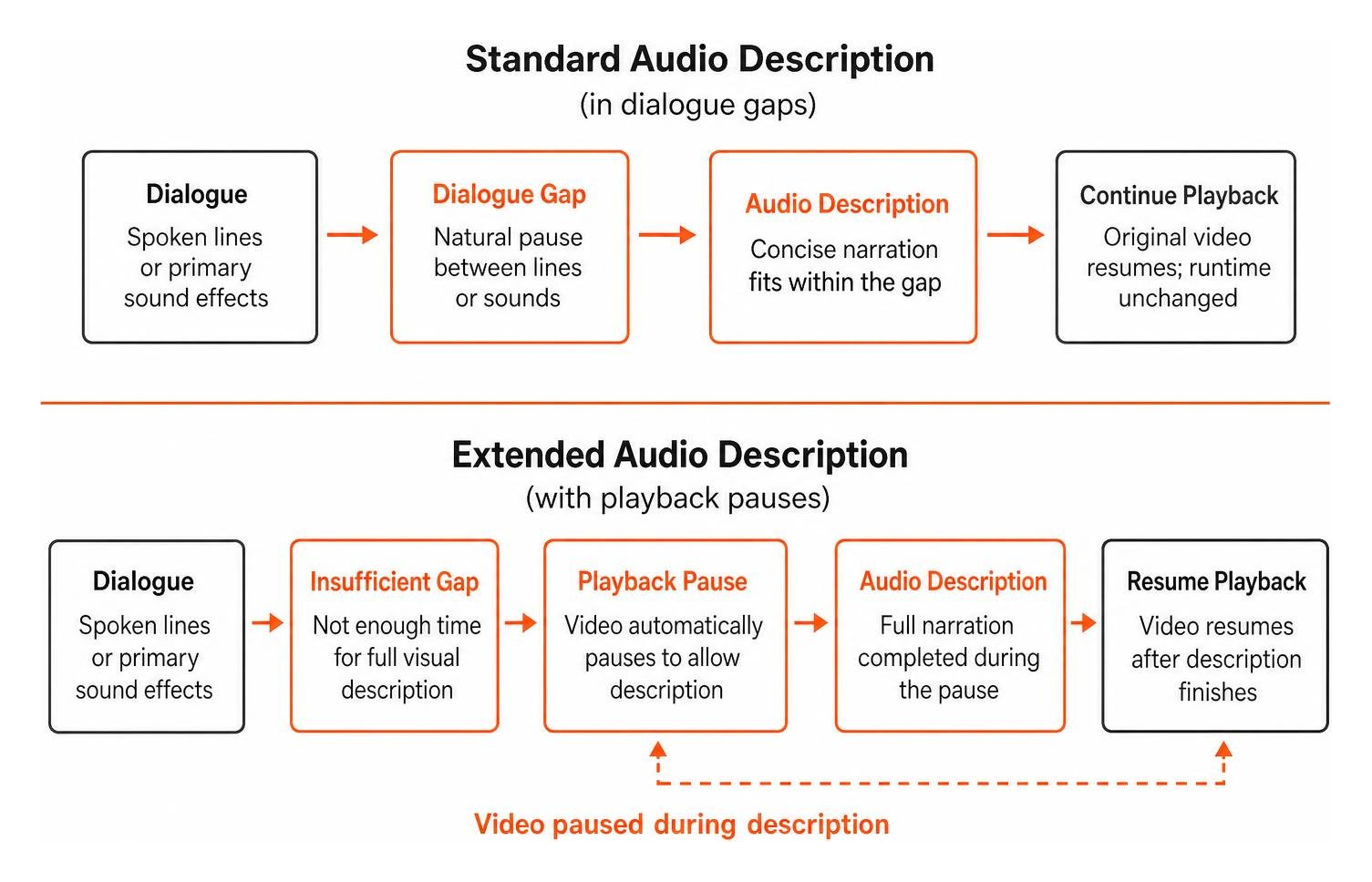
- Standard Audio Description: Concise descriptions fit strictly within natural gaps between spoken lines and major sound cues. The original video runtime remains unchanged.
- Extended Audio Description: When visual action is dense and dialogue leaves insufficient room for narration, the video player automatically pauses the picture to allow the describer to finish speaking before resuming playback.
- Live Audio Description: A trained describer provides real-time verbal narration during live theater performances, sports broadcasts, civic meetings, or live ceremonies, often broadcast through specialized assistive listening systems.
Best Audio Description Services for Videos
Selecting the right partner requires balancing human voice quality, automated turnaround speed, language requirements, and integration options.
| Provider | Service Focus | Description Type | Delivery Formats | Workflow Model |
|---|---|---|---|---|
| Voquent | Entertainment, film, enterprise | Standard, extended, multilingual | WAV, MP3, mixed MP4 | Human voice talent and managed AI |
| Video Caption Corporation | Broadcast, corporate, education | Standard, extended | Separate audio, mixed video | Full-service human production and QC |
| Described Video Canada | Broadcast, film, streaming | Standard broadcast DV | Broadcast masters, separate tracks | Human broadcast specialists |
| DASH Interpreting | Live events, cultural venues | Live and prerecorded | Live transmission, digital media | Professional live describers |
| ViddyScribe | Self-service web video, LMS | Standard, extended | WebVTT, MP4, extra audio tracks | AI-generated with browser script editor |
| Verbit | Education, government, media | Standard, extended | WebVTT, standalone tracks, player | AI generation with human expert review |
Best Human Audio Description Services for Videos
- Voquent offers complete scriptwriting and voice recording across diverse accents and languages for TV, film, and web projects. Their network provides specialized voice casting for dramatic, commercial, and educational video projects.
- Video Caption Corporation supplies end-to-end human production, managing script development, studio narration, sound engineering, and quality reviews to create compliant mixed tracks and broadcast deliverables.
- Described Video Canada delivers broadcast-ready described video tracks tailored to strict broadcast distribution standards and film productions.
- DASH Interpreting specializes in live event description, conferences, performing arts, and public civic meetings, using dedicated describers to narrate live visual experiences.
Best AI and Hybrid Audio Description Services for Videos
- ViddyScribe provides automated scene description and text-to-speech voice generation. It features an interactive editor that allows teams to modify wording, adjust timestamps, and export WebVTT or alternate audio tracks directly.
- Verbit combines automated visual analysis with human post-editing and expert quality checks. This hybrid structure scales description output for educational institutions, enterprise training libraries, and municipal video archives.
How to Compare Providers and Published Rates
When evaluating providers, examine their production methods, delivery turnaround, and track records. Key factors include:
- Turnaround Schedules: Automated workflows often deliver draft tracks in hours, while full human voice talent workflows generally require five to fourteen business days.
- Format Flexibility: Ensure the vendor exports formats your hosting platform accepts, such as standalone MP3 or WAV files, WebVTT description files, or multiplexed MP4 videos with alternate audio channels.
- Script Precision: High-quality providers describe physical actions objectively without guessing character motivations or emotional subtext.
- Directory Verification: Explore specialized registries such as the Audio Description Project professionals directory to locate certified independent describers and production agencies.
Legal Requirements and WCAG Guidance for Audio Description
Digital accessibility mandates across government, education, and commercial sectors emphasize equal access to audiovisual materials:
- The Americans with Disabilities Act (ADA): Title II covers state and local public entities, while Title III applies to public accommodations and commercial businesses. Courts and regulatory updates require public digital communications to provide effective auxiliary aids, including audio descriptions for synchronized video.
- Section 508 of the Rehabilitation Act: Federal departments, agencies, and federally funded programs must ensure all multimedia containing meaningful visual information provides synchronized visual descriptions.
- The 21st Century Communications and Video Accessibility Act (CVAA): Establishes Federal Communications Commission (FCC) requirements for broadcast networks and digital distribution to include secondary audio program narration on covered programming.
- The European Accessibility Act (EAA): Mandates accessible digital media services, audiovisual products, and electronic communications across European markets.
WCAG Standards and Success Criteria
The Web Content Accessibility Guidelines outline clear criteria for multimedia compliance:
- Guideline 1.1.1 Non-text Content requires non-text visuals, including prerecorded video tracks, to provide descriptive text alternatives.
- WCAG 1.2.3 Audio Description or Media Alternative (Prerecorded) Explained allows organizations at Level A to offer either an audio description track or a complete descriptive text transcript for synchronized video.
- Success Criterion 1.2.5 (Audio Description, Level AA): Mandates an audio description track for all prerecorded visual information that is not conveyed through the primary audio.
- Success Criterion 1.2.7 (Extended Audio Description, Level AAA): Recommends extended audio description when natural dialogue pauses cannot accommodate adequate visual narration.
- For real-time events, incorporating WCAG guidance on live captions ensures synchronized text access alongside any live spoken descriptions.
How to Add Audio Description, Estimate Costs, and Enable It for Viewers
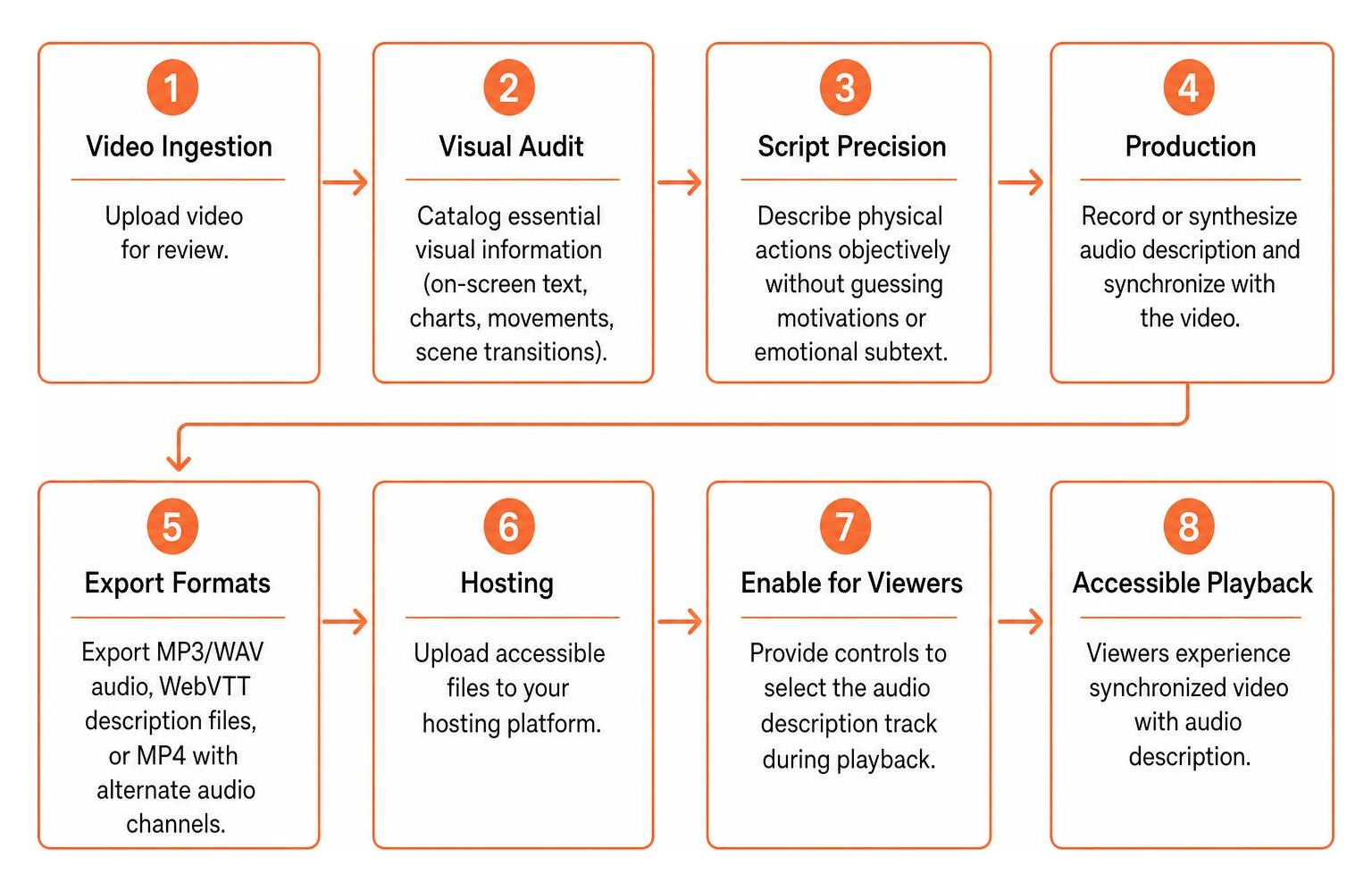
Implementing descriptive audio involves structured media planning, script development, and player integration. Consult the Audio Description Resource Guide from the National Library Service for federal standards and media resources.
Professional Production Workflow
- Visual Audit: A describer reviews the video to catalog essential visual information, such as on-screen text, chart data, character movements, and scene transitions.
- Scripting: The describer crafts concise narrative lines designed to fit into specific timecodes where dialogue is absent.
- Client Approval: The script is checked for factual accuracy and terminology before recording begins.
- Voice Recording: A voice artist records the approved narration, or a text-to-speech engine renders the script using synthetic speech.
- Audio Mixing: An audio engineer levels and synchronizes the description track against the original soundtrack, dipping background music where necessary.
- Export and Delivery: The final track is exported as an isolated audio file, a WebVTT description file, or a re-encoded video file with selectable dual-audio streams.
DIY, AI, Human Narration, or a Hybrid Workflow
Organizations can choose among several authoring approaches based on their internal resources:
- Scripting Ahead (DIY): Content creators can reduce or eliminate the need for secondary description tracks by having on-screen speakers introduce themselves, verbalize slide text, and describe visual demonstrations during filming.
- AI with Human Review: Automated tools generate initial timecodes and draft narration, which human editors then refine for accuracy, pronunciation, and tone.
- Studio Human Narration: Professional voice actors record nuanced descriptions, ideal for theatrical releases, television broadcasts, and emotionally complex media.
- Our comprehensive website accessibility remediation complete guide outlines how to integrate multimedia updates into a broader digital remediation plan.
Where Viewers Can Find and Turn On Audio Description
Playback controls vary depending on the viewing platform and device:
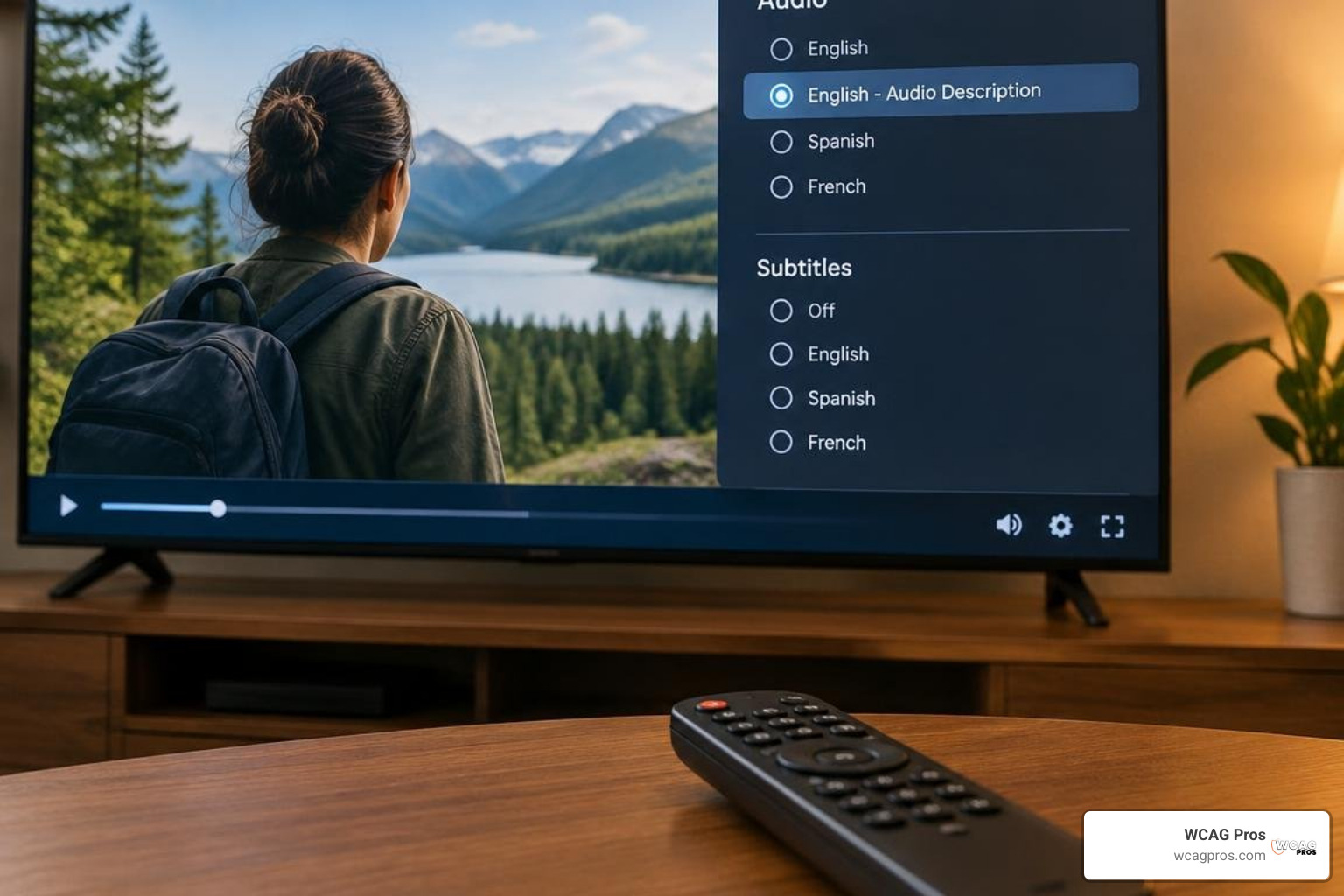
- Streaming Platforms (Netflix, Hulu, Disney+, Prime Video): Open the playback settings menu, select the audio and languages option, and choose the track labeled English Audio Description.
- Smart Devices (iOS, Android, Apple TV): In system accessibility menus, enable preferences to automatically play descriptive audio tracks whenever available in native media players.
- Television Broadcasts: Use the remote control to activate the Secondary Audio Program (SAP) or audio description channel.
- Movie Theaters: Request a wireless assistive listening headset configured for descriptive audio narration at the theater guest services desk.
Frequently Asked Questions about Audio Description Services
Can AI-generated audio description meet accessibility requirements?
Yes, provided the resulting narration accurately conveys all essential visual information and functions properly within an accessible media player. Because WCAG 2.2 evaluates the quality of the end-user experience rather than the authoring method, automated descriptions must be reviewed by humans to prevent misinterpretations, awkward timing, or robotic mispronunciations.
Does every video need audio description?
No. If all essential visual details, speaker identities, demonstrations, and on-screen text are already spoken clearly in the primary dialogue or voiceover, a separate description track is not required. Audio description is only necessary when vital information is presented exclusively through visual means.
How do I check whether a video player supports audio description?
Review the player documentation to confirm support for multi-track audio selection or WebVTT description files. You can test keyboard navigation to verify that users can open the audio selection menu, toggle between primary and descriptive audio tracks using screen readers, and adjust track volumes without mouse input.
Conclusion
Delivering high-quality audio description ensures that blind, low vision, and auditory-focused viewers experience your video content completely and equitably. Whether you choose full-service human narration, hybrid AI tools, or deliberate scripting during initial production, focus on objective descriptions, accurate timing, and seamless player integration.
At WCAG Pros, our team conducts comprehensive page-by-page audits across all 54 WCAG criteria to help organizations achieve full ADA compliance. Explore our ultimate list of free online accessibility checkers to assess your current web assets and begin building a more accessible digital environment today.
Read more website accessibility articles
Get Help With Your Website
We'll follow up with info about:
- The process
- Cost
- Timeline
We promise to respect your privacy, and never abuse the information you provide. We will not sell or rent your information to any third party.
By submitting this form, you consent to receive SMS messages and/or emails from SEM Dynamics LLC, dba WCAG Pros. To unsubscribe, follow the instructions provided in our communications. Msg & data rates may apply for SMS. Your information is secure and will not be sold to third parties.