
A Practical Developer Guide to Jest Axe Testing and Automated Audits
How to Start Jest Axe Testing
To start jest axe testing, install jest-axe, add its toHaveNoViolations matcher to your Jest setup, then render a component in a JSDOM test. Pass the rendered element to await axe(element) and check the result with expect(results).toHaveNoViolations(). Run the check again after interactions that change the page, such as opening a dialog or showing a form error.
This catches common accessibility problems while developers can still fix them quickly. It does not prove WCAG 2.2 conformance. JSDOM cannot test color contrast, and automated checks cannot judge whether a page works well with a keyboard or screen reader.
I’m Matthew Post, co-founder of WCAG Pros, with more than 20 years of web development experience and a focus on accessibility audits and remediation. I view jest axe testing as an early check that supports, but never replaces, a thorough accessibility review.
Jest axe testing vocab to learn:
Getting Started with Jest Axe Testing in Modern JavaScript Frameworks
When teams build modern digital products, shifting accessibility checks directly into daily engineering workflows prevents costly downstream remediation. By integrating axe-core directly into local unit tests, we capture structural HTML errors before code ever reaches a pull request. The open-source NickColley/jest-axe repository provides the custom matcher bridge between Jest and the underlying axe engine. With more than three million weekly downloads, it has become the standard mechanism for component-level automated audits.
To configure your testing suite, install the required packages using your preferred package manager:
npm install –save-dev jest jest-axe jest-environment-jsdom @types/jest-axe
Once installed, register the custom matcher globally so your assertions remain clean and readable across hundreds of test files. In your Jest configuration file, ensure the test environment is explicitly set to jsdom, then reference a global setup script through the setupFilesAfterEnv array.
Inside your global setup file, import toHaveNoViolations from jest-axe and pass it to expect.extend. Alternatively, import jest-axe/extend-expect directly. Setting this up globally means you will not need to manually import the matcher inside every individual component test file across your application.
This foundational setup helps teams make automated web accessibility testing a standard part of their daily build process.

Setting Up Automated Accessibility Assertions in React and Vue
Testing component accessibility in React and Vue follows an intuitive arrange-act-assert pattern. In React, we rely on React Testing Library to mount the component into the virtual JSDOM container. In Vue, Vue Test Utils or Vue Testing Library renders the template.
To test a React component, render your component and pass the resulting container property directly into the asynchronous axe function. The execution returns an axe results object containing details on all evaluated rules, applicable nodes, and potential violations.
The basic testing structure looks like this:
- Render the React component via render(
Submit Order ). - Await the axe evaluation on the returned container element using const results = await axe(container).
- Assert compliance using expect(results).toHaveNoViolations().
For Vue applications, mount your component using mount(CustomSelect) from Vue Test Utils, then pass wrapper.element directly into the axe invocation. Whether testing an interactive form, a navigation drawer, or a simple button, reviewing guides on modern component accessibility testing can help you standardize your component-level assertions across teams.
Angular and Next.js Configuration Patterns
Angular and Next.js applications also benefit from automated component-level accessibility scans. In Angular projects utilizing Jest and Angular TestBed, the rendered component DOM is accessed directly through the ComponentFixture interface.
In your Angular unit test, configure the testing module with TestBed.configureTestingModule, instantiate the component fixture, and call fixture.detectChanges to trigger the initial lifecycle hooks. Then pass fixture.nativeElement to await axe(fixture.nativeElement) and assert that toHaveNoViolations passes cleanly.
For Next.js applications containing Server Components and Client Components, ensure your Jest configuration handles module aliases and mock transforms correctly. When testing isolated components that lack surrounding page landmarks, axe-core may flag missing region landmarks as a violation. To prevent these false alarms on isolated UI fragments, create a shared test utility using configureAxe from jest-axe and disable the region rule:
const axe = configureAxe({ rules: { region: { enabled: false } } })
This custom instance can be imported across your test suite to keep your component tests focused on internal structural markup rather than full-page landmark requirements.
Writing Advanced Component Tests and Handling Dynamic UI States
Testing a component only in its default, resting state leaves massive blind spots in your automated test suite. Real-world user interfaces change dynamically in response to user actions, displaying validation errors, opening dropdowns, and expanding dialogs. Practicing smart automated accessibility testing means driving components through their entire lifecycle and running accessibility evaluations at every meaningful state transition.
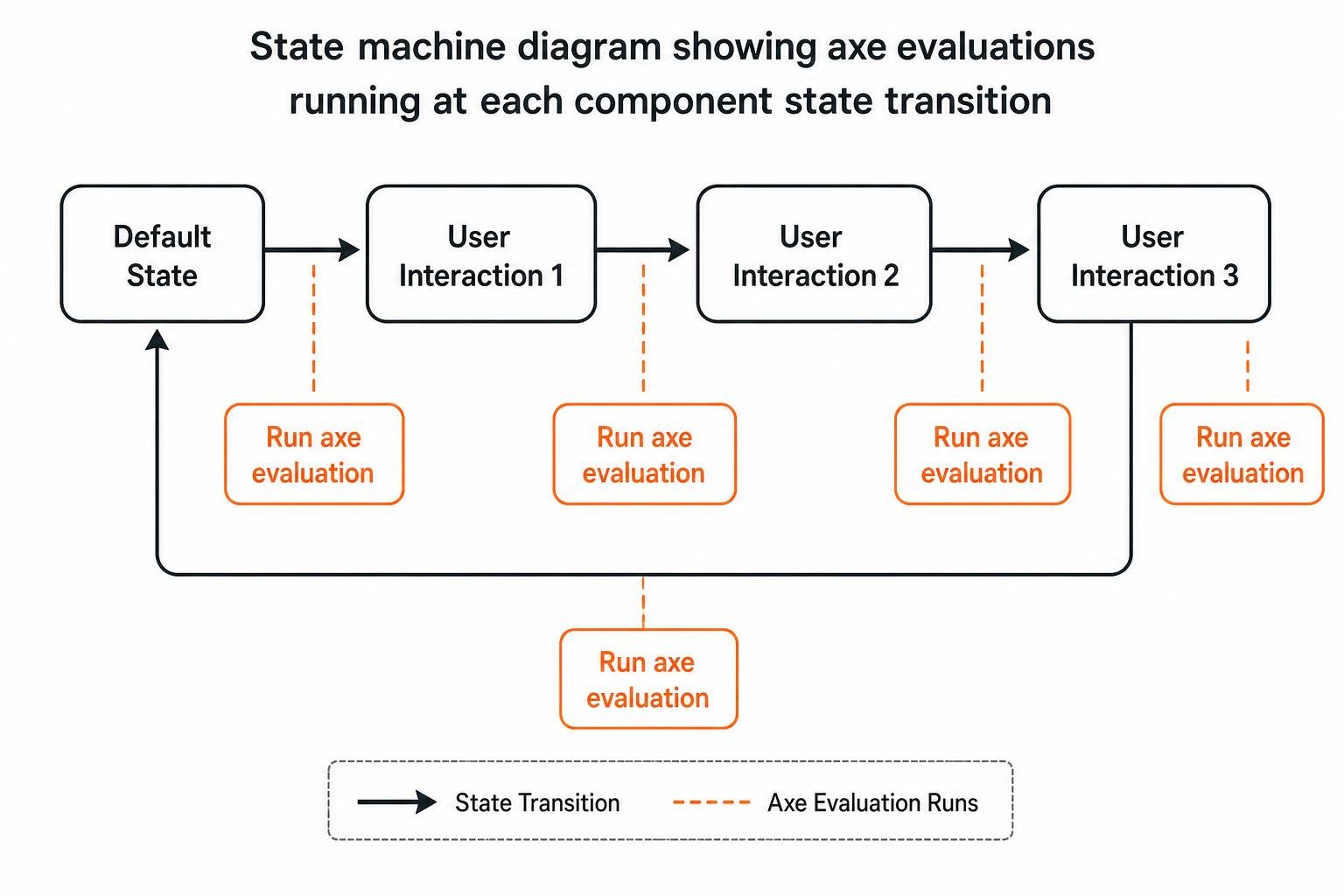
Always simulate interactions using userEvent from @testing-library/user-event rather than fireEvent. The userEvent library replicates the exact multi-event sequence that occurs in a browser, including focus, keydown, keyup, and input events, ensuring all underlying ARIA bindings and live regions trigger correctly.
Core Implementation of Jest Axe Testing for Interactive Components
When testing complex widgets like modal dialogs or accordion panels, ensure your assertions validate both the closed and open states.
For an accessible modal dialog, render the parent component, trigger the open button using await user.click(openButton), and wait for the modal to mount in the DOM. Once visible, invoke await axe(document.body) to audit the newly rendered modal structure.
Testing dynamic components introduces several subtle pitfalls that can lead to false-green test runs:
- Unawaited axe calls: Because axe is asynchronous, forgetting the await keyword causes the test to pass immediately, skipping all violation assertions.
- Portal scoping errors: Modals and tooltips often render into React Portals outside the standard test container. When testing portal components, pass baseElement or document.body into axe rather than container, which remains empty.
- Fake timer deadlocks: If your test suite uses jest.useFakeTimers to control animations or debounce delays, axe-core will time out because it relies on real asynchronous microtasks. Always restore real timers using jest.useRealTimers before calling axe, then re-enable fake timers afterward if necessary.
Combining Axe Matchers with Testing Library Role Queries
While jest-axe excels at catching missing structural attributes, it cannot tell whether your markup makes semantic sense for a human user. For example, axe will verify that an input element has an associated label element, but it cannot verify whether the label text accurately describes the input field.
To bridge this gap, pair structural jest-axe assertions with semantic Testing Library queries:
- Query elements using getByRole with the accessible name option, such as getByRole(‘button’, { name: ‘Save Changes’ }), ensuring the component computes the exact accessible name intended for assistive technology.
- Assert descriptive relationships using toHaveAccessibleDescription from @testing-library/jest-dom to verify that input error spans correctly link through aria-describedby.
- Check state attributes directly using toHaveAttribute(‘aria-expanded’, ‘true’) or toHaveAttribute(‘aria-invalid’, ‘true’) following user interaction.
Combining structural axe scans with semantic role queries guarantees that your components possess both valid syntax and meaningful accessibility contracts.
Technical Limitations of JSDOM and Testing Beyond Unit Tests
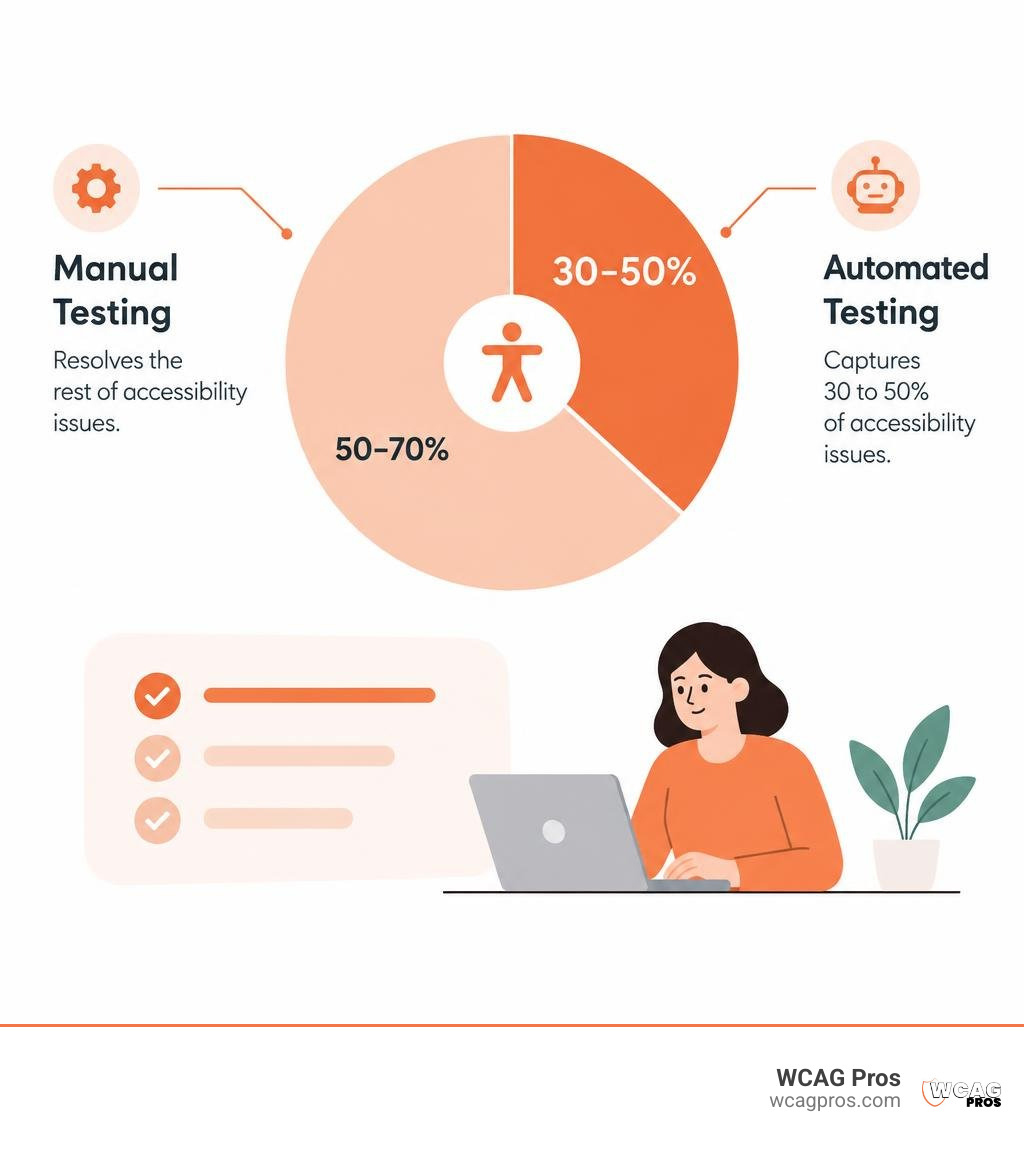
Automated tools play an essential role in modern engineering, but we must understand their technical boundaries. Research indicates that automated accessibility engines typically identify between 30% and 50% of total accessibility barriers. In fact, research by the UK Government Digital Service found that automated tests miss roughly 30% of access barriers entirely, while WebAIM analysis across one million homepages revealed tens of millions of obvious errors that slipped past development pipelines.
Consulting a practical guide to choosing an automated accessibility testing tool helps teams select the right tools for their stack while recognizing that unit tests represent only one layer of defense.
Understanding What Axe Testing with Jest Misses in Headless Environments
The primary constraint of running jest-axe in Jest lies within JSDOM itself. JSDOM is a pure JavaScript implementation of the DOM and HTML standards. It does not contain a visual layout or rendering engine.
Because JSDOM does not compute layout geometry, paint pixels, or render fonts, axe-core cannot evaluate rules that depend on visual positioning. The following table illustrates which checks function in jest-axe versus those requiring full-browser integration testing:
| Accessibility Rule Category | Jest Axe Testing in JSDOM | Playwright or Cypress with Axe | Manual and Screen Reader Audits |
|---|---|---|---|
| Missing Image Alt Text | Supported | Supported | Requires Human Review for Quality |
| Form Input Label Association | Supported | Supported | Requires Review for Clarity |
| ARIA Syntax and Valid Roles | Supported | Supported | Requires Evaluation of Widget Flow |
| Color Contrast Minimums | Not Supported | Supported | Requires Validation in High Contrast Modes |
| Target Size Minimum (2.5.8) | Not Supported | Supported | Requires Touch Target Review |
| Reflow and Zoom (1.4.10) | Not Supported | Supported | Requires Multi-Viewport Validation |
| Keyboard Focus Navigation | Not Supported | Partial | Requires Full Keyboard Testing |
| Logical Reading Sequence | Not Supported | Not Supported | Requires Screen Reader Testing |
To validate visual rules such as color contrast, target sizing, and responsive reflow, complement your Jest unit tests with end-to-end accessibility runs in Playwright or Cypress where real browser engines compute true layout styles.
Integrating axe-core Across CI/CD Pipelines and Design Systems
Design systems serve as the single source of truth for UI components across an enterprise. Running automated axe checks across every design system component prevents regressions from multiplying across hundreds of downstream consumer applications.
In your continuous integration pipelines, such as GitHub Actions, establish dedicated scripts to run your component accessibility test suites on every pull request. To prevent developer alert fatigue, configure your rules based on impact levels. When introducing accessibility tests into large legacy codebases, you can configure axe to fail builds only on critical and serious violations while tracking moderate and minor issues in your backlog.
Axe-core follows a strict zero false-positive philosophy, meaning any reported failure represents a concrete structural issue that requires developer remediation.
Frequently Asked Questions About Jest Axe Testing
Why do color contrast checks fail to run in JSDOM?
Color contrast evaluation requires calculating the exact rendered foreground text color against the computed background color, accounting for opacity, CSS cascade rules, inherited styles, and overlapping layout layers. Because JSDOM does not render pixels or execute layout calculations, it cannot determine true visual coordinates or contrast ratios. Consequently, the color-contrast rule is disabled by default in jest-axe and must be verified in browser-based test runners like Playwright or through manual review.
How do you handle fake timer timeouts when running axe?
When component tests utilize Jest fake timers through jest.useFakeTimers, axe-core will fail or trigger timeout exceptions. Axe-core relies on standard asynchronous timers and promises to process its extensive rule sets. To resolve this, call jest.useRealTimers immediately before invoking await axe(container), then re-enable fake timers with jest.useFakeTimers after your assertion completes.
Does passing jest-axe tests guarantee full WCAG compliance?
No. Passing a jest-axe test confirms that your rendered DOM markup is free of detectable automated syntax and structural errors. However, automated testing cannot verify whether your text alternatives are contextually meaningful, whether your keyboard focus order follows logical reading paths, or whether complex custom widgets operate smoothly with screen readers like NVDA, JAWS, or VoiceOver. Full ADA and WCAG 2.2 compliance requires combining automated unit tests with comprehensive manual audits conducted by accessibility specialists.
Conclusion
Automated accessibility testing with jest-axe provides development teams with an immediate, reliable safety net. By catching structural markup errors, invalid ARIA attributes, and missing form labels directly in local test suites and continuous integration builds, engineering teams eliminate common accessibility bugs before they reach production.
However, automated testing represents only the first milestone on the journey toward inclusive design. To achieve true digital accessibility and legal compliance under ADA and WCAG 2.2 standards, automated unit testing must be paired with human-led evaluations.
At WCAG Pros, based in Norco CA, we provide end-to-end ADA website compliance consulting. Our expert team conducts comprehensive page-by-page audits across all 54 WCAG 2.2 Level A, AA, and AAA success criteria. We provide precise code remediation fixes and free compliance re-audits to help your organization achieve full accessibility and earn official compliance badges. Explore our professional WCAG audit and remediation services to ensure your digital products provide an exceptional, barrier-free experience for every user.
Read more website accessibility articles
Get Help With Your Website
We'll follow up with info about:
- The process
- Cost
- Timeline
We promise to respect your privacy, and never abuse the information you provide. We will not sell or rent your information to any third party.
By submitting this form, you consent to receive SMS messages and/or emails from SEM Dynamics LLC, dba WCAG Pros. To unsubscribe, follow the instructions provided in our communications. Msg & data rates may apply for SMS. Your information is secure and will not be sold to third parties.