
Practical Guide to Choosing an Automated Accessibility Testing Tool
Practical Guide to Choosing an Automated Accessibility Testing Tool
How to Choose an Automated Accessibility Testing Tool
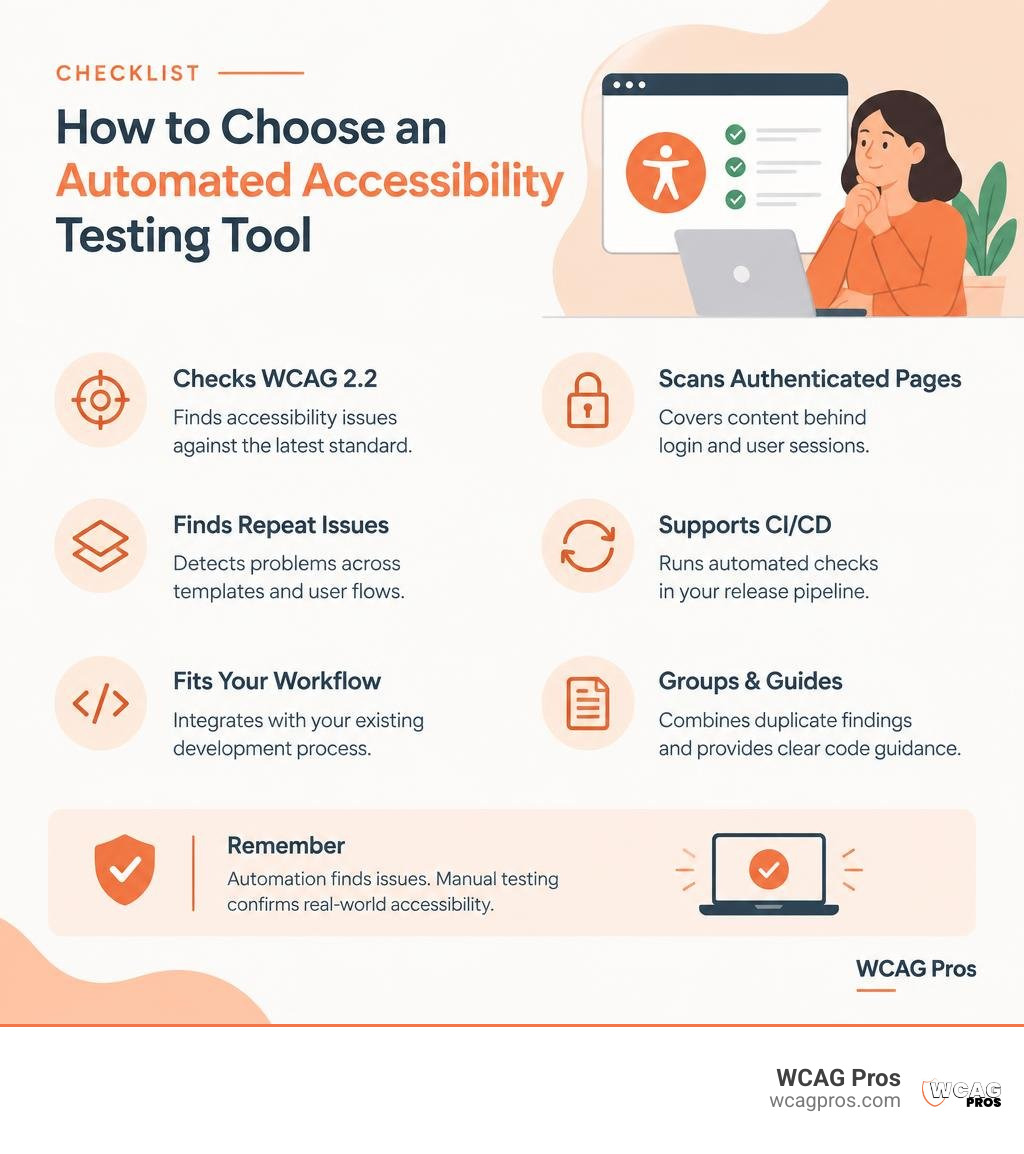
The best automated accessibility testing tool checks your site against WCAG 2.2, finds repeat issues across templates and user flows, and fits into how your team already ships code. Look for tools that can scan authenticated pages, support CI/CD checks, group duplicate findings, and give clear source code guidance.
Automated scans are fast and useful for catching issues like missing form labels, weak color contrast, invalid ARIA, and unlabeled buttons. They can help reduce ADA risk and support Section 508, EN 301 549, and European Accessibility Act requirements. But no scanner can prove full compliance on its own. Manual testing is still needed for keyboard flow, screen reader behavior, focus order, and whether content makes sense to real people.
This guide compares practical options for developers, agencies, and website owners, with a focus on detection quality, workflow fit, remediation support, and ongoing monitoring.
I am Matthew Post, co-founder of WCAG Pros and a programmer with more than 20 years of web development experience. I have audited and remediated websites using many forms of automated accessibility testing tool, then paired the findings with expert manual review to address real user barriers and legal risk.
Easy automated accessibility testing tool word list:
Key Features to Evaluate in an Automated Accessibility Testing Tool

Selecting the right software requires balancing testing depth against day-to-day developer experience. When we assess scanning software for enterprise environments or growing web applications, several core technical capabilities separate surface-level checkers from robust engineering tools.
First, verify standard coverage. Any modern scanner must evaluate your pages against WCAG 2.2 Level AA guidelines, which form the bedrock for international legal frameworks such as Title III of the ADA, Section 508 for United States federal agencies, and the European Accessibility Act (EAA) via EN 301 549. Exploring our comprehensive guide to WAI standards and WCAG 2.2 offers a clear overview of how these standards align. The software must parse new WCAG 2.2 criteria, including non-text contrast, target size, and focus appearance rules.
Second, examine how the engine handles shared components. A website with thousands of URLs rarely contains thousands of distinct bugs. In practice, most failures stem from repeated components like headers, footers, modal dialogs, and navigation bars. Tools equipped with cross-page pattern detection group these duplicate instances into a single root finding. Addressing that single component pattern typically cuts down total remediation effort by 50% to 70%, preventing your engineering team from drowning in bloated, redundant ticket backlogs.
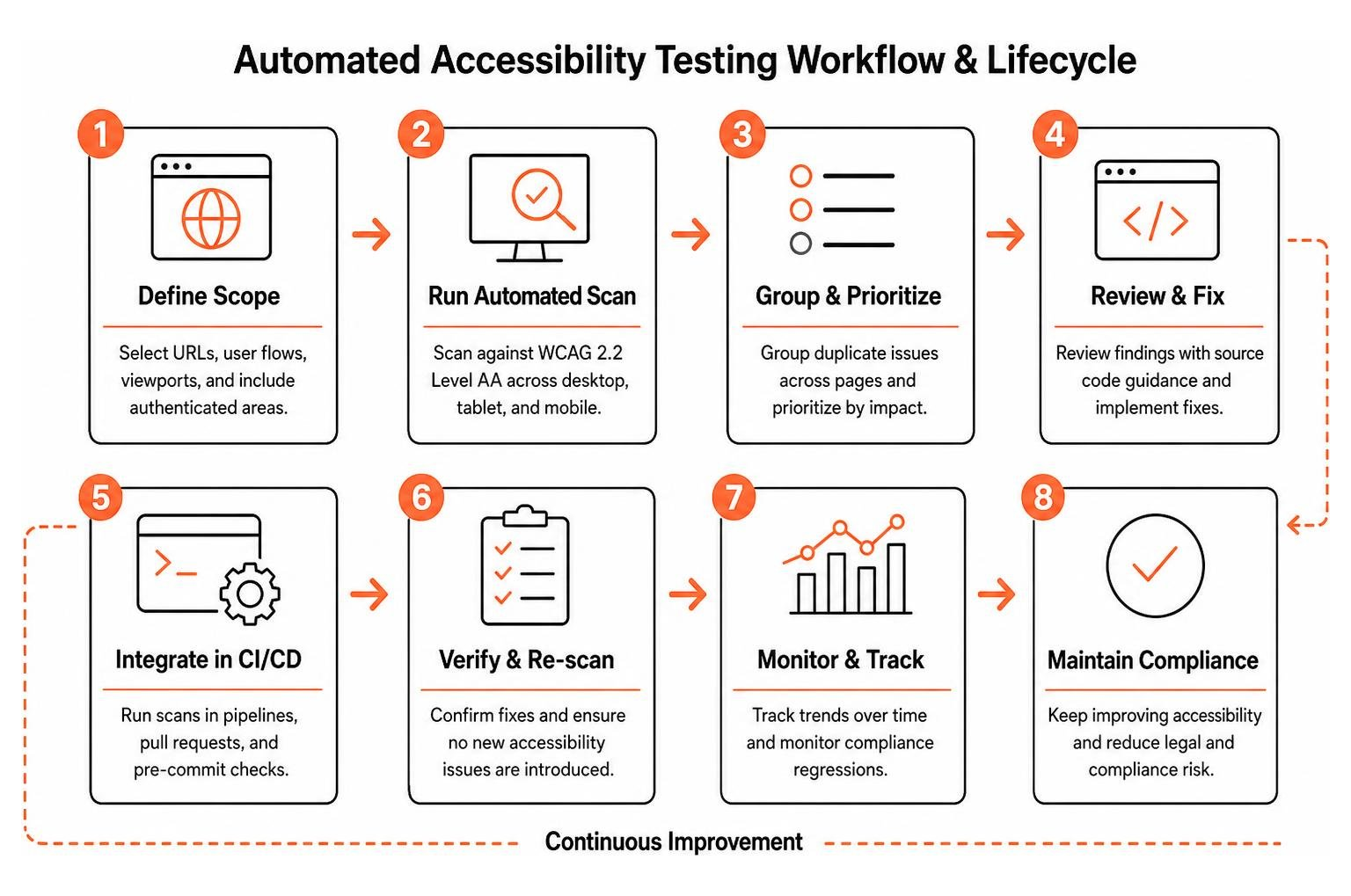
Third, look closely at development pipeline integration. To achieve continuous compliance, scanning must shift left into the software development lifecycle. Quality tools offer command-line interface (CLI) runners, pre-commit hooks, IDE plugins, and native GitHub Actions. This allows developers to catch regressions on pull requests before broken markup reaches production environments. Teams looking to streamline this setup can review how automated web accessibility testing made easy integrates into standard workflows.
Fourth, verify multi-viewport rendering and authentication capabilities. Modern web applications rely on responsive layouts where accessibility barriers might only appear on mobile or tablet breakpoints. The engine should render real DOM nodes across desktop, tablet, and mobile viewport widths. Additionally, ensure the software can pass authentication headers, handle bearer tokens, or execute scripted form logins to scan protected dashboards and staging environments.
Top Automated Accessibility Software Compared
Different engineering teams have distinct architectural setups, compliance mandates, and scanning requirements. Below is a high-level comparison of the leading engines on the market in 2026. For a deeper breakdown of various auditing platforms, see our practical guide to comparing the best accessibility tools.
| Tool | Core Engine & Philosophy | Key Workflow Integrations | Remediation & Code Fixes | Best Use Case |
|---|---|---|---|---|
| Axe DevTools | axe-core engine with zero false-positive ruleset | Chrome, Firefox, Edge, Axe MCP Server, Jira, CI/CD | Intelligent Guided Testing with AI prompts | Front-end engineers seeking fast, in-browser developer checks |
| ACE Scanner | Proprietary multi-page ACE Engine | Web dashboard, REST APIs, scheduled site crawls | Pattern deduplication with legal risk classification | Large-scale site monitoring and multi-domain compliance oversight |
| Adibilis | Multi-engine ensemble (900+ WCAG rules) | CLI, GitHub Actions, pull request gating | Framework-aware patches (React, Vue) and NVDA testing | Full-stack teams wanting verified source-code fixes in CI/CD |
| TestSprite | AI agent parsing product intent and specs | IDE MCP server, cloud sandbox, CI pipelines | Code-level remediation for ARIA, focus, and semantics | Continuous regression prevention across complex multi-step flows |
| Look-see | Open-source pixel and graph crawler | Self-hosted Docker, Neo4j, Google Cloud Run | Graph-based journey impact analysis | Teams needing transparent, pixel-level visual rendering audits |
Axe DevTools: Leading Automated Accessibility Testing Tool for Developers
Axe DevTools, developed by Deque Systems, is the undisputed industry standard for unit-level automated accessibility checking. Powered by the open-source axe-core rules engine, which has surpassed 3 billion total downloads and more than 800,000 installations in Chrome alone, it is celebrated for its zero-false-positive design philosophy. When axe flags an issue, you can be confident it is a true violation rather than algorithmic noise.
The platform extends beyond static browser checks through its Intelligent Guided Testing (IGT) feature. By combining automated rules with guided, interactive prompts, IGT helps developers check complex elements like table markup, modal focus traps, and custom interactive widgets without requiring deep compliance knowledge. Engineering leaders can integrate Axe directly into IDEs using the Axe MCP Server or push scan findings straight into Jira tickets.
ACE Scanner: Scalable Automated Accessibility Testing Tool for Cross-Page Patterns
ACE Scanner is built for organizations managing sprawling web properties that require rapid, large-scale discovery. The proprietary ACE Engine evaluates over 100 rules per page across WCAG 2.2, ADA, Section 508, and EAA standards. In large-scale benchmarks, ACE catches roughly 70% to 80% of automated accessibility issues quickly and reliably.
What makes ACE Scanner stand out is its cross-page pattern deduplication. Instead of reporting 500 separate button contrast errors across 500 pages, the engine identifies that all 500 instances originate from a single global footer template. This deduplication saves teams between 50% and 70% of their remediation backlog time. Furthermore, the tool applies an Impact Classification system that tags issues by Legal Risk, User Impact, and Best Practice. This ensures developers address high-liability issues first, an approach detailed further in our definitive guide to web page compliance testing tools.
Adibilis: Best for Code-Level Remediation and Screen Reader Verification
Adibilis takes a developer-first approach by tackling the gap between finding a defect and actually writing the code to resolve it. Rather than relying on a single scanning engine, Adibilis runs a multi-engine ensemble evaluating over 900 WCAG 2.2 rules against full browser renderings.
Crucially, Adibilis rejects JavaScript overlay widgets in favor of real, permanent source code changes. The platform generates framework-aware code patches for modern stacks like React, Next.js, and Vue. Once a patch is proposed, the platform validates the fix using simulated NVDA screen reader probes and focus state verifiers in automated CI pipelines. This eliminates guesswork and protects teams against the common pitfalls explained in our breakdown on why automated overlays fail and code fixes succeed.
TestSprite and Look-see: Emerging AI-Driven and Pixel-Level Audit Engines
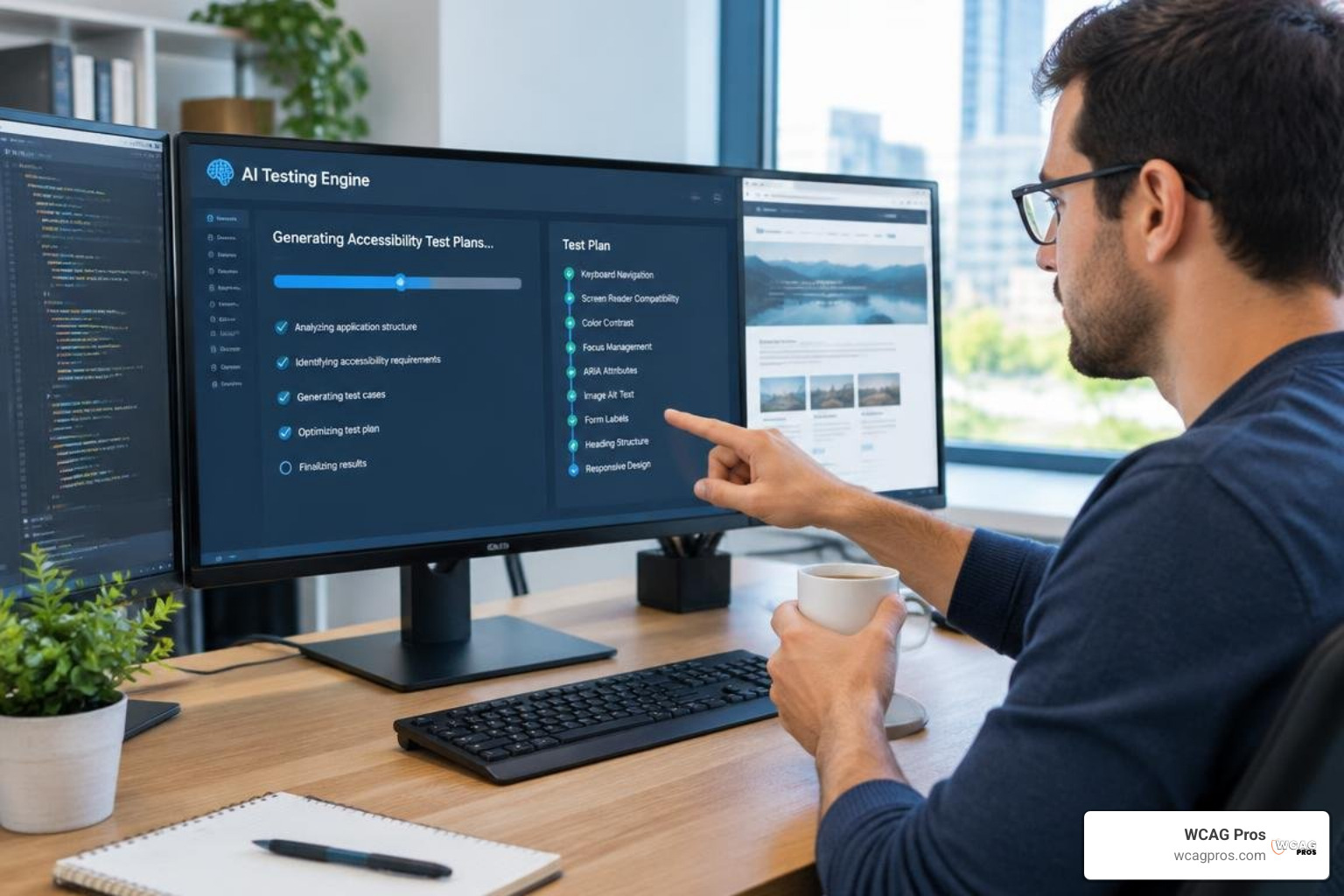
New testing paradigms are emerging to address dynamic web architectures. TestSprite is an AI-powered accessibility agent that integrates into developer IDEs via Model Context Protocol (MCP). By ingesting product requirement documents (PRDs) and design specifications, TestSprite infers accessibility intent, mapping complex user journeys directly to WCAG 2.2 success criteria. In real-world web project benchmark tests, TestSprite outperformed raw AI code generation by lifting test pass rates from 42% to 93% after a single automated remediation loop.
On the open-source front, Look-see offers an entirely transparent approach to journey-aware accessibility auditing. Instead of inspecting only static DOM text, Look-see evaluates actual rendered pixels in headless Chrome to catch visual design defects, non-standard typography clipping, and subtle color contrast failures. Built on Java, Spring Boot, Angular, and Neo4j, Look-see models an entire site as a relational graph. This architecture allows engineering teams to trace exactly how an accessibility violation on one page cascades across an entire transactional user flow.
Limitations of Automated Scanners and the Need for Hybrid Testing
While automated accessibility testing tools are essential for rapid scanning and regression prevention, relying on them as a complete compliance guarantee is a dangerous mistake. Across the digital accessibility industry, independent research confirms that algorithmic rules engines catch only 30% to 60% of all potential WCAG violations.
Understanding these limitations explains why automated scans must be paired with expert manual review:
- Contextual Alt Text: A scanner can confirm that an
altattribute, but it cannot determine if the text accurately describes the image context or whether the image is decorative and should have an emptyalt="". - Logical Focus and Reading Order: Automated tools cannot verify if the tab sequence follows the intuitive reading order of a human user, especially when CSS grid, flexbox, or dynamic DOM insertions alter the visual presentation.
- Complex Keyboard Interactions: Custom dropdowns, date pickers, drag-and-drop interfaces, and infinite scroll widgets often trap keyboard focus or fail to announce state changes to screen readers, issues invisible to static DOM linters.
- Assistive Technology Announcements: Synthetic rules cannot replicate how actual assistive software, like JAWS, NVDA, VoiceOver, or TalkBack, interprets live regions and dynamic status alerts.
- Plain Language and Cognitive Accessibility: Software cannot evaluate whether instructional text, error messages, and navigation labels are easy to understand for individuals with cognitive disabilities.
Industry authorities frequently emphasize the necessity of combining automated software with human expertise, as explored in Accessibility Testing Tools (2026): 5 Experts Weigh In. To maintain bulletproof compliance, teams should combine automated CI/CD gating with structured manual evaluations, a process detailed in our guide to WCAG 2.2 manual testing essentials and our broader practical accessibility testing guide.
Frequently Asked Questions About Automated Accessibility Scanners
Can an automated accessibility tool guarantee full ADA and WCAG 2.2 compliance?
No automated scanner can guarantee complete compliance with the ADA or WCAG 2.2 standards. Scanners operate on programmatic rules that test roughly 30% to 60% of WCAG success criteria. Critical elements like logical reading order, appropriate alternative text descriptions, intuitive error recovery, and seamless screen reader operation require hands-on manual verification by accessibility specialists. Automated tools are fantastic for catching obvious syntax and layout errors, but they must be paired with human testing to eliminate legal risk.
How do automated accessibility testing tools integrate into modern CI/CD pipelines?
Most leading automated accessibility testing tools integrate into continuous integration workflows through CLI packages, npm libraries, or dedicated GitHub Actions and GitLab CI runners. During build or pull request workflows, the tool spins up a headless browser instance, executes defined accessibility assertion suites against staging URLs or component stories, and outputs machine-readable JSON or JUnit reports. If critical WCAG 2.2 Level AA violations are detected, the pipeline can automatically block the pull request from merging, preventing code regressions.
What is the typical cost of an automated accessibility testing tool?
The pricing structure of automated accessibility software varies widely depending on functionality and scale. Many foundational tools, such as the open-source axe-core library and basic browser extensions, are free for individual developers. Commercial developer suites and cloud-based scanning SaaS platforms generally range from entry-level single-site subscriptions to comprehensive enterprise packages that offer scheduled multi-domain monitoring, team collaboration workspaces, API access, and white-labeled reporting.
Conclusion
Building an inclusive digital presence requires the right mix of automated speed and human judgment. An automated accessibility testing tool provides the velocity your development team needs to catch regressions early, deduplicate common component errors, and maintain continuous oversight across thousands of pages.
However, software alone cannot protect your organization from compliance risks or guarantee an intuitive experience for individuals using assistive technology. At WCAG Pros, located in Norco, CA, we believe the most reliable accessibility strategy is a hybrid methodology. We combine automated scanning efficiency with thorough page-by-page manual audits across all 54 WCAG 2.2 Level A through AAA success criteria, providing actual source-code remediation and free compliance re-audits.
When your team is ready to build a reliable, high-performing testing workflow, take the next step and pick the best web accessibility evaluation tool for your team to establish an accessible digital experience for all users.
Read more website accessibility articles
Get Help With Your Website
We'll follow up with info about:
- The process
- Cost
- Timeline
We promise to respect your privacy, and never abuse the information you provide. We will not sell or rent your information to any third party.
By submitting this form, you consent to receive SMS messages and/or emails from SEM Dynamics LLC, dba WCAG Pros. To unsubscribe, follow the instructions provided in our communications. Msg & data rates may apply for SMS. Your information is secure and will not be sold to third parties.