
WCAG 2.2 Manual Testing 101
WCAG 2.2 Manual Testing 101
Start WCAG Manual Testing Where Automated Tools Stop
WCAG manual testing is the hands-on review of a website using a keyboard, screen reader, browser settings, and human judgment. Start by testing your most important user journeys, such as navigation, search, forms, account access, and checkout. Then check whether people can complete each task without a mouse, understand what a screen reader announces, and use the page at high zoom.
Automated scanners are useful for finding code-level problems quickly. But they cannot reliably decide whether alt text is meaningful, focus moves in a logical order, a modal announces itself, or an error message actually helps someone fix a form.
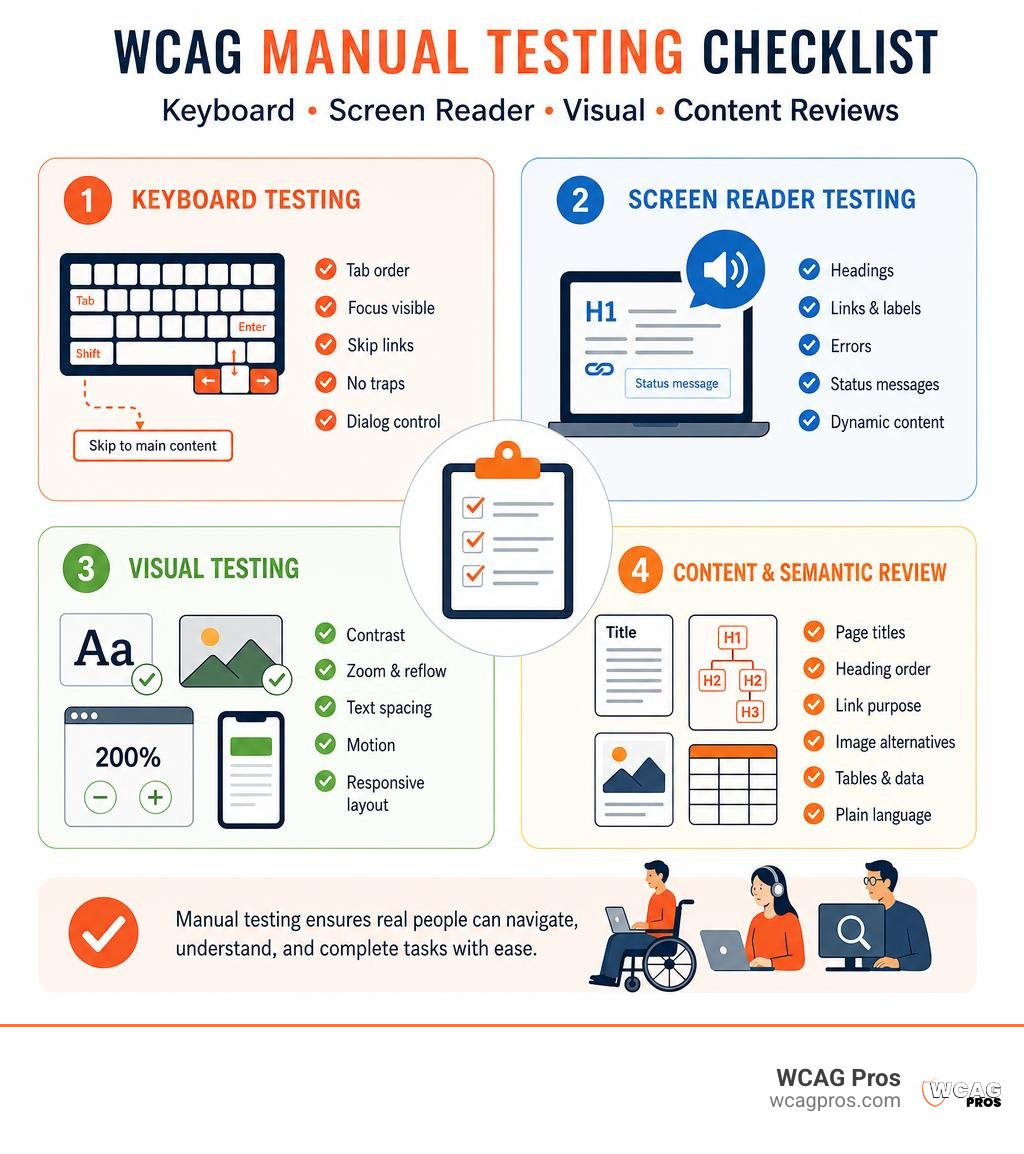
A practical WCAG 2.2 manual testing review includes:
- Keyboard testing: Tab through every interactive element. Check focus visibility, order, keyboard traps, skip links, and dialog behavior.
- Screen reader testing: Confirm headings, links, labels, errors, status messages, and dynamic content are announced clearly.
- Visual testing: Review contrast on images or gradients, zoom and reflow, text spacing, motion, and layout at different viewport sizes.
- Content and semantic review: Check page titles, heading order, link purpose, image alternatives, tables, and plain language.
This human layer matters because a site can pass an automated scan while still blocking a customer from completing a purchase, submitting a lead form, or finding key information. For businesses managing ADA risk, manual testing helps uncover the barriers that have the greatest real-world impact.
I am Matthew Post, co-founder of WCAG Pros and a programmer with more than 20 years of web development experience. I supervise WCAG manual testing, accessibility audits, and remediation work to help businesses find practical issues, improve usability, and reduce accessibility risk.
WCAG manual testing terms you need:
Why Manual Accessibility Testing Outperforms Automated Scanners
Automated scanners are an efficient starting point for any digital project, but they provide an incomplete picture. An Automated Tools Audit can crawl thousands of URLs in minutes to catch missing alt attributes, duplicate element IDs, and basic color contrast failures on plain backgrounds. However, automated scanners only detect between 30% and 40% of all WCAG violations.
Software tools analyze raw code against binary rules. They cannot understand human intent or context. An automated script can verify that an image contains an alt tag, but it cannot judge if the text photo123.jpg conveys any useful meaning. Scanners also create false positives and miss dynamic problems completely. According to Manual testing | UCSF IT, relying purely on automated tooling leaves digital products vulnerable to critical usability failures.
To achieve authentic digital compliance and reduce legal exposure under the ADA, human evaluation is essential. An auditor evaluates how ARIA attributes behave in real time, how custom widgets handle state changes, and how intuitive a multi-step workflow feels. For an overview of standard auditing principles, our A-Z Guide to WCAG Accessibility Testing explains the full landscape.
| Feature Category | Automated Scanner Detection | Manual Human Evaluation |
|---|---|---|
| Missing Image Alt Attribute | Yes (detects empty or missing tags) | Yes |
| Meaningful Alt Text Quality | No (cannot judge relevance) | Yes (confirms accurate context) |
| Basic Color Contrast (Solid BG) | Yes (calculates hex math) | Yes |
| Contrast on Gradients / Images | No (frequently inaccurate) | Yes (samples multiple points) |
| Keyboard Navigation and Traps | Limited (detects focusable elements) | Yes (verifies logical tabbing order) |
| Modal and Dialog Focus Control | No | Yes (confirms focus trapping and escape) |
| Screen Reader Announcements | No | Yes (verifies ARIA name and role output) |
| Reflow and 400% Zoom Layout | No | Yes (checks overlapping content and scrolling) |
Success Criteria That Demand Human Evaluation
The majority of WCAG 2.2 success criteria require human intellect to verify. Key criteria that demand manual testing include:
- Meaningful Alternative Text (1.1.1 Non-text Content): Ensuring descriptions provide equivalent meaning rather than keyword stuffing.
- Logical Focus Order (2.4.3 Focus Order): Confirming that keyboard focus follows a sequence that matches visual layout and preserves meaning.
- Error Suggestions (3.3.3 Error Suggestion): Checking that form error messages provide practical instructions on how to correct mistakes.
- Dynamic Content Announcements (4.1.3 Status Messages): Verifying that live regions alert screen reader users when a cart updates or a search finishes without moving their focus.
- Audio Descriptions and Captions (1.2.2 and 1.2.5): Ensuring spoken dialogue and meaningful sound effects are synchronized and accurate.
- Cognitive Load and Clear Language (3.1.5 Reading Level): Making sure instructions are plain, concise, and easy to follow.
Core Competencies of a Quality Accessibility Auditor
Effective manual testing requires technical skill and practical empathy. A qualified auditor should possess:
- Deep technical knowledge of WCAG 2.2 Level A, AA, and AAA success criteria.
- Proficiency with assistive technologies including screen readers, screen magnifiers, and voice control software.
- Advanced DOM inspection skills to debug HTML semantics, CSS layout anomalies, and custom JavaScript state handlers.
- Understanding of how people with disabilities navigate websites using keyboard shortcuts, switch devices, and virtual cursors.
- The ability to write clear remediation instructions that developers can implement quickly.
Core Pillars of WCAG Manual Testing
Manual evaluation is structured around the four POUR principles: Perceivable, Operable, Understandable, and Robust. When testing an application, auditors follow systematic checks to ensure all users can perceive content, operate the interface, understand information, and rely on robust platform support.

According to the official Manual accessibility testing | web.dev guidance, manual testing should systematically cover keyboard mechanics, screen reader validation, visual rendering, and semantic content structure. Teams learning the fundamentals can follow our step-by-step breakdown in How to WCAG Test in 5 Simple Steps to set up a baseline testing process.
Keyboard Navigation and Focus Management
Roughly 25% of all web accessibility issues stem from broken keyboard navigation. Many users with motor disabilities, repetitive strain injuries, or vision impairments rely entirely on keyboards rather than a mouse.
When conducting keyboard testing:
- Set aside the mouse: Use only the Tab, Shift+Tab, Enter, Spacebar, Arrow keys, and Escape key.
- Verify the focus sequence: Press Tab to navigate forward and Shift+Tab to move backward. Ensure the focus moves in a logical order that mirrors the visual layout.
- Inspect the focus indicator: Ensure every interactive component (links, buttons, inputs, custom dropdowns) displays a visible outline when focused. Look out for
outline: noneoroutline: 0in CSS rules that hide focus indicators. - Check for keyboard traps: Confirm you can enter and exit every component using standard keystrokes. Ensure modals close smoothly with the Escape key and return focus to the button that triggered them.
- Test skip navigation links: Verify that a bypass block link is the first focusable element on the page, becomes visible on focus, and jumps directly to the primary content area when activated.
For single-page applications and dynamic widgets, our guide on How to Audit JavaScript for WCAG Without Losing Your Mind provides detailed remediation patterns for complex focus management.
Screen Reader Verification across NVDA, JAWS, and VoiceOver
Screen readers convert visual text and code semantics into speech or braille output. Testing with a screen reader reveals whether your markup communicates the correct roles, states, names, and live updates.
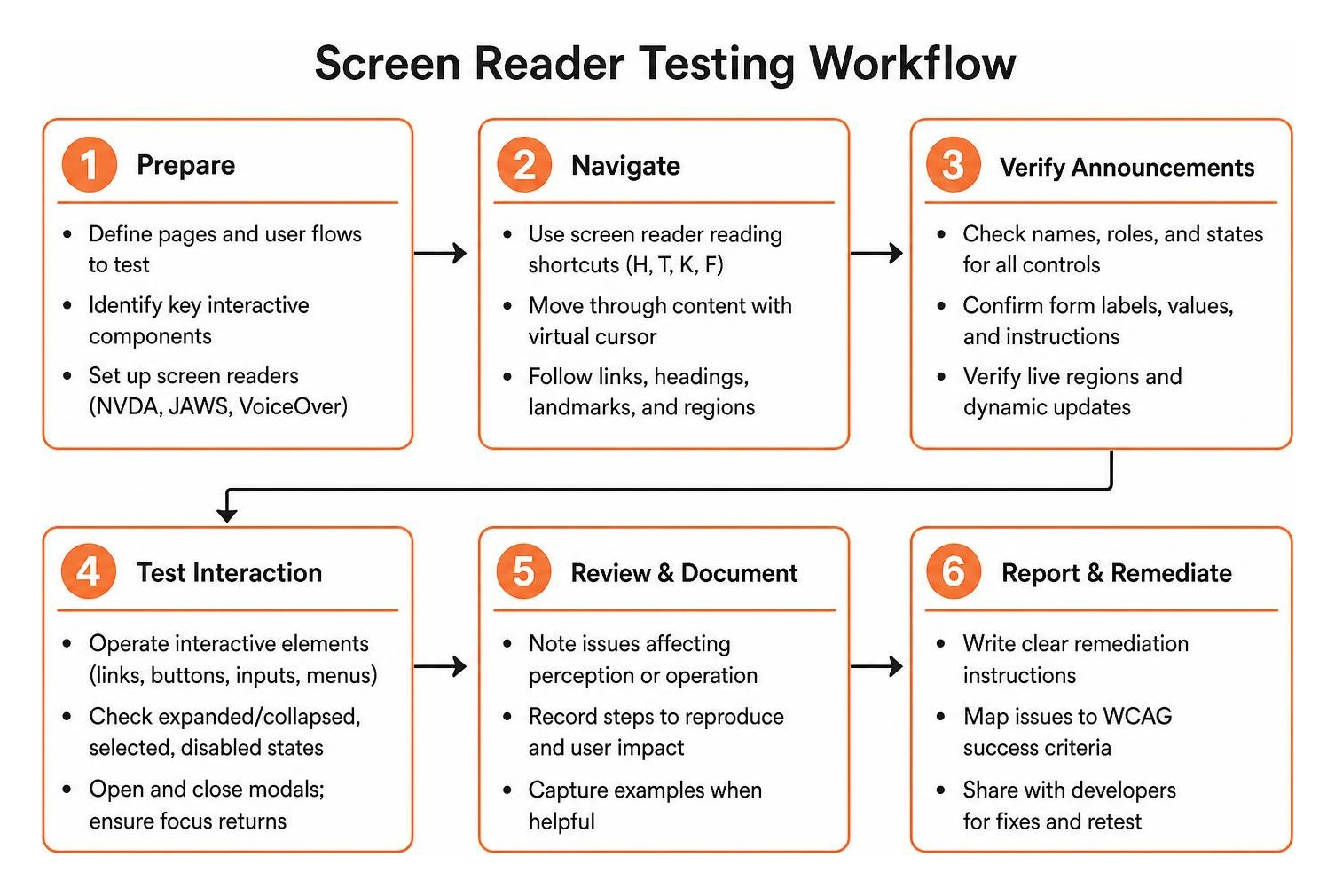
When performing screen reader reviews:
- Windows testing (NVDA & JAWS): Use NVDA with Chrome or Firefox for open-source testing. Use JAWS with Chrome or Edge to reflect enterprise corporate environments. Navigate using reading shortcuts (H for headings, T for tables, K for links, F for forms).
- macOS and iOS testing (VoiceOver): Enable VoiceOver and navigate using the VO modifier keys (Control + Option) along with arrow navigation and the VoiceOver Rotor.
- Check form control names: Ensure inputs, checkboxes, and buttons announce a clear name, role, and current state (such as expanded, collapsed, selected, or disabled).
- Confirm ARIA live regions: Trigger asynchronous actions like adding an item to a cart, filtering a search catalog, or submitting a form to ensure live updates are announced cleanly without interrupting the user.
Visual, Layout, and Zoom Checks
Visual accessibility testing ensures content remains clear and readable under varied viewing conditions, device screens, and display settings.
- 400% Zoom and Reflow (WCAG 1.4.10): Set your browser viewport to 1280px wide and zoom in to 400%. Check that content reflows into a single column without horizontal scrolling and that sticky headers do not block the reading area.
- Color Contrast Evaluation (WCAG 1.4.3 and 1.4.11): Normal text must achieve a minimum contrast ratio of 4.5:1 against its background, while large text (18pt or 14pt bold) requires 3:1. Non-text elements like icons and form borders also require a 3:1 ratio. Our practical tutorial on How to Test Color Contrast Compliance demonstrates how to check complex backgrounds.
- Contrast on Gradients and Images: Sample the lightest and darkest pixels under text placed over photos or color gradients to confirm compliance across the entire string.
- Target Size (WCAG 2.2 Criterion 2.5.8): Verify that touch and pointer targets are at least 24 by 24 CSS pixels, or have sufficient spacing around them, preventing accidental activations.
- Text Spacing and Motion: Adjust line height to 1.5 times the font size and paragraph spacing to 2 times the font size to ensure text boxes do not truncate. Confirm that autoplaying carousels, tickers, and videos provide a visible pause button.
Content Semantics and Structure Review
Semantic structure allows assistive technology to build a functional map of the page:
- Heading Hierarchy: Confirm that each page contains a descriptive
h1element and that subheadings follow a strict hierarchical order (h2beforeh3) without skipping levels. - Data Table Markup: Verify that data tables use
tags with proper scope="col"orscope="row"attributes, and avoid using layout tables for visual spacing.- Link Context: Ensure link text clearly describes its destination out of context. Avoid repetitive phrases like “click here”, “read more”, or bare URLs.
- Plain Language: Content should be structured with bulleted lists, short paragraphs, and clear terminology to reduce cognitive burden.
How to Conduct an Audit Using the WCAG-EM Methodology
To ensure consistency across complex websites, auditors follow the structured approach outlined in the WCAG Evaluation Methodology (WCAG-EM) 2.0. Following a formal methodology creates defensible, repeatable audit records.

The WCAG-EM workflow consists of five structured stages:
- Define the Evaluation Scope: Determine the target conformance level (WCAG 2.2 Level AA), identify product boundaries, and list included subdomains.
- Explore the Target Digital Product: Map primary user flows, distinct page layouts, unique technologies (video players, dynamic forms, canvas apps), and key interactive states.
- Select a Representative Sample Set: Choose a sample that includes common templates, high-traffic pages, critical transactional paths (checkout, login, registration), and pages containing diverse UI components.
- Evaluate the Selected Sample Set: Perform automated scans, keyboard-only testing, screen reader reviews, and visual inspections across every sampled page.
- Report the Evaluation Findings: Document every violation with exact reproduction steps, impact severity, corresponding WCAG success criteria, and code-level remediation guidance.
For organizations seeking third-party compliance verification, The Certified WCAG Audit Process Your Shield Against Lawsuits details how our comprehensive evaluation protects businesses from accessibility litigation.
Essential Tools for WCAG Manual Testing
Auditors rely on specialized testing tools to inspect code structure and simulate different user environments:
- axe DevTools: A browser extension that runs automated baseline scans and highlights specific elements for manual inspection.
- ANDI (Accessible Name & Description Inspector): A free accessibility bookmarklet that inspects interactive elements, visualizes tab order, and reveals accessible names.
- Colour Contrast Analyser (CCA): A standalone desktop tool that samples pixel colors across gradients, images, and custom UI components to calculate exact contrast ratios.
- Browser Developer Tools: Chrome, Firefox, and Safari DevTools allow auditors to inspect DOM trees, test pseudo-classes, view the accessibility tree, and simulate color blindness.
To assemble your team’s toolkit, review The Ultimate Website Accessibility Testing Checklist for 2026 for a complete breakdown of modern audit tools.
Integrating WCAG Manual Testing into Agile Sprints
Manual accessibility checks should not be saved for an annual audit. Organizations achieve better results by integrating accessibility testing directly into their regular development cycles:
- Design Handoff Reviews: UX designers annotate component focus indicators, reading order, and color contrast values before development starts.
- Pull Request Acceptance: Developers perform a quick keyboard-only check and inspect form labels before merging code into staging.
- Sprint QA Verification: QA engineers run dedicated manual accessibility test cases during regular sprint testing.
- Continuous Regression Monitoring: Automated scanners in CI/CD pipelines catch low-level regressions, while human testers evaluate newly released features.
To plan your team’s ongoing accessibility strategy, our Website Accessibility Remediation Complete Guide provides step-by-step instructions for fixing issues across your codebase.
Frequently Asked Questions about WCAG Testing
How much of WCAG 2.2 can automated tools catch compared to manual checks?
Automated scanners detect between 30% and 40% of WCAG 2.2 violations. Automated tools excel at verifying basic syntax, missing attributes, and simple mathematical contrast checks. However, human judgment is required to evaluate contextual issues like meaningful alt text, logical focus order, dynamic live announcements, and overall usability for assistive technology users.
How long does a manual accessibility review take per web page?
A thorough manual review typically takes between 20 and 40 minutes per web page or unique template. Simple informational pages with basic typography and few links can be reviewed in 15 to 20 minutes. Highly complex interactive pages, such as single-page application dashboards, checkout flows, or dynamic booking forms, may require 45 to 60 minutes to evaluate across multiple screen readers and viewport configurations.
What is the difference between manual inspection and user testing with disabled users?
Manual inspection is an expert-driven code and interface audit conducted by an accessibility specialist using assistive software, developer tools, and WCAG success criteria. User testing with disabled individuals involves real users completing core tasks on your website using their own everyday assistive technology. Expert manual audits uncover technical compliance issues, while user testing highlights real-world usability barriers and personal navigation preferences.
Conclusion
Building an accessible website requires a commitment to continuous quality and proactive remediation. While automated scanners provide a rapid baseline, manual testing provides the human insight needed to ensure true digital access for every customer. By evaluating keyboard mechanics, screen reader compatibility, responsive layouts, and content semantics, your team can eliminate digital barriers and reduce legal risk.
At WCAG Pros, our team of seasoned specialists conducts comprehensive manual audits of all 54 WCAG 2.2 Level A and AA checkpoints. We provide actionable, code-level remediation guidance and free re-audits to help your business achieve authentic compliance. To protect your brand and welcome all users, explore our expert WCAG audit services today.
Read more website accessibility articles
Get Help With Your Website
We'll follow up with info about:
- The process
- Cost
- Timeline
We promise to respect your privacy, and never abuse the information you provide. We will not sell or rent your information to any third party.
By submitting this form, you consent to receive SMS messages and/or emails from SEM Dynamics LLC, dba WCAG Pros. To unsubscribe, follow the instructions provided in our communications. Msg & data rates may apply for SMS. Your information is secure and will not be sold to third parties.
