
Step-by-Step Guide to WCAG Compliance Reports
Step-by-Step Guide to WCAG Compliance Reports
What a WCAG Compliance Report Actually Is (And Why It Matters for Your Business)
A WCAG compliance report is a structured document that records how well your website meets the Web Content Accessibility Guidelines set by the W3C. If you need a quick answer, here is what you need to know:
What a WCAG compliance report includes:
- The specific WCAG version and conformance level being claimed (Level A, AA, or AAA)
- The scope of the evaluation (which pages and processes were tested)
- Pass, fail, or partial results for each success criterion
- The testing methods and assistive technologies used
- Any exceptions or limitations, including third-party content
Why you need one:
- It documents your accessibility status for legal protection against ADA lawsuits
- It is required for U.S. federal procurement under Section 508
- It helps your team prioritize and track remediation work
- It demonstrates good faith effort to regulators and plaintiffs
Accessibility lawsuits in the U.S. have risen sharply over the past decade. Without a documented compliance report, your business has no clear record of what was tested, what was fixed, or where you stand. That gap is exactly where legal risk lives.
WCAG 2.2, published as a W3C Recommendation, adds 17 new success criteria beyond the original WCAG 2.0 standard. Many organizations are still reporting against outdated versions, which leaves real gaps in their coverage and legal defense.
I’m Matthew Post, co-founder of WCAG Pros and a web developer with over 20 years of experience auditing sites for WCAG compliance reports and leading remediation projects for businesses facing ADA legal risk. In the sections below, I’ll walk you through exactly how to build a report that holds up to scrutiny.
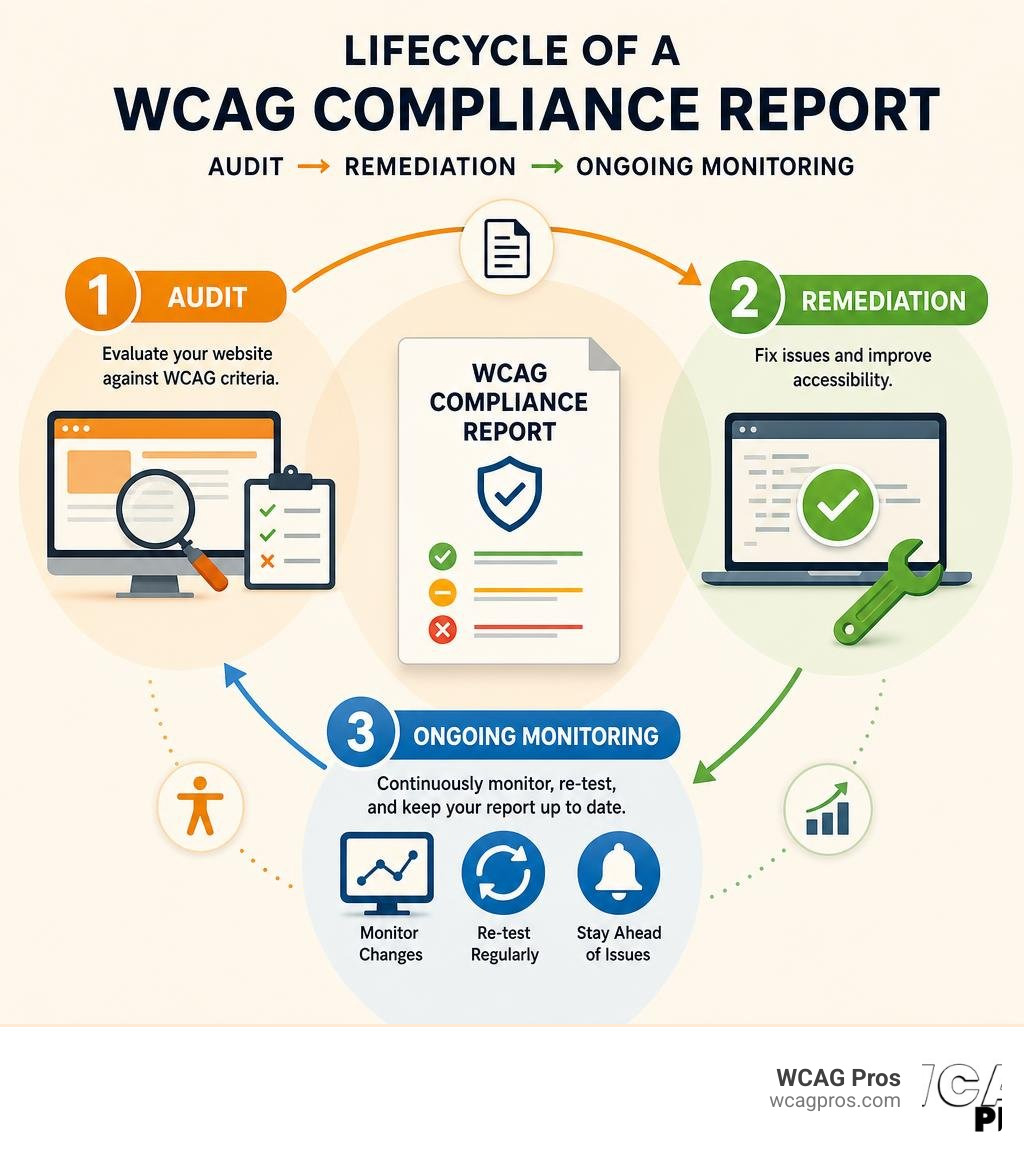
Know your WCAG compliance report terms:
What is a WCAG Compliance Report and Why Do You Need One
A WCAG compliance report is more than just a pass or fail grade for your website. It is an exhaustive evaluation that shows exactly how accessible your digital assets are to individuals with disabilities. Think of it as a comprehensive health check for your website code and user interface.
Many businesses treat accessibility as an afterthought, but a formal report is a vital business asset. When you document your accessibility journey, you create a shield against legal claims and build a clear path forward for your development team. To understand the foundations of this process, you can read our guide on Website Compliance Audit 101.

If you are a private business or a public entity, you face increasing pressure to make your digital content accessible. In the United States, Title III of the ADA requires businesses to provide accessible websites. If you do not have a documented report, you cannot easily prove your commitment to accessibility.
Additionally, many companies use a formal accessibility conformance report to satisfy procurement officers, commercial partners, and legal departments. It is the gold standard for showing that you take digital inclusion seriously.
Understanding Conformance Levels A, AA, and AAA
When you set out to create a compliance report, you must choose your target conformance level. WCAG divides its criteria into three distinct tiers:
- Level A is the absolute minimum level of accessibility. It covers basic features like keyboard navigation and alternative text for images. If your site fails Level A, it is highly likely that people with disabilities will find it completely unusable.
- Level AA is the global standard that most organizations target. It is the level referenced by major laws like the ADA, Section 508, and the European Accessibility Act. Level AA addresses more complex issues like color contrast, focus visibility, and reflow. To learn more about these specific criteria, look at The Complete Guide to WCAG AA Compliance Requirements.
- Level AAA is the highest and most stringent level of accessibility. It is extremely difficult to achieve across an entire website, and the W3C does not recommend it as a general policy for whole sites because some content simply cannot meet all AAA criteria. However, aiming for AAA in specific areas like sign language interpretation or advanced contrast is always a great practice.
For almost every business, Level AA is the correct target. It offers the best balance between design flexibility and comprehensive accessibility.
Key Components of a Standard WCAG Compliance Report
A professional WCAG compliance report must follow a specific structure to be considered valid and defensible. When we compile these reports, we make sure they contain both required and optional elements to provide a complete picture.
According to the W3C, a formal conformance claim must include the following required elements:
- The date of the claim because websites change constantly and a report is a snapshot in time.
- The specific guidelines and version used such as WCAG 2.2.
- The conformance level targeted which is typically Level AA.
- A detailed description of the scope including the exact URLs, domain names, or processes that were evaluated.
- A list of the technologies relied upon to make the site accessible, such as HTML, CSS, JavaScript, and WAI-ARIA.
Beyond these required elements, a great report also includes optional components that make the document practical for developers. These include:
- A list of the assistive technologies and web browsers used during testing.
- Detailed developer notes and code snippets for every failure identified.
- A prioritized remediation roadmap based on the severity of each issue.
- A clear statement of partial conformance if certain third-party elements are excluded.
To understand how to test for these elements, you can read The Ultimate Guide to Online Accessibility Testing.
Step-by-Step Process to Generate a Compliance Report
Creating an accurate WCAG compliance report requires a systematic approach. You cannot simply run a free online scanner and call it a day. Automated tools are incredibly helpful, but they only catch a fraction of actual accessibility issues. A true audit combines automated scanning with expert manual testing.
To help you visualize this journey, here is how the process flows from start to finish:
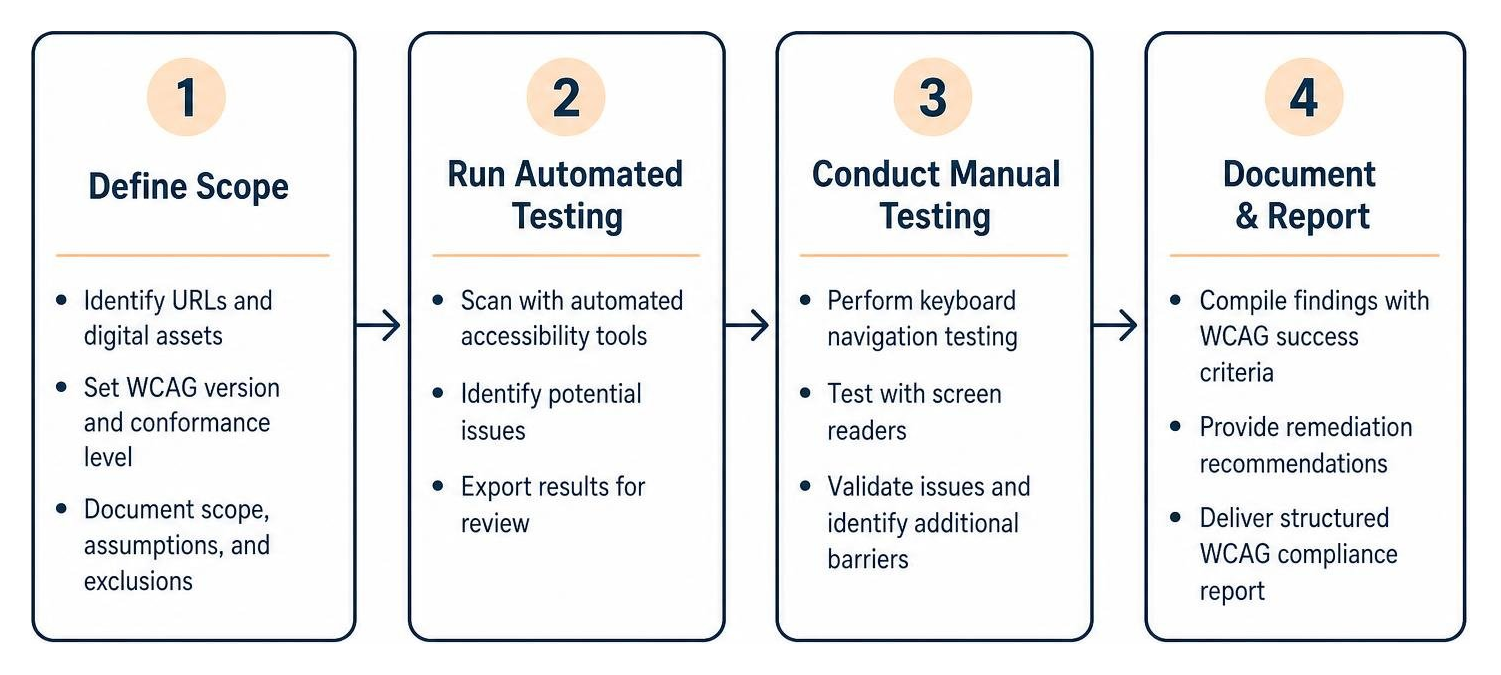
First, we define the scope of what we are testing. Second, we run automated tools to catch low-hanging fruit like missing alt text or poor color contrast. Third, our specialists perform manual keyboard and screen reader testing on a representative sample of pages. Finally, we document every finding in a structured report.
If you want to dive deeper into how we structure these comprehensive audits, check out The Ultimate Guide to a WCAG Comprehensive Website Audit.
Utilizing the WCAG-EM Report Tool for Documentation
The W3C provides a fantastic resource called the WCAG-EM Report Tool. This tool is built specifically to help organizations document WCAG evaluations in a standardized way. It follows the Web Content Accessibility Guidelines Evaluation Methodology (WCAG-EM).
The tool does not perform the testing for you. Instead, it acts as a structured wizard where you input your findings step by step.
It guides you through defining the evaluation scope, exploring the target website, selecting a representative sample of pages, and recording your audit results. Once you finish entering your data, the tool generates a clean, structured report that you can download and share with your stakeholders. It is an excellent way to ensure your report matches international auditing standards.
Defining the Scope and Testing Environment
Before you write a single line of your report, you must clearly define your testing scope. A website can have thousands of pages, and testing every single one manually is often impractical. Instead, we select a representative sample that includes:
- The homepage and main landing pages.
- Key user journeys like checkout, registration, or contact forms.
- Pages with unique layouts or interactive widgets.
- Legal documents and help centers.
You also need to document your testing environment. This is often called a browser and assistive technology matrix. You must test your site using different combinations of browsers and screen readers to ensure compatibility.
For example, a standard enterprise audit like the D2L Accessibility Conformance Report will explicitly list the operating systems, browsers, and screen readers used, such as JAWS, NVDA, or VoiceOver. This transparency ensures that your results are reproducible and verifiable.
Evaluating Key WCAG 2.2 Success Criteria
Evaluating your website against the guidelines requires a deep understanding of the individual success criteria. WCAG 2.2 is the latest standard, and it introduces important updates that build upon previous versions.
To help you understand how the standards have evolved, let us look at how WCAG 2.2 compares to the older WCAG 2.0 standard:
| Feature / Metric | WCAG 2.0 | WCAG 2.2 |
|---|---|---|
| Release Year | 2008 | Published as current standard |
| Total Success Criteria | 61 | 86 (Adds 25 criteria beyond 2.0) |
| Focus Areas | Desktop and basic web structures | Mobile devices, low vision, and cognitive accessibility |
| Key New Criteria | Basic keyboard, contrast, and alt text | Reflow, Non-text Contrast, and Label in Name |
| Backwards Compatibility | Foundation for all future versions | Fully compatible (Conforming to 2.2 means you conform to 2.0) |
This comparison highlights why reporting against the latest WCAG 2.2 standard is so critical. It addresses modern web design patterns that did not exist when WCAG 2.0 was written. For a complete breakdown of all requirements, you can consult The Definitive Guide to WCAG Guidelines.
Common Success Criteria Evaluated in a WCAG Compliance Report
When we review a website, several success criteria consistently require the most attention. These are the areas where developers most frequently make mistakes:
- Reflow (Success Criterion 1.4.10, Level AA): This requires that your content can zoom up to 400 percent without forcing users to scroll horizontally. It is crucial for users with low vision who need large text.
- Non-text Contrast (Success Criterion 1.4.11, Level AA): This extends contrast requirements to user interface components and graphical objects, ensuring that active buttons, form borders, and icons have a contrast ratio of at least 3:1 against their background.
- Label in Name (Success Criterion 2.5.3, Level A): For interactive controls, the programmatic accessible name must contain the visible text label. If a button says “Submit” visually but is labeled “Button 1” in the code, voice activation users will not be able to interact with it.
Major tech companies and platforms regularly document these criteria in their public reports. For instance, you can see how these standards are applied in the Experience Cloud, Aura (Desktop and Web Mobile) Spring ’25 Accessibility Conformance Report .
Verifying Accessibility-Supported Techniques
When evaluating a site, you must verify that your accessibility features are actually “accessibility-supported.” This means that they work reliably with assistive technologies like screen readers and screen magnifiers.
Sometimes, developers use non-supported methods that pass automated code checkers but fail in real-world usage.
For example, using custom CSS tricks to hide text might look fine to an automated scanner, but it can confuse screen readers or keyboard users. We perform manual code inspection and functional testing to verify that your developers are using W3C-approved sufficient techniques. This step ensures your compliance claim is accurate and defensible.
Handling Complex Scenarios and Partial Conformance
Not every website is built entirely from scratch. Most modern sites rely on third-party integrations, embedded widgets, or user-generated content. This can make achieving 100 percent conformance a major challenge.
What happens if an embedded map or a payment gateway that you do not control has accessibility barriers? WCAG allows you to handle these situations using a Statement of Partial Conformance.
A Statement of Partial Conformance allows you to claim compliance for the parts of your website that you do control, while clearly identifying the elements you do not.
For example, local government websites often have to integrate complex public record portals. You can see how a public entity handles this transparency by reviewing the Website Accessibility Information, City of Norco, Horsetown USA . By explicitly stating which third-party systems are excluded, you protect your organization while remaining honest about your digital footprint.
Frequently Asked Questions About WCAG Compliance Reports
Is a WCAG compliance report the same as a VPAT or ACR?
Not exactly, though they are closely related. A VPAT (Voluntary Product Accessibility Template) is a blank template created by the Information Technology Industry Council. When an accessibility expert completes a VPAT for a specific product, the finished document is called an ACR (Accessibility Conformance Report).
An ACR is a specific type of compliance report used primarily in procurement, especially when selling software or services to government entities or large enterprises. A general WCAG compliance report can take many formats, but an ACR always follows the strict VPAT structure.
How Often Should a WCAG Compliance Report Be Updated?
Websites are not static. Every time you publish a new blog post, update a product description, or release a new feature, you risk introducing new accessibility bugs. Because of this dynamic environment, we recommend updating your compliance report at least once a year.
If you run a highly active e-commerce platform or a web application with frequent code deployments, you should perform quarterly audits to keep your documentation accurate. To learn more about how WCAG versions and audits change over time, read Everything You Need to Know About WCAG Versions and Audits.
Can Automated Checkers Generate a Fully Compliant Report?
No. Automated accessibility checkers are incredibly useful for catching simple errors like missing image alt text or basic color contrast failures, but they can only detect about 30 to 40 percent of overall accessibility issues.
An automated tool cannot tell you if your keyboard focus order is logical, if your interactive modal traps focus correctly, or if your alternative text actually describes the meaning of an image in context. A truly compliant and legally defensible report requires a hybrid approach that combines automated scanning with expert manual testing by experienced accessibility professionals.
Conclusion
Creating a WCAG compliance report is a vital step toward protecting your business from legal risks, improving your search engine optimization, and opening your digital doors to all users. Whether you need to satisfy a corporate partner, meet federal procurement guidelines, or simply do the right thing for your customers, a structured compliance report is your roadmap to success.
At WCAG Pros, we specialize in helping businesses navigate this complex landscape. Based in Norco CA, we provide comprehensive, page-by-page audits of all 54 WCAG Level A and AA success criteria. Our reports do not just list your problems, they provide exact code-level fixes that your developers can implement immediately. Plus, we offer free re-audits to help you secure your official compliance badges.
Are you ready to secure your website and protect your business? Get a Professional WCAG Audit from our team today.
Read more website accessibility articles
Get Help With Your Website
We'll follow up with info about:
- The process
- Cost
- Timeline
We promise to respect your privacy, and never abuse the information you provide. We will not sell or rent your information to any third party.
By submitting this form, you consent to receive SMS messages and/or emails from SEM Dynamics LLC, dba WCAG Pros. To unsubscribe, follow the instructions provided in our communications. Msg & data rates may apply for SMS. Your information is secure and will not be sold to third parties.