
The Ultimate Guide to Online Accessibility Testing
The Ultimate Guide to Online Accessibility Testing
Why Online Accessibility Testing Matters for Every Website
Online accessibility testing is the process of evaluating a website to ensure people with disabilities can use it effectively. It checks whether your site meets standards like WCAG 2.2 and ADA requirements.
Quick answer: What is online accessibility testing?
| Question | Answer |
|---|---|
| What does it do? | Scans your website for barriers that block users with disabilities |
| Who needs it? | Any business with a website, especially those serving the public |
| What standards does it check? | WCAG 2.2, ADA, Section 508, EAA, and other global regulations |
| How is it done? | Automated scanners, manual audits, or a combination of both |
| What happens if you skip it? | Legal risk, lost customers, and ADA lawsuits averaging $5,000 to $25,000 in settlements |
Here is why this matters right now.
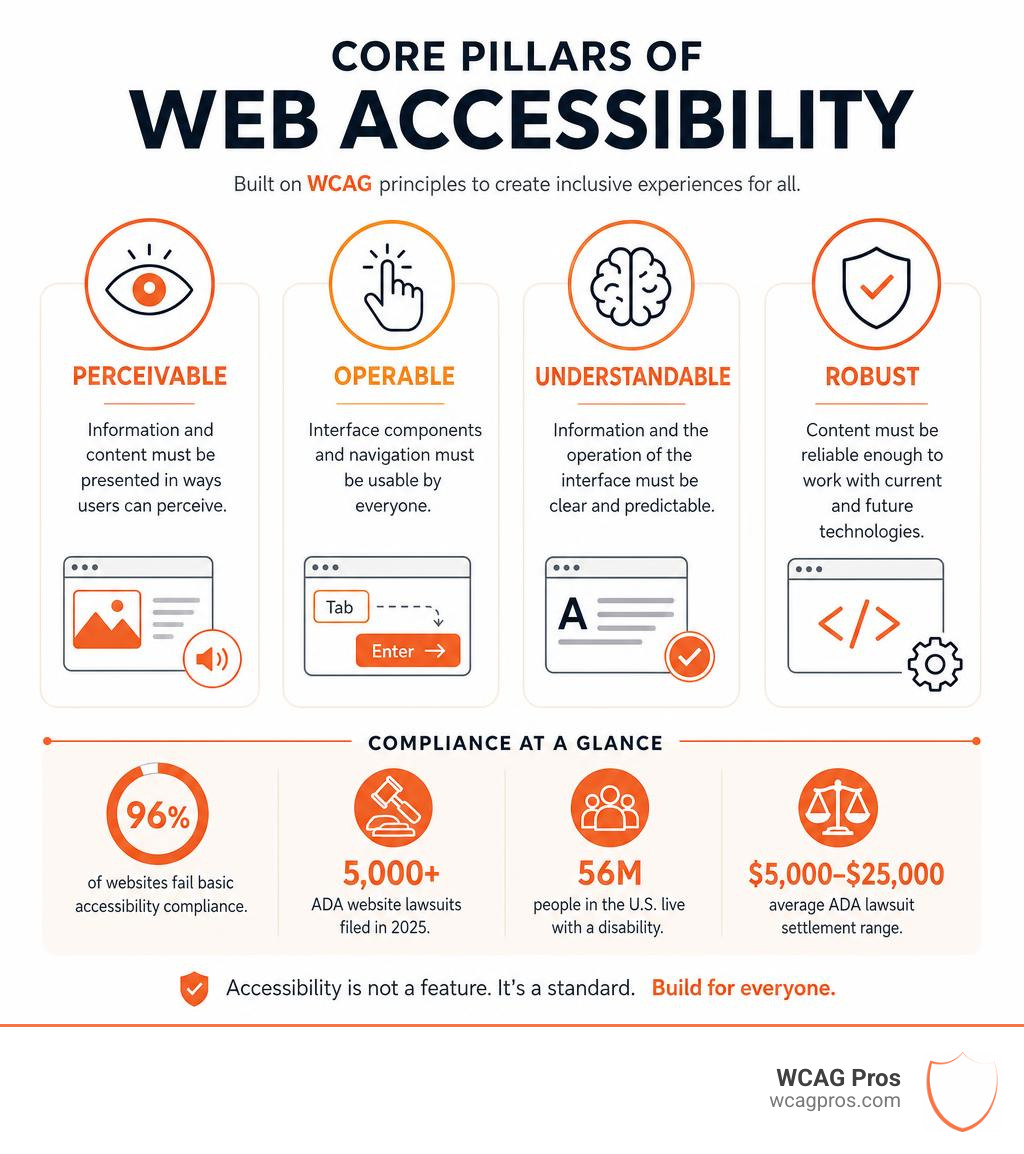
96% of websites fail basic accessibility compliance. That means the overwhelming majority of businesses are exposed to legal risk without even knowing it. Over 5,000 ADA website lawsuits were filed in 2025 alone, and enforcement is only increasing.
The stakes go beyond legal fees. Critical accessibility issues make your site effectively unusable to roughly 20% of the global population living with a disability. In the US alone, 56 million people have a disability. These are real customers you may be turning away.
The good news: accessibility testing gives you a clear picture of where your site stands and what to fix first. Whether you run a small business site or manage a large enterprise platform, the process starts the same way: find the issues, understand their impact, and fix them.
I’m Matthew Post, co-founder of WCAG Pros and a web developer with over 20 years of experience specializing in online accessibility testing, WCAG audits, and accessibility remediation. I personally supervise every audit at WCAG Pros, and this guide reflects what I’ve learned helping businesses of all sizes reduce legal risk and build more inclusive websites.
Understanding Web Accessibility Standards and Legal Risks
When we talk about web accessibility, we are not just talking about a polite design choice. We are talking about a set of global standards and legal frameworks that govern how digital content must behave. If your website is open to the public, it is subject to civil rights laws that protect people with disabilities from discrimination.
Understanding these rules is the first step toward protecting your business and serving all your users. Let us break down the core standards and the real-world legal landscape that every website owner must navigate.
Global Accessibility Regulations and Deadlines
The global standard for digital accessibility is the Web Content Accessibility Guidelines, which we always refer to as WCAG. The most current and comprehensive version is WCAG 2.2. These guidelines are organized into three levels of conformance: Level A (minimum accessibility), Level AA (the standard target for most legal compliance), and Level AAA (the highest level of accessibility).
While WCAG 2.2 itself is a technical standard rather than a law, it serves as the foundation for almost every major accessibility law in the world.
In the United States, the primary legislation affecting the private sector is Title III of the Americans with Disabilities Act, or ADA. Under ADA Title III, websites are legally considered places of public accommodation. This means businesses must make their websites accessible to individuals with disabilities. Courts consistently point to WCAG 2.2 Level AA as the benchmark for what makes a website legally compliant.
For government agencies and organizations that receive federal funding, Section 508 of the Rehabilitation Act is the governing law. Section 508 requires all federal information and communication technology to be accessible. This includes public websites, internal portals, and electronic documents.
Local rules are also tightening. For example, municipal websites must meet strict criteria to serve their local communities. You can see an example of local compliance standards by reviewing the Website Accessibility Information for the City of Norco Horsetown USA page, which demonstrates how local public entities outline their dedication to digital inclusion.
Internationally, the European Accessibility Act, or EAA, set a massive shift in motion. Private companies doing business in the European Union had to meet strict accessibility requirements, with enforcement ramping up heavily after the June 2025 deadline. In the US, state and local governments face their own strict deadlines to achieve compliance.
Failing to meet these deadlines carries severe consequences. Over 5,000 ADA website lawsuits were filed in 2025. The average settlement for these cases ranges from $5,000 to $25,000, not including your own legal fees or the cost of rushed website remediation. For businesses operating under regional guidelines, corporate fines can reach tens of thousands of dollars per day for ongoing non-compliance.
The Business and SEO Impact of Compliance
While avoiding lawsuits is a strong motivator, web accessibility is also an incredible business opportunity. When you optimize your website for users with disabilities, you naturally optimize it for search engines and general consumers as well.
Consider how search engine crawlers read your website. Search engines are essentially blind. They cannot watch a video, look at an image, or navigate a complex visual interface. They rely entirely on your website’s underlying code, structure, and text.
By implementing accessibility best practices, you improve your search engine optimization, or SEO, in several ways:
- Semantic HTML: Using proper header structures (H1, H2, H3) helps screen readers navigate your page, but it also tells search engines exactly what your content is about.
- Alternative Text: Adding descriptive alt text to images allows visually impaired users to understand your visuals while giving search engines valuable context for image searches.
- Descriptive Link Text: Replacing generic links like “click here” with descriptive text like “read our accessibility checklist” helps assistive technologies and improves keyword associations for search engines.
Furthermore, accessible design dramatically improves the overall user experience, or UX. Statistics show that 88% of consumers are less likely to return to a website after a bad user experience. If your site is frustrating to navigate, has poor color contrast, or features broken forms, you will lose visitors.
By investing in professional support, you can ensure your site provides a seamless experience for everyone. If you want to dive straight into a complete evaluation of your site, you can get a comprehensive review through our dedicated portal at WCAG Pros Audits.
A Step-by-Step Guide to Online Accessibility Testing
Achieving accessibility compliance does not happen by accident. It requires a structured approach to testing, fixing, and monitoring your digital assets. Let us look at how you can build an effective testing workflow.

Integrating Online Accessibility Testing into the Development Lifecycle
The most expensive way to handle accessibility is to build your entire website, launch it, and then try to fix the errors afterward. This is often called the “bolt-on” approach, and it frequently leads to broken layouts, delayed launches, and high development costs.
Instead, we recommend a “shift-left” testing strategy. This means integrating online accessibility testing into the very beginning of your website’s lifecycle.
Here is how you can build accessibility testing into your workflow:
- Design Phase: Review wireframes and design mockups for color contrast, clear typography, and logical layout flows before any code is written.
- Development Phase: Developers should use browser extensions and automated testing rules to check their code as they build components.
- Continuous Integration (CI/CD) Pipelines: Integrate automated testing engines into your deployment pipeline. This acts as a pre-release gate, automatically blocking code updates that introduce critical accessibility errors.
- Developer APIs: Use testing APIs to run automated scans on staging environments and local builds to catch errors before they reach your live server.
If you are new to this process, you can read our guide on How to Test Web Accessibility and Succeed to learn how to establish these workflows. You can also explore our step-by-step methodology in How to WCAG Test in 5 Simple Steps or learn how to Test Site for Accessibility Without Breaking a Sweat.
Best Practices for Ongoing Online Accessibility Testing and Monitoring
Websites are dynamic. Every time you publish a new blog post, upload a product image, or install a third-party plugin, you run the risk of introducing new accessibility barriers. Accessibility is not a one-time project. It is an ongoing practice.
To maintain compliance over time, establish a continuous monitoring routine:
- Schedule Regular Automated Scans: Run weekly or monthly automated scans across your entire domain to catch basic errors like missing alt text or broken links.
- Track Accessibility Scores: Use monitoring dashboards to track your progress and watch for sudden drops in your accessibility health score.
- Maintain an Audit Trail: Document your scans, identified issues, and completed fixes. This written record demonstrates a good-faith effort to maintain accessibility, which can be invaluable for legal defense.
- Empower Content Creators: Provide clear guidelines and checklists to anyone who updates your website so they do not accidentally introduce errors.
For a complete roadmap on maintaining your site, check out The Ultimate Website Accessibility Testing Checklist for 2026. If you are just starting out and need to understand the basics of a full review, our Beginners Guide to Website Accessibility Audit is the perfect place to begin.
Automated versus Manual Accessibility Testing Methods and Tools
A common question we hear is: “Can I just run an automated scanner and call it a day?” The short answer is no. To achieve true compliance and provide a great user experience, you must understand the strengths and weaknesses of both automated and manual testing.
| Testing Method | What It Catches | What It Misses | Best Used For |
|---|---|---|---|
| Automated Testing | Missing alt text, poor color contrast ratios, missing form labels, basic HTML structure errors | Logical reading order, quality of alternative text, keyboard traps, screen reader usability | High-volume scanning, rapid regression testing, continuous monitoring |
| Manual Testing | Keyboard navigation barriers, complex interactive elements, screen reader compatibility, cognitive usability | Scale testing across thousands of pages simultaneously, instant code syntax validation | Deep-dive audits, final compliance verification, testing interactive user flows |
The Limitations of Automated Scanners
Automated scanners are incredibly fast and efficient. They can scan hundreds of pages in seconds and flag obvious violations. However, automated tools can only detect about 30% to 50% of all potential accessibility issues.
Why is the detection rate so low? Because automated tools lack human context.
For example, an automated scanner can check if an image has an “alt” attribute. If the code says alt="image", the scanner will mark it as a pass. However, “image” is completely useless to a visually impaired user. A human tester would immediately flag this and replace it with descriptive text like “Golden Retriever puppy playing with a red ball.”
Similarly, automated tools struggle with dynamic elements, such as modal popups, custom dropdown menus, and interactive forms. They cannot tell if a keyboard user will get trapped inside a popup window with no way to close it.
To learn more about what automated tools can and cannot do, read our article on Automated Web Accessibility Testing Made Easy.
Why Manual Audits and Real User Testing are Essential
Manual testing is where true accessibility compliance is won or lost. It involves human testers interacting with your website exactly like your users do.
The core of manual testing includes:
- Keyboard-Only Navigation: Unplug your mouse or trackpad and try to navigate your entire website using only the Tab, Shift-Tab, Enter, and Arrow keys. Can you access every link? Can you submit forms? Is there a clear visual indicator showing which element is currently focused?
- Screen Reader Testing: Test your site using popular screen readers like NVDA, JAWS on Windows, or VoiceOver on macOS. Listen to how the screen reader announces your content. Is the reading order logical? Are interactive elements announced correctly?
- Assistive Technology Evaluation: Test how your site behaves when zoomed in to 400% or when viewed on different screen sizes and devices.
For the absolute best results, we highly recommend testing with users who have real-world disabilities. Their feedback will reveal usability barriers that no automated tool or non-disabled developer could ever predict. You can learn more about this approach in our guide on How to Test Your Websites Accessibility Using Real Users.
Popular Automated Checkers and Browser Extensions
When you are ready to start testing, there are several fantastic free and paid tools available to help you identify issues:
- WAVE (Web Accessibility Evaluation Tool): Developed by WebAIM, WAVE is one of the most popular free accessibility checkers. It provides visual feedback by injecting icons directly onto your web page, making it easy to see exactly where errors exist.
- axe DevTools: Built by Deque, axe is a powerful browser extension favored by developers. It integrates directly into your browser’s developer tools and provides highly accurate, actionable code recommendations.
- Siteimprove Accessibility Checker: A great extension for checking public pages and receiving clear explanations of WCAG 2.2 violations.
- ANDI (Accessible Name & Description Inspector): A free bookmarklet used by federal agencies to test for Section 508 compliance. It is excellent for checking text alternatives and interactive elements.
To explore more options, browse The Ultimate List of Free Online Accessibility Checkers or find Your Shortcut to the Best WCAG Checker Tool.
Selecting the Right Evaluation Software for Your Team
Choosing the right tool depends on your team’s size, technical expertise, and specific workflow needs. If you have a team of developers, you will want tools that offer robust APIs and command-line integrations. If you are a content manager, you will want visual dashboards and plain-language remediation instructions.
For a detailed breakdown of how to choose the right software, read our guide on how to Pick the Best Web Accessibility Evaluation Tool for Your Team.
Frequently Asked Questions about Web Accessibility
Are websites legally obligated to follow WCAG 2.2?
While WCAG 2.2 itself is a set of guidelines published by the World Wide Web Consortium, it is not a direct piece of legislation. However, it is the global standard that courts and regulators use to define digital accessibility.
Under laws like ADA Title III in the US, the European Accessibility Act in the EU, and regional rules worldwide, websites are legally obligated to be accessible. Meeting the criteria of WCAG 2.2 Level AA is widely recognized as the safest way to satisfy these legal obligations and protect your business from lawsuits.
What is the difference between ADA Title III and Section 508?
Both are US federal standards, but they apply to different groups:
- ADA Title III covers the private sector. It applies to businesses, non-profits, and any organization that serves the public. It mandates that websites must be accessible as places of public accommodation.
- Section 508 applies specifically to federal agencies, government departments, and organizations that receive federal funding or provide services to federal entities.
Both standards rely heavily on WCAG guidelines to measure compliance.
Can automated scanners identify all accessibility issues?
No. Automated scanners are excellent for catching high-volume technical errors like missing alt attributes or incorrect color contrast ratios. However, they cannot evaluate contextual usability, logical reading order, or whether a complex interactive element is truly usable with a screen reader.
To achieve full compliance and ensure a great user experience, automated scanning must always be paired with manual audits and keyboard testing.
Conclusion
Building an accessible website is not just about avoiding legal risk. It is about welcoming every user to your digital space. By combining automated testing tools with thorough manual reviews, you can identify barriers, improve your SEO, and deliver an exceptional user experience to everyone.
At WCAG Pros, we help businesses navigate this process with ease. We provide comprehensive, page-by-page manual audits covering all 54 WCAG A/AAA conformance points. We do not just hand you a list of errors. We deliver exact code fixes and offer free re-audits to help you earn your compliance badge.
Let us help you make your website accessible, compliant, and high-performing. Get started today by visiting our Get a Professional WCAG Audit page.
Read more website accessibility articles
Get Help With Your Website
We'll follow up with info about:
- The process
- Cost
- Timeline
We promise to respect your privacy, and never abuse the information you provide. We will not sell or rent your information to any third party.
By submitting this form, you consent to receive SMS messages and/or emails from SEM Dynamics LLC, dba WCAG Pros. To unsubscribe, follow the instructions provided in our communications. Msg & data rates may apply for SMS. Your information is secure and will not be sold to third parties.