
A Practical Guide to Web Accessibility Testing Tools
A Practical Guide to Web Accessibility Testing Tools
The Best Web Accessibility Testing Tools in 2026 (Quick Comparison)
Web accessibility testing tools are software programs or online services that help you find and fix barriers that prevent people with disabilities from using your website. They check your site against standards like WCAG 2.2, ADA, and Section 508.
Here are the top tools to know:
- WAVE (Free browser extension): Best for quick visual audits
- axe DevTools (Free + paid extension): Best for developer workflows
- IBM Equal Access (Free extension): Best for WCAG 2.2 depth
- Siteimprove (Paid platform): Best for enterprise monitoring
- AudioEye (Paid platform): Best for issue detection volume
- Clym Accessibility Tools (Free desktop app): Best for open source compliance
- UsableNet AQA (Paid platform): Best for automated user flow testing
No single tool catches every issue. Automated tools typically find around 30% to 40% of accessibility problems. The rest requires manual review and human judgment.
If your site is facing ADA legal risk, you need both automated scanning and expert manual testing.
Running a website with potential ADA exposure is stressful. You may have already received a demand letter, or you know your site is not fully compliant. Either way, the number of tools available can feel overwhelming. The W3C Web Accessibility Initiative alone lists 118 accessibility evaluation tools in its directory. Knowing which ones to trust, and how to use them together, is the real challenge.
I’m Matthew Post, cofounder of WCAG Pros and a web developer with over 20 years of experience auditing sites for web accessibility testing tools and WCAG compliance. In this guide, I’ll cut through the noise and show you exactly which tools work, what they catch, and where you still need expert help.
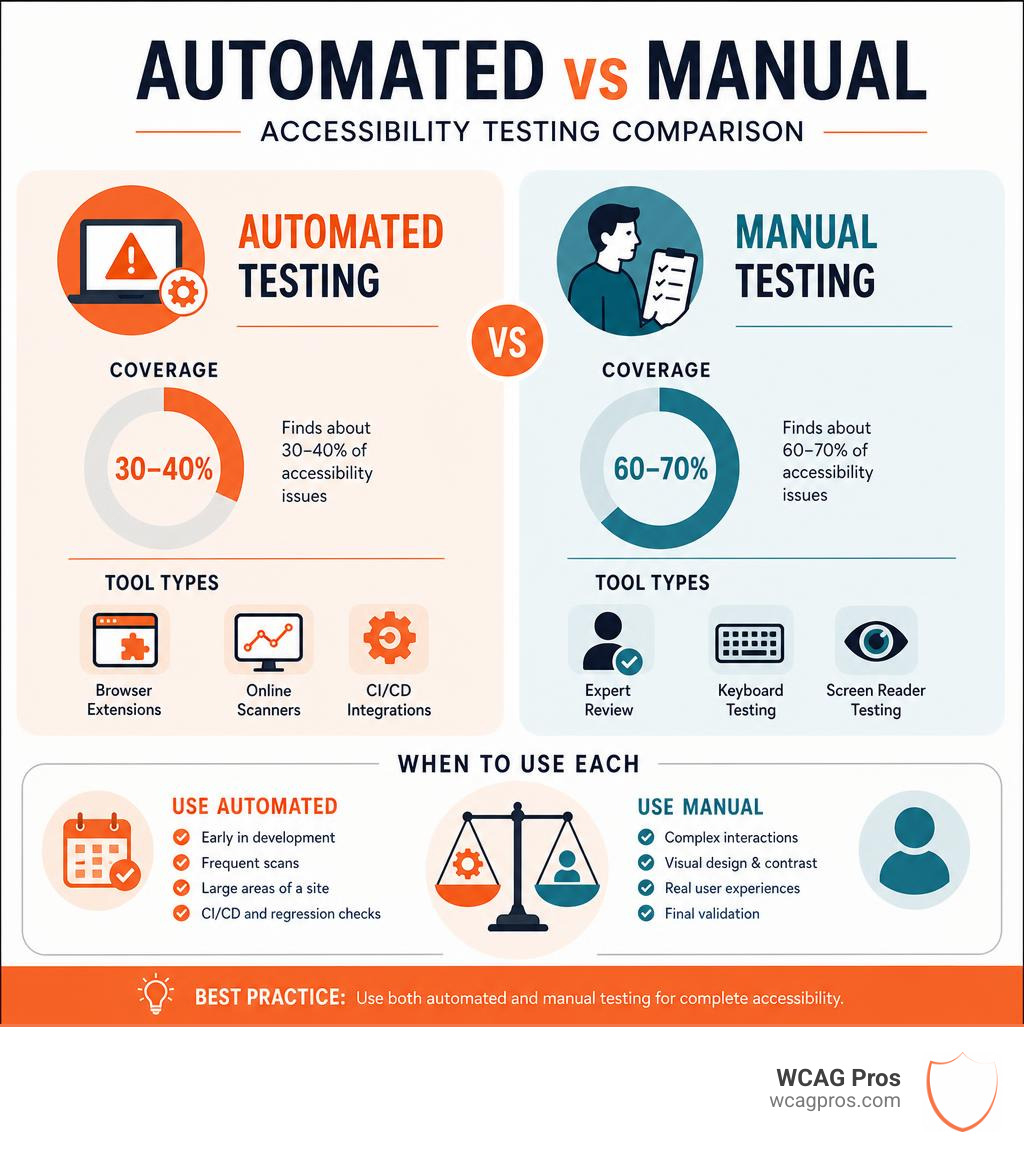
Web accessibility testing tools terms at a glance:
Understanding Web Accessibility Testing Tools and Categories
When you begin evaluating your website, you will quickly realize that not all tools are built the same way. Selecting the right software requires understanding the main categories of testing solutions. The W3C directory filters tools by more than 15 criteria including purpose, standards, scope, and language support. This massive variety exists because different tools serve different roles in your compliance journey.
To build a reliable testing pipeline, you must learn to Pick the Best Web Accessibility Evaluation Tool for Your Team based on your technical skills and goals. Generally, these tools fall into four main categories.
- Browser Extensions: These tools run directly inside Chrome, Firefox, or Edge. They are perfect for developers and designers who want to audit a single page during active development.
- Automated Monitors and Crawlers: These cloud based platforms scan your entire website on a schedule. They crawl from page to page, flag violations, and track your compliance score over time.
- Desktop Applications: These programs run locally on your computer. They are useful for offline testing and generating compliance documentation without uploading sensitive data to external servers.
- API and Command Line Integrations: These tools plug directly into your development workflow. They automatically block inaccessible code from being published to your live website.

Automated Web Accessibility Testing Tools
Automated tools are the workhorses of digital compliance. They run your website code through a database of rules to see if it meets WCAG 2.2 criteria. Most modern automated checkers rely on axe core, which is widely considered the global standard in automated accessibility testing.
These scanners are incredibly fast. They can analyze hundreds of pages in seconds and point you directly to the offending line of code. They are highly reliable for objective issues. For example, an automated tool can easily detect if an image is missing alternative text, if an input field lacks a form label, or if your text color lacks sufficient contrast against its background.
Using these platforms makes Automated Web Accessibility Testing Made Easy for teams that need to cover large volumes of content quickly. Running an Automated Tools Audit is always the first step we recommend when evaluating a new client website. It gives you an immediate list of low hanging fruit to fix.
Manual Testing Methods and Assistive Technologies
While automated tools are excellent for catching technical bugs, they have a massive blind spot. They cannot evaluate context or content quality. An automated tool can tell you if an image has an alt attribute, but it cannot tell you if that alt text actually describes the image accurately. If you have a picture of a golden retriever and your alt text says “blue sky”, the automated tool will give you a passing green light. A human user, however, will be completely confused.
To achieve true digital inclusion, you must combine automation with manual testing. Manual testing involves navigating your website using only a keyboard to ensure that all interactive menus, buttons, and links can be reached and activated. It also means testing your site with real assistive technologies.
The most common screen readers used for manual testing include:
- NVDA (NonVisual Desktop Access): A free, open source screen reader for Windows users.
- JAWS (Job Access With Speech): A highly popular, professional screen reader for Windows.
- VoiceOver: The built in screen reader for macOS and iOS devices.
- TalkBack: The native screen reader for Android mobile devices.
Testing with these tools helps you uncover complex issues like incorrect reading order, keyboard traps, and interactive widgets that do not announce their state to screen reader users. If you want to go a step further, we highly recommend learning How to Test Your Website’s Accessibility Using Real Users. Experiencing how a person with a disability actually navigates your digital product is the ultimate way to ensure your site is truly usable.
Top Free and Paid Web Accessibility Testing Tools in 2026
To help you choose the right software for your team, we have compiled a list of the top free and paid options available in 2026. These tools support audits for WCAG 2.2, ADA standards, Section 508, and the European Accessibility Act.
To keep your compliance efforts organized, you should use these tools alongside The Ultimate Website Accessibility Testing Checklist for 2026 to track your remediation progress.
Free Web Accessibility Testing Tools for Quick Audits
If you are working with a tight budget or just starting your accessibility journey, free tools are incredibly powerful. Many of these options provide professional grade testing capabilities without any cost.
- WAVE Browser Extension: Developed by WebAIM, WAVE is used by over 400,000 users via its Chrome extension alone. It injects colorful icons directly onto your web page to show you exactly where accessibility errors and alerts exist. It is highly educational and excellent for visual learners. You can also explore other web based options in this list of 8 Free Web Based Website Accessibility Evaluation Tools.
- axe DevTools: The axe DevTools Chrome extension has 400,000 users and is trusted by industry leaders worldwide. It integrates directly into your browser developer tools, allowing you to run quick, highly accurate page level scans.
- IBM Equal Access Accessibility Checker: This extension has a 4.9 out of 5 rating from users. It provides deep, structured guidance based on WCAG 2.2 standards, helping developers understand not just what is broken, but how to fix it step by step.
- ADA Checker: This is a client side browser based checker that audits HTML against WCAG rules with no server uploads or dependencies. It is perfect for privacy focused projects because your code never leaves your computer. It uses a custom scoring formula that weights violations by severity.
- Clym Accessibility Tools: An open source desktop application available for Windows, macOS, and Linux. It offers a comprehensive testing suite with no page limits or subscription costs. It supports WCAG EM methodology and helps you generate formal compliance reports.
For a broader selection of free checkers, you can bookmark The Ultimate List of Free Online Accessibility Checkers to keep your testing toolkit fully loaded.
Paid and Enterprise Accessibility Platforms
For larger organizations, manual page by page scanning is not scalable. Enterprise platforms offer continuous monitoring, site wide reporting, and advanced team collaboration features.
- Siteimprove: A unified platform that helps organizations achieve high accessibility scores. It features a Dynamic Content Checker that lets you test non crawlable content like forms and secure checkout flows. It also audits PDF documents for common accessibility errors.
- UsableNet AQA: This platform is designed to scale testing for complex websites. It can simulate screen reader and keyboard interactions to test interactive user flows in single page applications.
- AudioEye: This platform features a Website Accessibility Checker that detects a high volume of potential issues. It is designed for continuous monitoring and provides automated remediation options alongside manual expert reviews.
How to Choose and Integrate Web Accessibility Testing Tools
Selecting the right tool depends on your team’s existing workflow. If you force developers to use a separate, clunky testing platform, they will likely skip accessibility checks. The key is to integrate testing directly into the tools they already use every day.
For teams looking to automate their testing pipeline, tools like the DevNucleus86/mcp-accessibility-scanner offer a modern solution. This is a Model Context Protocol server that enables automated web accessibility scanning and browser automation using Playwright and axe core. It allows you to run matrix scans across different viewports, zoom levels, and media queries.
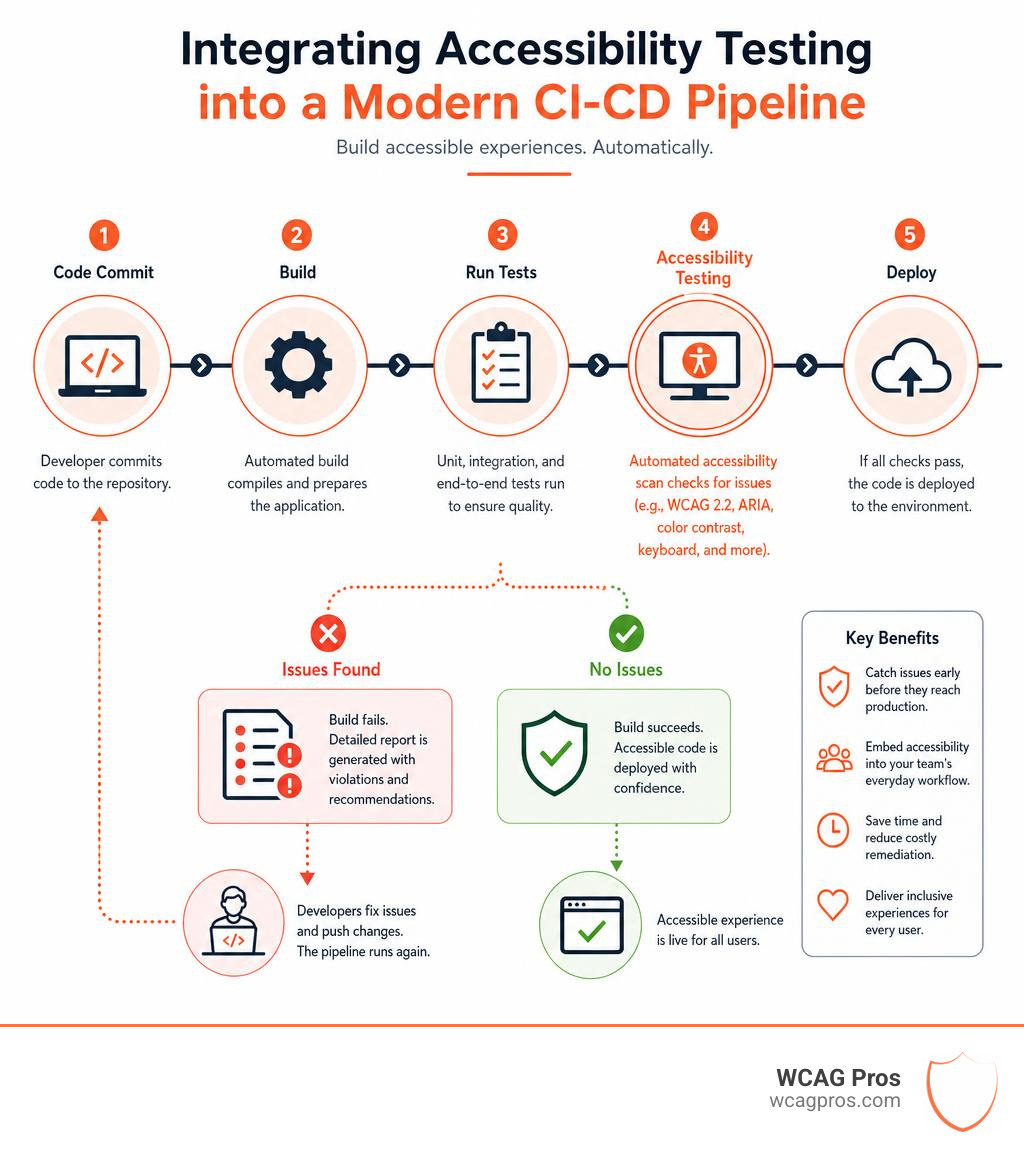
By embedding these automated checks into your continuous integration and continuous deployment pipelines, you can automatically scan your code every time a developer submits a pull request. If an accessibility violation is detected, the build fails, preventing the inaccessible code from ever reaching your production environment. If you want to find the perfect fit for your specific team size and technical stack, read Your Shortcut to the Best WCAG Checker Tool.
Frequently Asked Questions About Web Accessibility Testing Tools
What are the limitations of automated web accessibility testing tools
Automated tools are incredible for speed, but they cannot replace human evaluation. They cannot understand the context of your content. For example, an automated scanner cannot determine if your heading structure makes logical sense, if your video captions are synchronized correctly, or if your keyboard focus order is intuitive.
Relying solely on automated checkers can give you a false sense of security. To learn how to avoid these common pitfalls, check out our guide on how to Test Site for Accessibility Without Breaking a Sweat.
Which accessibility standards do these tools support
Most modern tools support WCAG 2.2 at levels A, AA, and AAA. These guidelines form the legal basis for major global regulations. This includes the ADA in the United States, Section 508 for federal agencies, and the European Accessibility Act in Europe. If you are new to compliance standards, we have simplified the process in our guide on How to WCAG Test in 5 Simple Steps.
How do browser extensions integrate into developer workflows
Extensions like WAVE, axe DevTools, and the Siteimprove Accessibility Checker live directly inside your browser dev tools. This allows developers to test their local code before publishing it. They can inspect elements, view the specific WCAG success criteria that were violated, and test dynamic states like hover menus and modal popups. To build a successful workflow around these extensions, read How to Test Web Accessibility and Succeed.
Conclusion
Web accessibility testing tools are essential for identifying technical barriers and keeping your website compliant. However, software alone cannot protect you from legal risks or guarantee a perfect user experience for individuals with disabilities.
At WCAG Pros, we specialize in helping businesses navigate this complex landscape. Based in Norco, California, we provide comprehensive website compliance consulting. Our expert team conducts thorough, page by page manual audits covering all 54 WCAG A/AAA success criteria. We do not just hand you a list of errors, we provide actual code fixes and offer free reaudits to help you earn your compliance badge.
If you are looking for a trusted partner to handle your compliance needs, take the next step toward peace of mind and Schedule a professional WCAG audit with us today.
Read more website accessibility articles
Get Help With Your Website
We'll follow up with info about:
- The process
- Cost
- Timeline
We promise to respect your privacy, and never abuse the information you provide. We will not sell or rent your information to any third party.
By submitting this form, you consent to receive SMS messages and/or emails from SEM Dynamics LLC, dba WCAG Pros. To unsubscribe, follow the instructions provided in our communications. Msg & data rates may apply for SMS. Your information is secure and will not be sold to third parties.