
A–Z Guide to ADA Compliance Checkers
A–Z Guide to ADA Compliance Checkers
Is Your Website ADA Compliant? Here’s How to Find Out Fast
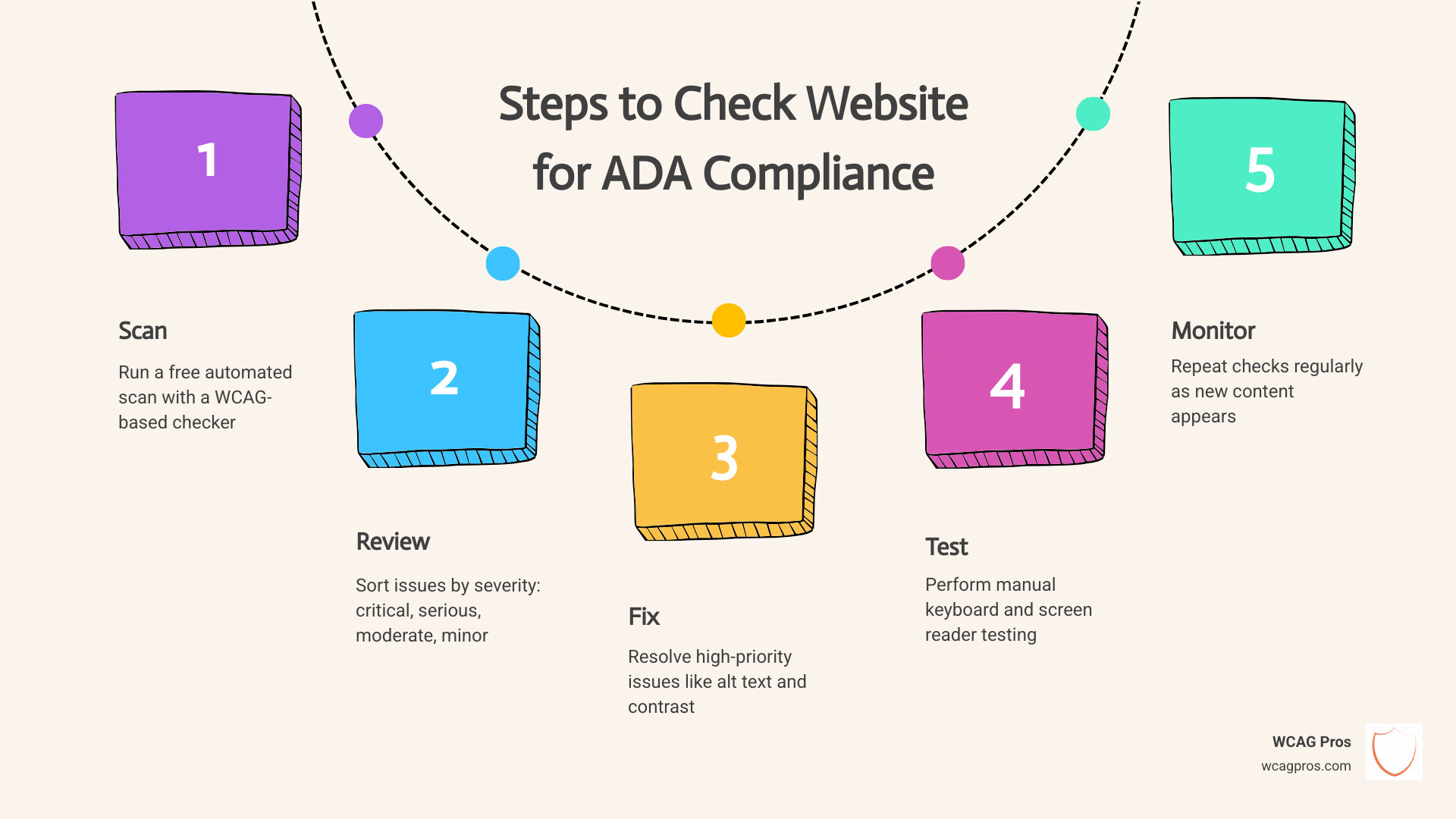
The fastest way to check your website for ADA compliance is to run a free automated scan, then follow up with manual testing. Here is a quick overview of how to get started:
- Run a free scan using a tool like WAVE, axe, or any WCAG-based checker
- Review your results and sort issues by severity (critical, serious, moderate, minor)
- Fix high-priority issues first, such as missing alt text, poor color contrast, and unlabeled form fields
- Test manually using keyboard-only navigation and a screen reader like VoiceOver or TalkBack
- Repeat regularly since new content can introduce new issues at any time
96% of websites have accessibility errors. The average site has more than 51 issues to fix. And with over 5,000 ADA-related web lawsuits filed in 2025 alone, the risk of doing nothing has never been higher.
If your website cannot be used by someone who is blind, deaf, or has a motor disability, you may already be a target for a demand letter or lawsuit. The legal and financial stakes are real. Settlements average anywhere from $5,000 to $150,000 depending on the case and jurisdiction.
The good news? Most accessibility issues are fixable. And checking your site is easier than most business owners expect.
I’m Matthew Post, co-founder of WCAG Pros and a web developer with over 20 years of experience helping businesses check their websites for ADA compliance and fix what is broken. In that time, I have personally supervised hundreds of audits and remediation projects across industries ranging from retail to healthcare to local government. This guide covers everything you need to know, from free tools and manual testing methods to legal deadlines and long-term compliance strategies.
Understanding Legal Requirements and Risks in 2026
In May 2026, digital accessibility is no longer a “nice to have” feature for your website. It is a strict legal requirement. The Americans with Disabilities Act (ADA) was originally written for physical spaces, but the Department of Justice has made it clear that it applies to the digital world too.
Title III of the ADA covers “places of public accommodation,” which includes almost every private business website that offers goods or services to the public. If a person with a disability cannot navigate your site to buy a product or find information, it is legally the same as having a flight of stairs at your front door with no ramp.
To understand where you stand, you first need to know How to Tell Your Website is ADA Compliant. We use the WCAG 2.2 standards as the yardstick. These guidelines are the international gold standard for making the web accessible.
The risks of ignoring these rules are massive. In 2023, web accessibility lawsuits exceeded 4,600, representing a 300 percent increase since 2018. By 2025, that number climbed over 5,000. Settlements for these cases typically range from $5,000 to $25,000 for small businesses, but they can soar much higher for larger corporations. Beyond the settlement, you also have to pay your own legal fees and then pay to fix the website anyway.
For businesses in California, the landscape is even tougher due to the Unruh Civil Rights Act, which allows for additional damages. You can find more local guidance through Website Accessibility Resources – DGS (ca.gov).
However, there is a silver lining. Small businesses can often claim up to $5,000 in ADA tax credits under IRC Section 44 to help offset the costs of making their digital presence accessible. It is a way for the government to help you do the right thing.
Why You Must Check Website for ADA Compliance in 2026
The clock is ticking for many organizations. The Department of Justice recently updated Title II of the ADA, which applies to state and local governments. Under these new rules, large public entities must meet WCAG 2.2 Level AA standards by April 2026, while smaller entities have until April 2027.
Even if you aren’t a government agency, these deadlines set the tone for the entire web. Consumer expectations are shifting. About 26 percent of US adults live with a disability, representing 61 million potential customers with $490 billion in disposable income. If they can’t use your site, they will leave. In fact, 71 percent of users leave inaccessible sites immediately.
Checking your site is about more than just avoiding a courtroom. It is about brand reputation and inclusive design. A site that works for a person using a screen reader usually works better for everyone. To stay organized, we recommend using The Ultimate Website Accessibility Testing Checklist for 2026 to track your progress.
Potential Legal and Financial Consequences
The “serial plaintiff” phenomenon is a major concern in 2026. Some law firms use automated scanners to find websites with basic errors, like missing alt text or unlabeled buttons. Once they find a flaw, they send out a demand letter.
If you receive one of these, you are often looking at a settlement between $15,000 and $150,000. These costs do not include the loss of business from the millions of users who simply cannot use your interface. Furthermore, the European Accessibility Act (EAA) now requires many private businesses selling products in the EU to be compliant, meaning the legal net is widening globally.
How to Check Website for ADA Compliance Using Automated Tools
Automated tools are the first line of defense. They are great for catching “low hanging fruit” like technical code errors that a human might miss. These tools work by scanning your site’s HTML and comparing it against known WCAG 2.2 rules.
You can use browser extensions, online scanners, or integrated developer tools to get an instant report. If you are looking for a place to start, check out The Ultimate List of Free Online Accessibility Checkers. These tools can scan a page in seconds and tell you exactly which lines of code are causing problems.
For those who want to dive deeper, we have a guide on how Automated Web Accessibility Testing Made Easy can fit into your existing workflow.
Benefits of Automated Accessibility Scanners
The biggest benefit is speed. An automated tool can check hundreds of pages in the time it takes a human to check one. This efficiency is vital for developers who need to catch errors during the building phase.
When you check website for ada compliance with an automated tool, you get a clear list of code errors, such as:
- Missing alternative text for images
- Empty form labels
- Incorrect heading structures
- Missing language attributes
To find the right fit for your organization, you might want to read about how to Pick the Best Web Accessibility Evaluation Tool for Your Team or use Your Shortcut to the Best WCAG Checker Tool. These resources help you sort through the noise and find tools that provide actionable data rather than just a scary score.
Limitations of Automated Testing
We have to be honest here: automated tools are not perfect. In fact, they only catch about 30 to 40 percent of accessibility issues. They are great at seeing “if” a tag exists, but they are terrible at knowing if the tag is “correct.”
For example, an automated scanner can tell you if an image has alt text. But if your image is a “Submit” button and the alt text says “Blue Circle,” the scanner will give you a green checkmark even though the description is useless to a blind user.
Automated tools also struggle with:
- Keyboard navigation traps
- Logical reading order
- Complex ARIA roles
- Video captions and transcripts
This is why you must learn How to Test Web Accessibility and Succeed by combining these scans with a human touch.
Manual Testing Methods for Comprehensive WCAG 2.2 Audits
Manual testing is where the real work happens. It involves a human being actually using the website the way a person with a disability would. This is the only way to ensure your site is truly usable, not just “technically” compliant.
| Feature | Automated Scanning | Manual Testing |
|---|---|---|
| Speed | Instant | Time-intensive |
| Accuracy | High for code syntax | Essential for user context |
| Detection Rate | ~35% | ~100% |
| Cost | Low/Free | Higher (Expertise required) |
| Best For | Initial pass/Monitoring | Legal defense/Certification |
Manual testing focuses on things like keyboard navigation and screen reader reviews. If you want to try it yourself, follow our guide on How to WCAG Test in 5 Simple Steps.
Step by Step Guide to Check Website for ADA Compliance Manually
To check website for ada compliance manually, you don’t need to be a coding genius. You just need patience and the right perspective.
- The Tab Test: Put your mouse away. Use the Tab key to move through your site. Can you see where you are? (This is called a “focus indicator”). Can you reach every button and link? Can you close pop ups with the Escape key?
- Screen Reader Review: Turn on VoiceOver (Mac/iOS) or TalkBack (Android). Close your eyes and try to navigate your homepage. Does the screen reader announce the links correctly, or does it just say “Link, Link, Link”?
- Mobile Check: Accessibility isn’t just for desktops. Test your site on a phone. Are the buttons too close together for someone with a motor disability to tap?
- Skip Links: Look for a “Skip to Content” link at the very top of the page. This allows keyboard users to bypass long navigation menus.
For a deeper dive, The Ultimate Guide to a WCAG Comprehensive Website Audit provides a roadmap for a professional grade review.
Evaluating User Experience for People with Disabilities
The best way to know if your site works is to How to Test Your Website’s Accessibility Using Real Users. People with visual impairments, motor disabilities, or cognitive barriers use assistive technology in ways developers might never imagine.
Human evaluation catches the nuances. It ensures that your heading hierarchy makes sense and that your error messages actually help someone fix a mistake in a form. If a user gets stuck on your checkout page because a “Buy Now” button isn’t labeled, that is a lost sale and a potential lawsuit.
Key Accessibility Barriers and How to Fix Them
When we check website for ada compliance, we see the same errors over and over. Most of them are simple to fix once you know they exist.
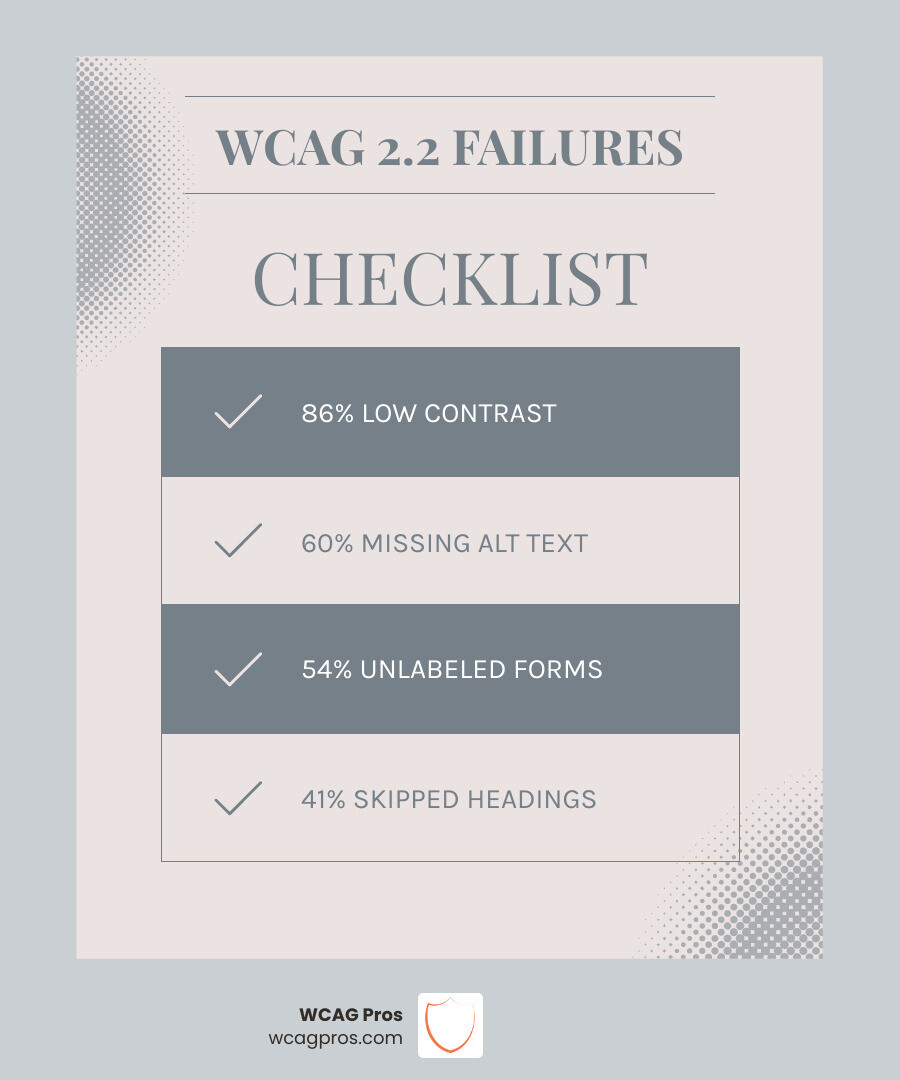
- Alt Text: Every meaningful image needs a text description. If it’s just for decoration, the code should tell the screen reader to ignore it.
- Form Labels: A search bar shouldn’t just have a magnifying glass icon. It needs a hidden label that says “Search” so a screen reader knows what the box is for.
- Color Contrast: Text must stand out against the background. Light grey text on a white background is a major barrier for people with low vision.
- Heading Hierarchy: Use H1, H2, and H3 tags in order. Don’t skip from an H1 to an H4 just because you like the font size.
Prioritizing and Remediating Identified Issues
You don’t have to fix everything in one day. We recommend a “triage” approach:
- Critical Violations (Level A): These are show stoppers. If a user can’t submit a form or navigate the menu, fix these first.
- Serious Violations (Level AA): This is the legal standard most lawsuits point to. It includes things like color contrast and consistent navigation.
- Enhancements (Level AAA): These are the “extra credit” items that make a site truly excellent for everyone.
Some modern tools now offer AI generated suggestions for code fixes. While these can save time, always have a developer verify the code before pushing it live to ensure it doesn’t break your site’s layout.
Ongoing Practices to Maintain Compliance
Compliance is a journey, not a destination. Every time you add a blog post, a new product, or a video, you risk breaking your accessibility.
To stay safe, you should:
- Create an official Accessibility Policy and link to it in your footer.
- Train your content team on how to write alt text and use proper headings.
- Ask your third party vendors (like Shopify or booking plugins) for a VPAT (Voluntary Product Accessibility Template) to prove their tools are accessible.
- Schedule a professional audit at least once a year.
Frequently Asked Questions about Website Accessibility
How often should I check my website for ADA compliance?
We recommend running an automated scan once a month and performing a full manual audit at least once a year, or whenever you launch a major site redesign.
Can I be sued if I use an accessibility overlay widget?
Yes. In fact, many “serial plaintiffs” target sites with overlays because the widgets often fail to fix the underlying code and can even interfere with screen readers. Overlays are not a substitute for true compliance.
What is the difference between Section 508 and the ADA?
Section 508 is a federal law that requires government agencies to make their electronic and information technology accessible. The ADA is a broader civil rights law that applies to both the public and private sectors. Both generally use WCAG as the technical standard.
Conclusion
Digital inclusion is simply good business. By taking the time to check website for ada compliance, you are opening your doors to millions of customers who have been previously excluded. You are also protecting your business from expensive legal battles and building a brand that stands for equality.
At WCAG Pros, we specialize in taking the stress out of this process. We don’t just give you a list of errors; we provide comprehensive page-by-page audits of all 54 WCAG points, complete with code fixes and professional certification.
If you are ready to stop guessing and start complying, we are here to help. Start your comprehensive WCAG audit today and let us help you make the web a better place for everyone.
Read more website accessibility articles
Get Help With Your Website
We'll follow up with info about:
- The process
- Cost
- Timeline
We promise to respect your privacy, and never abuse the information you provide. We will not sell or rent your information to any third party.
By submitting this form, you consent to receive SMS messages and/or emails from SEM Dynamics LLC, dba WCAG Pros. To unsubscribe, follow the instructions provided in our communications. Msg & data rates may apply for SMS. Your information is secure and will not be sold to third parties.