
Website Compliance Audit 101
Website Compliance Audit 101
What Is a Website Compliance Audit Detailed and Why It Matters Now
A website compliance audit detailed review is a systematic evaluation of your website against accessibility standards like WCAG 2.2, ADA, and Section 508 to find and fix barriers that prevent people with disabilities from using your site.
Here is what a detailed website compliance audit covers:
| Audit Component | What It Checks |
|---|---|
| Automated scan | Color contrast, missing alt text, form labels, page structure |
| Manual expert review | Keyboard navigation, screen reader compatibility, focus management |
| Assistive technology testing | NVDA, JAWS, VoiceOver, zoom up to 200% |
| Standards checked | WCAG 2.2 Level AA, ADA, Section 508, European Accessibility Act |
| Output | Prioritized report with issue severity and remediation steps |
The stakes in 2026 are real. Over 2,000 ADA website accessibility lawsuits were filed in just the first half of 2025, a 37% jump over the same period in 2024. Yet 94.8% of websites still have detectable WCAG failures, averaging 51 errors per page. Only 4 out of every 100 websites are genuinely accessible.
Most businesses do not know their site is non-compliant until a demand letter arrives.
The good news is that a proper compliance audit gives you a clear picture of where you stand and exactly what to fix.
I’m Matthew Post, co-founder of WCAG Pros and a web developer with over 20 years of experience conducting website compliance audit detailed reviews for businesses across industries. I personally supervise every audit and remediation project at WCAG Pros to make sure you get practical, actionable results that reduce your legal risk.
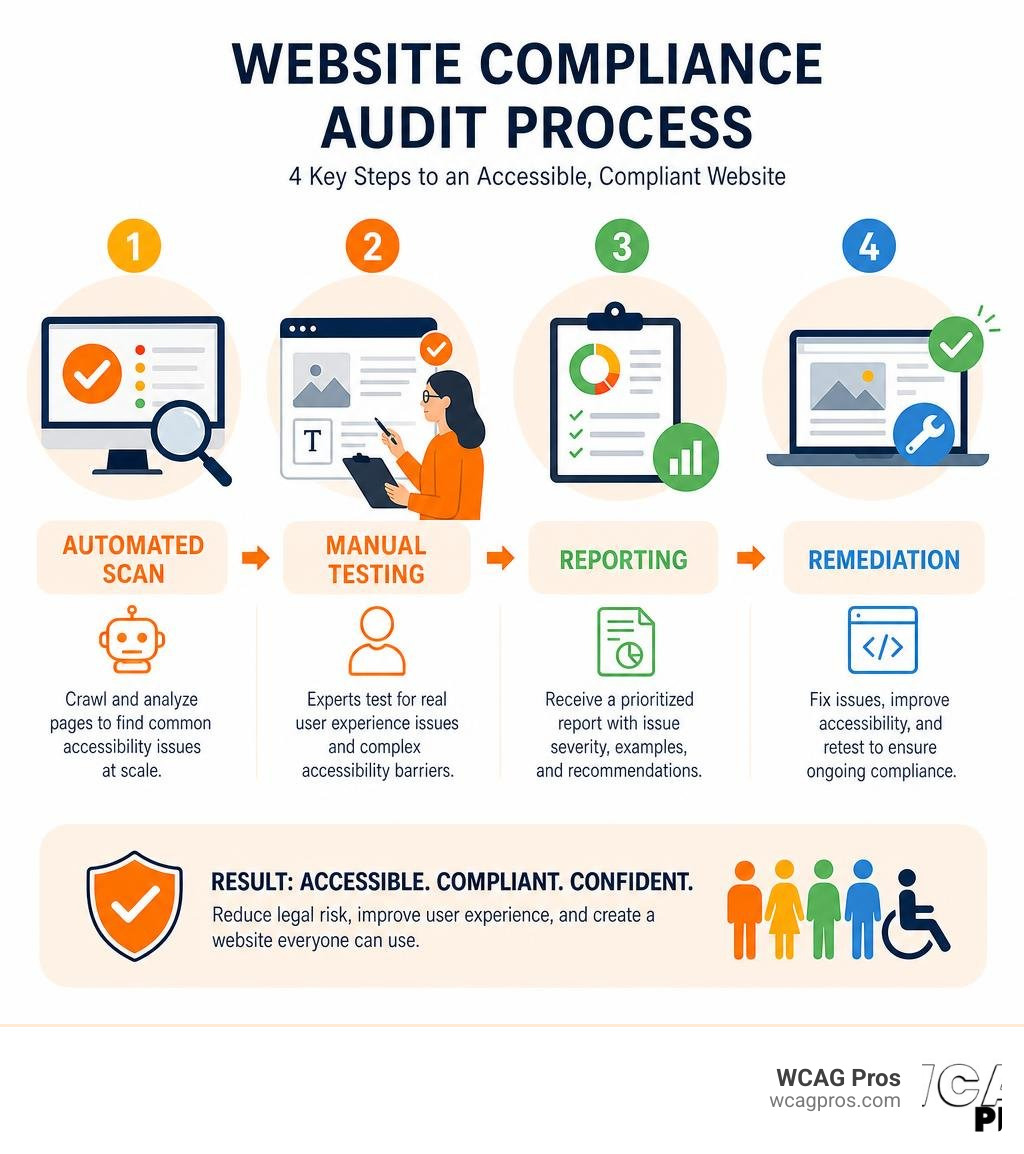
Website compliance audit detailed terms at a glance:
Why You Need a Website Compliance Audit Detailed in 2026
The internet is no longer a wild frontier where accessibility is treated as a minor option. In 2026, digital inclusion is a fundamental requirement. If your website is not accessible to everyone, you are closing your digital front door to millions of potential customers and leaving your business open to massive legal liability.
A website compliance audit detailed review is the only reliable way to find out if your digital assets meet modern standards. These standards include the Americans with Disabilities Act (ADA), Section 508 for federal agencies, and the European Accessibility Act (EAA) for companies doing business in Europe. To learn more about the official federal expectations, you can read the ADA Gov Guidance on Web Accessibility.
At WCAG Pros, we believe that compliance is not just about avoiding legal trouble. It is about building a better web. When you make your website accessible, you improve the browsing experience for every single visitor. You also open your brand to the 61 million adults in the United States who live with some type of disability.
Legal Risks and the 2026 Regulatory Landscape
The legal landscape has shifted dramatically. In the past, only massive corporations faced accessibility lawsuits. Today, businesses of all sizes are targeted. In the first half of 2025 alone, 2,014 ADA website accessibility lawsuits were filed in U.S. courts. This represents a 37% increase over the same period in 2024.
State laws have also become much stricter. In California, where we operate out of Norco, the Unruh Civil Rights Act allows plaintiffs to collect statutory damages for each accessibility violation. The Department of Justice has also made it clear that web accessibility is a top priority.
Many businesses try to take shortcuts by using overlay widgets or automated plugins. This is a dangerous mistake. In 2025, 456 lawsuits specifically targeted websites that used overlay tools. These overlays do not fix the underlying source code and often make the site harder to navigate for people who use screen readers.
To keep up with the latest official standards and guidelines, organizations look to the W3C Web Accessibility Initiative. The consensus is clear, you cannot fake compliance with a quick widget. You need a real, deep review of your code. For more details on the legal requirements, you can check out the Website Accessibility Resources from DGS (ca.gov).
Business Benefits Beyond Legal Protection
While avoiding a lawsuit is a great motivator, the business benefits of a website compliance audit detailed review go far beyond legal defense. When you optimize your site for accessibility, you also optimize it for search engines.
Search engine crawlers read websites in a very similar way to screen readers. By using clear heading structures, descriptive alt text for images, and semantic HTML elements, you help search engines understand your content much better. This directly improves your search engine optimization (SEO) performance and search visibility.
Furthermore, accessibility improvements overlap heavily with Google’s Core Web Vitals. Clean code, fast loading times, and stable layouts make your site easier to use for everyone. This leads to higher conversion rates, longer session durations, and reduced bounce rates.
To understand how this fits into your overall business strategy, check out our Beginner’s Guide to Website Accessibility Audit.
Methodology and Execution of a Digital Accessibility Review
A professional digital accessibility review is a highly structured process. We do not just run a single tool and hand you a generic report. We follow the Web Content Accessibility Guidelines Evaluation Methodology (WCAG-EM) to ensure our findings are legally defensible and technically accurate. To see how this structured approach works, you can review the W3C WCAG-EM Overview.
We start by defining the exact scope of the audit. This includes identifying all the unique page templates, user journeys, and dynamic features on your site. By selecting a representative sample of pages, we can find and fix global issues that affect your entire website.
Automated versus Manual Testing Approaches

There is a common myth that you can audit a website using automated software alone. The truth is that automated accessibility audits only catch 30 to 40% of accessibility issues outlined by the WCAG 2.2 standard.
For example, an automated tool can tell you if an image is missing alt text. However, it cannot tell you if the existing alt text actually makes sense or describes the image accurately. If you have a picture of a red button and the alt text says “blue circle,” an automated scanner will pass it, but a blind user will be completely confused.
| Testing Type | What It Catches | Limitations |
|---|---|---|
| Automated Testing | Missing alt text attributes, low color contrast, broken links, basic HTML structure errors | Misses 60 to 70% of issues, cannot evaluate context, produces false positives |
| Manual Testing | Keyboard trap issues, screen reader usability, logical tab order, complex form functionality, zoom reflow | Requires expert knowledge, takes more time to execute |
To achieve true WCAG 2.2 compliance, we combine automated scans with intensive manual testing. We navigate your site using only a keyboard to make sure there are no keyboard traps. We also test your site using popular screen readers like NVDA and VoiceOver to experience the site exactly how a disabled user would.
For a deeper dive into how we balance these two approaches, read our In-Depth Guide to Test Web Accessibility.
Step-by-Step Process for a Website Compliance Audit Detailed
To give you an idea of what to expect, here is the exact step-by-step process we use at WCAG Pros when conducting a website compliance audit detailed review:
- Define the Scope and Standards: We meet with your team to identify key user flows, dynamic components, and the target compliance level, which is typically WCAG 2.2 Level AA.
- Run Automated Scans: We use industry-leading tools to establish a baseline and quickly catch low-hanging fruit.
- Conduct Manual Keyboard Walks: We test every interactive element, link, and form field using only the Tab and Enter keys to verify focus indicators and navigation flow.
- Perform Screen Reader Testing: Our accessibility experts test the site with assistive technologies to ensure clear navigation landmarks and correct ARIA labels.
- Analyze Visual and Cognitive Elements: We check color contrast ratios, text resizing up to 200%, and animation pause controls.
- Deliver a Prioritized Report: We compile our findings into an actionable roadmap, grouping issues by severity so your developers know what to fix first.
- Provide Code Fixes and Re-Audits: We do not just hand you a list of problems. We provide the actual code fixes and offer free re-audits to verify the remediation.
This rigorous process is designed to protect your business. You can read more about how this acts as your legal defense in The Certified WCAG Audit Process: Your Shield Against Lawsuits.
For a broader understanding of how this compares to general website health checks, you can reference the How to Conduct a Detailed Website Audit: Complete Checklist and the Website Auditor Scoring Guide v3.9.1 with 12 Dimensions, 188 Factors, Complete Algorithm from Digital Marketing Co..
Common Failures and Financial Realities of Compliance
When we conduct audits, we notice the same patterns of errors across different industries. Understanding these common failures can help your team avoid them during the design and development phases.
The Most Common Accessibility Failures Found in Audits

According to the WebAIM Million report, 94.8% of websites have detectable WCAG failures. Here are the most common issues we find during our detailed audits:
- Low Color Contrast: This affects over 80% of websites. Text must have a contrast ratio of at least 4.5:1 against its background to be readable for users with low vision.
- Missing Alt Text: Informative images must have descriptive alternative text. Decorative images should have empty alt attributes so screen readers can skip them.
- Empty Links and Buttons: If a button only contains an icon without any text, a screen reader will simply announce “button” without explaining what it does.
- Missing Form Labels: Input fields must have explicit, programmatically linked labels so users know what information to enter.
- Poor Focus Indicators: When navigating with a keyboard, users need a clear visual outline to show which element is currently selected.
To make sure your site does not suffer from these common issues, you can download The Ultimate Website Accessibility Testing Checklist for 2026.
Costs Timelines and ROI of a Website Compliance Audit Detailed
We often hear business owners ask if a website compliance audit detailed review is worth the investment. The financial reality is that the cost of an audit is a fraction of the cost of a lawsuit.
The average total cost of a single ADA website lawsuit ranges from $50,000 to $150,000 when you factor in plaintiff fees, defense fees, and the cost of rushed remediation. On the other hand, a professional audit allows you to plan your remediation budget sensibly.
In terms of timeline, a thorough audit of a mid-size website typically takes 2 to 4 weeks. Remediation timelines vary depending on your development resources, but most organizations can reach a solid baseline of compliance within a few months.
The return on investment (ROI) is clear. By making your site accessible, you expand your market reach, improve your organic search rankings, and build brand loyalty among a massive demographic.
For more insights on planning your budget and timeline, consult our Expert Website WCAG Audit Guide for Businesses.
Frequently Asked Questions
How often should a website be audited for ADA and WCAG 2.2 compliance?
We recommend conducting a full manual audit at least once or twice a year. However, if you run a high-traffic site or make frequent content updates, you should set up continuous automated monitoring alongside quarterly manual checks. Websites are dynamic and new content can easily introduce accessibility barriers. To learn how to run quick checks between major audits, read How to WCAG Test in 5 Simple Steps.
Can automated scans replace a detailed compliance audit?
No. Automated scans are a helpful starting point, but they only catch 30 to 40% of WCAG 2.2 violations. They cannot test for logical tab order, screen reader context, or complex user interactions. Relying solely on automated tools leaves your business exposed to significant legal risk. To understand why a complete manual review is necessary, check out ADA Site-Wide Audit: Your Roadmap to Total Compliance.
What should be included in a professional accessibility audit report?
A professional audit report should include a high-level executive summary, a clear list of all identified violations mapped to specific WCAG 2.2 success criteria, screenshots or code snippets of the issues, and step-by-step remediation guidance for your development team. For information on how professional test reports are structured globally, you can refer to the W3C Accessibility Conformance Testing resources.
Conclusion
Achieving web compliance does not have to be an overwhelming or stressful process. When you partner with WCAG Pros, we guide you through every step of the journey, from the initial website compliance audit detailed review to final code remediation and compliance certification.
We perform comprehensive, page-by-page audits of all 54 WCAG A/AAA points. We do not just hand you a list of errors, we provide custom code fixes designed specifically for your website. Plus, we offer free re-audits so you can earn your compliance badge with confidence.
Let us help you make your website accessible, protect your business from legal risks, and build a more inclusive digital experience for everyone.
Ready to get started? Get a professional WCAG Audit from us today, or try our guide to Test Site for Accessibility Without Breaking a Sweat to run your first quick check.
Read more website accessibility articles
Get Help With Your Website
We'll follow up with info about:
- The process
- Cost
- Timeline
We promise to respect your privacy, and never abuse the information you provide. We will not sell or rent your information to any third party.
By submitting this form, you consent to receive SMS messages and/or emails from SEM Dynamics LLC, dba WCAG Pros. To unsubscribe, follow the instructions provided in our communications. Msg & data rates may apply for SMS. Your information is secure and will not be sold to third parties.