
A Comprehensive Guide to ADA Compliant Website
A Comprehensive Guide to ADA Compliant Website
What Is an ADA Compliant Website? The Quick Answer
What is an ADA compliant website is one of the most searched questions among business owners facing rising accessibility lawsuits. Here is the short answer:
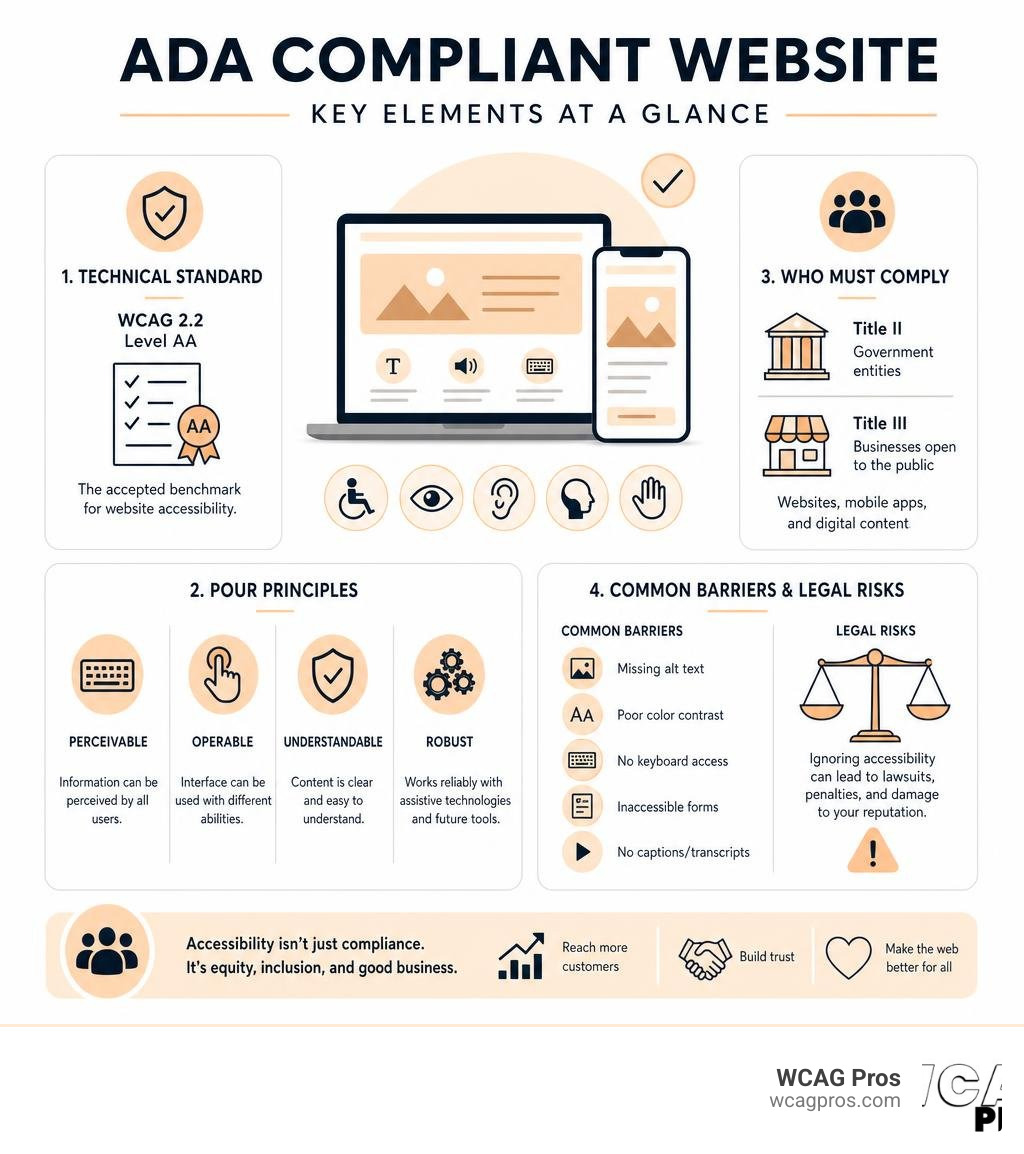
An ADA compliant website is a website that people with disabilities can access and use equally, meeting the standards set by the Americans with Disabilities Act (ADA) and the Web Content Accessibility Guidelines (WCAG 2.2 Level AA).
Key facts at a glance:
- Law: The ADA prohibits discrimination against people with disabilities, including on websites
- Who must comply: Government entities (Title II) and businesses open to the public (Title III)
- Technical standard: WCAG 2.2 Level AA is the accepted benchmark for compliance
- Scope: Covers websites, mobile apps, and downloadable digital content
- Risk of ignoring it: Over 8,800 ADA Title III lawsuits were filed in 2024 alone
The stakes are real. Right now, only 3% of the web is accessible to people with disabilities, yet 1 in 4 adults in the United States lives with some type of disability. That gap creates significant legal and business risk for any organization with an online presence.
This guide walks you through everything you need to know, from the legal framework to practical steps for making your site compliant.
I’m Matthew Post, co-founder of WCAG Pros and a web developer with over 20 years of experience auditing and remediating websites for ADA compliant website standards. I’ve helped businesses of all sizes navigate the technical and legal complexity of digital accessibility, and this guide reflects what I’ve learned across hundreds of real world compliance projects.
What is ADA compliant website terms to remember:
Understanding What is ADA Compliant Website Regulations

The legal landscape surrounding digital accessibility has evolved rapidly over the last few years. To understand what makes a website compliant, we must first look at the law that started it all. The Americans with Disabilities Act was signed into law in 1990, long before the modern internet became central to our daily lives.
Because the original statutory language did not explicitly mention websites, courts and federal agencies have had to interpret how these civil rights protections apply to the digital world. The United States Department of Justice has consistently maintained that the ADA applies to all digital spaces. To help organizations navigate these expectations, the government provides official Guidance on Web Accessibility and the ADA | ADA.gov which explains that inaccessible web content denies people with disabilities equal access to basic services.
Defining What is ADA Compliant Website in 2026
In 2026, a website is considered ADA compliant when it is designed, coded, and maintained in a way that allows anyone, regardless of physical or cognitive ability, to navigate it successfully. This means your digital presence must accommodate users who rely on assistive technology. Assistive technology includes software like screen readers, which read aloud the text on a screen for users who are blind or have low vision. It also includes hardware like refreshable Braille displays and alternative keyboards.
Equal access means a user with a disability must be able to obtain the same information, engage in the same interactions, and enjoy the same services as a user without a disability. If you want to know if your own platform meets these expectations, you can learn How to Tell Your Website is ADA Compliant through a series of technical checks.
How the ADA Applies to Digital Spaces
The core of the legal argument for web accessibility rests on the concept of places of public accommodation. Under Title III of the ADA, private businesses that fall into this category must not discriminate against individuals with disabilities. Historically, this referred to physical storefronts, hotels, restaurants, and offices.
Today, courts across the country have established that websites are either places of public accommodation themselves or serve as a critical gateway to physical locations. If a customer cannot read your menu, book a room, or purchase a product online due to an inaccessible interface, they are being denied equal access. If you are still asking yourself Does My Website Have to Be ADA Compliant? the answer for almost every public facing business is a definitive yes.
Legal Requirements and Who Must Comply

The legal obligations for digital accessibility are divided into different categories based on the type of organization you run. The rules that govern a local city website are different from those that apply to a private retail store.
Title II and Title III Obligations
Title II of the ADA applies to state and local government entities. This includes public schools, community colleges, public libraries, and municipal services. For these organizations, web accessibility is a strict statutory requirement.
In April 2024, the Department of Justice published an important update in the Federal Register, Volume 89 Issue 80 (Wednesday, April 24, 2024) which established WCAG 2.2 Level AA as the official technical standard for state and local governments. You can read more about this in the official Fact Sheet: New Rule on the Accessibility of Web Content and Mobile Apps Provided by State and Local Governments | ADA.gov which outlines the specific implementation timelines.
For example, local agencies in our home state of California, such as the City of Norco, must ensure their digital platforms are fully accessible. You can see how local municipalities handle these requirements by reviewing the Website Accessibility Information for the City of Norco page.
Title III of the ADA applies to private businesses that operate as public accommodations. This includes retail stores, banks, travel services, healthcare providers, and recreational facilities. While Title III does not have the same rigid population based compliance deadlines as Title II, the courts enforce the same WCAG 2.2 Level AA standard during legal disputes.
Title II (State and Local Governments):
- Applicability: Public entities, schools, local agencies
- Technical Standard: WCAG 2.2 Level AA (Mandated by 2024 DOJ Rule)
- Compliance Deadlines: April 2027 (50k+ population) or April 2028 (under 50k)
- Enforcement: DOJ audits, federal funding loss, private lawsuits
Title III (Public Accommodations / Private Businesses):
- Applicability: Private businesses open to the public
- Technical Standard: WCAG 2.2 Level AA (De facto standard used by courts)
- Compliance Deadlines: Immediate obligation under general nondiscrimination rules
- Enforcement: Private civil lawsuits, demand letters, DOJ actions
Exceptions and Exemptions to the Rules
There are very few exceptions to ADA website compliance requirements. For public entities under Title II, the DOJ has outlined five narrow exceptions where WCAG 2.2 Level AA compliance is not strictly required. These exceptions are detailed in Chapter 5: Website Accessibility Under Title II of the ADA and include:
- Archived web content that is not used for active administrative processes
- Preexisting conventional electronic documents, such as old PDFs, unless they are required to apply for or maintain services
- Third party content that is not posted due to contractual or licensing agreements with the public entity
- Individualized, password protected documents, like digital water bills sent to specific residents
- Preexisting social media posts created before the compliance deadlines
For private businesses under Title III, there are no automatic exemptions based on business size, employee count, or annual revenue. If you run a small business, you still have a legal obligation to make your goods and services accessible. To understand how these rules apply to commercial enterprises, you can consult A Comprehensive Guide to ADA Business Requirements. If you are operating a smaller company, we recommend reading ADA Compliance for Small Businesses in 2025: A Complete Guide to protect your business from legal risks.
Technical Standards and WCAG 2.2 Integration
Because the text of the ADA does not contain specific coding rules, the legal and tech industries rely on the Web Content Accessibility Guidelines. WCAG is developed by the World Wide Web Consortium and serves as the international benchmark for digital accessibility.
Technical Requirements for What is ADA Compliant Website Conformance
WCAG is structured around three levels of conformance, which are Level A (minimum accessibility), Level AA (the standard for legal compliance), and Level AAA (the highest possible level of accessibility). To achieve an ADA compliant website, your digital assets must meet the WCAG 2.2 Level AA standard.
If you want to understand the exact technical differences and how they impact your development workflow, you can explore The Definitive Guide to WCAG Guidelines. For a deeper dive into the specific rules that developers must implement, check out Everything You Need to Know About WCAG 2.2 AA Compliance which provides practical code level guidance.
The POUR Principles of Web Accessibility
All WCAG 2.2 success criteria are organized under four core principles, known as POUR. These principles define how content must be built to ensure accessibility:
- Perceivable: Users must be able to see or hear the information presented. This means providing text alternatives for non text content, such as alt text for images and captions for videos.
- Operable: Users must be able to navigate the interface. The website must be fully functional using only a keyboard, and users must have enough time to read and use the content without unexpected timeouts.
- Understandable: The information and the operation of the user interface must be clear. This includes making text readable, ensuring web pages appear and operate in predictable ways, and helping users avoid and correct input mistakes.
- Robust: The content must be compatible with a wide variety of user agents, including current and future assistive technologies. This requires clean, standardized code that screen readers can parse reliably.
Practical Steps to Build and Maintain Accessibility
Achieving compliance is not a one time project. It is an ongoing process of monitoring, testing, and updating your digital platforms as you publish new content.
How to Identify What is ADA Compliant Website Barriers
The first step in making your website compliant is identifying the barriers that prevent users with disabilities from accessing your content. Many of these issues are common across the web:
- Poor color contrast: Text that does not stand out sufficiently from its background makes reading difficult for users with low vision.
- Missing alt text: Images without descriptive text leave screen reader users in the dark about visual elements.
- Inaccessible forms: Forms without clear labels or helpful error messages make it impossible for some users to complete purchases or sign up for services.
- Keyboard navigation failures: Interfaces that require a mouse prevent users with physical disabilities from navigating your site using a keyboard.
To learn more about how these barriers lead to litigation and how to resolve them, read A Comprehensive Guide to ADA Business Requirements.
Automated and Manual Testing Methods
To find and fix these barriers, we recommend using a combination of automated and manual testing methods. Automated scanners are excellent for catching high volume, code level issues like missing image descriptions or incorrect contrast ratios. However, automated tools can only detect about 30 to 40 percent of all accessibility issues.
To ensure true compliance, you must perform manual testing. This involves navigating your website using only a keyboard, testing your interactive elements with popular screen readers like NVDA or JAWS, and reviewing your forms to ensure they handle errors gracefully.
Frequently Asked Questions About ADA Website Compliance
What is the difference between ADA and Section 508
While both are United States federal frameworks based on WCAG standards, they apply to different organizations. Section 508 of the Rehabilitation Act applies specifically to federal agencies and organizations that receive federal funding or provide services to federal entities. The ADA applies to state and local governments (Title II) and the private sector (Title III).
What are the penalties for noncompliance
If your website is not compliant, you face significant financial and legal risks. In addition to private lawsuits, businesses can face civil penalties under federal law. For a first violation, civil penalties can reach up to $50,000, and subsequent violations can cost up to $100,000.
In California, state laws like Assembly Bill 1757 introduce additional legal standards and risks for website owners. You can read about these state specific rules in legal guides concerning California web accessibility.
How often should a website be audited for accessibility
We recommend auditing your website at least once a quarter, or whenever you make significant updates to your code or content. Because websites are dynamic, new blog posts, product uploads, or plugin updates can easily introduce new accessibility barriers.
Conclusion
Building an ADA compliant website is not just about avoiding lawsuits, it is about expanding your market reach to include the millions of consumers living with disabilities. Providing an inclusive digital experience demonstrates corporate social responsibility and improves your overall user experience, which benefits your search engine optimization and brand reputation.
At WCAG Pros, we specialize in helping organizations achieve and maintain digital compliance. We provide comprehensive page by page audits of all WCAG points, complete with code fixes and free reaudits to ensure your site is fully accessible. If you are ready to secure your digital presence, book a professional WCAG Audit with our team today.
Read more website accessibility articles
Get Help With Your Website
We'll follow up with info about:
- The process
- Cost
- Timeline
We promise to respect your privacy, and never abuse the information you provide. We will not sell or rent your information to any third party.
By submitting this form, you consent to receive SMS messages and/or emails from SEM Dynamics LLC, dba WCAG Pros. To unsubscribe, follow the instructions provided in our communications. Msg & data rates may apply for SMS. Your information is secure and will not be sold to third parties.