
Website Accessibility Testing Services: Definitive Guide
Website Accessibility Testing Services: Definitive Guide
Why Website Accessibility Testing Services Are No Longer Optional
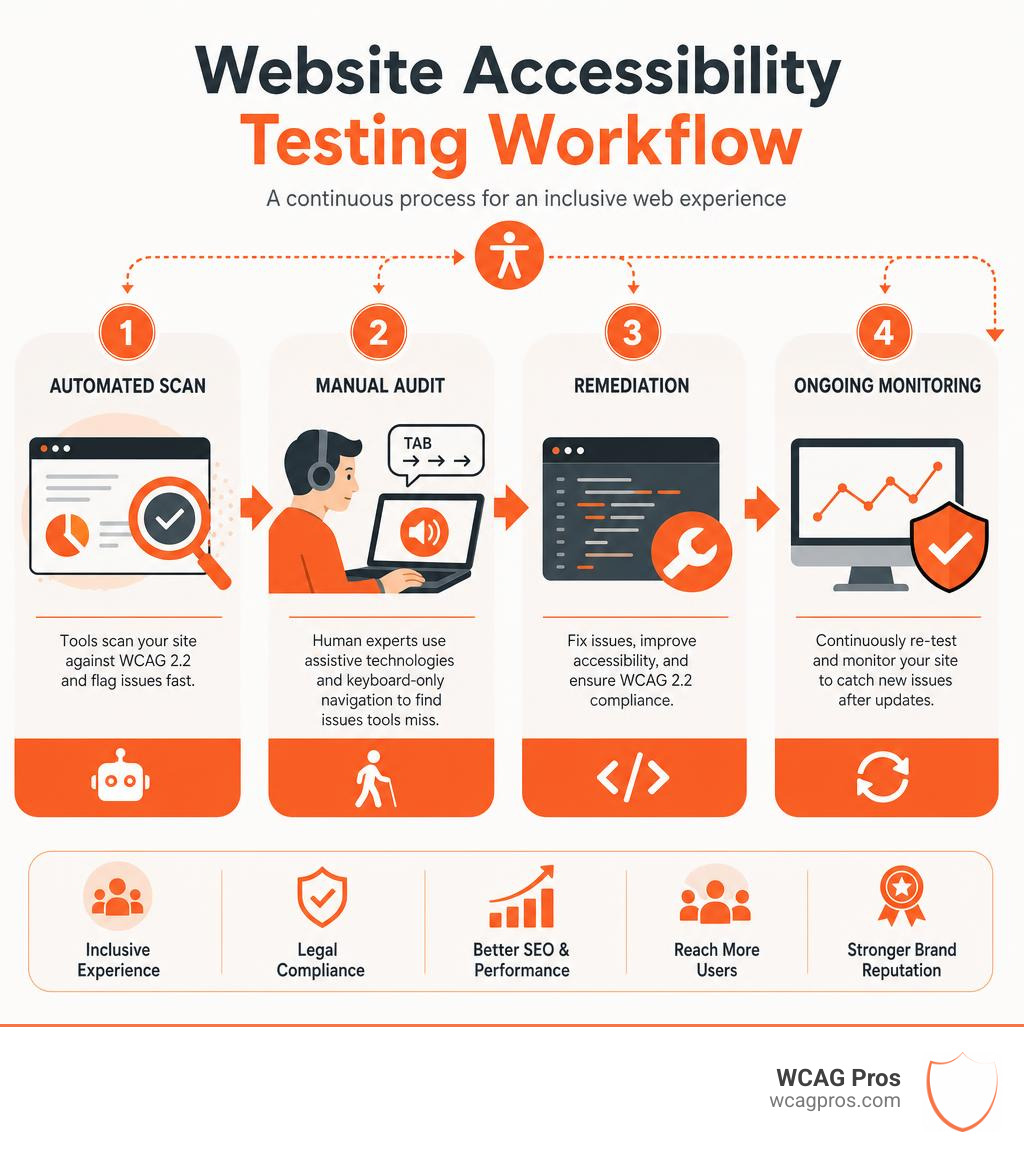
Website accessibility testing services help businesses find and fix digital barriers that prevent people with disabilities from using their websites. If you need a fast answer on what these services include, here is a quick overview:
What website accessibility testing services typically include:
- Automated scanning tools that check your code against WCAG 2.2 rules and flag common issues fast
- Manual testing human experts using screen readers and keyboard only navigation to find issues automated tools miss
- Full audits a complete review of your site mapped to WCAG 2.2 success criteria, with a detailed report
- VPAT documentation formal compliance reports required for government and enterprise procurement
- Remediation support guidance or direct code fixes to resolve identified issues
- Ongoing monitoring continuous retesting to catch new issues after site updates
Every year, more than 4,000 ADA website lawsuits are filed in the United States alone. The average settlement costs around $20,000, and that number does not include legal fees or reputational damage. Yet the root cause is almost always the same: a website that was never properly tested for accessibility.
Inaccessible websites shut out roughly 60 million Americans with disabilities. That is not just a legal problem. It is a significant loss of revenue and market reach.
The good news? A structured testing process can catch the issues before they become lawsuits.
Automated scanners are a useful starting point, but they only catch 30 to 40 percent of WCAG criteria. The rest requires trained human judgment. That gap is exactly where most businesses get into trouble.
I am Matthew Post, cofounder of WCAG Pros and a web developer with over 20 years of experience specializing in website accessibility testing services and WCAG compliance audits. I personally supervise every audit and remediation project we handle. This guide will walk you through everything you need to make a confident, informed decision about your accessibility testing strategy.
Website accessibility testing services terms at a glance:
What is Website Accessibility Testing and Why It Matters
Website accessibility testing is the process of evaluating a digital product to ensure that anyone, regardless of their physical or cognitive abilities, can navigate and interact with it. When we build websites, we often assume everyone uses a standard mouse, keyboard, and high resolution monitor. In reality, millions of users rely on assistive technology to browse the web.
Assistive technology includes screen readers, which read the text on a screen aloud to blind or visually impaired users. It also includes screen magnifiers, speech to text software, and alternative input devices like trackballs or mouth sticks. If your website code does not support these tools, users are met with digital brick walls.

For example, imagine a blind user trying to buy a product on your online store. They use a screen reader to read the page content. If your checkout button is labeled only with a generic icon and lacks descriptive text, the screen reader might simply announce “button.” The user has no idea what the button does, gets frustrated, and leaves.
This is why testing is so critical. It lets us experience our websites through the eyes and ears of all users. When you invest in testing, you can How to Test Web Accessibility and Succeed by catching these barriers early. You can also Test Site for Accessibility Without Breaking a Sweat using a systematic approach that blends automated software with real user reviews.
If you ignore accessibility, you risk alienating a huge portion of your audience. You also leave your business vulnerable to expensive legal action. In May 2026, digital inclusion is no longer a luxury. It is a fundamental part of running a modern, ethical, and profitable business.
Core Standards and Global Compliance Regulations
To build an accessible website, we need a set of rules to follow. The global gold standard for digital accessibility is the Web Content Accessibility Guidelines, or WCAG. Developed by the World Wide Web Consortium, WCAG provides the technical specifications that define what an accessible website actually looks like.
The current standard is WCAG 2.2. This version includes critical updates that address modern web design, mobile devices, and cognitive disabilities. WCAG 2.2 is organized into three levels of conformance:
- Level A: The most basic accessibility features. Without meeting Level A, a website is extremely difficult for people with disabilities to use.
- Level AA: The target standard for most global regulations and businesses. It addresses the most common and impactful barriers.
- Level AAA: The highest and most complex level of accessibility, which is typically reserved for specialized websites.
Major digital accessibility laws around the world point directly to WCAG 2.2 Level AA as their benchmark:
- ADA Title III: In the United States, the Americans with Disabilities Act prohibits discrimination on the basis of disability in places of public accommodation. Courts have consistently ruled that websites qualify as places of public accommodation. If your website is inaccessible, you are in violation of the ADA.
- Section 508: This law applies to federal agencies and organizations that receive federal funding. It requires all electronic and information technology to be accessible to people with disabilities.
- European Accessibility Act (EAA): This directive applies to private companies operating in the European Union. It mandates accessibility for a wide range of digital products and services, including ecommerce websites and mobile apps.
- AODA: The Accessibility for Ontarians with Disabilities Act is a province specific law in Canada that enforces strict accessibility standards for public and private organizations.
Staying compliant with these laws requires active, ongoing effort. If you are unsure where your website stands, you can get a professional review to identify your risks. For companies seeking direct assistance, you can use this resource to Contact Us Free ADA Evaluation or Inquiry on Your Website to see how your current site measures up.
Once you know your baseline, you can learn How to WCAG Test in 5 Simple Steps to start mapping out your compliance path. To keep your team organized, we also recommend using The Ultimate Website Accessibility Testing Checklist for 2026 to track your progress across all major requirements.
Types of Website Accessibility Testing Services
To achieve true compliance, we cannot rely on a single testing method. Different types of testing catch different types of errors. A robust strategy combines automated tools with human expertise to cover every angle.
- Automated Scanning
- Best Used For: Rapid, high volume code checks across thousands of pages.
- Pros: Fast, inexpensive, and easy to integrate into development pipelines.
- Cons: Only catches 30 to 40 percent of issues, high risk of false positives.
- Manual Testing
- Best Used For: Evaluating complex workflows, keyboard navigation, and screen readers.
- Pros: Catches interactive and logical errors that automated tools miss.
- Cons: Takes more time and requires specialized expert knowledge.
- Hybrid Audits
- Best Used For: Full compliance reviews, legal defense, and VPAT generation.
- Pros: Extremely thorough, highly accurate, and provides developer ready fixes.
- Cons: Requires a larger initial investment.
- Hardware Testing
- Best Used For: Physical kiosks, point of sale systems, and IoT devices.
- Pros: Ensures complete accessibility of physical and digital touchpoints.
- Cons: Restricted to projects with physical hardware components.
Automated Website Accessibility Testing Services
Automated testing relies on software algorithms to scan your website code. These tools check your HTML, CSS, and JavaScript against a database of known WCAG 2.2 rules. They can quickly find issues like missing image alt text, poor color contrast, and empty form labels.
Popular automated tools include the WAVE tool and the open source axe core engine. These tools are incredibly useful for running rapid checks during active development. They give developers instant feedback so they can fix basic errors before code is pushed to production.
To learn how to use these tools effectively, you can read about how Automated Web Accessibility Testing Made Easy can streamline your basic QA workflows. You can also Pick the Best Web Accessibility Evaluation Tool for Your Team to find a solution that fits your existing tech stack. For those on a budget, The Ultimate List of Free Online Accessibility Checkers is an excellent starting point.
However, we must always remember that automated tools have limits. A scanner can tell you if an image has alt text, but it cannot tell you if that alt text actually describes the image accurately. If a photo of a guide dog has the alt text “blue sky,” an automated scanner will mark it as passing, even though the description is completely useless to a blind user.
Manual Website Accessibility Testing Services
Manual testing is where human experts step in to evaluate the actual user experience. This involves navigating your website using only a keyboard, testing with various screen readers like NVDA, JAWS, or VoiceOver, and interacting with dynamic content like modals, dropdown menus, and video players.
Manual testers can easily spot keyboard traps, which occur when a keyboard only user gets stuck inside a menu or pop up and cannot escape. They also verify that the tab order of your page is logical. If a user tabs through your page and the focus jumps randomly from the header to the footer and back to the sidebar, manual testing will flag this as a critical usability issue.
To get the best results, it is highly beneficial to include people with disabilities in your testing process. You can learn How to Test Your Website’s Accessibility Using Real Users to gain authentic insights into how assistive technology interacts with your code. If your business operates in California, you can also explore a Top Web Accessibility Testing Service for Companies in California to find local experts who understand both state and federal requirements.
Full Audits and Hardware Testing
A full accessibility audit is a comprehensive, top to bottom review of your digital presence. This process involves testing representative templates, shared components, and high value user journeys, such as logging in, searching for a product, and completing a purchase.
At the end of a full audit, we deliver a detailed report mapping every issue to its specific WCAG 2.2 success criteria. This report provides exact code level recommendations in HTML, CSS, or JavaScript so your development team can implement fixes quickly.
For businesses that sell to government agencies, educational institutions, or large enterprises, a full audit is often required to generate a Voluntary Product Accessibility Template, or VPAT. A VPAT is a formal document that states exactly how accessible your product is. Many buyers will not even consider your product during the procurement process without a valid VPAT.
A full audit also covers mobile applications and physical hardware, such as point of sale kiosks, ATMs, or smart devices. To understand how this comprehensive process protects your business, you can read about The Certified WCAG Audit Process: Your Shield Against Lawsuits. For a deeper dive into what a professional audit looks like, check out our Expert Website WCAG Audit Guide for Businesses.
The Business Value and ROI of Digital Inclusion
Some businesses view accessibility testing as a compliance checkbox or an annoying legal hurdle. In reality, digital inclusion is a powerful driver of business growth and brand loyalty. When you make your website accessible, you unlock massive benefits that directly impact your bottom line.
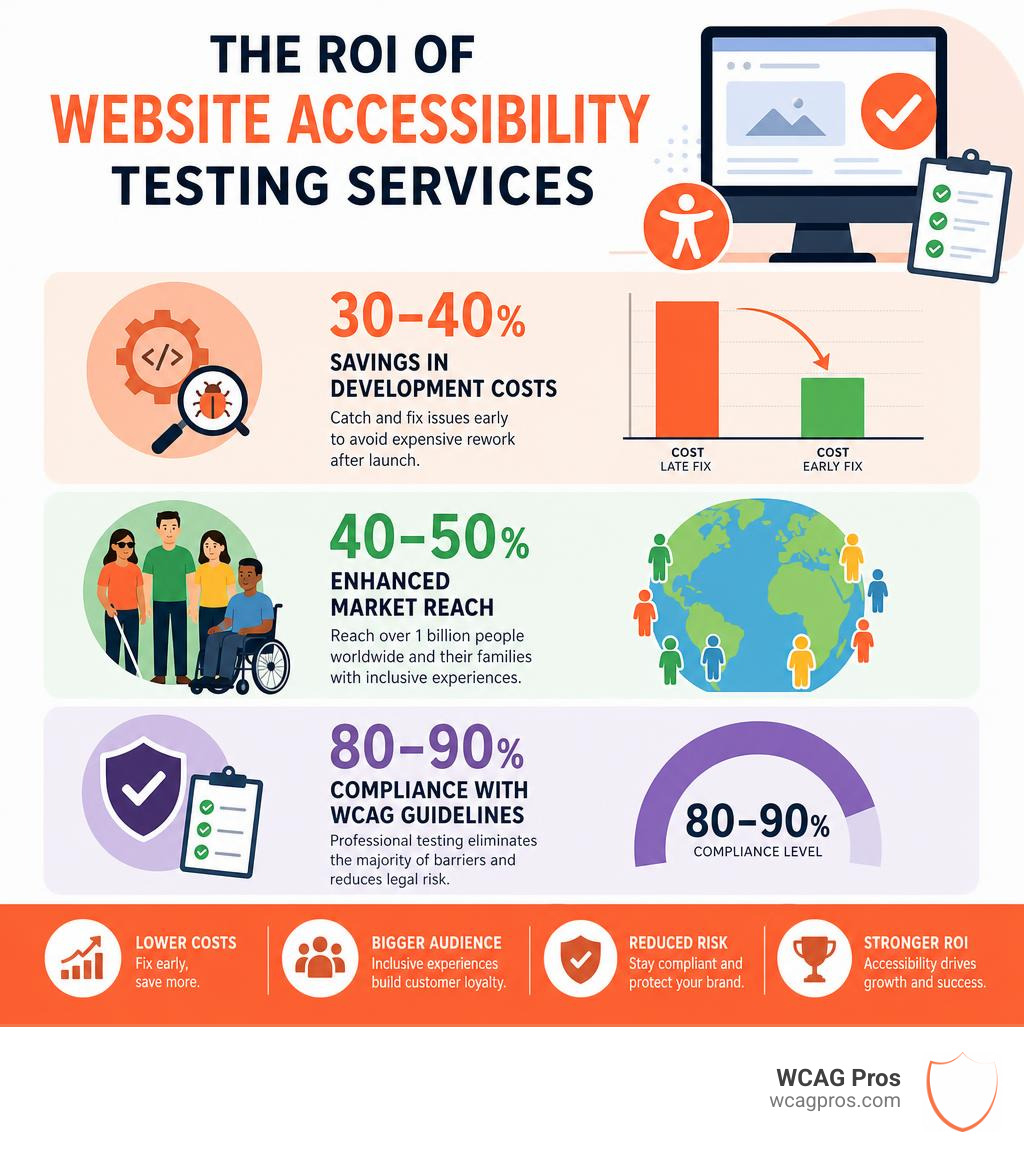
Here is what the data shows about the return on investment for accessibility testing:
- 30 to 40 percent savings in development costs: Finding and fixing bugs after a website is fully launched is incredibly expensive. By integrating accessibility testing early in your design and development phases, you prevent costly code rewrites and structural changes later.
- 40 to 50 percent enhanced market reach: Over 60 million people in the U.S. live with a disability. Globally, that number is over one billion. When you make your digital experiences inclusive, you tap into a massive, loyal customer base that controls billions of dollars in purchasing power.
- 80 to 90 percent compliance with WCAG guidelines: Professional testing services help you systematically eliminate the vast majority of accessibility barriers on your site, dramatically reducing your exposure to lawsuits.
- 75 to 90 percent improvement in compatibility with assistive technologies: Testing ensures your site works seamlessly with screen readers, screen magnifiers, and alternative input devices, providing a smooth experience for every visitor.
- Significant SEO gains: Search engines like Google love accessible websites. Clean code, semantic HTML, descriptive image alt text, and logical heading structures help search engine crawlers understand your content better. This improves your organic search rankings and drives more traffic to your site.
- Improved usability for everyone: Accessibility is the pinnacle of usability. When you design a site with clear navigation, readable fonts, and helpful error messages, you make the experience better for all users, including older adults, people with temporary injuries, and users on mobile devices. Better usability leads to higher conversion rates and fewer abandoned shopping carts.
Frequently Asked Questions About Accessibility Audits
We hear many questions from business owners and developers trying to navigate the complex world of digital accessibility. Here are some of the most common questions we answer.
What is the difference between an accessibility audit and reverification
An accessibility audit is your initial, comprehensive evaluation. It establishes your compliance baseline, identifies existing barriers, and provides a detailed roadmap of code fixes to get your site up to standard.
Reverification is the ongoing process of testing your website after those fixes have been implemented, or after new code updates are released. Websites are not static. Every time your team updates a header, adds a new product page, or installs a third party plugin, there is a risk of introducing new accessibility bugs. Reverification ensures that your compliance lives in every release, preventing code regressions over time.
Why is automated accessibility testing not enough
Automated tools are incredible for speed, but they lack human context and judgment. A scanner cannot tell if your site navigation is logical, if your interactive menus are easy to use with a keyboard, or if your error messages actually help a user correct a mistake.
Interactive elements like custom modal dialogs, complex forms, and dynamic checkout flows require human testers to verify that focus is managed correctly. Relying solely on automated scans leaves your business exposed to the 60 to 70 percent of WCAG 2.2 issues that only a human tester can find.
How do businesses choose the right accessibility testing partner
When choosing an accessibility testing provider, look for partners with proven, real world experience. A great partner should provide developer ready reports written in the native language of your engineering team, including HTML, CSS, and ARIA examples.
Avoid providers that rely on automated overlays or widgets. These quick fix solutions load external scripts over your site, slowing down performance and often making the experience worse for screen reader users. In fact, roughly 20 percent of ADA lawsuits target websites that use these overlays. A reputable partner will always focus on code level fixes that preserve your site speed, SEO, and security.
Conclusion
Achieving digital accessibility is a continuous journey, but you do not have to walk it alone. At WCAG Pros, we specialize in helping businesses of all sizes navigate the path to compliance with confidence. We do not believe in superficial patches or automated overlays that fail to protect your business.
Instead, we perform comprehensive, page by page audits of all 54 WCAG 2.2 A/AAA points. We provide your team with clear, developer ready code fixes, and we offer free reaudits to grant you compliance badges once the issues are resolved. Based in Norco, California, we are proud to support companies in building a more inclusive web.
Ready to secure your website, improve your user experience, and protect your business from legal risks? Get a Certified WCAG Audit from our team of experts today.
Read more website accessibility articles
Get Help With Your Website
We'll follow up with info about:
- The process
- Cost
- Timeline
We promise to respect your privacy, and never abuse the information you provide. We will not sell or rent your information to any third party.
By submitting this form, you consent to receive SMS messages and/or emails from SEM Dynamics LLC, dba WCAG Pros. To unsubscribe, follow the instructions provided in our communications. Msg & data rates may apply for SMS. Your information is secure and will not be sold to third parties.