
Is Your Site Legal and Compliant with Modern Standards
Is Your Site Legal and Compliant with Modern Standards
Is Your Website Actually Compliant? Here Is What You Need to Know
Check website compliance before a lawsuit does it for you. Here is a fast answer to get you started:
How to check website compliance in 5 steps:
- Run a free automated scan on your URL using a tool like WAVE or a WCAG 2.2 checker
- Review your accessibility score and identify critical failures first
- Prioritize Level AA issues since these are the most commonly required by law
- Conduct manual testing with a keyboard and screen reader to catch what automated tools miss
- Document your efforts with an accessibility statement and compliance report
Important: Automated tools only catch 30 to 40% of real accessibility issues. Manual review is essential for full compliance.
96% of websites have accessibility issues. That is not a minor statistic. It means that if you have not actively audited your site, there is a very high chance it fails modern standards right now.
And the stakes are real. Over 5,100 ADA website lawsuits were filed in 2025 alone, a 20% increase from the year before. Average settlements run between $5,000 and $25,000, not counting legal fees or remediation costs. Restaurants, healthcare providers, and e-commerce businesses are the most targeted.
The good news is that compliance is achievable. Understanding where your site falls short is the first step.
One in six people globally, roughly 1.3 billion, live with a significant disability. An inaccessible website does not just create legal risk. It locks out a massive portion of your potential customers.
I am Matthew Post, co-founder of WCAG Pros and a web developer with over 20 years of experience helping businesses check website compliance and close the gaps that put them at legal risk. In this guide, I will walk you through everything you need to know, from the standards that govern compliance to the tools and methods that actually work.
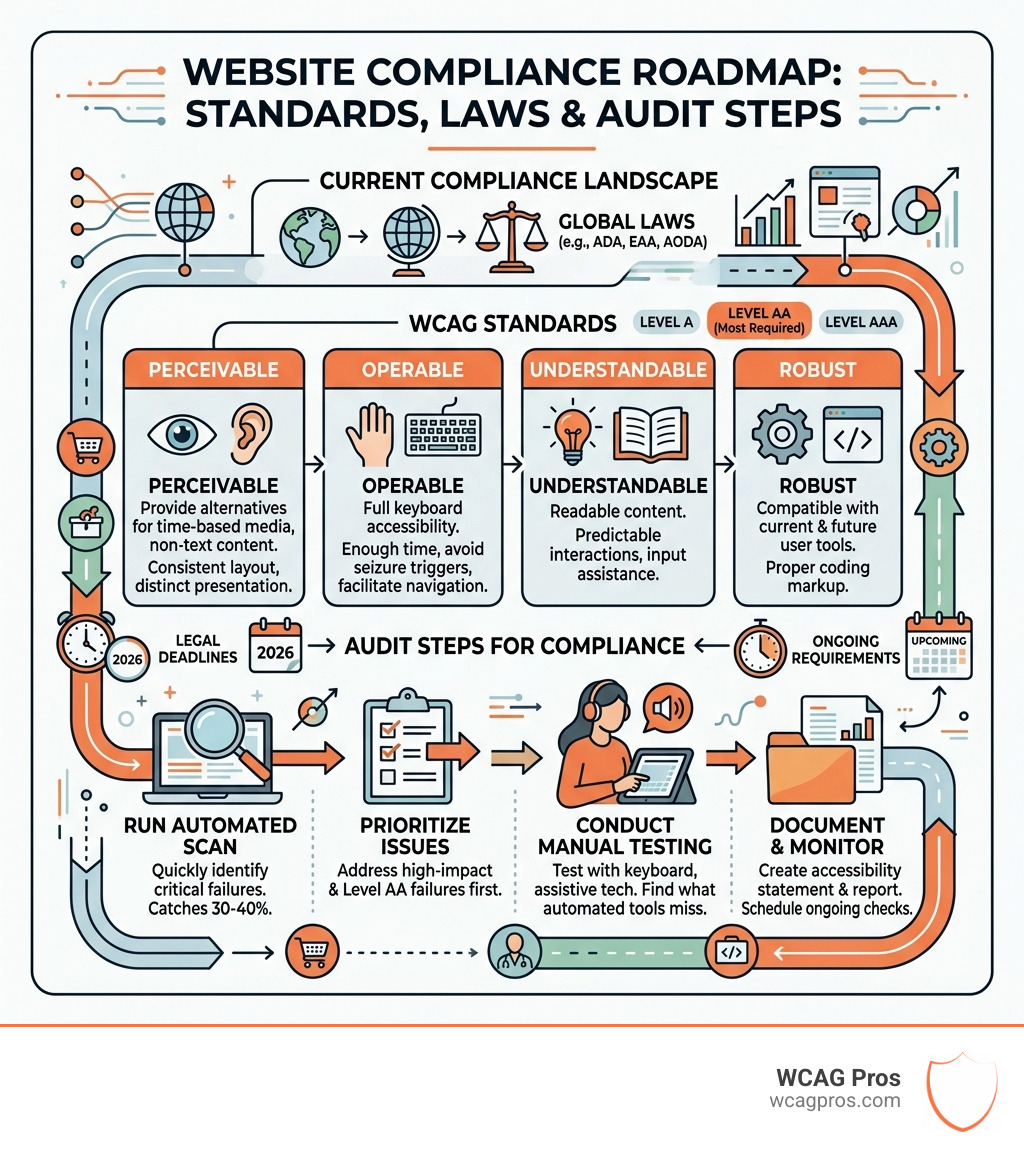
Simple guide to check website compliance terms:
Understanding Modern Accessibility Standards and WCAG 2.2
When we talk about digital compliance, the conversation usually revolves around a few key acronyms. The most important one is WCAG, which stands for Web Content Accessibility Guidelines. These guidelines are developed by the W3C and serve as the international gold standard for web accessibility.
Currently, we are operating under WCAG 2.2, which was released in late 2023. This version builds on previous iterations to address the needs of mobile users and individuals with cognitive or learning disabilities. If you want to check website compliance effectively, you must understand the three conformance levels:
- Level A: The most basic level of accessibility. If your site does not meet this, it is likely unusable for many people with disabilities.
- Level AA: The standard target for most businesses and government agencies. This level is what most laws, like the ADA and Section 508, actually require.
- Level AAA: The highest and most complex level. While it is great to aim for, it is often difficult to achieve for every single page of a website.
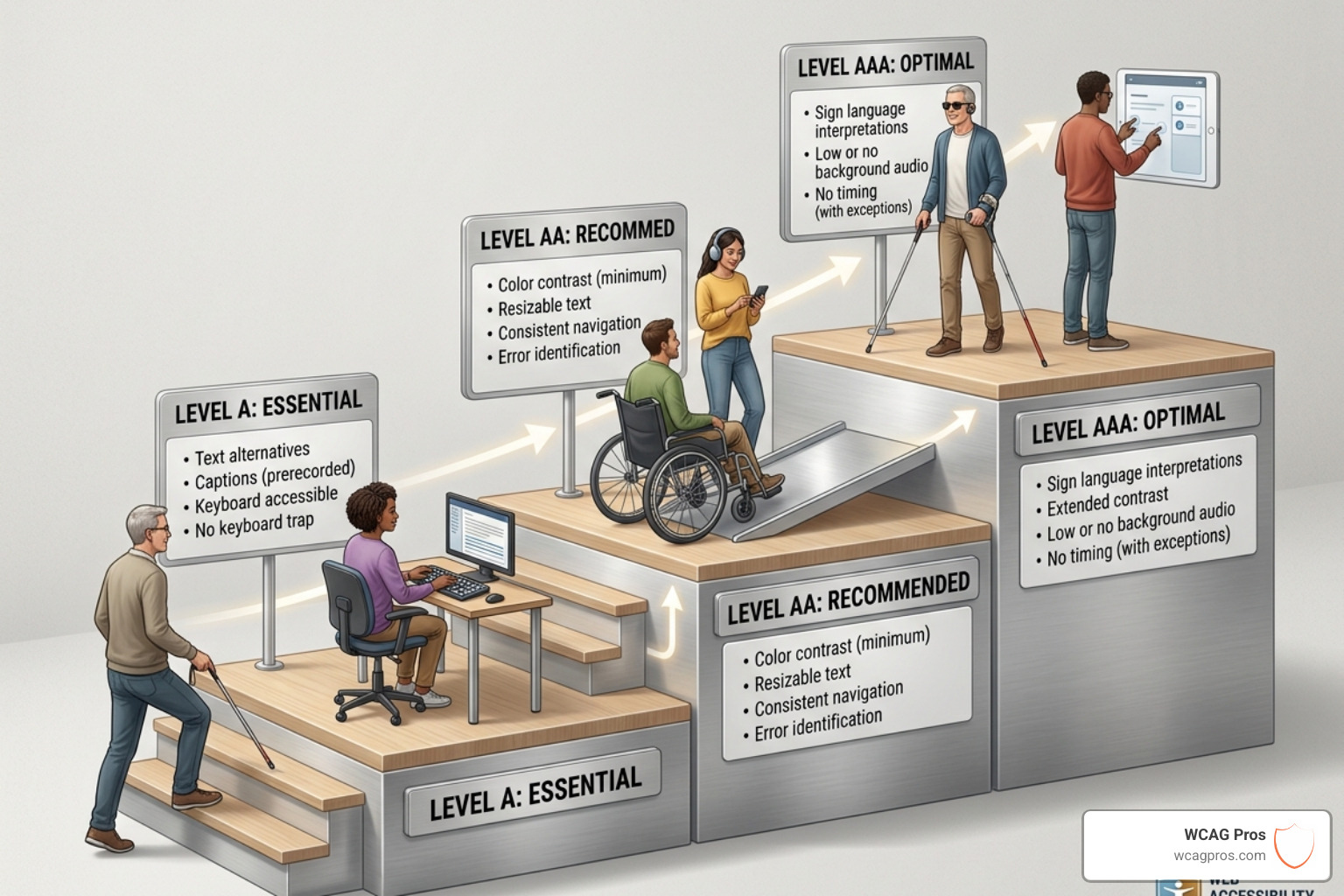
The Evolution of WCAG 2.2 Success Criteria
WCAG 2.2 introduced nine new success criteria that changed how we look at user interfaces. For instance, Focus Appearance ensures that when a user navigates via a keyboard, the “focus ring” around buttons or links is clearly visible. Other updates include Dragging Movements, which requires an alternative for actions that involve sliding or dragging, and Accessible Authentication, which prevents websites from forcing users to solve complex puzzles or memorize passwords to log in.
To keep track of these technical requirements, we recommend using a detailed resource like The Ultimate WCAG Checklist (PDF, Excel, and Print-Ready Versions) to ensure no stone is left unturned during your audit.
ADA Title III and Section 508 Requirements
In the United States, two main laws govern digital accessibility. Section 508 applies to federal agencies and any organization that receives federal funding or provides services to the government. It mandates that all information and communication technology be accessible.
On the other hand, ADA Title III applies to the private sector. While the original text of the Americans with Disabilities Act focused on physical buildings, the Department of Justice and the courts have made it clear that websites are “places of public accommodation.” This means if you run a business that serves the public, you have a legal obligation to check website compliance and ensure your digital doors are open to everyone.
Why Businesses Must Prioritize Digital Compliance in 2026
By April 2026, the digital landscape has become more regulated than ever. Beyond just avoiding a stern letter from a lawyer, there are compelling ethical and business reasons to make your site accessible. With 1.3 billion people globally experiencing disabilities, you are looking at a market with trillions of dollars in spending power.
Inclusive design also happens to be great for SEO. Search engines love clear heading structures, alt text for images, and fast-loading, semantic code. When you optimize for a screen reader, you are often optimizing for Google at the same time. You can learn more about these benefits in our Expert Website WCAG Audit Guide for Businesses.

Legal Risks and Lawsuit Statistics
The numbers are staggering. In 2025, over 5,100 ADA lawsuits were filed against website owners. That is more than 14 lawsuits every single day. These are not just targeting big tech giants either. Small to medium businesses are increasingly finding themselves in the crosshairs.
A typical settlement for a website accessibility claim ranges from $5,000 to $25,000. When you add in the cost of your own legal defense and the rush to fix the site after the fact, the bill can easily exceed $50,000. Using an ADA Site-Wide Audit is a proactive way to avoid these “drive-by” lawsuits.
Financial Incentives and Tax Credits
It is not all about the threat of fines. The government actually provides incentives to help small businesses cover the costs of becoming compliant. Under IRC Section 44, eligible small businesses can claim a Disabled Access Credit of up to $5,000 per year. This tax credit can offset 50% of the expenditures spent on accessibility, including the cost of audits and remediation.
For those in our local area, resources like the Website Accessibility Information – City of Norco – Horsetown USA provide additional context on how local businesses can stay ahead of these requirements.
How to Check Website Compliance Using Automated and Manual Methods
To truly check website compliance, you need a hybrid approach. Many people think they can just install a “widget” or run a quick scan and be done. Unfortunately, accessibility is more nuanced than that.
Automated scanners are excellent for catching “low-hanging fruit” like missing alt text or poor color contrast. However, they cannot tell you if the alt text actually describes the image correctly or if the site’s navigation makes sense to a human user. That is why we combine automated tools with manual reviews.
Essential Steps to Check Website Compliance for Your Business
We follow a structured process to ensure nothing is missed:
- Scanning: Use an online accessibility checker to get an initial report.
- Prioritization: Focus on critical issues that block users from completing tasks, such as broken forms or unnavigable menus.
- Remediation: Fix the code at the source rather than using a superficial overlay.
- Verification: Re-test with manual methods to confirm the fixes work.
If you are new to this, our Beginner’s Guide to Website Accessibility Audit is a great place to start. You can also explore The Ultimate List of Free Online Accessibility Checkers to find tools that fit your workflow.
Limitations of Tools Used to Check Website Compliance
It is a common myth that automated tools provide 100% protection. In reality, most industry experts agree that automated testing only detects about 30 to 40% of WCAG success criteria. For example, a tool can tell you an image has an alt attribute, but it cannot tell you if the text says “image123.jpg” instead of “a golden retriever sitting in a park.”
Human evaluation is required to test for logical reading order, the clarity of instructions, and the overall user experience for someone using a screen reader. For a deeper dive into why tools alone are not enough, check our article on Automated Tools Audit.
Global Accessibility Laws and Enforcement Deadlines
If you do business internationally, the legal landscape gets even more complex. In Europe, the European Accessibility Act (EAA) has a major deadline of June 28, 2025. This law requires a wide range of digital products and services, including e-commerce sites, to meet strict accessibility standards.
In Canada, the AODA (Accessibility for Ontarians with Disabilities Act) carries some of the heaviest fines in the world. Corporations found to be in non-compliance can face fines of up to $100,000 per day.
| Law | Region | Standard | Max Penalty |
|---|---|---|---|
| ADA Title III | USA | WCAG 2.2 AA (Commonly) | Private Lawsuits/Settlements |
| Section 508 | USA | WCAG 2.0/2.2 | Loss of Federal Funding |
| EAA | European Union | EN 301 549 / WCAG 2.2 | $250,000+ per violation |
| AODA | Ontario, Canada | WCAG 2.2 AA | $100,000 per day |
For businesses in Norco, CA, staying compliant with both federal and state laws is essential. You can find more information on local standards through Code Enforcement | City of Norco, CA.
The European Accessibility Act and EAA Readiness
The EAA is a game-changer because it focuses on the entire lifecycle of a product. If you sell digital goods or services in the EU, you must ensure your website is compliant before the June 2025 deadline. Failure to do so could result in your website being blocked from the market or facing significant enforcement actions. Proper WCAG Remediation is the only way to ensure EAA readiness.
Canadian Standards Under AODA and ACA
Canada’s approach is split between provincial laws like the AODA and the federal Accessible Canada Act (ACA). Both rely heavily on WCAG 2.2 Level AA. The AODA is particularly strict about documentation, requiring businesses to file accessibility reports regularly. If you are operating in these regions, a site-wide audit is not just a good idea—it is a legal necessity.
Frequently Asked Questions about Website Compliance
How often should I check website compliance?
Accessibility is not a one-time project. Every time you add a new blog post, update a plugin, or change your site’s design, you risk introducing new accessibility barriers. We recommend running a quick automated scan monthly and performing a full manual audit at least once a year or whenever significant changes are made.
Can AI tools fully fix my accessibility issues?
AI is a powerful assistant for identifying code patterns, but it is not a cure-all. AI often misses the context of how a human interacts with a page. Furthermore, “AI overlays” that claim to fix your site with one line of code are often criticized by the disability community and have even been cited as a reason for lawsuits because they can interfere with existing screen reader settings.
What is a VPAT and do I need one?
A VPAT (Voluntary Product Accessibility Template) is a document that explains how accessible a product is according to Section 508 standards. If you are a vendor trying to sell software or services to the US government or large educational institutions, you will almost certainly be asked to provide one.
Conclusion
Maintaining a compliant website is a continuous journey of monitoring and improvement. By using a combination of automated scans and manual expertise, you can protect your business from legal risks while providing a better experience for all users.
At WCAG Pros, we specialize in helping businesses navigate these complexities. Our team provides comprehensive audits covering all 54 WCAG A and AA points, ensuring your site is truly inclusive. Once we finish your remediation, we provide compliance badges and free re-audits to keep your site on track.
If you are ready to secure your digital presence, start with a professional WCAG Audit today and ensure your site is legal, compliant, and welcoming to everyone.
Read more website accessibility articles
Get Help With Your Website
We'll follow up with info about:
- The process
- Cost
- Timeline
We promise to respect your privacy, and never abuse the information you provide. We will not sell or rent your information to any third party.
By submitting this form, you consent to receive SMS messages and/or emails from SEM Dynamics LLC, dba WCAG Pros. To unsubscribe, follow the instructions provided in our communications. Msg & data rates may apply for SMS. Your information is secure and will not be sold to third parties.