
A – Z Guide to WCAG Accessibility Testing
Is Your Website Accessible? Here’s How WCAG Testing Works
WCAG accessibility testing is the process of evaluating your website against the Web Content Accessibility Guidelines to identify barriers that prevent users with disabilities from accessing your content.
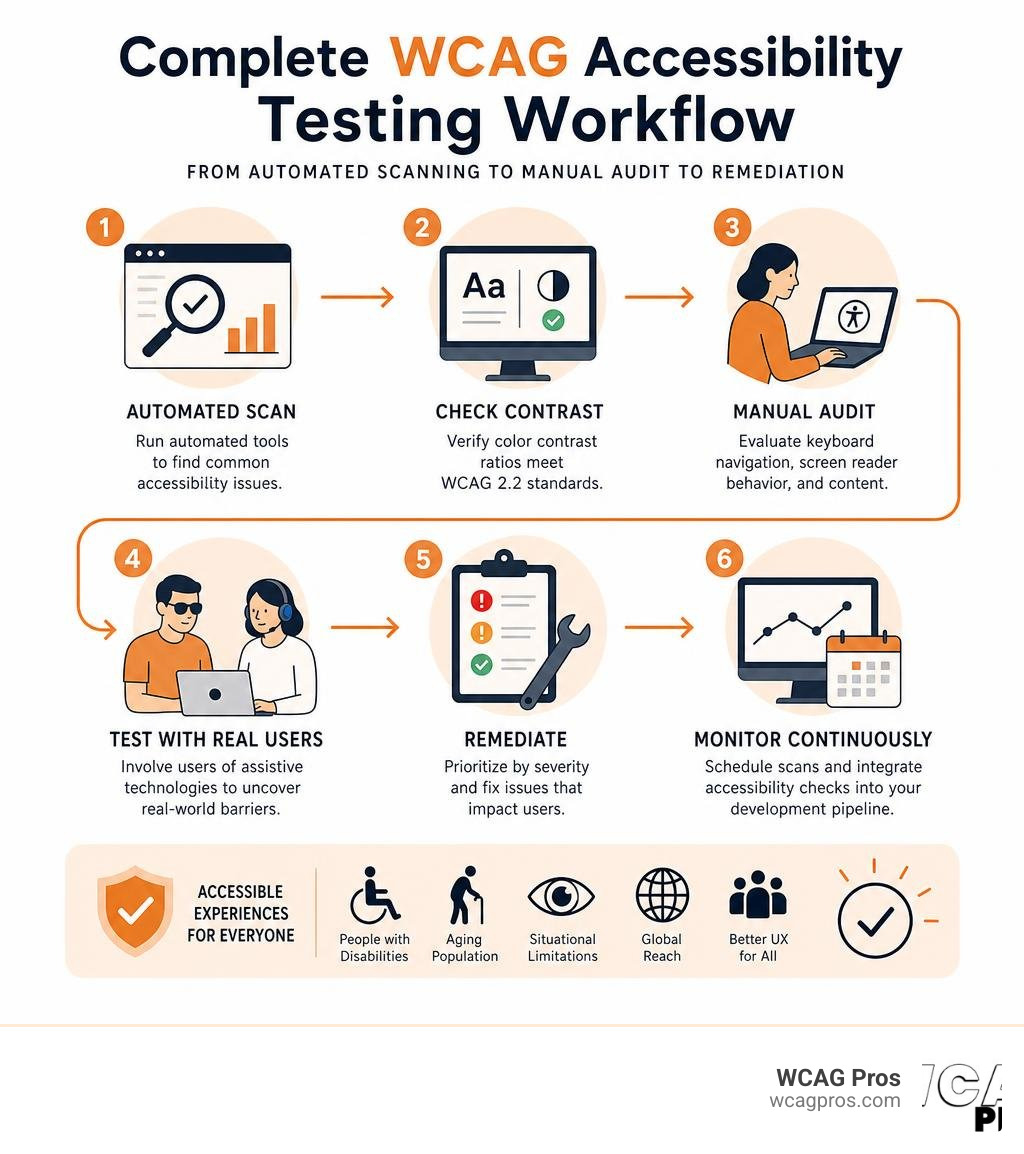
Quick answer: how to test your website for WCAG compliance:
- Run an automated scan using a tool like AccessibilityChecker.org, WAVE, or axe DevTools to catch common issues fast
- Check color contrast ratios for text and graphical elements against WCAG 2.2 standards
- Conduct a manual audit to evaluate keyboard navigation, screen reader behavior, and content quality
- Test with real users who rely on assistive technologies to surface usability barriers automation misses
- Prioritize and remediate findings by severity, starting with issues that block users entirely
- Monitor continuously with scheduled scans and integrate checks into your development pipeline
If you run a commercial website, the stakes have never been higher. ADA-related lawsuits targeting inaccessible websites have broken records in recent years, and many businesses are caught off guard because they assumed a quick automated scan was enough. The reality is that automated tools catch roughly 30% of WCAG issues. The remaining 70% require human review.
That gap is where legal exposure lives.
WCAG 2.2 is now an approved ISO standard (ISO/IEC 40500:2025) and forms the backbone of accessibility laws across the US, Europe, Canada, and Australia. Failing to meet even Level AA compliance can mean significant financial penalties and reputational damage.
We are WCAG Pros, based in Norco, California, and we specialize in comprehensive page-by-page audits of all 54 WCAG A and AAA points with code fixes and free re-audits for compliance badges. We have seen how the right testing strategy protects businesses from legal risk while making their sites genuinely better for every user. In this guide, we will walk you through everything you need to know to test, fix, and maintain WCAG compliance.
Basic WCAG accessibility testing terms:
What is WCAG and Why It Matters for Web Accessibility
The Web Content Accessibility Guidelines, created by the World Wide Web Consortium, represent the global benchmark for digital accessibility. Think of them as the building codes for the internet. Just as physical stores in California must have wheelchair ramps, digital storefronts must have equivalent entryways for users with diverse needs.
When we talk about digital barriers, we are not just talking about blind users who rely on screen readers. We are also talking about individuals with low vision who need high contrast, people with motor disabilities who cannot use a mouse, and users with cognitive processing challenges who need clear, predictable layouts. The W3C Web Content Accessibility Guidelines provide a structured, testable framework to ensure that your website does not shut out these valuable audiences.
The Evolution from WCAG 2.0 to WCAG 2.2
Web technologies move fast, and the guidelines must evolve to keep pace. While WCAG 2.0 was published in 2008, the modern standard is WCAG 2.2, which is approved as an International Organization for Standardization standard.
Each new version of the guidelines builds on the previous one. When WCAG 2.2 was introduced, it added nine new success criteria to the existing guidelines, specifically focusing on three key areas:
- Mobile accessibility, such as touch target sizing and pointer gestures
- Cognitive and learning disabilities, including accessible authentication and consistent help mechanisms
- Low vision needs, such as non-text contrast and focus appearance
It is important to know that WCAG 2.2 is fully backward-compatible. If your website meets WCAG 2.2 requirements, it automatically complies with older versions. For a deeper dive into these requirements, check out our guide on Everything You Need to Know About WCAG 2.2 AA Compliance.
Understanding the Four POUR Principles
At the heart of WCAG accessibility testing are four foundational principles known as POUR. These principles dictate how web content must be designed and developed to be accessible:
- Perceivable: Information and user interface components must be presented to users in ways they can detect. This means providing text alternatives for non-text content, captions for videos, and sufficient color contrast.
- Operable: User interface components and navigation must be usable. Users must be able to operate the site using only a keyboard, have enough time to read content, and avoid design patterns that can cause seizures.
- Understandable: Information and the operation of the user interface must be clear. This includes making text readable, ensuring web pages appear and operate in predictable ways, and helping users avoid and correct input mistakes.
- Robust: Content must be robust enough that it can be interpreted reliably by a wide variety of user agents, including assistive technologies. This requires clean semantic HTML and proper ARIA attributes.
To understand how these principles translate into specific, testable requirements, you can explore the official Understanding WCAG 2.0 documentation, which provides detailed guidance on implementation.
The Core Components of WCAG Accessibility Testing

A truly effective accessibility audit is never a single action. It is a structured process that combines different methodologies to evaluate your entire digital ecosystem. If you want to dive deep into the technical details, our In-Depth Guide to Test Web Accessibility outlines the exact processes we use during professional evaluations.
Conformance Levels A AA and AAA Explained
WCAG success criteria are organized into three levels of conformance, each representing a higher standard of accessibility:
- Level A: The absolute bare minimum. Without meeting these criteria, your website will have severe barriers that completely block some users from accessing content.
- Level AA: The globally accepted legal standard for most commercial and public websites. This level addresses the most common barriers affecting the widest range of users.
- Level AAA: The highest and most stringent level of accessibility. While some specialized websites target Level AAA, it is often impractical to apply across all dynamic web content.
Most organizations target Level AA as their standard. To learn more about what is required to hit this benchmark, read The Complete Guide to WCAG AA Compliance Requirements.
Legal Frameworks and Compliance Deadlines
In the United States, website accessibility is governed primarily by ADA Title III, which applies to places of public accommodation, including private sector websites. Federal agencies and organizations receiving federal funding must also comply with Section 508.
In California, businesses face some of the strictest civil rights protections in the nation under the Unruh Civil Rights Act, which treats a violation of the ADA as a violation of state law. The state provides helpful compliance materials, which you can review on the Website Accessibility Resources, DGS.ca.gov page.
Internationally, other major frameworks reference WCAG:
- The European Accessibility Act, which requires private European websites and services to comply by their respective deadlines
- The Accessibility for Ontarians with Disabilities Act in Canada, which enforces steep daily fines of up to 100,000 dollars for non-compliant corporations
How to Build a Hybrid WCAG Accessibility Testing Strategy
A common mistake is relying solely on automated checkers. While software is great for speed, it lacks human context. A hybrid testing strategy that blends automated scans, manual code reviews, and real user testing is the only way to achieve true compliance.

To understand how these methods compare, let us look at their strengths and limits:
| Testing Method | What It Catches | What It Misses | Best Use Case |
|---|---|---|---|
| Automated Scans | Missing alt text, low contrast, broken links, missing form labels | Whether alt text is meaningful, logical tab order, complex interactive widgets | Continuous monitoring, initial baseline audits, and broad page sweeps |
| Manual Code Reviews | Semantic HTML structure, ARIA usage, focus management, keyboard traps | Scalability across thousands of pages in real time | Deep template audits and validating complex interactive components |
| User Testing | Real-world usability barriers, screen reader flow, cognitive clarity | Edge case technical code errors | Validating high traffic user journeys like checkout and registration |
For an in-depth breakdown of how to structure these services, read our Website Accessibility Testing Services Definitive Guide.
Automated WCAG Accessibility Testing Tools and Limitations
Automated tools like WAVE, axe DevTools, Siteimprove, and AccessibilityChecker.org are excellent for scanning hundreds of pages in minutes. They can instantly flag a missing form label or a text element with poor color contrast.
However, they suffer from significant limitations:
- False positives: Tools might flag a custom interactive element as broken simply because they do not recognize the custom script, even if it is accessible.
- Context blindness: An automated tool can verify that an image has an
altattribute, but it cannot tell you if the text says “blue square” when the image is actually a red circle. - Interactive gaps: Software struggle to evaluate dynamic state changes, such as modal popups or dropdown menus that trigger on hover.
To learn how to use these tools effectively without falling into common traps, read Automated Web Accessibility Testing Made Easy.
Manual Audits and Screen Reader Evaluation
Manual audits are where the real work happens. This involves navigating your website using only a keyboard to ensure there are no keyboard traps, which are areas where a user can get stuck and cannot navigate away. It also means testing with screen readers like NVDA on Windows or VoiceOver on macOS to ensure content is read in a logical order.
We also verify the presence of skip links, which allow keyboard users to bypass repetitive header navigation and jump straight to the main content. For practical tips on how to run these manual checks, see How to Test Web Accessibility and Succeed.
User Testing with Real Assistive Technology Users
Nothing replaces the feedback of a real human being who uses assistive technology every day. Testing with individuals from the disability community reveals subtle usability barriers that automated scans and manual code reviews might overlook. It turns compliance from a checklist into a genuinely usable experience.
If you want to build a user testing program for your site, our guide on How to Test Your Website’s Accessibility Using Real Users provides a step-by-step roadmap to get started.
Step-by-Step Guide to Performing WCAG Accessibility Testing
Ready to audit your site? Let us break down the testing workflow into actionable steps. If you want a quick reference to keep beside you during this process, we recommend downloading The Ultimate Website Accessibility Testing Checklist for 2026.
Step 1 Define Scope and Explore Your Digital Assets
You do not need to audit every single page on a massive website. Instead, define a representative sample of pages. This sample should include:
- Your homepage
- Key transactional pages, such as contact forms and checkout flows
- Pages with unique layouts or templates
- Highly visited informational pages
To structure your audit methodology correctly, refer to the W3C WCAG-EM Conformance Evaluation Methodology, which is the official industry standard for scoping website evaluations.
Step 2 Run Automated Scans and Check Color Contrast
Once your scope is defined, run automated scans across those pages. Pay close attention to color contrast. WCAG 2.2 Level AA requires a contrast ratio of at least 4.5 to 1 for normal text and 3 to 1 for large text. It also requires a 3 to 1 ratio for graphical elements and user interface components.
You can find excellent resources to help with this in the W3C Web Accessibility Evaluation Tools List, which catalog various contrast checkers and automated scanning suites.
Step 3 Conduct Manual Code Reviews and Keyboard Testing
Next, step away from the automated tools and test the code manually:
- Unplug your mouse and use the Tab key to navigate. Can you see where the focus indicator is at all times?
- Inspect the HTML to ensure proper semantic structure, such as using
throughin a logical order. - Verify that form inputs have explicit, matching label elements instead of relying on placeholder text.
Integrating WCAG Accessibility Testing into Your CI/CD Pipeline
Accessibility should not be a one-time project. By integrating automated testing tools into your continuous integration and continuous deployment pipeline, you can catch errors before they ever reach production.
You can set up automated quality gates that run accessibility scans on every pull request. If a developer accidentally introduces an image without an alt tag or a button without a label, the build will fail, preventing the inaccessible code from going live.
Frequently Asked Questions About WCAG Accessibility Testing
What is the difference between ADA Title III and Section 508?
ADA Title III is a federal civil rights law that prohibits discrimination on the basis of disability by private sector businesses and places of public accommodation. Section 508, on the other hand, is a rehabilitation act amendment that specifically requires federal agencies and organizations receiving federal funding to make their electronic and information technology accessible. Both use WCAG as their functional standard, but they apply to different types of organizations.
For businesses operating in California, understanding how local and national regulations interact is critical for maintaining compliance and avoiding costly legal disputes.
Can automated tools guarantee 100 percent WCAG 2.2 compliance?
No. Automated tools are incredibly helpful for catching low-hanging fruit, but they can only detect about 30% of WCAG success criteria. Complex requirements, such as whether a form error message is helpful, whether the tab order is logical, or whether custom interactive widgets function correctly with screen readers, require manual human verification.
How often should an organization perform WCAG accessibility testing?
We recommend a tiered testing schedule:
- Continuous testing: Automated scans integrated into your CI/CD pipeline for every code deployment.
- Monthly monitoring: Automated full-site sweeps to catch content editor mistakes, such as missing alt text on new blog posts.
- Annual audits: Comprehensive manual and user-testing audits of your core templates and user journeys to ensure ongoing compliance.
Conclusion
Digital accessibility is not just a legal requirement. It is a fundamental part of building a user-friendly web. While the process of WCAG accessibility testing can seem daunting, breaking it down into a hybrid strategy of automated tools, manual reviews, and real user testing makes it manageable and highly effective.
If you want to ensure your website is fully compliant without the guesswork, we can help. At WCAG Pros, based in Norco, California, we provide comprehensive, page-by-page audits covering all 54 WCAG points, complete with direct code fixes and free re-audits to help you earn your compliance badge.
Let us help you protect your business and open your digital doors to everyone. Explore our WCAG Pros Remediation Services to get started today.
Read more website accessibility articles
Get Help With Your Website
We'll follow up with info about:
- The process
- Cost
- Timeline
We promise to respect your privacy, and never abuse the information you provide. We will not sell or rent your information to any third party.
By submitting this form, you consent to receive SMS messages and/or emails from SEM Dynamics LLC, dba WCAG Pros. To unsubscribe, follow the instructions provided in our communications. Msg & data rates may apply for SMS. Your information is secure and will not be sold to third parties.