
The Complete Guide to Website Accessibility Remediation
The Complete Guide to Website Accessibility Remediation
Why Website Accessibility Remediation Can No Longer Wait
Website accessibility remediation is the process of finding and fixing barriers on your site that prevent people with disabilities from using it, bringing your digital content into conformance with WCAG 2.2 and ADA standards.
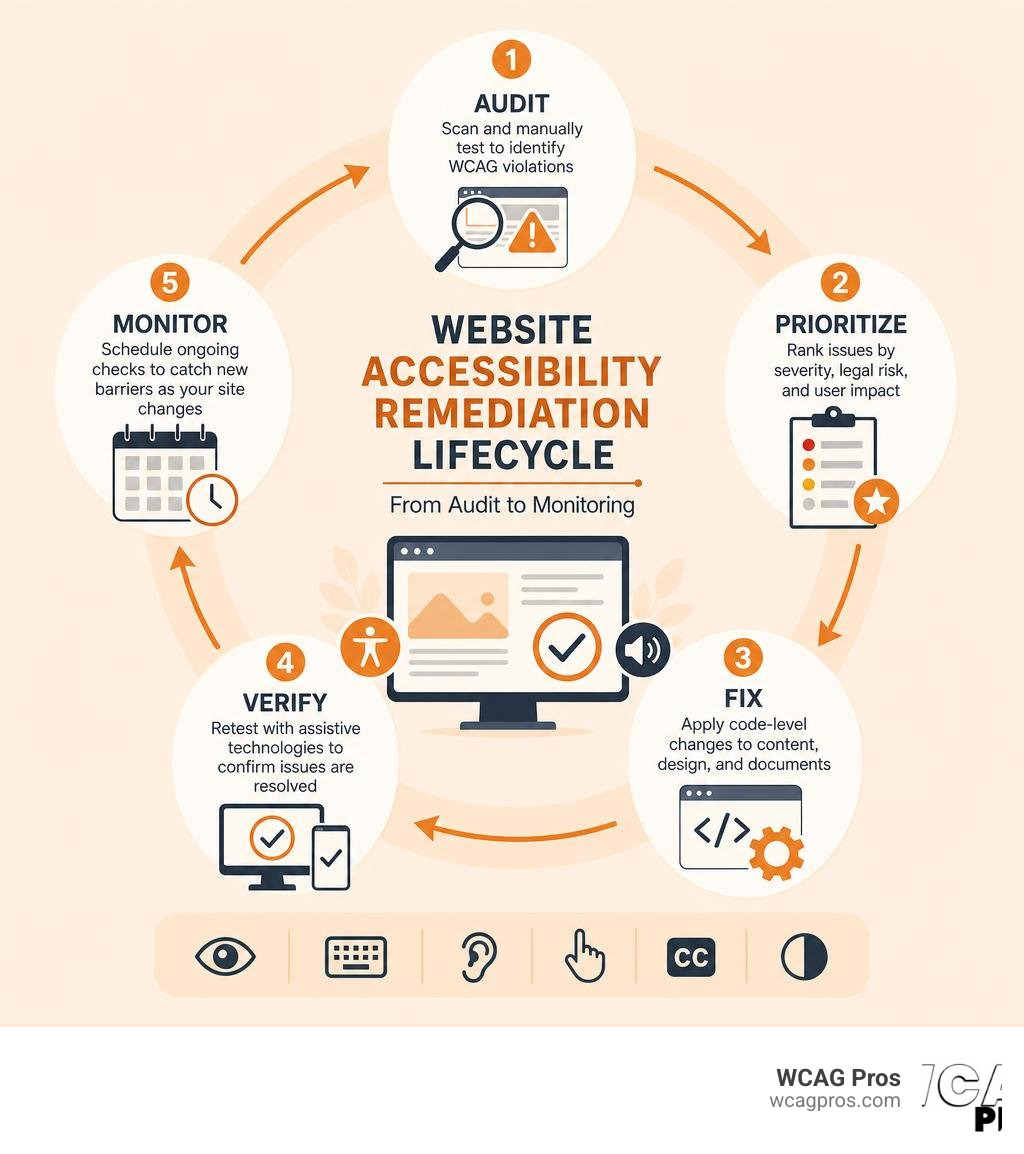
Here is a quick summary of what it involves:
- Audit (Scan and manually test your site to identify WCAG violations)
- Prioritize (Rank issues by severity, legal risk, and user impact)
- Fix (Apply code level changes to HTML, CSS, forms, images, and documents)
- Verify (Retest with assistive technologies to confirm issues are resolved)
- Monitor (Schedule ongoing checks to catch new barriers as your site changes)
One in six people has a disability that affects how they use the web. That is roughly 16% of your potential customers. And 69% of people with disabilities will simply leave a site they find hard to use.
The legal risk is just as real. Over 4,000 ADA lawsuits were filed in 2023 alone, a record high. In just the first half of 2024, more than 4,280 Title III ADA cases were filed in federal court. The average settlement runs between $25,000 and $75,000 before legal fees.
The cost of doing nothing is rising fast.
And here is what surprises many business owners: 97% of those lawsuits targeted websites. Not physical locations. Websites. Yours could be next.
I’m Matthew Post, cofounder of WCAG Pros and a web developer with over 20 years of experience specializing in website accessibility remediation and WCAG compliance. I personally supervise every audit and remediation project we take on, so you always get a thorough, practical path to compliance.
The sections below walk you through everything you need to know to fix your site, meet legal standards, and protect your business.
Understanding Website Accessibility Remediation and Its Importance
To understand website accessibility remediation, we must first look at the digital barriers that prevent people from accessing the web. Imagine trying to buy a product online when you cannot use a mouse, or trying to read an article when the text blends completely into the background. For millions of users, these are daily frustrations.
Digital barriers are elements in a website’s design or code that block people with disabilities from navigating or understanding the content. These can range from missing text descriptions on images to complex forms that throw errors without explaining how to fix them.
To make sense of these barriers, the World Wide Web Consortium created the Web Content Accessibility Guidelines, which are built around four core principles. These principles are known as POUR:
- Perceivable: Information and user interface components must be presentable to users in ways they can perceive. This means providing text alternatives for non text content, captions for videos, and enough contrast between text and backgrounds.
- Operable: User interface components and navigation must be operable. Users must be able to navigate your site using only a keyboard, have enough time to read content, and avoid designs that could cause seizures.
- Understandable: Information and the operation of the user interface must be understandable. Your text must be readable, and your web pages must operate in predictable ways with clear input assistance.
- Robust: Content must be robust enough that it can be interpreted reliably by a wide variety of user agents, including assistive technologies like screen readers.
When we perform website accessibility remediation, we work systematically to align your site with these principles. If you want a deep dive into how these concepts apply to your business, check out our comprehensive Website Accessibility Remediation Guide.
Key Steps in the Website Accessibility Remediation Process
A successful remediation project is not a chaotic scramble to fix random errors. It requires a structured, step by step approach. At WCAG Pros, we follow a proven framework to ensure no barrier is left behind:
- The Audit: We begin with a thorough inspection of your website. This is a hybrid process where we combine automated scanning tools with manual testing by real human experts. We test your site using screen readers, keyboard only navigation, and contrast checkers.
- Prioritization: Once we have a list of violations, we organize them. We look at which issues present the highest legal risk and which ones block users from completing key tasks.
- Code Level Fixes: Our developers go directly into your website’s source code. We fix the underlying HTML, CSS, and JavaScript. We do not use temporary band aids. We make permanent changes to your templates and components.
- Verification and Testing: After applying the fixes, we test the entire site again. We verify that every change successfully resolves the violation without breaking your website’s design or functionality.
- Continuous Monitoring: Website accessibility is not a one time project. Every time you add a new blog post, upload a PDF, or update a plugin, you risk introducing new barriers. We help you set up a schedule to monitor your site and keep it compliant.
For a practical breakdown of how to handle this process, read our guide on How to Fix ADA Website Issues in 5 Easy Steps.
Prioritizing Issues for Maximum Impact
If your website has hundreds of pages, the list of accessibility issues can feel overwhelming. You cannot fix everything in a single afternoon, so you must prioritize.
We recommend starting with your high traffic pages. Your homepage, checkout pages, contact forms, and main service pages should always be at the top of your list. If a user cannot access your homepage, they will never see the rest of your content.
Next, focus on interactive elements like forms and checkout flows. A broken image on a blog post is unfortunate, but an inaccessible checkout form completely prevents a transaction. This hurts your revenue and increases your legal risk.
Finally, address your critical documents. Many businesses host important policies, user manuals, and application forms as PDFs. If these documents are not structured for screen readers, they represent a significant compliance gap. To learn how to tackle your site systematically, read our article on How to Fix Your Website One Page at a Time.
Legal Standards and Compliance Guidelines
The legal landscape surrounding digital accessibility is evolving rapidly. In the United States, the primary driver for website accessibility is Title III of the Americans with Disabilities Act. While the ADA was originally written in 1990 before the modern web existed, the Department of Justice and federal courts have consistently ruled that websites are places of public accommodation and must be accessible.
For government agencies and organizations receiving federal funding, Section 508 of the Rehabilitation Act sets strict requirements for information technology. If you do business with federal or state entities, conforming to Section 508 is often a contractual requirement.
If you operate internationally, you must also consider the European Accessibility Act. This directive applies to many private businesses offering products and services in the European Union, making digital accessibility a global necessity.
In California, state laws like the Unruh Civil Rights Act allow plaintiffs to seek statutory damages for accessibility violations. Because we are based in Norco, CA, we closely monitor California’s legal climate, which regularly leads the nation in digital accessibility lawsuits. For a complete understanding of how these laws impact your digital presence, read our ADA and Website Accessibility Remediation Guidelines.
WCAG 2.2 Conformance Levels
The Web Content Accessibility Guidelines are organized into three levels of conformance. Each level builds upon the previous one, and they serve as the global benchmark for digital compliance:
- Level A: This is the bare minimum level of accessibility. It addresses the most critical barriers, such as basic keyboard navigation and alternative text for images. If your site does not meet Level A, it is highly likely to trigger lawsuits and actively block users.
- Level B / Level AA: This is the standard target for most businesses, legal settlements, and government regulations. Level AA address issues like color contrast, consistent navigation, and form error suggestions. Conforming to WCAG 2.2 Level AA is generally considered the sweet spot for legal protection and user experience.
- Level AAA: This is the highest and most stringent level of accessibility. It includes advanced requirements like sign language interpretation for videos and very high contrast ratios. While achieving Level AAA across an entire site is rare, incorporating some of its rules can greatly benefit your users.
Common Digital Content Barriers and How to Fix Them

When we look at websites across different industries, we see the same accessibility errors repeated. Let’s look at the most common types of digital content that require remediation and how to address them:
- Websites and Web Applications: Issues here usually involve poor coding practices, such as using non standard HTML elements that screen readers cannot interpret.
- Online Documents and PDFs: PDFs are notoriously difficult for assistive technologies. They must be tagged properly so that headings, paragraphs, and tables are read in the correct logical order.
- Videos and Multimedia: Videos require accurate captions for users who are deaf or hard of hearing, and audio descriptions for users with visual impairments.
- Podcasts and Audio Files: Any audio only content must be accompanied by a full text transcript.
To learn more about resolving these specific issues, refer to our guide on Detailed Accessibility Fixes for a More Inclusive Web.
Fixing Keyboard Navigation and Color Contrast
Two of the most common issues we encounter are broken keyboard navigation and poor color contrast.
Many users with motor disabilities cannot use a mouse. They rely on the Tab key to move through a website’s links, buttons, and form fields. If your site does not have visible focus indicators, these users have no way of knowing where they are on the page. We fix this by writing CSS that highlights elements when they receive keyboard focus.
Color contrast is another major barrier. If your text color is too similar to the background color, people with low vision or color blindness will struggle to read it. WCAG 2.2 Level AA requires a contrast ratio of at least 4.5 to 1 for normal text and 3 to 1 for large text. We resolve this by updating your site’s color palette to ensure strong visual hierarchy and readability. You can explore budget friendly ways to address these design issues in our article on Remediation with Fixes That Won’t Break the Bank.
Resolving Form Errors and Status Messages
Forms are the lifeblood of ecommerce and lead generation, but they are often filled with accessibility barriers.
If your form fields do not have clear HTML labels, a screen reader user will not know what information to enter. Simply using placeholder text inside the field is not enough, as that text disappears once the user starts typing.
Error handling is another critical area. When a user submits a form with errors, the site must clearly identify which field has the issue and provide instructions on how to fix it. We use ARIA live regions to ensure that screen readers immediately announce these status messages, allowing users to correct their mistakes without frustration. For detailed code fixes for your forms, read our guide on how to Stop Failing Audits with These ADA Form and Status Message Fixes.
Automated Tools versus Manual Testing and Code Level Fixes
Many business owners ask if they can just run a free automated scanner and fix their site based on that report. While automated tools are a great starting point, they have severe limitations.
Automated scanners only catch about 30% to 50% of WCAG violations. They can tell you if an image is missing alternative text, but they cannot tell you if the existing text actually makes sense in context. They can detect if a button has an ARIA label, but they cannot verify if that label accurately describes what the button does.
To achieve true compliance, you must use a hybrid approach that combines automated testing with manual reviews. This includes testing your site with actual screen readers like NVDA or VoiceOver, navigating using only a keyboard, and testing responsive layouts at high zoom levels.
| Feature / Capability | Automated Scanning | Manual Expert Testing |
|---|---|---|
| Speed | Instantaneous results | Takes days to weeks |
| Cost | Low or free | Higher initial investment |
| WCAG Coverage | Catches 30% to 50% of issues | Catches 100% of issues |
| Contextual Accuracy | Low (cannot judge logic) | High (understands user intent) |
| Assistive Tech Validation | None | Verifies NVDA, JAWS, VoiceOver |
For a deeper comparison of these methodologies, read our In Depth Guide to Website Remediation Services.
The Risks of Accessibility Overlays and Widgets
In recent years, many companies have turned to accessibility overlays, widgets, or toolbars as a quick fix. These are JavaScript snippets that paint over accessibility issues at runtime without changing your website’s underlying source code.
This is a dangerous path. Overlays do not deliver true WCAG conformance, and the Federal Trade Commission has warned that deceptive claims about overlay effectiveness can lead to regulatory action. In fact, plaintiff law firms actively target websites that use overlays because they are easy to identify and often fail to work for actual screen reader users. There was a 62% increase in digital accessibility lawsuits against businesses using overlays in 2023 compared to the previous year.
True remediation requires fixing the actual code. For a detailed look at why widgets increase your legal risk, check out The No Lawsuit Guide to Website Remediation.
Business Benefits and Cost Factors of Digital Remediation

While legal compliance is a strong motivator, website accessibility remediation offers significant business benefits.
First, it opens your business to a much larger audience. When you remove barriers, you make it easier for millions of people with disabilities to buy your products or use your services. People with disabilities limit their shopping to sites they know are accessible, and 86% of them would spend more if there were fewer barriers.
Second, accessibility cleanups naturally improve your search engine optimization. Search engine crawlers navigate websites in a very similar way to screen readers. Clean code, proper heading structures, alt text, and clear navigation help search engines understand your site better, which can boost your organic rankings.
Finally, showing that your business values inclusion builds trust and brand loyalty. To learn more about the positive impact of professional remediation, read about Professional ADA Remediation Services You Can Trust.
Understanding the Cost of Remediation
The cost of a remediation project depends on several key factors:
- Website Size and Page Count: A simple five page brochure site takes much less time to fix than an ecommerce store with thousands of product pages.
- Platform and Complexity: Custom built applications and complex interactive features require more development hours than standard WordPress or Shopify sites.
- The Severity of Violations: A site with deep structural code issues will require more extensive work than a site that just needs color contrast updates and alt text.
While remediation requires an upfront investment, it is far less expensive than defending an ADA lawsuit. With average settlement ranges between $25,000 and $75,000, addressing your code proactively is the smartest financial decision you can make.
Frequently Asked Questions about Digital Compliance
How long does the remediation process typically take?
The timeline for a typical remediation project is between 30 and 60 business days. This depends heavily on the size of your website and the complexity of its features. A standard marketing website can often be fully audited, fixed, and verified within a few weeks, while complex enterprise platforms or sites with thousands of PDFs may take several months.
Can we use AI tools to automatically fix all WCAG 2.2 issues?
No, AI cannot automatically fix all WCAG 2.2 issues. While AI is incredibly useful for generating initial code suggestions and draft alt text, it cannot understand human context. Only a human tester can verify if a form’s error message is clear, or if a screen reader’s reading order makes logical sense. A hybrid approach of AI assistance and manual validation is the only way to guarantee compliance.
What happens if our organization receives an ADA demand letter?
If you receive an ADA demand letter, do not panic, but do not ignore it either. Consult with a legal professional who specializes in digital accessibility immediately. Most demand letters lead to settlements ranging from $25,000 to $75,000. Your best defense and path forward is to immediately engage a professional remediation team to audit your site, build a clear roadmap, and begin fixing the critical barriers that triggered the complaint.
Conclusion
Choosing the Right Partner for Website Accessibility Remediation
Ensuring your website is fully accessible is a continuous journey, but you do not have to walk it alone.
At WCAG Pros, we specialize in helping businesses navigate the complexities of digital compliance. We do not offer quick fix overlays or superficial scans. Instead, we perform comprehensive, page by page audits of all 54 WCAG A and AAA points.
Our team of experienced developers delivers actual, code level fixes to your website’s source code. Once the work is complete, we perform free reaudits to verify compliance and award you our compliance badges, giving you and your users peace of mind.
If you are ready to protect your business, expand your audience, and make your digital presence truly inclusive, visit our WCAG Remediation page to get started today.
Read more website accessibility articles
Get Help With Your Website
We'll follow up with info about:
- The process
- Cost
- Timeline
We promise to respect your privacy, and never abuse the information you provide. We will not sell or rent your information to any third party.
By submitting this form, you consent to receive SMS messages and/or emails from SEM Dynamics LLC, dba WCAG Pros. To unsubscribe, follow the instructions provided in our communications. Msg & data rates may apply for SMS. Your information is secure and will not be sold to third parties.