
In-Depth Guide to Website Remediation Services
In-Depth Guide to Website Remediation Services
Why Website Remediation Is No Longer Optional for Business Owners
Website remediation is the process of identifying and fixing accessibility barriers on your site so that people with disabilities can use it, and so your organization stays compliant with laws like the ADA and WCAG 2.2.
Here is what you need to know right away:
- What it is: Fixing the underlying code, content, and structure of your website to meet WCAG 2.2 standards
- Who needs it: Any business, government body, or organization with a public facing website
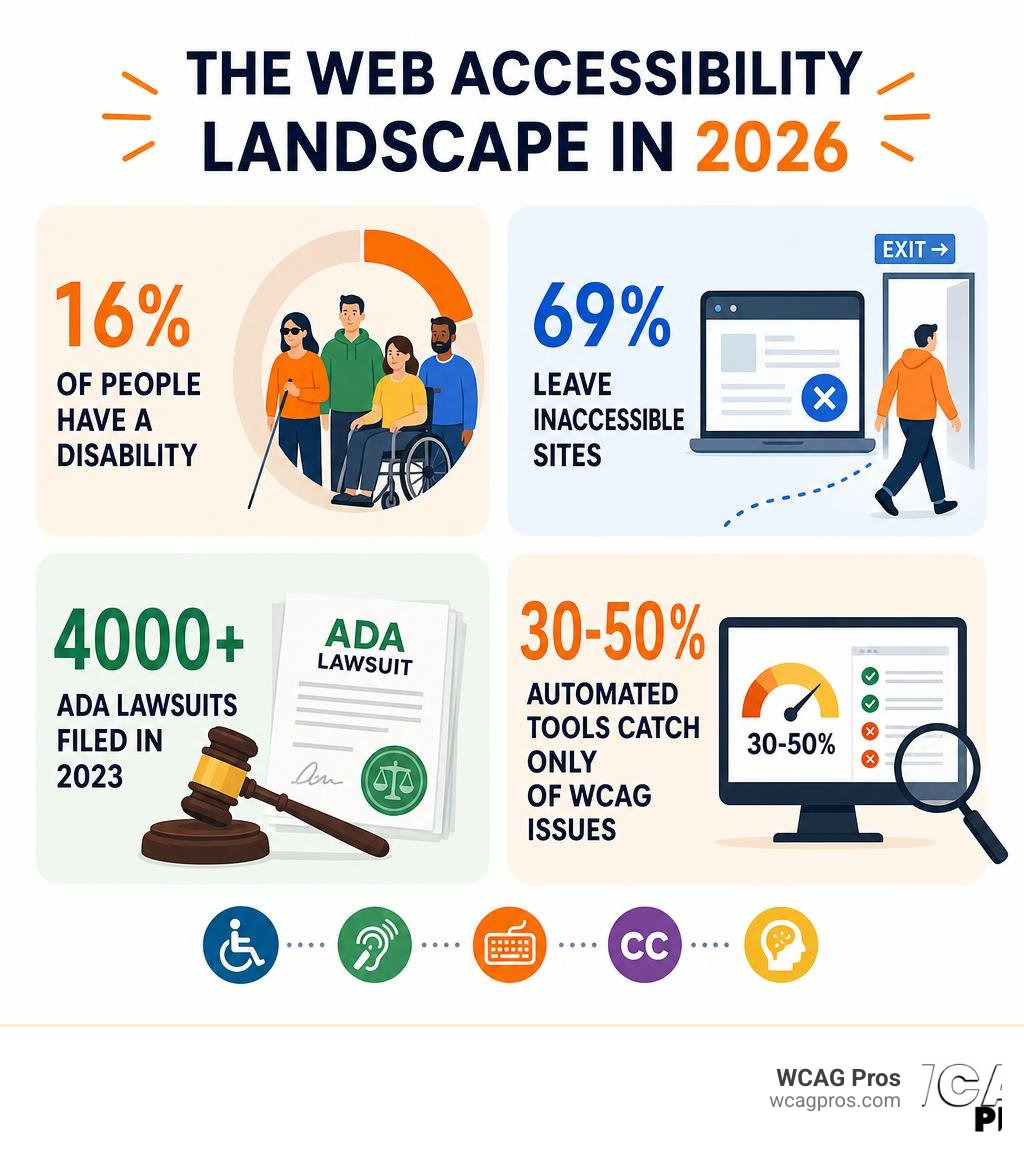
- Why it matters now: Over 4,000 ADA lawsuits were filed in 2023 alone, a record high, with average settlements ranging from $25,000 to $75,000
- What gets fixed: Images, forms, videos, PDFs, keyboard navigation, color contrast, and more
- What it is NOT: An overlay widget or plugin that sits on top of your site without fixing the real problems
The stakes are real. One in six people has a disability that makes accessing websites difficult. That is 16% of your potential customers. And 69% of them will simply leave a site they find hard to use.
Most websites were not built with accessibility in mind from the start. Design systems evolve, content gets added, and developers move on. The result is a site full of barriers that most owners do not even know exist until they receive a demand letter.
I’m Matthew Post, cofounder of WCAG Pros and a web developer with over 20 years of experience specializing in website remediation and WCAG compliance. I personally supervise every audit and remediation project we take on, and I’ve helped businesses of all sizes fix real code issues and reduce their legal exposure.
The Critical Role of Website Remediation in Digital Compliance
We live in a fully digital world. In June 2026, a website is often the primary way customers interact with your business. If your digital storefront is locked to people with visual, auditory, motor, or cognitive disabilities, you are locking out a massive portion of the market. This is where website remediation becomes essential. It is not just about making your site look nice. It is about restructuring your digital code to ensure everyone has equal access.
From a legal perspective, the landscape has become incredibly strict. The Department of Justice has made it clear that public websites are considered places of public accommodation under Title III of the Americans with Disabilities Act (ADA). If your business is based in California, or if you serve customers there, you must be especially vigilant. California has some of the most active web accessibility litigation in the country.
Beyond the ADA, government agencies must now comply with strict updated rules under ADA Title II. This requires state and local public entities to ensure all web content and mobile applications meet WCAG 2.2 Level AA standards. In Europe, the European Accessibility Act enforces similar strict requirements for ecommerce and digital services.
To understand how to protect your organization from costly litigation, we recommend reading The No Lawsuit Guide to Website Remediation. The truth is simple. Real compliance requires real code changes. You can read more about the core principles of fixing these issues on our dedicated WCAG Remediation page.
What Digital Content Requires Website Remediation?
When business owners think about accessibility, they often only think about the text on their homepage. But digital accessibility goes much deeper. Any asset that a user can download, view, or interact with must be fully accessible.
Here are the main types of digital content that require immediate attention:
- PDF Documents and Office Files: Scanned PDFs are often completely invisible to screen readers because they are treated as flat images. These documents must be tagged and structured so assistive technology can read the text in a logical order.
- Online Forms: If a user cannot navigate your contact forms, checkout fields, or application portals using only a keyboard, your site is not compliant. Every input field must have a clear label.
- Videos and Multimedia: All videos require accurate captions for users who are deaf or hard of hearing. Additionally, you should provide audio descriptions for visually impaired users.
- Audio Transcripts: Podcasts and audio recordings must have text transcripts available.
If you are worried about the potential costs of updating all of these assets, we have created a resource to help you find Remediation with Fixes That Won’t Break the Bank.
How to Identify Accessibility Issues Before Fixing Them
Before we can fix a problem, we must know exactly where it is. You cannot guess your way to accessibility compliance. The process always begins with a comprehensive assessment.

An effective assessment consists of three distinct parts:
- Automated Scanning: We run specialized software to crawl your website and flag obvious errors like missing image alt text or poor color contrast.
- Manual Testing: An accessibility expert navigates your site using only a keyboard and assistive tools to find complex interactive issues.
- User Feedback: Testing your website with real users from the disability community provides invaluable insight into how your site functions in the real world.
To learn how to properly document these findings and prepare for the next steps, consult The No Nonsense Guide to ADA Audit and Certification.
Automated Tools versus Manual Testing versus Hybrid Approaches
There is a common misconception that you can achieve full compliance by simply running a free automated scanner. This is a dangerous assumption. Automated tools are incredibly fast, but they can only catch roughly 30% to 50% of WCAG 2.2 success criteria.
For example, an automated tool can tell you if an image is missing an alternative text attribute. However, it cannot tell you if the alt text you wrote actually makes sense or if it is completely irrelevant to the page context. Only a human manual tester can determine that.
Testing Methods Comparison:
- Automated Scanning: Catches missing alt tags, basic contrast errors, and missing form labels. However, it misses 60% of WCAG issues and cannot test complex user flows. It is best for quick initial sweeps and continuous monitoring.
- Manual Testing: Catches keyboard traps, screen reader navigation, and logical reading order. It takes more time and human effort, but it is best for finding structural and interactive code errors.
- Hybrid Approach: Combines the speed of automation with the accuracy of human experts. It requires professional coordination, but it is best for complete, legally defensible compliance.
To ensure your site is tested thoroughly using both automated checks and manual screen reader evaluations, you can partner with us for professional WCAG Pros Remediation Services.
The Core Steps of a Successful Website Remediation Process
Once your audit is complete, it is time to take action. We follow a highly structured workflow to ensure no detail is missed.
We break down the journey into five actionable phases:
- Audit: We run automated scans and conduct manual testing to map out every single WCAG 2.2 violation on your site.
- Prioritize: We sort the issues by severity. Critical barriers that prevent users from completing purchases or filling out forms are fixed first.
- Fix: Our developers dive into your source code to resolve the underlying issues.
- Verify: We re-test every fixed element to ensure the code changes actually solved the problem without breaking other parts of your site.
- Monitor: We establish ongoing checks to make sure new content updates do not reintroduce accessibility errors.
For a simplified checklist of this process, check out our guide on How to Fix ADA Website Issues in 5 Easy Steps.
Common Code-Level Issues Resolved During Website Remediation
During the code repair phase, we frequently run into the same technical errors across almost every website.
Here are the most common code-level issues we fix:
- Missing Alternative Text: Every meaningful image must have descriptive alt text in the HTML code so screen readers can describe the image to visually impaired users.
- Low Color Contrast: Text must stand out clearly against its background. We adjust hex codes to meet the required contrast ratios.
- Improper ARIA Landmarks: Accessible Rich Internet Applications (ARIA) attributes help assistive technologies understand dynamic elements like dropdown menus, modals, and tabs.
- Keyboard Traps: Users navigating via keyboard must be able to move their focus into, and out of, every interactive element using only the Tab key.
If you have a large website with hundreds of pages, the task can feel overwhelming. We recommend learning How to Fix Your Website One Page at a Time to make the project highly manageable.
Why Accessibility Overlays and Widgets Fail to Provide Compliance
If you have searched for web accessibility solutions, you have likely seen advertisements for automated overlays or quick-fix widgets. These tools claim that by simply adding a single line of JavaScript to your site, your website will instantly become compliant.
In reality, overlays do not work. Here is why:
- They do not fix the source code: Overlays merely apply a temporary visual layer over your site. The underlying broken code remains completely inaccessible to screen readers.
- They block assistive technology: Many screen reader users have their devices highly customized. Overlays often interfere with these settings, making the site even harder to navigate.
- They do not prevent lawsuits: Courts have repeatedly ruled that overlays do not constitute a sufficient effort toward accessibility. Many businesses using overlays have still been sued.
- They miss complex issues: An overlay cannot rewrite your forms or correctly tag your complex PDFs.
True accessibility requires modifying your actual source code. There are no shortcuts to legal safety and genuine inclusion.
Frequently Asked Questions
How long does the remediation process typically take?
The timeline depends on the size and complexity of your website. A small brochure website with a dozen pages can often be remediated in a few weeks. However, large e-commerce platforms or enterprise portals with thousands of pages, dynamic database elements, and complex forms can take several months. Most organizations reach a strong, legally safe baseline within 30 to 60 business days.
What is the average cost of remediating a website?
The total investment depends on the scale of your digital footprint, the number of WCAG 2.2 violations found during the initial audit, and the complexity of your custom templates. While manual code fixes require professional development hours, they are incredibly cost-effective when compared to the massive financial toll of an ADA lawsuit settlement, which often ranges from $25,000 to $75,000 plus your own legal fees.
How do organizations maintain compliance after initial fixes?
Accessibility is not a one-time project. Every time you upload a new blog post, add a product, or update a plugin, you run the risk of introducing new accessibility barriers. To maintain compliance, we recommend scheduling quarterly manual audits, conducting automated scans of your high-traffic pages, and training your content creators on basic accessibility best practices.
Conclusion
Making your digital content accessible is both a legal necessity and an incredible business opportunity. By removing barriers, you open your doors to millions of users who are eager to support inclusive brands.
At WCAG Pros, we believe in doing things the right way. We do not use cutting-corners overlays. We provide real, human-led code fixes that protect your business and create beautiful experiences for everyone. If you are ready to secure your digital presence, explore our expert WCAG Remediation services. You can also learn more about how we help businesses secure their digital compliance by visiting our page on Professional ADA Remediation Services You Can Trust.
Read more website accessibility articles
Get Help With Your Website
We'll follow up with info about:
- The process
- Cost
- Timeline
We promise to respect your privacy, and never abuse the information you provide. We will not sell or rent your information to any third party.
By submitting this form, you consent to receive SMS messages and/or emails from SEM Dynamics LLC, dba WCAG Pros. To unsubscribe, follow the instructions provided in our communications. Msg & data rates may apply for SMS. Your information is secure and will not be sold to third parties.