
The Definitive Guide to Accessibility Testing Tools Online
The Definitive Guide to Accessibility Testing Tools Online
Why Accessibility Testing Tools Online Matter More Than Ever in 2026
If you need a quick answer, here are the most widely used accessibility testing tools online right now:
| Tool | Type | Best For |
|---|---|---|
| WAVE | Free web based + browser extension | Quick single page audits |
| axe DevTools | Browser extension + API | Developer and CI/CD workflows |
| Siteimprove | Enterprise SaaS | Site wide monitoring |
| AccessibilityChecker.org | Free automated scanner | ADA and WCAG compliance checks |
| TestKase Web Scanner | Automated WCAG audit | Pre release gating and regression tracking |
| Level Access | Enterprise platform | Manual audits plus automated scanning |
| Clym Accessibility Scanner | Free automated scanner | WCAG 2.2 and EN 301 549 checks |
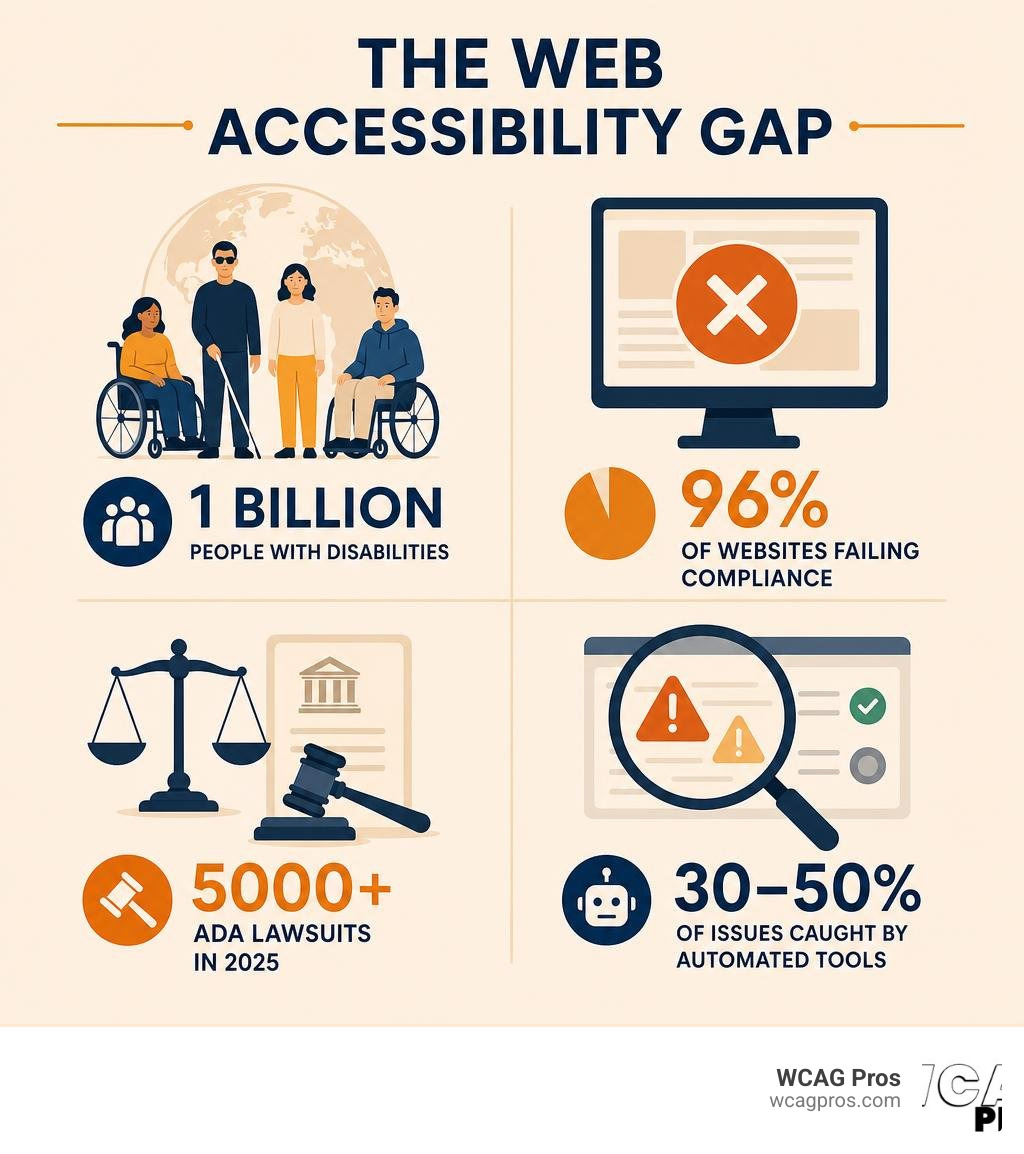
Finding the right accessibility testing tools online has become urgent for any business with a website. Over 5,000 ADA website lawsuits were filed in 2025 alone. Average settlements range from $5,000 to $25,000. And a staggering 96% of websites currently fail basic compliance checks.
The numbers behind the problem are just as striking. Over 1 billion people worldwide live with a disability. Yet the vast majority of websites still create barriers that shut those users out entirely.
The good news is that a wide range of tools exist to help you find and fix those barriers. Some are free. Some are built for large development teams. Some run in your browser. Others plug into your build pipeline. Knowing which tool fits your situation is the hard part.
That is exactly what this guide covers.
I’m Matthew Post, co founder of WCAG Pros and a web developer with more than 20 years of experience auditing and remediating websites for accessibility testing tools online and WCAG compliance. I personally supervise every audit at WCAG Pros, so the recommendations in this guide come from hands on work with real sites, not just theory.
How to Evaluate Accessibility Testing Tools Online
Selecting the right software for your team requires looking beyond marketing claims. With so many options in the industry, you need a structured way to evaluate what actually works.

To help you navigate this crowded landscape, the W3C Web Accessibility Initiative maintains a comprehensive directory. You can explore this resource directly via the Web Accessibility Evaluation Tools List W3C which showcases over 118 tools.
When evaluating these options, we must look at how well they map to core compliance standards. A great tool should not just flag generic errors. It should explicitly tell you which WCAG 2.2 success criteria have been violated. It must also support the specific legal frameworks that apply to your business, such as ADA Title III for private businesses, Section 508 for government entities, and the European Accessibility Act for organizations operating in the European market.
What Are Accessibility Testing Tools Online
At their core, accessibility testing tools online are specialized software programs designed to analyze the code and user interface of web pages. They inspect the underlying HTML, CSS, and JavaScript to determine if the content can be successfully used by individuals with disabilities.
These tools work by parsing your web pages and running them against a set of predefined rules. For example, they check if your images have alternative text, if your form inputs have associated labels, and if your color contrast ratios meet the required thresholds.
To explore the fundamental concepts of how these scanners operate, you can read The Ultimate Guide to Online Accessibility Testing. If you are looking for a quick, budget friendly way to start scanning your site today, we have also compiled a comprehensive resource in The Ultimate List of Free Online Accessibility Checkers.
Key Standards and Global Regulations in 2026
The legal landscape surrounding digital accessibility has become much stricter. In 2026, compliance is no longer optional. The benchmark for digital accessibility is the Web Content Accessibility Guidelines, specifically WCAG 2.2. This standard is divided into three conformance levels:
- Level A: The absolute minimum level of accessibility, addressing the most critical barriers.
- Level AA: The global standard for most commercial and government websites, covering major usability barriers.
- Level AAA: The highest and most stringent level of accessibility, typically reserved for specialized dedicated portals.
These guidelines serve as the technical foundation for major global regulations. In the United States, ADA Title III governs public accommodations, which courts have consistently ruled includes websites. If your organization receives federal funding or operates in the public sector, Section 508 of the Rehabilitation Act mandates strict compliance.
Meanwhile, the European Accessibility Act has introduced strict enforcement measures across the European Union, making digital accessibility a priority for any company doing business in Europe. To understand how these laws interact and how to choose a scanner that protects your business from legal risk, you can check out our AZ Guide to ADA Compliance Checkers.
Automated Scanners versus Manual Testing Methods
A common mistake is relying entirely on automation. While automated testing tools online are incredibly fast and efficient, they represent only one half of a complete accessibility strategy.

Automated scanners are excellent for catching low hanging fruit, but they have major blind spots. To build a truly compliant website, we must understand the critical balance between automated scans and manual human reviews. Harvard University outlines these essential testing workflows in their guide on Accessibility Testing Tools and Practices . To learn how to structure your testing process for long term success, you can read our guide on How to Test Web Accessibility and Succeed.
The Limitations of Automated Scanners
Automated scanners are fundamentally limited because they cannot understand context. An automated tool can check if an image tag contains an alt attribute, but it cannot tell you if that alt text actually describes the image accurately. If you have an image of a red button and your alt text says “blue sky” the scanner will mark it as a pass because the code is technically present.
Similarly, automation cannot fully evaluate screen reader compatibility or verify if the reading order of a page makes sense when spoken aloud. It cannot judge if your interactive widgets are intuitive for a user with cognitive disabilities. For a deeper dive into what automation can and cannot do, you can read Automated Web Accessibility Testing Made Easy.
When to Use Manual Testing Methods
Manual testing must be used to evaluate any interaction that requires human judgment. This includes testing your entire website using only a keyboard to ensure there are no keyboard traps and that the visual focus indicator is always clearly visible.
Manual testing is also required to verify that custom interactive components, such as modals, dropdown menus, and tab panels, behave correctly with assistive technologies. We recommend testing your site with real screen readers like NVDA on Windows or VoiceOver on macOS. To learn how to implement these human centered testing methods, you can read our detailed guide on How to Test Your Websites Accessibility Using Real Users.
Comparing Free and Paid Solutions
As you plan your accessibility budget, you will need to choose between free online checkers and robust enterprise platforms.
Free tools are perfect for quick, page by page checks during the design or development phase. However, as your website grows, manual page by page scanning becomes impossible. Paid enterprise solutions offer advanced features like site wide automated crawling, historical monitoring, and detailed executive reporting. To help you find the right balance for your organization, you can consult Your Shortcut to the Best WCAG Checker Tool.
Here is a comparison of how free and paid tools differ across key operational categories:
| Feature | Free Online Checkers | Paid Enterprise Platforms |
|---|---|---|
| Scan Volume | Single page at a time | Multi page, site wide crawling |
| Scheduling | Manual execution only | Automated daily, weekly, or monthly scans |
| Reporting | Basic on screen list of errors | Exportable PDF, CSV, and JSON compliance reports |
| Integrations | None | CI/CD pipelines, developer APIs, and JIRA |
| History | No historical tracking | Progress tracking and regression dashboards |
| Support | Community forums | Dedicated account managers and technical support |
Browser Extensions versus Web Based and API Based Tools
The format of your testing tool should match the workflow of the person using it. Browser extensions like WAVE or axe DevTools run directly inside your web browser. This makes them ideal for developers who want to test code changes locally before pushing them live. They are also perfect for testing dynamic single page applications because they inspect the rendered DOM in real time.
In contrast, web based tools allow you to paste a public URL into a scanner to generate a quick report. API based tools go a step further by allowing you to integrate accessibility checks directly into your software build pipelines. This means you can automatically block code deployments if a developer introduces a critical WCAG 2.2 error. You can read more about these different setups in our Web Accessibility Testing Tools Guide 2026.
Advanced Features for Dynamic Content and Mobile Apps
Modern websites are rarely static. They are filled with dynamic content, interactive single page frameworks, and complex user portals. Traditional scanners often struggle with these environments because they only analyze the initial static HTML sent from the server.
To test dynamic content effectively, you need tools that can monitor the Document Object Model for live changes. Furthermore, testing password protected pages, shopping carts, or user dashboards requires tools that support authenticated scanning or browser extensions that can run behind login walls. For mobile apps, you will need tools that offer native mobile SDKs to test iOS and Android interfaces directly. To choose the right technical fit for your team, read our guide on how to Pick the Best Web Accessibility Evaluation Tool for Your Team.
Best Practices for Digital Accessibility Compliance
Implementing accessibility testing tools online is only the first step. To maintain long term compliance, you must build a continuous, structured workflow.
An effective compliance program is integrated directly into your daily operations. To help you structure this process, we have developed a comprehensive roadmap, which you can access in The Ultimate Website Accessibility Testing Checklist for 2026.
Key Features to Look For in a Tool
When selecting your toolset, prioritize features that make remediation easier for your development team. Look for tools that offer:
- Comprehensive Reporting Formats: The ability to export findings as PDFs for compliance documentation, or CSV and JSON files for developers.
- Clear Remediation Guidance: The tool should not just say “this image is missing alt text.” It should provide exact instructions on how to fix the code.
- Severity Grading: Issues should be prioritized by their impact on users, such as critical, serious, moderate, or minor, so you know what to fix first.
- Cross Page Pattern Detection: If an error occurs in your global navigation header, the tool should group these identical errors together rather than listing them as separate issues on every single page.
Best Practices for Using Accessibility Testing Tools Online
To get the most out of your testing tools, we recommend adopting a “shift left” approach. This means testing for accessibility as early as possible in the design and development lifecycle, rather than waiting until a website is fully built.
Set up automated regression tracking to monitor your site on a scheduled basis. This ensures that when content editors upload new blog posts or product listings, any new accessibility issues are flagged immediately before they can trigger legal complaints.
Frequently Asked Questions about Online Accessibility Testing
Can automated tools detect all WCAG 2.2 violations
No. Automated tools can only detect roughly 30% to 50% of all WCAG 2.2 violations. They are excellent for catching technical issues like missing alt text tags, poor color contrast ratios, and structural heading errors. However, they cannot evaluate contextual issues. They cannot judge if your alternative text is descriptive, if your tab order is logical, or if your site is fully usable with a screen reader. Manual verification is always required for full compliance.
How do online tools test password protected pages
Standard web based scanners cannot access pages behind a login wall because they cannot bypass your authentication forms. To test secure areas, user dashboards, or staging environments, you must use browser extensions like WAVE or axe DevTools. Because these extensions run directly within your active browser session, they can inspect the fully rendered code of any page you can personally log into and view.
What are the legal risks of failing website compliance
The legal risks are substantial and rising. Over 5,000 ADA website lawsuits were filed in 2025, and average legal settlements range from $5,000 to $25,000. Beyond direct legal costs, businesses with inaccessible websites face brand damage, loss of customers, and exclusion from government contracts under Section 508 regulations.
Conclusion
Using accessibility testing tools online is a fantastic way to begin your digital accessibility journey. They help you find immediate errors, track your progress, and learn the basics of WCAG 2.2 compliance.
However, automated tools alone cannot protect your business from legal risks or guarantee a barrier free experience for your users.
That is where we come in. At WCAG Pros, based in Norco CA, we provide comprehensive, professional web accessibility services. We perform page by page manual audits covering all 54 points of the WCAG A and AAA success criteria. We do not just give you a list of errors. We provide actual code level fixes to make remediation simple for your team, and we offer free re audits to award you our official compliance badges.
Let us take the guesswork out of compliance. Contact us today to secure your digital presence by scheduling a professional WCAG Pros Audit.
Read more website accessibility articles
Get Help With Your Website
We'll follow up with info about:
- The process
- Cost
- Timeline
We promise to respect your privacy, and never abuse the information you provide. We will not sell or rent your information to any third party.
By submitting this form, you consent to receive SMS messages and/or emails from SEM Dynamics LLC, dba WCAG Pros. To unsubscribe, follow the instructions provided in our communications. Msg & data rates may apply for SMS. Your information is secure and will not be sold to third parties.