
Beginner’s Guide to Testing Website Accessibility (WCAG 2.2)
Beginner’s Guide to Testing Website Accessibility (WCAG 2.2)
Core Principles and Legal Stakes in Accessibility Website Testing
Accessibility website testing evaluates digital content against WCAG 2.2 standards to ensure that all visitors can perceive, operate, and understand your website. An effective evaluation follows four practical steps: running automated scans to identify basic syntax and contrast errors, conducting manual keyboard tests to verify navigation order and visible focus states, testing key interactive flows with screen readers like NVDA or VoiceOver, and logging code-level fixes for remediation.
Worldwide, more than one billion people live with some form of disability. When a website fails to provide equal access, it locks out potential customers and creates severe legal exposure.
The foundation of modern accessibility standards rests on the Web Content Accessibility Guidelines, specifically WCAG 2.2. These international standards are established by the World Wide Web Consortium (W3C). While WCAG 2.2 itself is a set of technical guidelines rather than a statute, governments and courts across the globe incorporate it directly into binding legislation.
In the United States, Title III of the Americans with Disabilities Act (ADA) applies to private sector businesses and places of public accommodation. Federal courts routinely interpret commercial websites as places of public accommodation, requiring them to meet WCAG 2.2 Level AA standards. For federal agencies and entities receiving federal funding, Section 508 of the Rehabilitation Act mandates strict electronic accessibility.
International requirements are equally rigorous. The European Accessibility Act (EAA) requires private European websites, e-commerce platforms, and digital services to comply with harmonized accessibility standards by June 28, 2025. In Canada, the Accessibility for Ontarians with Disabilities Act (AODA) imposes severe penalties for non-compliance, with fines reaching up to $50,000 per day for individuals and up to $100,000 per day for corporations.
Learning how to test website accessibility even if you’ve never tried it before helps you protect your organization against costly demand letters, administrative penalties, and reputational damage.
Institutions such as UC Irvine maintain comprehensive resources like the UC Irvine Accessibility Testing Guidelines to help developers understand institutional standards.
WCAG 2.2 organizes success criteria into three distinct levels of conformance:
| Conformance Level | Description | Target Application | Typical Success Criteria Included |
|---|---|---|---|
| Level A | The baseline minimum level of accessibility. Essential for basic functional access. | Critical for all websites to prevent severe access barriers. | Non-text content alternatives, keyboard operability, avoiding keyboard traps. |
| Level AA | The standard target for legal compliance and practical usability across the web. | Mandated by ADA Title III, Section 508, AODA, and the EAA. | Color contrast ratios, visible focus indicators, consistent navigation, error identification. |
| Level AAA | The highest and most stringent level of accessibility. | Specialized public services, specialized portals, and broad-reach applications. | Enhanced contrast ratios, sign language interpretation, comprehensive context help. |
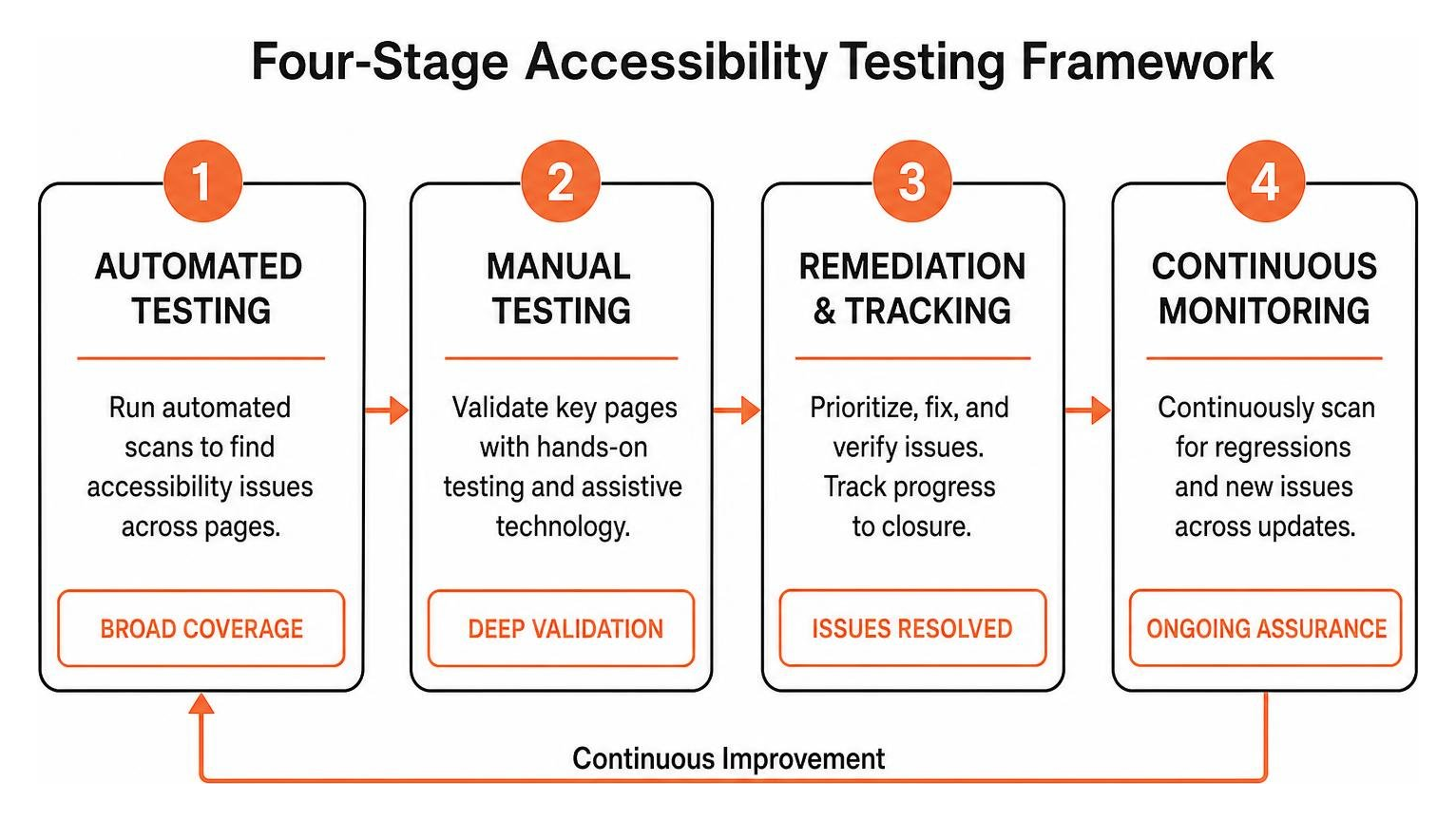
The Complete Four-Stage Testing Methodology
A comprehensive evaluation requires a balanced approach. Relying exclusively on one technique produces gaps in coverage and leaves critical defects hidden. We recommend a structured four-stage methodology that combines automated scanning, hands-on manual validation, structured remediation tracking, and continuous regression testing.
Setting Up Automated Checks for Accessibility Website Testing
Automated tools serve as the initial diagnostic layer in your testing workflow. Tools powered by the axe-core engine, the WAVE evaluation toolbar, and Google Lighthouse can evaluate hundreds of DOM nodes in milliseconds. These checkers excel at finding syntax violations, identifying elements missing accessible names, and calculating background-to-foreground color contrast ratios.
Understanding automated web accessibility testing made easy allows development teams to incorporate rapid sanity checks during everyday coding. For an extensive collection of evaluation software, you can browse the official W3C Web Accessibility Evaluation Tools List.
Automated checkers have hard operational boundaries. A scanner can verify that an HTML image tag contains an alt attribute, but it cannot evaluate whether that text accurately describes the image context or simply repeats the file name. Scanners also struggle to evaluate dynamic state changes in single-page applications, custom ARIA widgets, and complex form interactions. While automation is fast, it typically catches only 30 to 40 percent of total WCAG 2.2 success criteria failures.
Manual Audits and Assistive Tech in Accessibility Website Testing
Manual testing bridges the gap left by automation. It ensures that interactive components behave predictably for real humans using varied input modalities.
Begin manual audits by putting away the mouse. Navigate your entire site using only the Tab, Shift + Tab, Enter, Space, and arrow keys. Ensure that every interactive element receives a crisp, clearly visible focus outline, that keyboard focus moves in a logical reading sequence, and that modal dialogs trap focus correctly without letting it escape to the background.
Next, conduct screen reader reviews across major desktop environments:
- NVDA (NonVisual Desktop Access): A widely used, free, open-source screen reader for Windows.
- JAWS (Job Access With Speech): An enterprise-grade screen reader for Windows environments.
- VoiceOver: The built-in screen reader for Apple macOS platforms.
When navigating with a screen reader, verify that headings form a logical hierarchy, that buttons state their purpose clearly, and that status announcements trigger properly when content updates dynamically.
To maintain structured coverage across every page template, follow the ultimate website accessibility testing checklist for 2026.
Documenting Violations and Remediation Tracking
Finding accessibility defects is only helpful if your engineering team can resolve them efficiently. Every issue documented during testing should follow a structured reporting format:
- Issue Title: A clear, concise summary of the barrier.
- WCAG 2.2 Success Criterion: The exact rule violated (for example, 1.4.3 Contrast Minimum or 2.1.1 Keyboard).
- Severity Classification: Categorize issues as Critical (blocks primary user tasks), Serious (causes severe friction), Moderate (causes inconvenience), or Minor (cosmetic imperfection).
- Element Location: Specific URL, DOM selector, or code component.
- Assistive Technology Impact: Which user groups or devices are affected.
- Remediation Recommendation: Concrete code instructions showing the incorrect markup alongside the corrected snippet.
This structured data integrates directly into tracking platforms like Jira and forms the foundation for generating formal Accessibility Conformance Reports (ACR) based on the Voluntary Product Accessibility Template (VPAT) framework.
Advanced Verification: Mobile Platforms, CI/CD, and User Testing

A modern digital presence extends across responsive viewports, mobile applications, and rapid deployment cycles. Advanced verification ensures that accessibility remains intact across all consumer touchpoints.
Mobile App and Responsive Web Accessibility
Mobile accessibility requires dedicated attention to touch interaction, small screen real estate, and platform-specific assistive tools. Users with motor disabilities or low vision rely heavily on predictable touch targets and screen magnification.
Key mobile testing requirements include:
- Touch Target Sizing: Interactive controls must meet the WCAG 2.2 minimum target size requirement of at least 24 by 24 CSS pixels, with adequate spacing to prevent accidental activation.
- Dynamic Reflow: Content must reflow seamlessly down to 320 CSS pixels wide without requiring horizontal scrolling or losing functionality.
- Built-in Mobile Screen Readers: Test on iOS using VoiceOver gestures and on Android using TalkBack. Verify that swipe navigation follows the visual order and that custom interactive components announce their state correctly.
Developers can also inspect client-side markup using open-source utilities like the Google Chrome Accessibility Developer Tools repository.
Integrating Automated Scans into CI/CD Pipelines
To prevent regressions from reaching production environments, integrate accessibility tests directly into your continuous integration and deployment (CI/CD) pipelines.
Modern testing frameworks such as Cypress, Playwright, and Puppeteer can execute axe-core scans during unit and end-to-end test suites. By configuring rules to trigger automated build failures on Critical and Serious violations, engineering teams can catch accessibility bugs at pull request time before bad code gets merged.
Conducting Usability Audits with Real Users
While technical audits confirm that your code satisfies standard checkpoints, nothing replaces direct feedback from people who navigate the web using assistive technologies every day.
Lived-experience audits uncover subtle usability barriers that code audits often miss, such as confusing task flows, excessive verbosity in screen reader announcements, or awkward navigation paths.
Explore our guide on testing your website’s accessibility using real users to learn how to design respectful, productive user research sessions.
Frequently Asked Questions About Website Accessibility
How often should accessibility testing be conducted?
Accessibility testing should happen continuously throughout the development lifecycle. Automated scans should run on every pull request and staging build. Comprehensive manual audits across key user flows should be conducted quarterly, or whenever significant design changes, component updates, or new functional features are deployed to production.
Can automated testing tools catch all WCAG 2.2 errors?
No. Automated tools typically detect only 30 to 40 percent of potential WCAG 2.2 issues. They cannot evaluate contextual meaning, assess the logical flow of dynamic interactions, or determine if multimedia transcripts accurately reflect video content. Manual testing by experienced specialists is always necessary.
What are the most common WCAG non-compliance issues?
The most frequent accessibility barriers include insufficient text color contrast, missing or unhelpful image alt text, empty buttons and unlabeled form controls, inaccessible navigation menus that trap keyboard focus, and links with ambiguous anchor text like “click here” or “read more.”
Conclusion
Building an accessible digital presence is an ongoing commitment that pays continuous dividends in improved user experience, higher search engine visibility, and reduced legal risk. By pairing automated scanning with hands-on manual evaluations, mobile verification, and real-user testing, your organization can deliver digital products that welcome every visitor.
At WCAG Pros, our team in Norco CA delivers thorough, page-by-page audits across all 54 WCAG Level A through AAA checkpoints. We provide engineering teams with exact code-level fixes and free re-audits to help you secure reliable compliance badges.
If your team is ready to eliminate access barriers and protect your organization, explore our professional WCAG audit and certification services to start your path toward verified digital accessibility today.
Read more website accessibility articles
Get Help With Your Website
We'll follow up with info about:
- The process
- Cost
- Timeline
We promise to respect your privacy, and never abuse the information you provide. We will not sell or rent your information to any third party.
By submitting this form, you consent to receive SMS messages and/or emails from SEM Dynamics LLC, dba WCAG Pros. To unsubscribe, follow the instructions provided in our communications. Msg & data rates may apply for SMS. Your information is secure and will not be sold to third parties.