
How to Test Website Accessibility, Even if You’ve Never Tried it Before
How to Test Website Accessibility, Even if You’ve Never Tried it Before
Why Checking Website Accessibility Matters More Than Ever in 2026
Checking website accessibility means testing whether every person, including those with disabilities, can use your website fully and independently.
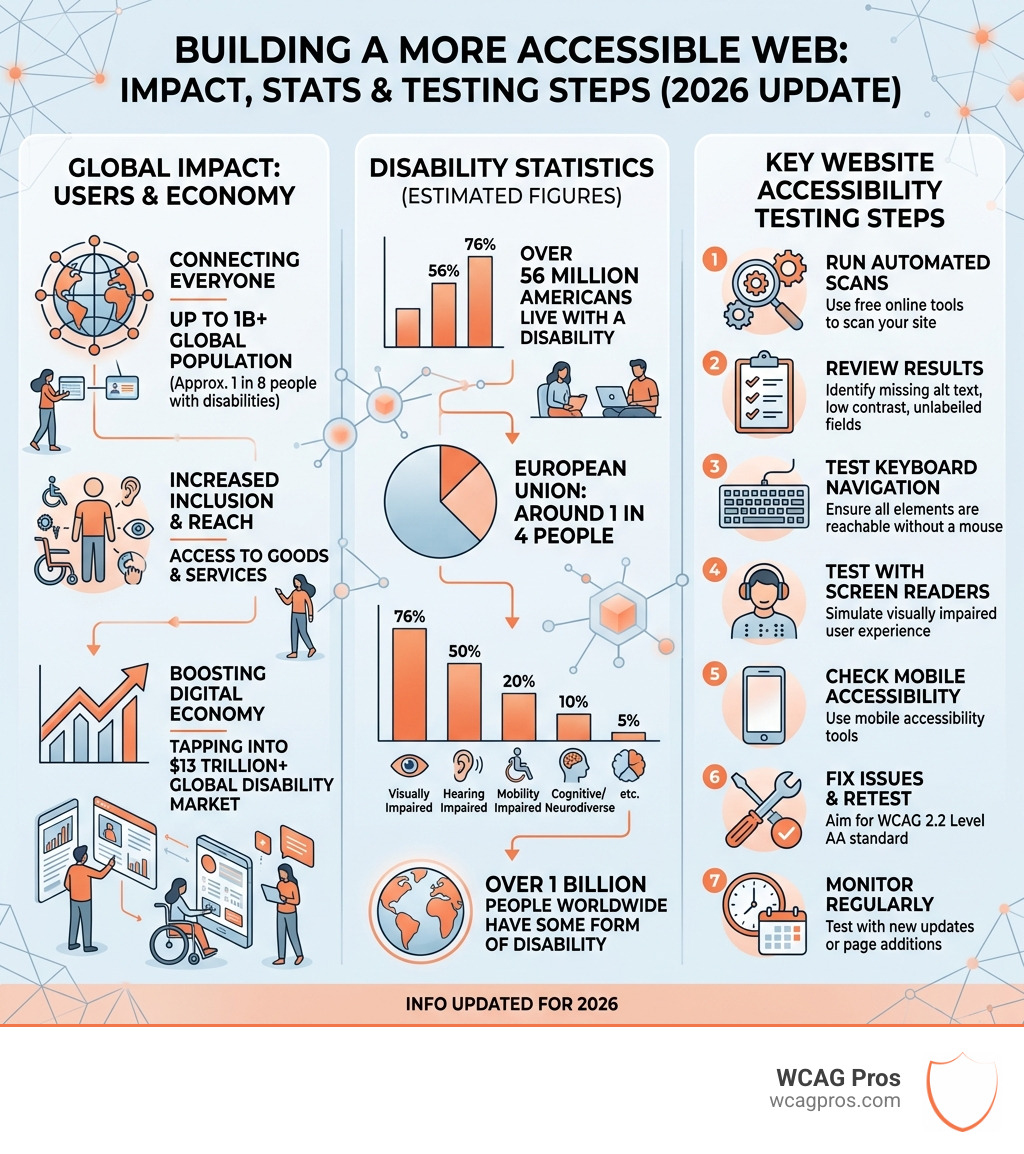
Here is a quick overview of how to do it:
- Run a free automated scan using a tool like WAVE or AccessibilityChecker.org by entering your URL
- Review the results for errors like missing alt text, poor color contrast, and unlabeled form fields
- Test manually using only your keyboard to navigate the site and check that all elements are reachable
- Test with a screen reader like NVDA (Windows) or VoiceOver (Mac/iOS) to simulate the experience of a visually impaired user
- Check mobile accessibility using built-in tools like TalkBack (Android) or VoiceOver (iOS)
- Fix issues and retest to confirm your site meets WCAG 2.2 Level AA standards
- Monitor regularly because accessibility can break with every new update or page addition
Right now, over 56 million Americans live with a disability. In the EU, that figure is one in four people. If your website has critical accessibility barriers, it is effectively unusable for up to 20% of the world’s population. That is not just a missed business opportunity. It is also a growing legal risk, as ADA-related lawsuits targeting inaccessible websites continue to rise.
The good news is that you do not need to be a developer to get started. There are free tools, simple manual tests, and clear standards like WCAG 2.2 that make the process approachable, even if you have never thought about accessibility before.
I am Matthew Post, co-founder of WCAG Pros and a web developer with over 20 years of experience helping businesses check website accessibility and resolve compliance issues. In this guide, I will walk you through everything from free scanning tools to hands-on testing methods so you can take action today.
Why You Must Check Website Accessibility in 2026
In April 2026, the digital landscape is more connected than ever. But for millions of people, a website that lacks proper structure is like a building without a ramp or a door handle. When we talk about the need to check website accessibility, we are talking about two things: doing the right thing for people and protecting your business.
Legal compliance is a primary driver for many organizations. Under ADA Title III, websites are increasingly viewed as places of public accommodation. This means that if your site is not accessible, you could be facing significant legal exposure. For government agencies or those receiving federal funding, Section 508 sets strict requirements for digital inclusivity. Even local municipalities, such as those discussed in the Website Accessibility Information – City of Norco – Horsetown USA resources, must ensure their digital services are reachable by all citizens.
Beyond the courtroom, there is the massive potential of market reach. There are 56 million Americans living with disabilities who represent a significant portion of the consumer base. Research shows that 88% of consumers are less likely to return to a site after a bad experience. If a user with a visual impairment cannot navigate your checkout page, they will take their business elsewhere. By following a guide on How to Tell Your Website is ADA Compliant, you can build brand reputation and foster long term consumer loyalty.
Understanding Global Standards like WCAG 2.2 and ADA
If you want to check website accessibility properly, you need to know the “rules of the road.” The W3C (World Wide Web Consortium) publishes the Web Content Accessibility Guidelines, or WCAG. As of 2026, WCAG 2.2 is the definitive standard. It is organized into three levels of success: A (minimum), AA (mid range), and AAA (highest). Most laws, including the ADA in the US and the European Accessibility Act (EAA), point toward WCAG 2.2 Level AA as the target for compliance.
In California, state agencies follow specific Website accessibility – Webstandards – CA.gov protocols to ensure every resident has equal access to information. Meanwhile, north of the border, the AODA (Accessibility for Ontarians with Disabilities Act) carries heavy penalties for non compliance. Fines can reach $50,000 per day for individuals and up to $100,000 per day for corporations.
To help you stay organized, we recommend using a resource like The Ultimate WCAG Checklist PDF, Excel, and Print-Ready Versions. These checklists simplify the technical jargon into actionable tasks, ensuring your corporate responsibility is met and your legal protection is secured before deadlines pass.
Top Tools to Check Website Accessibility Instantly
Technology has made it much easier to spot obvious errors. Automated scanners are software programs that “crawl” your website and flag technical issues. They are a fantastic starting point for any business.

One of the most popular tools is the Accessibility Checker, which performs over 50,000 scans every month. It provides a quick look at where your site stands. Another industry favorite is the WAVE tool, developed by WebAIM. WAVE is unique because it injects icons directly onto your webpage to show you exactly where an error is located. Siteimprove is another powerful option that integrates accessibility, SEO, and content quality into one report.
You can also use:
- Browser Extensions: Chrome, Firefox, and Edge extensions allow you to test pages as you browse them.
- API Integration: For larger companies, APIs can be plugged into the development process to test code automatically before it ever goes live.
For a full breakdown of your options, see The Ultimate List of Free Online Accessibility Checkers.
How to Use Automated Tools to Check Website Accessibility
Using these tools is generally as simple as typing in your URL. The scanner will look for things like missing alt text on images, empty buttons, and structural errors. These tools are incredibly efficient, often catching 30% to 50% of all possible issues in just a few seconds.
By following a guide like Automated Web Accessibility Testing Made Easy, you can learn how to interpret the remediation guidance these tools provide. Instead of just telling you something is wrong, many tools will explain why it is a problem and how to fix the code. This is why an Automated Tools Audit is often the first step we take at WCAG Pros.
Limitations of Automated Testing
As much as we love automation, it is not a silver bullet. Automated tools cannot understand context. For example, a tool can tell if an image has alt text, but it cannot tell if that text actually describes the image accurately. If you have a photo of a cat and the alt text says “blue car,” the automated tool will give you a green checkmark even though the content is useless to a blind user.
Automated tools also struggle with interactive elements like complex dropdown menus or custom popups. They might miss “false positives” or fail to detect issues with the logical reading order. This is why a Beginner’s Guide to Website Accessibility Audit always emphasizes that software is only half the battle.
Essential Manual Testing Methods for Full Compliance
To truly check website accessibility, you must get your hands on the keyboard. Manual testing is where you verify the “human” side of the experience.

Keyboard accessibility is the foundation of manual testing. Many users with motor disabilities cannot use a mouse and rely entirely on the Tab key to move through a site. When you test, you should ensure that every link, button, and form field can be reached using only the keyboard. You must also look for “focus indicators,” which are the visual outlines that show you where you are on the page.
Next, you should perform a screen reader review. Screen readers like NVDA (free for Windows) and JAWS (commercial) read the content of the screen aloud. This helps you identify if your heading structure makes sense and if your navigation is intuitive.
| Testing Type | What it Catches | What it Misses |
|---|---|---|
| Automated | Missing Alt Text, ID attributes, Color Contrast | Context, Logical Flow, Usability |
| Manual | Keyboard Traps, Screen Reader Flow, Meaningful Alt Text | Bulk code errors, hidden metadata |
For more advanced strategies, we suggest the Expert Website WCAG Audit Guide for Businesses. You might even consider How to Test Your Website’s Accessibility Using Real Users to get authentic feedback from people who use assistive technology every day.
Testing Mobile Accessibility with Built-in Tools
In 2026, more people access the web via mobile devices than desktops. This makes mobile testing a requirement, not an option. Both iOS and Android have excellent built-in screen readers: VoiceOver for iPhone and TalkBack for Android.
When testing mobile, focus on:
- Gesture Navigation: Can a user swipe through your content easily?
- Touch Targets: Are buttons large enough to be tapped without hitting something else?
- Responsive Design: Does the site stay accessible when zoomed in or when the orientation changes?
Our The Ultimate Website Accessibility Testing Checklist for 2026 includes a dedicated section for mobile compliance to ensure you don’t miss these critical touchpoints.
A Step-by-Step Guide to Check Website Accessibility
If you are ready to start, we recommend following a structured workflow. This prevents you from feeling overwhelmed by the technical requirements.
A professional WCAG Audit usually follows these steps:
- Scope the Audit: Decide which pages are most important (Home, Contact, Product pages).
- Run Automated Scans: Use the tools mentioned above to catch the “low hanging fruit.”
- Perform Manual Checks: Test keyboard navigation and screen reader compatibility.
- Prioritize Issues: Fix the “blockers” first (things that prevent a user from finishing a task).
- Remediate and Retest: Fix the code and run the tests again to ensure the fix worked.
Using an ADA Website Compliance 2025 Accessibility Checklist can help you track your progress and ensure nothing slips through the cracks.
How to Perform a Quick Check Website Accessibility Audit
If you only have ten minutes, you can still perform a “smoke test” to see if your site is in trouble. Check these five things:
- Alt Text: Right click an image and “Inspect” it. Does it have an alt attribute?
- Color Contrast: Is the text easy to read against the background?
- Heading Structure: Does the page have one H1 tag and follow a logical order (H2, H3)?
- Form Labels: Do your contact forms have clear labels that stay visible?
- Navigation Consistency: Are your menus in the same place on every page?
Once you have identified these basics, you should document your findings in an accessibility statement to show your users that you are actively working on improvements.
Frequently Asked Questions about Accessibility Testing
Is WCAG 2.2 a legal requirement for private businesses?
While WCAG 2.2 itself is a set of guidelines and not a law, it is the standard that courts and regulators use to determine if a site is “accessible” under the ADA. In many regions, such as the EU and Canada, WCAG 2.2 compliance is explicitly written into the law for private businesses of a certain size.
Can I rely solely on automated tools for ADA compliance?
No. Automated tools generally catch less than half of all accessibility barriers. To be truly ADA compliant, you must perform manual testing to ensure that the user experience is functional and logical for people using assistive technologies.
What are the fines for AODA non-compliance in 2026?
In Ontario, Canada, the AODA carries some of the steepest fines in the world. Corporations can be fined up to $100,000 per day for every day they remain out of compliance. This makes regular audits a financial necessity for any business operating in that region.
Conclusion
Checking website accessibility is no longer a “nice to have” feature. In 2026, it is a fundamental part of running a successful, inclusive, and legally sound business. By combining the speed of automated tools with the depth of manual testing, you can create a digital experience that welcomes everyone.
At WCAG Pros, we specialize in taking the guesswork out of compliance. We provide comprehensive page-by-page audits of all 54 WCAG points, complete with the exact code fixes your developers need. We even offer free re-audits to ensure you earn your compliance badge.
If you are ready to move beyond basic scans and want the peace of mind that comes with expert certification, Get a Professional WCAG Audit from our team today. Let’s work together to make the web a better place for everyone.
Read more website accessibility articles
Get Help With Your Website
We'll follow up with info about:
- The process
- Cost
- Timeline
We promise to respect your privacy, and never abuse the information you provide. We will not sell or rent your information to any third party.
By submitting this form, you consent to receive SMS messages and/or emails from SEM Dynamics LLC, dba WCAG Pros. To unsubscribe, follow the instructions provided in our communications. Msg & data rates may apply for SMS. Your information is secure and will not be sold to third parties.