
Step-by-Step Guide to WCAG 2.2 Compliance
Step-by-Step Guide to WCAG 2.2 Compliance
Understanding Conformance Levels and POUR Foundations
To achieve WCAG 2.2 compliance, teams use an actionable WCAG accessibility checklist to systematically audit web pages, identify digital barriers, and remediate code across all Level A and Level AA success criteria. Achieving conformance involves reviewing visual contrast, verifying full keyboard navigation, ensuring robust form labeling, and validating assistive technology compatibility across the four fundamental POUR principles:
- Perceivable: Information and user interface components must be presentable to users in ways they can perceive. Content cannot be invisible to all of their senses.
- Operable: User interface components and navigation must be operable. The interface cannot require an interaction that a user cannot perform.
- Understandable: Information and the operation of the user interface must be understandable. Users must be able to comprehend the content and the user interface flow.
- Robust: Content must be robust enough that it can be interpreted reliably by a wide variety of user agents, including assistive technologies.
To learn more about how these principles form the backbone of digital inclusion, check out The Definitive Guide to WCAG Guidelines.
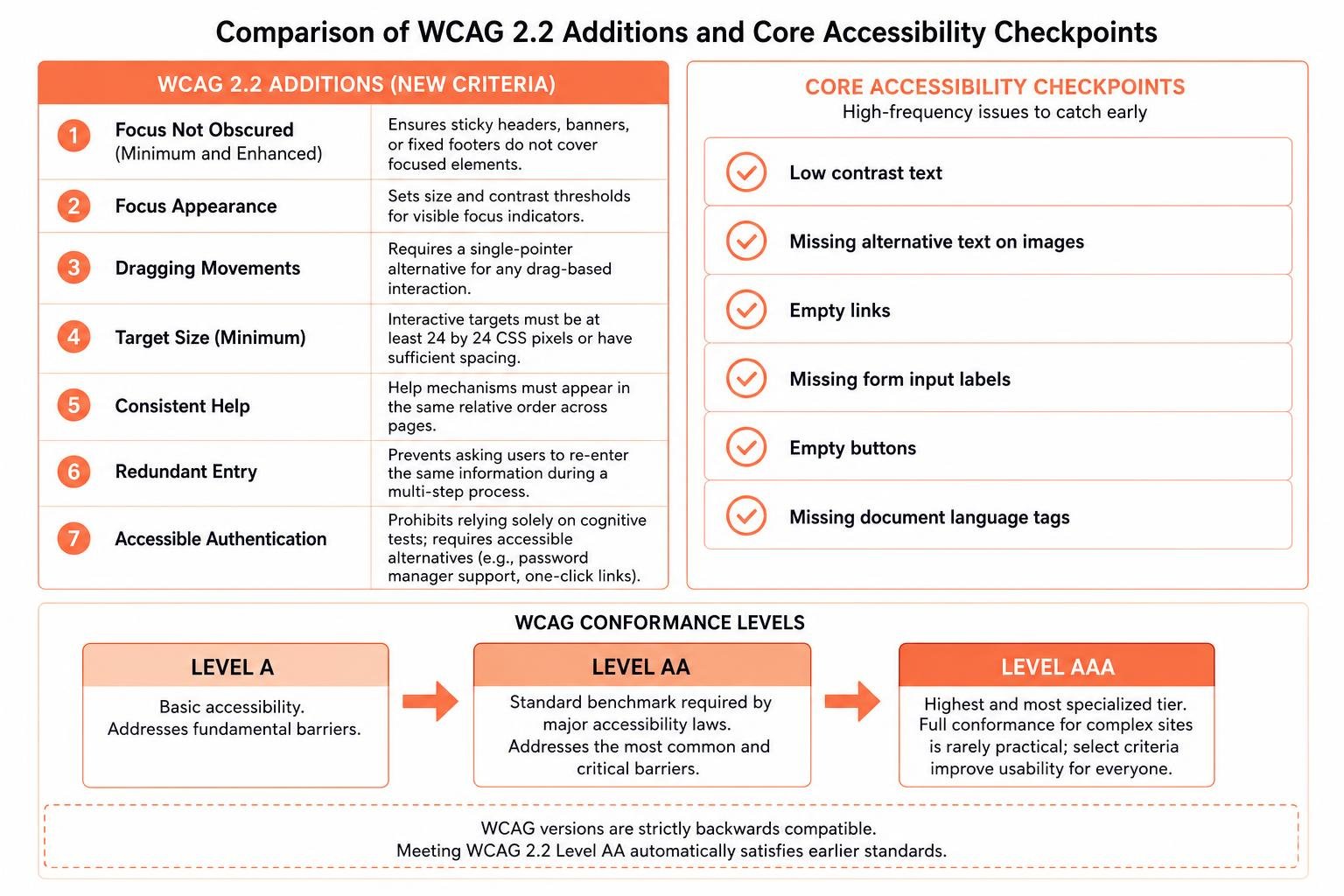
WCAG organizes its requirements into three distinct tiers of conformance:
- Level A: The absolute baseline of digital accessibility. Failing Level A creates significant barriers that make it nearly impossible for individuals with disabilities to access the page.
- Level AA: The standard benchmark required by major accessibility laws worldwide. It addresses the most common and critical barriers across modern devices and layouts.
- Level AAA: The highest and most specialized tier. While achieving full Level AAA conformance across an entire complex website is rarely practical, adopting select criteria improves usability for everyone.
WCAG versions are strictly backwards compatible. When your team meets WCAG 2.2 Level AA, your site automatically satisfies earlier standards.
Core Benefits of an Actionable WCAG Accessibility Checklist
Using a structured checklist keeps web projects organized and prevents common oversights. According to industry research, the vast majority of detected web accessibility failures stem from just a handful of repetitive mistakes:
- Low contrast text
- Missing alternative text on images
- Empty links
- Missing form input labels
- Empty buttons
- Missing document language tags
Addressing these high-frequency errors early eliminates the bulk of user barriers. To jumpstart your review, see our ADA Compliance Website Checklist 10 Must-Haves.
Key Additions in WCAG 2.2 vs Legacy Standards
WCAG 2.2 introduced critical criteria focused on mobile usability, cognitive accessibility, and keyboard navigation. The key updates include:
- Focus Not Obscured (Minimum and Enhanced): Ensures sticky headers, cookie banners, or fixed footers do not cover elements when they receive keyboard focus.
- Focus Appearance: Specifies size and contrast thresholds for visible focus indicators so keyboard users never lose their place.
- Dragging Movements: Requires a single-pointer alternative, such as a clickable button, for any interaction that relies on dragging. Review our Ultimate Checklist for WCAG Drag and Drop Compliance for practical implementation details.
- Target Size (Minimum): Mandates that interactive targets measure at least 24 by 24 CSS pixels or feature sufficient spacing.
- Consistent Help: Requires help mechanisms like chat links, contact info, or FAQs to appear in the same relative order across pages.
- Redundant Entry: Prevents asking users to re-enter the same information multiple times during a single multi-step process.
- Accessible Authentication: Prohibits relying solely on cognitive function tests, such as memorizing passwords or solving puzzles, without offering alternatives like password manager support or one-click verification links.
Complete WCAG Accessibility Checklist for Digital Teams
This practical reference brings together the core Level A and AA criteria every digital team must evaluate.
| Category | WCAG Criterion | Conformance Level | Primary Requirement |
|---|---|---|---|
| Perceivable | 1.1.1 Non-text Content | Level A | Provide descriptive alt text for informative images, and use empty alt text for decorative images. |
| Perceivable | 1.3.1 Info and Relationships | Level A | Use semantic HTML tags for headings, lists, tables, and form controls. |
| Perceivable | 1.4.3 Contrast (Minimum) | Level AA | Maintain at least 4.5:1 contrast for normal text and 3:1 for large text. |
| Perceivable | 1.4.10 Reflow | Level AA | Ensure content reflows without horizontal scrolling at 320 CSS pixels width. |
| Perceivable | 1.4.11 Non-text Contrast | Level AA | Maintain at least 3:1 contrast for UI components and interactive states. |
| Operable | 2.1.1 Keyboard | Level A | Make all functionality available using only a keyboard. |
| Operable | 2.1.2 No Keyboard Trap | Level A | Ensure keyboard focus can enter and exit all interactive components freely. |
| Operable | 2.4.1 Bypass Blocks | Level A | Provide skip-to-content links to bypass repetitive navigation menus. |
| Operable | 2.4.7 Focus Visible | Level AA | Ensure a clear visual focus indicator appears on all active elements. |
| Operable | 2.4.11 Focus Not Obscured (Min) | Level AA | Ensure focused items are not completely hidden by sticky UI elements. |
| Operable | 2.5.7 Dragging Movements | Level AA | Provide single-pointer alternatives for drag-and-drop interactions. |
| Operable | 2.5.8 Target Size (Minimum) | Level AA | Ensure interactive targets are at least 24 by 24 CSS pixels or have adequate spacing. |
| Understandable | 3.1.1 Language of Page | Level A | Set the default language attribute on the HTML root element. |
| Understandable | 3.2.6 Consistent Help | Level AA | Place self-help options in the same relative position across pages. |
| Understandable | 3.3.2 Labels or Instructions | Level A | Provide clear, persistent labels and instructions for all user inputs. |
| Understandable | 3.3.7 Redundant Entry | Level AA | Auto-populate or allow selection of previously entered data in multi-step flows. |
| Understandable | 3.3.8 Accessible Authentication | Level AA | Support copy-paste, password managers, or magic links during login. |
| Robust | 4.1.2 Name, Role, Value | Level A | Expose programmatic names, states, and roles for custom UI components. |
| Robust | 4.1.3 Status Messages | Level AA | Announce dynamic content updates using ARIA live regions without stealing focus. |
Perceivable and Operable Success Criteria
Creating perceivable content starts with ensuring every visual asset has a programmatic equivalent. Meaningful images need concise alternative text, complex graphs require text transcripts or structured data tables, and purely decorative graphics must use empty alt tags so screen readers ignore them. Visual contrast must reach at least 4.5:1 for standard text, while large text and graphical user interface elements require at least 3:1 contrast.
Operability requires complete device independence. Every link, form input, button, and modal must function smoothly using only the keyboard keys (Tab, Shift+Tab, Enter, Space, and Escape). Developers must also ensure that touch targets meet the 24 by 24 pixel minimum and that viewport layouts reflow cleanly at 320 pixels wide without horizontal scrolling. For government agency requirements and standardized audit forms, consult these State assessment standards.
Understandable and Robust Success Criteria
Content clarity ensures users never feel stranded in the middle of a transaction. Set the default document language on the HTML tag so screen readers pronounce terms accurately. Form fields must have visible labels and explicit programmatic associations using the label tag or descriptive ARIA properties. If an error occurs, identify the affected field in plain text and provide actionable suggestions for correction.
Robustness centers on standard code that assistive devices can parse reliably. Always use valid HTML semantics before creating custom widgets. Ensure all dynamic status messages, such as cart additions or search filter updates, use ARIA live regions to notify screen-reader users without pulling keyboard focus away from their current task.
How to Audit and Test Your Site Against the Checklist
Auditing a web property against the checklist requires a disciplined, multi-layered approach.
- Discovery and Scope Definition: Identify all high-risk user paths, including landing pages, search results, product listings, interactive forms, account portals, and checkout flows.
- Automated Scanning: Run baseline automated tools across all templates to instantly catch high-volume syntax, color contrast, and labeling issues.
- Manual Keyboard Testing: Disconnect the mouse and navigate through the entire user journey using only the keyboard to confirm focus visibility, logical tab order, and modal trapping behavior.
- Assistive Technology Evaluation: Test complex interactive widgets with screen readers such as NVDA, JAWS, and VoiceOver to verify role, name, and value announcements.
- Issue Documentation and Logging: Log every barrier with its corresponding WCAG success criterion, impact level, exact URL, and remediation recommendation.
For an in-depth breakdown of testing methods, review The Ultimate Website Accessibility Testing Checklist for 2026 and our A-Z Guide to WCAG Accessibility Testing.
Role-Based Implementation: Applying the WCAG Accessibility Checklist
Accessibility works best when responsibilities are distributed across every stage of the product lifecycle:
- UI and UX Designers: Define compliant color palettes, ensure sufficient target spacing, design visible focus states, and establish intuitive layouts.
- Front-End Developers: Implement semantic HTML, manage focus order in single-page apps, build accessible modals, and support password manager autofill.
- Content Editors: Write descriptive alt text, structure articles with logical heading hierarchies, provide video captions, and write clear error messages.
- QA Engineers: Run automated scans in CI/CD pipelines, execute manual keyboard test scripts, and verify bug fixes against WCAG criteria.
For hands-on team resources, explore these Interactive accessibility requirements.
Combining Automated Scanners and Real-User Testing
Automated testing tools are fast, but they only catch roughly 30% to 40% of all WCAG issues. Scanners can easily detect whether an image has an alt attribute, but they cannot tell you if that alt text accurately describes the image context. Similarly, a scanner cannot evaluate whether your checkout process is easy to operate for someone using voice commands.
Comprehensive audits combine automated tooling with skilled manual inspection and functional testing. Engaging native assistive technology users provides critical insight into real-world usability friction. Learn more about setting up these user sessions in our guide on How to Test Your Website’s Accessibility Using Real Users.
Legal Standards, ADA Compliance, and Risk Mitigation
In the United States, Title III of the Americans with Disabilities Act requires places of public accommodation to provide equal access to their goods and services. Federal courts and the Department of Justice routinely reference WCAG Level AA as the recognized technical standard for determining digital accessibility compliance under the ADA.
Beyond the ADA, public-sector organizations must comply with Section 508, while Canadian organizations adhere to the Accessibility for Ontarians with Disabilities Act. In Europe, the European Accessibility Act enforces digital accessibility across private-sector e-commerce and banking platforms. To protect your business from demand letters and costly litigation, review our ADA Website Compliance 2025 Accessibility Checklist.
Frequently Asked Questions About WCAG Compliance
What is the difference between WCAG 2.2 Level A, AA, and AAA?
Level A addresses fundamental accessibility requirements, Level AA represents the standard compliance benchmark targeted by businesses and legal frameworks, and Level AAA provides enhanced accessibility for specialized environments. Conformance is cumulative, meaning meeting Level AA requires full compliance with all Level A criteria as well.
Can automated scanning tools guarantee full WCAG 2.2 compliance?
No. Automated scanning tools catch between 30% and 40% of accessibility failures. Manual code reviews, keyboard navigation testing, and screen-reader audits are essential to identify complex functional barriers and achieve true compliance.
Which laws mandate WCAG 2.2 conformance in 2026?
Major legal frameworks including ADA Title II regulations, Section 508, the European Accessibility Act, and regional laws worldwide reference WCAG Level AA standards. Adopting WCAG 2.2 ensures your digital properties remain aligned with evolving regulatory requirements and DOJ enforcement practices.
Conclusion: Achieving Long-Term Accessibility Conformance
Building an accessible website is an ongoing operational commitment rather than a one-time project. Regular software updates, new marketing campaigns, and third-party integrations can introduce accessibility barriers if they are not actively monitored.
At WCAG Pros, we help organizations navigate digital accessibility with confidence. Based in Norco CA, our team provides comprehensive page-by-page audits covering all 54 WCAG A through AAA points. We deliver clear, production-ready code fixes and include free re-audits so you can earn verified compliance badges.
Schedule your professional WCAG audit and remediation with WCAG Pros today to make your digital experiences inclusive for every customer.
Read more website accessibility articles
Get Help With Your Website
We'll follow up with info about:
- The process
- Cost
- Timeline
We promise to respect your privacy, and never abuse the information you provide. We will not sell or rent your information to any third party.
By submitting this form, you consent to receive SMS messages and/or emails from SEM Dynamics LLC, dba WCAG Pros. To unsubscribe, follow the instructions provided in our communications. Msg & data rates may apply for SMS. Your information is secure and will not be sold to third parties.