
Ultimate Checklist for ADA Audit Compliance (WCAG 2.2)
Ultimate Checklist for ADA Audit Compliance (WCAG 2.2)
Start With an ADA Audit Checklist That Finds Real Barriers
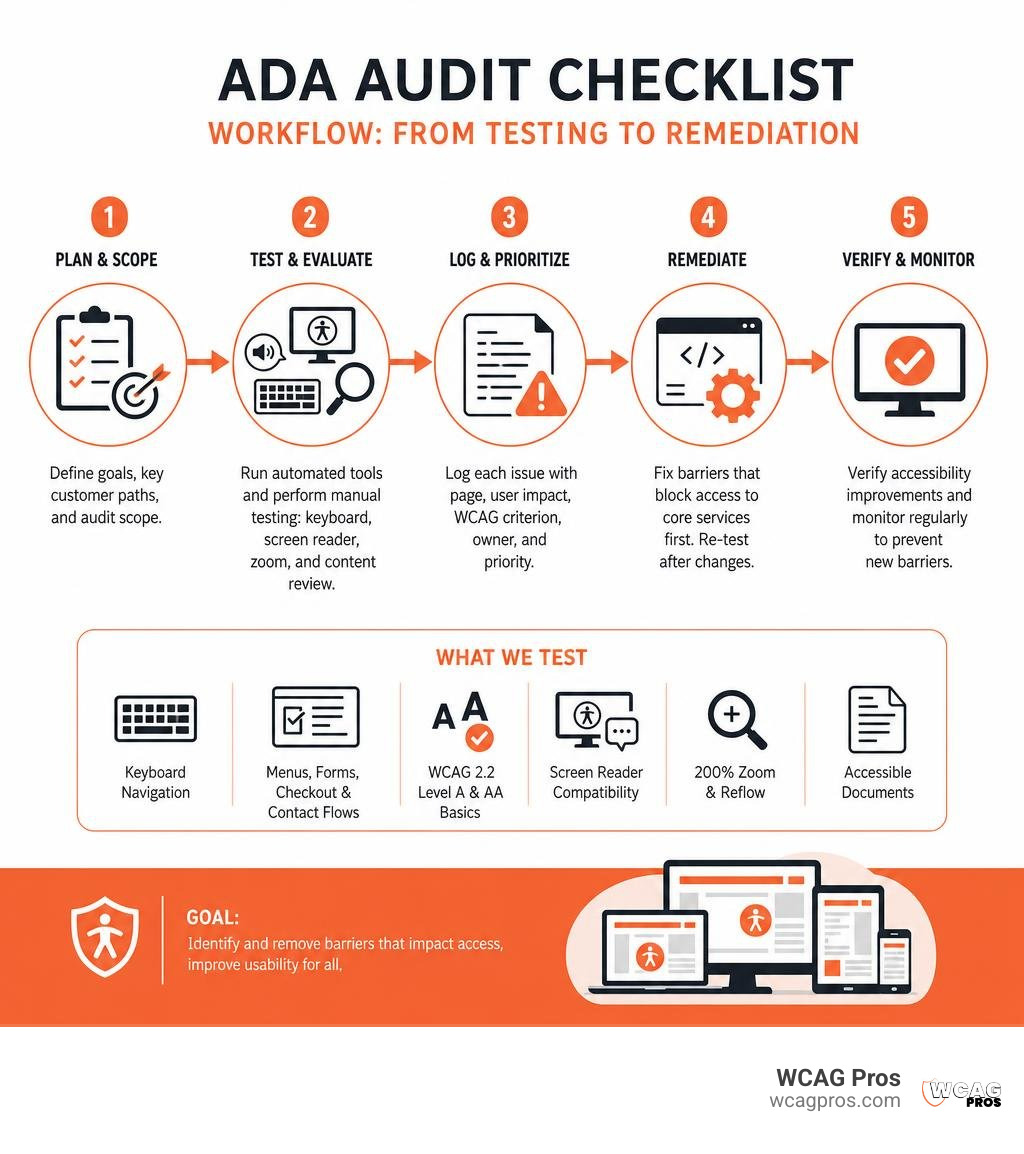
Use an ADA audit checklist to review every key customer path on your website, then test the failures that automated tools miss. Start with these priorities:
- Test navigation, menus, forms, checkout, and contact flows using only a keyboard.
- Check WCAG 2.2 Level A and AA basics, including alt text, headings, labels, visible focus, captions, and color contrast.
- Test with a screen reader and at 200% zoom.
- Log each issue with its page, user impact, WCAG criterion, owner, and target fix date.
- Fix barriers that block access to core services before cosmetic or low-impact issues.
This matters because accessibility is both a civil rights obligation and a business risk. Title II applies to state and local governments, while Title III applies to public-facing businesses. For commercial websites, WCAG 2.2 Level AA is a practical benchmark for finding and fixing barriers before they affect customers or become part of a legal claim.
A strong audit goes beyond a quick scan. It combines automated testing, hands-on keyboard and screen reader checks, accessible document reviews, and feedback from people with disabilities. It should also cover physical locations when your business serves the public in person.
I am Matthew Post, co-founder of WCAG Pros and a programmer with more than 20 years of web development experience. I oversee ADA audit checklist reviews and WCAG remediation work to help organizations find practical accessibility fixes, improve usability, and reduce risk.
Simple ADA audit checklist word guide:
Understanding ADA Legal Requirements: Title II vs. Title III
The Americans with Disabilities Act protects people with disabilities from discrimination. It is a civil rights law rather than a simple building code. One common myth is that older buildings or legacy websites are grandfathered in and exempt from these rules. In reality, existing facilities and digital platforms must continually maintain access.
The law is split into different sections known as titles. Understanding which title applies to your organization determines your exact legal framework.
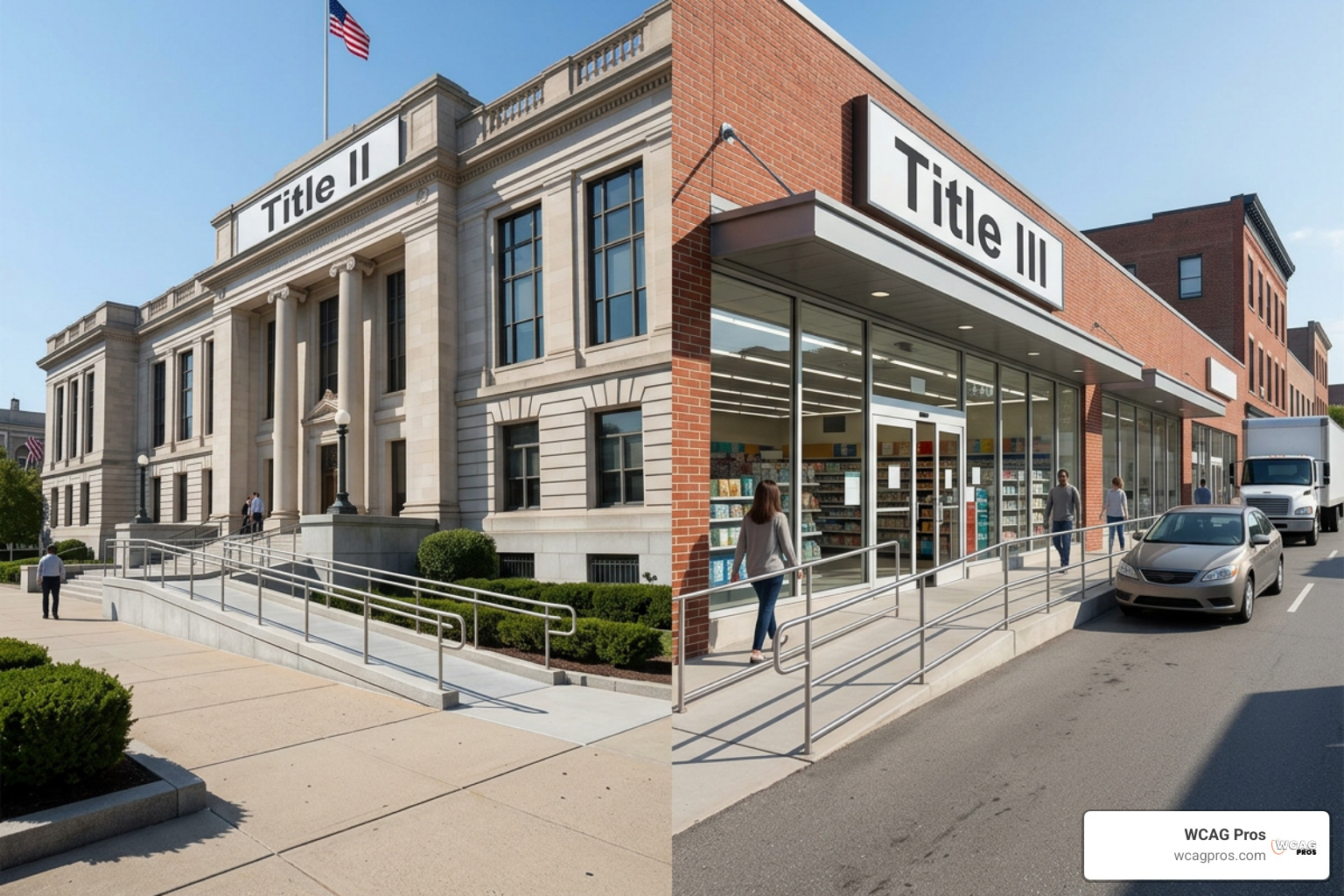
Title II covers state and local government entities, such as public schools, municipal transit, public libraries, and administrative agencies. Under Title II, public entities must ensure program accessibility. This means that when viewed in its entirety, every government program, service, or activity must be readily accessible to and usable by individuals with disabilities.
In April 2024, the Department of Justice published a final rule establishing WCAG 2.2 Level AA as the technical standard for public sector websites, mobile apps, and digital documents. State and local governments serving 50,000 or more residents must achieve full compliance by April 26, 2027. Public entities serving fewer than 50,000 residents and special district governments have until April 26, 2028.
Title III covers private businesses open to the public, known as places of public accommodation. This includes retail storefronts, hotels, restaurants, healthcare offices, and gyms. Under Title III, businesses must remove structural and communication barriers where such removal is readily achievable, meaning easily accomplishable without much difficulty or expense.
For physical spaces constructed prior to March 15, 2012, elements that comply with earlier 1991 ADA standards may benefit from safe harbor protections until those spaces undergo alterations. However, if an architectural barrier can be removed easily, the business has an active obligation to address it. Consult official ADA Checklists for Existing Facilities to evaluate these physical spaces.
In the digital world, federal courts and the Department of Justice treat commercial websites and mobile apps as public accommodations under Title III. Because web accessibility issues impact roughly 28% of residents, digital barriers expose businesses to serious legal risks. Organizations facing enforcement actions can encounter statutory fines reaching up to $75,000 for an initial violation and up to $150,000 for subsequent violations, alongside substantial legal defense fees. If you are new to digital evaluations, our guide on Website Compliance Audit 101 walks through the foundational concepts.
| Legal Category | Title II (State & Local Government) | Title III (Public Accommodations) |
|---|---|---|
| Applicable Entities | Municipalities, public universities, county agencies, transit | Retailers, restaurants, commercial services, private clinics |
| Core Legal Mandate | Program accessibility across all public operations | Readily achievable barrier removal |
| Digital Standard | Explicitly WCAG 2.2 Level AA under DOJ 2024 rule | WCAG 2.2 Level AA applied by courts and DOJ guidance |
| Compliance Deadlines | April 26, 2027 (50k+ population) or April 26, 2028 (<50k) | Ongoing obligation with active litigation risk |
| Safe Harbor Scope | Applies to specific historical digital archives and legacy docs | Applies to pre-2012 physical elements meeting 1991 ADA standards |
The Comprehensive ADA Audit Checklist for Digital and Physical Compliance
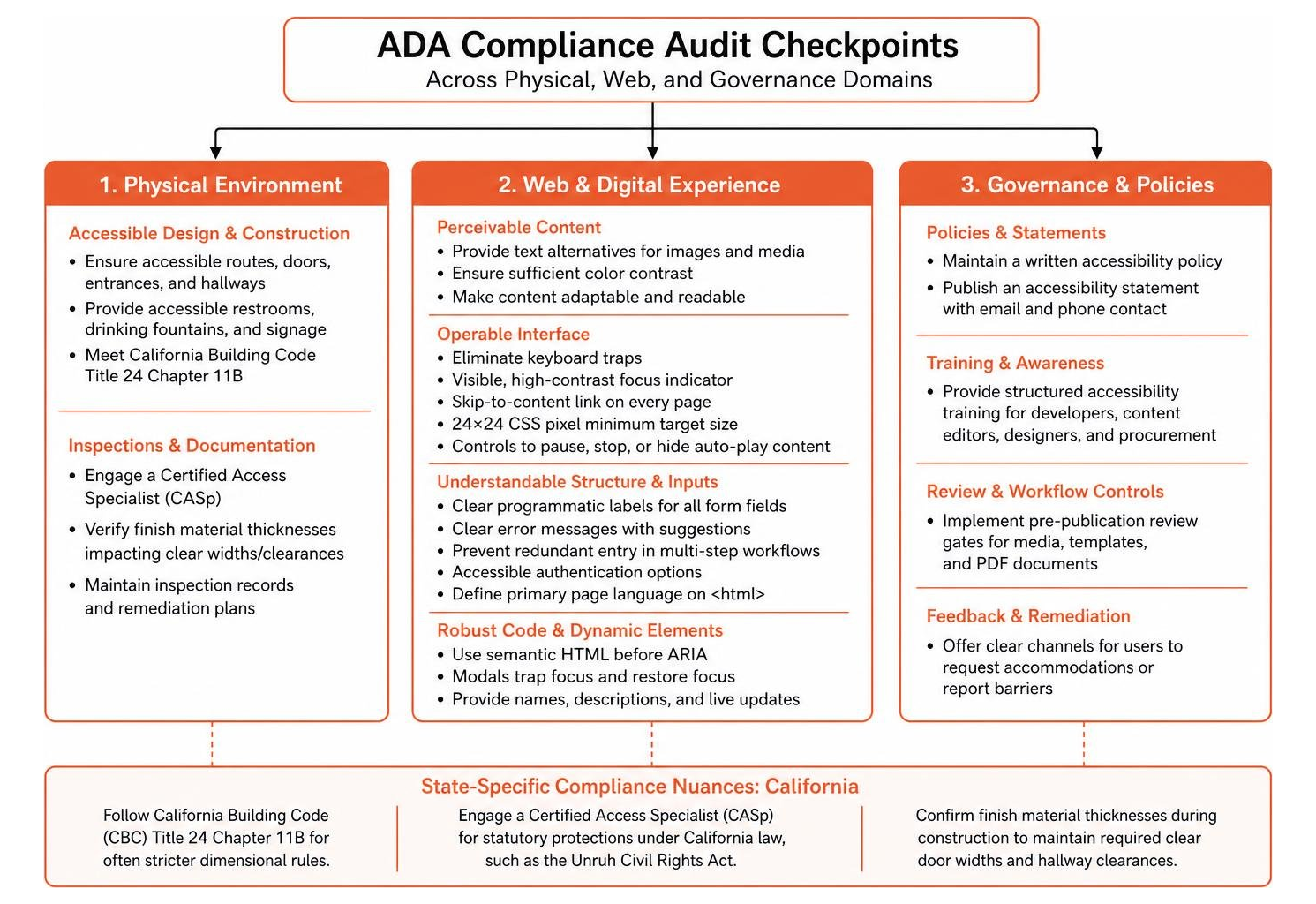
A complete accessibility evaluation examines both the physical built environment and digital properties. Here is the operational checklist structured across architectural elements, web standards, and state-specific governance.

Core Physical Accessibility Audit Checklist
Physical spaces must allow independent arrival, entry, and navigation for visitors of all mobility levels.
- Accessible Parking Spaces and Aisles: Verify that lots have the required number of accessible stalls. For lots with 1 to 25 total spaces, at least 1 accessible space is required. In lots with 501 to 1000 spaces, at least 2% of total spaces must be accessible. Standard car spaces must be at least 96 inches wide with a 60-inch marked access aisle. Van-accessible stalls require an 132-inch width with a 60-inch aisle or a 96-inch width with an 96-inch aisle, accompanied by 98 inches of vertical clearance.
- Exterior Walkways and Curb Ramps: Inspect approach paths from property lines and transit stops. Walkways must provide a minimum 36-inch clear width with a running slope no steeper than 1:20. Where transitions exceed this slope, ramps must have a running slope no steeper than 1:12, paired with level landings and handrails on both sides whenever the vertical rise exceeds 6 inches. Curb ramps must feature detectable warnings and flared sides where pedestrian traffic crosses the ramp.
- Building Entrances and Doorways: Confirm that at least 60% of public entrances are fully accessible. Doorways must provide a clear opening width of at least 32 inches when the door is opened to 90 degrees. Hardware such as levers or push bars must be mounted between 34 and 48 inches above the floor and operable with one hand without tight pinching or twisting. Ensure interior doors require no more than 5 pounds of opening force.
- Interior Corridors and Circulation Paths: Verify that hallways maintain a continuous clear width of 36 inches, with 60 by 60 inch turning or passing spaces positioned at least every 200 feet. Objects mounted to walls must not project more than 4 inches into circulation paths if their leading edge is between 27 and 80 inches above the floor.
- Public Restrooms: Ensure stall doors provide clear entry and a full 60-inch turning diameter inside the room. Centerline spacing for toilets must be 16 to 18 inches from the adjacent side wall. Horizontal grab bars must be installed on the rear wall (at least 36 inches long) and side wall (at least 42 inches long) mounted between 33 and 36 inches above the floor. Restroom sinks must be mounted no higher than 34 inches from the floor with at least 27 inches of open knee clearance underneath and insulated water pipes.
- Service Counters and Reach Ranges: Sales, check-in, and customer service counter sections must have a lowered portion no higher than 36 inches above the finished floor, extending at least 36 inches wide. All operable switches, payment terminals, and dispensers must fall within clear reach ranges between 15 and 48 inches above the floor. For comprehensive state construction inspections, reference the Accessibility Construction Inspection Checklist 2020 Edition.
Web and Digital ADA Audit Checklist (WCAG 2.2 Level A and AA)
Digital properties must follow the four POUR principles: Perceivable, Operable, Understandable, and Robust. Our team breaks down these checkpoints based on the latest standards. Review our companion guide on The Complete Guide to WCAG AA Compliance Requirements for deeper technical context.
- Perceivable Content:
- Provide meaningful text alternatives for all informational images, charts, and icons, and use empty alt tags for decorative graphics.
- Deliver synchronized closed captions and transcripts for all prerecorded and live video media.
- Maintain a minimum color contrast ratio of 4.5:1 for normal body text against its background, and 3:1 for large text and interactive user interface components.
- Ensure the user interface supports text resizing up to 200% and viewports down to 320 CSS pixels without loss of content or requiring horizontal scrolling.
- Do not rely solely on color, shape, or sound to convey important instructions or system states.
- Operable Navigation and Interactions:
- Unplug your mouse to confirm that all links, buttons, inputs, and custom interactive widgets can be reached and activated using only the keyboard.
- Eliminate all keyboard traps so navigation never locks into a specific dialog or component.
- Provide a visible, high-contrast focus indicator around the active element, ensuring it is not obscured by sticky headers or footers.
- Place a skip-to-content link as the first focusable element on every page to allow keyboard and screen reader users to bypass repetitive header menus.
- Ensure interactive targets meet the WCAG 2.2 minimum size requirement of 24 by 24 CSS pixels, or provide sufficient surrounding spacing.
- Supply simple pause, stop, or hide controls for auto-playing sliders, animations, or scrolling carousels.
- Understandable Structure and Inputs:
- Assign clear programmatic labels to all form fields using explicit HTML markup instead of relying on temporary placeholder text.
- Identify form input validation errors in clear text and provide suggestions for correction.
- Prevent redundant entry in multi-step workflows by auto-populating previously entered user information.
- Provide accessible authentication methods that do not rely entirely on cognitive function tests like complex puzzles or memory recall.
- Define the primary programmatic language on the root HTML tag of each page so assistive technologies load the proper pronunciation rules.
- Robust Code and Dynamic Elements:
- Build pages using standard semantic HTML elements before introducing custom ARIA roles and attributes.
- Ensure custom modal dialogs trap focus while open and restore focus back to the triggering element when dismissed.
- Provide accessible names, descriptions, and dynamic live region status updates for interactive web components. Explore practical ways to strengthen your routine with our ADA Compliance Checklist: 7 Smart Ways You’ll Wish You Knew Sooner.
State-Specific Variations and Governance ADA Audit Checklist
An effective compliance process pairs technical validation with organizational governance and state-specific legal requirements.
- Organizational Policies and Governance:
- Maintain a formal written digital accessibility policy that outlines technical standards, testing frequencies, and remediation workflows.
- Publish an accessibility statement with direct email and telephone contact options so users can easily request accommodations or report barriers.
- Conduct structured accessibility training for web developers, content editors, designers, and procurement teams.
- Establish pre-publication review gates to prevent non-compliant media, templates, or PDF documents from reaching production. Use the Chapter 5 Addendum: Title II Checklist, (Website Accessibility) for public agency governance best practices.
- California Compliance Nuances:
- Facilities must adhere to the California Building Code (CBC) Title 24 Chapter 11B, which often contains stricter dimensional rules than baseline federal standards.
- Engaging a Certified Access Specialist (CASp) to inspect commercial properties provides important statutory protections against specific damages under California law, such as the Unruh Civil Rights Act.
- Businesses must confirm finish material thicknesses during construction, as flooring and wall coverings can alter required clear door widths and hallway clearances.
How to Prioritize and Remediate Identified Accessibility Barriers
Finding accessibility barriers is only the first half of the equation. To protect your organization and serve all users, you need a clear system to track, prioritize, and fix issues based on their real-world impact.
4-Tier Barrier Remediation Matrix
We recommend categorizing every identified issue into a 4-tier remediation matrix. This allows development and facilities teams to address critical blockers immediately while systematically working through lower-impact enhancements.

- Critical Priority (0 to 30 Days): Complete blockers that prevent users from accessing core services, completing purchases, or safely navigating physical spaces.
- Physical: Inaccessible main building entrance, missing parking access aisles, blocked emergency exit routes.
- Digital: Complete keyboard navigation traps, missing form labels on primary checkout fields, lack of accessible authentication preventing login, entire pages unreadable by screen readers.
- High Priority (30 to 90 Days): Severe barriers that make navigation difficult, frustrating, or confusing, but do not completely stop the user journey.
- Physical: Restroom sinks lacking required knee clearance, service counters exceeding 36 inches in height, steep exterior curb ramps.
- Digital: Severe color contrast failures on body copy, missing alternative text on informative diagrams, absent visible focus indicators, interactive buttons smaller than required target sizes.
- Medium Priority (90 to 180 Days): Technical non-conformance issues that present minor friction for assistive technology users.
- Physical: Signage mounted slightly outside standard height ranges, non-compliant door handle hardware on secondary interior doors.
- Digital: Illogical heading hierarchy (such as jumping from H2 directly to H4), missing landmarks on supplemental content, redundant entry requirements across optional form steps.
- Low Priority (180+ Days / Ongoing Maintenance): Minor technical discrepancies or cosmetic refinements that do not interfere with understanding or core usability.
- Physical: Minor paint striping wear in parking stalls, cosmetic wear on handrail finishes.
- Digital: Minor contrast variances on decorative elements, missing title attributes on decorative inline frames, minor layout shifts during page loading.
Documenting each remediation milestone in a central barrier log creates an auditable record of good-faith effort. Learn how formal audit verification protects your organization in The Certified WCAG Audit Process: Your Shield Against Lawsuits.
User Testing and Assistive Technology Validation
Automated scanning tools are a fast starting point, but they catch only about 30% to 40% of accessibility errors. They cannot evaluate whether an image description makes contextual sense, whether a keyboard tab sequence feels logical, or whether dynamic notifications read smoothly to screen readers.
A thorough audit pairs automated scans with manual testing performed with assistive software. Testers should navigate your key digital conversion paths using NVDA, JAWS, and VoiceOver screen readers.
Involving people with disabilities in functional usability testing provides invaluable insight into real navigation challenges. After deploying code fixes, run regression tests to verify that newly introduced site features or CMS updates have not disrupted existing accessibility standards. Read our breakdown on Automated Tools Audit to understand where automated checkers succeed and where manual evaluation is necessary.
Frequently Asked Questions About ADA Compliance Audits
What is the difference between Title II and Title III ADA requirements for existing facilities?
Title II applies directly to state and local government entities, requiring complete program accessibility across all public services and operations. Title III applies to private commercial businesses that serve the public, requiring the removal of architectural and communication barriers whenever readily achievable.
Neither title permits older properties or legacy websites to be grandfathered in as exempt from civil rights compliance.
How often should an organization perform an ADA audit?
Organizations should conduct a full, comprehensive digital accessibility audit at least once per year. In addition, teams should run automated regression scans and manual keyboard spot-checks after every major website redesign, core template release, or third-party software integration.
Physical facilities should undergo an on-site accessibility inspection whenever planning structural alterations, restriping parking areas, or moving into a new commercial facility.
Can automated testing tools replace a manual ADA accessibility audit?
No. Automated testing tools detect only 30% to 40% of WCAG violations. They are excellent for quickly finding obvious errors like missing alt attributes, duplicate element IDs, or basic contrast math failures.
However, they cannot determine if alternative text accurately describes an image, verify that interactive custom components work with screen readers, or confirm that keyboard navigation order makes logical sense. Comprehensive legal risk reduction requires expert manual auditing alongside assistive technology testing.
Conclusion
Conducting a thorough evaluation using a structured checklist helps organizations identify and resolve critical barriers before they lead to regulatory penalties or costly litigation. At WCAG Pros, our team provides comprehensive page-by-page audits across all WCAG success criteria, delivering clear code-level remediation guidance and free re-audits for verifiable compliance badges.
Whether you are updating digital services to meet upcoming Title II government deadlines or protecting your commercial business under Title III, proactive accessibility ensures equal access for every customer. Explore our expert WCAG audit services today to begin your path toward sustainable digital compliance.
Read more website accessibility articles
Get Help With Your Website
We'll follow up with info about:
- The process
- Cost
- Timeline
We promise to respect your privacy, and never abuse the information you provide. We will not sell or rent your information to any third party.
By submitting this form, you consent to receive SMS messages and/or emails from SEM Dynamics LLC, dba WCAG Pros. To unsubscribe, follow the instructions provided in our communications. Msg & data rates may apply for SMS. Your information is secure and will not be sold to third parties.