
Step-by-Step Guide to WCAG 2.2 Compliance Audit Requirements
Step-by-Step Guide to WCAG 2.2 Compliance Audit Requirements
What an ADA Accessibility Compliance Audit Is and How to Evaluate Your Site
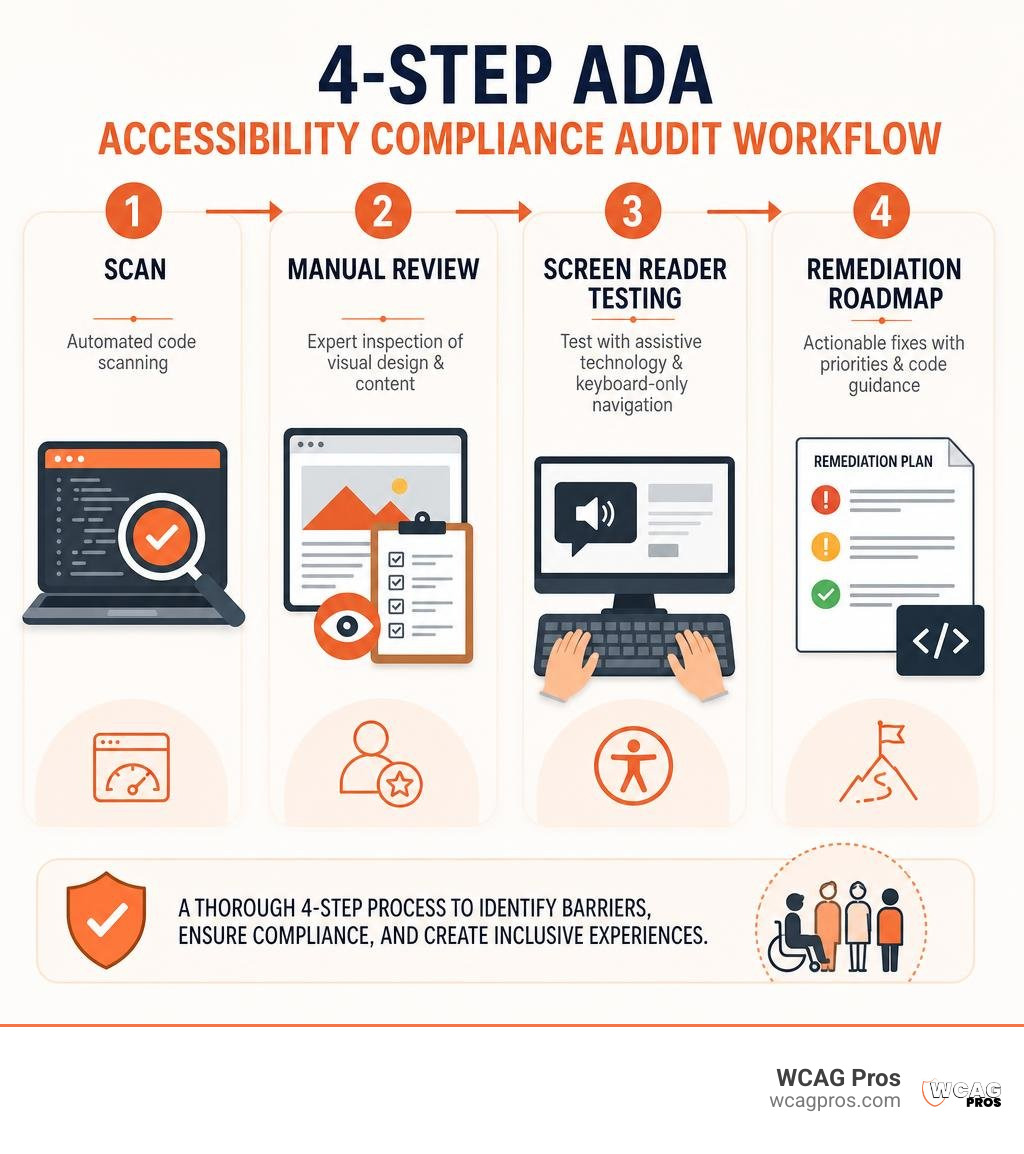
An ADA accessibility compliance audit is a professional evaluation of your website to find and fix digital barriers that block people with disabilities. To evaluate your website accessibility compliance accurately, an audit must test your digital assets against WCAG 2.2 Level AA standards through four core steps:
- Automated code scanning to quickly identify broad syntax errors across all page templates.
- Manual expert inspection to evaluate visual contrast, touch targets, and content structure.
- Assistive technology testing using keyboard-only navigation and screen readers like NVDA and VoiceOver.
- Remediation roadmap generation to provide developers with specific code fixes and issue severity levels.
Over 3,100 federal ADA Title III lawsuits were filed in 2025 alone, and automated testing tools catch only a fraction of total barriers. Relying solely on automated checkers leaves major gaps in keyboard navigation, dynamic forms, and screen reader usability. A thorough audit gives your team a clear, actionable plan to eliminate legal risk, welcome millions of disabled visitors, and make your site truly usable for everyone.
I am Matthew Post, co-founder of WCAG Pros, with more than 20 years of web development and digital accessibility experience. Over the past two decades, I have helped hundreds of organizations conduct a thorough ADA accessibility compliance audit to eliminate digital barriers, protect against lawsuits, and build inclusive online experiences.
Glossary for ADA accessibility compliance audit:
Legal Mandates and Standards: Title II, Title III, and Section 508
Federal law and modern web standards require organizations across every sector to build digital experiences that are fully accessible. Digital accessibility is governed primarily by the Americans with Disabilities Act (ADA) and Section 508 of the Rehabilitation Act in the United States. Gaining clarity on All About ADA Audit Meaning helps your team understand why compliance is not just about avoiding litigation, but about ensuring equitable access for the 28.7% of American adults who live with a disability.
The Department of Justice (DOJ) has made it clear that web accessibility is non-negotiable. For organizations operating globally or selling into the European Union, the European Accessibility Act (EAA) enforces EN 301 549 standards on commercial digital products. If your business wants to follow the latest regulatory conversations and accessibility best practices, connecting with our team at WCAG Pros on LinkedIn is a great way to stay informed.
Title III vs. Title II Compliance Deadlines
ADA Title III applies to commercial entities, private businesses, and places of public accommodation. While Title III does not explicitly name a specific technical standard in the statutory text, federal courts and DOJ consent decrees consistently enforce WCAG 2.2 Level AA as the legal benchmark. Websites that fail to meet these guidelines remain exposed to private litigation, demand letters, and costly settlement negotiations.
In contrast, the DOJ established strict compliance deadlines under ADA Title II for state and local government entities. Public sector organizations serving populations of 50,000 or more must meet comprehensive WCAG compliance standards by April 26, 2027. Smaller public bodies and special district governments have until April 26, 2028 to bring all public-facing web portals, internal services, and mobile applications into full conformance.
WCAG 2.2 Success Criteria Breakdown
Understanding how web standards evolve is essential for planning an effective digital roadmap. Reviewing Everything You Need to Know About WCAG Versions and Audits provides valuable context on why testing against current rules matters. WCAG 2.2 is structured around four foundational POUR principles:
- Perceivable: Users must be able to comprehend the information presented through sight, sound, or touch.
- Operable: Interface components and navigation cannot require interactions that a user cannot perform.
- Understandable: Content and interface operations must be predictable and intuitive.
- Robust: Code must be interpretable by a wide variety of user agents, including modern assistive technologies.
WCAG 2.2 expands upon earlier standards with key success criteria that target real-world usability gaps:
- Focus Appearance (2.4.11): Requires interactive elements to feature high-contrast, easily visible focus indicators when navigated via keyboard.
- Dragging Movements (2.5.7): Ensures any action relying on dragging can also be executed with simple, single-pointer clicks.
- Target Size Minimum (2.5.8): Mandates touch targets of at least 24 by 24 CSS pixels with adequate spacing to prevent accidental clicks.
- Consistent Help (3.2.6): Requires contact forms, chat widgets, and support links to appear in the same relative order across pages.
- Redundant Entry (3.3.7): Prevents websites from forcing users to re-enter previously supplied information in multi-step workflows.
- Accessible Authentication (3.3.8): Eliminates cognitive function tests like visual puzzles or complex memory recall during login flows.
How to Conduct an ADA Accessibility Compliance Audit
Evaluating a complex website requires a systematic, structured approach. Our comprehensive review process is detailed in The Ultimate Guide to a WCAG Comprehensive Website Audit. Because manually auditing every single page on large websites is impractical, we select a representative sample of core page templates, interactive components, and high-value user journeys such as checkout funnels, login flows, and customer portals.

During an audit, our certified technicians review your pages with keyboard-only controls, high-contrast display modes, and assistive software tools. This ensures your underlying markup functions smoothly for individuals using alternative input devices or screen magnification.
Manual Testing vs. Scans in an ADA Accessibility Compliance Audit
Automated scanners are helpful for broad syntax checks, but they cannot evaluate human context. In our deep dive on Automated Tools Audit, we explore how automated tools detect only 25% to 40% of WCAG success criteria.
Software scanners easily miss false positives and false negatives. For instance, an automated scanner can confirm that an image contains an alt tag, but it cannot tell whether the text accurately describes the image or provides nonsensical filler. Similarly, automated tools cannot verify whether dynamic modal dialogs trap keyboard focus or if ARIA live regions announce updates correctly. Manual expert testing remains the only way to confirm true compliance.
Accessibility Audits vs. User Testing with Disabilities
While an accessibility audit is a technical evaluation grading your code against WCAG 2.2 criteria, user testing involves individuals with disabilities navigating your platform to evaluate real-world usability. Both methods complement each other:
- Technical Audit: Pinpoints exact code-level WCAG failures, missing ARIA landmarks, and broken programmatic relationships.
- User Testing: Uncovers subjective friction, confusing task flows, and edge cases that pass technical validation but cause practical frustration.
Step-by-Step Self-Check Protocol Using POUR Principles
Internal teams can run an initial assessment before booking an expert review. You can follow our actionable walkthrough on How to Do an Accessibility Audit in 5 Easy-to-Follow Steps to test your core templates.
- Perceivable Checks: Verify that all informative images have meaningful alternative text. Confirm that text meets minimum contrast ratios of 4.5:1 for normal text and 3:1 for large text. Zoom your browser viewport to 400% to ensure responsive reflow without horizontal scrolling.
- Operable Checks: Put your mouse aside and navigate your site using only the
Tab,Shift + Tab,Enter, andSpacekeys. Ensure every interactive link, button, and menu shows a visible focus outline and does not cause a keyboard trap. - Understandable Checks: Verify that error alerts on forms clearly identify what went wrong and provide instructions on how to correct the input. Ensure navigation menus remain consistent across the entire site.
- Robust Checks: Inspect custom interface components like accordions, modals, and tabs to confirm they include valid HTML elements and appropriate ARIA attributes.
| Evaluation Metric | Automated Scanning Only | Comprehensive Manual Expert Audit |
|---|---|---|
| WCAG 2.2 Criteria Coverage | 25% to 40% coverage | 100% full criteria evaluation |
| Contextual Alt Text Review | Checks tag presence only | Evaluates descriptive accuracy |
| Keyboard Focus Navigation | Limited script detection | Complete human keyboard verification |
| Screen Reader Compatibility | Cannot test audio flow | Tested on NVDA, JAWS, and VoiceOver |
| Legal Defensibility | Low defense value | High legal defense record |
Audit Reports, VPAT Procurement, and Prioritized Remediation
A successful audit concludes with a clear, developer-friendly remediation deliverable. In our detailed breakdown on WCAG Audit Report: Complete Guide, we highlight how our reports group issues by underlying root cause rather than flooding your team with thousands of duplicate errors.

Many issues can be resolved rapidly across your global CSS tokens and master templates. For actionable guidance on repairing broken inputs, explore our guide on how to Stop Failing Audits with These ADA Form and Status Message Fixes.
Generating VPAT and ACR Documentation for Enterprise Deals
Organizations selling software or digital services to enterprise clients, educational institutions, or government agencies must provide formal proof of accessibility. A Voluntary Product Accessibility Template (VPAT) is completed using technical audit findings to produce an Accessibility Conformance Report (ACR).
Enterprise procurement teams rely on ACR documents to verify that incoming software meets federal Section 508 and WCAG standards. Having an accurate, up-to-date ACR removes friction during RFP evaluations and accelerates enterprise contract approvals.
Common WCAG Failures and Remediation Priority Matrix
Most non-compliant websites fail the same recurring checkpoints. When engineering teams partner with Professional ADA Remediation Services You Can Trust, fixes are organized by severity to maximize speed and legal protection:
- P1 Critical: Blocker issues that prevent navigation or task completion, such as keyboard traps, missing form submission buttons, or inaccessible checkout fields.
- P2 Major: High-impact violations that cause severe difficulty, including low-contrast body text, missing alternative text on critical buttons, and broken heading hierarchies.
- P3 Moderate: Secondary functional barriers, such as redundant links, improper table markup, or sub-optimal focus indicator styling.
- P4 Minor: Technical validation improvements and minor cosmetic adjustments that enhance code quality without blocking user interactions.

Audit Costs, Service Selection, and Maintenance Scheduling
Investing in an accessibility audit safeguards your business against costly lawsuits while expanding your market to millions of customers. When scoping an engagement, our overview in The Ultimate Guide to ADA Audit Services breaks down how site complexity, custom user journeys, and template volume influence project scope.
Industry accessibility experts emphasize that manual technical audits are the single most effective shield against compliance disputes. Relying on automated overlay widgets often increases litigation exposure, as serial plaintiffs frequently target websites that use quick-fix plugins instead of native source code repairs.
How Often to Schedule an ADA Accessibility Compliance Audit
Maintaining digital accessibility is an ongoing commitment. Websites evolve continuously as marketing teams add new campaigns, developers deploy features, and third-party plugins update. Organizations should conduct a full manual audit annually, complemented by scheduled quarterly assessments when rolling out major platform updates.
Our roadmap in ADA Site-Wide Audit: Your Roadmap to Total Compliance explains how integrating automated checks into your continuous integration and deployment (CI/CD) pipelines helps prevent regressions before code reaches production.
Red Flags to Avoid When Choosing Audit Providers
When evaluating accessibility auditing partners, watch out for these common warning signs:
- 100% Automated Guarantees: Any vendor promising instant, fully automated compliance is ignoring the fact that most WCAG criteria require human evaluation.
- Overlay Widget Resellers: Avoid companies that push dynamic toolbar plugins as a substitute for true source-code remediation.
- Generic Violation Lists: Steer clear of audit deliverables that provide raw error logs without actionable code snippets or direct developer guidance.
- Uncertified Technicians: Ensure your audit team holds recognized industry credentials, such as IAAP Certified Professional in Accessibility Core Competencies (CPACC) or Web Accessibility Specialist (WAS) certifications.
Frequently Asked Questions About Website Accessibility Audits
What factors influence the cost of an ADA compliance audit?
Audit costs are determined by the size and complexity of your digital footprint. Key factors include the total number of unique page templates, custom dynamic workflows (such as multi-step checkout processes or authenticated portals), mobile application testing requirements, and whether your organization needs formal VPAT and ACR documentation for procurement.
Can an automated scanner make a website fully ADA compliant?
No automated scanner can make a website fully compliant on its own. Automated checkers evaluate roughly 25% to 40% of WCAG criteria and cannot assess subjective, context-dependent requirements like alt text quality, logical keyboard navigation, or dynamic screen reader announcements. A reliable audit must pair automated checks with manual testing by experienced specialists.
What are the legal risks of ignoring digital accessibility?
Ignoring web accessibility leaves organizations vulnerable to federal ADA Title III lawsuits, state-level civil claims, and formal Department of Justice investigations. Beyond legal defense costs and settlement payouts, inaccessible websites suffer from higher bounce rates, lost e-commerce revenue, and damage to brand reputation among the disability community and their allies.
Conclusion
Conducting a professional audit is the most effective way to eliminate digital barriers, protect your organization from litigation, and build an inclusive web presence. At WCAG Pros, based in Norco CA, we deliver comprehensive page-by-page audits across all 54 WCAG 2.2 A and AAA checkpoints, providing your developers with clear code fixes and free re-audits for your compliance badges.
To start evaluating your digital assets, explore our curated list of free online accessibility checkers to benchmark your baseline code, then partner with our team to achieve lasting, defensible compliance.
Read more website accessibility articles
Get Help With Your Website
We'll follow up with info about:
- The process
- Cost
- Timeline
We promise to respect your privacy, and never abuse the information you provide. We will not sell or rent your information to any third party.
By submitting this form, you consent to receive SMS messages and/or emails from SEM Dynamics LLC, dba WCAG Pros. To unsubscribe, follow the instructions provided in our communications. Msg & data rates may apply for SMS. Your information is secure and will not be sold to third parties.