
All About ADA Audit Meaning
All About ADA Audit Meaning
What the ADA Audit Meaning Actually Is (Quick Answer)
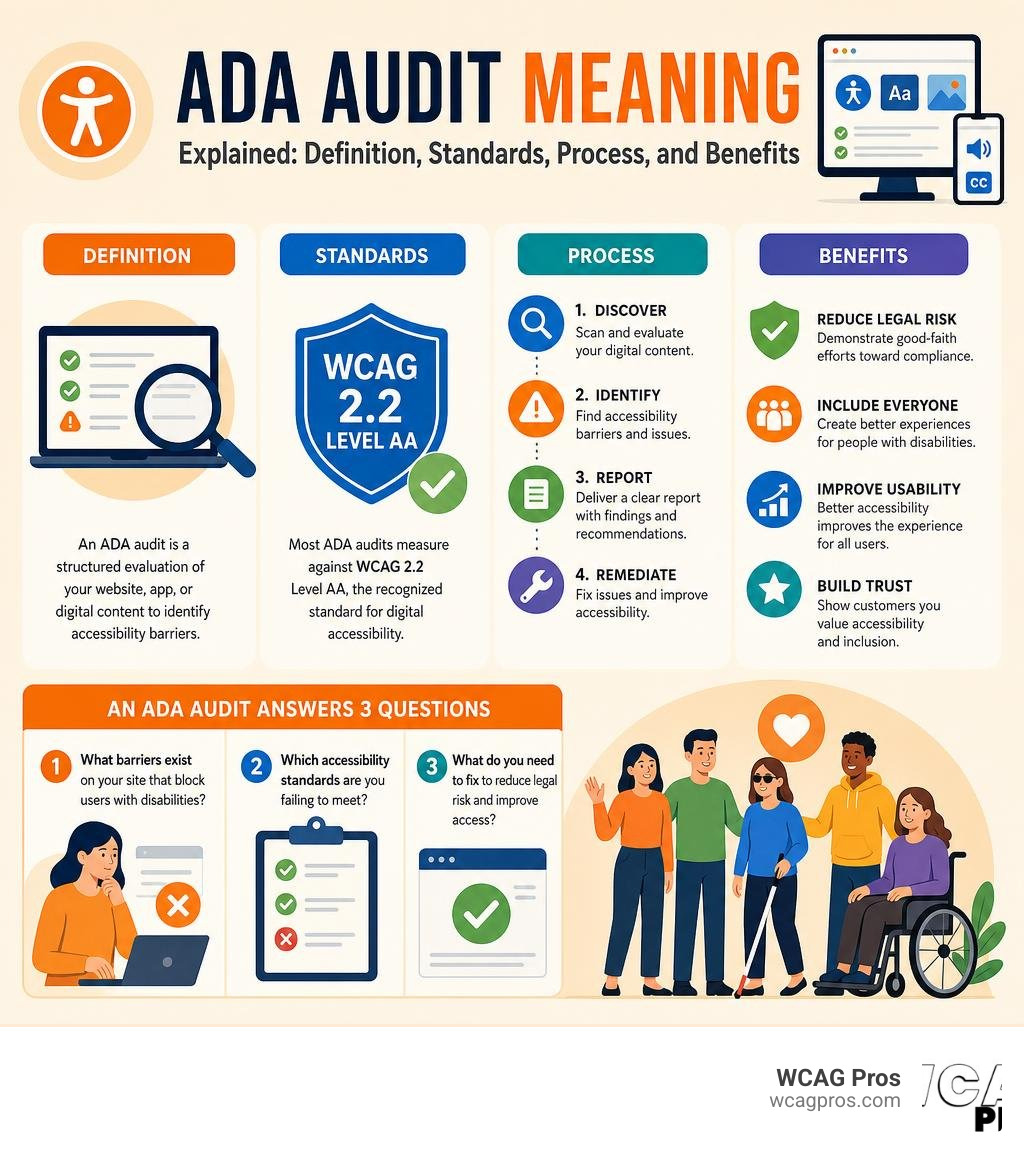
The ADA audit meaning in digital accessibility is straightforward: it is a structured evaluation of your website, app, or digital content to identify barriers that prevent people with disabilities from using it. The audit measures your site against established accessibility standards and produces a report showing what needs to be fixed.
In plain terms, an ADA audit answers three questions:
- What barriers exist on your site that block users with disabilities?
- Which accessibility standards are you failing to meet?
- What do you need to fix to reduce legal risk and improve access?
The technical benchmark used in most ADA audits is WCAG 2.2 Level AA, the standard developed by the World Wide Web Consortium (W3C) and referenced by courts and regulators when evaluating digital accessibility compliance.
More than 61 million adults in the United States live with some type of disability, according to the CDC. Every one of them may need to use your website. And in 2026, the legal stakes for ignoring this are higher than ever. In 2024 alone, 8,667 federal ADA website lawsuits were filed. Most business owners discover they have an accessibility problem the wrong way, a law firm sends a letter, or a plaintiff files in federal court.
An ADA audit is how you find and fix the problems before that happens.
I’m Matthew Post, co-founder of WCAG Pros and a web developer with over 20 years of experience helping businesses understand the ADA audit meaning and navigate WCAG compliance through hands-on audits and remediation. I personally supervise every audit project at WCAG Pros to make sure you get actionable findings, not just a scan report.
Easy ADA audit meaning word list:
Defining the ADA Audit Meaning in Digital Accessibility
To truly understand what we mean by an ADA audit, we have to look at the history of civil rights in the physical world and how it translated to our digital lives. The Americans with Disabilities Act was passed in 1990, long before the modern internet became our primary gateway for shopping, working, and communicating.
Originally, the law focused on physical spaces, ensuring that restaurants, hotels, and retail stores had wheelchair ramps, accessible restrooms, and clear pathways. As the world moved online, the Department of Justice and federal courts clarified that the internet is also a place of public accommodation. This means that your website, mobile app, and online documents must be just as accessible as a physical storefront.
A digital ADA audit is the process of examining your online presence to find web barriers. These barriers are the digital equivalents of a locked door or a steep flight of stairs. They include things like images without descriptive alt text, videos without captions, forms that cannot be filled out using only a keyboard, and text colors that blend into the background.
When we perform an audit, we are not just checking boxes. We are evaluating whether real people with visual, auditory, motor, or cognitive disabilities can successfully navigate your digital home. If you want to dive deeper into the basics of this process, we recommend starting with our Beginner’s Guide to Website Accessibility Audit.
How ADA Audits Differ From Financial and Algorithmic Audits
The term audit gets thrown around in many different industries, which can lead to some confusion. If you search for the word audit in a business setting, you might find information about financial reviews or artificial intelligence assessments. It is helpful to understand how these processes differ so you know exactly what to expect from a digital accessibility review.
Audit Data Analytics in Finance
In the financial sector, auditors use advanced software tools known as Audit Data Analytics. According to the AICPA, these techniques help financial teams leverage current technologies to move toward a more data-driven approach to planning or performing a financial audit.
Instead of checking a small sample of transaction records, financial professionals use these tools to test entire populations of data, such as analyzing a million sales transactions at once to spot material misstatements. You can learn more about this technical process in the academic chapter on Using ADAs in Performing Risk Assessment Procedures and in Procedures to Assist When Forming an Overall Conclusion . While both processes use data to identify risks, a financial data audit is focused on numbers and transactional integrity, whereas a digital ADA audit is focused on user experience and code compliance.
Algorithmic and AI Audits
Another emerging field is algorithmic auditing, which has gained traction as artificial intelligence systems become more common in hiring, credit scoring, and content moderation. An algorithm audit tests an AI product or service to see if it produces biased outcomes or discriminates against specific demographic groups.
For example, regulatory frameworks like New York City Local Law 144 require companies to audit automated employment decision tools to ensure they do not treat applicants unfairly based on race or gender. The challenges and structures of these reviews are detailed in the discussion paper Code & conduct – How to create third party auditing regimes for AI .
Digital ADA Audits
Unlike financial reviews or AI bias checks, a digital ADA audit focuses entirely on human-computer interaction and web standards. We look at the underlying HTML code, CSS stylesheets, and JavaScript functionality of your website to ensure they play nicely with assistive technologies. To understand the fundamental building blocks of a digital review, you can explore our guide on Website Compliance Audit 101.
The Core Standards of a Digital ADA Audit
When we conduct an ADA audit, we do not make up the rules as we go. We rely on the Web Content Accessibility Guidelines, which are the gold standard for digital accessibility worldwide. Specifically, we test websites against WCAG 2.2 Level AA.

The WCAG 2.2 standard is built around four core principles, often referred to by the acronym POUR. For a website to be considered accessible, it must meet all four of these criteria:
- Perceivable: Users must be able to see or hear the information presented. This means providing text alternatives for non-text content, such as alt text for images and transcripts for audio files. It also means ensuring that text has sufficient color contrast against its background so that users with low vision can read it easily.
- Operable: Users must be able to navigate the website and use all of its features. A critical part of this principle is keyboard navigation. Many users with physical disabilities cannot use a mouse and rely entirely on a keyboard or assistive switches to move around a page. If a user gets stuck in a menu or cannot submit a form using only the Tab and Enter keys, the site fails this principle.
- Understandable: The content and user interface must be easy to comprehend. This means your navigation should be consistent across different pages, form inputs should have clear labels, and error messages should explain exactly how to fix a mistake rather than displaying confusing technical jargon.
- Robust: The website must work reliably across a wide variety of browsers, devices, and assistive technologies. Your code should be clean and follow modern web standards so that screen readers, braille displays, and voice control software can interpret the content accurately.
For a deep dive into how these principles are evaluated across an entire web property, you can read The Ultimate Guide to a WCAG Comprehensive Website Audit.
Step-by-Step Guide to Conducting an ADA Audit
Conducting a thorough ADA audit requires a systematic, evidence-based approach. We cannot simply run a quick scan and call it a day. A real audit follows a structured workflow to ensure no barriers are missed.
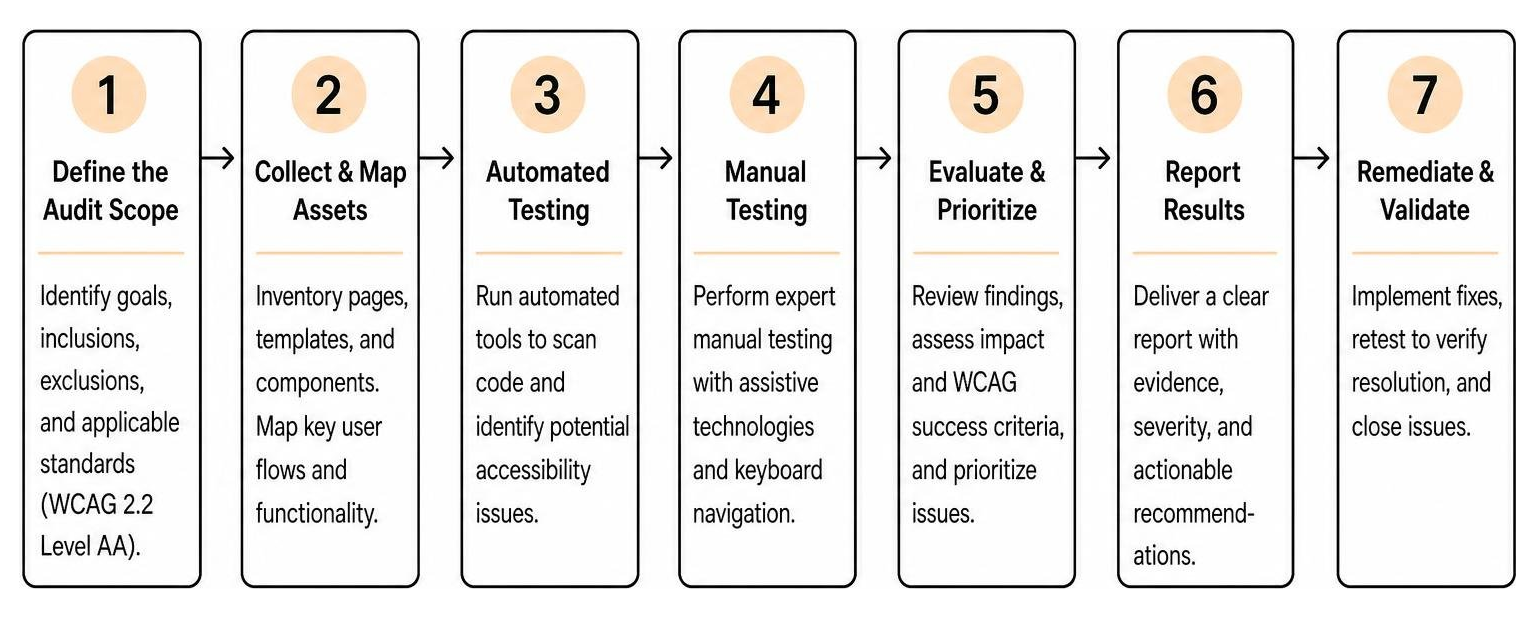
Here is how we break down the process at WCAG Pros:
1. Define the Audit Scope
Before we inspect a single line of code, we must define what we are testing. For a small business website, we might audit every single page. For a massive e-commerce platform or a complex web application, auditing thousands of pages individually is not practical.
Instead, we identify a representative sample of pages. This sample always includes your homepage, contact page, utility pages, and every unique page template. We also include critical user journeys, such as the complete checkout flow, user registration, and search functionality.
2. Gather Standards and Reference Points
We establish our testing benchmarks. For digital assets, this is WCAG 2.2 Level AA. If your business also has a physical presence in California, we must keep in mind how digital access connects to physical access standards, such as those detailed by the California Commission on Disability Access on ADA Compliance – Existing Facitlities – DGS.ca.gov .
3. Run Automated Scanning
We use automated testing tools to quickly flag machine-detectable issues across your entire site. This helps us find obvious errors, like missing alt text on images or generic color contrast failures, across hundreds of pages simultaneously.
4. Conduct Manual Expert Testing
This is the most critical phase of the audit. Our accessibility experts manually test the scoped pages. We navigate the site using only a keyboard to check for focus indicators and keyboard traps.
We also use industry-standard screen readers, such as NVDA on Windows and VoiceOver on macOS, to experience the site exactly as a blind or visually impaired user would. We check custom interactive elements, dynamic content updates, and modal dialogs to ensure they are fully accessible.
5. Document Findings and Create a Remediation Roadmap
We compile all identified failures into a detailed audit report. Each finding is mapped to a specific WCAG 2.2 success criterion and includes the location of the issue, a description of the barrier, its severity level, and specific remediation guidance for your development team.
To learn more about how professional auditors approach this structured process, check out the Step-by-Step Guide to ADA Compliance Auditors or read the practical business tips in How to Conduct an ADA Compliance Audit for Your Business – KNOW-THE-ADA .
Automated Scans vs Manual Expert ADA Audits
A common mistake many organizations make is relying entirely on free automated scanners or quick-fix overlay widgets. While automated tools are a helpful starting point, they are not a substitute for a comprehensive expert audit.
| Feature / Capability | Automated Scans | Manual Expert Audits |
|---|---|---|
| How It Works | Software scans code for machine-identifiable patterns. | Certified professionals test the site using assistive tech. |
| Percentage of Issues Caught | Approximately 25% to 40% of WCAG failures. | 80% to 95% of accessibility barriers. |
| Keyboard Navigation Testing | Cannot verify if tab order is logical or if keyboard traps exist. | Fully tests every interactive element with a keyboard. |
| Screen Reader Evaluation | Can only check if alt text exists, not if it makes sense. | Verifies if spoken descriptions match visual context. |
| Dynamic Content & Modals | Often misses issues with interactive popups and menus. | Evaluates complex user journeys and focus management. |
| Legal Defensibility | Low. Scans do not prove compliance to courts. | High. Provides documented proof of due diligence. |
Automated tools are great for catching obvious errors, but they lack human judgment. For example, an automated scan can check if an image has an alt attribute, but it cannot tell if the description is helpful or completely misleading. If you have an image of a red checkout button and the alt text says “blue dog,” the automated tool will pass it, but a screen reader user will be incredibly confused.
Similarly, complex interactions like dropdown menus, modal windows, and custom form controls require human testing to ensure that focus is managed correctly and that users do not get trapped in a loop.
To explore the technical differences between these testing methodologies, you can read our Expert Website WCAG Audit Guide for Businesses or check out ADA Compliance Audit 101: How to Check and Fix Your Website .
Business Benefits and Legal Risk Mitigation
While avoiding lawsuits is a major motivator for most business owners, the benefits of conducting an ADA audit go far beyond legal compliance. Making your website accessible is simply good business.
Shielding Your Business From Lawsuits
In the current legal environment, plaintiff law firms use automated scanners to find websites with obvious accessibility errors, and they quickly send out costly demand letters. If you receive a demand letter, having a professional, dated ADA audit report is your strongest shield. It proves that you are actively working on compliance and have a structured plan in place. You can learn more about how this acts as a protective shield in our article on The Certified WCAG Audit Process: Your Shield Against Lawsuits.
Reaching a Massive, Loyal Market
People with disabilities control billions of dollars in annual disposable income. If a user with a disability lands on your website and cannot complete a purchase because of an inaccessible checkout form, they will not hesitate to take their business to a competitor. Conversely, when you provide a seamless, accessible user experience, you build immense brand loyalty within a community that is often overlooked.
Boosting Your Search Engine Optimization
There is a massive overlap between web accessibility and SEO. Search engine crawlers are essentially blind, they read your website’s code in a very similar way to a screen reader. When you improve your site’s heading structure, add descriptive alt text to your images, and ensure your navigation is clean and logical, you are making it easier for Google to index your content, which can improve your search rankings.
Frequently Asked Questions about ADA Audit Meaning
What is the true ADA audit meaning for modern websites?
The true ADA audit meaning for modern websites is that it is a comprehensive health check for your digital presence. It is not just about passing a test, it is about ensuring that every user can successfully complete their journey on your site, whether they are buying a product, reading an article, or contacting your team. A proper audit evaluates your entire site structure against WCAG 2.2 standards to create a clear roadmap for improvement. You can read more about site-wide evaluations in our guide to an ADA Site-Wide Audit: Your Roadmap to Total Compliance.
How does the ADA audit meaning apply to mobile applications?
Mobile apps are fully covered under the ADA, and they present their own unique accessibility challenges. A mobile ADA audit looks at touch target sizes to ensure buttons are easy to tap, screen orientation support, responsive design, and compatibility with mobile screen readers like VoiceOver on iOS and TalkBack on Android. To understand how we audit mobile apps, you can explore The Ultimate Guide to ADA Audit Services.
How often should my business conduct an ADA audit?
We recommend conducting a comprehensive ADA audit at least once a year. Websites are dynamic, and every time your team adds new content, updates code, or integrates third-party plugins, new accessibility barriers can be introduced. Annual audits, combined with continuous automated monitoring, ensure that you maintain compliance over time. You can learn more about why regular audits are so important for smaller organizations in our article on Why Your Small Business Needs an Annual ADA Compliance Audit.
Conclusion
Understanding the ADA audit meaning is the first step toward building a more inclusive, legally secure, and successful digital business. An audit is not a one-time chore, it is an investment in your brand’s future and a commitment to treating all users with respect.
At WCAG Pros, based in Norco, California, we specialize in helping businesses navigate this journey. We do not just hand you an automated report and leave you to figure it out. We provide comprehensive, page-by-page manual audits of all WCAG success criteria, deliver actionable code fixes, and offer free re-audits to award you a compliance badge once the fixes are in place.
If you are ready to secure your website, improve your user experience, and show your commitment to digital inclusion, explore The No-Nonsense Guide to ADA Audit and Certification or contact us today to learn more about our WCAG Pros Website Audit Services. We are here to help you every step of the way.
Read more website accessibility articles
Get Help With Your Website
We'll follow up with info about:
- The process
- Cost
- Timeline
We promise to respect your privacy, and never abuse the information you provide. We will not sell or rent your information to any third party.
By submitting this form, you consent to receive SMS messages and/or emails from SEM Dynamics LLC, dba WCAG Pros. To unsubscribe, follow the instructions provided in our communications. Msg & data rates may apply for SMS. Your information is secure and will not be sold to third parties.