
Step-by-Step Guide to WCAG Audit Reports
Step-by-Step Guide to WCAG Audit Reports
What a WCAG Audit Report Actually Is (And Why You Need One Now)
A WCAG audit report is a structured document that records how well your website meets the Web Content Accessibility Guidelines (WCAG 2.2) and identifies exactly what needs to be fixed.
Here is what a WCAG audit report covers at a glance:
| Section | What It Tells You |
|---|---|
| Executive Summary | Overall conformance level and pass/fail status |
| Scope of Review | Which pages and content were tested |
| Methodology | How the audit was conducted (automated, manual, or both) |
| Findings | Every accessibility issue found, with severity and location |
| Remediation Guidance | What to fix, in what order, and how |
| Conformance Statement | Whether your site meets WCAG 2.2 Level A, AA, or AAA |
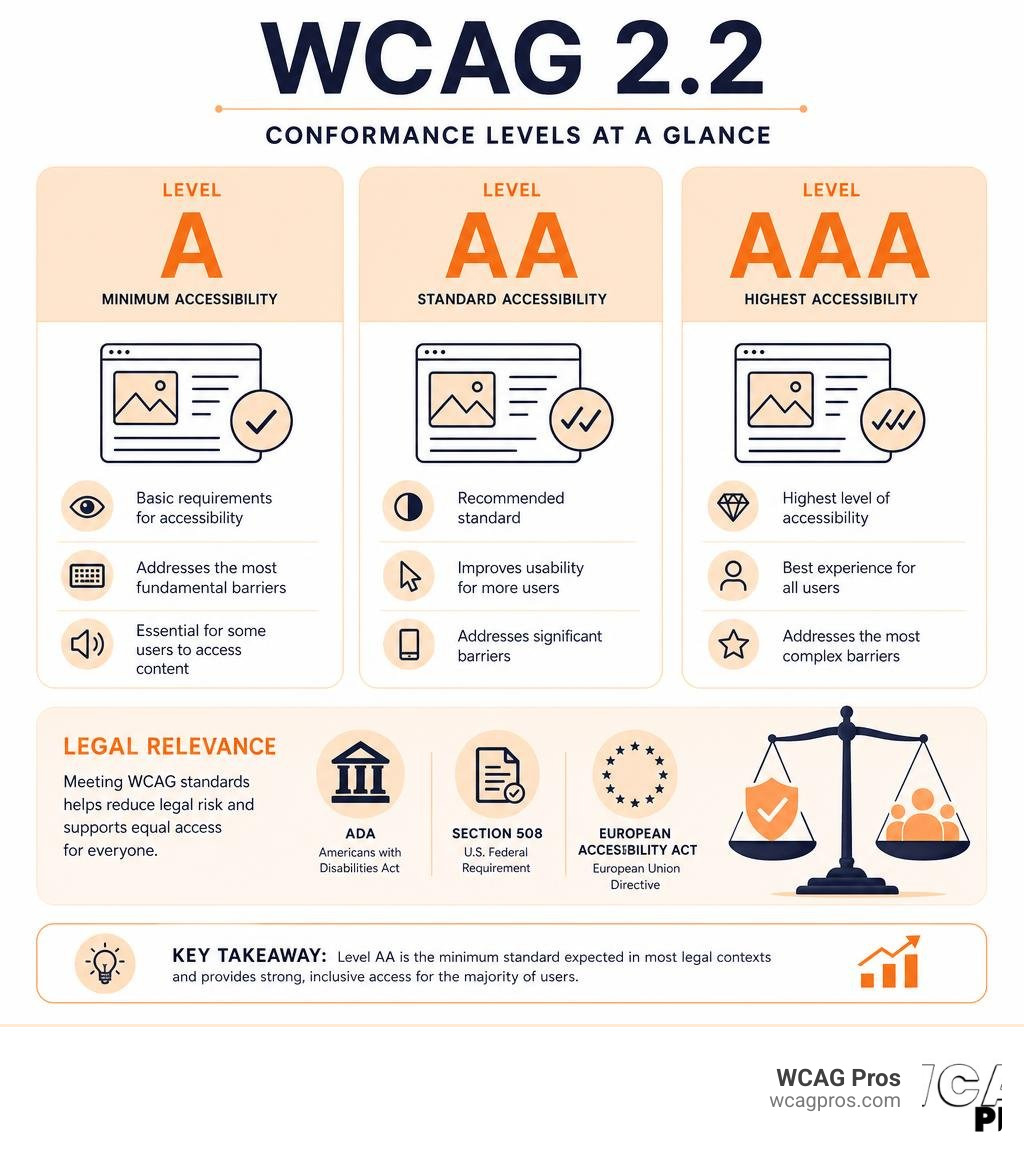
More than 1.3 billion people worldwide live with a disability. Without an accessible website, you are blocking a significant portion of your potential customers and opening your business to serious legal risk under laws like the ADA, Section 508, and the European Accessibility Act.
WCAG 2.2 Level AA is the standard cited in most US ADA enforcement actions. A proper audit report is your proof of effort and your roadmap to compliance.
I’m Matthew Post, co-founder of WCAG Pros and a web developer with over 20 years of experience. I have personally supervised hundreds of WCAG audit reports for businesses of all sizes, helping them reduce legal exposure and build genuinely accessible websites. In the guide below, I’ll walk you through everything you need to know to understand, create, and act on a professional WCAG audit report.
What is a WCAG Audit Report and Why is it Critical

To build a website that everyone can use, we first need to understand where the barriers are. This is where a WCAG audit report becomes the foundation of your entire digital accessibility strategy. It is not just a compliance document, it is a comprehensive health check for your digital presence.
At its core, digital inclusion means making sure that people with visual, auditory, motor, or cognitive disabilities can navigate, understand, and interact with your website. When we run an audit, we look for common barriers. These barriers might include images without alternative text, forms that cannot be filled out using a keyboard alone, or text with low color contrast that is impossible for low-vision users to read.
A professional audit report provides a clear baseline for remediation. Instead of guessing what might be wrong with your code, you get an organized list of specific issues. This allows your development team to focus their energy on the changes that will make the biggest impact. For a deeper dive into how this process begins, you can read our Beginner’s Guide to Website Accessibility Audit or explore the fundamentals in our Website Compliance Audit 101.
Without this baseline, teams often waste dozens of hours trying to fix the wrong elements. Worse, they might install quick-fix widgets or overlays that do not actually solve the underlying code failures and can even make the experience worse for screen reader users. A comprehensive report ensures you build accessibility directly into your website structure.
How to Structure a Professional WCAG Audit Report
A high-quality audit report must be organized logically so that both business stakeholders and web developers can understand it. When we build these reports, we follow a standardized format to ensure consistency and clarity.
A professional report should always include the following key sections:
- Executive Summary: This is a high-level overview designed for executives and legal teams. It highlights the overall conformance score, the main areas of concern, and a clear pass or fail statement regarding your target WCAG 2.2 level.
- Scope of Review: This defines exactly what was tested. It lists the specific URLs, templates, user journeys, and document types (like PDFs) that were included in the evaluation.
- Evaluation Methodology: This details the tools, browsers, and assistive technologies used during testing. For example, it should list the screen readers used, such as NVDA or VoiceOver, and specify the operating systems.
- Detailed Findings: The meat of the report. This section breaks down every single violation, mapping it directly to a WCAG 2.2 success criterion. It should include the location of the issue, a plain-language explanation of how it affects users, and concrete recommendations for fixing it.
For organizations looking to build their own reporting structure, the W3C provides an excellent Template for Accessibility Evaluation Reports by W3C. Using a standardized template helps ensure that your evaluations are consistent over time, making it easy to compare your website accessibility levels from one year to the next.
Legal Compliance and Global Accessibility Standards
Understanding the legal landscape is essential for any business operating online today. Web accessibility is no longer just a nice gesture, it is a strict legal requirement in many jurisdictions around the world.
In the United States, the Americans with Disabilities Act (ADA) Title III applies to the private sector. Federal courts have consistently ruled that websites are considered places of public accommodation. This means your digital storefront must be accessible to individuals with disabilities. For public sector entities and organizations receiving federal funding, Section 508 of the Rehabilitation Act enforces strict compliance with WCAG standards. To understand how to protect your business, you can read about our ADA Site-Wide Audit: Your Roadmap to Total Compliance and learn how a structured process acts as The Certified WCAG Audit Process: Your Shield Against Lawsuits.
The legal risks are even more pronounced under regional laws. For example, the Accessibility for Ontarians with Disabilities Act (AODA) in Canada imposes severe penalties for non-compliance. Corporations that fail to meet these requirements can face AODA fines of up to 100000 dollars per day. In Europe, the European Accessibility Act (EAA) sets strict accessibility mandates across member states, requiring private businesses of various sizes to comply with digital accessibility standards.
For businesses operating in California, local regulations are incredibly active. To ensure you meet state-specific requirements, it is highly recommended to follow a comprehensive web accessibility checklist. Following a detailed checklist helps you stay ahead of local demand letters and state-level enforcement actions.
Automated Manual and Hybrid Auditing Approaches
When it comes to generating a WCAG audit report, not all testing methods are created equal. There are three primary approaches to evaluating a website: automated scanning, manual testing, and hybrid testing.
Automated tools are excellent for scanning thousands of pages quickly. They can instantly find obvious errors like missing image alt text, empty form labels, or basic color contrast issues. However, automated scans have massive blind spots. They can tell you if an image has an alt attribute, but they cannot tell you if the text inside that attribute actually describes the image accurately. For instance, an automated tool might pass an image of a checkout button with the alt text “blue circle”, which is completely useless to a blind user.
Manual testing is performed by human accessibility experts. These specialists navigate your site using keyboard-only controls and assistive technologies like screen readers (including NVDA, JAWS, and VoiceOver). They test interactive elements, complex forms, and dynamic content to ensure they behave predictably.
The hybrid approach is the undisputed gold standard. By combining automated scanning with manual expert testing, you get the speed and coverage of software alongside the nuance and accuracy of human review.
| Testing Method | Best For | Limitations | Accuracy Rate |
|---|---|---|---|
| Automated Only | Rapidly scanning large sites for low-hanging fruit | Misses up to 70 percent of accessibility issues | Low to Medium |
| Manual Only | Deep-dive testing of complex interactive elements | Time-consuming and difficult to scale across thousands of pages | High |
| Hybrid (Gold Standard) | Comprehensive compliance audits and legal defense | Requires expert knowledge and resources | Extremely High |
To learn more about selecting the right approach for your business, take a look at our Expert Website WCAG Audit Guide for Businesses and discover the steps involved in The Ultimate Guide to a WCAG Comprehensive Website Audit.
How to Document and Prioritize Accessibility Issues

A massive list of web accessibility errors can easily overwhelm a development team. That is why a professional WCAG audit report must present findings in a clear, prioritized, and highly actionable format.
When we document accessibility failures, we make sure to include all the details a developer needs to implement a fix immediately. Each issue in the report should feature:
- A Unique Issue ID: For easy tracking in project management systems like Jira.
- The Target URL and Element: Showing exactly where the error lives.
- The WCAG 2.2 Success Criterion: Referencing the specific guideline violated.
- The Severity Level: Prioritizing the issue based on its impact on users.
- Clear Remediation Guidance: Giving exact instructions and code suggestions.
- Visual Evidence: Screenshots and code snippets to give context.
To help teams manage their workload, we categorize findings into three distinct priority levels:
- Priority 0 (P0) – Must Fix: These are critical blockers that completely prevent a user with a disability from completing a core task, such as buying a product, submitting a contact form, or navigating the main menu.
- Priority 1 (P1) – Should Fix: These are high-severity issues that cause significant frustration or confusion but do not completely block the user journey. Examples include poor color contrast on secondary text or missing skip links.
- Priority 2 (P2) – Best Practice: These are minor issues or usability improvements that make the site cleaner and easier to navigate for assistive technology users.
For real-world examples of how large organizations present these complex findings, you can explore the Experience Cloud – Aura (Desktop and Web Mobile) Spring ’25 Accessibility Conformance Report . This document provides a great look at how detailed conformance tables and remarks are structured. You can also view a variety of completed reports by visiting the W3C Accessibility Conformance Report Gallery.
How to Action and Remediate a WCAG Audit Report
Once you receive your WCAG audit report, the real work of remediation begins. Having a solid workflow is key to making sure these fixes are implemented smoothly without disrupting your regular development cycles.
First, your project manager should import the prioritized issues from the report into your ticketing system. We recommend tackling all P0 issues first. Because these are critical blockers, fixing them immediately removes the most severe legal risks and usability barriers. A typical e-commerce site remediation might require between 14 and 22 developer hours to resolve the most pressing issues.
As your developers apply the code fixes, they should document their changes directly within the tickets. Once a batch of fixes is complete, a secondary round of testing, or a re-audit, must be performed. This step is crucial because it confirms that the fixes were implemented correctly and did not accidentally introduce new accessibility bugs.
Working with experienced professionals can make this process much easier. To learn how to select the right partner for this journey, read our Step-by-Step Guide to ADA Compliance Auditors.
Frequently Asked Questions
What is the difference between WCAG 2.2 Level A and Level AA
WCAG 2.2 is organized into three levels of conformance to meet different needs. Level A represents the most basic web accessibility requirements. If your site fails to meet Level A, it contains severe barriers that make it incredibly difficult or impossible for people with disabilities to use.
Level AA is the standard required for most legal compliance frameworks worldwide, including the ADA and Section 508. It addresses the most common barriers, such as color contrast, keyboard navigation, and consistent layout. Level AAA is the highest and most stringent level of accessibility, which is generally optional for most commercial websites but highly recommended for specialized platforms.
How often should an organization run a WCAG audit
We recommend conducting a comprehensive audit at least once a year. However, if your website undergoes frequent design changes, content updates, or new feature rollouts, you should integrate automated scanning into your continuous deployment pipeline. This helps you catch new issues before they are published.
Can automated tools guarantee complete ADA compliance
No, automated tools cannot guarantee complete compliance. While they are incredibly helpful for catching quick errors, they can only detect about 30 to 40 percent of total accessibility issues. A true compliance strategy must include manual testing by human experts to ensure that your site is genuinely usable for everyone.
Conclusion
A WCAG audit report is much more than a checklist of errors, it is your strategic roadmap to building a more inclusive, legally compliant, and user-friendly website. By understanding the barriers on your site and systematically fixing them, you protect your business from costly lawsuits while opening your doors to a massive audience of users with disabilities.
At WCAG Pros, based in Norco, California, we specialize in helping businesses navigate this journey with ease. We provide comprehensive page-by-page audits of all 54 WCAG A and AAA points, complete with actionable code fixes and free re-audits to help you earn your compliance badges.
To learn more about how to formalize your accessibility achievements, explore The Ultimate Guide to Website Accessibility Certification Services and read our A Practical Guide to Website Accessibility Certification. For a straightforward look at protecting your business, check out The No-Nonsense Guide to ADA Audit and Certification.
Ready to take the first step toward complete digital compliance? Contact our team today to Get a Professional WCAG Audit and let us help you build a web experience that works for everyone.
Read more website accessibility articles
Get Help With Your Website
We'll follow up with info about:
- The process
- Cost
- Timeline
We promise to respect your privacy, and never abuse the information you provide. We will not sell or rent your information to any third party.
By submitting this form, you consent to receive SMS messages and/or emails from SEM Dynamics LLC, dba WCAG Pros. To unsubscribe, follow the instructions provided in our communications. Msg & data rates may apply for SMS. Your information is secure and will not be sold to third parties.