
ADA Website Accessibility Checker Survival Guide (54 characters)
ADA Website Accessibility Checker Survival Guide (54 characters)
What an ADA Website Accessibility Checker Does
An ADA website accessibility checker scans a web page or website for common barriers that can prevent people with disabilities from using it. It compares your site’s code and content against WCAG 2.2 criteria, then flags problems such as missing image text, weak color contrast, unlabeled form fields, and broken keyboard access.
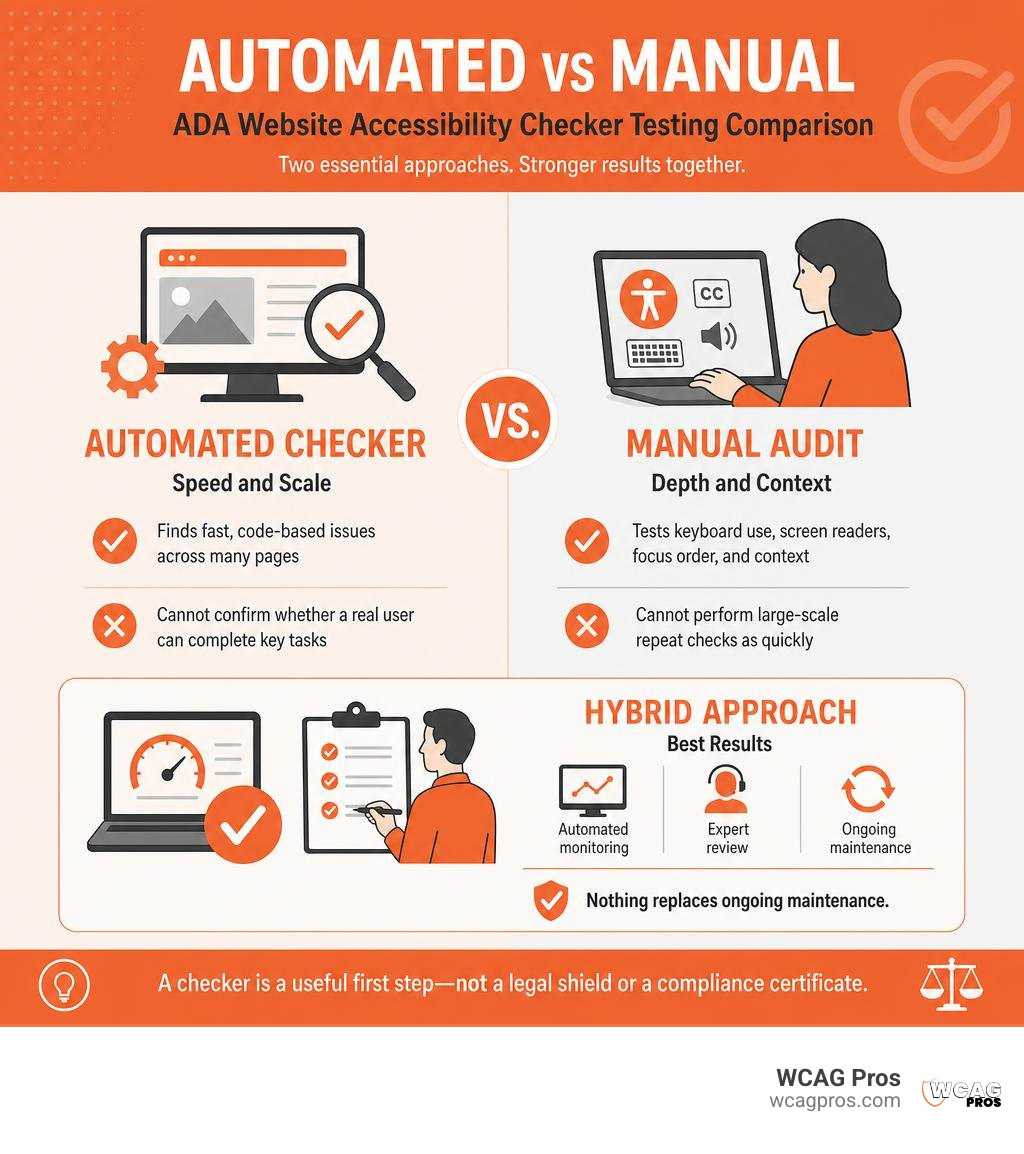
| Checker type | What it does best | What it cannot confirm alone |
|---|---|---|
| Automated scanner | Finds fast, code based issues across many pages | Whether a real user can complete key tasks |
| Manual audit | Tests keyboard use, screen readers, focus order, and context | Large scale repeat checks as quickly |
| Hybrid approach | Combines automated monitoring with expert review | Nothing replaces ongoing maintenance |
A checker is a useful first step, not a legal shield or a compliance certificate. The U.S. Department of Justice advises organizations to pair automated testing with manual review, because many accessibility failures require human judgment.
For commercial sites, this matters well beyond a score. ADA claims continue to target common barriers, including sites that use accessibility widgets instead of fixing the underlying code. A reliable checker helps your team find, document, prioritize, and correct issues before they become a user problem or a legal one.
I am Matthew Post, co-founder of WCAG Pros and a web development professional with more than 20 years of experience finding and resolving complex digital issues. I oversee WCAG audits and remediation work, including ADA website accessibility checker reviews that help businesses improve usability and reduce accessibility risk.
Legal Requirements, WCAG 2.2, and Accessibility Standards
Digital accessibility is a fundamental legal requirement under Title II and Title III of the Americans with Disabilities Act. Title II applies to state and local governments, while Title III covers private businesses operating as places of public accommodation. For years, courts and regulatory agencies have treated the Web Content Accessibility Guidelines as the standard for digital compliance. In 2026, the accepted benchmark across North America and Europe is WCAG 2.2 Level AA.
Understanding how an ADA website accessibility checker relates to global laws helps business owners protect their organizations. Section 508 of the Rehabilitation Act requires federal agencies and contractors to meet WCAG 2.2 standards. Across the border in Ontario, Canada, the Accessibility for Ontarians with Disabilities Act enforces strict corporate compliance. In Europe, the European Accessibility Act sets binding digital standards backed by significant regulatory fines.
When you run a scan with a tool like a free ADA website compliance checker, you are checking your HTML and CSS against international benchmarks. To learn more about how different tools evaluate these requirements, check out our A to Z Guide to ADA Compliance Checkers.
Department of Justice Digital Guidance and Lawsuit Trends
The U.S. Department of Justice has consistently maintained that websites must be accessible to individuals with disabilities. Legal exposure for non-compliant sites reached record levels recently. Over 5,000 ADA website lawsuits were filed in 2025 alone.
The average lawsuit settlement sits around $25,000, but total legal defense costs and remediation fees frequently push exposure between $60,000 and $200,000 per case. State level legislation like California’s Unruh Civil Rights Act allows plaintiffs to seek statutory damages for every visit to an inaccessible site. State and local government entities face strict deadlines under updated Title II rules. Managing this risk requires proactive testing, which we explain in our guide on how Automated Web Accessibility Testing Made Easy can keep your site on track.
Common Accessibility Barriers Detected by Checkers
Automated scanning software excels at finding repetitive HTML errors that prevent screen readers and assistive devices from reading web pages properly. When you run an ADA website accessibility checker, it inspects your DOM structure for the most common digital barriers:
- Missing alternative text: Functional and informative images without descriptive alt attributes leave screen reader users completely in the dark.
- Poor color contrast: Text that blends into background colors creates major reading barriers for people with low vision or color blindness.
- Unlabeled form inputs: Online form fields without associated label elements make it nearly impossible for screen reader users to fill out contact forms or complete purchases.
- Missing keyboard focus indicators: Interactive buttons and links that hide focus outlines prevent keyboard-only users from tracking their position on the screen.
- Broken heading structure: Jumping from an H1 directly to an H4 ruins the visual and structural outline that screen reader users rely on for quick navigation.
If you want to dive deeper into fixing visual elements, read our full article on How to Test Color Contrast Compliance.
Top Accessibility Checkers and Testing Tools for 2026

Choosing the right ADA website accessibility checker depends on your technical workflow, team size, and site architecture. Modern scanning platforms use advanced browser engines like Playwright or headless Chrome to render full page DOMs, evaluating dynamic JavaScript elements, popups, and visual components.
Popular developer options include axe core, WAVE, Lighthouse, and commercial platforms such as AudioEye. Each tool offers different strengths in WCAG 2.2 success criteria coverage, audit speed, and automated reporting.
Overview of Leading Evaluation Tools
To compare how different tools perform across key testing categories, we compiled this breakdown of popular automated scanning engines.
| Tool / Engine | WCAG 2.2 criteria coverage | Best deployment method | Key advantage |
|---|---|---|---|
| ADAGuard | 43 of 55 criteria (~78%) | Real browser DOM scans | Highest automated WCAG coverage |
| AudioEye | 37 of 55 criteria (~67%) | Platform hybrid monitoring | Integrated automated fixes and reporting |
| axe core | 31 of 55 criteria (~56%) | CI/CD build pipelines | Industry standard open source engine |
| WAVE Suite | Visual DOM overlay | Browser extension & API | Excellent visual error flagging |
| Lighthouse | 23 of 55 criteria (~42%) | Chrome DevTools | Fast instant page checks |
How to Evaluate an ADA Website Accessibility Checker
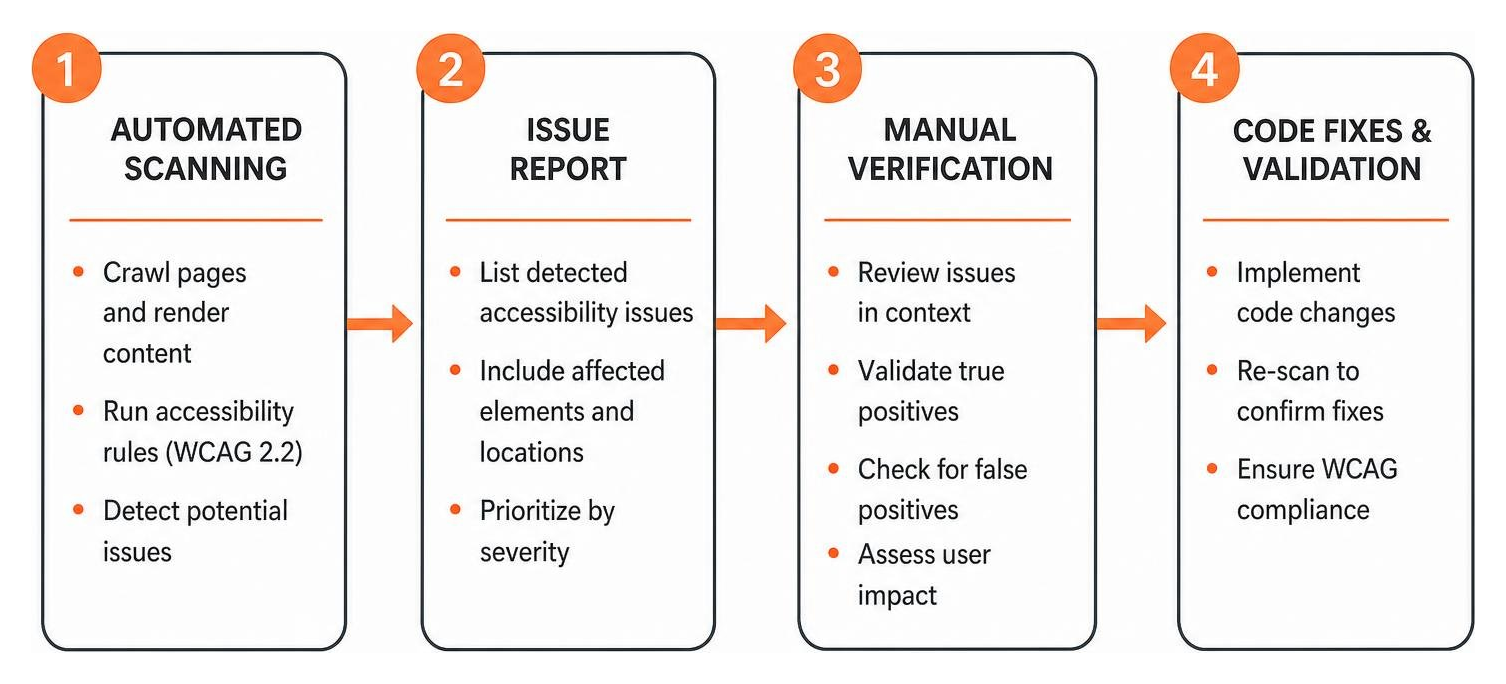
When selecting an ADA website accessibility checker, you need to look beyond marketing claims and check core functionality. A basic scanner might only read static HTML strings, missing the dynamic elements generated by modern React, Vue, or WordPress page builders.
A great evaluation tool executes full browser rendering, checks authenticated user flows, and integrates directly into your build software.
Key Features of an ADA Website Accessibility Checker
To choose a reliable testing platform for your business, look for these features:
- Comprehensive WCAG 2.2 Level AA rule sets: Ensure the software checks for modern success criteria like focus appearance and minimum target size.
- Dynamic DOM rendering: The tool must test executed JavaScript, dynamic popups, custom navigation menus, and single page applications.
- Visual evidence and screenshot logging: Clear visual highlights speed up remediation work for designers and developers.
- Issue tracking export: Look for export options in JSON, PDF, or Markdown formats to feed directly into Jira, Linear, or AI coding tools.
- Tax credit documentation: Small businesses in the United States can claim up to $5,000 in tax credits under IRC Section 44 for qualifying accessibility expenditures.
Automated Scans vs Manual Auditing in an ADA Website Accessibility Checker
While an automated ADA website accessibility checker is an incredible tool for finding code flaws, it has real limits. Industry research shows that automated tools can only test for rules that are programmatically verifiable. At best, an automated engine checks 43 out of 55 WCAG 2.2 Level AA criteria. That leaves roughly 22% to 30% of success criteria untested.
Automated scanners cannot judge context. A computer cannot tell whether alternative text accurately describes an image in context, whether visual focus order makes logical sense, or whether screen reader announcements are helpful. That is why human expert audits remain essential for true legal compliance.
Accessibility Overlays vs Code Level Fixes

The digital accessibility market features two very different approaches: fixing source code directly or installing a surface level JavaScript overlay widget. Accessibility overlay vendors promise instant compliance by dropping a line of code onto your website.
However, courts, disability advocates, and regulatory agencies overwhelmingly reject overlay widgets.
Why Overlay Widgets Fail in Court
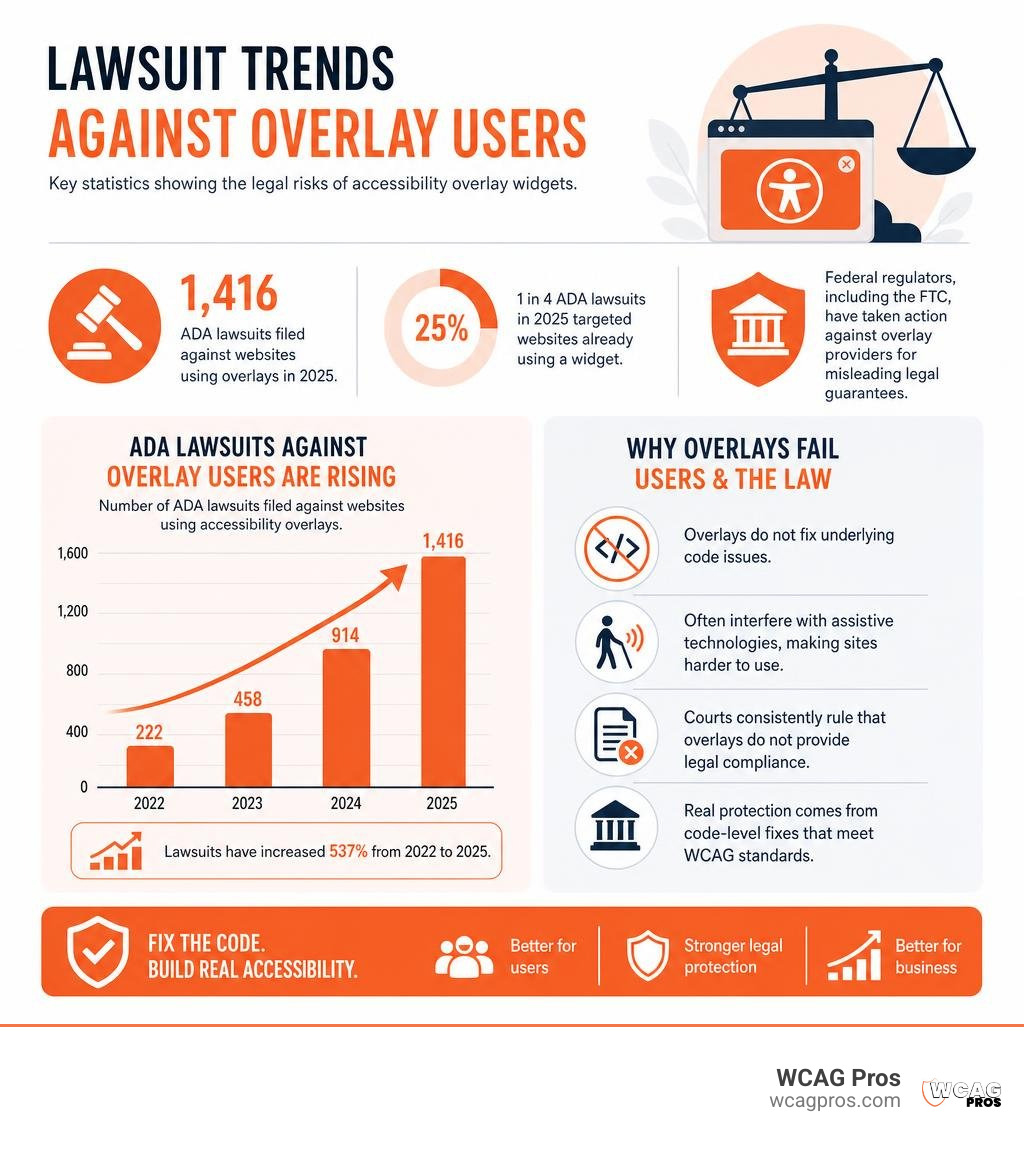
Overlays hide issues behind a script rather than fixing underlying code defects. Screen reader users frequently report that widgets interfere with their native assistive technologies, making websites harder to navigate.
The legal record speaks for itself. In 2025, plaintiff attorneys filed 1,416 ADA lawsuits against websites running accessibility overlays. In fact, 1 in 4 ADA lawsuits in 2025 targeted websites that were already using a widget. Federal regulators like the FTC have taken action against widget providers for making misleading legal guarantees. True legal protection requires fixing source code HTML, CSS, and ARIA attributes permanently. For a step by step approach to fixing site code, review The Ultimate Website Accessibility Testing Checklist for 2026.
Frequently Asked Questions
Can an automated scanner guarantee 100% ADA compliance?
No automated ADA website accessibility checker can guarantee full ADA or WCAG compliance. Automated tools only test programmatically checkable rules, catching around 30% to 78% of total criteria. Criteria involving screen reader pronunciation, logical tab sequence, and clear contextual instructions require manual testing by human experts.
How often should organizations run accessibility checks?
Organizations should run automated scans at least monthly. Additionally, automated checks should be built into continuous integration pipelines to catch code errors before deployments. Comprehensive human manual audits should occur annually or whenever launching major website redesigns.
What is the difference between WCAG 2.2 Level A and Level AA?
WCAG 2.2 Level A sets the minimum baseline for web accessibility, covering basic items like alt text and keyboard navigation. Level AA includes higher standards like strict color contrast ratios, visible focus indicators, and accessible form errors. Level AA is the universally accepted standard for legal compliance under ADA Title II and Title III.
Conclusion
Finding accessibility issues with an ADA website accessibility checker is the first step toward creating an inclusive web presence. However, automated scans are only a diagnostic tool. Protecting your organization from lawsuit exposure and delivering equal access requires fixing source code defects and validating user flows with human testing.
At WCAG Pros, we help businesses navigate digital compliance with confidence. We provide comprehensive page by page audits covering all 54 WCAG 2.2 Level A and AA points, complete with direct code fixes and free re audits for your official compliance certification badge. You can explore more resources in The Ultimate List of Free Online Accessibility Checkers or contact our team to audit and secure your website today.
Read more website accessibility articles
Get Help With Your Website
We'll follow up with info about:
- The process
- Cost
- Timeline
We promise to respect your privacy, and never abuse the information you provide. We will not sell or rent your information to any third party.
By submitting this form, you consent to receive SMS messages and/or emails from SEM Dynamics LLC, dba WCAG Pros. To unsubscribe, follow the instructions provided in our communications. Msg & data rates may apply for SMS. Your information is secure and will not be sold to third parties.