
Why Automated Overlays Fail and You Need a Real WCAG Code Fix Service
Why Automated Overlays Fail and You Need a Real WCAG Code Fix Service
Why a WCAG Code Fix Service Beats an Accessibility Overlay
A professional WCAG code fix service finds accessibility barriers, repairs the actual HTML, CSS, JavaScript, content, and components behind them, then verifies the result with automated and manual testing. To get started, ask for an audit against WCAG 2.2 Level AA, prioritize barriers in key user journeys like navigation, forms, login, and checkout, and require documented source-code fixes that your team can maintain.
An overlay widget may add a toolbar or change the page at runtime, but it does not reliably repair the underlying website. That leaves common problems in place, including missing form labels, weak color contrast, broken keyboard focus, incorrect heading structure, and ARIA that gives screen readers the wrong information.
For commercial websites, this is more than a technical cleanup. ADA-related accessibility claims continue to create legal and business risk, while inaccessible pages can block customers from completing basic tasks. Real remediation also supports cleaner semantic markup, which can improve usability, search engine understanding, and long-term site maintenance.
I am Matthew Post, co-founder of WCAG Pros and a web developer with more than 20 years of experience solving complex website problems. I personally oversee WCAG code fix service audits and remediation work to help businesses remove barriers, reduce risk, and build accessibility into their websites for the long term.
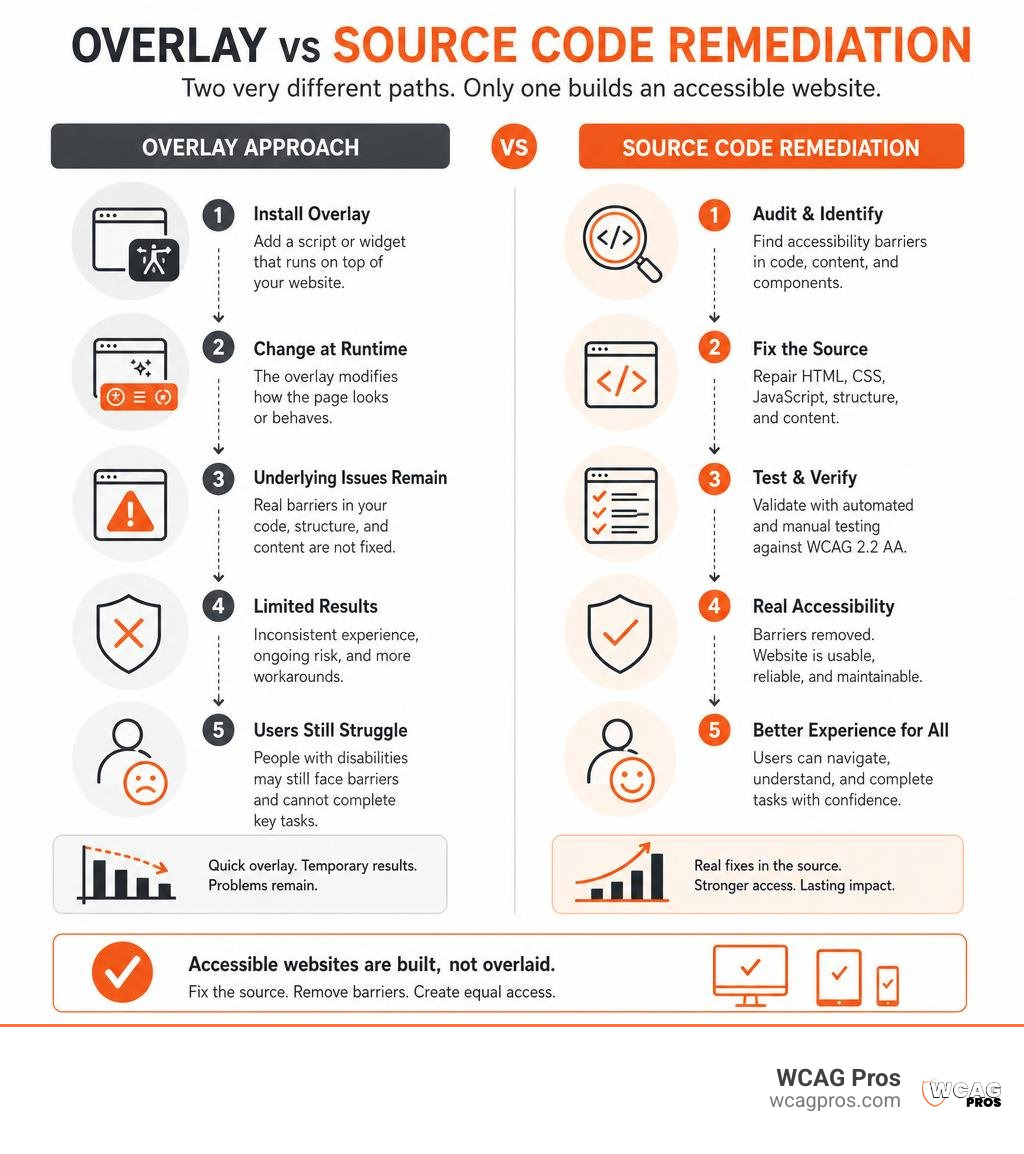
Simple guide to WCAG code fix service:
The Hidden Risks of Accessibility Overlays vs Real Code Remediation
Many website owners turn to quick JavaScript overlay widgets in the hope of solving compliance issues overnight. These widgets claim to modify pages instantly using automated scripts, but they merely sit on top of broken templates. An overlay acts like a fresh coat of paint on a cracked foundation. The fundamental barriers remain untouched in your repository, leaving disabled users frustrated and your business exposed to regulatory and legal action.
Federal regulators have increased their scrutiny of misleading accessibility marketing. The Federal Trade Commission took public regulatory action against prominent overlay vendors for making unsubstantiated claims that automated widgets make websites fully ADA compliant. True accessibility requires concrete source code remediation that alters underlying templates, form structures, and interactive scripts.
Organizations can understand local regulations by learning How To Meet WCAG Compliance Requirements In California. When evaluating your compliance strategy, comparing the fundamental differences between runtime widgets and code-level remediation helps highlight the best long-term approach.
| Accessibility Approach | Source Code Modified | Screen Reader Compatibility | Legal Protection Level | Long-Term Maintainability |
|---|---|---|---|---|
| Accessibility Overlay Widget | No (Runtime injection only) | Often conflicts with assistive devices | High lawsuit risk (Attorneys scan for widgets) | Poor (Breaks across dynamic updates) |
| Code-Level Remediation | Yes (Permanent HTML/CSS/JS fixes) | Fully native and standards compliant | High (Defensible audit trail and certification) | Excellent (Persists through deployments) |
Why Plaintiff Attorneys Target Overlay Plugins
Digital accessibility lawsuits remain at historically high levels. Thousands of federal ADA Title III cases are filed annually, with average legal settlements ranging from tens of thousands of dollars upward when accounting for legal fees and emergency developer rework. Legal firms frequently use automated scanners to identify websites that install overlays, viewing these scripts as an open admission that the underlying digital property contains unaddressed accessibility barriers.
Nearly forty percent of businesses facing digital accessibility lawsuits had an overlay plugin installed at the time of filing. Courts and federal agencies consistently find that third-party JavaScript toolbars do not satisfy ADA Title III requirements when basic interactive components remain unusable for assistive technology users. You can review our no lawsuit guide to website remediation to understand how courts view genuine technical conformance versus superficial plugins.
Performance, Security, and SEO Pitfalls of Quick Fixes
Relying on client-side overlay scripts introduces severe operational baggage. These scripts intercept DOM events on every page load, causing layout shifts, slower render times, and degraded Google Core Web Vitals scores. Slower page loads directly hurt conversion rates and organic search rankings.
Injecting third-party scripts into your production site also introduces potential security risks and data privacy concerns. If an external script is compromised, sensitive customer input fields could be exposed. Fixing your source code directly eliminates external script dependencies, producing lean, semantic HTML that search engines crawl and index with total clarity.
Understanding WCAG 2.2 Standards and Global Legal Mandates
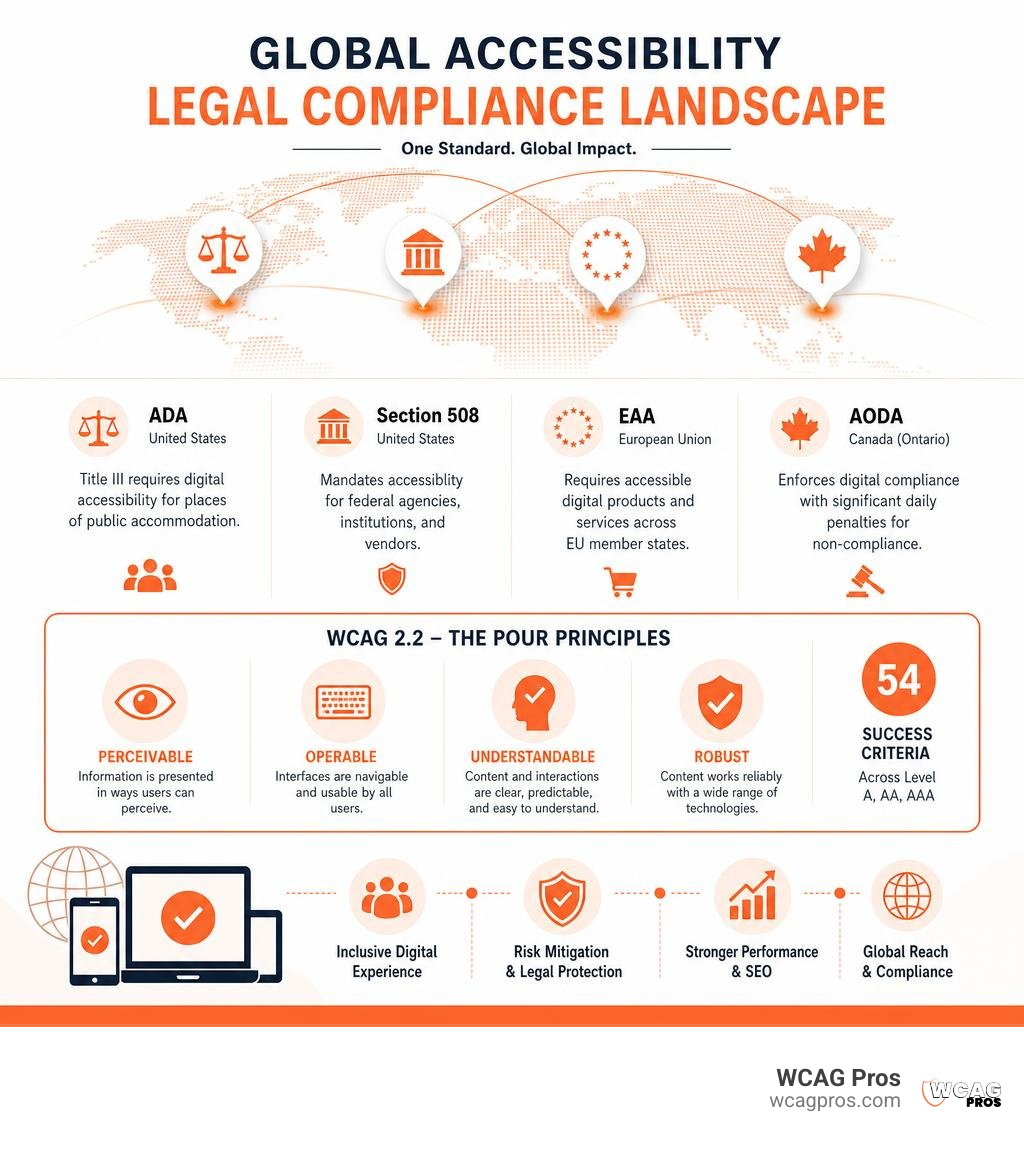
The Web Content Accessibility Guidelines serve as the definitive international benchmark for digital accessibility. Created by the World Wide Web Consortium, WCAG 2.2 organizes digital inclusion around four core design principles, known as the POUR framework:
- Perceivable: Information and user interface components must be presentable to users in ways they can perceive without relying on a single sense.
- Operable: Interface components and navigation must be fully operable via keyboard, switch device, or screen reader without creating traps.
- Understandable: Information and the operation of user interfaces must be clear, predictable, and forgiving of user input mistakes.
- Robust: Content must be robust enough to be reliably interpreted by a wide variety of user agents, including modern assistive technologies.
Under WCAG 2.2, there are 54 individual success criteria across Level A, Level AA, and Level AAA. Most global regulations mandate adherence to Level AA. Public entities and private businesses in California must follow strict standards, as detailed in the official California state accessibility standards.
Global Accessibility Mandates: ADA, EAA, and AODA
Major legal frameworks across the globe use WCAG 2.2 Level AA as their technical yardstick:
- Americans with Disabilities Act (ADA): Title III covers places of public accommodation, which courts and the Department of Justice interpret as including commercial websites.
- Section 508 of the Rehabilitation Act: Mandates digital accessibility for federal agencies, public institutions, and vendors receiving government funding.
- European Accessibility Act (EAA): Stated that private European websites, e-commerce stores, and digital banking platforms must be accessible and comply with its requirements by June 28, 2025.
- Accessibility for Ontarians with Disabilities Act (AODA): Enforces strict digital compliance in Canada. Failure to comply with AODA can result in fines of $50,000 per day or part day for individuals and fines of up to $100,000 per day or part day for corporations.
Organizations seeking practical legal compliance can read our essential guide to ADA remediation services for compliance to align their digital products with these strict regulatory expectations.
Most Common Code-Level Violations in Modern Web Apps
Automated web audits reveal recurring violations in modern web frameworks. Automated tools can detect issues based on over 100 parameters, yet the majority of digital barriers stem from a handful of fundamental coding omissions:
- Insufficient Color Contrast: Text elements failing the required 4.5:1 contrast ratio against their background for standard body text, or 3:1 for large text and non-text interface components.
- Missing or Generic Alternative Text: Images containing empty, decorative-only, or missing attributes, leaving blind users without crucial visual context.
- Keyboard Navigation Traps and Unfocused Modals: Interactive elements that cannot be reached or dismissed using standard Tab, Shift+Tab, Space, and Enter key presses.
- Unlabeled Form Controls: Inputs, search fields, and checkboxes lacking associated label tags or ARIA labels, preventing screen readers from announcing input purposes.
- Broken ARIA Roles and Attributes: Improper use of custom ARIA attributes that override native browser accessibility semantics incorrectly.

How a Professional WCAG Code Fix Service Works
A dedicated code repair engagement addresses the exact markup, stylesheets, and JavaScript logic responsible for accessibility barriers. Rather than relying on generic recommendations or temporary client-side patches, professional engineers write clean, standards-compliant code that is merged directly into your digital repository.
Businesses looking to overhaul their digital products can review our comprehensive website accessibility remediation guide 2026 to understand how code-level fixes transform legacy web assets into compliant systems.
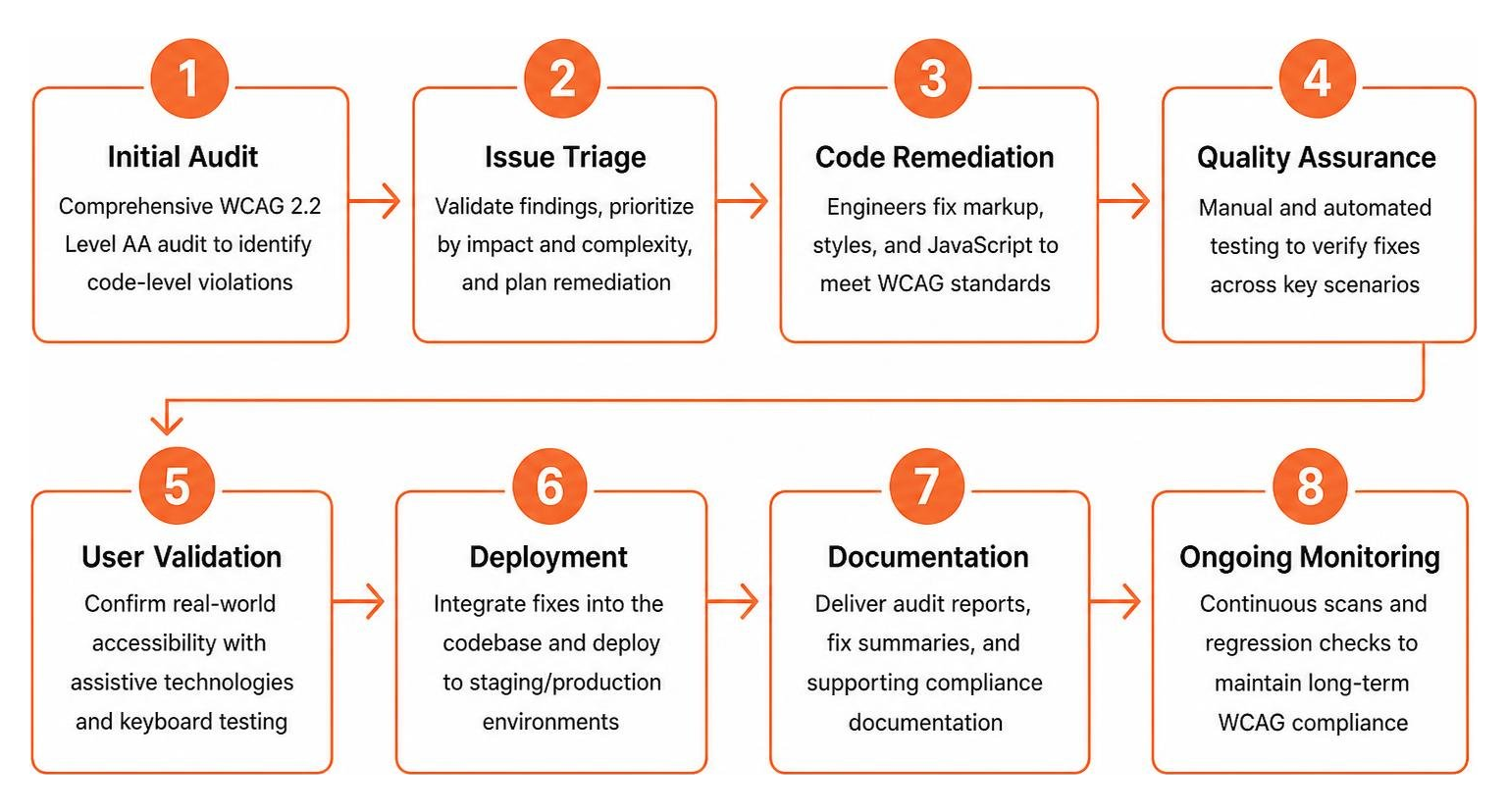
Step-by-Step Remediation Process in a WCAG Code Fix Service
Achieving full compliance requires a structured technical workflow:
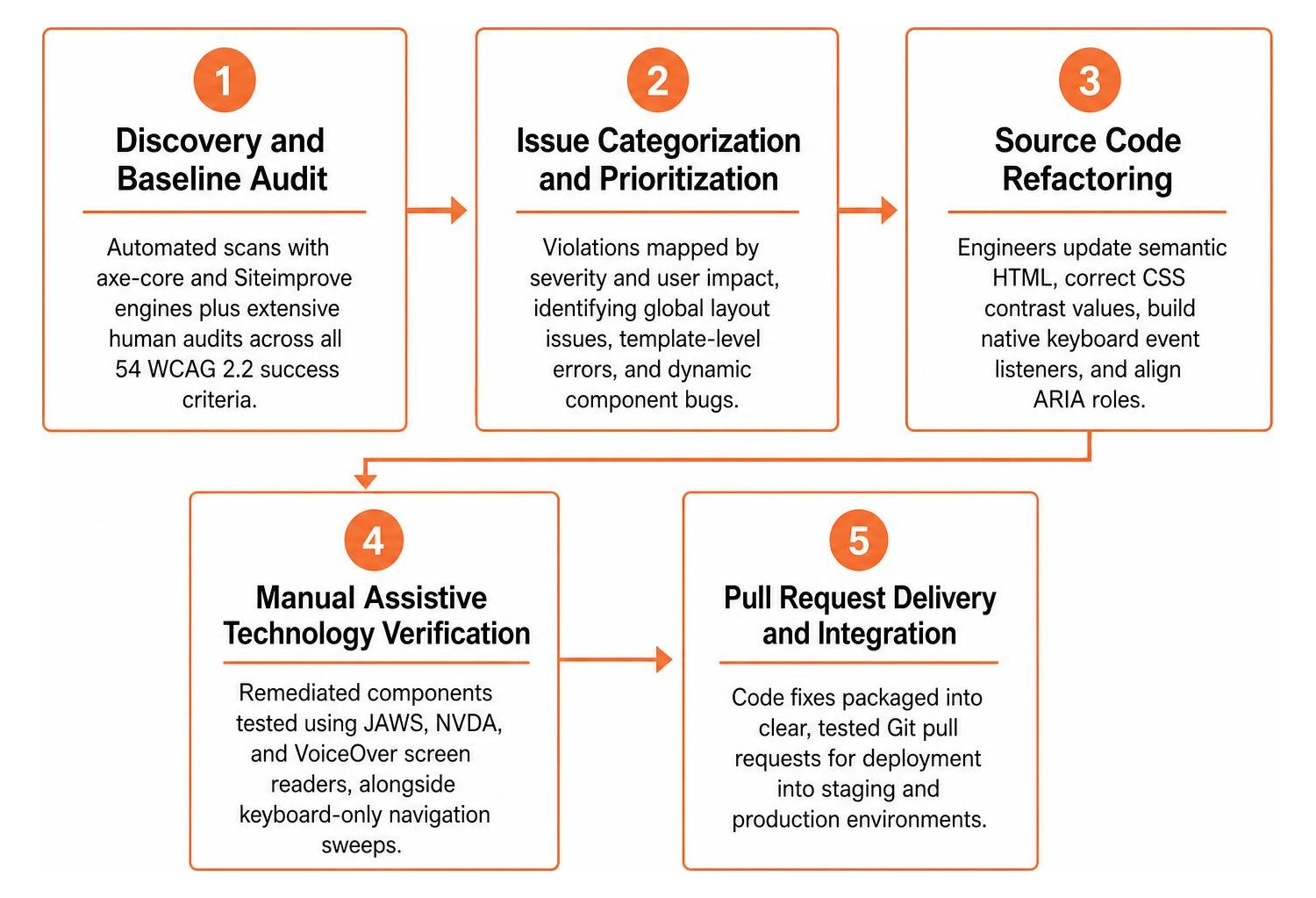
- Discovery and Baseline Audit: We run automated scans using axe-core and Siteimprove engines while conducting extensive human audits across all 54 WCAG 2.2 success criteria.
- Issue Categorization and Prioritization: Violations are mapped by severity and user impact, identifying global layout issues, template-level errors, and dynamic component bugs.
- Source Code Refactoring: Engineers update semantic HTML elements, correct CSS contrast values, build native keyboard event listeners, and align ARIA roles.
- Manual Assistive Technology Verification: Remediated components are tested using JAWS, NVDA, and VoiceOver screen readers, alongside keyboard-only navigation sweeps.
- Pull Request Delivery and Integration: Code fixes are packaged into clear, tested Git pull requests for deployment into your staging and production environments.
- Post-Deployment Re-Scan and Certification: A full re-audit verifies that all violations have been successfully resolved, issuing a formal compliance certificate.
For a granular breakdown of implementation methods, explore our definitive guide to WCAG 2.2 website remediation steps.
Integrating a WCAG Code Fix Service into CI/CD Pipelines
Digital accessibility is not a one-time project. New product features, content updates, and CMS edits can accidentally introduce accessibility bugs. Professional code fix partners help embed automated testing into modern CI/CD pipelines.
By integrating rules engines like axe-core into GitHub Actions, GitLab CI, or Jenkins pipelines, your engineering team can catch accessibility regressions during pre-commit checks and pull request validation. This shift-left approach prevents non-compliant markup from reaching production servers.

How to Choose the Right Accessibility Partner for Your Tech Stack
Selecting the right remediation provider requires assessing technical depth, testing methodologies, and compatibility with your existing content management systems or JavaScript frameworks.
Organizations can evaluate partner capabilities using our in-depth guide to website remediation services. When choosing an accessibility engineering team, consider the following technical capabilities:
- Full-Stack Competency: Ability to work seamlessly across React, Angular, Vue, WordPress, Shopify, Magento, and custom backend stacks.
- Hybrid Testing Methodology: Pairing automated scanning tools with certified manual human auditing.
- Transparent Version Control Delivery: Providing tested code commits, branches, and pull requests rather than abstract PDF issue reports.
- Post-Fix Support and Re-Auditing: Delivering free re-auditing to verify that fixes remain intact after major deployments.
Key Provider Credentials and Verification Standards
Trustworthy accessibility partners employ specialists certified by the International Association of Accessibility Professionals, holding credentials such as Certified Professional in Web Accessibility or Web Accessibility Specialist.
When evaluating potential vendors, demand tangible compliance deliverables such as Voluntary Product Accessibility Templates, documented audit trails, and legal evidence packs that prove proactive compliance. Learn more about our specialized engineering practices by visiting our WCAG remediation service overview.
Long-Term Maintenance and Retesting Strategies
Maintaining compliance requires routine audits, automated monitoring, and team training. Regular retesting ensures that new marketing campaigns, blog posts, and site redesigns maintain full accessibility conformance.
Building internal awareness through accessible component design systems and developer guidelines prevents future accessibility debt. Organizations should schedule quarterly re-scans and maintain clear accessibility statements on their websites.
Frequently Asked Questions About WCAG Remediation
Can I make a legacy website compliant without a full rebuild?
Yes. Targeted code remediation allows businesses to fix accessibility violations in legacy web applications without commissioning an expensive, ground-up rebuild. By isolating templates, navigation headers, footer elements, forms, and dynamic components, engineers can repair semantic markup and ARIA states in place. This surgical approach preserves existing styling and business logic while achieving full WCAG 2.2 Level AA conformance.
Why are automated accessibility scanners not enough on their own?
Automated scanners are powerful tools for catching surface-level issues, but they reliably detect only thirty to fifty percent of all WCAG criteria. Automated tools cannot judge whether image alternative text accurately describes visual context, whether focus order is intuitive, or whether custom interactive widgets function correctly for screen reader users. Full legal and technical compliance requires combining automated rule engines with hands-on manual testing.
How long does a complete code-level accessibility remediation take?
The timeline for complete code remediation depends on site scale, template complexity, and tech stack architecture. Most mid-sized commercial websites and e-commerce portals complete the entire discovery, source code refactoring, manual verification, and certification process within two to four weeks. Prioritizing high-traffic user journeys, checkout funnels, and navigation menus ensures that critical accessibility barriers are eliminated quickly.
Conclusion
Relying on automated overlays leaves your website vulnerable to legal action, frustrates users with disabilities, and fails to address deep-rooted technical barriers. Real digital inclusion demands permanent source code remediation that ensures your digital properties remain usable, accessible, and legally defensible.
At WCAG Pros, based in Norco, CA, we deliver comprehensive page-by-page audits across all 54 WCAG 2.2 Level A and Level AAA criteria. Our full-stack accessibility engineers fix the code directly in your templates and provide free re-audits with official compliance badges. You can begin assessing your current digital health by exploring our list of free online accessibility checkers to scan your site and begin your journey toward sustainable accessibility.
Read more website accessibility articles
Get Help With Your Website
We'll follow up with info about:
- The process
- Cost
- Timeline
We promise to respect your privacy, and never abuse the information you provide. We will not sell or rent your information to any third party.
By submitting this form, you consent to receive SMS messages and/or emails from SEM Dynamics LLC, dba WCAG Pros. To unsubscribe, follow the instructions provided in our communications. Msg & data rates may apply for SMS. Your information is secure and will not be sold to third parties.