
How to Build an Accessibility Report for Website Teams Without the Headaches
Why Modern Web Teams Need an Actionable Accessibility Test Report
To build an effective accessibility report for website compliance, web teams must define the audit scope across key templates, run automated scans, perform manual assistive technology testing, and document code-level remediation guidance prioritized by user impact. Following WCAG audit report best practices transforms technical testing data into clear engineering deliverables that bridge regulatory mandates and practical development fixes.
Digital accessibility relies on established standards including WCAG 2.2, Title III of the ADA, Section 508 for federally funded institutions, and international legislation like the European Accessibility Act. Without clear documentation, teams often react to legal demand letters rather than proactively resolving usability barriers.
The scale of non-compliance across the web remains staggering. Recent industry research from the WebAIM Million 2026 report findings reveals that web pages average 56.1 distinct accessibility errors each, representing an overall error density that creates constant friction for users with disabilities.
When an audit report is actionable, it shifts your organization from compliance panic to structured remediation. Rather than debating subjective design choices, teams work from objective data points that detail exactly where code fails conformance criteria.
The 2026 Accessibility Landscape: Why Compliance Cannot Wait
The current state of digital accessibility highlights severe systemic gaps. Automated benchmarks indicate that 95.9% of all home pages fail detectable WCAG requirements. Six specific categories account for 96% of all detected failures:
- Low contrast text: Present on 83.9% of evaluated pages
- Missing alternative text: Affecting 16.2% of all home page images
- Missing form input labels: Leaving 33.1% of form controls unannounced to screen readers
- Empty links: Confusing non-sighted navigation on 46.3% of home pages
- Empty buttons: Found on over 30% of scanned sites
- Missing document language declarations: Preventing speech synthesizers from choosing the correct accent or pronunciation
The commercial and legal stakes continue to rise. Law firms and businesses routinely face ADA lawsuits with defense and settlement figures reaching $75,000 or more per violation. According to The Internet Accessibility Report 2026 by Accessalyze, which audited 543 of the largest global web properties across various industries, the average score stood at a modest 68 out of 100. Education websites led the benchmark with an average score of 81, while media and news portals lagged behind at 59.
Proactive evaluation helps teams avoid litigation by identifying and solving barriers before users encounter them.
Essential Elements Every Accessibility Report for Website Audits Must Include
A comprehensive accessibility report serves multiple internal and external audiences. To carry legal credibility and technical value, every report must contain specific foundational components. Incorporating structured comprehensive website audit techniques ensures your testing process stands up to regulatory scrutiny.
An authoritative accessibility report includes:
- Executive Summary: A high-level overview explaining overall compliance posture, total issue counts by severity, major usability themes, and executive risk analysis.
- Audit Scope and Representative Sampling: Clear boundaries detailing all included domains, key user journeys, templates, interactive components, and login-protected user dashboards.
- Testing Methodology: An explicit breakdown of how the audit was conducted, combining automated scanning tools, human-driven code inspection, and assistive technology testing.
- Tester Credentials: Evaluator qualifications, such as Department of Homeland Security Trusted Tester certifications or professional accessibility credentials, which establish report authenticity.
- Test Environment and Assistive Tech Combinations: Specific operating systems, screen reader versions (such as JAWS, NVDA, or VoiceOver), and web browser releases used during the assessment.
- Detailed Findings and Recommendations: Precise defect logs containing technical explanations, WCAG success criteria mappings, visual proof, and remediation advice.
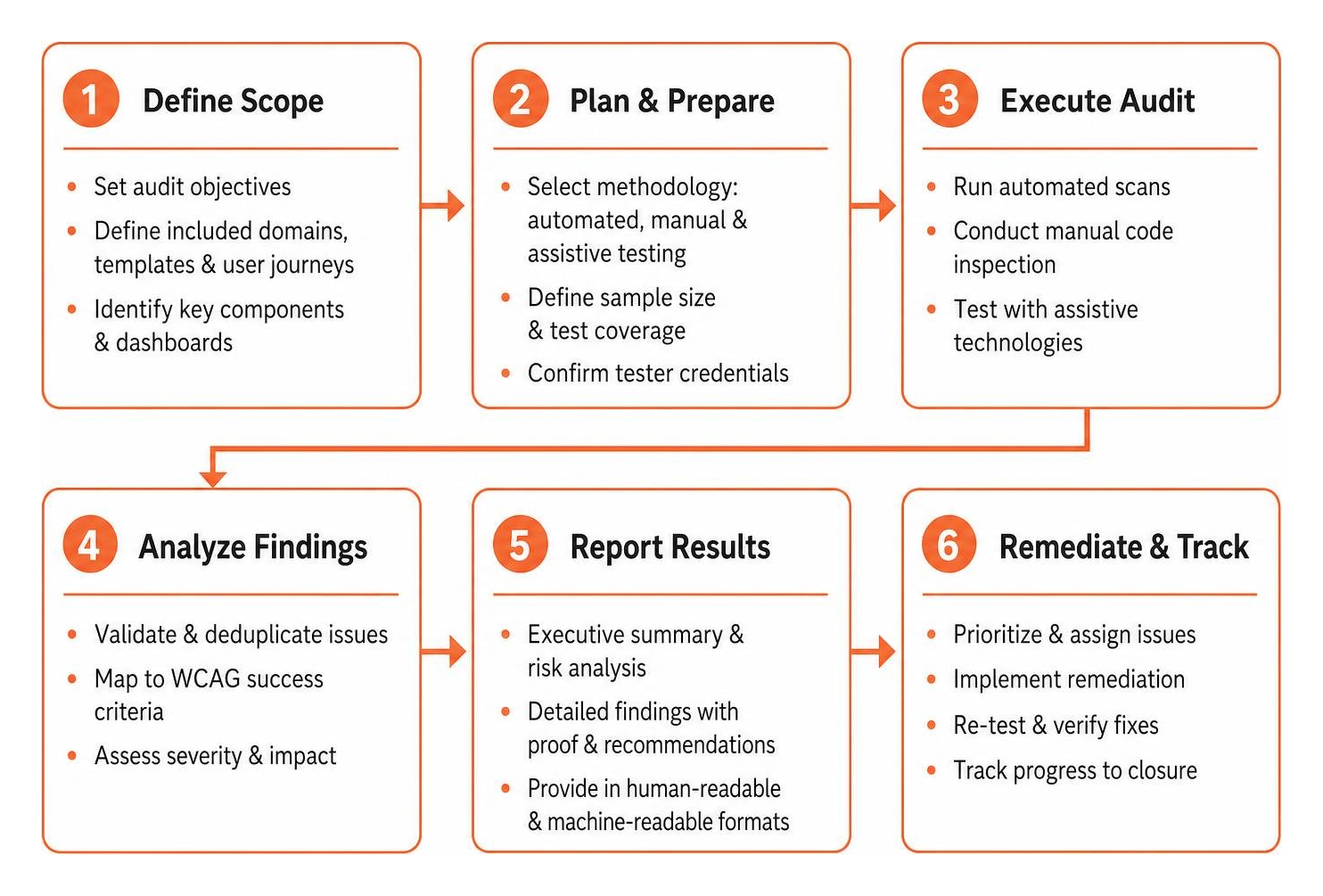
Structuring an Accessibility Report for Website Developers and Legal Teams
Different departments consume accessibility data in distinct ways. Developers need reproducible steps, code examples, and component references, while legal and executive teams need high-level conformance matrices, liability reduction tracking, and timeline projections.
Following standard ADA audit checklist guidelines helps structure findings logically across teams. Reports should be provided in human-readable documents as well as machine-readable formats like CSV or JSON, enabling teams to import issues directly into project management platforms like Jira or Linear.
| Section / Audience | Developer View | Executive and Legal View |
|---|---|---|
| Primary Metric | Defect counts, CSS selectors, DOM nodes | WCAG Level AA pass rate, overall risk level |
| Evidence Provided | Code snippets, browser console logs, DOM state | Screen captures, user journey impact summaries |
| Fix Guidance | Exact semantic HTML and ARIA recommendations | Target remediation deadlines and resource allocation |
| Delivery Format | CSV, JSON, Jira tickets | PDF Conformance Report, Executive Dashboard |
Severity Scoring and Prioritization Framework
Without clear prioritization, development teams can feel overwhelmed by lengthy issue lists. Categorizing findings by impact ensures engineering resources tackle the most disruptive barriers first.
- Critical Severity: Blockers that prevent a user with assistive technologies from completing a core action, such as a missing keyboard focus state on a checkout button or an inaccessible authentication modal.
- Serious Severity: Significant barriers that make a task very difficult, such as unlabeled form fields, missing skip links, or extensive low-contrast body text.
- Moderate Severity: Usability issues that create confusion or inefficiency, such as skipped heading levels, non-descriptive link labels, or missing document landmarks.
- Minor Severity: Technical conformance deviations that cause minimal end-user friction, such as minor layout attribute warnings or valid but redundant ARIA declarations.
Prioritizing fixes based on direct user impact and WCAG levels ensures that Level A and Level AA violations affecting core user flows are addressed immediately.
Automated vs. Manual Auditing: How to Capture 100% of Conformance Gaps
Automated testing tools powered by engines like Axe-core are exceptional at scanning thousands of pages quickly. They flag syntax issues, missing attributes, and obvious color contrast failures. However, automated testing alone typically captures only 30% to 40% of all WCAG success criteria.
The remaining 60% to 70% of accessibility requirements depend on human judgment and interactive testing. Relying entirely on automated scans creates a false sense of security. Adopting practical accessibility testing workflows combines automated speed with manual precision.

Manual testing is essential for verifying:
- Logical Reading and Tab Order: Ensuring dynamic Single Page Applications (SPAs) shift focus logically when views update.
- Keyboard Operability and Trap Avoidance: Verifying that every dropdown, modal dialog, and custom control can be opened, navigated, and closed using only the Tab, Escape, Enter, and Arrow keys.
- Alternative Text Accuracy: Checking that image descriptions convey genuine context rather than repeating generic filenames or stuffing keywords.
- Screen Reader Announcements: Listening to how NVDA, JAWS, or VoiceOver announce complex custom widgets like accordions, tabs, and alert notifications.
The ARIA Complexity Paradox
Modern web applications often attempt to fix accessibility barriers by adding Accessible Rich Internet Applications (ARIA) attributes. However, incorrect ARIA usage frequently creates more problems than it solves.
Data from the top one million home pages reveals that sites utilizing ARIA attributes averaged 59.1 accessibility errors, compared to just 42 errors on pages without ARIA. Modern pages now average over 133 ARIA attributes each, representing a 27% year-over-year increase. Common issues include invalid role definitions, misplaced state attributes, and missing live regions.
The first rule of ARIA remains clear: do not use ARIA when standard semantic HTML5 elements (such as , , ) already provide built-in accessibility features. Keeping DOM structure clean, maintaining a logical heading hierarchy from to , and defining the document language on the tag solves the majority of baseline accessibility requirements naturally.
How to Build and Deliver the Audit: From Testing to Remediation
Conducting a thorough website audit requires a systematic approach. By breaking down testing into distinct phases, teams can gather actionable data without getting lost in technical complexity. Following how to do an accessibility audit in 5 easy to follow steps provides a clear blueprint for this process.
- Define Scope and Environments: Identify production, staging, and authenticated user environments across desktop and mobile screen resolutions.
- Execute Automated Baselines: Run automated crawlers across key page templates to establish initial error counts and identify widespread layout issues.
- Perform Comprehensive Manual Audits: Use keyboard-only navigation and screen readers to inspect complex interactions, forms, and custom components.
- Log Defect Records: Document each issue with the affected URL, component name, WCAG criterion, severity, reproduction steps, and suggested code remedies.
- Deliver and Integrate: Present the findings to stakeholders and import technical tasks into your team’s development backlog.
Organizations operating in public jurisdictions can also consult state-specific standards, such as the California Commission on Disability Access resources, to confirm local compliance requirements.
Tools to Build an Accessibility Report for Website Conformance
Several recognized tools can assist your team in compiling and formatting audit results:
- WCAG-EM Report Tool: Provided by the W3C Web Accessibility Initiative, this tool guides auditors through the official Website Accessibility Conformance Evaluation Methodology.
- Section 508 SCRT: The Section 508 Compliance Reporting Tool helps teams organize findings against federal standards.
- Open-Source Spreadsheets: Standardized audit sheets allow cross-functional teams to collaborate on issue tracking, assign roles, and monitor remediation status.
Mastering website compliance audit fundamentals allows teams to select the reporting tools that best fit their existing technical stack.
Turning Findings into VPATs and Accessibility Conformance Reports (ACRs)
When bidding on government contracts or selling enterprise software, prospective clients often require a Voluntary Product Accessibility Template (VPAT). A completed VPAT is published as an Accessibility Conformance Report (ACR).
An ACR documents how a digital product conforms to WCAG 2.2 and Section 508 criteria. Creating an accurate ACR requires rigorous testing data, as inaccurate or fabricated claims expose organizations to contract disputes and legal exposure. Leveraging the certified WCAG audit process ensures your conformance documentation is fully supported by verified testing evidence.
Frequently Asked Questions About Website Accessibility Reports
How often should a website accessibility report be updated?
An accessibility report should be updated whenever significant design updates, structural code modifications, or new template rollouts occur. For active commercial platforms, we recommend conducting automated baseline scans continuously within CI/CD pipelines, supported by comprehensive manual audits at least once per year or on a quarterly basis.
What is the difference between an accessibility audit report and a VPAT?
An accessibility audit report is an internal diagnostic document designed for technical teams, highlighting specific bugs, code snippets, and remediation instructions. A VPAT is a standardized industry template used to generate a formal Accessibility Conformance Report (ACR), which communicates product conformance levels to procurement officers and regulatory bodies.
Can automated tools generate a legally defensible accessibility report?
No. Automated testing tools cannot evaluate critical usability factors such as logical tab navigation, screen reader accuracy, dynamic focus shifts, or the quality of alternative text descriptions. A legally defensible report requires manual inspection by human accessibility professionals alongside automated scan data.
Conclusion
Building a clear, comprehensive accessibility report transforms digital accessibility from an intimidating chore into a structured engineering process. Treating accessibility as an ongoing quality practice rather than a one-time project protects your business from legal exposure while opening your products to millions of users who rely on assistive technologies every day.
At WCAG Pros, our team provides comprehensive page-by-page audits evaluating all 54 WCAG 2.2 Level A and Level AAA success criteria. Headquartered in Norco CA, we deliver exact code remediation guidance and offer free re-audits to help your team achieve verified compliance.
Explore our professional WCAG audit and certification services to identify compliance gaps, protect your business, and deliver an inclusive online experience for all your visitors.
Read more website accessibility articles
Get Help With Your Website
We'll follow up with info about:
- The process
- Cost
- Timeline
We promise to respect your privacy, and never abuse the information you provide. We will not sell or rent your information to any third party.
By submitting this form, you consent to receive SMS messages and/or emails from SEM Dynamics LLC, dba WCAG Pros. To unsubscribe, follow the instructions provided in our communications. Msg & data rates may apply for SMS. Your information is secure and will not be sold to third parties.