
A Comprehensive Guide to Verify Site ADA Compliance with WCAG 2.2
A Comprehensive Guide to Verify Site ADA Compliance with WCAG 2.2
How to Check if Your Site Is ADA Compliant
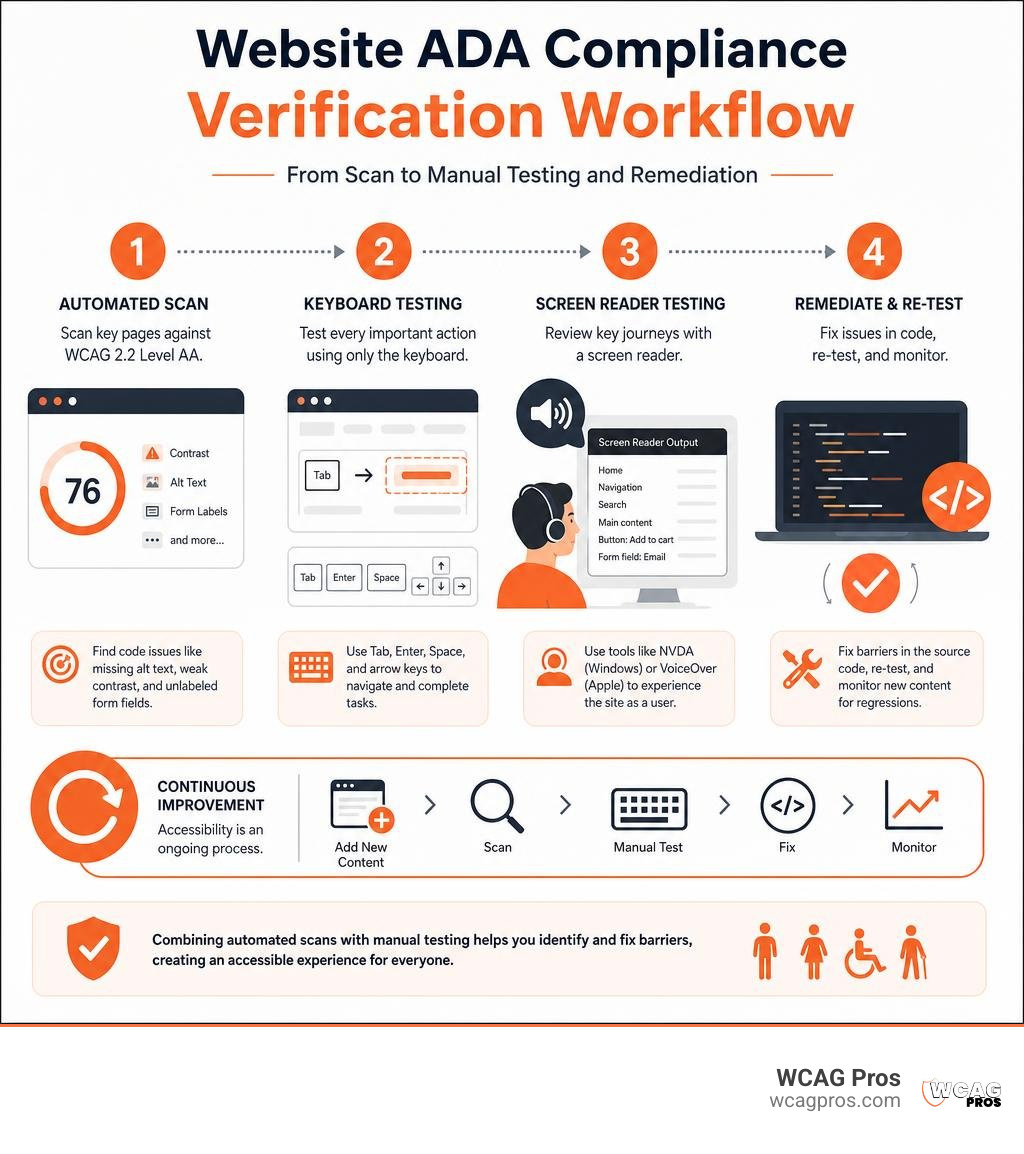
To check if a site is ADA compliant, start with an automated scan against WCAG 2.2 Level AA, then test key pages by keyboard and screen reader. Scan more than your homepage. Include contact forms, product pages, login areas, checkout, PDFs, and other tasks customers need to complete.
- Run a free accessibility scanner to find code issues like missing alt text, weak color contrast, and unlabeled form fields.
- Test every important action using only the Tab, Enter, Space, and arrow keys.
- Review key journeys with a screen reader, such as NVDA on Windows or VoiceOver on Apple devices.
- Fix issues in the website’s source code, re-test, and monitor new content for regressions.
An ADA-compliant website gives people with disabilities equal access to your products, services, and information. While the ADA does not give private businesses one single technical rulebook, WCAG 2.2 Level AA is the practical benchmark used in accessibility work and legal settlements. Automated tools are a useful first step, but they cannot judge every barrier or prove legal compliance on their own.
The risk is real. In 2025, 8,667 ADA lawsuits were filed, and businesses under $25 million in annual revenue made up 77% of targets. Accessibility is also a customer experience issue. When visitors cannot navigate a menu, understand a form error, or finish a purchase without a mouse, they may simply leave.
I am Matthew Post, co-founder of WCAG Pros and a programmer with more than 20 years of web development experience. I have audited and remediated websites for WCAG compliance, helping organizations check if site is ADA compliant and resolve the barriers that create risk for users and businesses alike.
Simple check if site is ADA compliant word guide:
Digital Accessibility Legal Standards and Litigation Risks

When business owners ask us does my website have to be ADA compliant, the short answer is yes. The Americans with Disabilities Act was enacted in 1990 to prohibit discrimination against individuals with disabilities in physical spaces known as places of public accommodation. Since 1996, the United States Department of Justice has consistently stated that Title III of the ADA applies to digital spaces, including commercial websites, mobile applications, and web-based portals.
Because roughly 26% of adults in the United States live with some form of disability, an inaccessible website shuts out more than one-fourth of your potential audience. Title III of the ADA requires commercial businesses that are open to the public to provide full and equal enjoyment of their goods and services. When a digital storefront or informational portal cannot be navigated using assistive technologies like screen readers or keyboard inputs, it constitutes a barrier to access.
Federal courts and regulatory agencies rely on the Web Content Accessibility Guidelines, published by the World Wide Web Consortium, as the benchmark standard for evaluating whether a digital property meets accessibility mandates. Specifically, WCAG 2.2 Level AA represents the practical target for enterprise websites, small businesses, and institutions alike.
The legal exposure for ignoring digital accessibility has never been higher. A record 8,667 ADA lawsuits were filed in 2025, representing an average of 24 lawsuits filed every single day and a 37% surge over prior periods. Contrary to the myth that plaintiffs only target Fortune 500 corporations, 77% of these legal filings targeted businesses generating under $25 million in annual revenue.
For first-time targets, average settlement expenses generally range from $5,000 to $25,000, not including defense attorney costs and the required code remediation. In situations involving repeat violations or class action claims, financial exposure frequently climbs between $50,000 and $150,000 or more. Reviewing legal analysis on how to know if a website is ADA compliant highlights that taking proactive action is substantially less expensive than reacting to a formal demand letter.
Title II Federal Deadlines for Public Sector Digital Assets
While private commercial businesses operate under ADA Title III, state and local governments fall under ADA Title II. On April 24, 2024, the Department of Justice published a final rule formally establishing WCAG 2.2 Level AA technical standards for state and local government digital services, public schools, and municipal websites.
To provide agencies sufficient time for code remediation and technical updates, the Department of Justice issued an updated timeline that establishes two main compliance dates based on population:
- Large public entities serving populations of 50,000 or more must achieve full digital compliance by April 26, 2027.
- Small public entities serving populations under 50,000, along with special districts, have until April 26, 2028.
These standards cover not just public HTML pages, but also downloadable PDFs, council meeting agendas, online utility portals, resident payment systems, and third-party vendor integrations. Meeting these standards is essential for all civic bodies, including municipal digital accessibility standards maintained in communities like Norco CA. In parallel, related healthcare regulations under Section 504 have set target dates extending through May 11, 2027, requiring hospitals and healthcare providers receiving federal assistance to ensure their patient portals and clinical resources meet accessibility requirements.
Why Third-Party Overlay Widgets Fail Compliance Tests
In an effort to avoid lawsuits quickly, many website owners install JavaScript accessibility overlay widgets or AI toolbars. These plugins promise instant legal immunity by altering visual settings on the front end. However, overlay widgets do not fix the underlying source code and fail to provide true digital accessibility.
In fact, 1 in 4 ADA lawsuits filed in 2025 targeted websites that were already running an accessibility overlay widget. Assistive technology users routinely report that these widgets disrupt screen reader reading orders, break customized keyboard navigation settings, and fail to repair fundamental architectural flaws like broken document forms or non-semantic HTML structures.
Regulatory agencies have also scrutinized these marketing claims. The Federal Trade Commission issued a $1 million fine against an overlay vendor for deceptive advertising practices regarding automated compliance capabilities. True accessibility cannot be applied through a third-party script. Achieving real accessibility requires repairing the underlying source code, which you can explore further in our comprehensive guide to ADA compliant website structure.
Step-by-Step Process to Check if Site Is ADA Compliant

Verifying your website for accessibility requires an organized methodology that evaluates structural HTML markup, responsive display behaviors, and interactive workflows across multiple screen sizes and viewports.
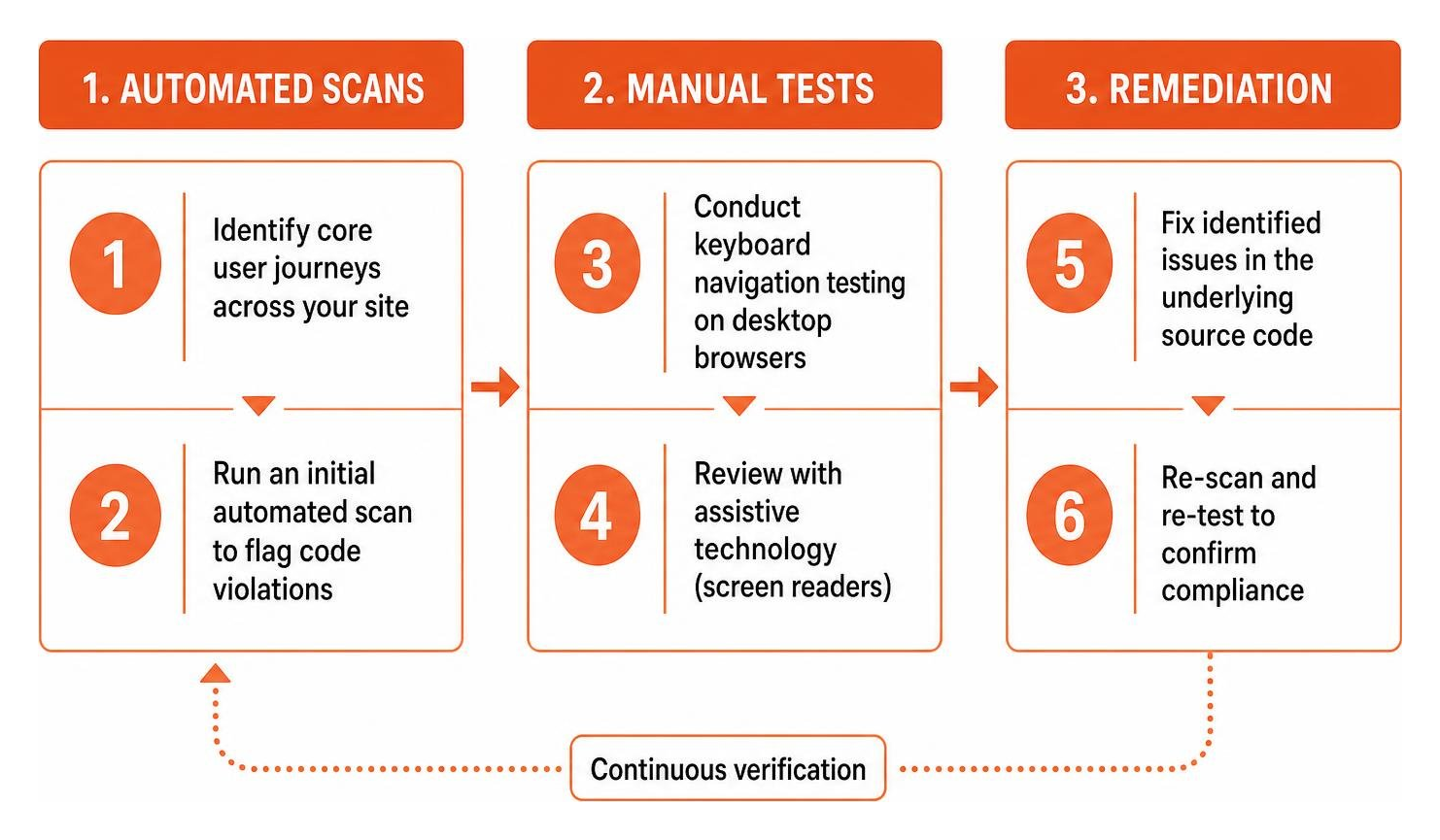
Here is the exact step-by-step process we recommend for verifying your site:
- Identify core user journeys across your site, such as viewing product catalogs, completing contact forms, scheduling appointments, logging into member areas, and finishing an e-commerce checkout.
- Run an initial automated scan using a reputable accessibility engine to flag low-hanging code violations across all primary templates.
- Conduct keyboard navigation testing on desktop browsers to verify focus indicators and interactive controls.
- Perform screen reader evaluations across desktop and mobile devices to test visual context, non-text elements, and dynamic alerts.
- Audit downloadable documents, including public PDF forms, guides, and policy documents, to verify structural tagging.
- Document all identified failures in a remediation tracker, mapping each barrier to its corresponding WCAG 2.2 Level AA success criterion.
- Implement code fixes directly within your website templates, CSS stylesheets, and CMS components.
- Re-test all remediated pages using both automated and manual methods to verify that the issues are resolved.
Use Automated Testing Tools to Check if Site Is ADA Compliant
Automated testing tools provide a fast, cost-effective method to audit large volumes of content across your digital footprint. Automated engines parse rendered Document Object Model trees against programmed WCAG rules, quickly flagging errors in image markup, color styling, and missing HTML tags.
To begin checking your pages, review 5 free ADA compliance tools to check your website instantly. Popular options include:
- The Axe-core engine by Deque Systems, available through free browser extensions to inspect rendered DOM trees.
- WAVE Web Accessibility Evaluation Tools by WebAIM, providing visual icons directly over web page elements to highlight structural errors.
- Google Lighthouse, built into Chromium developer tools to evaluate baseline accessibility alongside site performance.
- Command-line interface scanners and automated testing APIs, which allow development teams to integrate accessibility checks directly into continuous integration pipelines to catch code regressions before deployment.
When evaluating automated results, you can consult our ADA website accessibility checker survival guide for help sorting through your scan reports. Additionally, you can consult the ultimate list of free online accessibility checkers to find tools that fit your technical environment.
Manual Testing Methods to Check if Site Is ADA Compliant
While automated scanners flag obvious structural defects, manual testing is essential for evaluating whether a site is genuinely usable for people with disabilities. Manual evaluation tests functional user interactions that software algorithms cannot judge.
Begin your manual testing by checking keyboard navigation:
- Disconnect or ignore your mouse entirely.
- Use the Tab key to move forward through interactive elements like links, buttons, and form fields. Use Shift plus Tab to move backward.
- Verify that every interactive control displays a clear, visible focus outline so you always know which element is currently selected.
- Confirm that drop-down menus, modal dialogs, and image carousels can be opened, navigated, and closed using the Enter, Space, and Escape keys.
- Ensure you never encounter a keyboard trap where focus gets stuck inside a sub-menu or pop-up window without a way to exit.
Next, test your site using desktop and mobile screen readers. On Windows, use NVDA or JAWS with browsers like Firefox or Chrome. On macOS and iOS devices, turn on the built-in VoiceOver screen reader, or enable TalkBack on Android devices. Verify that text is announced in a logical reading order, image descriptions make sense in context, form fields announce clear instructions, and dynamic content changes are communicated audibly.
If you are new to assistive technology, our guide on how to test website accessibility even if youve never tried it before provides a practical starting point. For deeper usability insights, you can also explore how to test your websites accessibility using real users.)
Automated Scanners vs Manual Audits: Why Both Are Required
A complete accessibility evaluation requires combining automated scanning with expert human audits. Automated scanners excel at processing hundreds of URLs in minutes, catching missing code attributes, broken markup, and obvious contrast mismatches. However, automated testing engines only detect between 40% and 57% of all WCAG 2.2 Level AA success criteria.
Understanding how to tell your website is ADA compliant means recognizing the limits of automated tools. An automated scanner can check if an image has an HTML alt attribute, but it cannot determine whether the text inside that attribute actually describes the image accurately or if the image is purely decorative. Similarly, automated tools cannot verify whether dynamic checkout flows work properly for keyboard users or whether audio descriptions match on-screen video actions.
| Evaluation Feature | Automated Compliance Scanners | Expert Manual Code Audits |
|---|---|---|
| Speed and Scale | Scans hundreds of pages in minutes | Detailed page-by-page analysis |
| WCAG 2.2 AA Coverage | Detects roughly 40% to 57% of criteria | Evaluates 100% of applicable criteria |
| Contextual Judgment | Cannot interpret meaning or relevance | Evaluates qualitative context accurately |
| Assistive Tech Testing | Simulated algorithmic tests only | Native testing with NVDA, JAWS, VoiceOver |
| Interactive Flow Checks | Limited on dynamic forms and checkouts | Complete validation of complex workflows |
| False Positive Rate | Moderate due to algorithmic misinterpretations | Very low due to human validation |
| Legal Documentation | Diagnostic starting point only | Comprehensive VPAT and compliance support |
By combining automated monitoring with manual audits, organizations can maintain continuous quality checks on high-volume pages while ensuring that complex user journeys remain accessible and legally compliant.
Top Web Accessibility Violations and Code-Level Fixes
Industry studies show that 96% of commercial homepages contain detectable accessibility failures, with the average website having 51 or more distinct accessibility barriers. To address these issues, teams can reference our ADA compliance website checklist 10 must-haves to systematically remediate the most common errors.
Resolving Missing Alt Text and Non-Text Content
Under WCAG 2.2 Success Criterion 1.1.1 (Non-text Content, Level A), all non-text content presented to users must include a text alternative that serves an equivalent purpose. Missing alternative text is the single most common web accessibility barrier, appearing on roughly 86% of tested websites.
When screen reader software encounters an image without an alt attribute, it may announce the raw image file name, creating a confusing experience for the user.
To fix this issue in your HTML source code:
- For informative images, supply a concise, descriptive
altattribute explaining the image subject matter in context:
- For purely decorative icons, background graphics, or visual dividers, provide an empty null
altattribute so screen readers bypass the image entirely: - Avoid vague descriptions like “image” or “photo” and never stuff alt text with repetitive SEO keywords.


Correcting Low Color Contrast and Visual Indicators
WCAG 2.2 Success Criterion 1.4.3 (Contrast Minimum, Level AA) requires that the visual presentation of standard body text and images of text maintain a minimum contrast ratio of 4.5:1 against their background. For large text (defined as 18-point text or 14-point bold text), the required minimum contrast ratio is 3:1.
Roughly 83% of websites fail color contrast guidelines, often by pairing light gray text with white backgrounds or using subtle placeholder text inside input fields.
To resolve contrast barriers:
- Update your CSS color variables to ensure all foreground text meets the 4.5:1 ratio threshold against its corresponding background container.
- Verify user interface components, buttons, and form input borders meet a 3:1 contrast ratio against adjacent colors under WCAG 2.2 Success Criterion 1.4.11.
- Never use color alone to convey critical meaning or system states. For example, when indicating a required form field or an input error, combine color changes with explicit text labels or icons.
Fixing Unlabeled Form Fields and Accessible Names
Forms are critical for user interaction, whether visitors are signing up for a newsletter, submitting a support ticket, or purchasing a product. WCAG 2.2 Success Criterion 1.3.1 (Info and Relationships) and Success Criterion 4.1.2 (Name, Role, Value) require that form controls have descriptive, programmatically associated labels. Despite this requirement, 62% of websites feature form inputs with missing or broken labels.
When an input field lacks an associated tag, screen readers may announce the input as “edit text blank” without informing the user what information belongs in the field. Using visual placeholder text alone is insufficient because placeholders disappear when users start typing and often fail color contrast requirements.
To fix unlabeled form controls:
- Explicitly bind form labels to their corresponding input elements using matching
forandidattributes: - For search boxes, newsletter bars, or icon-only buttons, supply an accessible name using the
aria-labelattribute: - When a user submits invalid data, display clear text error messages explaining what went wrong and how to fix it, programmatically linking the error message to the field using
aria-describedby.
Post-Audit Remediation and Ongoing Maintenance Plan
Finding accessibility errors is only the first part of the process. The real work is systematically resolving those barriers and establishing workflows to prevent new issues from appearing.
To build an ongoing compliance maintenance program, review our ADA compliance checklist 7 smart ways youll wish you knew sooner and follow these steps:
- Prioritize critical and serious barriers first, focusing on keyboard navigation blockers, missing form labels, missing alt text, and color contrast failures that prevent users from completing key tasks.
- Update global website components, including header navigation menus, footer links, modal dialogs, and form templates, to resolve errors across multiple pages at once.
- Remediate downloadable digital documents, ensuring that all public PDF files, spreadsheets, and Word documents are structured with proper heading tags and reading orders.
- Publish a transparent website accessibility statement that details your commitment to WCAG 2.2 Level AA compliance, lists active remediation work, and provides direct contact information for visitors who encounter accessibility barriers.
- Train your content editors, designers, and web development teams to incorporate accessibility checks into daily publishing workflows and continuous integration environments.
- Schedule ongoing automated scans and quarterly manual audits to catch code regressions early as new content and features are deployed.
Frequently Asked Questions About ADA Website Compliance
How often should I check my website for ADA compliance?
We recommend running automated compliance scans at least once a month, or integrating automated linters directly into your code release pipeline to catch issues before deployment. For manual keyboard and screen reader reviews, conduct thorough audits quarterly and whenever launching major site redesigns, new page templates, or third-party checkout integrations.
Can automated accessibility checkers guarantee 100% ADA compliance?
No automated scanner can guarantee complete ADA compliance. Automated engines evaluate between 40% and 57% of WCAG 2.2 Level AA criteria because software algorithms cannot judge contextual meaning, reading flow quality, or complex interactive states. Full legal and technical verification requires combining automated tools with expert manual audits.
What should I do immediately if I receive an ADA demand letter?
If you receive an ADA demand letter or legal complaint, contact legal counsel experienced in digital accessibility litigation immediately. Do not ignore the notice or install an accessibility overlay widget as a quick fix. Instead, commission an expert manual audit to document current compliance, build a formal remediation roadmap, and begin fixing the underlying source code to demonstrate good-faith progress toward full accessibility.
Conclusion
Creating an accessible website is a legal necessity, a strong commercial advantage, and an essential part of delivering a great user experience. Because 88% of consumers are less likely to return to a website after a bad digital experience, removing accessibility barriers helps you protect your organization against litigation while welcoming millions of individuals with disabilities who rely on assistive technologies every day.
At WCAG Pros, we specialize in helping businesses, public entities, and agencies achieve and maintain digital accessibility. We provide comprehensive page-by-page audits of all 54 WCAG A and AAA success points, deliver clear code fixes, and provide re-audits for your compliance badge.
Contact us today to schedule your professional WCAG audit and remediation services and ensure your digital properties are fully accessible and compliant under WCAG 2.2 Level AA.
Read more website accessibility articles
Get Help With Your Website
We'll follow up with info about:
- The process
- Cost
- Timeline
We promise to respect your privacy, and never abuse the information you provide. We will not sell or rent your information to any third party.
By submitting this form, you consent to receive SMS messages and/or emails from SEM Dynamics LLC, dba WCAG Pros. To unsubscribe, follow the instructions provided in our communications. Msg & data rates may apply for SMS. Your information is secure and will not be sold to third parties.