
Stop Shipping Inaccessible Interfaces with Smart a11y Automated Testing
Stop Shipping Inaccessible Interfaces with Smart a11y Automated Testing
Build Accessibility Checks Into Every Release
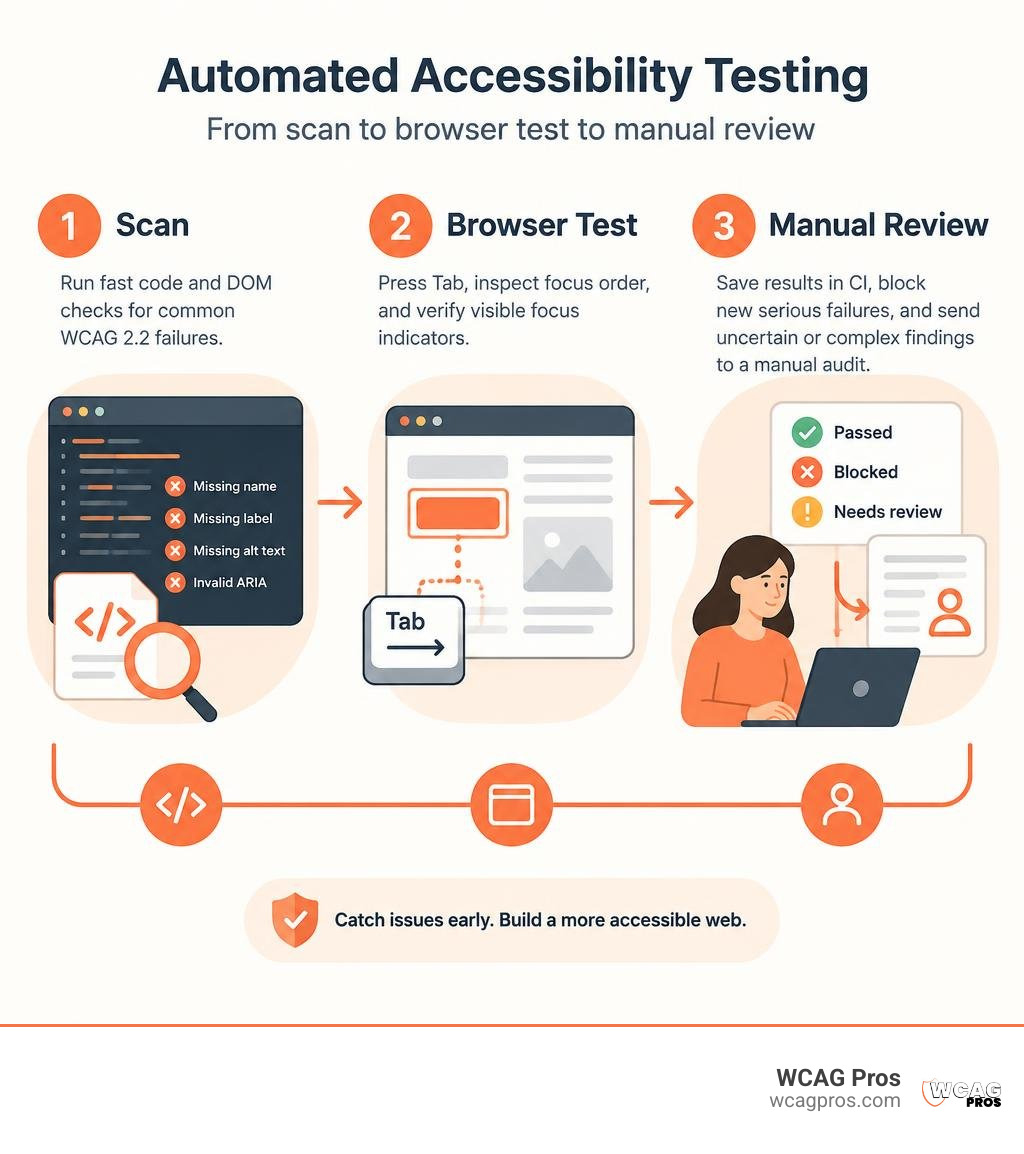
Use a11y automated testing in every pull request to catch common WCAG 2.2 failures before they reach customers or create ADA risk. A practical workflow is:
- Run fast code and DOM checks for missing names, labels, alt text, and invalid ARIA.
- Run browser based tests that press Tab, inspect focus order, and verify visible focus indicators.
- Save results in CI, block new serious failures, and send uncertain or complex findings to a manual audit.
Static scans are useful, but they cannot tell you whether a keyboard user gets trapped in a modal, whether focus is visible after interaction, or whether a screen reader receives meaningful information. Modern browser driven tests fill that gap by checking the rendered page, real keyboard behavior, layout, and accessibility tree.
I am Matthew Post, co founder of WCAG Pros and a programmer with more than 20 years of web development experience. My work in a11y automated testing, WCAG audits, and remediation helps organizations find issues early while improving usability and reducing legal exposure.
A11y automated testing terms explained:
Moving Beyond Static Scans with Interactive a11y Automated Testing
Static document analysis tools parse raw HTML strings to find missing alt attributes or duplicate IDs. While these quick checks provide value, they miss dynamic interface failures. They cannot evaluate how interactive components behave once JavaScript renders custom widgets, attaches dynamic event handlers, or manipulates focus. Relying exclusively on static scans leaves digital products exposed to severe usability barriers.

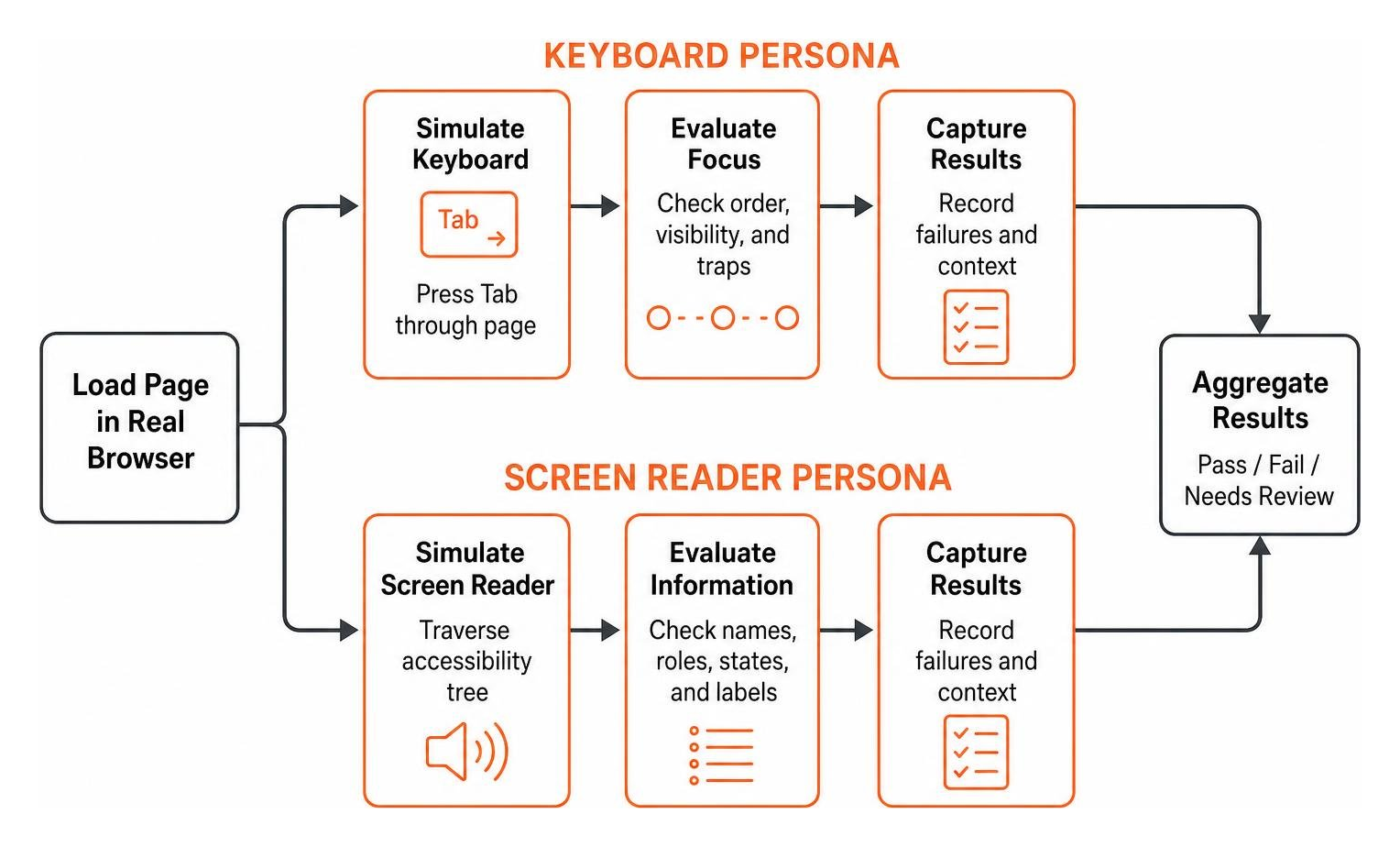
Modern testing architectures bridge this gap by driving actual browser engines like Chromium through Playwright. By connecting directly to the Chrome DevTools Protocol, these systems fetch the browser’s live accessibility tree. Instead of guessing how markup renders, our testing harnesses simulate real interactions using two complementary perspectives: a keyboard user persona and a screen reader persona.
Tools such as SpecA11y evaluate 113 built-in rules across live web applications. These engines handle complex edge cases, such as rendering inside nested iframes or inspecting single page applications during asynchronous state changes. Frameworks like the Salesforce Accessibility Automation Libraries demonstrate how developers can integrate rule engines directly into component test suites, turning static markup verification into interactive accessibility assertions. Exploring our web accessibility testing tools guide highlights how these dynamic suites integrate into end-to-end pipelines.
Keyboard Persona: Catching Traps and Focus Failures with a11y Automated Testing
The keyboard persona walks through every focusable element on a page using real keyboard events. This method ensures complete keyboard operability without relying on mouse hover or touch inputs.
By simulating native Tab, Shift-Tab, Escape, and Enter keystrokes, the keyboard runner detects critical WCAG 2.2 criteria violations:
- Keyboard Traps (WCAG 2.1.2): When focus enters a modal dialog or interactive widget, the runner ensures the user can exit using standard keys without getting stuck in an infinite loop.
- Bypass Blocks and Skip Links (WCAG 2.4.1): The runner verifies that a skip navigation mechanism exists as one of the first focusable elements, becomes visible on focus, and correctly jumps viewport focus past repeated navigation headers.
- Focus Order and Positive Tabindex (WCAG 2.4.3): Static analysis rarely detects unexpected tab sequences caused by bad CSS order or positive tabindex attributes. The runner maps the sequential focus path to confirm it preserves logical meaning and reading order.
- On Focus Context Changes (WCAG 3.2.1): The runner watches for unexpected form submissions, sudden viewport scrolling, or automatic popup openings triggered merely by moving focus to a control.
Open source utilities like the keyboard-a11y-tester demonstrate how programmatic key dispatch surfaces hidden navigation barriers before code merges into staging environments.
Screen-Reader Persona: Validating Semantics and ARIA Tree Output
The screen reader persona inspects the browser accessibility tree to evaluate what assistive technologies announce to users. Screen reader software implementations like NVDA and VoiceOver often update their exact spoken verbosity across operating system releases. To prevent brittle tests caused by varying system phrases, modern tools query the underlying accessibility tree directly.
Using libraries like A11y-Oracle, the screen reader persona maps raw nodes to a standardized Name, Role, and State structure:
- Name and Role Verification (WCAG 4.1.2): Confirms that every interactive control provides a discernible accessible name and valid ARIA role, preventing generic announcement of bare roles without context.
- Heading Structure Validation (WCAG 1.3.1): Analyzes page heading levels from h1 through h6 to ensure content teams have not skipped structural levels or broken programmatic hierarchies.
- Landmark Mapping (WCAG 1.3.1): Checks that regions like main, navigation, search, and complementary landmarks are clearly structured and properly labeled when duplicate types exist.
- Live Region Announcements (WCAG 4.1.3): Tracks dynamic notifications declared via aria-live to confirm status updates actually trigger accessible announcements during asynchronous operations.
- Non-text Content Alternatives (WCAG 1.1.1): Verifies that images contain informative alternative text or clear aria-label attributes, distinguishing between meaningful assets and decorative visuals.
How Modern Engines Evaluate Focus Indicators and WCAG Compliance
A persistent challenge in automated testing is verifying visible focus rings. Static CSS linters can check if a stylesheet contains an outline: none rule, but they cannot determine whether an element retains an alternative visual indicator when focused.
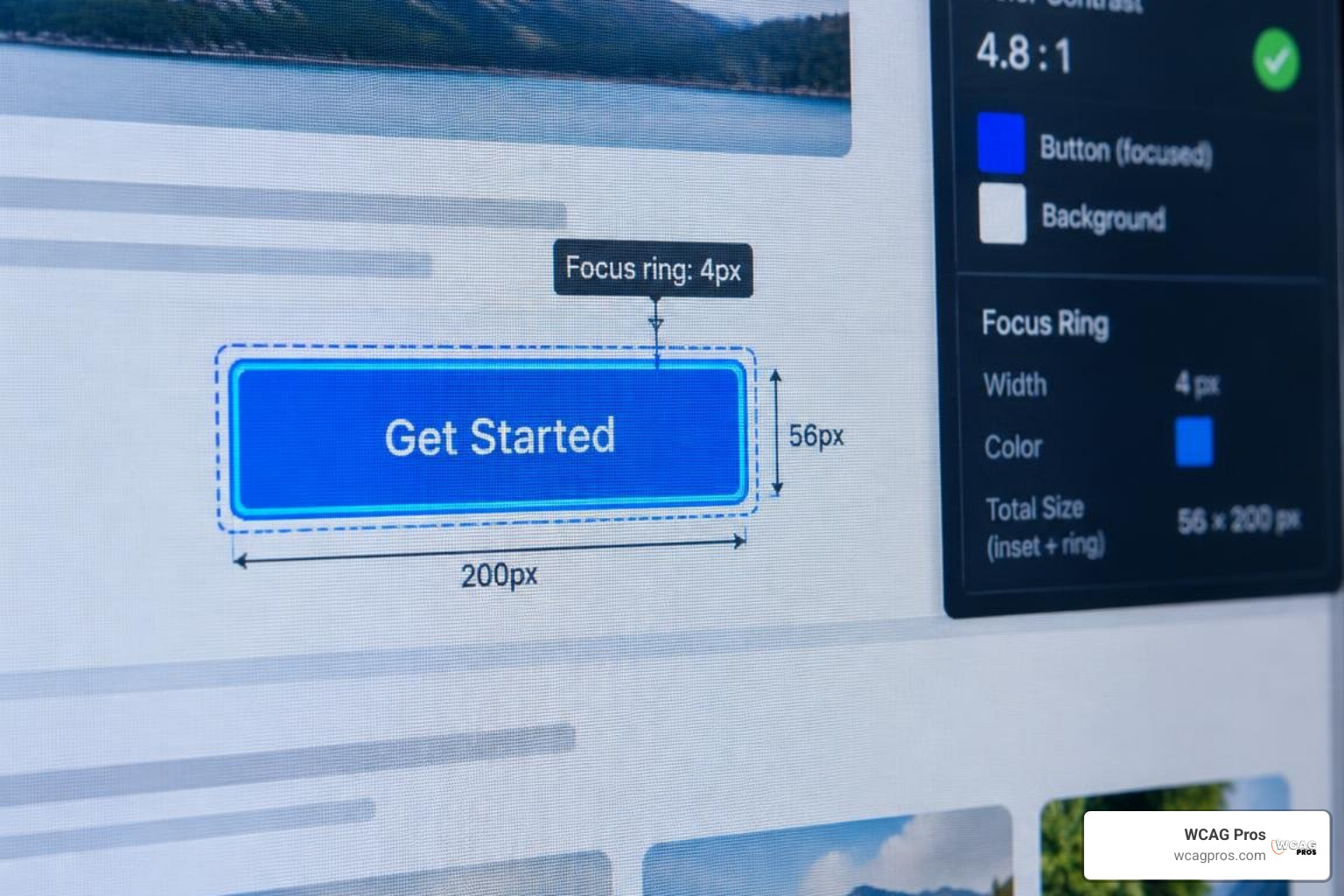
Modern deterministic runners solve this by capturing element bounding boxes before and after receiving focus. The engine extracts computed styles, including outline, border, and box-shadow declarations. It then compares high-resolution image snapshots using pixel-diffing algorithms. If the computed styles suggest an ancestor or detached sibling renders the focus indicator, the engine traverses surrounding nodes to confirm visible changes take place.
| Testing Method | Focus Trap Detection | Focus Contrast Calculation | Dynamic ARIA Verification | Setup Complexity | Execution Speed |
|---|---|---|---|---|---|
| Static DOM Scans | None | None | Partial | Minimal | Instantaneous |
| Deterministic Browser Testing | Comprehensive | Mathematical | High | Moderate | Fast |
| Manual Assistive Tech Audits | Comprehensive | Visual and Contextual | Complete | High | Deliberate |
Reviewing the table above clarifies why modern engineering teams combine automated execution with expert oversight.
Verifying Visual Focus Strength and Non-Color Indicators
Automating focus checks requires evaluating both baseline visibility and visual contrast strength under WCAG 2.2:
- Focus Visibility (WCAG 2.4.7 AA): Requires that an interactive element presents an unmistakable, visible focus indicator when selected via keyboard navigation.
- Focus Appearance (WCAG 2.4.13 AAA): Serves as an advanced metric evaluating the focus indicator’s physical surface area, thickness, and color contrast against surrounding background pixels.
- Non-Color Indicators (WCAG 1.4.1 AA): Ensures that focus states do not rely solely on color changes. The indicator must introduce shape modifications, underline bars, borders, or high-contrast styling shifts.
Deterministic engines calculate the contrast ratio between the unfocused and focused states against the immediate background, checking for a minimum 3.0 to 1 contrast ratio. When learning how to evaluate tools, our guide on comparing WCAG 2.2 testing options provides practical benchmarks for choosing the right validation suite.
Setting Up Deterministic Runners and AI-Assisted CI/CD Quality Gates
Modern accessibility automation combines deterministic browser runners with AI-assisted interpretation layers. The deterministic engine executes reliable, repeatable browser interactions, taking snapshots and capturing trace logs. When complex failures emerge, an AI evaluation layer examines the rendered evidence to assess semantic intent, such as determining whether an image alt text accurately describes the visual context.
Engineering teams export these audit findings using the standard Static Analysis Results Interchange Format (SARIF). Continuous integration pipelines upload SARIF logs directly into GitHub Code Scanning or GitLab security dashboards. Developers receive line-by-line annotations within their pull requests, highlighting exact WCAG criteria violations.
To prevent test flakiness on secure portals, Playwright fixtures load pre-authenticated storageState files containing session tokens and cookies. When combined with delta scanning, the pipeline checks only newly modified pull request code, preventing review fatigue and reducing mean time to recovery (MTTR) by up to 70%. Repositories like DanPiatto/A11yAudit on GitHub show how custom automation scripts integrate directly into GitHub Actions workflows. Learn more about optimizing continuous checks with our review of automated accessibility audit workflows.
Integrating a11y Automated Testing into Jest, Vitest, and Playwright Pipelines
Integrating automated accessibility assertions into existing JavaScript and TypeScript test suites is straightforward. Teams choose between lightweight jsdom unit assertions and full browser end-to-end checks depending on test scope.
Here is a recommended checklist of essential interactive WCAG 2.2 automated test assertions to implement across your repositories:
- Focus containment verification for every modal, dialog, and drawer component
- Logical tab order validation across complex form layouts and navigation menus
- Visible focus indicator pixel checks on custom styled buttons, links, and input elements
- Form control accessible name assertions to prevent orphan input elements
- Reflow checks at 320px viewport widths to verify absence of horizontal scrollbars
- Interactive target size validation confirming clickable surfaces meet 24 by 24 pixel minimums
- Empty or unannounced live region detection on dynamic alert panels
Teams can also refer to open community resources such as The A11Y Project for additional guidance on testing fundamentals and inclusive patterns. For more educational resources, you can start testing for web accessibility using step-by-step developer tutorials, or explore automated accessibility testing scenarios to study real-world remediation workflows.
Understanding the Boundaries: When Automated Checks Require Human Audits
Even the most advanced automated testing pipelines cannot catch every accessibility barrier. Industry benchmarks show that automated checks reliably catch between 30% and 40% of WCAG violations. The remaining 60% to 70% require human evaluation and manual testing with assistive technologies.
Automated tools excel at verifying objective criteria, like checking whether an alt attribute exists or whether a color contrast ratio measures 4.5 to 1. However, automation cannot evaluate subjective criteria:
- Is the alternative text genuinely descriptive and meaningful in the context of the page?
- Does a complex dynamic web application make intuitive sense when navigated using VoiceOver on macOS or NVDA on Windows?
- Are instructions and error recovery steps easy to understand for individuals with cognitive disabilities?
- Does an ARIA design pattern match user expectations during multi-step checkout processes?
Relying solely on automated tests creates a false sense of security that can leave severe usability barriers unnoticed. A comprehensive accessibility strategy uses automated tests as a defensive baseline to catch regressions during daily development, combined with expert manual audits for complete WCAG 2.2 AA validation.
Frequently Asked Questions About Automated Accessibility
How does a dual-persona test runner differ from basic axe-core scans?
A basic static scan inspects the current DOM snapshot of a page. It evaluates static rules like element IDs, color contrasts against static backgrounds, and basic attribute structures. A dual-persona runner actively drives a live browser session. It presses keyboard keys, tests tab sequences, opens dropdowns, and monitors dynamic state changes. It queries the browser accessibility tree to evaluate both keyboard focus behavior and virtual screen reader announcements in real time.
Can automated testing guarantee full WCAG 2.2 AA compliance?
No automated testing suite can guarantee complete WCAG 2.2 AA or AAA compliance. Automated runners check programmatic requirements, but human reviewers must evaluate subjective usability, semantic relevance, audio descriptions, cognitive clarity, and screen reader announcements. Automation provides continuous regression protection, while manual testing ensures complete digital inclusion and legal compliance.
How do automated tools handle iframes and dynamic single-page applications?
Modern browser automation frameworks handle single page applications and embedded frames by interacting directly with the browser engine. Using Playwright frame selectors, the test runner penetrates cross-origin iframes to evaluate internal controls such as embedded payment forms or video players. For single page applications, the runner waits for client-side routing, DOM hydration, and focus transfers before executing accessibility assertions.
Conclusion: Building a Resilient Continuous Accessibility Strategy
Shipping accessible digital experiences requires shifting accessibility checks to the earliest stages of the development cycle. By integrating browser-driven focus validation, keyboard navigation checks, and accessibility tree assertions into your continuous integration pipelines, your team can catch critical usability defects before they reach production.
Automation serves as an essential first line of defense. However, achieving true compliance and delivering accessible experiences demands expert validation. At WCAG Pros, we provide ADA website compliance consulting, including comprehensive page-by-page audits of all 54 WCAG A and AAA points, complete code fixes, and free re-audits for compliance certification badges. If your organization wants to eliminate digital barriers and ensure compliance, partner with our team for a comprehensive WCAG audit today.
Read more website accessibility articles
Get Help With Your Website
We'll follow up with info about:
- The process
- Cost
- Timeline
We promise to respect your privacy, and never abuse the information you provide. We will not sell or rent your information to any third party.
By submitting this form, you consent to receive SMS messages and/or emails from SEM Dynamics LLC, dba WCAG Pros. To unsubscribe, follow the instructions provided in our communications. Msg & data rates may apply for SMS. Your information is secure and will not be sold to third parties.