
A Practical Guide to Usability & Accessibility Testing Methods
A Practical Guide to Usability & Accessibility Testing Methods
Why Usability and Accessibility Testing Belong Together
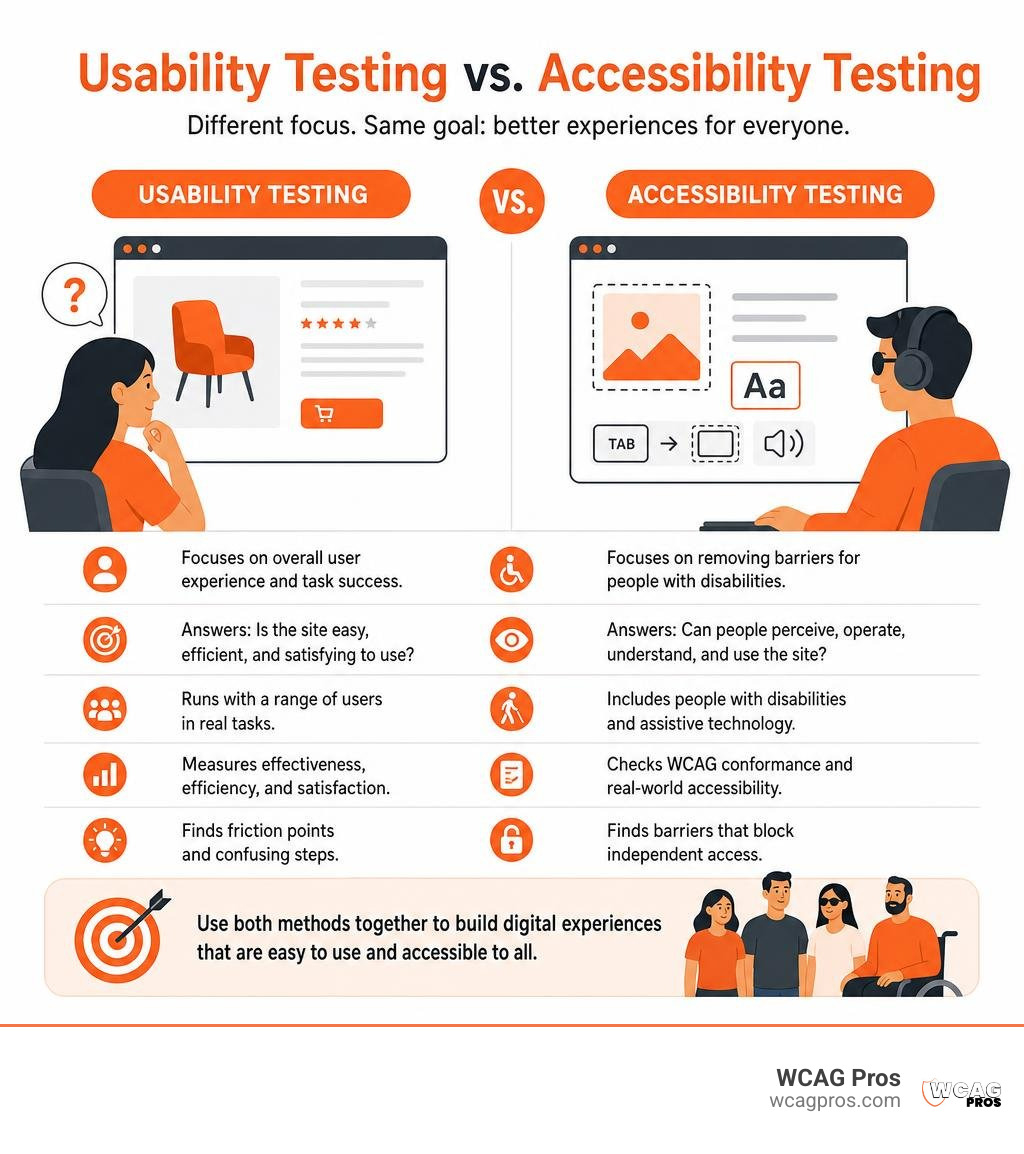
Usability and accessibility testing answer different questions, and you need both. Usability testing shows whether people can complete key tasks easily, efficiently, and with confidence. Accessibility testing checks whether people with disabilities can perceive, operate, understand, and reliably use your website, including with assistive technology.
For a practical starting point:
- Test your highest-value paths, such as checkout, account access, and contact forms.
- Scan for common WCAG 2.2 issues, then manually test keyboard access, focus order, forms, and screen reader output.
- Include people with disabilities in user sessions to find barriers that automated tools and technical audits cannot reveal.
A website can meet some technical requirements yet still be confusing in real use. It can also feel simple for mouse and keyboard users while blocking someone who uses a screen reader, magnifier, voice control, or switch device. For businesses facing ADA risk, this distinction matters. Technical conformance helps reduce exposure, while real-user testing shows whether essential customer journeys truly work.
I’m Matthew Post, co-founder of WCAG Pros and a web developer with more than 20 years of experience finding and resolving complex digital issues. I oversee WCAG audits and remediation work, with a focus on usability and accessibility testing that improves customer access while helping businesses reduce compliance risk.
Easy usability and accessibility testing word list:
Key Differences Between Usability and Accessibility Testing
While usability and accessibility are often spoken of in the same breath, they evaluate distinct aspects of the user journey. Usability testing determines how easy, efficient, and satisfying an interface is for a general audience. Accessibility testing checks whether individuals with disabilities, including those using assistive technology, can access that same information without friction.
Around 15% of the global population lives with some form of disability, and roughly 2.5 billion people worldwide need one or more assistive technologies. If an interface is technically usable for a mouse user but completely unnavigable by keyboard, it is not accessible. Conversely, a website can pass every technical accessibility checklist on paper yet still leave users confused by convoluted copy or cluttered menus. True digital quality requires both.
| Core Dimension | Usability Testing | Accessibility Testing |
|---|---|---|
| Primary Goal | Evaluate ease of use, task flow efficiency, and satisfaction | Ensure equal access and remove barriers for people with disabilities |
| Guiding Standard | ISO 9241-11, Nielsen Norman Group heuristics | WCAG 2.2, ADA Title III, Section 508, EN 301 549 |
| Core Principles | Learnability, Efficiency, Memorability, Errors, Satisfaction | Perceivable, Operable, Understandable, Robust (POUR) |
| Evaluation Method | User observation, task completion, think-aloud studies | Automated scans, manual code audits, assistive technology testing |
| Primary Tooling | Task scenarios, eye tracking, analytics, prototype testing | Screen readers, contrast checkers, keyboard-only navigation, linters |
Usability Testing Principles and Metrics
Usability testing relies heavily on human behavior. As defined by the NIST usability testing framework and standard ISO 9241-11, usability measures how effectively, efficiently, and satisfactorily specified users can achieve specified goals in a particular context.
Jakob Nielsen outlined five core quality components of usability:
- Learnability: How easily can users accomplish basic tasks the first time they encounter the design?
- Efficiency: Once users learn the design, how quickly can they perform tasks?
- Memorability: When users return to the design after a period of non-use, how easily can they re-establish proficiency?
- Error tolerance: How many errors do users make, how severe are these errors, and how easily can they recover?
- Satisfaction: How pleasant is it to use the design?
Steve Krug’s famous First Law of Usability, the Principle of Self-Evidence, reminds us that digital products should be intuitive enough to navigate without needing instructions. When you explore How to Test Website Accessibility Even If Youve Never Tried It Before, you quickly discover that standard usability metrics like task completion rates and time-on-task serve as critical baselines for user satisfaction.
Accessibility Testing Frameworks and the POUR Principles
Accessibility testing evaluates software against established legal and technical benchmarks. The foundation of digital accessibility rests on the Web Content Accessibility Guidelines (WCAG) and its four core POUR principles:
- Perceivable: Information and user interface components must be presentable to users in ways they can perceive. This requires text alternatives for non-text content, captions for multimedia, and sufficient color contrast.
- Operable: User interface components and navigation must be operable across various inputs. This includes full keyboard access, sufficient time limits, and avoidance of content that could cause seizures.
- Understandable: Information and the operation of the user interface must be understandable. Text must be readable, pages must operate predictably, and forms should offer clear error correction guidance.
- Robust: Content must be robust enough that it can be interpreted reliably by a wide variety of user agents, including assistive technologies.
To understand how these standards translate into functional web pages, our A-Z Guide to WCAG Accessibility Testing breaks down every layer of WCAG 2.2 Level AA compliance.
Regulatory Standards and Assistive Technology in Digital Testing
Digital accessibility is governed by clear legal frameworks worldwide. In the United States, Title III of the Americans with Disabilities Act (ADA) applies to places of public accommodation, which courts and the Department of Justice routinely interpret to include public-facing websites and mobile applications. Federal agencies and their vendors must comply with Section 508, which incorporates WCAG Level AA requirements into Information and Communication Technology (ICT) procurement. Internationally, regulations such as the European Accessibility Act (EAA) and standard EN 301 549 impose similar mandates.

Assistive Technologies to Include During Evaluations
Conducting thorough evaluations means testing how content renders across varied hardware and software configurations. Key assistive technologies include:
- Screen readers: Software that translates visual digital interfaces into synthesized speech or refreshable braille displays. Common screen readers include JAWS and NVDA for Windows, VoiceOver for Apple platforms, and TalkBack for Android.
- Screen magnifiers: Tools such as ZoomText or built-in OS magnifiers that enlarge interface elements for users with low vision.
- Alternative input devices: Switch controls, eye-tracking systems, mouth sticks, and adaptive keyboards used by people with mobility impairments.
- Voice recognition software: Tools like Dragon NaturallySpeaking that let individuals navigate and input data using spoken commands.
To see how screen reader testing operates on specific platforms, check out The Ultimate Manual for Screen Reader WordPress Testing.
Automated, Manual, and Hybrid Accessibility Testing Methods
An effective accessibility strategy incorporates three complementary testing tiers:
- Automated scanning: Automated tools quickly scan codebases to flag syntax issues, missing alternative text, broken ARIA attributes, and color contrast failures. You can consult the W3C WAI evaluation tools list to find options tailored to your environment.
- Manual code inspection and functional audits: Human experts manually verify keyboard navigation, focus indicators, dynamic live regions, and screen reader output. Automated scanners cannot determine whether an image description is contextually meaningful, making human review essential.
- Hybrid testing: Combining automated scans with expert manual review delivers the highest accuracy while maintaining sprint velocity.
For an introduction to streamlining the scanning phase, see our guide on how Automated Web Accessibility Testing Made Easy helps development teams catch errors early.
Conducting Inclusive User Research with People with Disabilities
While expert manual testing verifies technical compliance, inclusive user research uncovers real-world behavioral friction. Engaging people with disabilities ensures your designs function smoothly for those who navigate digital products with lived experience.

Best Practices for Usability and Accessibility Testing with Diverse Users
When designing usability studies that include people with disabilities, standard protocols require deliberate adjustments. Following the guidance in Tips for usability testing with people with disabilities, consider these best practices:
- Screen for specific assistive technologies: When recruiting, document the exact assistive software, hardware, and version numbers participants use regularly.
- Focus on error analysis over speed: Standard usability studies often prioritize time-on-task. In accessibility usability studies, focus on task completion success, hesitation points, and recovery from confusion.
- Adjust think-aloud methods: Screen reader users must listen carefully to synthesized speech. Avoid speaking over the audio output, and allow the participant to complete an interaction before asking clarifying questions.
For practical steps on setting up user studies, read How to Test Your Websites Accessibility Using Real Users.
Facilitation Etiquette and Accommodation Strategies
Respectful and effective facilitation requires understanding accommodation logistics:
- Provide buffer time: Schedule approximately 25% extra session time to accommodate initial audio configuration, screen sharing adjustments, and assistive technology coordination.
- Respect service animals: When conducting in-person sessions, never interact with or distract a service animal, and ensure relief areas and water breaks are available.
- Support remote testing environments: Remote studies are often ideal because participants can work on their own customized setups, high-contrast monitors, or personalized switch hardware.
- Use natural, neutral prompts: You do not need to avoid everyday phrases like “let’s look at this” when speaking with visually impaired users. Use open prompts such as “What do you expect this control to do?” to observe genuine interaction patterns.
Streamlining and Scaling Continuous Testing in Product Lifecycles
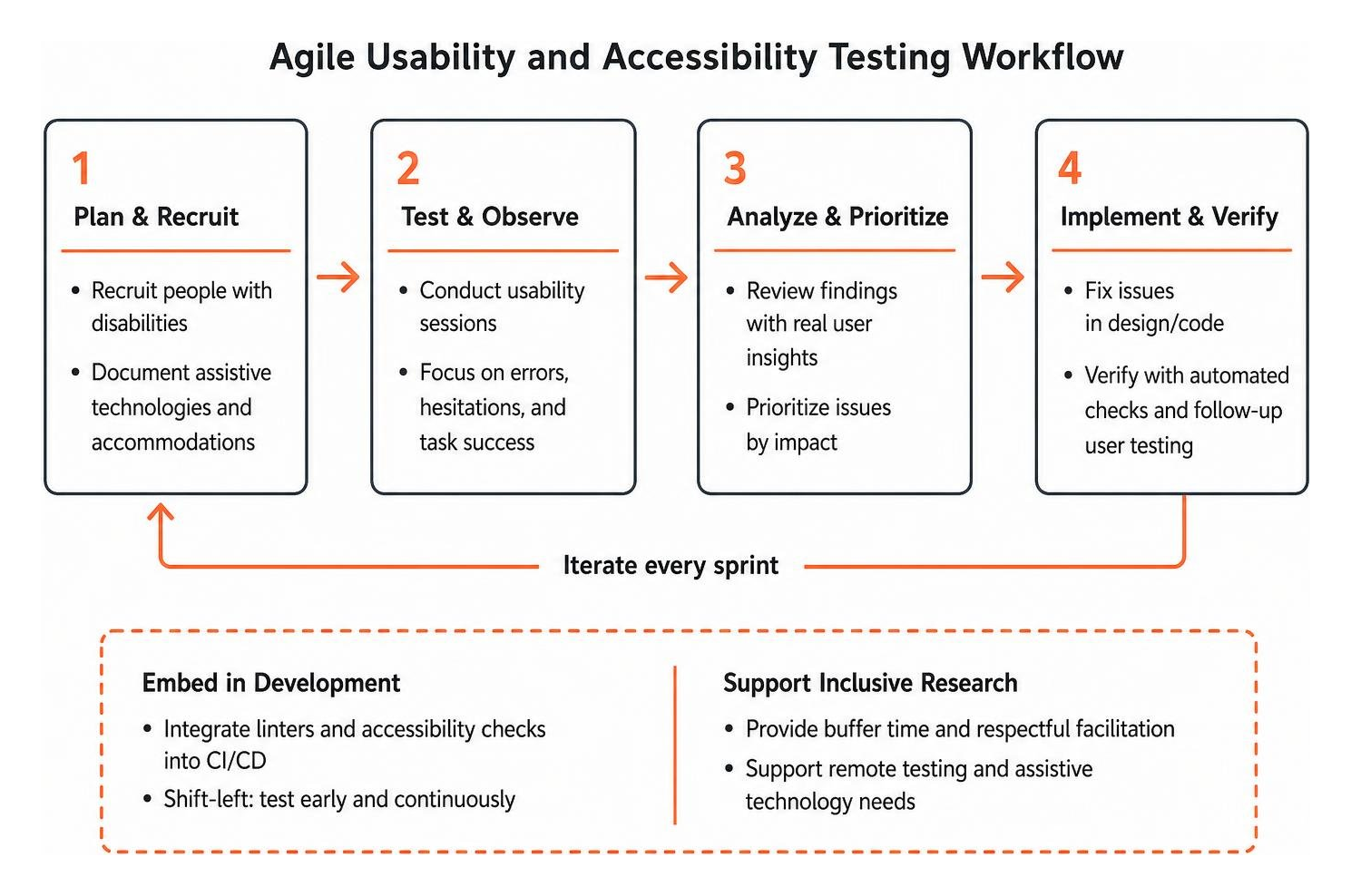
Accessibility cannot be an afterthought tacked on at the end of a project. Adopting a shift-left testing mindset embeds accessibility and usability checks directly into early planning, design systems, and daily coding sprints.
Integrating Usability and Accessibility Testing into the Development Lifecycle
To build sustainable testing workflows across your organization:
- Integrate linters and CI/CD tools: Catch basic markup errors before code is merged by integrating automated accessibility checks into pull requests.
- Test design tokens early: Validate color contrast, touch target sizes, and typography scales inside design libraries before development begins.
- Triage issues by user impact: Prioritize blockers that prevent task completion as critical items, followed by high-friction usability issues, and finally minor aesthetic tickets.
Our guide on How to Do an Accessibility Audit in 5 Easy to Follow Steps provides a clear roadmap for embedding these audits into existing development backlogs.
Measuring Real-World Business and Conversion Impact
Accessibility features often produce a curb-cut effect, creating improvements originally intended for people with disabilities that ultimately help everyone. High-contrast text makes screens easier to read outdoors in direct sunlight. Captions help users watching video in noisy environments. Clean heading structures improve organic search engine optimization and speed up navigation for all visitors.
Measuring usability with standardized frameworks like the System Usability Scale (SUS) allows teams to track quantitative user satisfaction improvements over time. For practical strategies on tracking these results, explore our Practical Accessibility Testing Guide 2026.
Frequently Asked Questions About Usability and Accessibility Testing
Can automated testing tools replace manual usability and accessibility testing?
No. Automated tools typically detect only 20% to 40% of WCAG compliance failures, such as basic color contrast issues and missing code tags. Automated scanners cannot evaluate whether alternative text is accurate in context, whether keyboard focus moves in an intuitive reading order, or whether dynamic interactive menus are easy to operate. Complete digital quality requires human manual auditing and real-user feedback.
How many participants are needed for accessible usability studies?
For standard usability testing, research from the Nielsen Norman Group shows that 3 to 5 users will uncover approximately 80% of usability problems. When conducting accessible usability studies, aim for 8 to 12 participants to ensure adequate representation across different disability types, such as screen reader users, screen magnification users, keyboard-only navigators, and neurodivergent individuals.
What WCAG conformance level should organizations target in 2026?
Organizations should target WCAG 2.2 Level AA. Level AA is the internationally recognized benchmark referenced by the ADA, Section 508, the European Accessibility Act, and most global accessibility legislation. Meeting WCAG 2.2 Level AA ensures digital properties provide comprehensive accessibility while significantly lowering legal risk.
Conclusion
Combining usability testing with accessibility testing ensures your website is both technically compliant and easy for everyone to use. Building an inclusive digital experience requires continuous evaluation, pairing automated scans with expert manual code reviews and real-user testing.
At WCAG Pros, based in Norco CA, we help organizations navigate digital accessibility with confidence. We deliver comprehensive page-by-page audits of all 54 WCAG points with code fixes and free re-audits for compliance badges. When you are ready to eliminate barriers and protect your organization, schedule a comprehensive WCAG audit with our team.
Read more website accessibility articles
Get Help With Your Website
We'll follow up with info about:
- The process
- Cost
- Timeline
We promise to respect your privacy, and never abuse the information you provide. We will not sell or rent your information to any third party.
By submitting this form, you consent to receive SMS messages and/or emails from SEM Dynamics LLC, dba WCAG Pros. To unsubscribe, follow the instructions provided in our communications. Msg & data rates may apply for SMS. Your information is secure and will not be sold to third parties.