
Decoding ADA WCAG Requirements: From Technical Rules to Real Inclusion
Decoding ADA WCAG Requirements: From Technical Rules to Real Inclusion
What ADA WCAG Requirements Mean for Your Website
ADA WCAG requirements mean your website or app should be usable by people with disabilities, including people who use screen readers, keyboards, captions, voice controls, or screen magnification. For a practical compliance target, audit your site against WCAG 2.2 Level AA, fix barriers in key user journeys, and keep testing as your content and features change.
The ADA requires equal access and effective communication. For state and local governments, Title II sets specific web and mobile accessibility duties. For businesses open to the public, Title III creates meaningful legal risk when digital services prevent customers from shopping, booking, applying, paying, or getting information independently.
Common problems include missing image text, low color contrast, unlabeled form fields, keyboard traps, and videos without captions. These failures can exclude users and expose an organization to complaints, lawsuits, remediation demands, and lost customers.
Accessibility is not just a technical checklist. It helps people handle private tasks, such as paying a bill, reviewing health information, or submitting an application, without needing to ask another person for help.
I am Matthew Post, co-founder of WCAG Pros and a web development professional with more than 20 years of experience auditing and fixing digital accessibility barriers. I oversee accessibility audits and remediation work focused on helping organizations understand ADA WCAG requirements, improve usability, and reduce avoidable legal risk.
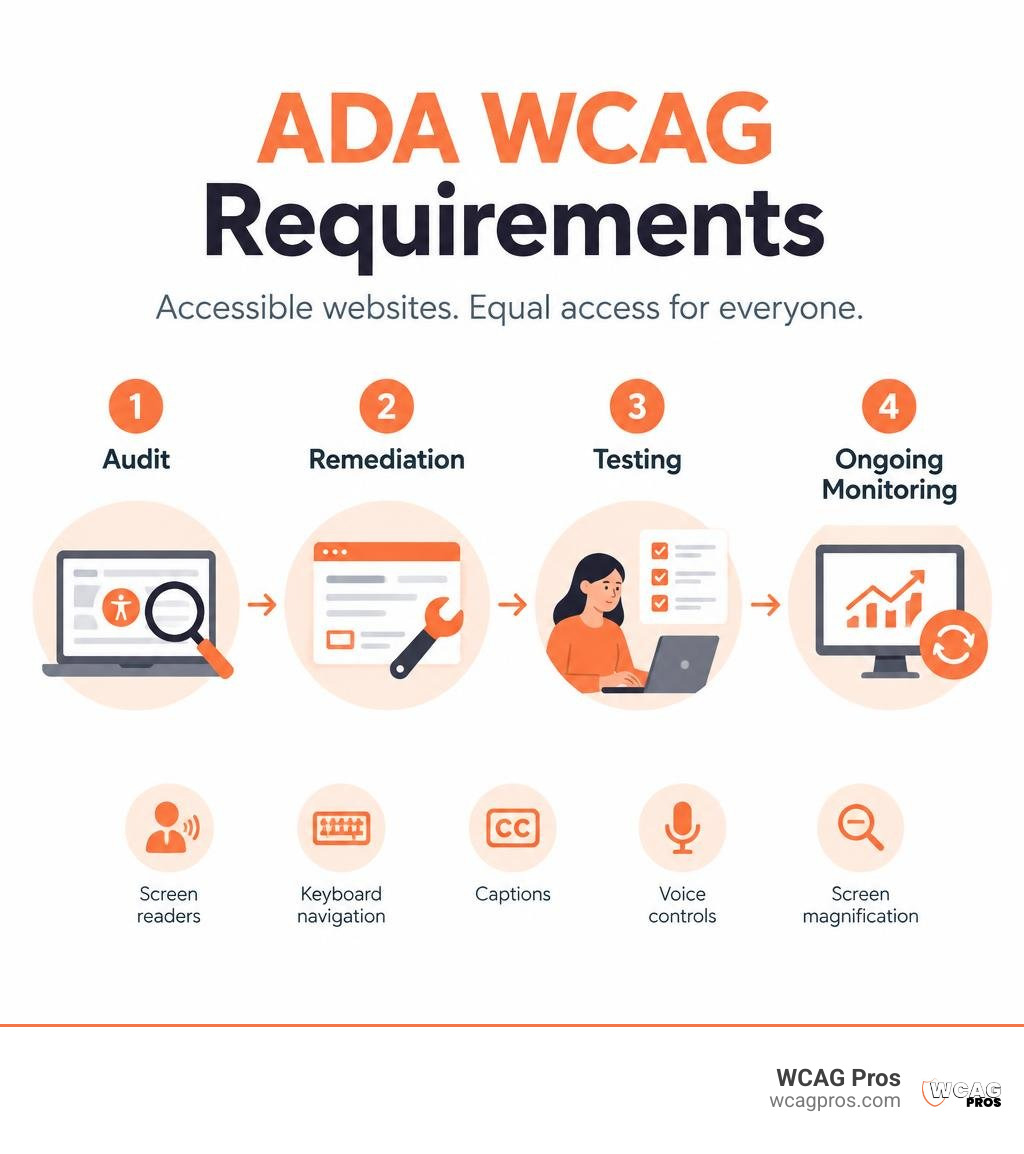
ADA WCAG requirements basics:
Legal Framework: How the ADA Governs Digital Accessibility
The Americans with Disabilities Act protects individuals with disabilities from discrimination in everyday life. When the law was passed in 1990, lawmakers focused on physical infrastructure like ramps and braille signage. The Department of Justice has affirmed since 1996 that digital spaces fall squarely under ADA authority.
Title II covers state and local governments, while Title III applies to public accommodations in the private sector. The Department of Justice published formal Guidance on Web Accessibility and the ADA to reiterate that digital portals must deliver effective communication. Inaccessible web code creates barriers comparable to physical steps blocking a wheelchair user from entering a municipal office or storefront.
Federal legislation works in harmony across jurisdictions. Section 504 of the Rehabilitation Act prohibits disability discrimination by programs receiving federal financial assistance. Section 508 requires federal agencies to make electronic information accessible. Both statutes align with international web accessibility benchmarks. Organizations evaluating how to determine if a website must comply with the ADA can see that federal statutory rules converge on standardized technical requirements.
Essential ADA WCAG Requirements for State and Local Governments
State agencies, city departments, public school districts, county courts, and special utility districts provide critical community resources online. Public entities enable citizens to register to vote, pay local property taxes, review public hearing minutes, and access emergency services through online portals.
The Department of Justice issued a landmark formal rule titled Nondiscrimination on the Basis of Disability: Accessibility of Web Information and Services of State and Local Government Entities to codify specific digital standards. Public entities must ensure their web content and mobile apps conform to technical accessibility standards. Digital accessibility is now a core civil rights obligation for all public services. Taking early action on compliance is the best way to shield your organization from potential legal action and serve every resident with dignity.
Public Accommodations and Title III Private Sector Rules
Title III covers private businesses open to the public, including retail stores, banks, restaurants, travel platforms, healthcare providers, and educational institutions. Federal courts throughout the country consistently treat technical digital accessibility guidelines as the primary measure of effective communication.
Commercial websites must enable equal enjoyment of goods and services. A customer who relies on assistive technology must be able to browse inventory, select products, input payment details, and complete transactions without encountering digital walls. Commercial enterprises can review actionable ADA compliance strategies for small businesses to build an inclusive digital presence that welcomes all shoppers.
Understanding Core ADA WCAG Requirements for Modern Websites

The World Wide Web Consortium establishes global technical specifications known as the Web Content Accessibility Guidelines. These guidelines organize digital inclusion around four core POUR principles.
- Perceivable: Users must be able to perceive information through their available senses. Text alternatives must accompany images, captions must accompany audio, and visual contrast must remain crisp.
- Operable: Users must be able to operate all interface components. Every link, form control, and interactive widget must work seamlessly via a standard keyboard.
- Understandable: Content and operations must be easy to comprehend. Forms should offer clear instructions, predictable navigation structures, and helpful error messages.
- Robust: Code must be clean and standardized so assistive technologies like screen readers and braille displays can interpret it reliably.
Reviewing the official Web Content Accessibility Guidelines (WCAG) 2.2 helps web developers understand how these principles translate into day-to-day code. You can also explore our detailed guide to Level AA success criteria to see how each technical criterion functions on live websites.
The Technical Benchmark: WCAG 2.2 Level AA
Accessibility guidelines use a three-tier conformance structure. Level A addresses basic web accessibility barriers. Level AA establishes practical standards that eliminate the most common hurdles for users with disabilities. Level AAA provides specialized enhancements for niche scenarios.
Federal regulations and legal settlements rely on Level AA as the primary compliance target. WCAG 2.2 includes updated criteria that address modern device interfaces and cognitive accessibility.
- Focus Not Obscured: Sticky headers, floating banners, and popups must not completely conceal interactive elements when a user navigates via keyboard.
- Dragging Movements: Interfaces that rely on dragging items, like custom sliders or kanban boards, must provide simple single-pointer alternatives such as buttons.
- Target Size Minimum: Interactive elements must have a touch target area of at least 24 by 24 CSS pixels or sufficient spacing around them to prevent accidental taps.
- Accessible Authentication: Login processes must not depend solely on complex cognitive tests, memory recall, or visual puzzles without offering a simpler alternative or password manager support.
How to Comply with ADA WCAG Requirements Across Mobile Apps
Mobile applications are essential tools for daily life, but they often present significant accessibility barriers. A study from the University of Washington found that 23% of approximately 10,000 mobile apps reviewed did not provide content descriptions of images for most of their image-based buttons, making them completely unusable for screen reader users.
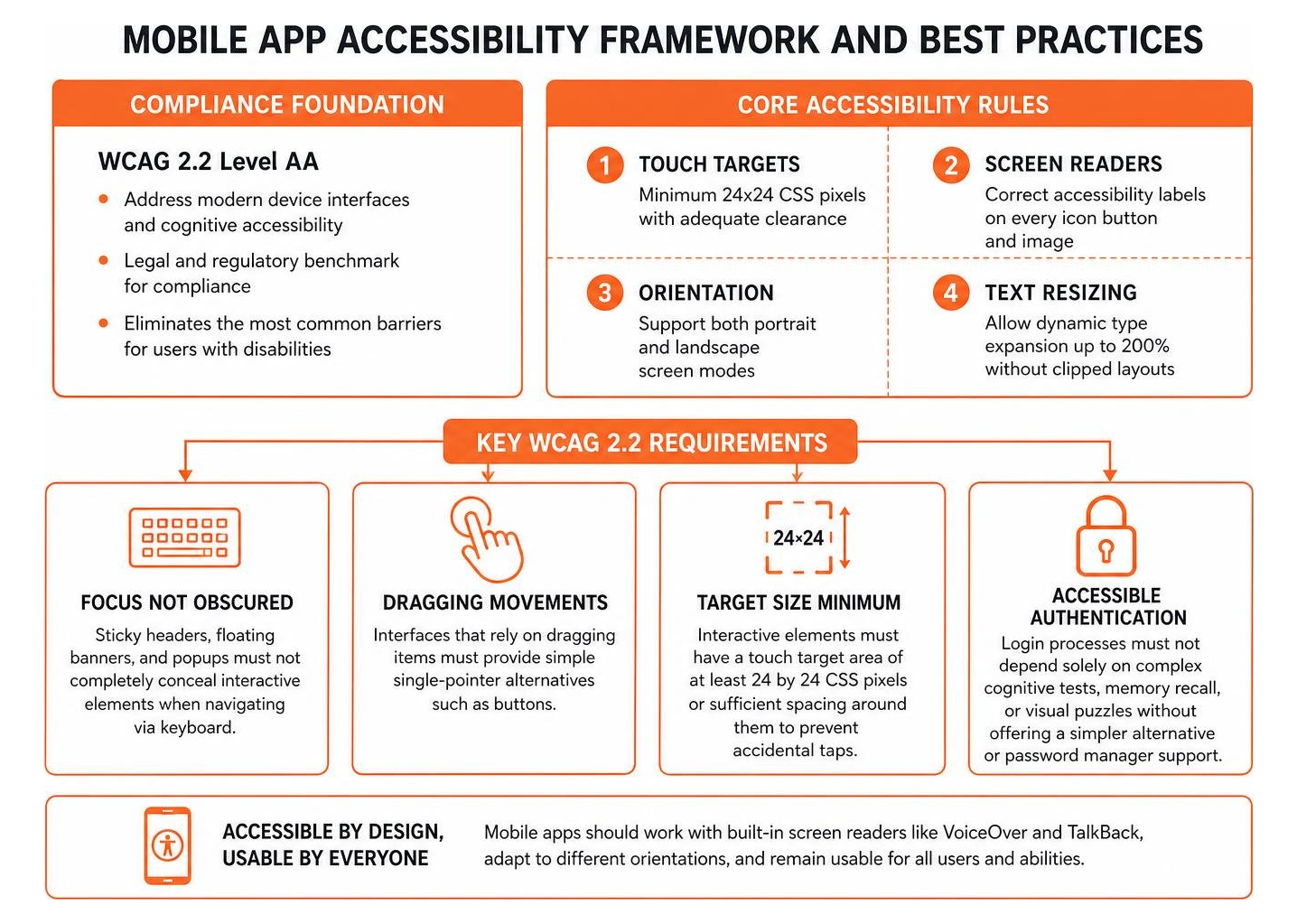
Mobile developers must ensure full compatibility with built-in screen readers like VoiceOver and TalkBack. Layouts should adapt cleanly between portrait and landscape orientations without breaking text strings or hiding interactive controls. Teams looking to validate their mobile and web platforms can follow our step-by-step WCAG certification walkthrough to verify full technical compliance.
Compliance Timelines, Legal Exceptions, and Undue Burden
Federal rules establish clear timelines for public entities to audit, remediate, and maintain accessible digital platforms. The Department of Justice published these enforceable requirements in the 31320 Federal Register rule publication.
The Department of Justice estimates that the annualized net benefits of the ADA web accessibility rule for state and local governments will be $1.9 billion per year using a 3% discount rate and $1.5 billion per year using a 7% discount rate. Meeting these legal milestones requires a structured site-wide digital compliance roadmap that tracks progress across all public-facing platforms.
| Public Entity Category | Population Threshold | Compliance Deadline | Mandatory Standard |
|---|---|---|---|
| Large State & Local Governments | 50,000 or more residents | April 24, 2026 | WCAG 2.2 Level AA |
| Small Municipalities & Towns | Under 50,000 residents | April 26, 2027 | WCAG 2.2 Level AA |
| Special District Governments | All population sizes | April 26, 2027 | WCAG 2.2 Level AA |
The Five Content Exceptions Under DOJ Regulations
The Department of Justice established five narrow content exceptions to help organizations focus their resources on active, high-impact services.
- Archived Web Content: Old web pages maintained solely for historical reference that have not been modified since their initial archival date.
- Preexisting Conventional Electronic Documents: Legacy PDFs, spreadsheets, and text documents published before the entity’s compliance date, provided they are not currently used to deliver active municipal services.
- Third-Party Content: Unsolicited public comments, external message board postings, or content outside the control of the public entity.
- Password-Protected Individual Records: Highly personalized documents, such as water bills or individual medical records, though an accessible version must still be provided upon direct request.
- Preexisting Social Media Content: Historical social media updates posted prior to the formal compliance deadline.
Navigating Undue Burden, Fundamental Alteration, and Alternate Versions
Public entities can claim an exception if remediating a specific digital asset would cause an undue financial and administrative burden or result in a fundamental alteration of the service. These defenses are held to strict standards. An agency head must provide written documentation explaining the financial constraints and operational hurdles after evaluating all available resources.
When a public entity proves that direct remediation is technically or legally impossible, it may provide a conforming alternate version. This alternative page must deliver equivalent information and functionality, match the update schedule of the main content, and remain easy to find. Public agencies must also fulfill individualized accommodation requests whenever a user needs an accessible format to access a public program.
Common Accessibility Barriers and Remediation Strategies

Many digital platforms suffer from recurring coding oversights that block assistive technologies. Identifying these barriers is the first step toward building an accessible digital experience.
- Low Color Contrast: Text that blends into background colors strains low-vision users. Normal text requires a contrast ratio of at least 4.5 to 1 against its background, while large text requires a 3 to 1 ratio.
- Missing Alternative Text: Screen readers cannot describe an image without clean alt attributes. Decorative graphics should have empty alt tags, while functional images need descriptive labels.
- Inaccessible Forms: Online inputs without explicit programmatic label associations leave screen reader users guessing what information to submit.
- Keyboard Traps: Interactive modals, menus, or checkout fields that trap keyboard focus prevent non-mouse users from completing transactions.
- Uncaptioned Multimedia: Prerecorded and live videos without accurate synchronized captions exclude deaf and hard-of-hearing audiences.
- Untagged PDF Documents: Digital documents without proper heading structures, reading orders, and table headers cause screen readers to fail.
To help your team spot these issues quickly, we recommend reviewing our essential ten-point accessibility checklist alongside our guide on practical code updates for common website issues.
Automated Testing vs. Manual Auditing
Automated checkers provide a helpful starting point for scanning large websites, but they cannot replace human evaluation. Automated software typically detects only 30% to 40% of WCAG violations. Software cannot judge whether alternative text accurately describes an image, whether a keyboard focus order is logical, or whether error instructions are understandable.
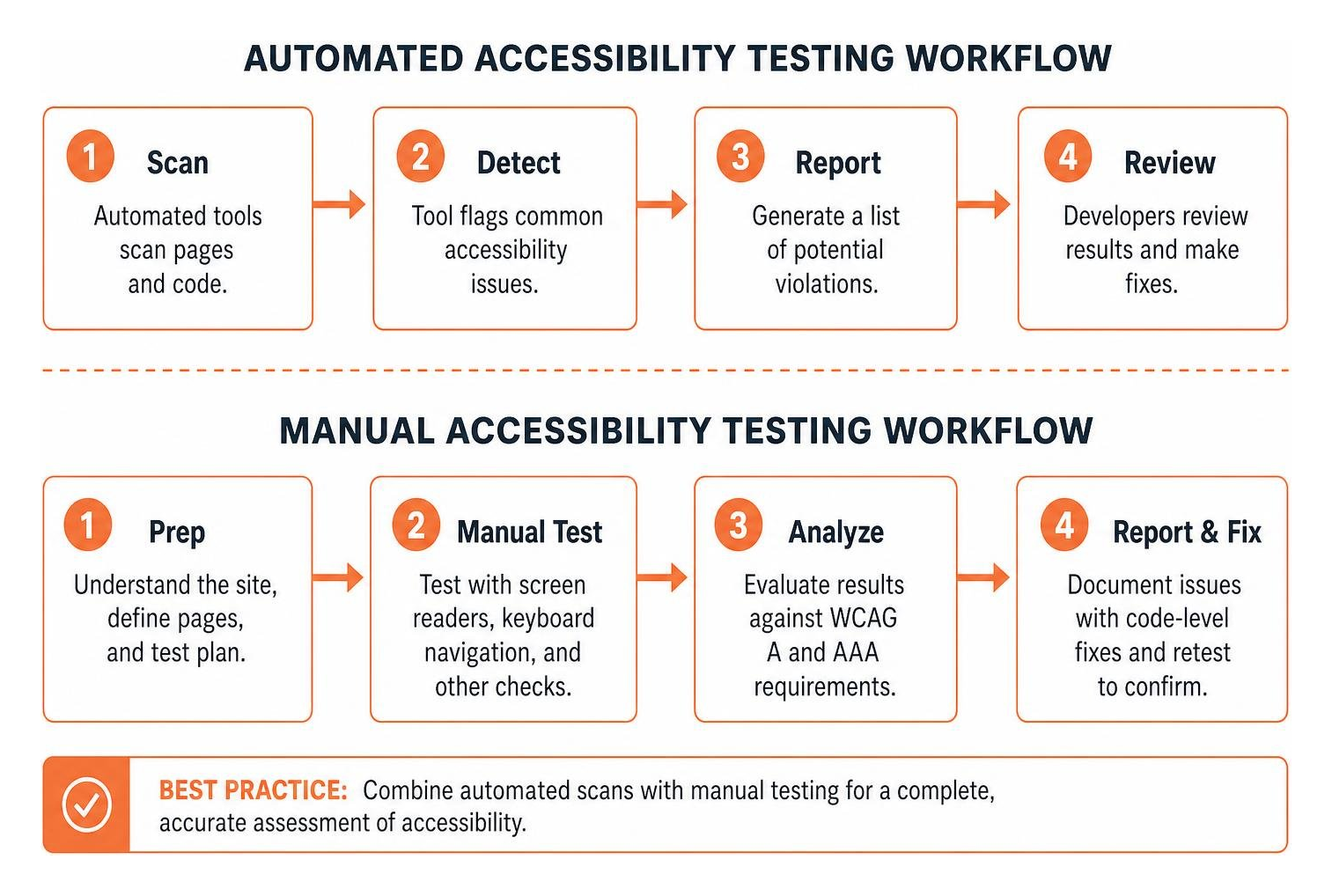
A comprehensive compliance strategy combines automated scans with hands-on manual testing. Certified accessibility professionals evaluate web assets using native screen readers like NVDA, JAWS, and VoiceOver, perform keyboard-only navigation checks, and inspect underlying code structures.
At WCAG Pros, our team conducts comprehensive page-by-page audits across all 54 WCAG A and AAA checkpoints, supplies direct code-level fixes, and delivers free re-audits to grant official compliance badges. You can learn more by reading our practical manual accessibility testing guide and our comprehensive website audit walkthrough.
Risks of Non-Compliance: Legal, Financial, and Human Impact
Ignoring accessibility standards exposes organizations to significant legal and financial consequences. Federal civil rights investigations can lead to substantial civil penalties, mandatory multi-year monitoring agreements, and expensive code overhauls. Private sector website accessibility lawsuits continue to increase year over year, leaving non-compliant businesses responsible for their own legal defense as well as plaintiff attorney fees.
The Department of Justice has enforced these standards through numerous high-profile settlement agreements with public and private organizations, including Louisiana Tech University, Nueces County, and H&R Block.
Beyond financial liability, digital barriers carry a profound human cost. Over 160 million publication pages are accessible on ResearchGate, highlighting the vast scale of scientific and academic content that must remain open to all researchers. In the gig economy, Freelancer.com reports that 80% of jobs receive offers within 60 seconds, which demonstrates why fast, accessible interfaces are critical for professionals with disabilities.
Accessible websites safeguard individual autonomy. When digital portals are built properly, users with disabilities can manage their healthcare, pay utility bills, shop online, and apply for jobs independently without exposing personal details to third-party helpers. Embracing digital inclusion is not just a defensive measure, as demonstrated in our analysis of why accessible design creates a commercial advantage.
Frequently Asked Questions About ADA Web Accessibility
What is the primary difference between Title II and Title III digital accessibility requirements?
Title II applies to state and local government entities, including public school districts, municipal courts, transit systems, and county offices. Title II incorporates WCAG 2.2 Level AA as an explicit, codified federal technical standard with fixed compliance deadlines.
Title III applies to private commercial businesses that serve the public, such as retail stores, restaurants, private universities, and financial institutions. Courts evaluate Title III digital compliance using WCAG 2.2 Level AA as the recognized benchmark for fulfilling effective communication duties under federal civil rights law.
Are small businesses and small municipalities completely exempt from digital compliance?
Small businesses and small municipalities are not exempt from the ADA. Under Title II, municipalities with populations under 50,000 residents and special district governments receive an extended timeline until April 26, 2027, to achieve full WCAG 2.2 Level AA compliance.
Under Title III, private commercial businesses of all sizes must ensure their digital services do not discriminate against customers with disabilities. Small organizations facing financial constraints must document their limitations while continuing to provide accessible alternatives upon request.
Can automated tools solve all ADA website compliance requirements?
Automated accessibility tools, widgets, and overlays cannot resolve all ADA compliance requirements on their own. While automated scanners help catch baseline coding errors like missing alt tags or simple contrast failures, they cannot interpret contextual meaning, complex screen reader workflows, dynamic ARIA live regions, or keyboard focus visibility.
Relying entirely on quick-fix overlays often introduces new barriers and leaves organizations vulnerable to legal challenges. Genuine compliance requires remediation of the underlying source code alongside manual expert testing.
Conclusion: Building a Sustainable Path to Digital Equality
Creating an accessible digital world requires ongoing dedication. Web accessibility is not a one-time project, because websites change constantly as new content is published, plugins are updated, and features are added.
Organizations must implement continuous monitoring, establish accessibility policies, train content creators, and audit their code regularly. Taking proactive steps to satisfy technical standards ensures that your digital services remain open, welcoming, and legally sound.
Our team at WCAG Pros provides end-to-end consulting, comprehensive 54-point WCAG audits, precise code remediation, and free re-auditing for official compliance certification. Explore our definitive guide to digital accessibility guidelines to build an online space where every user can participate with independence and equality.
Read more website accessibility articles
Get Help With Your Website
We'll follow up with info about:
- The process
- Cost
- Timeline
We promise to respect your privacy, and never abuse the information you provide. We will not sell or rent your information to any third party.
By submitting this form, you consent to receive SMS messages and/or emails from SEM Dynamics LLC, dba WCAG Pros. To unsubscribe, follow the instructions provided in our communications. Msg & data rates may apply for SMS. Your information is secure and will not be sold to third parties.