
The Ultimate Guide to WCAG 2.2 Certification Process Steps
The Ultimate Guide to WCAG 2.2 Certification Process Steps
Understanding the WCAG Certification Process
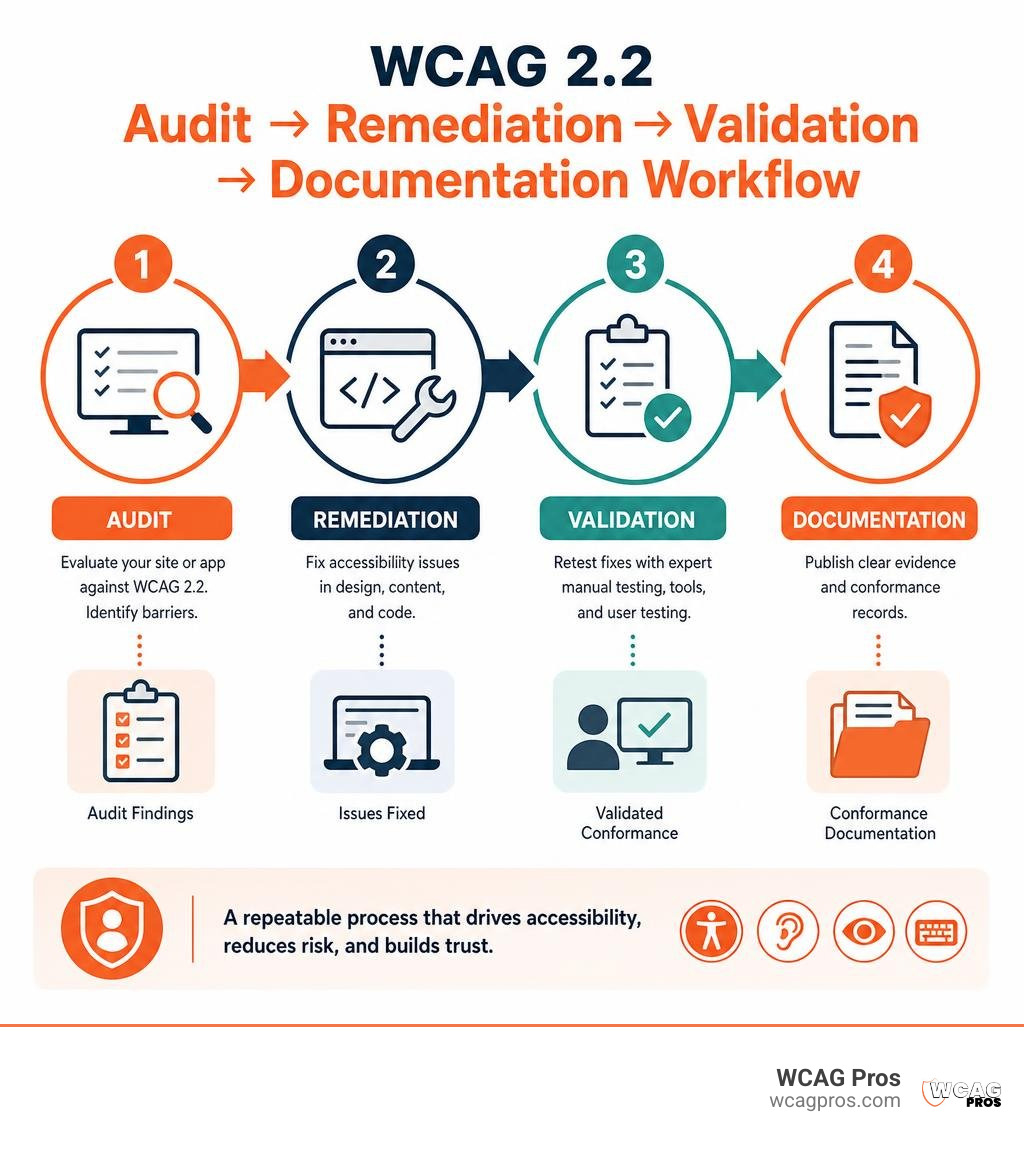
The WCAG certification process is a structured way to evaluate a website or app against WCAG 2.2, fix barriers, validate the fixes, and document the results. The W3C does not issue an official WCAG certificate, but a thorough third party audit and clear conformance records can show that your organization has taken meaningful steps toward accessibility and ADA risk reduction.
- Audit: Define the scope and test pages, templates, and key user journeys against WCAG 2.2.
- Remediation: Fix the accessibility issues found in design, content, and code.
- Validation: Retest the fixes through expert manual testing, tools, and often user testing.
- Documentation: Publish evidence such as an audit report, Statement of Conformance, VPAT or ACR, or provider certification.
For many commercial websites, WCAG 2.2 Level AA is the practical target. It helps serve people with disabilities, while giving business leaders stronger evidence of ongoing accessibility work amid rising ADA lawsuits.
Matthew Post is the co founder of WCAG Pros and a programmer with more than 20 years of web development experience. His team oversees accessibility audits and remediation work, helping businesses navigate every stage of the WCAG certification process with clear findings and practical fixes.
Simple WCAG certification process glossary:
Is There an Official WCAG Certification from the W3C?
A very common myth in the digital accessibility world is that the World Wide Web Consortium issues an official seal of approval or a stamped certificate to websites. People often ask where they can sign up for the official W3C badge. The simple answer is that no single official WCAG certification body exists. The W3C develops technical guidelines such as WCAG 2.2, but it does not act as an auditing body or certifying organization.
Think of the W3C much like the creators of the English dictionary. They write the definitions and grammar rules, but they do not walk into your office to grade your emails. Because the W3C does not certify websites, any company claiming to offer an official government backed or W3C stamped certificate is misrepresenting how compliance works.
Instead, compliance is demonstrated through thorough third party evaluation reports and independent audits. You can learn more about how this framework operates in the overview How Does WCAG Certification Work?. When an experienced auditing firm evaluates your digital assets against WCAG 2.2 standards, they issue formal documentation that verifies your conformance status.
To understand the full set of technical requirements you must satisfy before claiming compliance, review The Complete Guide to WCAG AA Compliance Requirements. Demonstrating accessibility relies on transparent documentation and evidence of ongoing maintenance rather than a magical one time piece of paper.
Core Steps in the WCAG Certification Process

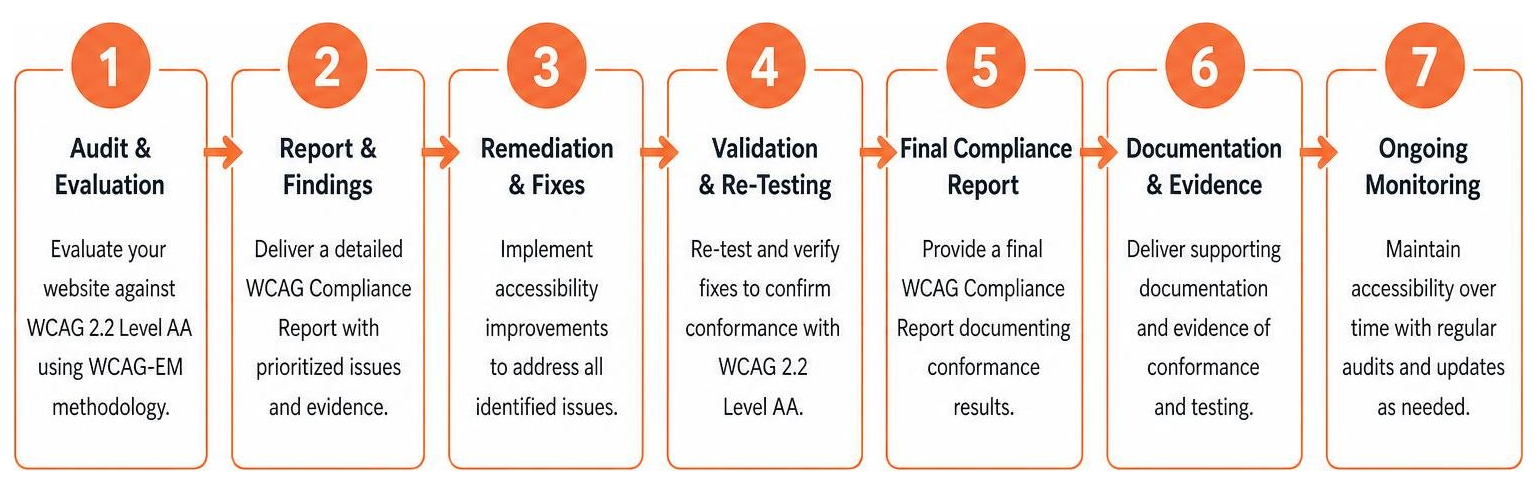
Achieving a clean conformance report requires a clear methodology. The WCAG certification process is not something that happens overnight, nor is it a matter of running a quick automated scan and slapping a badge in your website footer. Real accessibility requires a multi step workflow that pairs technical expertise with practical testing.
To navigate this journey smoothly, break the workflow into distinct phases. You can read a detailed strategy guide on How to Pass Your WCAG 2.2 AA Certification with Flying Colors to see how these phases fit into a broader corporate strategy.
Step 1: Audit and WCAG Evaluation Methodology (WCAG EM)
The first step in any legitimate WCAG certification process is a comprehensive evaluation. To ensure the audit is structured and repeatable, professional auditors rely on the WCAG Evaluation Methodology (WCAG EM) 2.0. This standardized 5 step framework guides evaluators through scoping, sampling, and reviewing digital products.
The five core steps of WCAG EM include:
- Define the evaluation scope: Identify the target digital assets, state the WCAG 2.2 target level such as Level AA, and define the baseline assistive technology support.
- Explore the target product: Catalog common views, core user functionality, key interaction points, and underlying technologies.
- Select a representative sample set: Choose structured samples that represent all unique layouts, functional paths, and dynamic states, plus a small random selection.
- Evaluate the selected sample set: Perform testing using automated tools and expert manual checks against every applicable success criterion.
- Report the evaluation findings: Aggregate findings into a structured report that details pass rates, failures, and clear remediation guidance.
Automated scanners are useful for catching quick errors like missing image alternative text or basic contrast issues. However, many criteria require expert manual testing with keyboards and screen readers. For a deep dive into scoping and sample selection, explore The Ultimate Guide to a WCAG Comprehensive Website Audit.
Step 2: Code Remediation and Practical Validation
Once the initial audit report is delivered, your development and design teams must fix the identified accessibility barriers. Remediation involves updating source code, adjusting design systems, correcting heading structures, and ensuring interactive elements are fully operable via keyboard inputs.
Remediation is rarely finished in a single pass. In practice, validation often takes several rounds of iterative retesting to confirm that every issue has been properly resolved. Under W3C conformance rules, full conformance requires unresolved failures within the defined evaluation scope to be corrected before a full Statement of Conformance is issued.
During this stage, developers rely on actionable feedback and precise code snippets. For guidance on structuring your retesting workflow, check out the ADA Compliance Retest Guide Free. Iterative validation ensures that fixes do not introduce new regressions in other parts of the application.
Step 3: User Testing in the WCAG Certification Process
While technical audits evaluate code against written standards, user testing brings real world perspective to the WCAG certification process. Code can technically satisfy a success criterion while still creating a clunky or confusing experience for someone who relies on assistive technology.
Engaging accessibility professionals with disabilities to conduct user testing provides practical insight. Testers using screen readers, screen magnifiers, or switch devices navigate key conversion funnels such as dynamic forms, account creation flows, and checkout steps.
Combining expert technical audits with practical user testing yields true usability. When people with disabilities validate that your site is easy to navigate, your organization achieves both legal defensibility and genuine digital inclusion.
Types of Documentation Proving WCAG Conformance

Because there is no single official W3C badge, proving your compliance status comes down to the quality of your documentation. Different business contexts require different types of proof. For instance, selling software to a government agency requires formal procurement documents, whereas demonstrating compliance to a website visitor requires a clear public statement.
Here is a quick overview comparing the main types of documentation used in the industry:
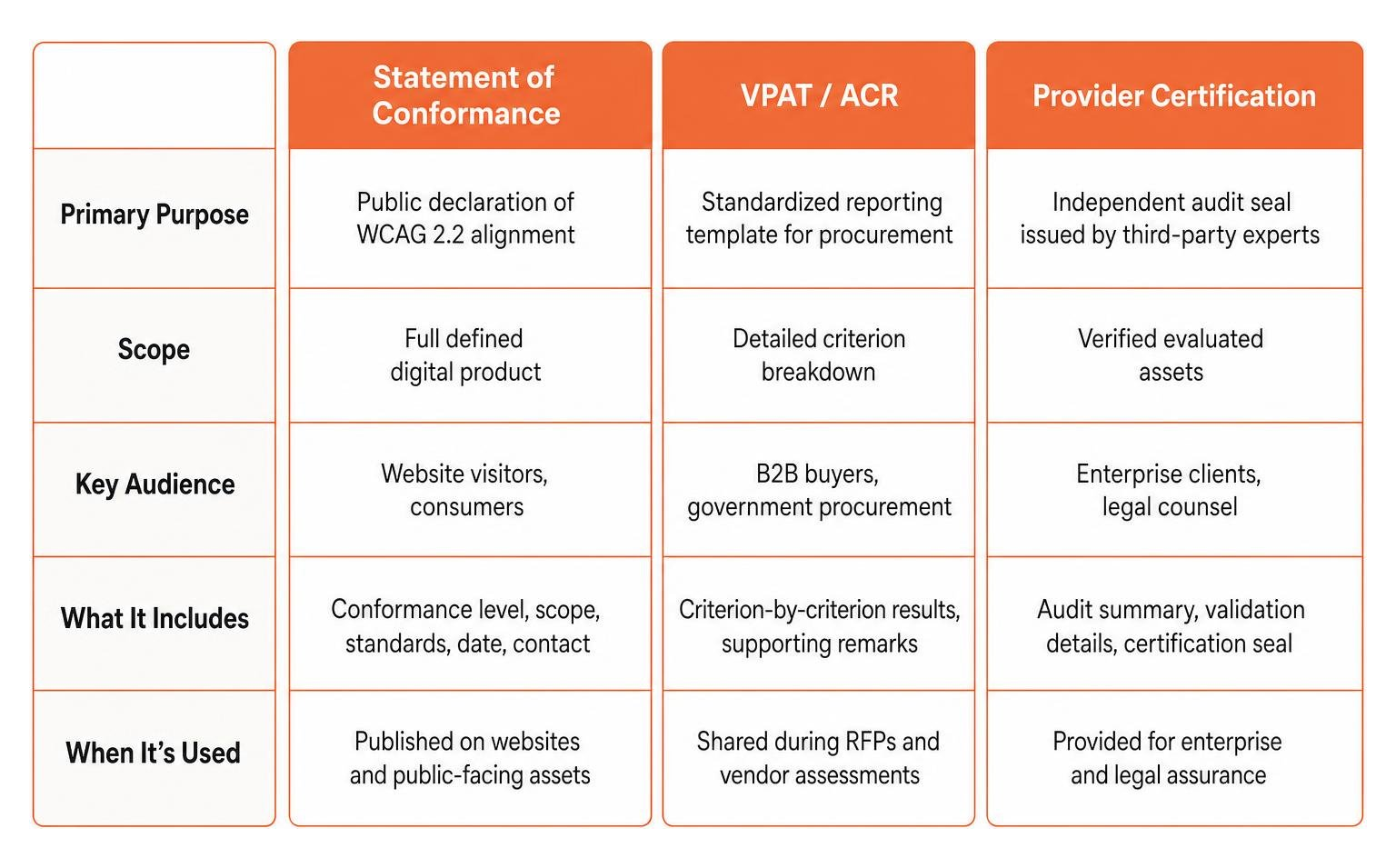
- Statement of Conformance: Public declaration of WCAG 2.2 alignment for a full defined digital product aimed at website visitors and consumers.
- VPAT / ACR: Standardized reporting template for procurement with detailed criterion breakdown aimed at B2B buyers and government procurement.
- Provider Certification: Independent audit seal issued by third party experts covering verified evaluated assets for enterprise clients and legal counsel.
- Statement of Partial Conformance: Acknowledges uncontrolled third party content across the primary site while excluding external widgets for legal records and risk management.
Understanding Statements of Conformance vs. VPAT and ACR
A Statement of Conformance is a public declaration governed by W3C guidelines. To publish one, your site must satisfy all WCAG 2.2 criteria within the defined scope with zero exceptions. It lists the date of evaluation, the exact guidelines and level targeted, the page scope, and the test methods used. You can explore the guidelines for evaluating conformance claims through the official WCAG EM Overview: Website Accessibility Conformance Evaluation Methodology.
In enterprise software sales and public sector procurement, a Voluntary Product Accessibility Template is the standard tool. A VPAT is a blank form governed by the Information Technology Industry Council in collaboration with the W3C. Once an auditing firm completes the evaluation, the filled document becomes an Accessibility Conformance Report.
An ACR documents exact compliance details for every criterion, listing whether the product supports, partially supports, or does not support the requirement. It provides corporate buyers with an accurate accounting of your product accessibility status.
Third Party Audit Reports and Provider Certification Documents
A Provider Certification is an official document issued by an independent accessibility firm following a complete audit and remediation cycle. This document confirms that expert evaluators audited your digital property and validated all code fixes.
In many corporate websites, third party integrations such as live chat widgets, embedded maps, or third party ad networks are outside your direct technical control. If these external elements contain accessibility errors, W3C rules allow you to issue a Statement of Partial Conformance. This document clearly defines which third party elements are excluded from the primary site scope.
Having detailed third party documentation can support a stronger accessibility risk management file. To see how expert documentation helps protect your organization, read The Certified WCAG Audit Process Your Shield Against Lawsuits.
Individual Accessibility Credentials vs. Organizational Compliance
It is helpful to separate credentials awarded to human professionals from compliance documentation issued for websites. While websites do not receive personal certificates from the W3C, individual developers, designers, and auditors can earn industry recognized credentials to prove their knowledge.
The International Association of Accessibility Professionals offers certifications for individuals, including:
- CPACC: Certified Professional in Accessibility Core Competencies. This credential focuses on foundational conceptual knowledge, accessibility laws, management strategies, and universal design principles.
- WAS: Web Accessibility Specialist. This is a technical credential for hands on web professionals who conduct code audits, fix technical barriers, and write accessible code.
- CPWA: Certified Professional in Web Accessibility. This credential is awarded automatically to professionals who successfully pass both the CPACC and WAS examinations.
Building internal capacity by training your staff or supporting IAAP certification helps prevent barriers before code reaches production. Explore the educational resource How to Master W3C Web Accessibility Guidelines Without Breaking a Sweat to help build internal expertise.
Integrating Certification Into Your Development Lifecycle
Achieving accessibility is not a one time project that you finish and forget. Web applications constantly evolve through new feature releases, design updates, and content additions. Every time a content author publishes an unoptimized image or a developer adds a custom UI component, new accessibility barriers can emerge.
To maintain your certified status, you must integrate accessibility checks early in your design and development pipeline. This shift left strategy ensures that UI components are vetted during design wireframing and automated test runs before launch.
Continuous monitoring can also support your compliance strategy by catching regressions between formal manual audits. Automated scans are useful for alerts, but they should support expert review rather than replace it.
Maintaining Compliance in the WCAG Certification Process
Maintaining conformance across the entire WCAG certification process requires establishing an ongoing governance routine. This includes:
- Publishing an accessibility statement: Place a clear link in your website footer linking to an accessibility statement that lists your WCAG 2.2 goals, current progress, known limitations, and direct contact details.
- Providing direct feedback channels: Give users an easy email address or phone number so they can report accessibility barriers directly to your team.
- Automated monitoring: Run weekly or monthly automated scans to catch regression errors like missing alt text or broken heading hierarchies.
- Annual re audits: Schedule full annual manual audits to re evaluate core user flows and certify new dynamic features against current WCAG 2.2 standards.
Frequently Asked Questions About WCAG Certification
Can a website receive official certification directly from the W3C?
No. The W3C develops the Web Content Accessibility Guidelines, but it does not evaluate websites or issue official accessibility certificates. Any website badge or certificate you see online comes from independent third party auditing companies or accessibility providers.
How much does professional WCAG certification testing cost?
The financial investment for professional certification testing varies based on several factors, including total page count, site complexity, dynamic application flows, and the number of validation retesting rounds required. Simple brochure websites require far less evaluation time than enterprise ecommerce portals or multi tenant SaaS platforms. Organizations should budget for the initial manual audit, developer remediation support, validation re audits, and ongoing annual maintenance.
What is the difference between WCAG 2.0 and WCAG 2.2 conformance?
WCAG versions build upon one another backward compatibly. WCAG 2.0 established core principles for web content. WCAG 2.2 expands upon earlier standards by incorporating accommodations for mobile devices, touch interactions, low vision, cognitive disabilities, fine motor control, and visual focus indicators. To understand the foundational mechanics of WCAG history, you can review Understanding WCAG 2.0. Today, WCAG 2.2 Level AA represents the practical baseline target for modern legal and technical compliance.
Conclusion
Navigating the WCAG certification process is one of the most effective ways to make your digital experiences inclusive, reduce litigation risk, and ensure that every user can interact with your brand. While an official W3C badge does not exist, building a structured workflow around WCAG EM audits, thorough code remediation, user testing, and formal documentation provides strong evidence of your compliance efforts.
Located in Norco CA, WCAG Pros guides companies through every step of this journey. The team provides comprehensive page by page audits covering all 54 WCAG A and AA points, paired with actionable code fixes and free re audits so you can earn verified compliance badges with confidence.
Ready to secure your digital assets and deliver an outstanding experience for all users? Schedule Your Comprehensive WCAG Audit Today and let an expert team help shield your business against legal risks.
Read more website accessibility articles
Get Help With Your Website
We'll follow up with info about:
- The process
- Cost
- Timeline
We promise to respect your privacy, and never abuse the information you provide. We will not sell or rent your information to any third party.
By submitting this form, you consent to receive SMS messages and/or emails from SEM Dynamics LLC, dba WCAG Pros. To unsubscribe, follow the instructions provided in our communications. Msg & data rates may apply for SMS. Your information is secure and will not be sold to third parties.