
ADA Compliance Review Terms Demystified
ADA Compliance Review Terms Demystified
ADA Compliance Review: A Clear Starting Point for Website Owners
An ADA compliance review evaluates whether your website creates barriers for people with disabilities and identifies where it falls short of WCAG 2.2 accessibility expectations.
For a business owner, the quick answer is simple:
- Review your site with automated and manual testing.
- Find barriers in key user journeys, such as navigation, forms, product pages, booking tools, and checkout.
- Map issues to WCAG 2.2 so developers know what needs to change.
- Fix and retest the underlying code, rather than relying on a widget or overlay.
- Keep records of audits, fixes, and follow up testing to show a good faith accessibility effort.
This matters because an inaccessible website can exclude customers and create legal exposure under the ADA. A scan can find common code issues, but a useful review also checks the real experience of keyboard users and people who use screen readers.
I am Matthew Post, cofounder of WCAG Pros and a programmer with more than 20 years of web development experience. I oversee ADA compliance review and remediation work focused on finding complex accessibility barriers, making practical fixes, and helping businesses reduce digital risk.
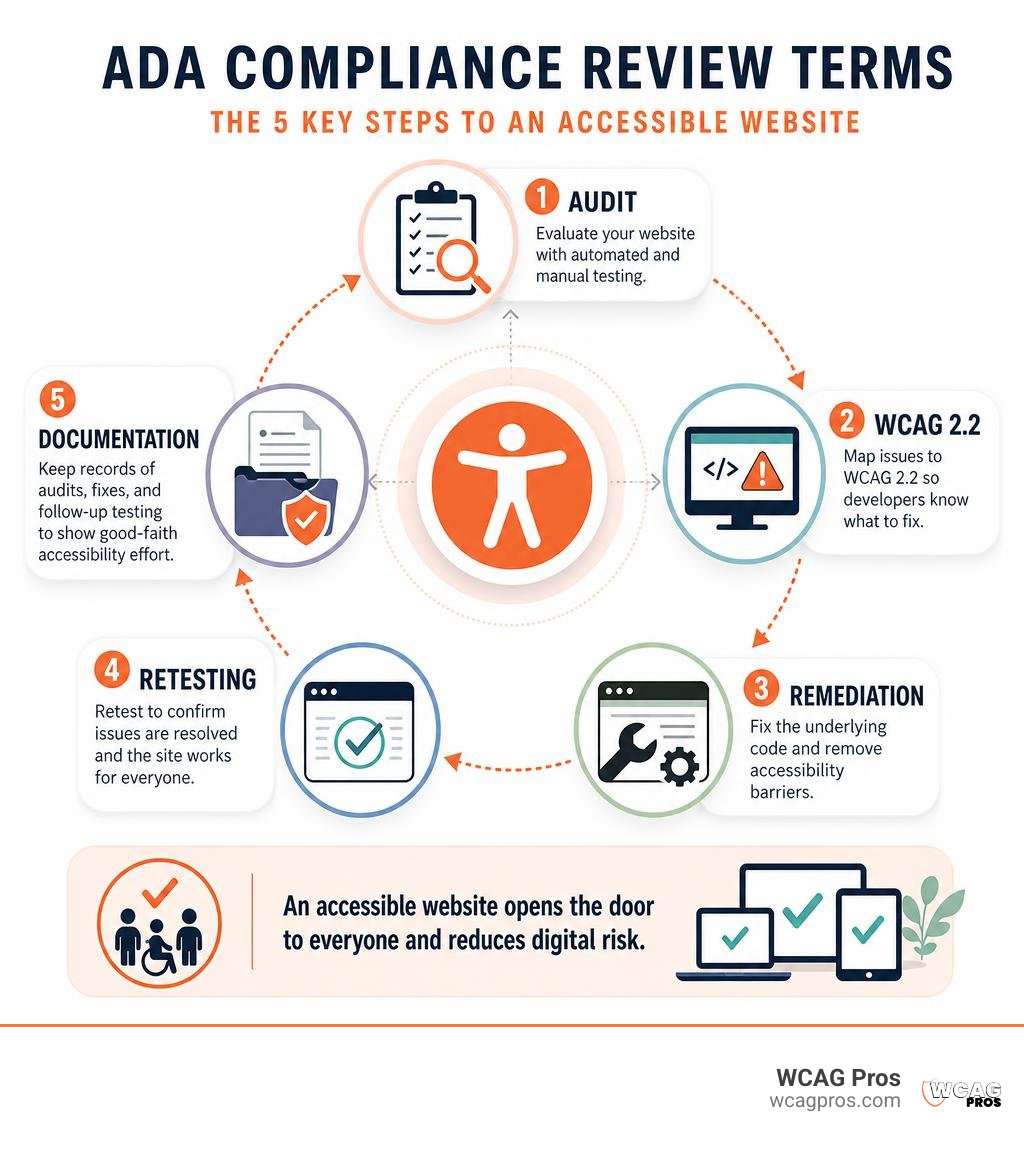
Easy ADA compliance review word list:
What Is an ADA Compliance Review and Why It Matters
An ADA compliance review is an evaluation of digital or physical properties to determine whether they meet federal accessibility standards. Passed by Congress in 1990, the Americans with Disabilities Act protects people with disabilities from discrimination across public and private life.
When we talk about Title II, we refer to state and local government operations. Title III applies to public accommodations, which include private businesses open to the public. Federal courts and the Department of Justice interpret public accommodations to include commercial websites, mobile apps, and online portals.
Understanding the baseline terminology helps business owners navigate legal expectations. If you want to dive deeper into fundamental terminology, you can learn all about ADA audit meaning in our detailed companion guide.
Removing digital barriers ensures that everyone can read content, submit contact forms, make purchases, and access services. Beyond helping community members, an ADA compliance review protects organizations against enforcement actions by the Department of Justice, civil lawsuits, and EEOC workplace disability claims.
Scope of ADA Compliance for Digital Assets
Digital scoping defines which online properties require evaluation during an ADA compliance review. It is a mistake to assume only your primary homepage matters. Courts evaluate complete websites, customer portals, mobile applications, hosted videos, and online documents.
Every user journey must be accessible. This includes online scheduling tools, PDF forms, payment gateways, and third party widgets integrated into your site. Legacy websites created years ago must meet current accessibility benchmarks just like brand new site builds.
When planning a new site launch or major redesign, incorporating accessibility from the beginning prevents technical debt. Continuous maintenance ensures that new blog posts, updated product pages, or newly uploaded documents do not introduce new digital barriers.
Digital ADA Compliance Review for Websites
A proper ADA compliance review for websites uses the Web Content Accessibility Guidelines as its technical measuring stick. The primary target for digital compliance is WCAG 2.2 Level AA.
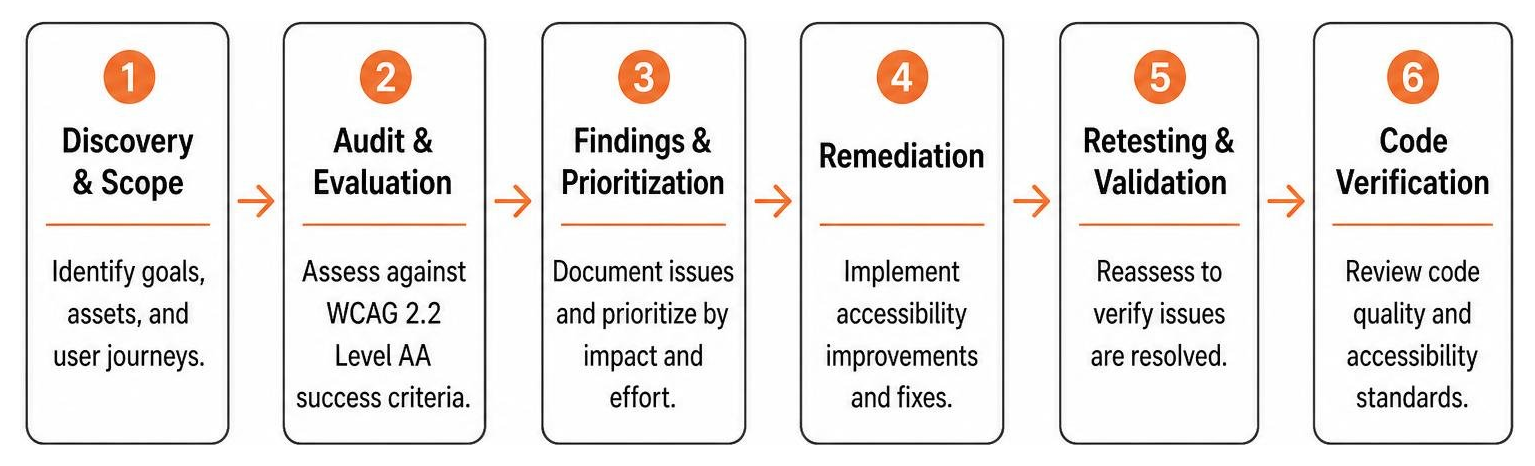
During a thorough review, we evaluate multiple key areas:
- Screen reader compatibility to ensure blind or low vision visitors receive clear audio descriptions of all page elements.
- Color contrast levels so visitors with visual impairments can comfortably read text against background colors.
- Alt text attributes for images, ensuring decorative graphics are hidden while informative images carry clear descriptions.
- Full keyboard navigation capability so users who cannot operate a mouse can navigate menus, links, and forms using only the Tab key.
If you are looking to evaluate technical audit options for your business, check out the ultimate guide to ADA audit services for an in depth breakdown of available options.
Financial Penalties and Legal Risks of Non Compliance

Failing to maintain digital accessibility creates significant legal exposure. Federal agencies and private plaintiffs can take legal action against non compliant entities, leading to severe financial penalties and mandatory court oversight.
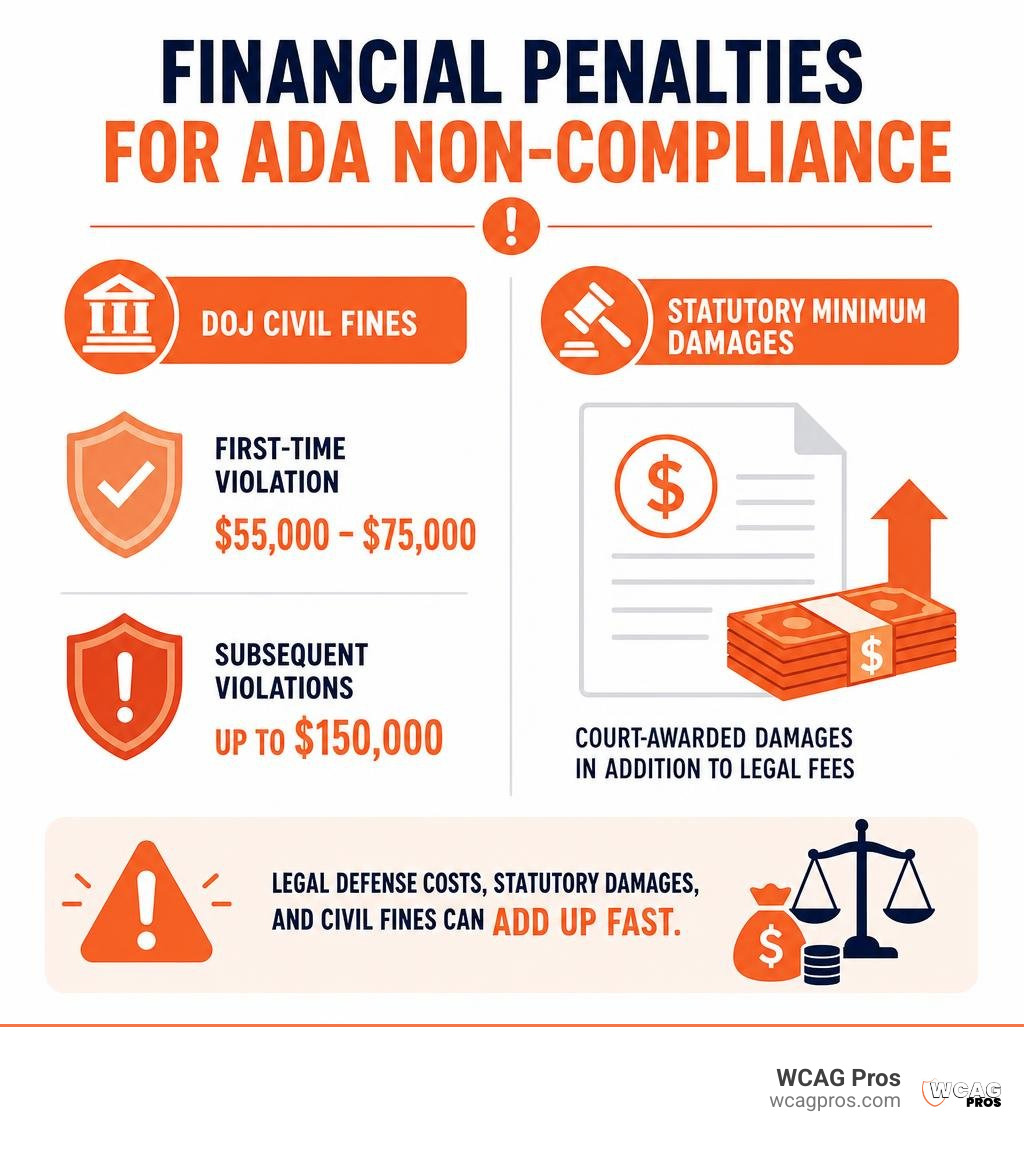
Businesses often overlook how quickly legal defense fees and statutory damages add up. A single lawsuit can disrupt business operations and divert leadership focus away from growth.
Federal Fines and State Specific Damages
The Department of Justice enforces civil penalties for ADA violations. A first time violation can carry civil penalty fines ranging from $55,000 to $75,000. For subsequent violations, civil penalty fines can reach up to $150,000.
State laws introduce additional financial liability. In California, the Unruh Civil Rights Act guarantees plaintiffs a mandatory statutory minimum penalty of $4,000 per violation plus mandatory payment of the plaintiff attorney fees. Public institutions and local communities frequently face scrutiny over these standards. You can read about local physical accessibility discussions in community updates like Norco High School’s ADA compliance issues.
In high litigation states like California, private lawsuits against commercial businesses are common. Settling out of court often costs tens of thousands of dollars without eliminating the underlying requirement to fix the website code.
Reputational Damage and Brand Equity
Financial costs are only one piece of the puzzle. Non compliance damages your brand reputation and public standing. When customers encounter digital barriers on your website, they feel excluded and turned away.
Word spreads quickly online. Public claims of disability discrimination lead to negative social media attention, lost consumer trust, and potential customer boycotts.
By contrast, maintaining an accessible website demonstrates core values of inclusion and social responsibility. It opens your business to over 70 million Americans living with disabilities who control substantial purchasing power.
Common ADA Compliance Mistakes on Websites
Many websites contain unintentional accessibility errors. Even recently designed or custom built sites frequently fail basic WCAG 2.2 criteria due to reliance on template frameworks or improper code structure.
Understanding the difference between automated detection and human review is essential when evaluating these common errors.
| Accessibility Issue | Detected by Automated Scan? | Requires Manual Code Review? | Impact on End User |
|---|---|---|---|
| Low contrast text | Yes | No | Makes body text unreadable for low vision users |
| Missing image alt text | Yes | Yes (for context accuracy) | Leaves screen reader users without image descriptions |
| Unlabeled form inputs | Yes | No | Prevents screen readers from identifying input fields |
| Keyboard focus traps | No | Yes | Prevents keyboard users from navigating past popups or menus |
| Incorrect heading order | Yes | Yes | Confuses screen reader navigation through page content |
| Unusable mobile submenus | No | Yes | Blocks mobile screen reader users from accessing pages |
Navigation and User Interface Oversights
Navigation barriers are among the most frustrating issues for users with disabilities. Missing visual focus indicators make it impossible for keyboard users to see which link or button is currently selected.
Unlabeled form inputs create huge hurdles during checkout or registration. When a screen reader reaches a form field without a programmatic label, it reads only input or edit text, leaving the user guessing whether the box asks for a name, email address, or credit card number.
Inaccessible dropdown menus and interactive widgets frequently trap keyboard focus. A user tabs into a calendar picker or modal window but cannot tab back out to finish reading the page.
Digital Accessibility Code Errors
Code errors often sit hidden beneath a polished visual layout. Deploying overlay widgets or AI toolbars is a common mistake. Federal courts have ruled that accessibility overlays fail to fix underlying source code defects and can actually create new barriers for screen readers.
Incorrect ARIA attributes are another frequent problem. ARIA labels should enhance semantic HTML, but misconfigured ARIA roles tell screen readers that elements are buttons when they are actually passive text divs.
PDF documents posted to websites represent a massive compliance backlog. Unformatted PDFs lack structural tags, preventing screen readers from reading text aloud in proper order. For a step by step roadmap to auditing these issues, explore our guide on how to do an accessibility audit in 5 steps.
How to Conduct an Evaluation Before Launch or Redesign

Evaluating your digital property before launching a site or major redesign saves time and protects your budget. Fixing code during early development costs a fraction of what retrofitting an existing live site costs after receiving a legal demand letter.
We recommend following a structured evaluation process prior to publication.
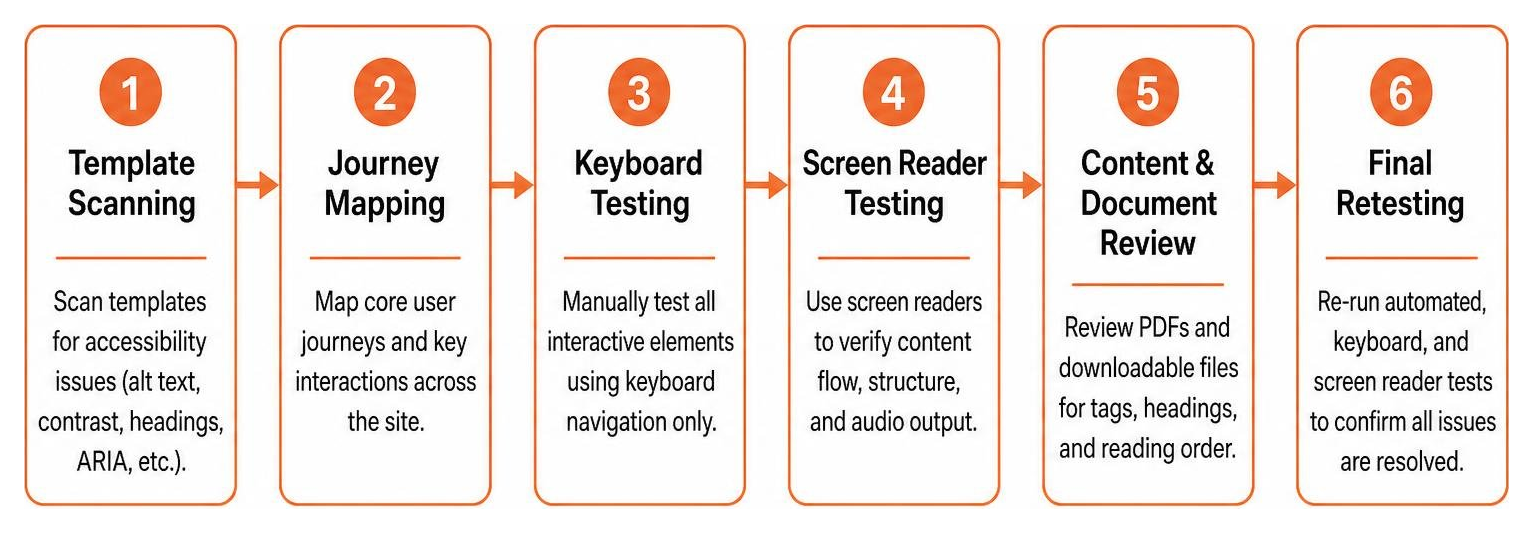
- Map out all core user journeys, including user registration, search functions, contact forms, and checkout steps.
- Run automated scanners across template structures to identify surface level code errors like missing alt attributes and low contrast.
- Perform manual keyboard testing by navigating through every interactive element without touching a mouse.
- Conduct screen reader testing using software like NVDA, JAWS, or VoiceOver to verify content flow and audio output.
- Review PDF documents and downloadable files to ensure structural tags, headers, and reading order are set correctly.
- Remediate root source code rather than applying temporary JavaScript fixes or third party overlay tools.
- Perform a final reaudit to verify all code fixes and document your findings for legal defense records.
To stay on track, bookmark the ultimate website accessibility testing checklist for 2026 as your team plans future updates.
Frequently Asked Questions About Compliance Reviews
How do ADA standards apply to existing websites versus new web builds?
Under Title III of the ADA, existing websites and newly built websites are held to the exact same standard of digital accessibility. There is no grandfather clause that exempts older, legacy websites from removing digital barriers.
While physical buildings sometimes have nuanced rules for structural alterations, websites are expected to maintain accessible content for the public regardless of when the domain was originally launched. If an existing site is open to the public, it must be accessible under WCAG 2.2 expectations.
Are accessibility overlay widgets sufficient for digital compliance?
No, accessibility overlay widgets and third party AI scripts are not sufficient for legal or technical compliance. Overlays attempt to modify website display settings on the front end without altering the underlying HTML source code.
Federal courts have repeatedly noted that overlay tools fail to fix fundamental accessibility barriers like missing form labels, improper heading structures, or keyboard focus traps. In fact, many screen reader users prefer to disable overlays because the automated scripts interfere with custom assistive technology settings. Real source code remediation is required.
How does a compliance review protect against lawsuits?
An ADA compliance review protects your business by identifying and eliminating the specific code errors that legal web crawlers look for when generating demand letters. By fixing low contrast, unlabelled forms, and broken keyboard paths, you eliminate the barriers that trigger complaints.
Furthermore, conducting a professional audit and maintaining documented evidence of remediation demonstrates a good faith effort toward accessibility. Having dated audit records, remediation roadmaps, and retest certificates gives your legal counsel strong evidence to defend your organization if a claim is ever raised.
Conclusion
An ADA compliance review is essential for protecting your business, welcoming all customers, and maintaining digital integrity. By moving beyond surface level automated scans and addressing root code barriers, you build a sustainable web presence that meets WCAG 2.2 criteria.
At WCAG Pros, we specialize in comprehensive page by page audits covering all 54 WCAG A through AAA success criteria. We provide full developer code fixes, thorough manual testing with native screen reader users, and free reaudits to issue formal compliance certificates.
If you are ready to remove digital barriers and secure your website against legal risk, explore our expert WCAG Remediation Services today.
Read more website accessibility articles
Get Help With Your Website
We'll follow up with info about:
- The process
- Cost
- Timeline
We promise to respect your privacy, and never abuse the information you provide. We will not sell or rent your information to any third party.
By submitting this form, you consent to receive SMS messages and/or emails from SEM Dynamics LLC, dba WCAG Pros. To unsubscribe, follow the instructions provided in our communications. Msg & data rates may apply for SMS. Your information is secure and will not be sold to third parties.