
A Comprehensive Guide to WCAG 2.2 Level AA Standards
A Comprehensive Guide to WCAG 2.2 Level AA Standards
Why WCAG 2.2 Level AA Standards Matter for Your Website
WCAG 2.2 Level AA standards are the most widely used benchmark for making a website accessible to people with disabilities. To meet them, your site must satisfy every Level A and Level AA success criterion, including usable keyboard navigation, visible focus indicators, clear form errors, responsive reflow, and sufficient color contrast. Organizations that previously planned around earlier Level AA guidance should update their accessibility roadmap to WCAG 2.2 Level AA because the newer version keeps the earlier requirements and adds important guidance for modern interfaces.
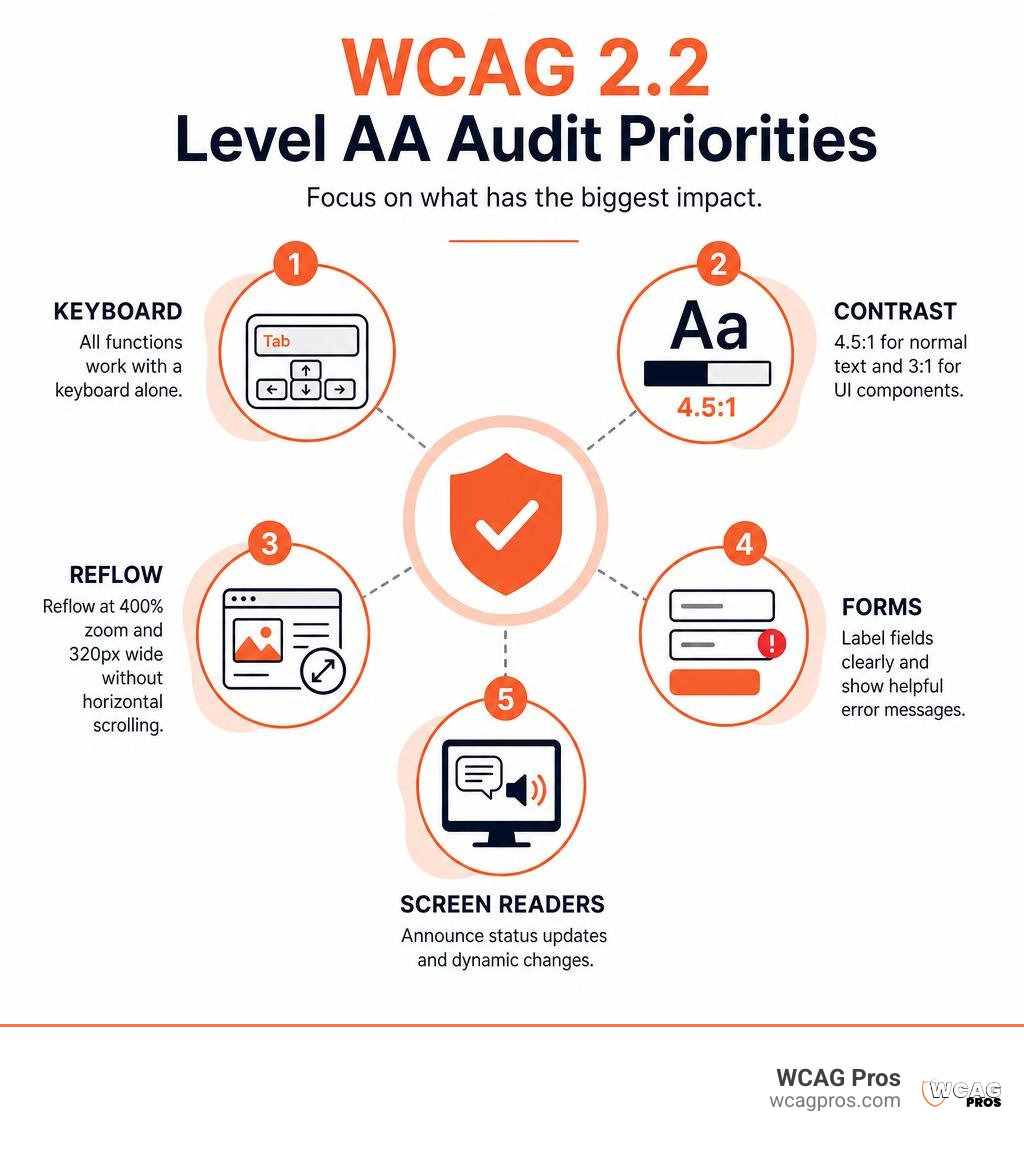
Start by checking these high-impact areas:
- Ensure all functions work with a keyboard alone.
- Maintain 4.5:1 contrast for normal text and 3:1 contrast for user interface controls.
- Test pages at 400% zoom and 320 CSS pixels wide without unnecessary horizontal scrolling.
- Label form fields clearly and announce important status updates to screen readers.
Level AA is a practical target because it addresses common barriers for people who use screen readers, keyboard navigation, magnification, touch devices, captions, and other assistive technology. It also helps organizations reduce accessibility risk while creating a smoother experience for every visitor. WCAG 2.2 builds on earlier WCAG versions, so it retains the core accessibility requirements while adding newer guidance for focus, target size, dragging, and accessible authentication.
I am Matthew Post, co-founder of WCAG Pros and a web developer with more than 20 years of experience solving complex digital issues. I oversee audits and remediation work focused on WCAG 2.2 Level AA standards, helping organizations identify barriers, improve usability, and reduce accessibility risk.
WCAG 2.2 Level AA standards terms to learn:
Understanding the Core Framework of WCAG 2.2 Level AA Standards
Web accessibility is built on international recommendations published by the World Wide Web Consortium. Exploring the official Web Content Accessibility Guidelines (WCAG) 2.2 reveals how digital standards adapt over time to support emerging hardware, touchscreens, and assistive tech. Every iteration maintains backward compatibility, meaning that content meeting current rules inherently fulfills preceding versions. Reviewing The Complete Guide to WCAG AA Compliance Requirements provides an essential roadmap for teams striving to eliminate interface barriers.
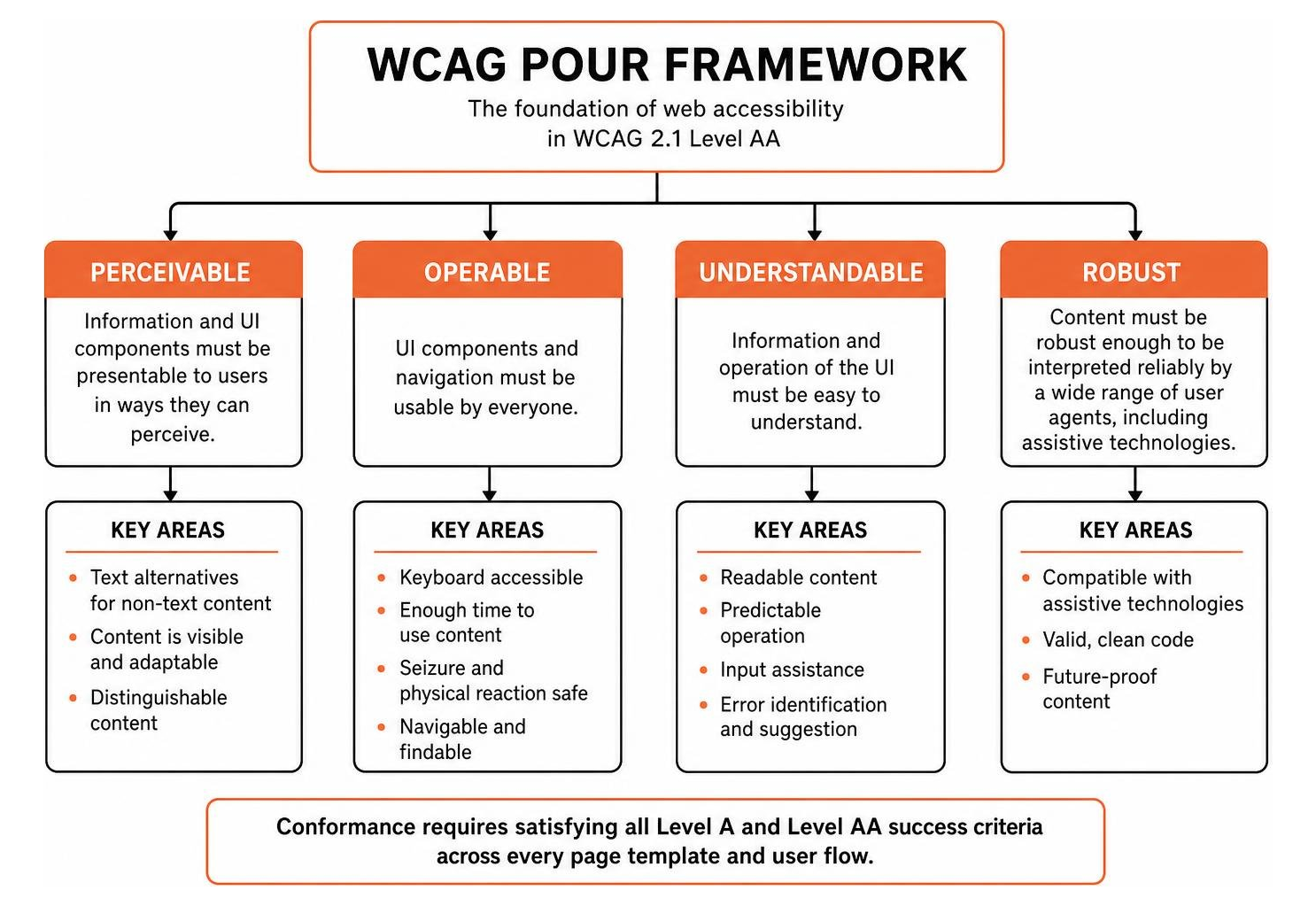
The foundation of web accessibility rests on four principles known collectively as POUR: Perceivable, Operable, Understandable, and Robust. These principles form the top layer of guidance, branching into actionable guidelines and testable success criteria. Conformance requires satisfying both Level A baseline items and Level AA mid-tier criteria across every page template and user flow.
Perceivable and Operable Success Criteria
The Perceivable principle mandates that information and user interface components must be presentable to users in ways they can perceive. Content cannot be invisible to all of a person senses. Essential criteria include:
- Text alternatives for non-text content so images can be transformed into synthesized speech or braille
- Synchronized captions for prerecorded and live multimedia audio
- Audio descriptions for video presentations to explain vital visual action
- Adaptable layout structures that preserve information hierarchy across orientations
The Operable principle ensures that users can navigate and interact with controls using diverse input devices. Nobody should get trapped in a component simply because they do not use a mouse. Vital requirements cover:
- Full keyboard operability without keyboard traps
- Meaningful focus order that follows logical reading sequences
- Sufficient time limits with options to extend or turn off active countdowns
- Pointer cancellation mechanisms to prevent accidental clicks when lifting a finger or mouse button
Understandable and Robust Architecture
Under the Understandable principle, content and interface operations must be clear, intuitive, and predictable. When users encounter complex input forms or unexpected context changes, accessibility falls apart. This principle requires:
- Human language identification in HTML markup for accurate pronunciation by screen readers
- Consistent navigation menus and predictable component identification across pages
- Clear error identification and helpful text suggestions for form correction
- Reversible submissions for transactions involving legal or financial commitments
The Robust principle demands that content remains compatible with current and future user agents, including assistive technologies. Code must adhere to standard specifications, ensuring that custom interactive widgets expose correct names, roles, and values to accessibility APIs.
Conformance Levels and Technical Criteria Breakdown
Conformance is divided into three distinct tiers: Level A, Level AA, and Level AAA. Level A establishes the absolute minimum accessibility baseline, addressing severe blockers like missing keyboard access. Level AA broadens usability, tackling widespread barriers like low contrast and mobile layout failures. Level AAA represents the highest and most restrictive standard, often reserved for specialized environments. Understanding The Great Debate: WCAG AA vs AAA Explained helps developers choose the most practical compliance path.
| Conformance Tier | Scope and Purpose | Typical Technical Requirements |
|---|---|---|
| Level A | Basic digital accessibility baseline | Keyboard access, alternative text, basic form labels, captions for prerecorded video |
| Level AA | Comprehensive industry and legal target | 4.5:1 text contrast, responsive reflow at 320px, visible focus states, status messages |
| Level AAA | Advanced, highly specialized enhancements | 7:1 text contrast, sign language interpretation, no timing limits, extended audio description |
Implementing WCAG 2.2 Level AA Standards for Mobile and Reflow
Modern web browsing happens across thousands of screen dimensions. Checking What’s New in WCAG 2.2 | Web Accessibility Initiative (WAI) | W3C illustrates how mobile touch targets and viewport handling became mandatory requirements. Content must support both portrait and landscape screen orientations unless a specific orientation is strictly essential, such as a piano simulator or bank check scanning tool.
Reflow requirements mandate that content adapts smoothly to small screens without loss of information or functionality. Vertical-scrolling layouts must fit within a width of 320 CSS pixels, which is equivalent to viewing a standard 1280px desktop screen zoomed to 400%. Horizontal scrolling must never be required for body copy.

Touch interactions also require careful handling. Multi-point or path-based gestures, like pinch-to-zoom or complex swiping, must offer single-pointer alternatives such as tap buttons. Furthermore, motion actuation features that trigger actions by shaking or tilting a device must include on-screen controls and the ability to be disabled.
Visual Distinguishability and Text Spacing Rules
Visual distinguishability ensures that users with low vision or color vision deficiencies can read text and understand interface components effortlessly.
- Normal text must achieve a contrast ratio of at least 4.5:1 against adjacent background colors.
- Large text, defined as 18pt regular or 14pt bold, must achieve a contrast ratio of at least 3:1.
- Non-text elements, such as graphical icons, form field borders, and button outlines, require a minimum contrast ratio of 3:1.

Text spacing overrides must not break page functionality. Users frequently apply custom stylesheets to increase legibility. Your layouts must accommodate these style adjustments without truncating text or overlapping buttons:
- Line height of at least 1.5 times the font size
- Spacing following paragraphs to at least 2 times the font size
- Letter spacing tracking to at least 0.12 times the font size
- Word spacing to at least 0.16 times the font size
Text must also resize cleanly up to 200% using standard browser controls without requiring assistive technology and without clipping essential content.
How to Audit and Remediate Digital Content for Level AA
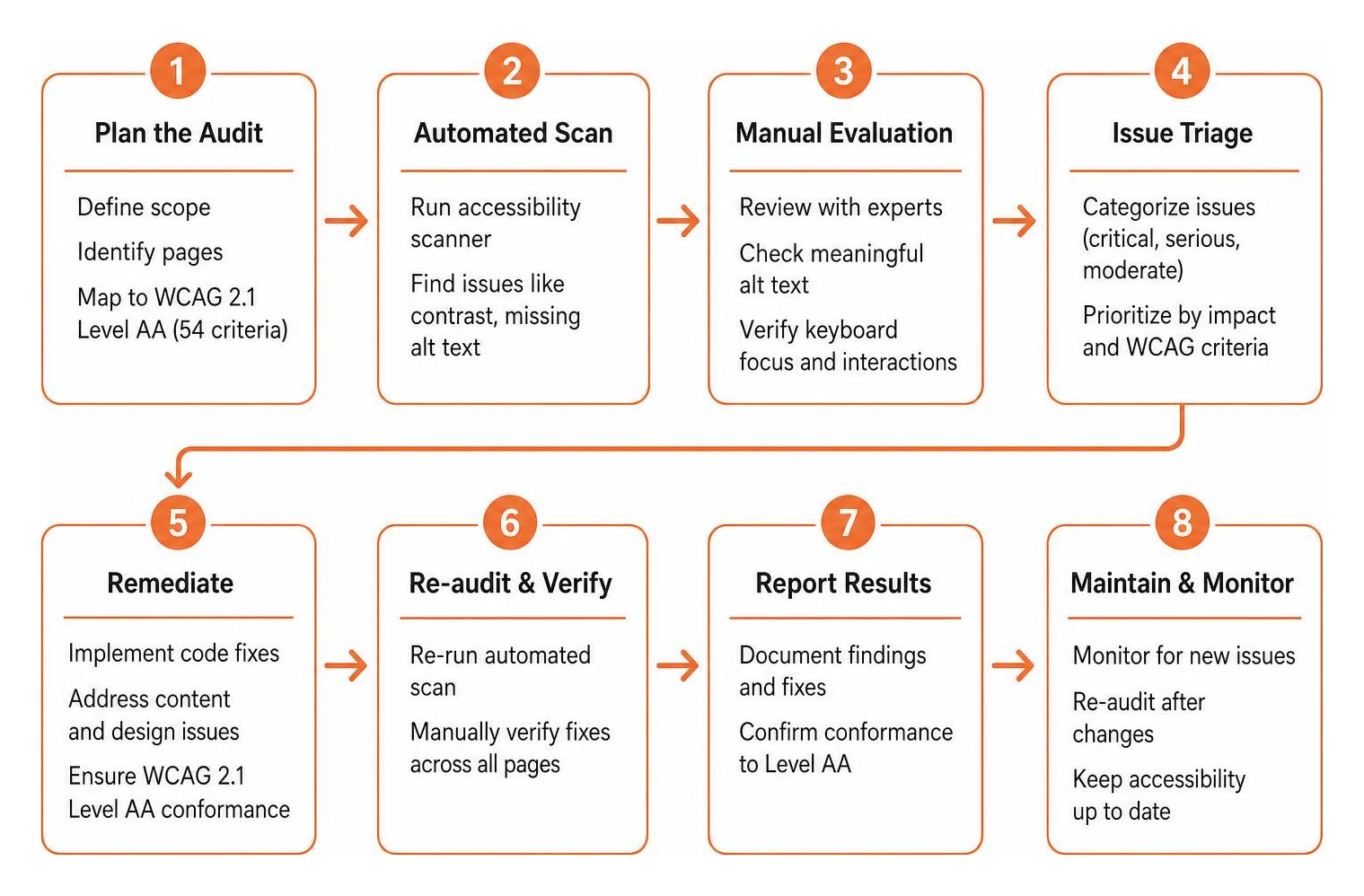
Achieving digital conformance requires a blend of automated software analysis and rigorous manual evaluation. Automated scanners catch roughly 30 percent of common accessibility flaws, such as obvious color contrast mismatches or missing image alternative text. However, human judgment is essential to assess whether alt text is meaningful, keyboard focus moves in logical patterns, or dynamic menus operate intuitively.
Following our structured WCAG Accessibility Checklist Guide ensures that no success criterion is overlooked during internal testing. At WCAG Pros, our specialists conduct comprehensive page-by-page audits across all 54 success points, providing precise code fixes and free re-audits to help you secure a trusted compliance badge.
Form Inputs, Status Messages, and Focus Handling
Online forms present substantial usability hurdles when built incorrectly. Inputs collecting user identity information, like names, billing addresses, and credit card numbers, must utilize standard autocomplete attributes. This allows browsers and assistive tools to auto-populate fields, reducing cognitive fatigue and physical typing effort.
Status messages that update dynamically, such as search result counts, cart notifications, or form submission confirmations, must be announced to screen reader users without shifting visual focus. Implementing proper ARIA live regions ensures that these updates are spoken smoothly without disrupting the user active navigation.
Keyboard focus handling requires clear visual presentation. Interactive components like buttons, links, and text fields must display an obvious outline when focused. The focus indicator must never be hidden with stylesheet resets, and interactive elements must never become obscured by sticky headers or floating promotional banners.
Screen Reader Verification and Conformance Reporting
Manual verification with leading screen readers ensures real-world compatibility. Testing must involve standard software configurations across multiple operating systems:
- NVDA on Windows with modern web browsers
- JAWS on Windows for enterprise workflow validation
- VoiceOver on macOS and iOS for native Apple environments
- TalkBack on Android for mobile user journeys
Documenting results via a Voluntary Product Accessibility Template produces an industry-standard Accessibility Conformance Report. This documentation proves your conformance status to enterprise buyers, educational institutions, and legal teams. When third-party embedded content cannot be remediated immediately, providing a fully conforming alternate version ensures visitors still enjoy equal access. For organizations seeking official validation, our Step-by-Step Guide to WCAG 2.2 Certification Process details the audit milestones required for full verification.
Frequently Asked Questions About Web Accessibility Compliance
What Distinguishes WCAG 2.2 Level AA Standards from Basic Level A?
Level A represents the bare minimum baseline for web accessibility, addressing severe functional barriers such as complete keyboard lockups, missing image descriptions, and unlabelled forms. While essential, Level A alone leaves significant gaps for users with low vision, motor impairments, and cognitive challenges.
Level AA incorporates all Level A rules while adding vital enhancements that make interfaces practical for everyday use. It introduces strict 4.5:1 visual contrast ratios, responsive reflow for mobile devices, visible keyboard focus indicators, text spacing customization, and dynamic status announcements. Most international policies and enterprise procurement standards require Level AA rather than basic Level A.
Is Level AA Conformance Legally Required Under ADA Title II?
Yes, Level AA conformance serves as the explicit technical benchmark under federal regulations. In April 2024, the United States Department of Justice published a final rule under Title II of the Americans with Disabilities Act, establishing WCAG 2.2 Level AA as the official technical standard for state and local government digital services.
This rule covers public websites, mobile applications, digital forms, and electronic documents provided by public entities. Compliance deadlines are structured by population size, giving larger public entities until April 2027 and smaller entities until April 2028 to satisfy every required criterion.
How Does Text Resizing Differ from Page Zoom at Level AA?
Text resizing and page zoom address distinct user requirements under Level AA guidelines. Text resizing focuses on enlarging font dimensions up to 200% without scaling images or altering the entire page layout. Content containers must expand gracefully so enlarged typography does not overlap adjacent elements or truncate important copy.
Page zoom scales the entire viewport uniformly up to 400%, which activates responsive reflow mechanics. Under this scenario, a desktop page must rearrange its layout into a single column at 320 CSS pixels wide, eliminating the need for horizontal scrolling. Both capabilities must work seamlessly without requiring third-party assistive tools.
Conclusion
Building an inclusive web presence requires ongoing commitment, thoughtful engineering, and routine validation. Meeting WCAG 2.2 Level AA standards protects your organization from digital accessibility risks while opening your products and services to millions of individuals with disabilities.
Whether you are updating an existing web portal or architecting a new application from scratch, our team at WCAG Pros is here to assist. Based out of Norco CA, we deliver comprehensive page-by-page audits across all success criteria, provide production-ready code remediation, and issue verified compliance badges. Explore our Comprehensive WCAG Guidelines and Resources today to elevate your digital accessibility strategy and deliver exceptional web experiences for every visitor.
Read more website accessibility articles
Get Help With Your Website
We'll follow up with info about:
- The process
- Cost
- Timeline
We promise to respect your privacy, and never abuse the information you provide. We will not sell or rent your information to any third party.
By submitting this form, you consent to receive SMS messages and/or emails from SEM Dynamics LLC, dba WCAG Pros. To unsubscribe, follow the instructions provided in our communications. Msg & data rates may apply for SMS. Your information is secure and will not be sold to third parties.