
The Ultimate Guide to a Comprehensive ADA Website Audit (WCAG 2.2)
The Ultimate Guide to a Comprehensive ADA Website Audit (WCAG 2.2)
Start With a Comprehensive ADA Website Audit, Not a Quick Scan
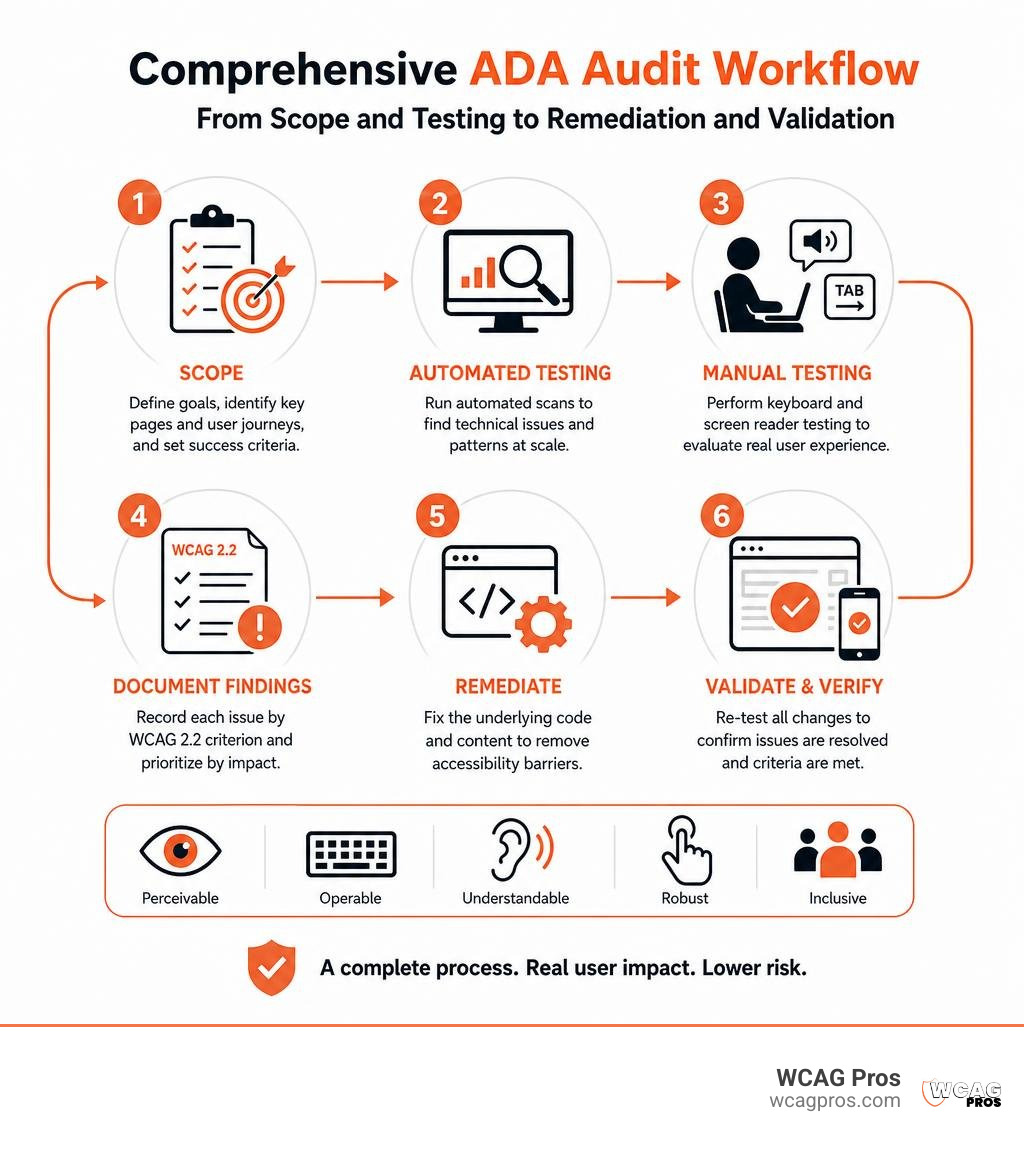
A Comprehensive ADA website audit checks your site against WCAG 2.2 using three layers: automated scanning, manual keyboard and screen reader testing, and review of the pages and journeys that matter most to customers. Start by identifying key templates and tasks such as search, account login, contact forms, booking, and checkout. Then test for barriers, document each issue by WCAG criterion, fix the underlying code, and re-test the changes.
This matters because a scan is only a starting point. Automated tools can spot repeated technical errors at scale, but they cannot reliably judge whether alt text makes sense, focus moves logically through a modal, or a screen reader user can recover from a form error. A meaningful audit tests the experience, not just the markup.
In February 2026, 95.9% of the top one million home pages had detectable WCAG failures, with an average of 56.1 errors per page. The most common problems include low contrast, missing image alternatives, unlabeled form fields, empty links, and empty buttons. These issues can block people from buying, booking, applying, or getting support.
For commercial websites, WCAG 2.2 Level AA is the practical benchmark for reducing ADA risk and building a more usable site. Accessibility also supports clearer structure, better usability, and stronger search visibility. Most importantly, it helps serve the millions of adults in the United States who live with disabilities.
I am Matthew Post, co-founder of WCAG Pros and a web developer with more than 20 years of experience resolving complex website problems. I personally oversee Comprehensive ADA website audit and remediation work to help organizations find real barriers, make practical fixes, and reduce digital accessibility risk.
Quick Comprehensive ADA website audit terms:
- Website accessibility certification services
- website accessibility certification
- Website accessibility code remediation
Legal Regimes and Standards: Title II, Title III, and WCAG 2.2
Navigating web accessibility laws starts with understanding which statutory requirements apply to your organization. In the United States, the Americans with Disabilities Act establishes civil rights protections across public and private life.
State and local government entities fall under ADA Title II. Private commercial businesses, retail stores, healthcare systems, and hospitality brands fall under ADA Title III as places of public accommodation. Organizations operating in California must also adhere to strict local accessibility mandates outlined in California disability access guidelines, where non-compliance can trigger statutory financial liabilities under the Unruh Civil Rights Act.
Federal agencies and vendors selling technology to the federal government must comply with Section 508 of the Rehabilitation Act. Organizations serving international audiences or conducting business in the European Union must align with the European Accessibility Act under European standard EN 301 549. Across all these jurisdictions, the underlying technical rules point directly back to the Web Content Accessibility Guidelines.
Title II Deadlines and Title III Litigation Benchmarks
For state and local governments, the Department of Justice finalized formal web accessibility rules mandating technical compliance. Under an Interim Final Rule published by the DOJ, compliance deadlines were extended to give public sector organizations sufficient time to remediate complex digital properties. Public entities serving populations of 50,000 or more must achieve full WCAG 2.2 Level AA compliance by April 26, 2027. Smaller public bodies and special district governments have until April 26, 2028.
Private businesses governed by ADA Title III do not have a separate formal federal compliance deadline because courts have long treated commercial websites as public accommodations. Federal website accessibility lawsuits filed in 2025 reached 3,117 cases, which represented a 27% increase over 2024. Lawsuits involving digital properties accounted for 36% of all federal ADA Title III filings. Following the certified WCAG audit process gives private businesses the defensible proof required to prevent lawsuits and answer legal demand letters quickly.
Why WCAG 2.2 Is the Required Conformance Standard
The World Wide Web Consortium publishes WCAG as the universal technical standard for digital inclusion. WCAG is structured across four foundational POUR principles:
- Perceivable: Information and user interface components must be presentable to users in ways they can perceive.
- Operable: User interface components and navigation must be fully operable via keyboard and assistive tools.
- Understandable: Information and the operation of the user interface must be understandable.
- Robust: Content must be robust enough that it can be interpreted reliably by a wide variety of user agents, including assistive technologies.
While older regulatory language referenced earlier versions, WCAG 2.2 Level AA is the recognized industry and courtroom benchmark in 2026. WCAG 2.2 introduced critical new success criteria designed to protect users with cognitive, motor, and visual impairments:
- Focus Appearance: Requires high-visibility outlines around active elements so keyboard navigators never lose their place.
- Dragging Movements: Mandates single-point click or tap alternatives for any action requiring drag-and-drop mechanics.
- Target Size (Minimum): Requires interactive touch and click targets to measure at least 24 by 24 CSS pixels to assist users with motor control challenges.
- Accessible Authentication: Eliminates cognitive function tests, like remembering complex passwords or solving puzzles, by supporting copy-paste and password managers.
- Redundant Entry: Prevents unnecessary data re-entry across multi-step checkout and application forms.
Automated Scans vs. Manual Audits: Why Automation Alone Fails

Many business owners wonder why running a free browser tool is not enough to protect them from litigation. Automated scanning tools play an important role during the initial discovery phase, but they evaluate only raw DOM structure without understanding real user experience. A complete automated tools audit should always serve as an initial triage step rather than your final compliance defense.
| Evaluation Factor | Automated Accessibility Scanners | Comprehensive Manual ADA Audit |
|---|---|---|
| Overall WCAG Coverage | Detects roughly 30% to 57% of technical issues | Evaluates 100% of applicable WCAG success criteria |
| Alt Text Quality | Checks if alt attribute exists | Evaluates whether description matches visual context |
| Keyboard Traps | Misses dynamic script focus locks | Manually navigates all modals, menus, and dropdowns |
| Form Error Recovery | Flags missing generic labels | Verifies live screen reader error announcements |
| Legal Defensibility | Low (automated logs reveal unaddressed gaps) | High (produces verified VPAT and ACR documentation) |
| Assistive Tech Testing | None (simulates rule syntax only) | Native testing on NVDA, JAWS, and VoiceOver |
Limitations of Automated Scanners and 57% Detection Rate
Large-scale industry research reveals why automated scanners cannot stand alone. A comprehensive study of over 2,000 audits conducted by Deque demonstrated that automated testing identifies only 57% of digital accessibility issues by volume.
When testing specific barrier types, automated coverage drops significantly. Benchmark testing conducted by the UK Government Digital Service found that 42 out of 143 injected accessibility barriers were completely missed by every automated tool on the market. Individual scanning tools caught between 13% and 40% of barrier types.
Automated scanners cannot evaluate contextual alt text. For example, if an image of a classroom contains an alt tag that says “blue car”, an automated tool marks it as a pass because the alt attribute is present, yet it fails WCAG Success Criterion 1.1.1. Scanners also cannot evaluate logical reading order, verify whether custom ARIA expand states update properly, or detect whether a keyboard user is trapped inside a checkout modal.
The Danger of Overlay Widgets and the FTC Enforcement Precedent
In an attempt to avoid manual remediation, many website owners turned to third-party JavaScript accessibility overlay widgets. These widgets promise instant compliance by floating a small toolbar over the site. In reality, overlay widgets create significant legal exposure.
In the first half of 2025, 22.6% of all federal web accessibility lawsuits targeted websites that had overlay widgets actively installed. Overlays attempt to simulate compliance through client-side scripting without fixing the underlying source code. They address only about 30% of WCAG criteria, leaving deep template errors unresolved.
The Federal Trade Commission took historic enforcement action in 2025 against accessiBe, imposing a $1 million civil penalty for deceptive and unsubstantiated claims regarding automated AI compliance. Installing an overlay widget often acts as an open signal to plaintiff attorneys that a website owner knows their website has accessibility barriers but failed to fix the code.
How to Conduct a Comprehensive ADA Website Audit Step-by-Step
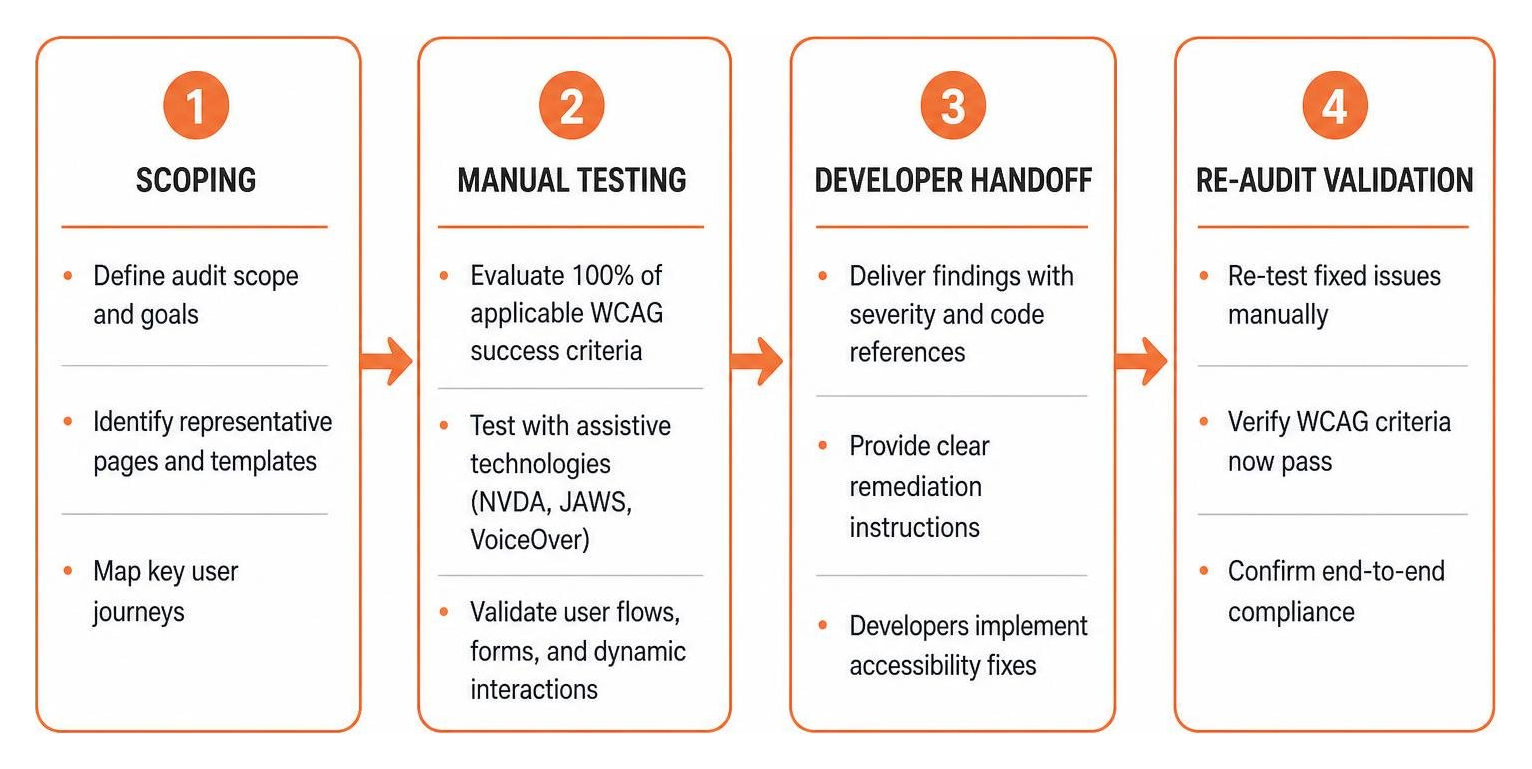
Performing an audit requires a disciplined, structured approach. When we conduct an ADA site-wide audit, we combine automated pattern matching with human inspection of critical digital journeys.
Setting the Scope for a Comprehensive ADA Website Audit
Testing every single URL across an enterprise website containing tens of thousands of dynamic catalog entries is unnecessary. Instead, comprehensive auditing uses representative sampling to evaluate core templates, component design systems, and primary user conversion funnels.
Your audit scope must cover:
- Global page templates: Main homepage, category hubs, search result indexes, standard blog layouts, and contact pages.
- High-value user journeys: Multi-step checkout processes, account creation flows, login portals, billing dashboards, and reservation booking engines.
- Dynamic interactive components: Hamburger navigation menus, modal popups, accordion FAQ widgets, filter drawers, and custom form controls.
- Multimedia assets: Product demonstration videos, audio podcasts, downloadable transactional PDF statements, and graphic data tables.
The 9-Point Manual WCAG 2.2 Self-Check Routine
You can assess your website’s baseline health in less than two hours by running this 9-point manual WCAG self-check:
- Keyboard Navigation (SC 2.1.1): Unplug your mouse. Press the Tab key to navigate from the top of the page to the bottom. Verify you can access every link, button, and form field, and press Shift+Tab to move backward without getting stuck.
- Focus Visible (SC 2.4.7): As you tab through the page, check that a visible outline or halo clearly indicates which element currently has focus.
- Non-text Content (SC 1.1.1): Inspect your non-decorative images. Verify that all informational graphics have concise, meaningful alternative text and purely decorative elements have empty alt attributes (alt=””).
- Color Contrast (SC 1.4.3): Use a contrast inspection tool to verify that body text meets the minimum 4.5:1 ratio against its background, and large text (18pt or 14pt bold) meets at least 3:1.
- Info and Relationships (SC 1.3.1): Check that page headings follow a logical H1 to H6 hierarchy without skipping levels, and ensure tables use proper table header (th) tags.
- Form Labels (SC 3.3.2): Inspect text fields, checkboxes, and select dropdowns to confirm each control has a programmatic label tag connected via matching “for” and “id” attributes.
- Text Reflow (SC 1.4.10): Zoom your desktop browser to 400%. Verify that content reflows into a single vertical column without requiring two-dimensional horizontal scrolling or causing text boxes to collide.
- Captions Prerecorded (SC 1.2.2): Play your embedded videos. Verify that synchronized closed captions are present and accurately represent spoken dialogue and sound effects.
- Name, Role, Value (SC 4.1.2): Inspect custom UI elements like toggle switches or tabbed panels to ensure their roles and states (such as aria-expanded=”true”) are communicated accurately to assistive software.
Assistive Technology and Screen Reader Testing Protocol

Manual inspection must culminate in live testing using assistive software. Native screen reader users interact with web interfaces differently than automated crawlers. A robust testing protocol requires:
- NVDA on Windows running Google Chrome and Mozilla Firefox.
- JAWS on Windows running Microsoft Edge and Chrome.
- VoiceOver on Apple macOS running Safari.
- VoiceOver on iOS and TalkBack on Android to evaluate mobile touch gestures and screen reader voice announcements.
Testers verify that dynamic status messages, like “item added to cart” or “submission failed”, are announced immediately through ARIA live regions without forcing the user to search the page.
Audit Findings, Risk Prioritization, and Remediation Strategy
Once evaluation is complete, the findings must be organized into an actionable technical roadmap. If you are managing fixes internally, learning how to fix your website one page at a time helps keep your development sprints organized and manageable.
Top 6 Accessibility Violations Across the Web
The WebAIM Million 2026 report analyzed one million commercial homepages and revealed that six specific error types account for 96% of all detected failures:
- Low Contrast Text (83.9% of home pages): Light gray text on white backgrounds or dark text on dark buttons that strains readability.
- Missing Alternative Text (53.1% of home pages): Product graphics, infographic banners, and icons lacking descriptive text alternatives.
- Missing Form Input Labels (51.0% of home pages): Checkout and newsletter input fields lacking programmatic labels.
- Empty Links (46.3% of home pages): Hyperlinks containing only icons or background images with no readable anchor text.
- Empty Buttons (30.6% of home pages): Icon buttons, like search submit magnifying glasses or shopping bag icons, lacking text descriptions.
- Missing Document Language (13.5% of home pages): HTML elements lacking the lang attribute (for example, html lang=”en”), preventing screen readers from loading correct pronunciation dictionaries.
The Risk Factor Formula for Lawsuit Mitigation
Litigation exposure is not distributed equally across all accessibility defects. Plaintiff attorneys look for high-impact barriers that prevent users from completing basic transactions.
Many accessibility professionals use a Risk Factor formula to calculate immediate legal exposure:
Risk Score = (User Flow Criticality) x (Barrier Severity) x (Visibility Index)
- User Flow Criticality (1 to 5): Main navigation, account registration, lead capture forms, and checkout payment funnels receive a score of 5. Informational policy footers receive a score of 1.
- Barrier Severity (1 to 5): Total keyboard traps and unlabeled form submit buttons receive a score of 5 because they completely halt transactions. Minor text contrast variances on secondary links receive a score of 2.
- Visibility Index (1 to 5): High-traffic public entry points score a 5, while obscure archived resource pages score a 1.
Remediating items with high combined risk scores protects your business quickly while long-term template fixes are deployed.
What a Professional Comprehensive ADA Website Audit Deliverable Includes
A professional audit deliverable must bridge the gap between executive risk management and engineering execution. At WCAG Pros, our audit reports provide:
- Technical Scope Summary: A clear statement of all URLs, screen resolutions, and operating environments tested.
- Direct WCAG Mapping: Every barrier mapped to its exact WCAG 2.2 success criterion.
- Code-Level Fix Recommendations: Copy-pasteable HTML, CSS, JavaScript, and ARIA code snippets for your developers.
- Visual Proof of Defects: High-resolution screenshots and video recordings showing the barrier in action.
- Formal Documentation: Industry-standard VPATs and ACRs that document your accessibility posture for enterprise procurement and legal defense.
- Signed Letter of Conformance: Issued after remediation re-testing to certify compliance.
Business Benefits and Costs of Web Accessibility Compliance
Investing in accessibility delivers substantial commercial returns beyond reducing lawsuit exposure. Exploring the wide-ranging business benefits of an accessible website shows that digital inclusion improves overall brand performance.
Pricing Factors and Audit Cost Breakdown
The cost of an accessibility audit depends on several core technical factors:
- Template and page volume evaluated during the assessment.
- Interactive complexity of dynamic applications, client portals, and checkout funnels.
- Quality and structure of the underlying codebase.
- Inclusion of native assistive technology user testing and post-remediation validation.
Investing in a thorough manual audit and direct code remediation eliminates ongoing legal exposure. In contrast, resolving an ADA lawsuit through private settlement typically costs tens of thousands of dollars in plaintiff legal fees and damages, not including your own defense costs or the expense of rush remediation under court supervision.
Beyond Lawsuits: SEO, Usability, and Market Reach
Building an accessible digital presence creates significant operational advantages:
- Expanding Market Share: Over 61 million adults in the United States live with a disability, representing substantial purchasing power that is often excluded by inaccessible websites.
- Organic Search Engine Optimization: Accessible design relies on clean semantic HTML, descriptive alt attributes, structured headings, and video transcripts, all of which help search engine crawlers index your content accurately.
- AI Agent Optimization: As autonomous AI agents and voice interfaces browse the web on behalf of consumers, they rely on accessible semantic structure and ARIA labels to complete actions and process data.
- Enhanced Conversion Rates: Streamlined keyboard navigation, legible color contrast, and clear form validation reduce friction and abandonment for all customers.
Frequently Asked Questions About ADA Website Compliance Audits
How much does a professional ADA website audit cost?
Audit costs vary based on page count, template variety, interactive complexity, and whether post-fix re-audits are included. Enterprise web applications with custom portals and extensive transaction workflows require more comprehensive testing than static informational websites.
Can an automated scanner or overlay widget make my website fully compliant?
No. Automated testing tools detect only about 30% to 57% of WCAG violations by volume and cannot evaluate human context, reading order, or dynamic error recovery. Overlay widgets do not fix source code, have been penalized by the FTC for deceptive marketing claims, and appear frequently in federal lawsuits. Complete compliance requires manual code remediation.
What is the difference between a VPAT and an Accessibility Conformance Report (ACR)?
A Voluntary Product Accessibility Template (VPAT) is a standardized document format created by the Information Technology Industry Council. An Accessibility Conformance Report (ACR) is the completed, official document generated after an auditor evaluates your product against accessibility standards. ACR documents are routinely required during corporate procurement and government contract bidding to prove good-faith compliance.
Conclusion
Digital accessibility is an ongoing operational commitment, not a one-time project. As your marketing team publishes new landing pages, developers push software updates, and third-party plugins evolve, regular auditing ensures your digital experience remains open to everyone.
At WCAG Pros, located in Norco, CA, we specialize in comprehensive page-by-page manual audits covering all 54 WCAG Level A through AAA success criteria. We provide clear, code-level remediation guidance for your engineering team and include free re-auditing to validate fixes and issue formal compliance badges.
Protect your organization from legal liability, improve your search engine rankings, and welcome every customer by partnering with WCAG Pros for your comprehensive accessibility audit today.
Read more website accessibility articles
Get Help With Your Website
We'll follow up with info about:
- The process
- Cost
- Timeline
We promise to respect your privacy, and never abuse the information you provide. We will not sell or rent your information to any third party.
By submitting this form, you consent to receive SMS messages and/or emails from SEM Dynamics LLC, dba WCAG Pros. To unsubscribe, follow the instructions provided in our communications. Msg & data rates may apply for SMS. Your information is secure and will not be sold to third parties.