
Writing Image Descriptions That Satisfy Screen Readers and ADA Law
How to Write Image Descriptions for ADA Compliance
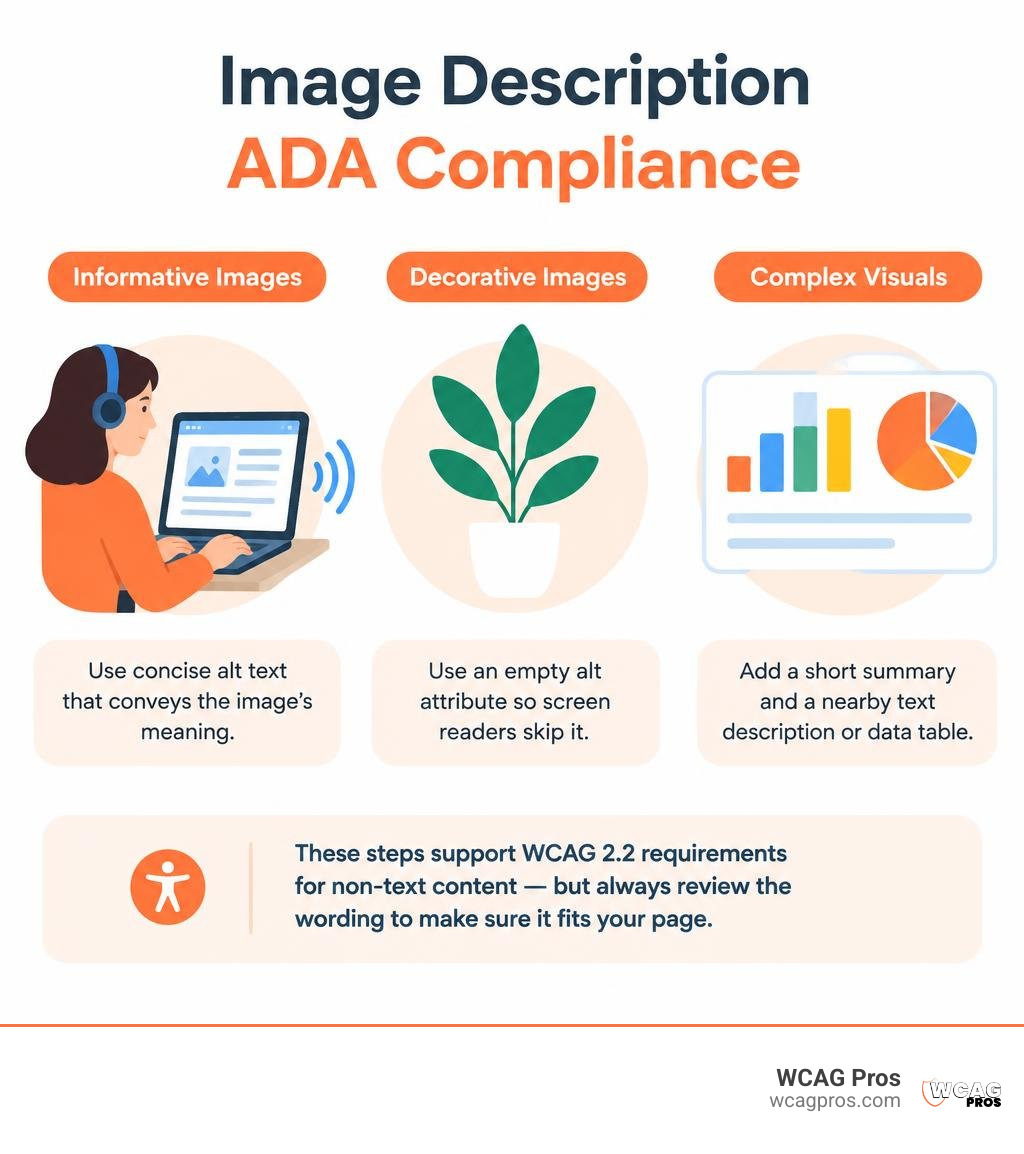
For image description ADA compliance, start with the image’s purpose. Give informative images concise alt text that conveys their meaning. Describe what a linked image does or where it goes. Mark purely decorative images with an empty alt attribute so screen readers skip them. For charts and other complex visuals, add a short summary and a nearby text description or data table. These steps support WCAG 2.2 requirements for non-text content, but the wording still needs a human review to make sure it fits the page.
I’m Matthew Post, co-founder of WCAG Pros, and I have spent more than 20 years working in web development. I oversee WCAG audits and remediation, including reviews of image description for ADA compliance, and this guide will show you how to apply those checks to your own content.
Key resources for mastering these standards include understanding an ADA audit, running a WCAG color contrast check, and learning how to build an ADA compliant website.
Visual content drives the modern web. From e-commerce product photos and branding logos to intricate infographics, images convey critical data and set an emotional tone. Yet fewer than 1% of images online contain accessible text descriptions for individuals who live with vision loss.
Visual impairment exists on a broad spectrum rather than a simple binary. Many people navigate digital environments using assistive technologies like screen readers or refreshable Braille displays, while others rely on screen magnification and high-contrast display modes. Beyond total blindness, millions of individuals live with print disabilities or low vision. Globally, the disability community controls $1.9 trillion in annual disposable income, expanding to over $10.7 trillion when factoring in family networks.
When you implement clear text alternatives, you trigger the curb-cut effect. Just as physical sidewalk ramps originally designed for wheelchair users benefit parents pushing strollers and travelers wheeling heavy luggage, accessible image descriptions provide essential fallback text during poor connectivity, assist low-vision readers who disable image rendering to save mobile bandwidth, and provide structured context to search engine web crawlers.
Legal Standards for Image Description ADA Compliance
In the United States, digital accessibility is anchored in federal civil rights law. The Americans with Disabilities Act prohibits discrimination against individuals with disabilities, mandating equal access across public and private spaces. When images lack appropriate text alternatives, assistive technologies cannot interpret the pixels, effectively shutting out users from accessing essential goods, public resources, and services.
The Department of Justice enforces digital accessibility under both Title II and Title III of the statute. According to official federal web accessibility guidance, missing alternative text ranks among the most frequent barriers encountered by blind and low-vision web visitors. Federal courts evaluate digital barriers using the legal standard of meaningful access, ensuring that disabled individuals receive an equivalent level of communication and independent utility.
Private sector organizations that ignore accessible image authoring face severe litigation exposure. Plaintiff law firms frequently target missing, broken, or generic image tags because automated scanning tools easily detect empty image tags. Understanding these legal frameworks under the ADA helps organizations mitigate lawsuit risks while building inclusive digital experiences.
Title II and Title III Digital Mandates
Title II applies directly to state and local government entities, public school districts, municipal utilities, and public transit authorities. Under Title II rules, public entities must ensure their web pages and mobile applications offer nondiscriminatory access. They cannot outsource or contract away their legal responsibilities. If an agency uses third-party digital vendors or software platforms, the agency remains legally accountable for any inaccessible media those vendors publish.
Title III governs private commercial enterprises classified as public accommodations, including online retailers, financial institutions, private healthcare networks, restaurants, and entertainment venues. Under Title III effective communication regulations, businesses must provide auxiliary aids and services to guarantee equal participation. A failure to provide descriptive alternatives for informational graphics denies equal enjoyment of online commerce, exposing commercial website owners to regulatory enforcement and civil liability.
Technical Success Criteria Under WCAG 2.2
The Web Content Accessibility Guidelines serve as the globally recognized technical benchmark for legal compliance. When evaluating visual assets, teams must align their content with WCAG Non-text Content requirements under Success Criterion 1.1.1 at Conformance Level A. This criterion requires web authors to provide text alternatives that serve an equivalent purpose for any non-text element.
At Level AA, Success Criterion 1.4.5 restricts the use of images of text. Except for corporate logos, customizable font interfaces, or essential visual representations like historical documents, authors should render words as live HTML text rather than rasterized images. Baking typography into visual graphics prevents text resizing, distorts resolution on screen magnification software, and blocks user-selected contrast styling. Conformance Level AAA extends these principles under Success Criterion 1.4.9, prohibiting images of text entirely unless strictly decorative.
Core Differences Between Alt Text, Captions, and Extended Descriptions
Creating compliant visual content requires distinguishing between the distinct tools available in web publishing. Content creators often confuse alt text, on-page captions, and extended descriptions, using them interchangeably. Each tool serves a specific structural purpose, addresses different user needs, and functions through different technical mechanisms.
Alt text is coded directly into the image element using HTML attributes. It remains visually hidden from standard web layouts and is parsed primarily by assistive software. When a screen reader encounters an image with alt text, it announces the presence of the graphic and reads the descriptive string linearly in a single pass. The browser also renders this alt attribute text on the screen if an image file fails to load due to broken server paths or weak mobile network connections.
Captions represent visible text positioned adjacent to a graphic. They offer editorial commentary, cite photographic credits, or provide supplementary background details intended for everyone who views the page. Unlike alt text, a caption does not automatically substitute for a direct description of what the image visually communicates.
Extended descriptions provide detailed breakdowns for complex visual media such as geological diagrams, multi-axis scatter plots, and maps. They can live directly within the surrounding body text, inside an expandable disclosure widget, or on a linked supplementary web page. Authors should consult W3C image accessibility standards when structuring multi-layered descriptions.
| Feature | Alt Text | Image Captions | Extended Descriptions |
|---|---|---|---|
| Primary Placement | HTML image attribute (alt) |
Visible on-page text | Nearby copy, accordion, or linked page |
| Primary Audience | Screen reader users, search crawlers | All website visitors | Low-vision users, data analysts, students |
| Typical Length | 1 to 2 concise sentences | 1 sentence or phrase | Multi-paragraph or structured data table |
| Visual Display | Hidden unless image load fails | Always visible below image | Always visible or expandable on demand |
| Core Function | Direct visual equivalence | Context, credit, or backstory | Exhaustive data or spatial breakdown |
Choosing the Right Text Alternative for Users
Selecting the correct descriptive approach depends on your editorial intent and the surrounding context of the page. Never duplicate the visible caption text word-for-word inside the alt attribute. Doing so forces screen reader users to listen to the exact same phrasing twice in rapid succession.
Instead, let the caption supply external context such as dates, locations, or photographer attributions, while the alt text describes the meaningful visual action and subject matter. For readers with residual vision who rely on screen magnifiers, visible descriptions provide clarity without requiring full assistive audio translation. Search engines also index visible descriptions and alt text differently, using both signals to index page topics accurately.
Technical Implementation with Semantic HTML and ARIA
To present visual media cleanly, web developers should use semantic HTML5 elements. Wrapping an image and its corresponding visible description inside a semantic figure tag establishes an unambiguous structural relationship:
When authoring complex graphics that require detailed data breakdowns, the aria-describedby attribute programmatically links an image to an extended text block elsewhere on the page:
If an element serves solely as a decorative design motif, combining an empty alt tag with an explicit presentation role informs assistive engines to bypass the asset entirely without announcing extraneous DOM nodes.
How to Write Compliant Image Descriptions for Different Visual Assets

Writing high-quality text alternatives requires balancing brevity with precision. Rather than describing every minute visual detail, such as the color of a distant wall or background lighting reflections, focus on the core communication goal of the image. Adhering to federal Section 508 authoring guidelines ensures your descriptions remain informative, objective, and contextually grounded.
A reliable method for writing effective descriptions is the Subject, Action, and Setting framework. Identify who or what the primary subject is, explain what action is occurring, and note the relevant environment only if it contributes to the meaning of the content.
Write using active present tense verbs to keep sentence length tight. For example, instead of writing “A group of three doctors who are standing together and reviewing patient records in a hospital corridor,” write “Three physicians review patient records in a hospital hallway.” This eliminates unnecessary auxiliary verbs while conveying the exact same message.
When describing public figures, state their full name directly rather than detailing generic physical traits. For photographs of unidentified individuals, maintain an objective, respectful, and non-assumptive tone regarding demographic attributes like race or gender unless those identities are explicitly relevant to the surrounding article. For scanned or digital signatures, format the alt text cleanly as “Signature: Jane Doe” instead of describing cursive penmanship styles.
Decorative Versus Informative Images
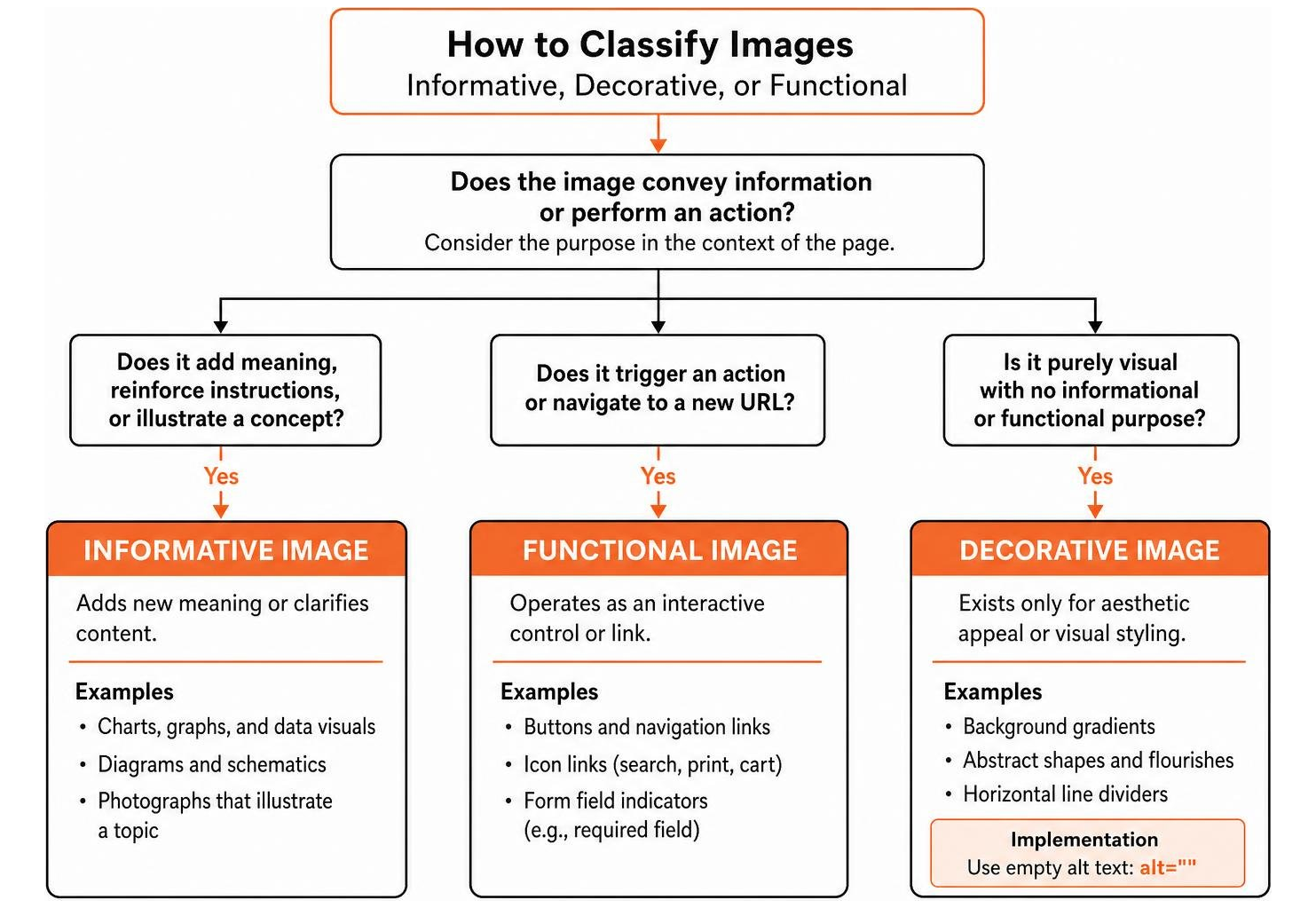
Before writing any text alternative, determine whether the visual asset is informative, functional, or decorative. An image is informative if it adds new meaning, reinforces instructions, or illustrates a concept described in the text. An image is functional if clicking it triggers an action or navigates to a new URL.
Decorative images exist solely for aesthetic appeal, visual styling, or atmospheric polish. Examples include generic background gradients, abstract geometric flourishes, and visual horizontal line dividers. Ensuring the proper handling of decorative images is vital for accessibility compliance.
If you omit the alt attribute completely from an HTML image tag, screen readers often default to reading out the raw image file name, such as “bannerherov2_final.png”, creating a frustrating listening experience. To silence decorative graphics, assign an empty null attribute using alt="".
Effective Image Description for ADA Compliance in Complex Graphics

Data visualizations, technical engineering schematics, and multi-variable scatter plots present unique accessibility challenges. An alt attribute with a brief character limit cannot adequately summarize forty distinct data points or sequential workflow relationships.
For complex visuals, use a two-part descriptive strategy:
- Provide a high-level summary within the image alt attribute that identifies the chart type, the metrics measured, and the overall trajectory or primary conclusion.
- Provide a fully structured text equivalent directly below the graphic, such as an accessible HTML data table or a nested ordered list detailing the exact data points.
For instance, when presenting an epidemiological bar chart illustrating seasonal infection spikes, your alt text might read: “Bar graph showing influenza hospitalization rates rising sharply from October through January, peaking at 120 admissions per 100,000 residents.” Immediately following the graphic, include a clean HTML data table providing the monthly numbers for all plotted regions.
Functional Icons and Action Buttons
When an image operates as an interactive control, such as a standalone navigation button or hyperlinked icon, standard descriptive rules change. Assistive technology users do not need to know what the icon visually looks like. They need to know what action will occur when they activate the control.
Avoid writing alt text like “Drawing of a small magnifying glass” or “Blue silhouette of a printer.” Instead, describe the functional outcome or destination:
- Magnifying glass icon button:
alt="Search site" - Printer icon link:
alt="Print this article" - Shopping bag icon button:
alt="View shopping cart with 3 items" - Form field indicator:
alt="Required field"rather thanalt="Red asterisk"
Best Practices and Quality Workflows for Digital Teams
Achieving consistent image accessibility across a large digital ecosystem requires treating alternative text as a core editorial responsibility rather than an afterthought for developers. Content creators, marketing teams, and graphic designers must collaborate to verify visual assets before publishing them to live servers.
While automated scanning software helps flag completely missing image tags, automated tools cannot judge whether a written description accurately reflects the editorial context of the page. Integrating manual verification protocols and testing web assets with screen readers allows your team to experience your content exactly as assistive technology users do.
Avoiding Common Alt Text Traps
Content teams frequently make several common mistakes when writing image descriptions:
- Redundant filler phrases: Do not begin descriptions with “Image of,” “Photo of,” or “Graphic showing.” Screen reading software automatically announces the presence of an image element before reading the alt text, making these introductory phrases repetitive. You should, however, specify the artistic medium if relevant, such as “Oil painting of…” or “Architectural blueprint showing…”
- Keyword stuffing: Never treat alt text as a repository for repetitive search engine optimization keywords. Packing irrelevant marketing terms into alt attributes harms comprehension for screen reader users and risks search engine ranking penalties for deceptive practices.
- Copying visible captions: Reusing identical text across captions and alt tags creates frustrating audio redundancy.
- Missing closing punctuation: Always conclude your alt text sentences with a period. Screen reading engines use periods to insert natural vocal pauses between the image description and the surrounding body paragraphs.
- Unedited AI outputs: Modern automated vision models frequently misinterpret visual context, hallucinate emotional states, or overlook critical text baked into screenshots. Never push AI-generated alt text directly to production without manual human review.
Organizational Workflows for Image Description ADA Compliance
To maintain long-term compliance, organizations must embed accessibility gates into their daily publishing operations:
- Mandate image tags at the CMS upload level: Configure your Content Management System to prompt authors for alt text or require an explicit decorative confirmation checkbox before an asset can be placed on a page.
- Transcribe text in images verbatim: If an infographic, event banner, or social announcement graphic contains typography, transcribe the exact wording into the alt attribute or accompanying body copy.
- Synchronize localized content: When translating digital content into multiple languages, ensure that all image alt attributes are fully translated alongside the primary page copy.
- Maintain a centralized asset library: Store verified, compliant alt text strings directly within your Digital Asset Management platform so reusable company logos, staff headshots, and product photos carry compliant metadata whenever they are deployed across new pages.
- Conduct regular staff training: Provide ongoing web accessibility training for newly hired content authors, editors, and front-end engineers.
Frequently Asked Questions About Image Description ADA Compliance
What is the recommended length for ADA compliant alt text?
For standard informative images, aim for one to two concise sentences, typically between 50 and 125 characters. This provides sufficient room to capture the core subject and context without overwhelming the listener. If a graphic contains deeper data that requires a longer explanation, summarize the main takeaway in the alt text and place the complete description in the surrounding page content or link to a data table.
Can AI tools generate compliant image descriptions automatically?
Artificial intelligence vision models can serve as a helpful starting draft for content creators, but they cannot ensure ADA compliance on their own. Automated models often miss the specific editorial intent of why an image was chosen for a particular article, and they struggle with subtle emotional expressions and complex diagrams. A qualified human editor must review and adjust all AI-generated descriptions before publication.
How should purely decorative graphics be coded for screen readers?
Purely decorative graphics must be coded with an empty null attribute (alt=""). This informs assistive software that the image carries no informational value, allowing the screen reader to skip past the graphic smoothly. Never use words like “null” or “decorative” inside the quotes, as the screen reader will read those words aloud to the user.
Conclusion
Building an accessible digital ecosystem is not a one-time project. It is an ongoing practice of inclusive communication. High-quality image descriptions protect your organization from legal liability while welcoming millions of blind, low-vision, and print-disabled individuals into your digital community.
Achieving reliable image accessibility across complex web architectures requires rigorous standards and deep technical expertise. At WCAG Pros, our team provides comprehensive page-by-page evaluations covering all 54 WCAG Level A and AA success criteria, delivering clear code remediation guidance and free re-audits. To ensure your digital assets provide equal access to all users, explore our comprehensive WCAG audit and remediation services today.
Read more website accessibility articles
Get Help With Your Website
We'll follow up with info about:
- The process
- Cost
- Timeline
We promise to respect your privacy, and never abuse the information you provide. We will not sell or rent your information to any third party.
By submitting this form, you consent to receive SMS messages and/or emails from SEM Dynamics LLC, dba WCAG Pros. To unsubscribe, follow the instructions provided in our communications. Msg & data rates may apply for SMS. Your information is secure and will not be sold to third parties.