
How to Hire a WordPress ADA Compliance Consultant Without Losing Your Mind
How to Hire a WordPress ADA Compliance Consultant Without Losing Your Mind
Is Your WordPress Site Legally Accessible? Here’s What You Need to Know First
A WordPress ADA compliance consultant helps businesses audit, fix, and maintain their WordPress websites to meet WCAG 2.2 AA standards and reduce the risk of ADA lawsuits.
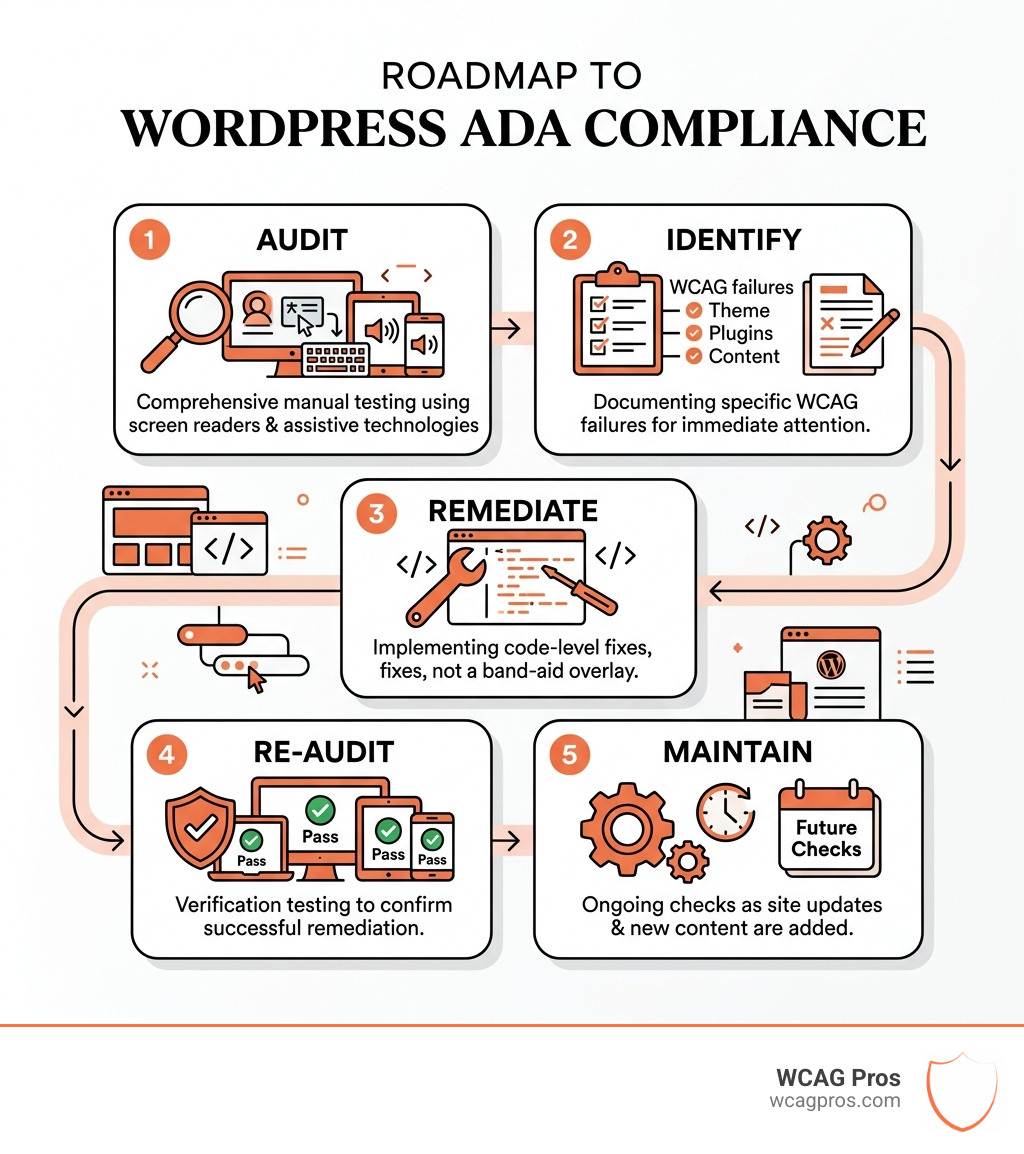
Here is what a qualified consultant should do for you:
- Audit your site manually, page by page, using screen readers and keyboard testing
- Identify specific WCAG failures across your theme, plugins, and content
- Remediate issues at the code level, not with a band-aid overlay widget
- Re-audit to confirm fixes before issuing any compliance documentation
- Maintain compliance over time as your site gets updates and new content
WordPress powers over 42.7% of all websites globally. That is a massive footprint. And yet, the majority of those sites fail basic ADA accessibility requirements. In 2024 alone, more than 2,452 website accessibility lawsuits were filed in federal court, accounting for 28% of all Title III ADA cases. If your WordPress site is not accessible, you are exposed.
This is not just a legal problem. Over 61 million Americans live with a disability, and disabled Americans control more than $200 billion in online discretionary spending. An inaccessible site does not just risk a lawsuit. It turns away real customers every single day.
I am Matthew Post, co-founder of WCAG Pros and a web developer with over 20 years of experience specializing in WCAG compliance and accessibility remediation. I have personally audited and overseen the remediation of hundreds of WordPress sites, and I know exactly where businesses go wrong when searching for a WordPress ADA compliance consultant. In this guide, I will walk you through everything you need to make a smart, confident decision.
WordPress ADA compliance consultant further reading:
Why Your Business Needs a WordPress ADA Compliance Consultant in 2026
As we move through 2026, the digital landscape is more regulated than ever. The Department of Justice (DOJ) has made it clear that websites are considered “places of public accommodation” under Title III of the Americans with Disabilities Act (ADA). This means if your website is not accessible, you are technically in violation of federal law.
The numbers are sobering. In 2024, plaintiffs filed over 4,600 ADA lawsuits against organizations with inaccessible websites. By mid-2025, that number had already climbed significantly, with nearly 5,000 lawsuits filed in just the first half of the year. For business owners in Norco, CA and across the country, this represents a massive financial risk. Civil penalties for a first violation can reach as high as $92,000, while subsequent violations can skyrocket to approximately $184,000.
Beyond the fear of a courtroom, there is a massive market opportunity at stake. The U.S. is home to 61 million individuals with disabilities and 71 million Baby Boomers. Together, they represent a demographic with significant spending power. If your site has keyboard traps, missing alt text, or low color contrast, you are effectively closing your doors to one in four U.S. adults.
Hiring a WordPress ADA compliance consultant is not just about avoiding a “demand letter” in the mail. It is about why your business needs an ADA compliance consultant right now to capture that $200 billion in discretionary spending and improve your overall SEO. Search engines love accessible sites because they are well-structured, easy to crawl, and provide a superior user experience.
The Hidden Dangers of Automated Plugins and Overlays
If you have spent any time looking into ADA compliance WordPress 101, you have likely seen advertisements for “accessibility overlays” or “AI widgets” that promise to make your site compliant with a single line of code.
We have a professional opinion on this: stay away.
These tools are often described as “band-aids” on a broken leg. While they might change the font size or contrast for a user, they do not fix the underlying structural code of your WordPress theme or plugins. In fact, many screen reader users find these overlays intrusive and frustrating because they often interfere with the user’s own assistive technology.
Research shows that approximately 20% of ADA website lawsuits in the past year targeted sites that were already using an overlay. They do not provide legal protection. Instead, they often act as a “flag” for plaintiff attorneys looking for easy targets. True compliance requires WordPress ADA compliant code remediation that addresses the root of the problem.
| Feature | Automated Overlays | Manual Code Remediation |
|---|---|---|
| Fixes Source Code | No | Yes |
| Legal Protection | Low (Often targeted) | High (Defensible) |
| User Experience | Can be intrusive | Seamless and inclusive |
| WCAG 2.2 Coverage | 30-40% | 100% |
| SEO Benefit | None | Significant |
Essential Qualities and Methodology for WordPress Remediation
When you are looking for a WordPress ADA compliance consultant, you need to look past the sales pitch and dive into their methodology. WordPress is a unique beast. Because it relies on a combination of core code, third-party themes, and various plugins, a “one size fits all” audit simply will not work.
A professional audit must be based on the Web Content Accessibility Guidelines (WCAG) 2.2 AA. This is the current gold standard. Your consultant should be looking at semantic HTML, ARIA attributes, and keyboard navigation. If they are only running an automated scan and handing you a PDF, they are not doing their job. A WCAG audit should be a comprehensive, page-by-page review of your unique templates and high-value user journeys.
Proven Methodology for a WordPress ADA Compliance Consultant
The best consultants follow a rigorous process that combines technology with human insight. At WCAG Pros, we believe that no amount of software can replace the lived experience of a human being.
Our methodology includes:
- Manual Testing: Navigating the site using only a keyboard to ensure no “keyboard traps” exist.
- Screen Reader Testing: Using tools like NVDA or JAWS to ensure the site makes sense when read aloud.
- User Testing: Engaging testers with disabilities to verify that the site is actually usable, not just technically compliant.
- Remediation Roadmap: Providing a clear, developer-ready guide on how to fix every identified issue.
Knowing how to choose the right web accessibility consultant for 2025 and beyond involves asking if they provide the ADA web consultation your roadmap to digital inclusion that includes a re-audit. You need to know that once the fixes are implemented, they actually work.
Documentation and Ongoing Maintenance Requirements
Compliance is not a “one and done” project. Every time you update a plugin, change your theme, or add a new blog post, you risk breaking your accessibility. A qualified WordPress ADA compliance consultant will help you set up an accessibility statement for your footer. This statement tells the world (and potential litigants) that you are committed to inclusion and provides a way for users to report issues.
You may also need a Voluntary Product Accessibility Template (VPAT) if you are working with government entities or large corporations. Beyond documentation, you need professional ADA remediation services you can trust to provide ongoing monitoring. We recommend regular check-ups to ensure that new content remains accessible and that your team is trained on best practices for image alt text and heading structures.
Frequently Asked Questions about WordPress Accessibility
What is the typical cost for a WordPress ADA Compliance Consultant?
We understand that budget is a major concern for businesses in Norco, CA. The cost of a WordPress ADA compliance consultant typically depends on the complexity of your site. A simple 10-page site will naturally cost less to audit and remediate than a complex e-commerce platform with thousands of products.
Generally, you are looking at three main cost centers:
- The Audit: A manual, deep-dive into your site’s current state.
- Remediation: The actual coding work to fix the errors.
- Maintenance: Ongoing monitoring and re-testing.
While it might seem expensive upfront, professional ADA remediation services you can trust are an investment in risk mitigation. A quiet settlement for a lawsuit can easily cost $20,000 to $50,000, which is far more than the cost of being proactive.
Which WCAG level should my WordPress site target?
For the vast majority of WordPress sites, you should target WCAG 2.2 Level AA.
- Level A: The bare minimum (not enough for legal protection).
- Level AA: The standard referenced by the DOJ and most international laws.
- Level AAA: The highest level, usually reserved for specialized sites.
Following ADA compliance WordPress 101 means aiming for AA. This level covers the most common barriers, such as color contrast, navigation consistency, and form labeling.
Can I use free tools for an initial WordPress check?
Yes, tools like WAVE or Google Lighthouse are great for a “quick and dirty” check. They can catch about 30% to 40% of the most obvious errors, like missing alt text or low contrast. However, they cannot tell you if your site is truly WordPress ADA compliant. They cannot feel if a menu is frustrating to navigate with a keyboard or if a screen reader is announcing a pop-up correctly. Use free tools to get started, but rely on a consultant for the heavy lifting.
Conclusion
Navigating web accessibility can feel like walking through a minefield, but it does not have to be that way. By hiring a specialized WordPress ADA compliance consultant, you are protecting your business from legal threats, improving your SEO, and opening your doors to a massive, underserved market.
At WCAG Pros, we pride ourselves on being more than just auditors. We are your partners in digital inclusion. Based in Norco, CA, we provide comprehensive, page-by-page audits of all 54 WCAG A/AA points. We do not just give you a list of problems; we provide the code fixes to solve them. Our process includes free re-audits and compliance badges to give you and your users peace of mind.
If you are ready to stop worrying about lawsuits and start building a better website for everyone, we are here to help.
- Learn more about us
- Start your WCAG remediation journey
- Contact us today for a consultation
Read more website accessibility articles
Get Help With Your Website
We'll follow up with info about:
- The process
- Cost
- Timeline
We promise to respect your privacy, and never abuse the information you provide. We will not sell or rent your information to any third party.
By submitting this form, you consent to receive SMS messages and/or emails from SEM Dynamics LLC, dba WCAG Pros. To unsubscribe, follow the instructions provided in our communications. Msg & data rates may apply for SMS. Your information is secure and will not be sold to third parties.