
Professional Accessibility Remediation Plan: Moving from Audit Gaps to Conformance
Understanding WCAG 2.2 Success Criteria and Compliance Shifts
A practical WCAG 2.2 remediation plan starts by triaging audit findings into severity tiers, prioritizing global templates and high-conversion user flows, repairing recurring code failures with semantic HTML and ARIA, and validating fixes through hybrid automated and manual assistive technology testing. This structured approach moves your digital product from audit gaps to conformance while reducing legal risk.
Digital accessibility evolves alongside modern interface design. As web applications have grown more dynamic, user experience patterns have shifted toward touch screens, interactive overlays, and complex authentication flows. The publication of the W3C Web Content Accessibility Guidelines 2.2 Specification introduced critical updates designed to solve modern usability hurdles for people with disabilities. In October 2026, building an effective remediation roadmap requires a firm grasp of these updated criteria and their legal implications under standards such as the Washington State Digital Accessibility Standard and federal ADA enforcement frameworks.
WCAG 2.2 operates on a dot-release architecture. This means it directly builds on top of WCAG 2.0 and WCAG 2.2 requirements while maintaining full backward compatibility. If your digital product achieves conformance with WCAG 2.2 Level AA, it automatically satisfies earlier standards. Organizations seeking a complete transformation should explore our comprehensive website remediation guide to see how these criteria fit into broader digital governance.
| Success Criterion | Name | Level | Primary User Impact |
|---|---|---|---|
| 2.4.11 | Focus Not Obscured (Minimum) | AA | Prevents sticky headers or banners from hiding keyboard focus |
| 2.4.12 | Focus Not Obscured (Enhanced) | AAA | Ensures focused elements remain fully visible without any overlap |
| 2.4.13 | Focus Appearance | AAA | Mandates high contrast and perimeter area thresholds for focus rings |
| 2.5.7 | Dragging Movements | AA | Provides single-pointer alternatives for drag-and-drop interactions |
| 2.5.8 | Target Size (Minimum) | AA | Requires interactive touch targets to be at least 24 by 24 CSS pixels |
| 3.2.6 | Consistent Help | A | Ensures support channels appear in the same relative order across pages |
| 3.3.7 | Redundant Entry | A | Prevents users from having to re-enter information within the same process |
| 3.3.8 | Accessible Authentication (Minimum) | AA | Eliminates cognitive tests during login unless alternatives exist |
| 3.3.9 | Accessible Authentication (Enhanced) | AAA | Removes cognitive tests and object recognition from all security checks |
Key Additions: Focus, Authentication, and Target Size Criteria
The new criteria in WCAG 2.2 focus heavily on cognitive accessibility, low vision support, and motor dexterity.
Success Criterion 2.4.11 Focus Not Obscured Minimum requires that when a user navigates via keyboard, the focused element must not be entirely hidden by author-created content. Floating cookie banners, sticky headers, and fixed promotional footers frequently violate this rule by covering focused form fields or buttons.
Success Criterion 2.5.7 Dragging Movements ensures that any interface action requiring a drag operation can also be completed using simple single pointer clicks or taps. For example, a kanban board that lets users drag cards between columns must also provide standard up or down buttons or a dropdown menu to move items without dragging.
Success Criterion 2.5.8 Target Size Minimum establishes that clickable or tappable targets must measure at least 24 by 24 CSS pixels, unless adequate spacing exists around them or the control is part of an inline sentence. This prevents accidental taps for users with hand tremors or mobile touch users.
Cognitive support criteria include Success Criterion 3.2.6 Consistent Help, which requires help features like chat widgets or support links to remain in the same relative location across page templates. Success Criterion 3.3.7 Redundant Entry prevents repetitive data entry by demanding that systems auto-populate previously entered fields in multi-step checkouts or applications. Finally, Success Criterion 3.3.8 Accessible Authentication Minimum prevents websites from requiring cognitive function tests such as memorizing complex passwords, solving math problems, or recognizing puzzles unless an assistive method like WebAuthn, password manager autofill, or copy-paste is supported.
The Deprecation of Criterion 4.1.1 Parsing and Impact on Auditing
One major structural update in WCAG 2.2 is the formal deprecation and removal of Success Criterion 4.1.1 Parsing. When WCAG 2.0 was published in 2008, assistive technology software often parsed raw HTML markup directly. If developers had unclosed tags or duplicate attributes, screen readers would crash or misinterpret the page.
Modern web browsers handle HTML parsing errors uniformly using standardized DOM repair specifications. Assistive technology now interacts directly with the browser accessibility tree rather than raw markup. Because modern browsers automatically correct parsing quirks, Success Criterion 4.1.1 became redundant. In our audits and remediation projects, we no longer flag pure HTML validation errors under 4.1.1 unless those errors directly break programmatic names or roles under Success Criterion 4.1.2 Name, Role, Value.
Step-by-Step Framework for Building a WCAG 2.2 Remediation Plan
Turning a complex audit into a functional development backlog requires a systematic approach. Without structured project management, remediation efforts often lose momentum, leaving organizations exposed to legal risks and technical debt.

Teams can reference our guide on definitive steps for WCAG 2.2 code remediation to coordinate engineering sprints. Using a standardized structure like the Structured Accessibility Audit Report Template helps engineering teams categorize findings by severity, page location, and estimated developer hours.
| Severity Tier | Definition & Impact Level | Target Resolution Window | Example Defects |
|---|---|---|---|
| Tier 1: Critical (P0) | Complete operational blockers in core user journeys | 1 to 14 Business Days | Keyboard traps, inaccessible checkout buttons, obscured login fields |
| Tier 2: High (P1) | Significant barriers that severely degrade usability | 15 to 45 Business Days | Low contrast text, missing form labels, lack of single-pointer dragging alternatives |
| Tier 3: Moderate (P2) | Navigational hurdles or minor compliance gaps | 46 to 90 Business Days | Skipped heading levels, target size below 24px with nearby links, inconsistent help placement |
| Tier 4: Low (P3) | Minor cosmetic or best-practice enhancements | Next Major Release Cycle | Redundant alt text on non-critical images, non-standard link styling |
Establishing Priorities Within Your WCAG 2.2 Remediation Plan
Prioritizing your backlog should balance user impact with business risk. We always advise starting remediation on global templates and design systems before touching individual landing pages.
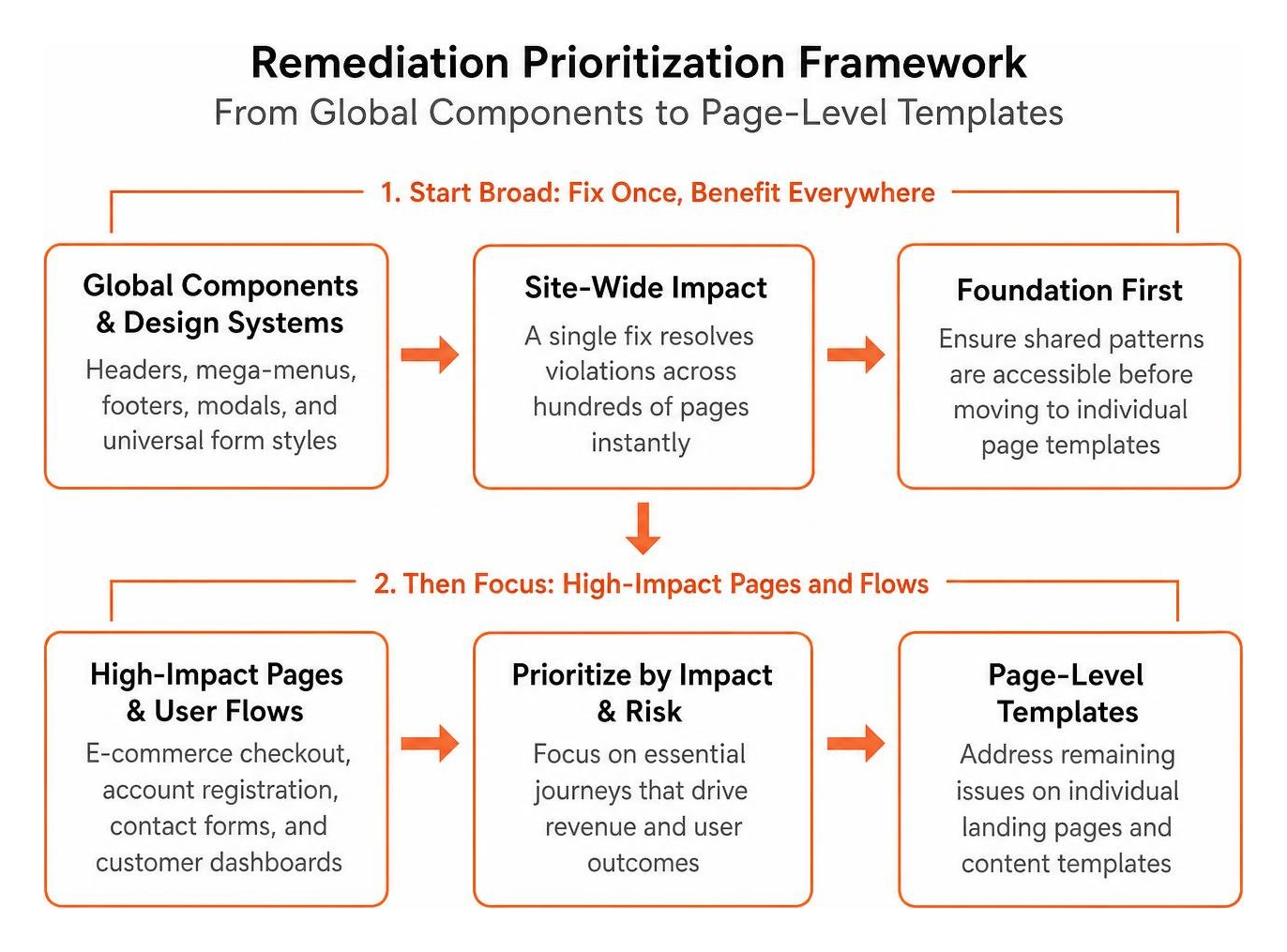
Begin by auditing and repairing shared components such as site headers, mega-menus, footers, modal frameworks, and universal form styles. A single code fix in your navigation component can resolve hundreds of individual audit violations across thousands of web pages instantly.
Once global components are solid, focus directly on high-conversion paths and essential user flows. E-commerce checkout funnels, account registration pages, contact forms, and customer dashboards must take precedence over static marketing content.
Resolving High-Frequency Code Failures and Structural Gaps
Most web audits uncover a recurring set of common defects. When executing professional WCAG code remediation, our engineers focus on replacing fragile custom widgets with robust semantic HTML and clean ARIA patterns.
Common technical fixes include:
- Replacing non-semantic button elements built from unstyled divs with native
tags to guarantee keyboard focus and activation. - Eliminating keyboard traps in custom modal dialogs by implementing JavaScript focus containment and binding the Escape key to close actions.
- Updating color variables across central CSS design tokens to guarantee a minimum contrast ratio of 4.5 to 1 for body copy and 3 to 1 for large headings and interface controls.
- Adding programmatic associations between form inputs and their descriptions using
andaria-describedbyattributes. - Refactoring drag-and-drop components by attaching auxiliary single-pointer click events or numerical ordering inputs.
- Adjusting CSS scroll-margin-top properties on focusable elements to ensure sticky navigation bars do not obscure active focus rings.
Validating Fixes with Hybrid Automated and Manual QA Testing
Automated testing tools like axe-core, Lighthouse, and WAVE provide rapid coverage for structural markup and color contrast issues. However, automated scanners can only detect between 30% and 40% of all WCAG violations.
The remaining 60% to 70% of accessibility criteria require expert manual testing. Screen readers like NVDA on Windows and VoiceOver on macOS and iOS must be used to test navigation flow, dynamic announcements, and form submission feedback. Testers must also perform complete keyboard-only walkthroughs to ensure focus indicators are visible and logical throughout every state change.
Sustainable Accessibility Workflows and Future Standards
Remediation should not be treated as a one-time clean-up project. If accessibility practices are not embedded into everyday workflows, technical debt inevitably returns with every software release.

Forward-thinking organizations review our remediation services overview to learn how we help development teams transition from reactive bug fixing to sustainable, proactive accessibility management.
Embedding a Sustainable WCAG 2.2 Remediation Plan into CI/CD Pipelines
To maintain conformance over time, teams should integrate accessibility testing directly into their continuous integration and continuous deployment pipelines. Automated end-to-end testing frameworks like Playwright and Cypress can run automated accessibility scanners against rendered components during pull requests.
Integrating pre-commit linters and automated tests catches regressions before bad markup reaches production. When a developer submits code that lacks an accessible name or introduces low-contrast text, the CI pipeline flags the issue immediately, saving hours of manual review downstream.
Privacy, Security, and Preparing for Future Guidelines
Modern accessibility must coexist smoothly with enterprise security requirements. Success Criterion 3.3.8 Accessible Authentication highlights the intersection of privacy, security, and cognitive accessibility. Requiring users to remember complicated passwords or type codes from external authenticator apps without clipboard support creates severe cognitive barriers.
Supporting browser autofill, password managers, and biometric WebAuthn logins improves both security and digital accessibility. Looking ahead, the W3C is developing WCAG 3.0, which introduces outcome-based scoring (Bronze, Silver, and Gold conformance tiers) across emerging technologies like conversational user interfaces and mobile applications. By conforming to WCAG 2.2 today, your organization establishes the architectural foundation needed to adapt smoothly to WCAG 3.0 when it is eventually finalized.
Team Training, Ownership, and Vendor Governance
A sustainable remediation plan requires cross-functional education. Designers must learn how to design with proper color contrast and clear focus indicators. Front-end engineers must master semantic markup and ARIA live regions. Content editors must understand how to write meaningful alternative text for informative images.
Organizations must also establish strong vendor governance. Third-party software, embedded widgets, and SaaS platforms must provide valid Accessibility Conformance Reports based on the VPAT standard. Establishing contractual accessibility service level agreements ensures your external software vendors remain accountable for keeping their components compliant with WCAG 2.2.
Frequently Asked Questions About WCAG 2.2 Remediation
How long does a full WCAG 2.2 remediation process typically take?
The timeframe for complete remediation depends on the size and complexity of your digital ecosystem. For most standard business websites and web applications, resolving critical Tier 1 blockers takes between 14 and 30 days. Addressing high and moderate issues across all templates typically takes 60 to 90 days. Large enterprise platforms with significant technical debt or legacy codebases often take between 90 and 120 days to achieve full WCAG 2.2 Level AA conformance.
How should third-party plugins and vendor software be handled in remediation?
Your organization remains legally responsible for the accessibility of any third-party tools embedded on your website, including chat widgets, cookie banners, review feeds, and checkout plugins. If a third-party plugin fails WCAG 2.2 criteria, you should notify the vendor immediately and request their remediation timeline. If the vendor cannot provide an accessible update, explore alternative compliant vendors or implement accessible custom fallbacks while documenting the issue in your public accessibility statement.
Conclusion
Building and executing a thorough remediation strategy transforms accessibility from an intimidating compliance hurdle into an ongoing standard of technical excellence. By methodically categorizing audit findings, prioritizing high-impact user flows, repairing underlying code, and validating fixes with manual assistive technology testing, your organization protects itself from legal liability while creating an outstanding digital experience for every user.
At WCAG Pros, our team in Norco CA delivers comprehensive page-by-page audits evaluating all 54 WCAG criteria, paired with hands-on code remediation and free re-audits to deliver verified compliance badges. If your organization is ready to move from audit findings to certified conformance, explore our comprehensive WCAG audit and remediation services to get started today.
Read more website accessibility articles
Get Help With Your Website
We'll follow up with info about:
- The process
- Cost
- Timeline
We promise to respect your privacy, and never abuse the information you provide. We will not sell or rent your information to any third party.
By submitting this form, you consent to receive SMS messages and/or emails from SEM Dynamics LLC, dba WCAG Pros. To unsubscribe, follow the instructions provided in our communications. Msg & data rates may apply for SMS. Your information is secure and will not be sold to third parties.